wiper fluid CHEVROLET EQUINOX 2018 Owner's Manual
[x] Cancel search | Manufacturer: CHEVROLET, Model Year: 2018, Model line: EQUINOX, Model: CHEVROLET EQUINOX 2018Pages: 428, PDF Size: 6.05 MB
Page 6 of 428
Chevrolet Equinox Owner Manual (GMNA-Localizing-U.S./Canada/Mexico-
10446639) - 2018 - CRC - 8/18/17
In Brief 5
In Brief
Instrument Panel
Instrument Panel . . . . . . . . . . . . . . . . 6
Initial Drive Information
Initial Drive Information . . . . . . . . . . 8
Stop/Start System . . . . . . . . . . . . . . . 8
Remote Keyless Entry (RKE)System . . . . . . . . . . . . . . . . . . . . . . . . 8
Remote Vehicle Start . . . . . . . . . . . 8
Door Locks . . . . . . . . . . . . . . . . . . . . . 9
Liftgate . . . . . . . . . . . . . . . . . . . . . . . . 10
Windows . . . . . . . . . . . . . . . . . . . . . . . 10
Seat Adjustment . . . . . . . . . . . . . . . 11
Memory Features . . . . . . . . . . . . . . 13
Heated and Ventilated Seats . . . 13
Head Restraint Adjustment . . . . 14
Seat Belts . . . . . . . . . . . . . . . . . . . . . 14
Passenger Sensing System . . . 14
Mirror Adjustment . . . . . . . . . . . . . . 15
Steering Wheel Adjustment . . . . 15
Interior Lighting . . . . . . . . . . . . . . . . 16
Exterior Lighting . . . . . . . . . . . . . . . 17
Windshield Wiper/Washer . . . . . . 17
Climate Controls . . . . . . . . . . . . . . . 18
Transmission . . . . . . . . . . . . . . . . . . 19
Vehicle Features
Infotainment System . . . . . . . . . . . 20
Radio(s) . . . . . . . . . . . . . . . . . . . . . . . 20
Satellite Radio . . . . . . . . . . . . . . . . . 21
Portable Audio Devices . . . . . . . . 21
Bluetooth
®. . . . . . . . . . . . . . . . . . . . . 21
Steering Wheel Controls . . . . . . . 21
Cruise Control . . . . . . . . . . . . . . . . . 22
Driver Information Center (DIC) . . . . . . . . . . . . . . . . . 23
Forward Collision Alert (FCA) System . . . . . . . . . . . . . . . . . . . . . . . 23
Forward Automatic Braking (FAB) . . . . . . . . . . . . . . . . 23
Lane Keep Assist (LKA) . . . . . . . 23
Lane Change Alert (LCA) . . . . . . 24
Surround Vision . . . . . . . . . . . . . . . 24
Rear Vision Camera (RVC) . . . . 24
Rear Cross Traffic Alert (RCTA) System . . . . . . . . . . . . . . . . . . . . . . . 24
Parking Assist . . . . . . . . . . . . . . . . . 24
Power Outlets . . . . . . . . . . . . . . . . . 25
Universal Remote System . . . . . 25
Sunroof . . . . . . . . . . . . . . . . . . . . . . . . 25
Performance and Maintenance
Traction Control/Electronic Stability Control . . . . . . . . . . . . . . 26
Tire Pressure Monitor . . . . . . . . . . 27 Fuel (LYX - 1.5L L4 Turbo
Engine) . . . . . . . . . . . . . . . . . . . . . . . 27
Fuel (LTG - 2.0L L4 Turbo Engine) . . . . . . . . . . . . . . . . . . . . . . . 28
Fuel (Diesel) . . . . . . . . . . . . . . . . . . . 28
E85 or FlexFuel . . . . . . . . . . . . . . . . 28
Engine Oil Life System . . . . . . . . 28
Driving for Better Fuel
Economy . . . . . . . . . . . . . . . . . . . . . 29
Diesel Particulate Filter . . . . . . . . 29
Diesel Exhaust Fluid . . . . . . . . . . . 30
Roadside Assistance Program . . . . . . . . . . . . . . . . . . . . . . 30
Page 18 of 428
Chevrolet Equinox Owner Manual (GMNA-Localizing-U.S./Canada/Mexico-
10446639) - 2018 - CRC - 8/18/17
In Brief 17
Exterior Lighting
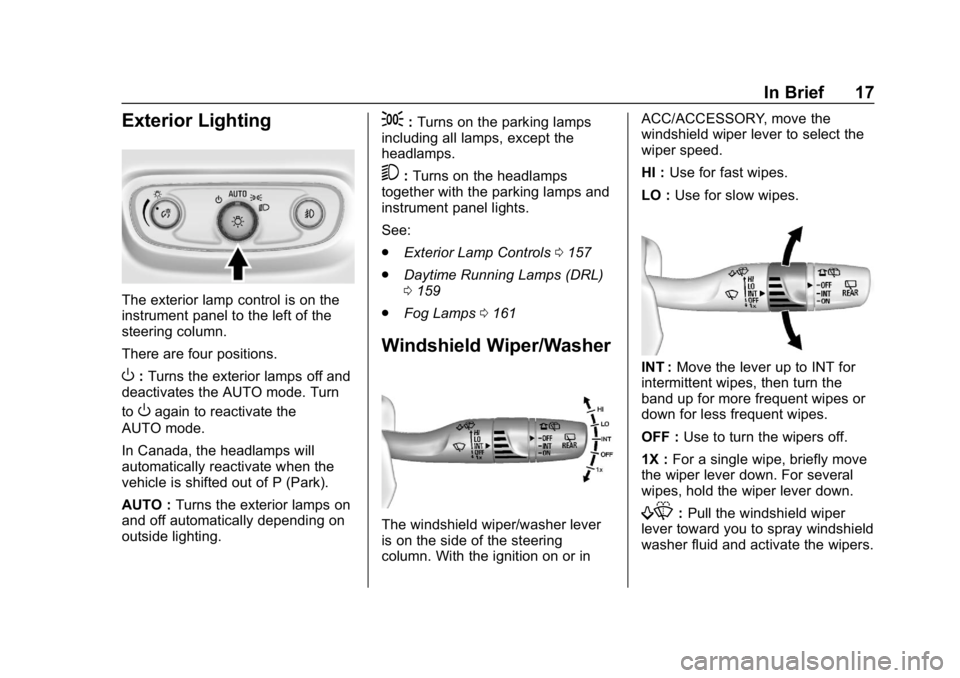
The exterior lamp control is on the
instrument panel to the left of the
steering column.
There are four positions.
O:Turns the exterior lamps off and
deactivates the AUTO mode. Turn
to
Oagain to reactivate the
AUTO mode.
In Canada, the headlamps will
automatically reactivate when the
vehicle is shifted out of P (Park).
AUTO : Turns the exterior lamps on
and off automatically depending on
outside lighting.
;: Turns on the parking lamps
including all lamps, except the
headlamps.
5: Turns on the headlamps
together with the parking lamps and
instrument panel lights.
See:
. Exterior Lamp Controls 0157
. Daytime Running Lamps (DRL)
0159
. Fog Lamps 0161
Windshield Wiper/Washer
The windshield wiper/washer lever
is on the side of the steering
column. With the ignition on or in ACC/ACCESSORY, move the
windshield wiper lever to select the
wiper speed.
HI :
Use for fast wipes.
LO : Use for slow wipes.
INT : Move the lever up to INT for
intermittent wipes, then turn the
band up for more frequent wipes or
down for less frequent wipes.
OFF : Use to turn the wipers off.
1X : For a single wipe, briefly move
the wiper lever down. For several
wipes, hold the wiper lever down.
f: Pull the windshield wiper
lever toward you to spray windshield
washer fluid and activate the wipers.
Page 19 of 428
Chevrolet Equinox Owner Manual (GMNA-Localizing-U.S./Canada/Mexico-
10446639) - 2018 - CRC - 8/18/17
18 In Brief
Rear Window Wiper/Washer
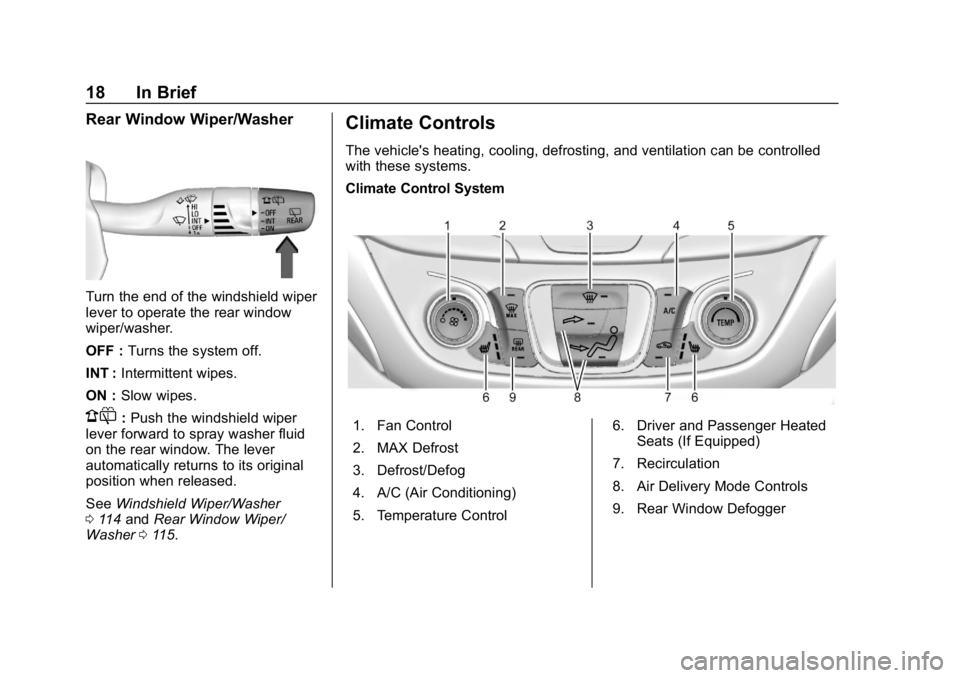
Turn the end of the windshield wiper
lever to operate the rear window
wiper/washer.
OFF :Turns the system off.
INT : Intermittent wipes.
ON : Slow wipes.
1:Push the windshield wiper
lever forward to spray washer fluid
on the rear window. The lever
automatically returns to its original
position when released.
See Windshield Wiper/Washer
0 114 and Rear Window Wiper/
Washer 0115.
Climate Controls
The vehicle's heating, cooling, defrosting, and ventilation can be controlled
with these systems.
Climate Control System
1. Fan Control
2. MAX Defrost
3. Defrost/Defog
4. A/C (Air Conditioning)
5. Temperature Control 6. Driver and Passenger Heated
Seats (If Equipped)
7. Recirculation
8. Air Delivery Mode Controls
9. Rear Window Defogger
Page 113 of 428
Chevrolet Equinox Owner Manual (GMNA-Localizing-U.S./Canada/Mexico-
10446639) - 2018 - CRC - 8/18/17
112 Instruments and Controls
Instruments and
Controls
Controls
Steering Wheel Adjustment . . . 113
Steering Wheel Controls . . . . . . 113
Heated Steering Wheel . . . . . . . 114
Horn . . . . . . . . . . . . . . . . . . . . . . . . . . 114
Windshield Wiper/Washer . . . . 114
Rear Window Wiper/Washer . . . . . . . . . . . . . . . . . . . . . . 115
Compass . . . . . . . . . . . . . . . . . . . . . 116
Clock . . . . . . . . . . . . . . . . . . . . . . . . . 116
Power Outlets . . . . . . . . . . . . . . . . 118
Wireless Charging . . . . . . . . . . . . 120
Warning Lights, Gauges, and
Indicators
Warning Lights, Gauges, and Indicators . . . . . . . . . . . . . . . . . . . 121
Instrument Cluster . . . . . . . . . . . . 122
Speedometer . . . . . . . . . . . . . . . . . 126
Odometer . . . . . . . . . . . . . . . . . . . . . 126
Trip Odometer . . . . . . . . . . . . . . . . 126
Tachometer . . . . . . . . . . . . . . . . . . . 126
Fuel Gauge . . . . . . . . . . . . . . . . . . . 127
Engine Coolant Temperature
Gauge . . . . . . . . . . . . . . . . . . . . . . 127 Seat Belt Reminders . . . . . . . . . 128
Airbag Readiness Light . . . . . . . 129
Passenger Airbag Status
Indicator . . . . . . . . . . . . . . . . . . . . 129
Charging System Light . . . . . . . 130
Malfunction Indicator Lamp
(Check Engine Light) . . . . . . . . 130
Brake System Warning Light . . . . . . . . . . . . . . . . . . . . . . . . 132
Electric Parking Brake Light . . . . . . . . . . . . . . . . . . . . . . . . 133
Service Electric Parking Brake Light (Uplevel Only) . . . . . . . . . 133
Antilock Brake System (ABS) Warning Light . . . . . . . . . . . . . . . 134
Tow/Haul Mode Light . . . . . . . . . 134
Lane Keep Assist (LKA) Light . . . . . . . . . . . . . . . . . . . . . . . . 134
Vehicle Ahead Indicator . . . . . . 135
Traction Off Light . . . . . . . . . . . . . 135
StabiliTrak OFF Light . . . . . . . . . 135
Traction Control System (TCS)/ StabiliTrak Light . . . . . . . . . . . . . 135
Wait-to-Start Light . . . . . . . . . . . . 136
Tire Pressure Light . . . . . . . . . . . 136
Engine Oil Pressure Light . . . . 136
Low Fuel Warning Light . . . . . . 137
Diesel Exhaust Fluid (DEF) Warning Light . . . . . . . . . . . . . . . 137
Security Light . . . . . . . . . . . . . . . . . 138 High-Beam On Light . . . . . . . . . . 138
Front Fog Lamp Light . . . . . . . . . 138
Lamps On Reminder . . . . . . . . . 138
Cruise Control Light . . . . . . . . . . 139
Information Displays
Driver Information
Center (DIC) . . . . . . . . . . . . . . . . 139
Vehicle Messages
Vehicle Messages . . . . . . . . . . . . 144
Engine Power Messages . . . . . 145
Vehicle Speed Messages . . . . . 145
Vehicle Personalization
Vehicle Personalization . . . . . . . 145
Universal Remote System
Universal Remote System . . . . 154
Universal Remote SystemProgramming . . . . . . . . . . . . . . . 154
Universal Remote System Operation . . . . . . . . . . . . . . . . . . . 156
Page 116 of 428
Chevrolet Equinox Owner Manual (GMNA-Localizing-U.S./Canada/Mexico-
10446639) - 2018 - CRC - 8/18/17
Instruments and Controls 115
Heavy snow or ice can overload the
wiper motor. If the wiper motor
overheats, the windshield wipers will
stop until the motor cools and the
wiper control is turned off. See
Electrical System Overload0311.
Wiper Parking
If the ignition is turned off while the
wipers are on LO, HI, or INT, they
will immediately stop.
If the windshield wiper lever is then
moved to OFF before the driver
door is opened or within 10 minutes,
the wipers will restart and move to
the base of the windshield.
If the ignition is turned off while the
wipers are performing wipes due to
windshield washing, the wipers
continue to run until they reach the
base of the windshield.
Windshield Washer
f: Pull the windshield wiper
lever toward you to spray windshield
washer fluid and activate the wipers.
The wipers will continue until the
lever is released or the maximum
wash time is reached. When the lever is released, additional wipes
may occur depending on how long
the windshield washer had been
activated. See
Washer Fluid0300
for information on filling the
windshield washer fluid reservoir.
{Warning
In freezing weather, do not use
the washer until the windshield is
warmed. Otherwise the washer
fluid can form ice on the
windshield, blocking your vision.
Rear Window Wiper/
Washer
The ignition must be on or in the
ACC/ACCESSORY position to
operate the rear window wiper/
washer.
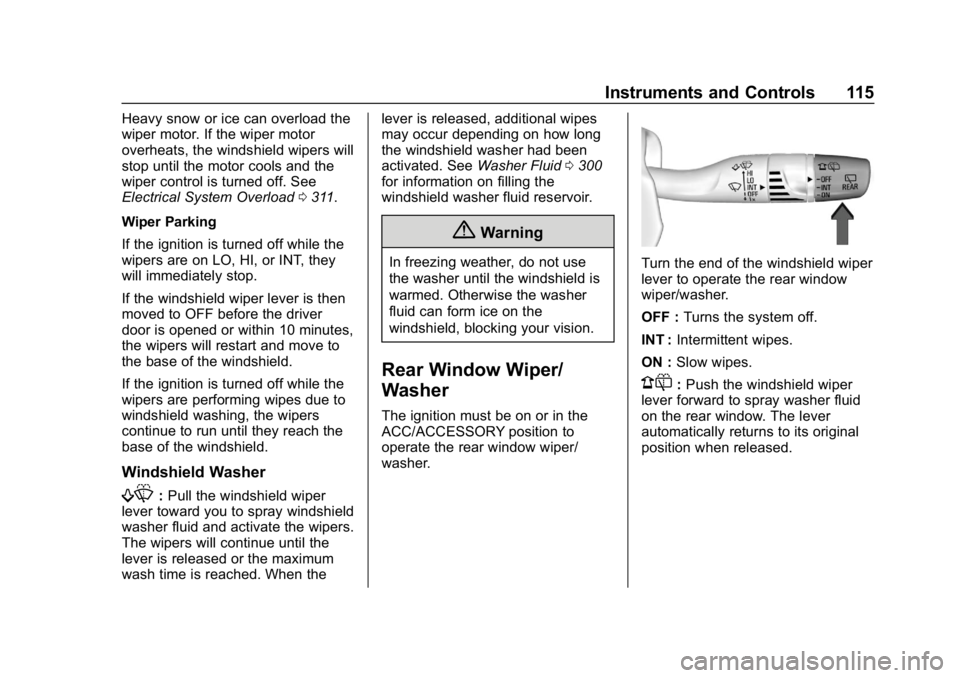
Turn the end of the windshield wiper
lever to operate the rear window
wiper/washer.
OFF : Turns the system off.
INT : Intermittent wipes.
ON : Slow wipes.
1:Push the windshield wiper
lever forward to spray washer fluid
on the rear window. The lever
automatically returns to its original
position when released.
Page 117 of 428
Chevrolet Equinox Owner Manual (GMNA-Localizing-U.S./Canada/Mexico-
10446639) - 2018 - CRC - 8/18/17
116 Instruments and Controls
{Warning
In freezing weather, do not use
the washer until the windshield is
warmed. Otherwise the washer
fluid can form ice on the
windshield, blocking your vision.
Rear Wiper Arm Assembly
Protection
When using an automatic car wash,
move the rear wiper control to OFF
to disable the rear wiper. In some
vehicles, if the transmission is in
N (Neutral) and the vehicle speed is
very slow, the rear wiper will
automatically park.
The wiper operations return to
normal when the transmission is no
longer in N (Neutral) or the vehicle
speed has increased.
Reverse Gear Wipes
If the rear wiper control is off, the
rear wiper will automatically operate
continuously when the transmission
is in R (Reverse), and the front
windshield wiper is performing low or high speed wipes. If the rear
wiper control is off, the transmission
is in R (Reverse), and the front
windshield wiper is performing
interval wipes, then the rear wiper
automatically performs interval
wipes.
This feature can be turned on or off.
See
Vehicle Personalization 0145.
The windshield washer reservoir is
used for the windshield and rear
window. Check the fluid level if
either washer is not working. See
Washer Fluid 0300.
Compass
The vehicle may have a compass
display on the Driver Information
Center (DIC). The compass receives
its heading and other information
from the Global Positioning
System (GPS) antenna, StabiliTrak,
and vehicle speed information.
The compass system is designed to
operate for a certain number of
miles or degrees of turn before
needing a signal from the GPS
satellites. When the compass display shows CAL, drive the
vehicle for a short distance in an
open area where it can receive a
GPS signal. The compass system
will automatically determine when a
GPS signal is restored and provide
a heading again.
Clock
Base Radio
The infotainment system controls
are used to access the time and
date settings through the menu
system. See
Operation0168 on
how to use the menu system.
Setting the Time and Date
When Auto Set is enabled the time
cannot be manually set.
1. Press
{, then touch
SETTINGS.
2. Touch Time and Date, then Set Time or Set Date.
3. Touch + or −to adjust the
value.
Page 146 of 428
Chevrolet Equinox Owner Manual (GMNA-Localizing-U.S./Canada/Mexico-
10446639) - 2018 - CRC - 8/18/17
Instruments and Controls 145
.Brakes
. Ride Control Systems
. Driver Assistance Systems
. Cruise Control
. Lighting and Bulb Replacement
. Wiper/Washer Systems
. Doors and Windows
. Seat Belts
. Airbag Systems
. Engine and Transmission
. Tire Pressure
. Battery
Engine Power Messages
ENGINE POWER IS REDUCED
This message displays when the
vehicle's propulsion power is
reduced. Reduced propulsion power
can affect the vehicle's ability to
accelerate. If this message is on,
but there is no observed reduction
in performance, proceed to your
destination. The performance may
be reduced the next time the vehicle is driven. The vehicle may be driven
while this message is on, but
maximum acceleration and speed
may be reduced. Anytime this
message stays on, or displays
repeatedly, the vehicle should be
taken to your dealer for service as
soon as possible.
Vehicle Speed Messages
SPEED LIMITED TO
XXX KM/H (MPH)
This message shows that the
vehicle speed has been limited to
the speed displayed. The limited
speed is a protection for various
propulsion and vehicle systems,
such as lubrication, thermal,
suspension, Teen Driver if
equipped, or tires.
If equipped with a diesel engine,
see
Diesel Exhaust Fluid 0226.
Vehicle
Personalization
Use the audio system controls to
access the personalization menus
for customizing vehicle features.
The following are all possible
personalization features. Depending
on the vehicle, some may not be
available.
Infotainment System Audio
System Controls
To access the
personalization menu:
1. Touch SETTINGS on the Home Page on the infotainment
display.
2. Touch the desired feature to display a list of available
options.
3. Touch the desired option.
4. Touch the back icon to return to the previous menu.
Page 279 of 428
Chevrolet Equinox Owner Manual (GMNA-Localizing-U.S./Canada/Mexico-
10446639) - 2018 - CRC - 8/18/17
278 Vehicle Care
Vehicle Care
General Information
General Information . . . . . . . . . . 279
California Proposition65 Warning . . . . . . . . . . . . . . . . . 279
California Perchlorate Materials Requirements . . . . . 280
Accessories and Modifications . . . . . . . . . . . . . . . . 280
Vehicle Checks
Doing Your OwnService Work . . . . . . . . . . . . . . . 280
Hood . . . . . . . . . . . . . . . . . . . . . . . . . 281
Engine Compartment Overview . . . . . . . . . . . . . . . . . . . . 283
Engine Oil . . . . . . . . . . . . . . . . . . . . 288
Engine Oil Life System . . . . . . . 292
Automatic Transmission Fluid . . . . . . . . . . . . . . . . . . . . . . . . 293
Engine Air Cleaner/Filter . . . . . . 293
Cooling System . . . . . . . . . . . . . . 295
Engine Overheating . . . . . . . . . . 299
Washer Fluid . . . . . . . . . . . . . . . . . 300
Brakes . . . . . . . . . . . . . . . . . . . . . . . 301
Brake Fluid . . . . . . . . . . . . . . . . . . . 302
Battery - North America . . . . . . 303
All-Wheel Drive . . . . . . . . . . . . . . . 303 Starter Switch Check . . . . . . . . . 304
Automatic Transmission Shift
Lock Control Function
Check . . . . . . . . . . . . . . . . . . . . . . . 304
Park Brake and P (Park)
Mechanism Check . . . . . . . . . . 304
Wiper Blade Replacement . . . . 305
Windshield Replacement . . . . . 306
Gas Strut(s) . . . . . . . . . . . . . . . . . . 306
Headlamp Aiming
Headlamp Aiming . . . . . . . . . . . . 308
Bulb Replacement
Bulb Replacement . . . . . . . . . . . . 308
Halogen Bulbs . . . . . . . . . . . . . . . . 308
High Intensity Discharge (HID) Lighting . . . . . . . . . . . . . . . . . . . . . 308
LED Lighting . . . . . . . . . . . . . . . . . 308
Headlamps . . . . . . . . . . . . . . . . . . . 309
Front Turn Signal and Fog Lamps . . . . . . . . . . . . . . . . . . . . . . 309
Taillamps . . . . . . . . . . . . . . . . . . . . . 310
License Plate Lamp . . . . . . . . . . 311
Electrical System
Electrical System Overload . . . 311
Fuses and Circuit Breakers . . . 312
Engine Compartment Fuse Block . . . . . . . . . . . . . . . . . . . . . . . . 312 Instrument Panel Fuse
Block . . . . . . . . . . . . . . . . . . . . . . . . 315
Rear Compartment Fuse Block . . . . . . . . . . . . . . . . . . . . . . . . 318
Wheels and Tires
Tires . . . . . . . . . . . . . . . . . . . . . . . . . . 319
All-Season Tires . . . . . . . . . . . . . . 320
Winter Tires . . . . . . . . . . . . . . . . . . 320
Summer Tires . . . . . . . . . . . . . . . . 321
Tire Sidewall Labeling . . . . . . . . 321
Tire Designations . . . . . . . . . . . . . 323
Tire Terminology andDefinitions . . . . . . . . . . . . . . . . . . 324
Tire Pressure . . . . . . . . . . . . . . . . . 327
Tire Pressure Monitor System . . . . . . . . . . . . . . . . . . . . . . 328
Tire Pressure Monitor Operation . . . . . . . . . . . . . . . . . . . 329
Tire Inspection . . . . . . . . . . . . . . . . 333
Tire Rotation . . . . . . . . . . . . . . . . . 333
When It Is Time for New Tires . . . . . . . . . . . . . . . . . . . . . . . . 334
Buying New Tires . . . . . . . . . . . . . 335
Different Size Tires and Wheels . . . . . . . . . . . . . . . . . . . . . . 336
Uniform Tire Quality Grading . . . . . . . . . . . . . . . . . . . . . 337
Wheel Alignment and Tire Balance . . . . . . . . . . . . . . . . . . . . . 338
Wheel Replacement . . . . . . . . . . 338
Page 301 of 428
Chevrolet Equinox Owner Manual (GMNA-Localizing-U.S./Canada/Mexico-
10446639) - 2018 - CRC - 8/18/17
300 Vehicle Care
If the engine coolant temperature
gauge is in the overheat zone and
an overheat DIC message is
displayed with no sign of steam:1. Turn the air conditioning off.
2. Turn the heater on to the highest temperature and to the
highest fan speed. Open the
windows as necessary.
3. When it is safe to do so, pull off the road, shift to P (Park) or
N (Neutral), and let the
engine idle.
If the engine coolant temperature
gauge is no longer in the overheat
zone or an overheat DIC message
no longer displays, the vehicle can
be driven. Continue to drive the
vehicle slowly for about 10 minutes.
Keep a safe distance from the
vehicle in front. If the engine coolant
temperature gauge does not go
back to the overheat zone or an
overheat DIC message does not
display, continue to drive normally
and have the cooling system
checked for proper fill and function. If the engine coolant temperature
gauge is still in the overheat zone or
an overheat DIC message still
displays, pull over, stop, and park
the vehicle right away. If overheat
messages appear repeatedly, see
your dealer.
If there is no sign of steam, idle the
engine for three minutes while
parked. If the engine coolant
temperature gauge is still in the
overheat zone or an overheat DIC
message displays, turn off the
engine until it cools down.
Washer Fluid
What to Use
When windshield washer fluid is
needed, be sure to read the
manufacturer's instructions before
use. If operating the vehicle in an
area where the temperature may fall
below freezing, use a fluid that has
sufficient protection against
freezing.
Adding Washer Fluid
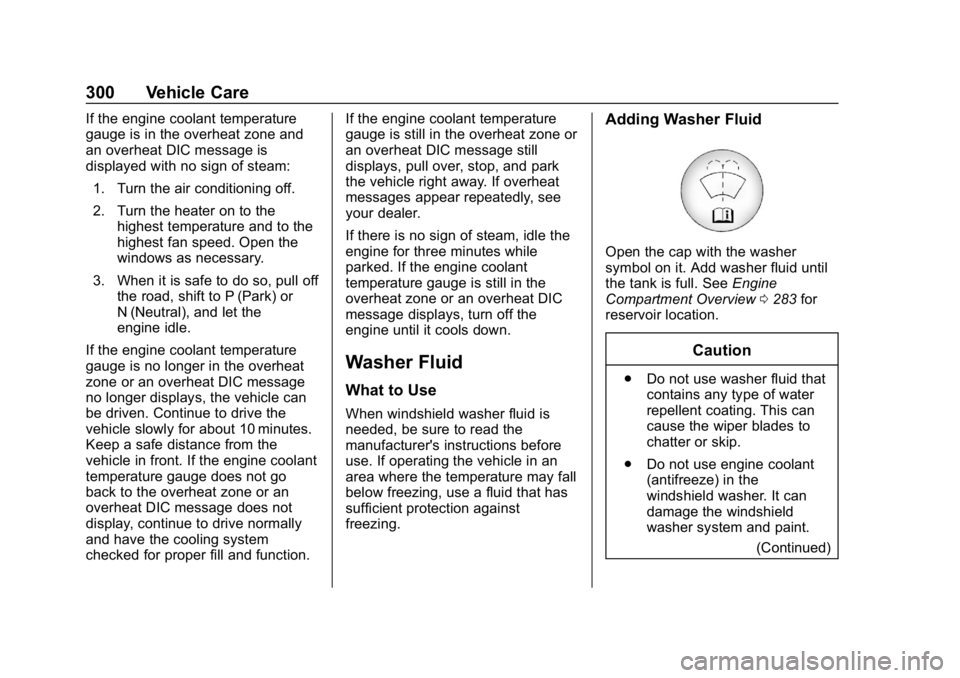
Open the cap with the washer
symbol on it. Add washer fluid until
the tank is full. See
Engine
Compartment Overview 0283 for
reservoir location.
Caution
. Do not use washer fluid that
contains any type of water
repellent coating. This can
cause the wiper blades to
chatter or skip.
. Do not use engine coolant
(antifreeze) in the
windshield washer. It can
damage the windshield
washer system and paint.
(Continued)
Page 365 of 428
Chevrolet Equinox Owner Manual (GMNA-Localizing-U.S./Canada/Mexico-
10446639) - 2018 - CRC - 8/18/17
364 Vehicle Care
Shutter System
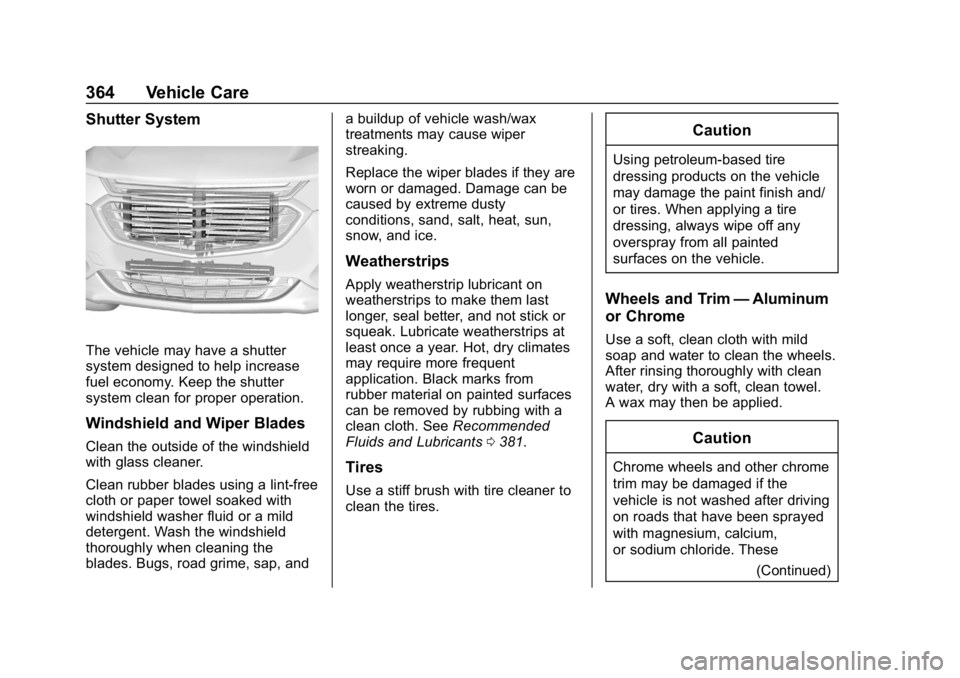
The vehicle may have a shutter
system designed to help increase
fuel economy. Keep the shutter
system clean for proper operation.
Windshield and Wiper Blades
Clean the outside of the windshield
with glass cleaner.
Clean rubber blades using a lint-free
cloth or paper towel soaked with
windshield washer fluid or a mild
detergent. Wash the windshield
thoroughly when cleaning the
blades. Bugs, road grime, sap, anda buildup of vehicle wash/wax
treatments may cause wiper
streaking.
Replace the wiper blades if they are
worn or damaged. Damage can be
caused by extreme dusty
conditions, sand, salt, heat, sun,
snow, and ice.
Weatherstrips
Apply weatherstrip lubricant on
weatherstrips to make them last
longer, seal better, and not stick or
squeak. Lubricate weatherstrips at
least once a year. Hot, dry climates
may require more frequent
application. Black marks from
rubber material on painted surfaces
can be removed by rubbing with a
clean cloth. See
Recommended
Fluids and Lubricants 0381.
Tires
Use a stiff brush with tire cleaner to
clean the tires.
Caution
Using petroleum-based tire
dressing products on the vehicle
may damage the paint finish and/
or tires. When applying a tire
dressing, always wipe off any
overspray from all painted
surfaces on the vehicle.
Wheels and Trim —Aluminum
or Chrome
Use a soft, clean cloth with mild
soap and water to clean the wheels.
After rinsing thoroughly with clean
water, dry with a soft, clean towel.
A wax may then be applied.
Caution
Chrome wheels and other chrome
trim may be damaged if the
vehicle is not washed after driving
on roads that have been sprayed
with magnesium, calcium,
or sodium chloride. These
(Continued)