service indicator CHEVROLET EQUINOX 2019 User Guide
[x] Cancel search | Manufacturer: CHEVROLET, Model Year: 2019, Model line: EQUINOX, Model: CHEVROLET EQUINOX 2019Pages: 426, PDF Size: 6.38 MB
Page 137 of 426
Chevrolet Equinox Owner Manual (GMNA-Localizing-U.S./Canada/Mexico-
12145779) - 2019 - CRC - 7/30/18
136 Instruments and Controls
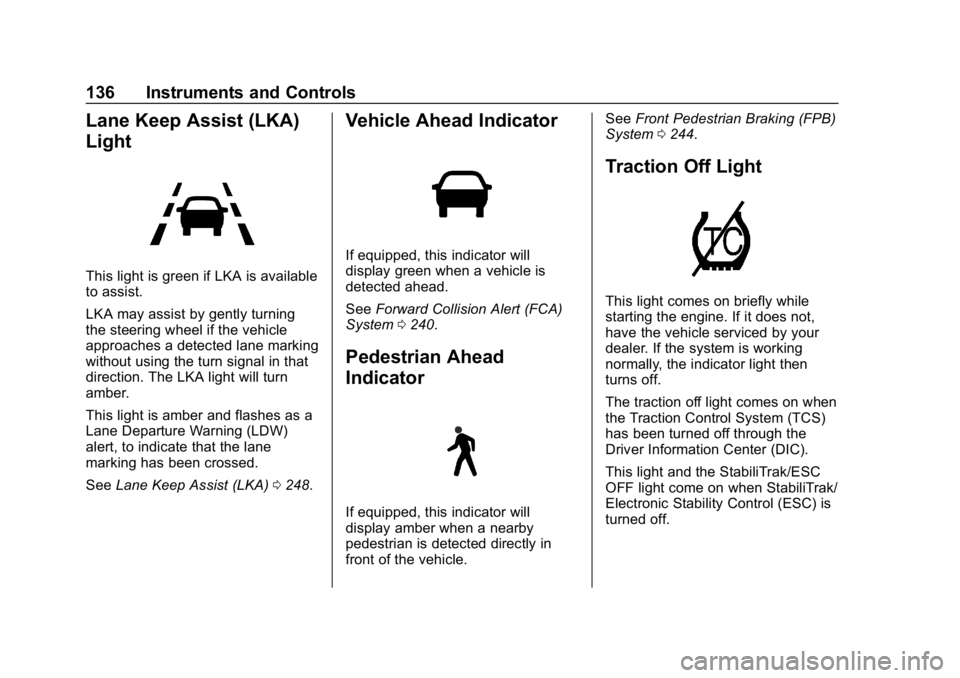
Lane Keep Assist (LKA)
Light
This light is green if LKA is available
to assist.
LKA may assist by gently turning
the steering wheel if the vehicle
approaches a detected lane marking
without using the turn signal in that
direction. The LKA light will turn
amber.
This light is amber and flashes as a
Lane Departure Warning (LDW)
alert, to indicate that the lane
marking has been crossed.
SeeLane Keep Assist (LKA) 0248.
Vehicle Ahead Indicator
If equipped, this indicator will
display green when a vehicle is
detected ahead.
See Forward Collision Alert (FCA)
System 0240.
Pedestrian Ahead
Indicator
If equipped, this indicator will
display amber when a nearby
pedestrian is detected directly in
front of the vehicle. See
Front Pedestrian Braking (FPB)
System 0244.
Traction Off Light
This light comes on briefly while
starting the engine. If it does not,
have the vehicle serviced by your
dealer. If the system is working
normally, the indicator light then
turns off.
The traction off light comes on when
the Traction Control System (TCS)
has been turned off through the
Driver Information Center (DIC).
This light and the StabiliTrak/ESC
OFF light come on when StabiliTrak/
Electronic Stability Control (ESC) is
turned off.
Page 138 of 426
Chevrolet Equinox Owner Manual (GMNA-Localizing-U.S./Canada/Mexico-
12145779) - 2019 - CRC - 7/30/18
Instruments and Controls 137
If the TCS is off, wheel speed will
be limited when necessary to
protect the driveline from damage.
Adjust driving accordingly.
SeeTraction Control/Electronic
Stability Control 0218.
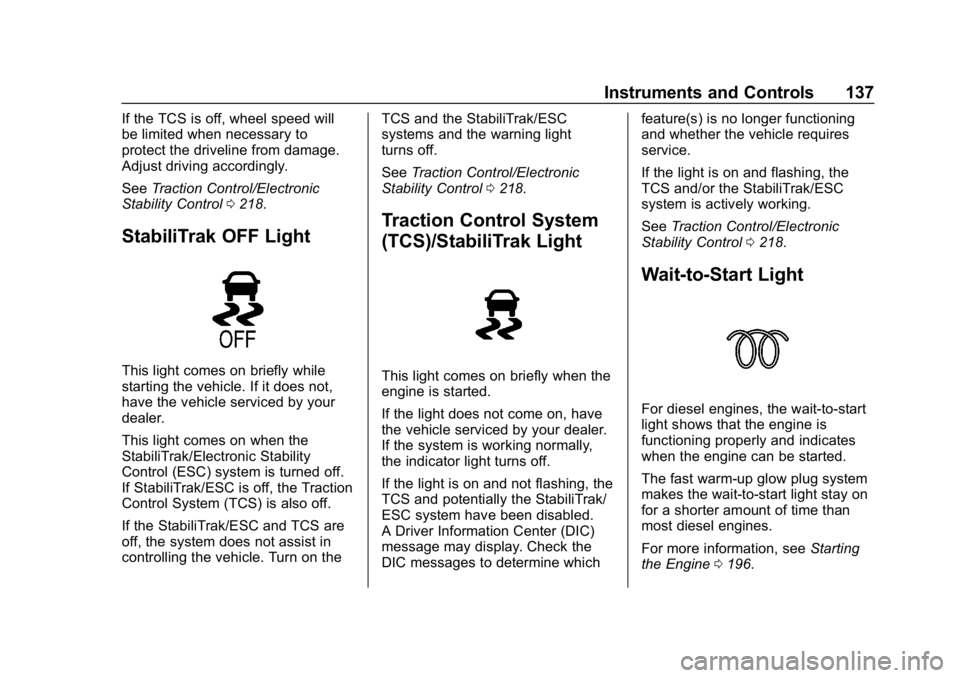
StabiliTrak OFF Light
This light comes on briefly while
starting the vehicle. If it does not,
have the vehicle serviced by your
dealer.
This light comes on when the
StabiliTrak/Electronic Stability
Control (ESC) system is turned off.
If StabiliTrak/ESC is off, the Traction
Control System (TCS) is also off.
If the StabiliTrak/ESC and TCS are
off, the system does not assist in
controlling the vehicle. Turn on the TCS and the StabiliTrak/ESC
systems and the warning light
turns off.
See
Traction Control/Electronic
Stability Control 0218.
Traction Control System
(TCS)/StabiliTrak Light
This light comes on briefly when the
engine is started.
If the light does not come on, have
the vehicle serviced by your dealer.
If the system is working normally,
the indicator light turns off.
If the light is on and not flashing, the
TCS and potentially the StabiliTrak/
ESC system have been disabled.
A Driver Information Center (DIC)
message may display. Check the
DIC messages to determine which feature(s) is no longer functioning
and whether the vehicle requires
service.
If the light is on and flashing, the
TCS and/or the StabiliTrak/ESC
system is actively working.
See
Traction Control/Electronic
Stability Control 0218.
Wait-to-Start Light
For diesel engines, the wait-to-start
light shows that the engine is
functioning properly and indicates
when the engine can be started.
The fast warm-up glow plug system
makes the wait-to-start light stay on
for a shorter amount of time than
most diesel engines.
For more information, see Starting
the Engine 0196.
Page 140 of 426
Chevrolet Equinox Owner Manual (GMNA-Localizing-U.S./Canada/Mexico-
12145779) - 2019 - CRC - 7/30/18
Instruments and Controls 139
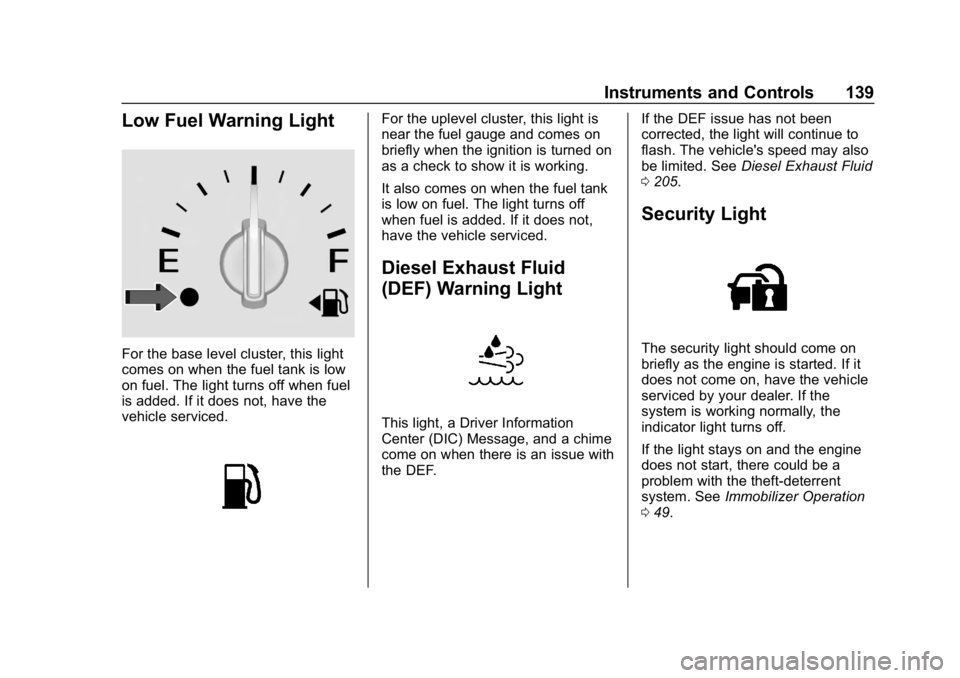
Low Fuel Warning Light
For the base level cluster, this light
comes on when the fuel tank is low
on fuel. The light turns off when fuel
is added. If it does not, have the
vehicle serviced.
For the uplevel cluster, this light is
near the fuel gauge and comes on
briefly when the ignition is turned on
as a check to show it is working.
It also comes on when the fuel tank
is low on fuel. The light turns off
when fuel is added. If it does not,
have the vehicle serviced.
Diesel Exhaust Fluid
(DEF) Warning Light
This light, a Driver Information
Center (DIC) Message, and a chime
come on when there is an issue with
the DEF.If the DEF issue has not been
corrected, the light will continue to
flash. The vehicle's speed may also
be limited. See
Diesel Exhaust Fluid
0 205.
Security Light
The security light should come on
briefly as the engine is started. If it
does not come on, have the vehicle
serviced by your dealer. If the
system is working normally, the
indicator light turns off.
If the light stays on and the engine
does not start, there could be a
problem with the theft-deterrent
system. See Immobilizer Operation
0 49.
Page 196 of 426
Chevrolet Equinox Owner Manual (GMNA-Localizing-U.S./Canada/Mexico-
12145779) - 2019 - CRC - 7/30/18
Driving and Operating 195
The Remote Keyless Entry (RKE)
transmitter must be in the vehicle for
the system to operate. If the
pushbutton start is not working, the
vehicle may be near a strong radio
antenna signal causing interference
to the Keyless Access system. See
Remote Keyless Entry (RKE)
System Operation030.
Stopping the Engine/Off (No
Indicator Lights)
When the vehicle is stopped, press
ENGINE START/STOP once to turn
the engine off.
To shift out of P (Park), the vehicle
must be on and the brake pedal
must be applied.
If the vehicle is in P (Park), the
ignition will turn off, and Retained
Accessory Power (RAP) will remain
active. See Retained Accessory
Power (RAP) 0201.
If the vehicle is not in P (Park), the
ignition will return to ACC/
ACCESSORY and display the
message SHIFT TO PARK in the
Driver Information Center (DIC). When the vehicle is shifted into
P (Park), the ignition system will
turn off.
The vehicle may have an electric
steering column lock. The lock is
activated when the vehicle is turned
off and either front door is opened.
A sound may be heard as the lock
actuates or releases. The steering
column lock may not release with
the wheels turned off center. If this
happens, the vehicle may not start.
Move the steering wheel from left to
right while attempting to start the
vehicle. If this does not work, the
vehicle needs service.
Do not turn the engine off when the
vehicle is moving. This will cause a
loss of power assist in the brake
and steering systems and disable
the airbags.
If the vehicle must be turned off in
an emergency:
1. Brake using a firm and steady pressure. Do not pump the
brakes repeatedly. This may
deplete power assist, requiring
increased brake pedal force. 2. Shift the vehicle to N (Neutral).
This can be done while the
vehicle is moving. After shifting
to N (Neutral), firmly apply the
brakes and steer the vehicle to
a safe location.
3. Come to a complete stop. Shift to P (Park) and turn the
ignition off.
4. Set the electric parking brake. See Electric Parking Brake
0 216.
{Warning
Turning off the vehicle while
moving may cause loss of power
assist in the brake and steering
systems and disable the airbags.
While driving, only shut the
vehicle off in an emergency.
If the vehicle cannot be pulled over
and must be turned off while driving,
press and hold ENGINE START/
STOP for longer than two seconds,
or press twice in five seconds.
Page 197 of 426
Chevrolet Equinox Owner Manual (GMNA-Localizing-U.S./Canada/Mexico-
12145779) - 2019 - CRC - 7/30/18
196 Driving and Operating
ACC/ACCESSORY (Amber
Indicator Light)
This mode allows you to use some
electrical accessories when the
engine is off.
With the ignition off, pressing the
button one time without the brake
pedal applied will place the ignition
system in ACC/ACCESSORY.
The ignition will switch from ACC/
ACCESSORY to OFF after
five minutes to prevent battery
rundown.
ON/RUN/START (Green
Indicator Light)
This mode is for driving and starting.
With the ignition off and the brake
pedal applied, pressing the button
once will place the ignition system
in ON/RUN/START. Once engine
cranking begins, release the button.
Engine cranking will continue until
the engine starts. SeeStarting the
Engine 0196. The ignition will then
remain in ON/RUN.
Service Mode
This power mode is available for
service and diagnostics, and to
verify the proper operation of the
malfunction indicator lamp as may
be required for emission inspection
purposes. With the vehicle off and
the brake pedal not applied,
pressing and holding the button for
more than five seconds will place
the vehicle in Service Mode. The
instruments and audio systems will
operate as they do in ON/RUN, but
the vehicle will not be able to be
driven. The engine will not start in
Service Mode. Press the button
again to turn the vehicle off.
Starting the Engine
Move the shift lever to P (Park) or
N (Neutral). To restart the engine
when the vehicle is already moving,
use N (Neutral) only.
Caution
Do not try to shift to P (Park) if the
vehicle is moving. If you do, you
could damage the transmission.
Shift to P (Park) only when the
vehicle is stopped.
Caution
If you add electrical parts or
accessories, you could change
the way the engine operates. Any
resulting damage would not be
covered by the vehicle warranty.
See Add-On Electrical Equipment
0 273.
Gasoline Engine Starting
Procedure 1. With the Keyless Access system, the Remote Keyless
Entry (RKE) transmitter must
be in the vehicle. Press
ENGINE START/STOP with the
Page 206 of 426
Chevrolet Equinox Owner Manual (GMNA-Localizing-U.S./Canada/Mexico-
12145779) - 2019 - CRC - 7/30/18
Driving and Operating 205
If the vehicle continues to be driven
with the DPF warning message on,
and the exhaust filter is not cleaned
as required, the malfunction
indicator lamp and the ENGINE
POWER IS REDUCED message
will come on. Dealer service is
necessary.
SeeMalfunction Indicator Lamp
(Check Engine Light) 0132.
{Warning
During DPF self cleaning or
during extended idling while
parked, the exhaust system and
exhaust gases are very hot.
Things that burn could touch hot
exhaust parts under the vehicle
and ignite. You or others could be
burned. Do not park, or idle for an
extended period of time, near or
over papers, leaves, dry grass,
or other things that can burn.
Keep the exhaust area clear of
material that could ignite or burn.
See Parking over Things That
Burn 0202 for more information.
Diesel Exhaust Fluid
{Warning
Avoid getting Diesel Exhaust
Fluid (DEF) on your skin or in
your eyes as it could cause
irritation. For more safety,
handling, and storage information,
see the Diesel Exhaust Fluid
container label.
Diesel Exhaust Fluid (DEF) is used
with diesel engines to reduce the
amount of regulated emissions
produced. Products such as AdBlue
are types of DEF, and are approved
for use in the vehicle as long as
they have an API certification label
or meet ISO 22241.The fluid level in
the DEF tank must be maintained
for the vehicle to run properly. DEF
is not a fuel additive. DEF should
not be mixed with or added to diesel
fuel. DEF freezes when exposed to
temperatures below −11 °C (12 ° F).It is normal to hear the DEF system
purge fluid back into the tank after
the vehicle is shut off.
Locating Diesel Exhaust Fluid
DEF can be purchased at your
dealer. It can also be purchased at
authorized vehicle and truck
dealerships. Additionally, some
diesel truck fueling stations or
retailers may have DEF for
purchase. For vehicles with an
active OnStar or connected services
plan, OnStar can help to locate a
DEF retailer. See
Customer
Assistance Offices 0389 for phone
numbers to assist in contacting a
GM dealer. See Recommended
Fluids and Lubricants 0379.
Filling the DEF Tank
Caution
Use only DEF that is GM
approved, or fluid containing the
API certified or ISO 22241 label.
The use of other fluids could (Continued)
Page 213 of 426
Chevrolet Equinox Owner Manual (GMNA-Localizing-U.S./Canada/Mexico-
12145779) - 2019 - CRC - 7/30/18
212 Driving and Operating
Caution
A transmission hot message may
display if the automatic
transmission fluid is too hot.
Driving under this condition can
damage the vehicle. Stop and idle
the engine to cool the automatic
transmission fluid. This message
clears when the transmission fluid
has cooled sufficiently.
D : This position is for normal
driving. If more power is needed for
passing, press the accelerator
pedal down.
Caution
If the vehicle does not shift gears,
the transmission could be
damaged. Have the vehicle
serviced right away.
Caution
Spinning the tires or holding the
vehicle in one place on a hill
using only the accelerator pedal
may damage the transmission.
The repair will not be covered by
the vehicle warranty. If the vehicle
is stuck, do not spin the tires.
When stopping on a hill, use the
brakes to hold the vehicle in
place.
L : Allows the driver to select the
range of gear positions. See Manual
Mode 0212.
Operating Modes
The transmission may operate in a
lower gear than normal to improve
vehicle performance. The engine
speed may be higher and there may
be an increase in noise during the
following conditions:
. When climbing a grade.
. When driving downhill. .
When driving in hot
temperatures or at high altitude.Manual Mode
Electronic Range Select
(ERS) Mode
ERS or manual mode allows for the
selection of the range of gear
positions. Use this mode when
driving downhill or towing a trailer to
limit the top gear and vehicle speed.
The shift position indicator within the
Driver Information Center (DIC) will
display a number next to the L
indicating the highest available gear
under manual mode and the driving
conditions when manual mode was
selected.
To use this feature:
1. Move the shift lever to L (Manual Mode).
Page 233 of 426
Chevrolet Equinox Owner Manual (GMNA-Localizing-U.S./Canada/Mexico-
12145779) - 2019 - CRC - 7/30/18
232 Driving and Operating
{Warning
On curves, ACC may respond to
a vehicle in another lane, or may
not have time to react to a vehicle
in your lane. You could crash into
a vehicle ahead of you, or lose
control of your vehicle. Give extra
attention in curves and be ready
to use the brakes if necessary.
Select an appropriate speed while
driving in curves.
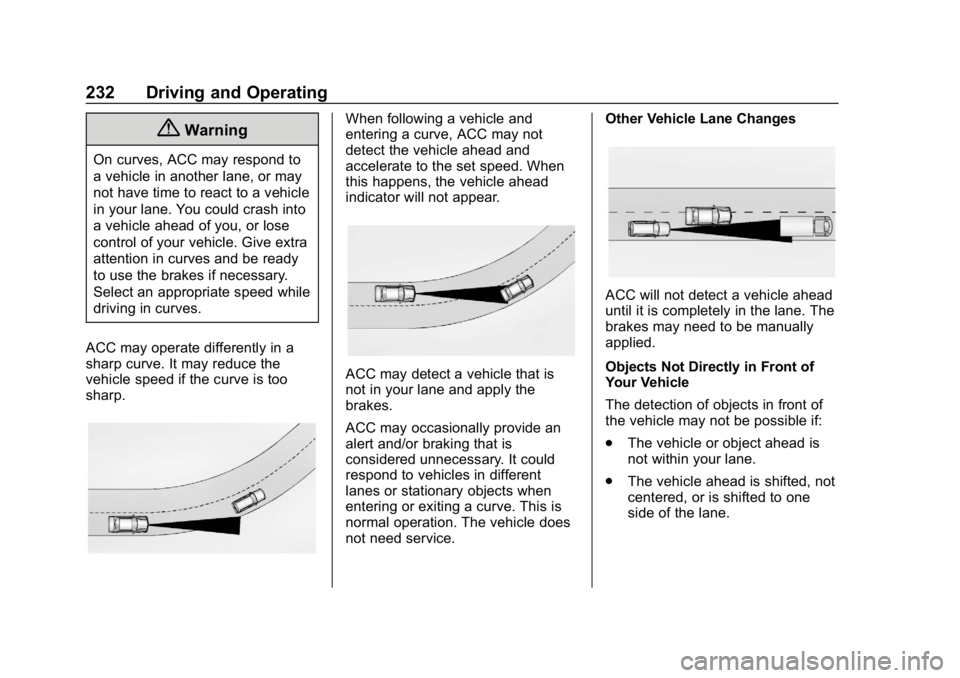
ACC may operate differently in a
sharp curve. It may reduce the
vehicle speed if the curve is too
sharp.
When following a vehicle and
entering a curve, ACC may not
detect the vehicle ahead and
accelerate to the set speed. When
this happens, the vehicle ahead
indicator will not appear.
ACC may detect a vehicle that is
not in your lane and apply the
brakes.
ACC may occasionally provide an
alert and/or braking that is
considered unnecessary. It could
respond to vehicles in different
lanes or stationary objects when
entering or exiting a curve. This is
normal operation. The vehicle does
not need service. Other Vehicle Lane Changes
ACC will not detect a vehicle ahead
until it is completely in the lane. The
brakes may need to be manually
applied.
Objects Not Directly in Front of
Your Vehicle
The detection of objects in front of
the vehicle may not be possible if:
.
The vehicle or object ahead is
not within your lane.
. The vehicle ahead is shifted, not
centered, or is shifted to one
side of the lane.
Page 243 of 426
Chevrolet Equinox Owner Manual (GMNA-Localizing-U.S./Canada/Mexico-
12145779) - 2019 - CRC - 7/30/18
242 Driving and Operating
chosen setting will remain until it is
changed and will affect the timing of
both the Collision Alert and the
Tailgating Alert features. The timing
of both alerts will vary based on
vehicle speed. The faster the
vehicle speed, the farther away the
alert will occur. Consider traffic and
weather conditions when selecting
the alert timing. The range of
selectable alert timings may not be
appropriate for all drivers and
driving conditions.
Following Distance Indicator
The following distance to a moving
vehicle ahead in your path is
indicated in following time in
seconds on the Driver Information
Center (DIC). SeeDriver
Information Center (DIC) (Base
Level and Midlevel) 0141 orDriver
Information Center (DIC) (Uplevel)
0 146. The minimum following time
is 0.5 seconds away. If there is no
vehicle detected ahead, or the
vehicle ahead is out of sensor
range, dashes will be displayed.
Unnecessary Alerts
FCA may provide unnecessary
alerts for turning vehicles, vehicles
in other lanes, objects that are not
vehicles, or shadows. These alerts
are normal operation and the
vehicle does not need service.
Cleaning the System
If the FCA system does not seem to
operate properly, this may correct
the issue:
. Clean the outside of the
windshield in front of the
rearview mirror.
. Clean the entire front of the
vehicle.
. Clean the headlamps.
Forward Automatic
Braking (FAB)
If the vehicle has Forward Collision
Alert (FCA), it also has FAB, which
includes Intelligent Brake
Assist (IBA). When the system
detects a vehicle ahead in your path
that is traveling in the same direction that you may be about to
crash into, it can provide a boost to
braking or automatically brake the
vehicle. This can help avoid or
lessen the severity of crashes when
driving in a forward gear. Depending
on the situation, the vehicle may
automatically brake moderately or
hard. This forward automatic
braking can only occur if a vehicle is
detected. This is shown by the FCA
vehicle ahead indicator being lit.
See
Forward Collision Alert (FCA)
System 0240.
The system works when driving in a
forward gear between 8 km/h
(5 mph) and 80 km/h (50 mph).
It can detect vehicles up to
approximately 60 m (197 ft).
{Warning
FAB is an emergency crash
preparation feature and is not
designed to avoid crashes. Do
not rely on FAB to brake the
vehicle. FAB will not brake (Continued)
Page 245 of 426
Chevrolet Equinox Owner Manual (GMNA-Localizing-U.S./Canada/Mexico-
12145779) - 2019 - CRC - 7/30/18
244 Driving and Operating
{Warning
Using FAB or IBA while towing a
trailer could cause you to lose
control of the vehicle and crash.
Turn the system to Alert or Off
when towing a trailer.
A system unavailable message may
display if:
. The front of the vehicle or
windshield is not clean.
. Heavy rain or snow is interfering
with object detection.
. There is a problem with the
StabiliTrak/Electronic Stability
Control (ESC) system.
The FAB system does not need
service.
Front Pedestrian Braking
(FPB) System
If equipped, the Front Pedestrian
Braking (FPB) system may help
avoid or reduce the harm caused by
front-end crashes with nearby pedestrians when driving in a
forward gear. FPB displays an
amber indicator,
~, when a nearby
pedestrian is detected directly
ahead. When approaching a
detected pedestrian too quickly,
FPB provides a red flashing alert on
the windshield and rapidly beeps.
FPB can provide a boost to braking
or automatically brake the vehicle.
This system includes Intelligent
Brake Assist (IBA), and the Forward
Automatic Braking (FAB) system
may also respond to pedestrians.
See Forward Automatic Braking
(FAB) 0242.
The FPB system can detect and
alert to pedestrians in a forward
gear at speeds between 8 km/h
(5 mph) and 80 km/h (50 mph).
During daytime driving, the system
detects pedestrians up to a distance
of approximately 40 m (131 ft).
During nighttime driving, system
performance is very limited.
{Warning
FPB does not provide an alert or
automatically brake the vehicle,
unless it detects a pedestrian.
FPB may not detect pedestrians,
including children: . When the pedestrian is not
directly ahead, fully visible,
or standing upright, or when
part of a group.
. Due to poor visibility,
including nighttime
conditions, fog, rain,
or snow.
. If the FPB sensor is blocked
by dirt, snow, or ice.
. If the headlamps or
windshield are not cleaned
or in proper condition.
Be ready to take action and apply
the brakes. For more information,
see Defensive Driving 0180.
Keep the windshield, headlamps,
and FPB sensor clean and in
good repair.