manual mode CHEVROLET EQUINOX 2023 Owners Manual
[x] Cancel search | Manufacturer: CHEVROLET, Model Year: 2023, Model line: EQUINOX, Model: CHEVROLET EQUINOX 2023Pages: 360, PDF Size: 14.71 MB
Page 3 of 360
Chevrolet Equinox Owner Manual (GMNA-Localizing-U.S./Canada-
16540728) - 2023 - crc - 6/16/22
2 Introduction
Introduction
The names, logos, emblems, slogans, vehicle
model names, and vehicle body designs
appearing in this manual including, but not
limited to, GM, the GM logo, CHEVROLET,
the CHEVROLET Emblem, and EQUINOX are
trademarks and/or service marks of General
Motors LLC, its subsidiaries, affiliates,
or licensors.
For vehicles first sold in Canada, substitute
the name“General Motors of Canada
Company” for Chevrolet Motor Division
wherever it appears in this manual.
This manual describes features that may or
may not be on the vehicle because of
optional equipment that was not purchased
on the vehicle, model variants, country
specifications, features/applications that may
not be available in your region, or changes
subsequent to the printing of this owner’s
manual, including changes in standard or
optional content. Refer to the purchase documentation
relating to your specific vehicle to confirm
the features.
Keep this manual in the vehicle for quick
reference.
Canadian Vehicle Owners
A French language manual can be obtained
from your dealer, at www.helminc.com,
or from:
Propriétaires Canadiens
On peut obtenir un exemplaire de ce guide
en français auprès du concessionnaire ou à
l'adresse suivante:
Helm, Incorporated
Attention: Customer Service
47911 Halyard Drive
Plymouth, MI 48170
USA
Using this Manual
To quickly locate information about the
vehicle, use the Index in the back of the
manual. It is an alphabetical list of what is
in the manual and the page number where
it can be found.
About Driving the Vehicle
As with other vehicles of this type, failure to
operate this vehicle correctly may result in
loss of control or a crash. Be sure to read
the driving guidelines in this manual in the
section called
“Driving and Operating” and
specifically Driver Behavior 0177, Driving
Environment 0177, and Vehicle Design 0177.
Page 7 of 360
Chevrolet Equinox Owner Manual (GMNA-Localizing-U.S./Canada-
16540728) - 2023 - crc - 6/16/22
6 Introduction
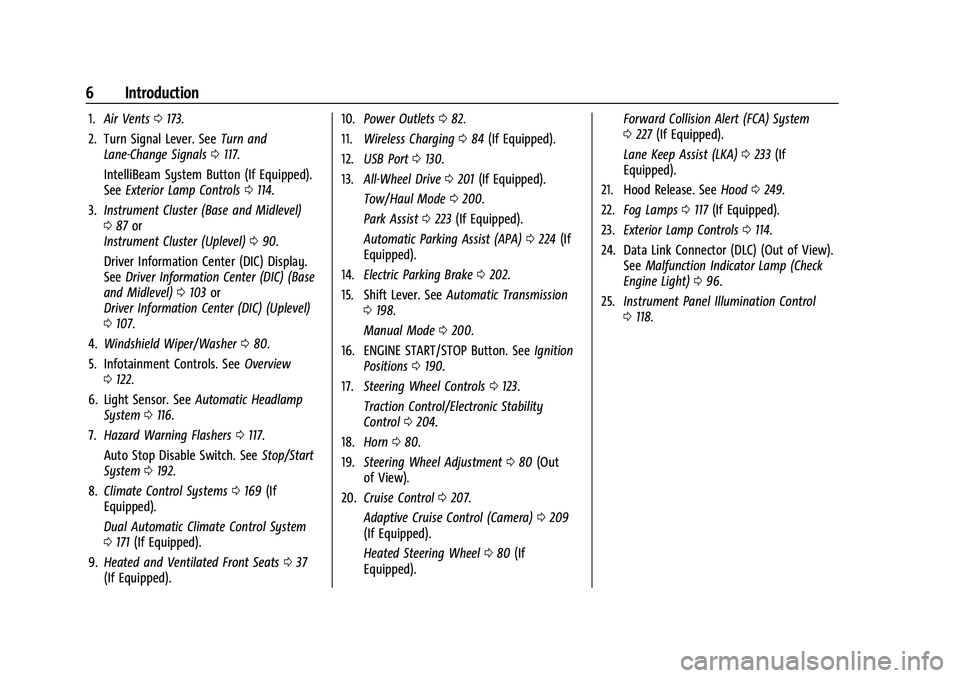
1.Air Vents 0173.
2. Turn Signal Lever. See Turn and
Lane-Change Signals 0117.
IntelliBeam System Button (If Equipped).
See Exterior Lamp Controls 0114.
3. Instrument Cluster (Base and Midlevel)
087 or
Instrument Cluster (Uplevel) 090.
Driver Information Center (DIC) Display.
See Driver Information Center (DIC) (Base
and Midlevel) 0103 or
Driver Information Center (DIC) (Uplevel)
0 107.
4. Windshield Wiper/Washer 080.
5. Infotainment Controls. See Overview
0 122.
6. Light Sensor. See Automatic Headlamp
System 0116.
7. Hazard Warning Flashers 0117.
Auto Stop Disable Switch. See Stop/Start
System 0192.
8. Climate Control Systems 0169 (If
Equipped).
Dual Automatic Climate Control System
0 171 (If Equipped).
9. Heated and Ventilated Front Seats 037
(If Equipped). 10.
Power Outlets 082.
11. Wireless Charging 084 (If Equipped).
12. USB Port 0130.
13. All-Wheel Drive 0201 (If Equipped).
Tow/Haul Mode 0200.
Park Assist 0223 (If Equipped).
Automatic Parking Assist (APA) 0224 (If
Equipped).
14. Electric Parking Brake 0202.
15. Shift Lever. See Automatic Transmission
0 198.
Manual Mode 0200.
16. ENGINE START/STOP Button. See Ignition
Positions 0190.
17. Steering Wheel Controls 0123.
Traction Control/Electronic Stability
Control 0204.
18. Horn 080.
19. Steering Wheel Adjustment 080 (Out
of View).
20. Cruise Control 0207.
Adaptive Cruise Control (Camera) 0209
(If Equipped).
Heated Steering Wheel 080 (If
Equipped). Forward Collision Alert (FCA) System
0
227 (If Equipped).
Lane Keep Assist (LKA) 0233 (If
Equipped).
21. Hood Release. See Hood0249.
22. Fog Lamps 0117 (If Equipped).
23. Exterior Lamp Controls 0114.
24. Data Link Connector (DLC) (Out of View). SeeMalfunction Indicator Lamp (Check
Engine Light) 096.
25. Instrument Panel Illumination Control
0118.
Page 12 of 360
Chevrolet Equinox Owner Manual (GMNA-Localizing-U.S./Canada-
16540728) - 2023 - crc - 6/16/22
Keys, Doors, and Windows 11
To view available settings from the
infotainment screen, touch Settings >
Vehicle > Remote Lock, Unlock, Start.
Keyless Liftgate Opening
When the doors are locked, press the touch
pad on the liftgate handle to open the
liftgate if the remote key is within
1 m (3 ft).
Key Access
To access a vehicle with a dead remote key
battery, seeDoor Locks015.
Programming Remote Keys to the
Vehicle
Only remote keys programmed to the
vehicle will work. If a remote key is lost or
stolen, a replacement can be purchased and
programmed through your dealer. The
vehicle can be reprogrammed so that lost or
stolen remote keys no longer work. Each
vehicle can have up to eight remote keys
matched to it.
Programming with Recognized Remote Keys
A new remote key can be programmed to
the vehicle when there are two recognized
remote keys. To program, the vehicle must be off and all
of the remote keys, both currently
recognized and new, must be with you.
1. Remove the key from the remote key.
2. Remove the key lock cylinder cap on the driver door handle. See Door Locks015.
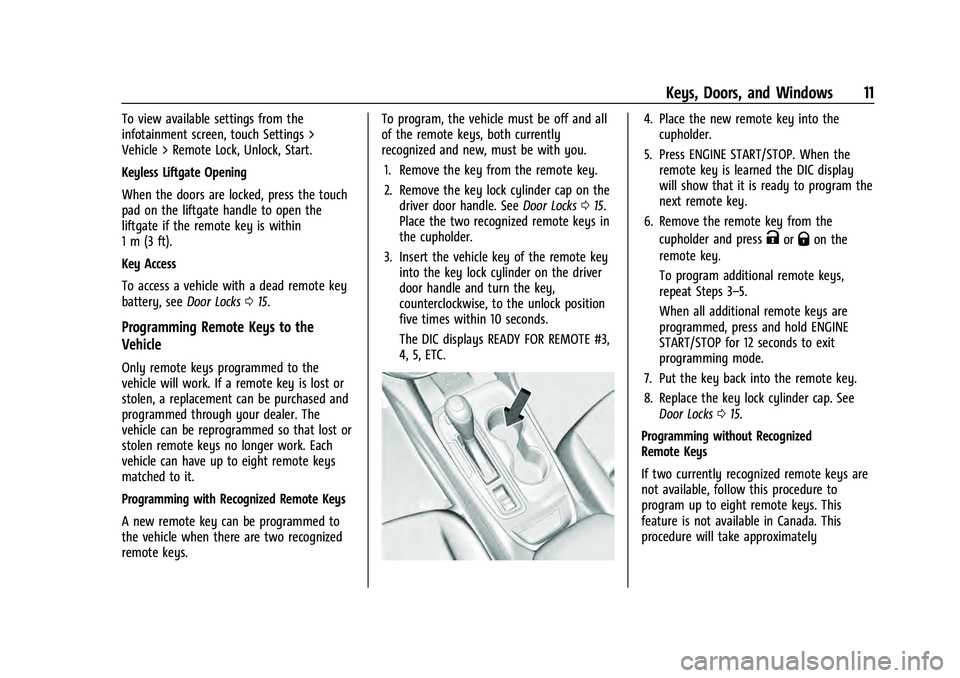
Place the two recognized remote keys in
the cupholder.
3. Insert the vehicle key of the remote key into the key lock cylinder on the driver
door handle and turn the key,
counterclockwise, to the unlock position
five times within 10 seconds.
The DIC displays READY FOR REMOTE #3,
4, 5, ETC.
4. Place the new remote key into thecupholder.
5. Press ENGINE START/STOP. When the remote key is learned the DIC display
will show that it is ready to program the
next remote key.
6. Remove the remote key from the cupholder and press
KorQon the
remote key.
To program additional remote keys,
repeat Steps 3–5.
When all additional remote keys are
programmed, press and hold ENGINE
START/STOP for 12 seconds to exit
programming mode.
7. Put the key back into the remote key.
8. Replace the key lock cylinder cap. See Door Locks 015.
Programming without Recognized
Remote Keys
If two currently recognized remote keys are
not available, follow this procedure to
program up to eight remote keys. This
feature is not available in Canada. This
procedure will take approximately
Page 13 of 360
Chevrolet Equinox Owner Manual (GMNA-Localizing-U.S./Canada-
16540728) - 2023 - crc - 6/16/22
12 Keys, Doors, and Windows
30 minutes to complete. The vehicle must
be off and all of the remote keys you wish
to program must be with you.1. Remove the key from the remote key.
2. Remove the key lock cylinder cap on the driver door handle. See Door Locks015.
Insert the vehicle key of the remote key
into the key lock cylinder on the driver
door handle and turn the key,
counterclockwise, to the unlock position
five times within 10 seconds.
The DIC displays REMOTE LEARN
PENDING, PLEASE WAIT.
3. Wait for 10 minutes until the DIC displays PRESS ENGINE START BUTTON TO
LEARN and then press ENGINE
START/STOP.
The DIC display will again show REMOTE
LEARN PENDING, PLEASE WAIT.
4. Repeat Step 2 two additional times. After the third time all previously known
remote keys will no longer work with
the vehicle. Remaining remote keys can
be relearned during the next steps.
The DIC display should now show READY
FOR REMOTE # 1.
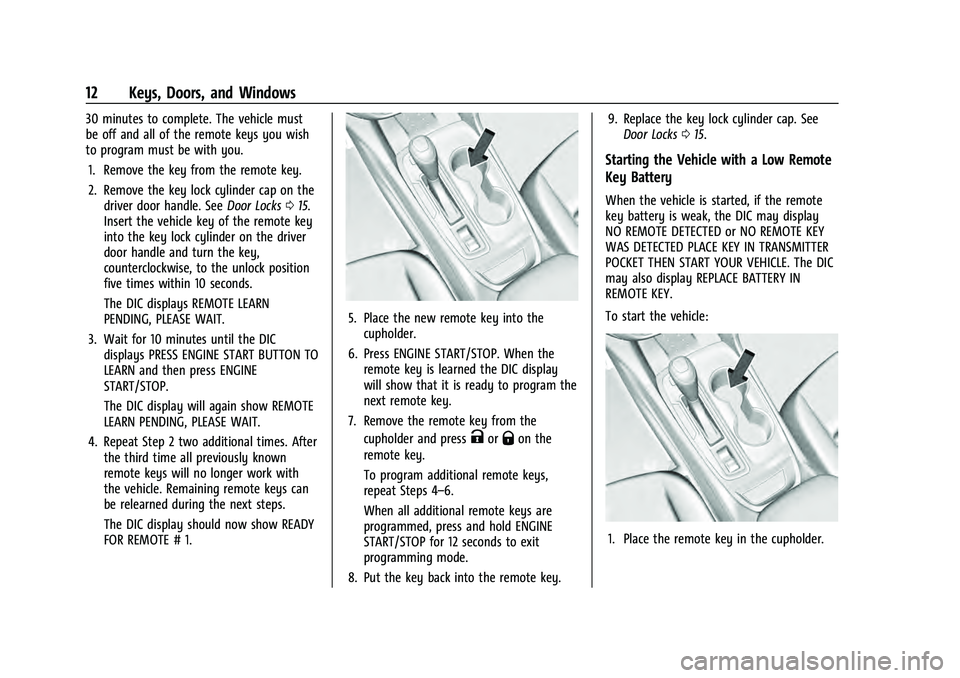
5. Place the new remote key into thecupholder.
6. Press ENGINE START/STOP. When the remote key is learned the DIC display
will show that it is ready to program the
next remote key.
7. Remove the remote key from the cupholder and press
KorQon the
remote key.
To program additional remote keys,
repeat Steps 4–6.
When all additional remote keys are
programmed, press and hold ENGINE
START/STOP for 12 seconds to exit
programming mode.
8. Put the key back into the remote key. 9. Replace the key lock cylinder cap. See
Door Locks 015.
Starting the Vehicle with a Low Remote
Key Battery
When the vehicle is started, if the remote
key battery is weak, the DIC may display
NO REMOTE DETECTED or NO REMOTE KEY
WAS DETECTED PLACE KEY IN TRANSMITTER
POCKET THEN START YOUR VEHICLE. The DIC
may also display REPLACE BATTERY IN
REMOTE KEY.
To start the vehicle:
1. Place the remote key in the cupholder.
Page 19 of 360
Chevrolet Equinox Owner Manual (GMNA-Localizing-U.S./Canada-
16540728) - 2023 - crc - 6/16/22
18 Keys, Doors, and Windows
To unlock the doors:
.PressKon the power door lock switch.
.Shift into P (Park).
Automatic door locking cannot be disabled.
Automatic door unlocking can be
programmed. To view available settings
from the infotainment screen, touch Settings
> Vehicle > Power Door Locks.
Lockout Protection
If the ignition is on or in accessory mode
and the power door lock switch is pressed
with the driver door open, all the doors will
lock and only the driver door will unlock.
If the vehicle is off and locking is requested
while a door is open, when all doors are
closed the vehicle will check for remote keys
inside. If an remote key is detected and the
number of remote keys inside has not
reduced, the driver door will unlock and the
horn will chirp three times.
Lockout Protection can be manually
overridden by pressing and holding
Qon
the power door lock switch. This does not
apply to Open Door Anti-Lockout. Open Door Anti-Lockout
If Open Door Anti-Lockout is turned on, the
driver door is open, and locking is requested,
all the doors will lock and only the driver
door will unlock. The Open Door
Anti-Lockout feature can be turned on or off.
To view available settings from the
infotainment screen, touch Settings >
Vehicle > Power Door Locks.
Safety Locks
The rear door safety locks prevent
passengers from opening the rear doors
from inside the vehicle.
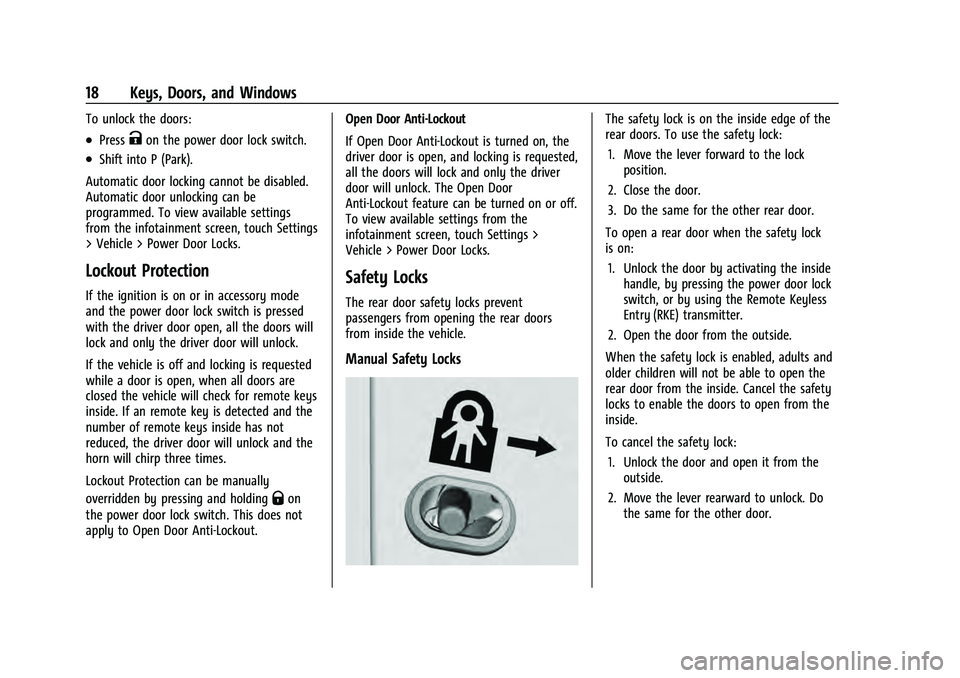
Manual Safety Locks
The safety lock is on the inside edge of the
rear doors. To use the safety lock:
1. Move the lever forward to the lock position.
2. Close the door.
3. Do the same for the other rear door.
To open a rear door when the safety lock
is on: 1. Unlock the door by activating the inside handle, by pressing the power door lock
switch, or by using the Remote Keyless
Entry (RKE) transmitter.
2. Open the door from the outside.
When the safety lock is enabled, adults and
older children will not be able to open the
rear door from the inside. Cancel the safety
locks to enable the doors to open from the
inside.
To cancel the safety lock: 1. Unlock the door and open it from the outside.
2. Move the lever rearward to unlock. Do the same for the other door.
Page 21 of 360
Chevrolet Equinox Owner Manual (GMNA-Localizing-U.S./Canada-
16540728) - 2023 - crc - 6/16/22
20 Keys, Doors, and Windows
Power Liftgate Operation
{Warning
You or others could be injured if caught
in the path of the power liftgate. Make
sure there is no one in the way of the
liftgate as it is opening and closing.
Caution
Driving with an open and unsecured
liftgate may result in damage to the
power liftgate components.
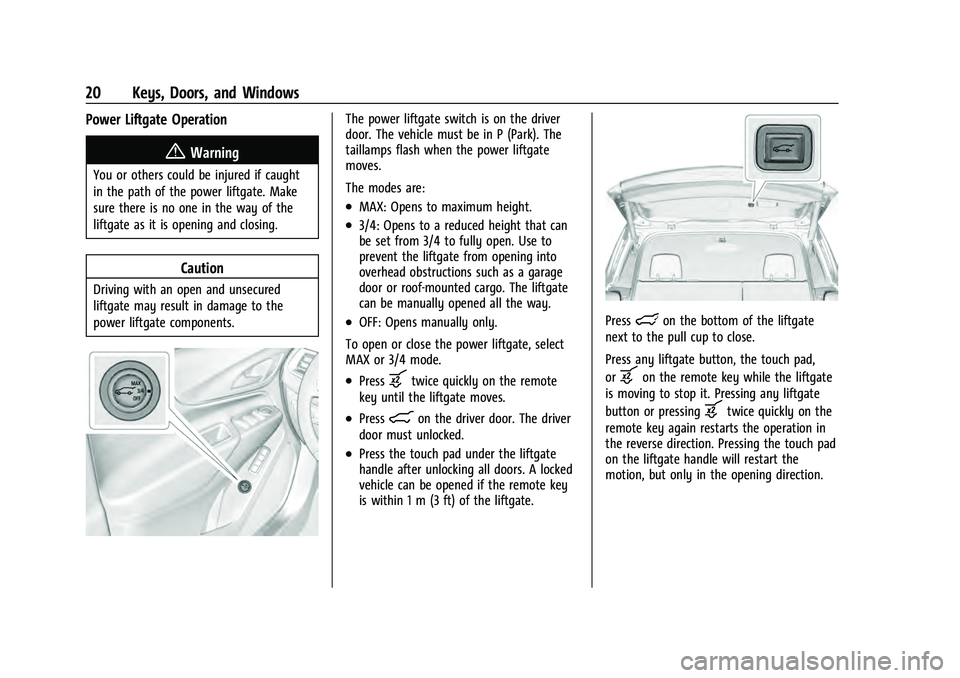
The power liftgate switch is on the driver
door. The vehicle must be in P (Park). The
taillamps flash when the power liftgate
moves.
The modes are:
.MAX: Opens to maximum height.
.3/4: Opens to a reduced height that can
be set from 3/4 to fully open. Use to
prevent the liftgate from opening into
overhead obstructions such as a garage
door or roof-mounted cargo. The liftgate
can be manually opened all the way.
.OFF: Opens manually only.
To open or close the power liftgate, select
MAX or 3/4 mode.
.Pressbtwice quickly on the remote
key until the liftgate moves.
.Press8on the driver door. The driver
door must unlocked.
.Press the touch pad under the liftgate
handle after unlocking all doors. A locked
vehicle can be opened if the remote key
is within 1 m (3 ft) of the liftgate.
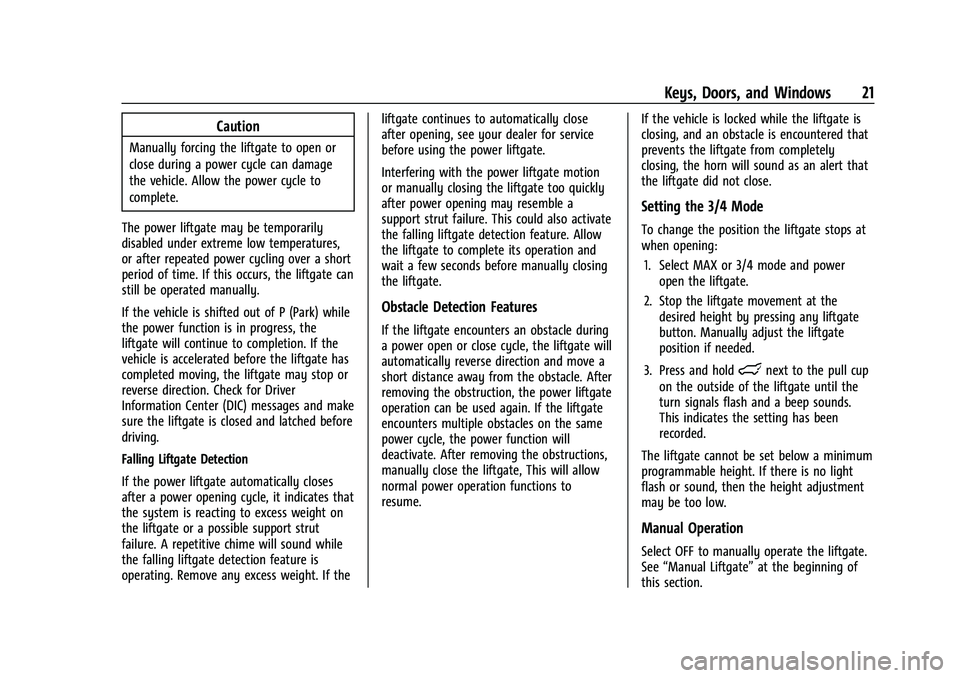
Presslon the bottom of the liftgate
next to the pull cup to close.
Press any liftgate button, the touch pad,
or
bon the remote key while the liftgate
is moving to stop it. Pressing any liftgate
button or pressing
btwice quickly on the
remote key again restarts the operation in
the reverse direction. Pressing the touch pad
on the liftgate handle will restart the
motion, but only in the opening direction.
Page 22 of 360
Chevrolet Equinox Owner Manual (GMNA-Localizing-U.S./Canada-
16540728) - 2023 - crc - 6/16/22
Keys, Doors, and Windows 21
Caution
Manually forcing the liftgate to open or
close during a power cycle can damage
the vehicle. Allow the power cycle to
complete.
The power liftgate may be temporarily
disabled under extreme low temperatures,
or after repeated power cycling over a short
period of time. If this occurs, the liftgate can
still be operated manually.
If the vehicle is shifted out of P (Park) while
the power function is in progress, the
liftgate will continue to completion. If the
vehicle is accelerated before the liftgate has
completed moving, the liftgate may stop or
reverse direction. Check for Driver
Information Center (DIC) messages and make
sure the liftgate is closed and latched before
driving.
Falling Liftgate Detection
If the power liftgate automatically closes
after a power opening cycle, it indicates that
the system is reacting to excess weight on
the liftgate or a possible support strut
failure. A repetitive chime will sound while
the falling liftgate detection feature is
operating. Remove any excess weight. If the liftgate continues to automatically close
after opening, see your dealer for service
before using the power liftgate.
Interfering with the power liftgate motion
or manually closing the liftgate too quickly
after power opening may resemble a
support strut failure. This could also activate
the falling liftgate detection feature. Allow
the liftgate to complete its operation and
wait a few seconds before manually closing
the liftgate.
Obstacle Detection Features
If the liftgate encounters an obstacle during
a power open or close cycle, the liftgate will
automatically reverse direction and move a
short distance away from the obstacle. After
removing the obstruction, the power liftgate
operation can be used again. If the liftgate
encounters multiple obstacles on the same
power cycle, the power function will
deactivate. After removing the obstructions,
manually close the liftgate, This will allow
normal power operation functions to
resume.
If the vehicle is locked while the liftgate is
closing, and an obstacle is encountered that
prevents the liftgate from completely
closing, the horn will sound as an alert that
the liftgate did not close.
Setting the 3/4 Mode
To change the position the liftgate stops at
when opening:
1. Select MAX or 3/4 mode and power open the liftgate.
2. Stop the liftgate movement at the desired height by pressing any liftgate
button. Manually adjust the liftgate
position if needed.
3. Press and hold
lnext to the pull cup
on the outside of the liftgate until the
turn signals flash and a beep sounds.
This indicates the setting has been
recorded.
The liftgate cannot be set below a minimum
programmable height. If there is no light
flash or sound, then the height adjustment
may be too low.
Manual Operation
Select OFF to manually operate the liftgate.
See “Manual Liftgate” at the beginning of
this section.
Page 23 of 360
Chevrolet Equinox Owner Manual (GMNA-Localizing-U.S./Canada-
16540728) - 2023 - crc - 6/16/22
22 Keys, Doors, and Windows
Caution
Attempting to move the liftgate too
quickly and with excessive force may
result in damage to the vehicle.
Operate the liftgate manually with a
smooth motion and moderate speed. The
system includes a feature which limits the
manual closing speed to protect the
components.
Hands-Free Operation
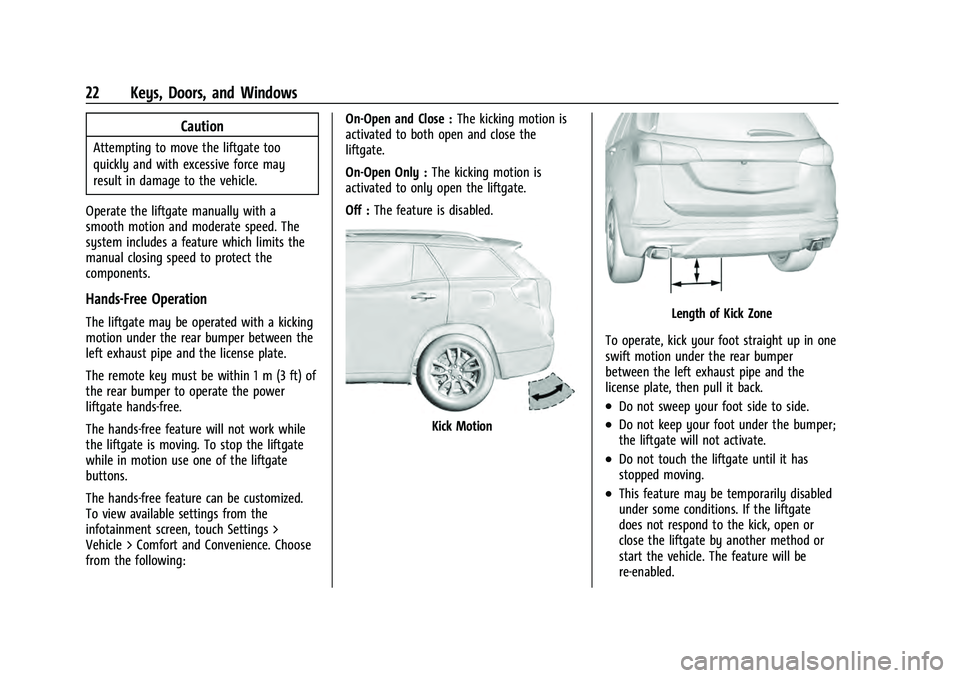
The liftgate may be operated with a kicking
motion under the rear bumper between the
left exhaust pipe and the license plate.
The remote key must be within 1 m (3 ft) of
the rear bumper to operate the power
liftgate hands-free.
The hands-free feature will not work while
the liftgate is moving. To stop the liftgate
while in motion use one of the liftgate
buttons.
The hands-free feature can be customized.
To view available settings from the
infotainment screen, touch Settings >
Vehicle > Comfort and Convenience. Choose
from the following: On-Open and Close :
The kicking motion is
activated to both open and close the
liftgate.
On-Open Only : The kicking motion is
activated to only open the liftgate.
Off : The feature is disabled.
Kick Motion
Length of Kick Zone
To operate, kick your foot straight up in one
swift motion under the rear bumper
between the left exhaust pipe and the
license plate, then pull it back.
.Do not sweep your foot side to side.
.Do not keep your foot under the bumper;
the liftgate will not activate.
.Do not touch the liftgate until it has
stopped moving.
.This feature may be temporarily disabled
under some conditions. If the liftgate
does not respond to the kick, open or
close the liftgate by another method or
start the vehicle. The feature will be
re-enabled.
Page 25 of 360
Chevrolet Equinox Owner Manual (GMNA-Localizing-U.S./Canada-
16540728) - 2023 - crc - 6/16/22
24 Keys, Doors, and Windows
How to Detect a Tamper Condition
IfKis pressed on the RKE transmitter and
the horn chirps and the lights flash three
times, an alarm occurred previously while
the alarm system was armed.
If the alarm has been activated, a message
will appear on the DIC.
Immobilizer
See Radio Frequency Statement 0335.
Immobilizer Operation
This vehicle has a passive theft-deterrent
system.
The system does not have to be manually
armed or disarmed.
The vehicle is automatically immobilized
when the vehicle is turned off.
The immobilization system is disarmed
when the ignition is on or in accessory
mode and a valid remote key is present in
the vehicle.
The security light, in the instrument cluster,
comes on if there is a problem with arming
or disarming the theft-deterrent system.
The system has one or more remote keys
matched to an immobilizer control unit in
your vehicle. Only a correctly matched
remote key will start the vehicle. If the
remote key is ever damaged, you may not
be able to start your vehicle.
When trying to start the vehicle, the
security light may come on briefly when the
ignition is turned on.
If the engine does not start and the security
light stays on, there is a problem with the
system. Turn the ignition off and try again.
If the vehicle will not change ignition
modes, and the remote key appears to be
undamaged, try another remote key. Or,
you may try placing the remote key in the
cupholder. See “Starting the Vehicle with a
Low Remote Key Battery” inRemote Key
Operation 08. If the ignition mode will not change with
the other remote key or in the cupholder,
your vehicle needs service. If the ignition
does change modes, the first remote key
may be faulty. See your dealer who can
service the theft-deterrent system and have
a new remote key programmed to the
vehicle.
It is possible for the immobilizer system to
learn new or replacement remote keys. Up
to eight remote keys can be programmed
for the vehicle. To program additional
remote keys, see
“Programming Remote
Keys to the Vehicle” underRemote Key
Operation 08.
Do not leave the remote key or device that
disarms or deactivates the theft-deterrent
system in the vehicle.
Exterior Mirrors
Convex Mirrors
{Warning
A convex mirror can make things, like
other vehicles, look farther away than
they really are. If you cut too sharply (Continued)
Page 28 of 360
Chevrolet Equinox Owner Manual (GMNA-Localizing-U.S./Canada-
16540728) - 2023 - crc - 6/16/22
Keys, Doors, and Windows 27
Warning (Continued)
children in the rear seat, use the window
lockout switch to prevent operation of
the windows. SeeKeys07.
Power windows work when the ignition is
on, in accessory mode, or when Retained
Accessory Power (RAP) is active. See
Retained Accessory Power (RAP) 0196.
Using the window switch, press to open or
pull to close the window.
The windows may be temporarily disabled if
they are used repeatedly within a
short time.
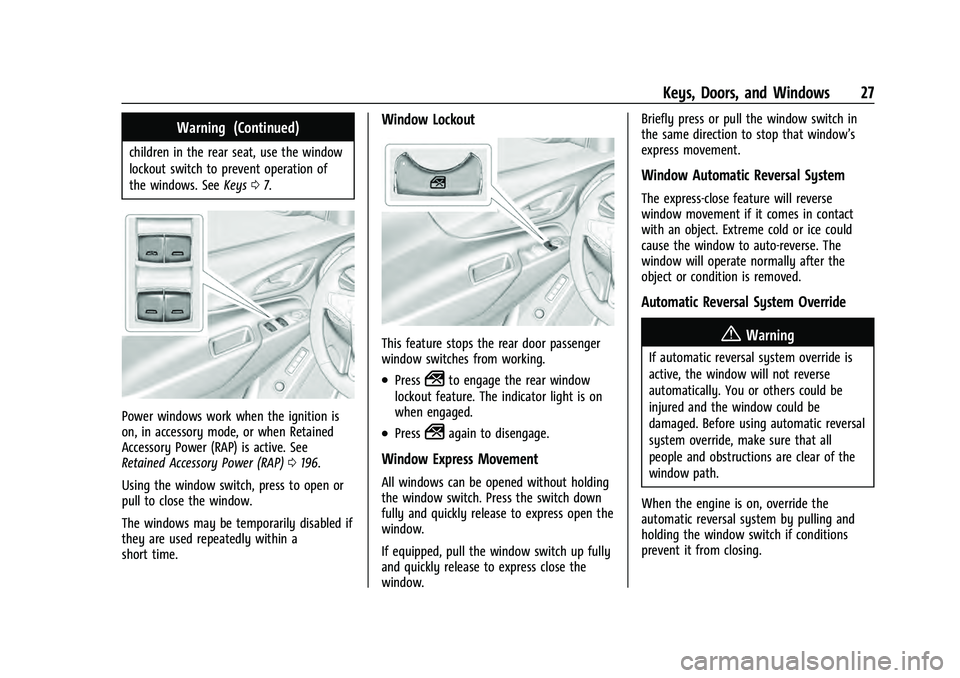
Window Lockout
This feature stops the rear door passenger
window switches from working.
.Press2to engage the rear window
lockout feature. The indicator light is on
when engaged.
.Press2again to disengage.
Window Express Movement
All windows can be opened without holding
the window switch. Press the switch down
fully and quickly release to express open the
window.
If equipped, pull the window switch up fully
and quickly release to express close the
window. Briefly press or pull the window switch in
the same direction to stop that window’s
express movement.
Window Automatic Reversal System
The express-close feature will reverse
window movement if it comes in contact
with an object. Extreme cold or ice could
cause the window to auto-reverse. The
window will operate normally after the
object or condition is removed.
Automatic Reversal System Override
{Warning
If automatic reversal system override is
active, the window will not reverse
automatically. You or others could be
injured and the window could be
damaged. Before using automatic reversal
system override, make sure that all
people and obstructions are clear of the
window path.
When the engine is on, override the
automatic reversal system by pulling and
holding the window switch if conditions
prevent it from closing.