battery CHEVROLET EXPRESS 2016 Owners Manual
[x] Cancel search | Manufacturer: CHEVROLET, Model Year: 2016, Model line: EXPRESS, Model: CHEVROLET EXPRESS 2016Pages: 289, PDF Size: 11.46 MB
Page 9 of 289
Chevrolet Express Owner Manual (GMNA-Localizing-U.S./Canada/Mexico-
15555951) - 2022 - CRC - 1/27/22
8 Keys, Doors, and Windows
With an active OnStar or connected service
plan, an OnStar Advisor may remotely
unlock the vehicle. SeeOnStar Overview
0 270.
Remote Keyless Entry (RKE)
System
See Radio Frequency Statement 0267.
If there is a decrease in the Remote Keyless
Entry (RKE) operating range:
.Check the distance. The transmitter may
be too far from the vehicle.
.Check the location. Other vehicles or
objects may be blocking the signal.
.Check the transmitter's battery. See
“Battery Replacement” later in this
section.
.If the transmitter is still not working
correctly, see your dealer or a qualified
technician for service.
Remote Keyless Entry (RKE)
System Operation
If equipped, the RKE transmitter functions
work up to 60 m (197 ft) away from the
vehicle. Other conditions can affect the performance
of the transmitter. See
Remote Keyless Entry
(RKE) System 08.
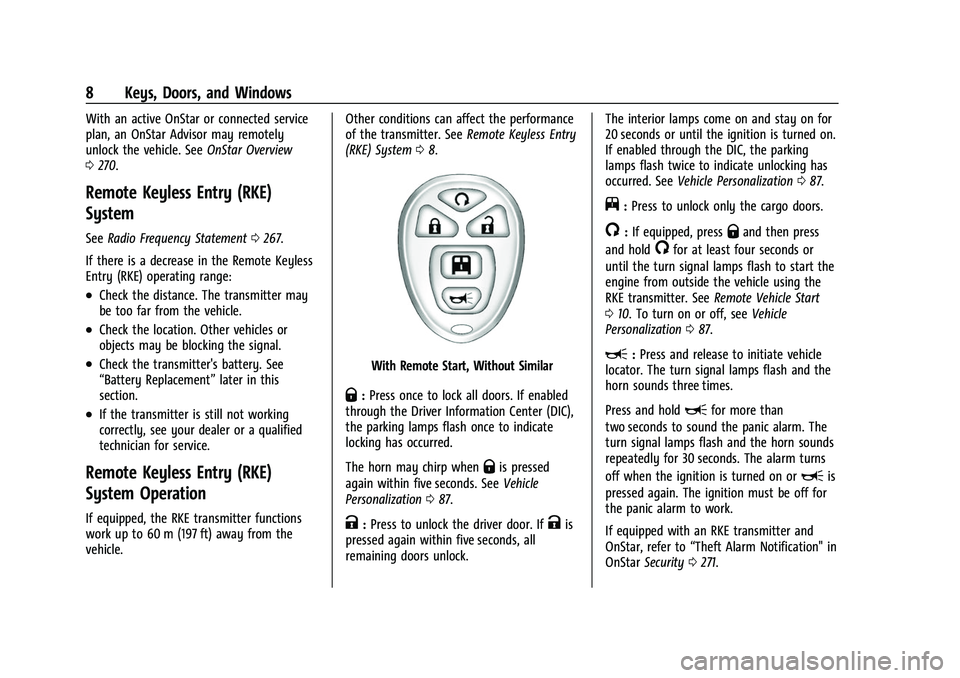
With Remote Start, Without Similar
Q:Press once to lock all doors. If enabled
through the Driver Information Center (DIC),
the parking lamps flash once to indicate
locking has occurred.
The horn may chirp when
Qis pressed
again within five seconds. See Vehicle
Personalization 087.
K:Press to unlock the driver door. IfKis
pressed again within five seconds, all
remaining doors unlock. The interior lamps come on and stay on for
20 seconds or until the ignition is turned on.
If enabled through the DIC, the parking
lamps flash twice to indicate unlocking has
occurred. See
Vehicle Personalization 087.
j:Press to unlock only the cargo doors.
/:If equipped, pressQand then press
and hold
/for at least four seconds or
until the turn signal lamps flash to start the
engine from outside the vehicle using the
RKE transmitter. See Remote Vehicle Start
0 10. To turn on or off, see Vehicle
Personalization 087.
L:Press and release to initiate vehicle
locator. The turn signal lamps flash and the
horn sounds three times.
Press and hold
Lfor more than
two seconds to sound the panic alarm. The
turn signal lamps flash and the horn sounds
repeatedly for 30 seconds. The alarm turns
off when the ignition is turned on or
Lis
pressed again. The ignition must be off for
the panic alarm to work.
If equipped with an RKE transmitter and
OnStar, refer to “Theft Alarm Notification" in
OnStar Security 0271.
Page 10 of 289
Chevrolet Express Owner Manual (GMNA-Localizing-U.S./Canada/Mexico-
15555951) - 2022 - CRC - 1/27/22
Keys, Doors, and Windows 9
Programming Transmitters to the Vehicle
Only RKE transmitters programmed to the
vehicle will work. If a transmitter is lost or
stolen, a replacement can be purchased and
programmed through your dealer. When the
replacement transmitter is programmed to
the vehicle, all remaining transmitters must
also be programmed. Any lost or stolen
transmitters no longer work once the new
transmitter is programmed. Each vehicle can
have up to four transmitters programmed
to it.
Battery Replacement
{Warning
Never allow children to play with the RKE
transmitter. The transmitter contains a
small battery, which can be a choking
hazard. If swallowed, internal burns can
occur, resulting in severe injury or death.
Seek medical attention immediately if a
battery is swallowed.
{Warning
To avoid personal injury, do not touch
metal surfaces on the RKE transmitter
when it has been exposed to extreme
heat. These surfaces can be hot to the
touch at temperatures above 59 °C
(138 °F).
Caution
When replacing the battery, do not touch
any of the circuitry on the transmitter.
Static from your body could damage the
transmitter.
Caution
Always replace the battery with the
correct type. Replacing the battery with
an incorrect type could potentially create
a risk of battery explosion. Dispose of
used batteries according to instructions
and local laws. Do not attempt to burn,
crush, or cut the used battery, and avoid
exposing the battery to environments
with extremely low air pressures or high
temperatures.
Caution
If the RKE transmitter is not reassembled
properly, liquids could enter the housing
and damage the circuitry, resulting in an
RKE transmitter malfunction and/or
failure. To prevent damage, always follow
the steps for RKE transmitter reassembly
in this manual to ensure the transmitter
is sealed properly whenever the RKE
transmitter is opened.
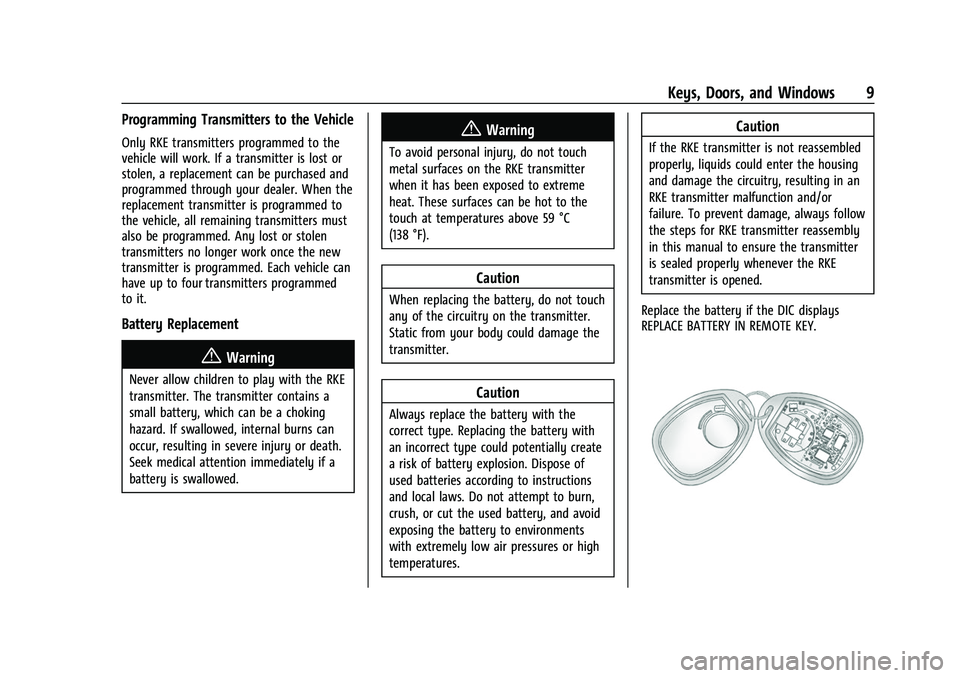
Replace the battery if the DIC displays
REPLACE BATTERY IN REMOTE KEY.
Page 11 of 289
Chevrolet Express Owner Manual (GMNA-Localizing-U.S./Canada/Mexico-
15555951) - 2022 - CRC - 1/27/22
10 Keys, Doors, and Windows
To replace the battery:1. Separate the transmitter with a flat, thin object, such as a flat head screwdriver.
.Carefully insert the tool into the
notch located along the parting line
of the transmitter. Do not insert the
tool too far. Stop as soon as
resistance is felt.
.Twist the tool until the transmitter is
separated.
2. Remove the old battery. Do not use a metal object.
3. Insert the new battery, positive side facing down. Replace with a CR2032 or
equivalent battery.
4. Set transmitter button side down on a hard surface and press the other half
straight down to force the halves
together.
Remote Vehicle Start
This vehicle may have a remote start
feature. This feature allows you to start the
engine from outside the vehicle. It may also
start the vehicle's heating or air conditioning
systems. See Climate Control Systems 0114. Laws in some local communities may restrict
the use of remote starters. For example,
some laws may require a person using
remote start to have the vehicle in view
when doing so. Check local regulations for
any requirements on remote starting of
vehicles.
Do not use the remote start feature if the
vehicle is low on fuel. The vehicle may run
out of fuel.
The RKE transmitter range may be less while
the vehicle is running.
Other conditions can affect the performance
of the transmitter. See
Remote Keyless Entry
(RKE) System 08.
/:This button will be on the RKE
transmitter if the vehicle has remote start.
To start the engine using the remote start
feature:
1. Press and release
Qon the transmitter.
2. Immediately press and hold
/until the
turn signal lamps flash. If you cannot see
the lamps, press and hold
/for at least
four seconds. When the engine starts, the parking
lamps will turn on and remain on while
the engine is running. The doors will be
locked.
The engine will continue to run for
10 minutes. After 30 seconds, repeat the
steps if a 10-minute extension is desired.
Remote start can be extended only once.
After entering the vehicle during a remote
start, turn the ignition on to drive the
vehicle.
A maximum of two remote starts or a start
with an extension are allowed between
ignition cycles.
If the remote start procedure is used again
before the first 10-minute time frame has
ended, the first 10 minutes will immediately
expire and the second 10-minute time frame
will start.
After the engine has been remote started
two times or a start with an extension, the
ignition must be turned on and then off
before the remote start procedure can be
used again.
Page 46 of 289
Chevrolet Express Owner Manual (GMNA-Localizing-U.S./Canada/Mexico-
15555951) - 2022 - CRC - 1/27/22
Seats and Restraints 45
To turn the front outboard passenger airbag
on again, insert the ignition key into the
airbag on-off switch, push in, and move the
switch to the ON position.
The front outboard passenger frontal airbag
is now enabled, and may inflate. SeeAirbag
On-Off Light 076.
Servicing the Airbag-Equipped
Vehicle
Airbags affect how the vehicle should be
serviced. There are parts of the airbag
system in several places around the vehicle.
Your dealer and the service manual have
information about servicing the vehicle and
the airbag system. To purchase a service
manual, see Publication Ordering
Information 0266.
{Warning
For up to 10 seconds after the vehicle is
turned off and the battery is
disconnected, an airbag can still inflate
during improper service. You can be
injured if you are close to an airbag
when it inflates. Avoid yellow connectors.
They are probably part of the airbag
(Continued)
Warning (Continued)
system. Be sure to follow proper service
procedures, and make sure the person
performing work for you is qualified to
do so.
Adding Equipment to the
Airbag-Equipped Vehicle
Adding accessories that change the vehicle's
frame, bumper system, height, front end,
or side sheet metal may keep the airbag
system from working properly.
The operation of the airbag system can also
be affected by changing, including
improperly repairing or replacing, any parts
of the following:
.Airbag system, including airbag modules,
front or side impact sensors, sensing and
diagnostic module, or airbag wiring
.Front seats, including stitching, seams or
zippers
.Seat belts
.Steering wheel, instrument panel, ceiling
trim, or pillar garnish trim
.Inner door seals, including speakers Your dealer and the service manual have
information about the location of the airbag
modules and sensors, sensing and diagnostic
module, and airbag wiring along with the
proper replacement procedures.
If the vehicle has rollover roof-rail airbags,
see
Different Size Tires and Wheels 0218 for
additional important information.
If the vehicle must be modified because you
have a disability and have questions about
whether the modifications will affect the
vehicle's airbag system, or if you have
questions about whether the airbag system
will be affected if the vehicle is modified for
any other reason, call Customer Assistance.
See Customer Assistance Offices 0260.
Airbag System Check
The airbag system does not need regularly
scheduled maintenance or replacement.
Make sure the airbag readiness light is
working. See Airbag Readiness Light 075.
Caution
If an airbag covering is damaged, opened,
or broken, the airbag may not work
properly. Do not open or break the airbag
coverings. If there are any opened or
(Continued)
Page 71 of 289

Chevrolet Express Owner Manual (GMNA-Localizing-U.S./Canada/Mexico-
15555951) - 2022 - CRC - 1/27/22
70 Instruments and Controls
Clock
Setting the Time or Date
1. With the radio on, pressHand the HR,
MIN, MM, DD, and YYYY (hour, minute,
month, day, and year) display.
2. Press the softkey under any one of the tabs to be changed. Every time the
softkey is pressed again, the time or the
date if selected, increases by one.
Another way to increase the time or
date is to press
¨SEEK or\FWD
(forward).
3. To decrease, press
©SEEK orsREV.
Turn the
fknob, on the upper right side
of the radio, to adjust the selected
setting.
Changing the Time or Date Default Settings
1. With the radio on, press
Hand then the
softkey under the forward arrow that is
currently displayed on the infotainment
display until the time 12H (hour) and 24H
(hour), and the date MM/DD (month and
day) and DD/MM (day and month) are
displayed.
2. Press the softkey under the desired option. 3. Press
Hagain to apply the selected
default, or let the screen time out.
Power Outlets
Power Outlets 12 Volt Direct Current
The accessory power outlets can be used to
plug in electrical equipment, such as a cell
phone or an MP3 player.
The vehicle may have two accessory power
outlets on the instrument panel.
Remove the cover to access and replace
when not in use.
Certain power accessory plugs may not be
compatible to the accessory power outlet
and could overload vehicle or adapter fuses.
If a problem is experienced, see your dealer.
{Warning
Power is always supplied to the outlets.
Do not leave electrical equipment
plugged in when the vehicle is not in use
because the vehicle could catch fire and
cause injury or death.
Caution
Leaving electrical equipment plugged in
for an extended period of time while the
vehicle is off will drain the battery.
Always unplug electrical equipment when
not in use and do not plug in equipment
that exceeds the maximum 20 amp
rating.
When adding electrical equipment, be sure
to follow the proper installation instructions
included with the equipment. See Add-On
Electrical Equipment 0171.
Caution
Hanging heavy equipment from the
power outlet can cause damage not
covered by the vehicle warranty. The
power outlets are designed for accessory
power plugs only, such as cell phone
charge cords.
Power Outlet 110/120 Volt Alternating
Current
This power outlet can be used to plug in
electrical equipment that uses a maximum
limit of 150 watts.
Page 76 of 289
Chevrolet Express Owner Manual (GMNA-Localizing-U.S./Canada/Mexico-
15555951) - 2022 - CRC - 1/27/22
Instruments and Controls 75
When the engine is not running, but the
ignition is on, this gauge shows the
battery's state of charge in DC volts.
When the engine is running, the gauge
shows the condition of the charging system.
Readings between the low and high warning
zones indicate the normal operating range.
Readings in the low warning zone may occur
when a large number of electrical
accessories are operating in the vehicle and
the engine is left at an idle for an extended
period. This condition is normal since the
charging system is not able to provide full
power at engine idle. As engine speeds are
increased, this condition should correct itself
as higher engine speeds allow the charging
system to create maximum power.
The vehicle can be only driven for a short
time with the reading in either warning
zone. If it must be driven, turn off all
unnecessary accessories.
Readings in either warning zone indicate a
possible problem in the electrical system.
Have the vehicle serviced as soon as
possible.Seat Belt Reminders
Driver Seat Belt Reminder Light
There is a seat belt reminder light on the
instrument cluster.
When the vehicle is started, this light
flashes and a chime may come on to remind
the driver to fasten their seat belt. Then the
light stays on solid until the belt is buckled.
This cycle may continue several times if the
driver remains or becomes unbuckled while
the vehicle is moving.
If the driver seat belt is buckled, neither the
light nor the chime comes on.
Airbag Readiness Light
This light shows if there is an electrical
problem with the airbag system. It is
located in the instrument cluster. The
system check includes the airbag sensor(s),
the airbag on-off switch, the pretensioners
(if equipped), the airbag modules, thewiring, and the crash sensing and diagnostic
module. For more information on the airbag
system, see
Airbag System 037.
The airbag readiness light comes on for
several seconds when the vehicle is started.
If the light does not come on then, have it
fixed immediately.
{Warning
If the airbag readiness light stays on
after the vehicle is started or comes on
while driving, it means the airbag system
might not be working properly. The
airbags in the vehicle might not inflate in
a crash, or they could even inflate
without a crash. To help avoid injury,
have the vehicle serviced right away.
If there is a problem with the airbag
system, a Driver Information Center (DIC)
message may also come on.
Page 78 of 289
Chevrolet Express Owner Manual (GMNA-Localizing-U.S./Canada/Mexico-
15555951) - 2022 - CRC - 1/27/22
Instruments and Controls 77
Charging System Light
The charging system light comes on briefly
when the ignition is turned on, but the
engine is not running, as a check to show
the light is working. It should go out when
the engine is started.
If the light stays on, or comes on while
driving, there may be a problem with the
electrical charging system. Have it checked
by your dealer. Driving while this light is on
could drain the battery.
When this light comes on, or is flashing, the
Driver Information Center (DIC) also displays
a message.
If a short distance must be driven with the
light on, be sure to turn off all accessories,
such as the radio and air conditioner. Find a
safe place to stop the vehicle.
Malfunction Indicator Lamp
(Check Engine Light)
This light is part of the vehicle’s emission
control on-board diagnostic system. If this
light is on while the engine is running, a
malfunction has been detected and the
vehicle may require service. The light should
come on to show that it is working when
the ignition is on and the engine is not
running. SeeIgnition Positions 0130.
Malfunctions are often indicated by the
system before any problem is noticeable.
Being aware of the light and seeking service
promptly when it comes on may prevent
damage.
Caution
If the vehicle is driven continually with
this light on, the emission control system
may not work as well, the fuel economy
may be lower, and the vehicle may not
(Continued)
Caution (Continued)
run smoothly. This could lead to costly
repairs that might not be covered by the
vehicle warranty.
Caution
Modifications to the engine, transmission,
exhaust, intake, or fuel system, or the
use of replacement tires that do not
meet the original tire specifications, can
cause this light to come on. This could
lead to costly repairs not covered by the
vehicle warranty. This could also affect
the vehicle’s ability to pass an Emissions
Inspection/Maintenance test. See
Accessories and Modifications 0173.
If the light is flashing : A malfunction has
been detected that could damage the
emission control system and increase vehicle
emissions. Diagnosis and service may be
required.
To help prevent damage, reduce vehicle
speed and avoid hard accelerations and
uphill grades. If towing a trailer, reduce the
amount of cargo being hauled as soon as
possible.
Page 79 of 289
Chevrolet Express Owner Manual (GMNA-Localizing-U.S./Canada/Mexico-
15555951) - 2022 - CRC - 1/27/22
78 Instruments and Controls
If the light continues to flash, find a safe
place to park. Turn the vehicle off and wait
at least 10 seconds before restarting the
engine. If the light is still flashing, follow
the previous guidelines and see your dealer
for service as soon as possible.
If the light is on steady :A malfunction has
been detected. Diagnosis and service may be
required.
Check the following:
.A loose or missing fuel cap may cause
the light to come on. See Filling the Tank
0 154. A few driving trips with the cap
properly installed may turn the light off.
.Poor fuel quality can cause inefficient
engine operation and poor driveability,
which may go away once the engine is
warmed up. If this occurs, change the fuel
brand. It may require at least one full
tank of the proper fuel to turn the light
off. See Recommended Fuel 0153.
If the light remains on, see your dealer.
Emissions Inspection and Maintenance
Programs
If the vehicle requires an Emissions
Inspection/Maintenance test, the test
equipment will likely connect to the
vehicle's Data Link Connector (DLC).
The DLC is under the instrument panel to
the left of the steering wheel. Connecting
devices that are not used to perform an
Emissions Inspection/Maintenance test or to
service the vehicle may affect vehicle
operation. See Add-On Electrical Equipment
0 171. See your dealer if assistance is
needed.
The vehicle may not pass inspection if:
.The light is on when the engine is
running.
.The light does not come on when the
ignition is on while the engine is off.
.Critical emission control systems have not
been completely diagnosed. If this
happens, the vehicle would not be ready
for inspection and might require
several days of routine driving before the
system is ready for inspection. This can
happen if the 12-volt battery has recently
been replaced or run down, or if the
vehicle has been recently serviced.
See your dealer if the vehicle will not pass
or cannot be made ready for the test.
Brake System Warning Light
MetricEnglish
This light should come on briefly when the
vehicle is turned on. If it does not come on
then, have it fixed so it will be ready to
warn you if there is a problem.
When the vehicle is on, the brake system
warning light also comes on when the
parking brake is set. The light stays on if
the parking brake does not fully release. If it
Page 87 of 289
Chevrolet Express Owner Manual (GMNA-Localizing-U.S./Canada/Mexico-
15555951) - 2022 - CRC - 1/27/22
86 Instruments and Controls
Relearn Tire Positions
The vehicle may have this display. To access
this display, the vehicle must be in P (Park).
If the vehicle has the Tire Pressure Monitor
System (TPMS), after rotating the tires or
after replacing a tire or sensor, the system
must re-learn the tire positions. To re-learn
the tire positions, seeTire Pressure Monitor
System 0211. See Tire Inspection 0214 and
Tire Rotation 0214.
Change Compass Zone
The vehicle may have this feature. To
change the compass zone through the DIC,
see Compass 068.
Calibrate Compass
The vehicle may have this feature. The
compass can be manually calibrated. To
calibrate the compass through the DIC, see
Compass 068.
Blank Display
This display shows no information.Vehicle Messages
Messages displayed on the DIC indicate the
status of the vehicle or some action that
may be needed to correct a condition.
Multiple messages may appear one after
another.
The messages that do not require
immediate action can be acknowledged and
cleared by pressing
V. The messages that
require immediate action cannot be cleared
until that action is performed.
All messages should be taken seriously;
clearing the message does not correct the
problem.
If a SERVICE message appears, see your
dealer.
Follow the instructions given in the
messages. The system displays messages
regarding the following topics:
.Service Messages
.Fluid Levels
.Vehicle Security
.Brakes
.Steering
.Ride Control Systems
.Driver Assistance Systems
.Cruise Control
.Lighting and Bulb Replacement
.Wiper/Washer Systems
.Doors and Windows
.Seat Belts
.Airbag Systems
.Engine and Transmission
.Tire Pressure
.Battery
Engine Power Messages
ENGINE POWER IS REDUCED
This message displays when the vehicle's
propulsion power is reduced. A reduction in
propulsion power can affect the vehicle's
ability to accelerate. If this message is on,
but there is no observed reduction in
performance, proceed to your destination.
Under certain conditions the performance
may be reduced the next time the vehicle is
driven. The vehicle may be driven while this
message is on, but maximum acceleration
and speed may be reduced. Anytime this
message stays on, or displays repeatedly,
the vehicle should be taken to your dealer
for service as soon as possible.
Page 88 of 289
Chevrolet Express Owner Manual (GMNA-Localizing-U.S./Canada/Mexico-
15555951) - 2022 - CRC - 1/27/22
Instruments and Controls 87
Under certain operating conditions,
propulsion will be disabled. Try restarting
after the ignition has been off for
30 seconds.
Vehicle Speed Messages
SPEED LIMITED TO XXX KM/H (MPH)
This message shows that the vehicle speed
has been limited to the speed displayed. The
limited speed is a protection for various
propulsion and vehicle systems, such as
lubrication, thermal, brakes, suspension,
Teen Driver if equipped, or tires.
Vehicle Personalization
This vehicle may have customization
capabilities that allow you to program
certain features to one preferred setting.
Customization features can only be
programmed to one setting on the vehicle
and cannot be programmed to a preferred
setting for two different drivers.
All of the customization options may not be
available on your vehicle. Only the options
available will be displayed on the DIC.The default settings for the customization
features were set when the vehicle left the
factory, but may have been changed from
their default state since then.
The customization preferences are
automatically recalled.
To change customization preferences, use
the following procedure.
Entering the Feature Settings Menu
1. Turn the ignition on and place the
vehicle in P (Park).
To avoid excessive drain on the battery,
it is recommended that the headlamps
are turned off.
2. Press
Uto enter the feature
settings menu.
If the menu is not available, FEATURE
SETTINGS AVAILABLE IN PARK will display.
Before entering the menu, make sure the
vehicle is in P (Park).
Feature Settings Menu Items
The following are customization features
that allow you to program settings to the
vehicle: DISPLAY IN ENGLISH
This feature will only display if a language
other than English has been set. This feature
allows you to change the language in which
the DIC messages appear to English.
Press
Uuntil the PRESSVTO DISPLAY IN
ENGLISH screen appears on the DIC display.
Press the set/reset button once to display
all DIC messages in English.
LANGUAGE
This feature allows you to select the
language in which the DIC messages will
appear.
Press
Uuntil the LANGUAGE screen appears
on the DIC display. Press
Vonce to access
the settings for this feature. Then press
U
to scroll through the following settings:
ENGLISH (default) : All messages will appear
in English.
FRANCAIS : All messages will appear in
French.
ESPANOL : All messages will appear in
Spanish.
NO CHANGE : No change will be made to
this feature. The current setting will remain.