park assist CHEVROLET EXPRESS 2019 Owner's Manual
[x] Cancel search | Manufacturer: CHEVROLET, Model Year: 2019, Model line: EXPRESS, Model: CHEVROLET EXPRESS 2019Pages: 373, PDF Size: 5.57 MB
Page 5 of 373
Chevrolet Express Owner Manual (GMNA-Localizing-U.S./Canada/Mexico-
12146162) - 2019 - crc - 11/26/18
4 Introduction
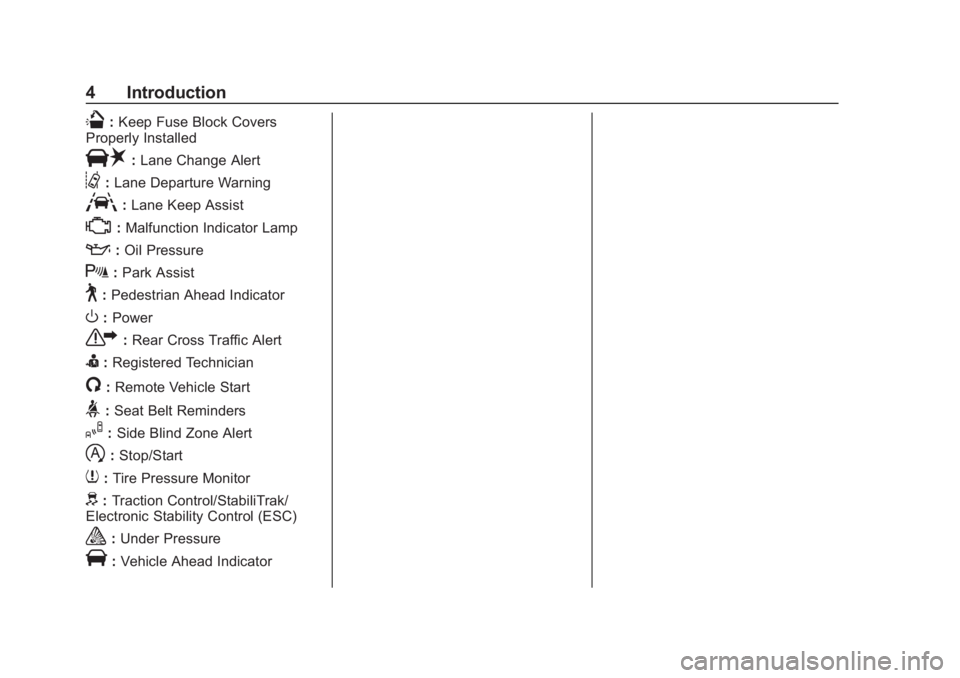
Q:Keep Fuse Block Covers
Properly Installed
|: Lane Change Alert
@:Lane Departure Warning
A:Lane Keep Assist
*:Malfunction Indicator Lamp
::Oil Pressure
X:Park Assist
~:Pedestrian Ahead Indicator
O:Power
7: Rear Cross Traffic Alert
I:Registered Technician
/:Remote Vehicle Start
>:Seat Belt Reminders
I: Side Blind Zone Alert
h:Stop/Start
7: Tire Pressure Monitor
d:Traction Control/StabiliTrak/
Electronic Stability Control (ESC)
a: Under Pressure
V:Vehicle Ahead Indicator
Page 6 of 373
Chevrolet Express Owner Manual (GMNA-Localizing-U.S./Canada/Mexico-
12146162) - 2019 - crc - 11/26/18
In Brief 5
In Brief
Instrument Panel
Instrument Panel . . . . . . . . . . . . . . . . 6
Initial Drive Information
Initial Drive Information . . . . . . . . . . 8
Remote Keyless Entry (RKE)System . . . . . . . . . . . . . . . . . . . . . . . . 8
Remote Vehicle Start . . . . . . . . . . . 8
Door Locks . . . . . . . . . . . . . . . . . . . . . 9
Windows . . . . . . . . . . . . . . . . . . . . . . . . 9
Seat Adjustment . . . . . . . . . . . . . . . 10
Seat Belts . . . . . . . . . . . . . . . . . . . . . . 11
Airbag On-Off Switch . . . . . . . . . . 11
Mirror Adjustment . . . . . . . . . . . . . . 12
Steering Wheel Adjustment . . . . 12
Interior Lighting . . . . . . . . . . . . . . . . 13
Exterior Lighting . . . . . . . . . . . . . . . 14
Windshield Wiper/Washer . . . . . . 14
Climate Controls . . . . . . . . . . . . . . . 15
Transmission . . . . . . . . . . . . . . . . . . 16
Vehicle Features
Infotainment System . . . . . . . . . . . 17
Radio(s) . . . . . . . . . . . . . . . . . . . . . . . 17
Satellite Radio . . . . . . . . . . . . . . . . . 18
Portable Audio Devices . . . . . . . . 18
Bluetooth . . . . . . . . . . . . . . . . . . . . . . 19 Steering Wheel Controls . . . . . . . 19
Cruise Control . . . . . . . . . . . . . . . . . 20
Forward Collision Alert (FCA)
System . . . . . . . . . . . . . . . . . . . . . . . 20
Lane Departure
Warning (LDW) . . . . . . . . . . . . . . . 20
Side Blind Zone Alert (SBZA) . . . . . . . . . . . . . . . . . . 20
Rear Vision Camera (RVC) . . . . 21
Park Assist . . . . . . . . . . . . . . . . . . . . 21
Power Outlets . . . . . . . . . . . . . . . . . 21
Performance and Maintenance
Traction Control/Electronic Stability Control . . . . . . . . . . . . . . 21
Tire Pressure Monitor . . . . . . . . . . 22
Fuel (Gasoline) . . . . . . . . . . . . . . . . 22
Fuel (Diesel) . . . . . . . . . . . . . . . . . . . 22
E85 or FlexFuel . . . . . . . . . . . . . . . . 23
Engine Oil Life System . . . . . . . . 23
Driving for Better Fuel Economy . . . . . . . . . . . . . . . . . . . . . 23
Roadside Assistance Program . . . . . . . . . . . . . . . . . . . . . . 24
Page 22 of 373
Chevrolet Express Owner Manual (GMNA-Localizing-U.S./Canada/Mexico-
12146162) - 2019 - crc - 11/26/18
In Brief 21
Rear Vision
Camera (RVC)
If equipped, the RVC displays a
view of the area behind the vehicle
when the vehicle is shifted into
R (Reverse).
To clean the camera lens, rinse it
with water and wipe it with a soft
cloth.
SeeRear Vision Camera (RVC)
0 198.
Park Assist
If equipped, Rear Park Assist (RPA)
uses sensors on the rear bumper to
assist with parking and avoiding
objects while in R (Reverse).
It operates at speeds less than
8 km/h (5 mph) and uses audible
beeps to provide distance and
system information.
Keep the sensors on the vehicle's
rear bumper clean to ensure proper
operation.
See Park Assist 0199.
Power Outlets
The accessory power outlets can be
used to plug in electrical equipment,
such as a cell phone or an MP3
player.
The vehicle may have two
accessory power outlets on the
instrument panel.
Remove the cover to access and
replace when not in use.
See Power Outlets 098.
Performance and
Maintenance
Traction Control/
Electronic Stability
Control
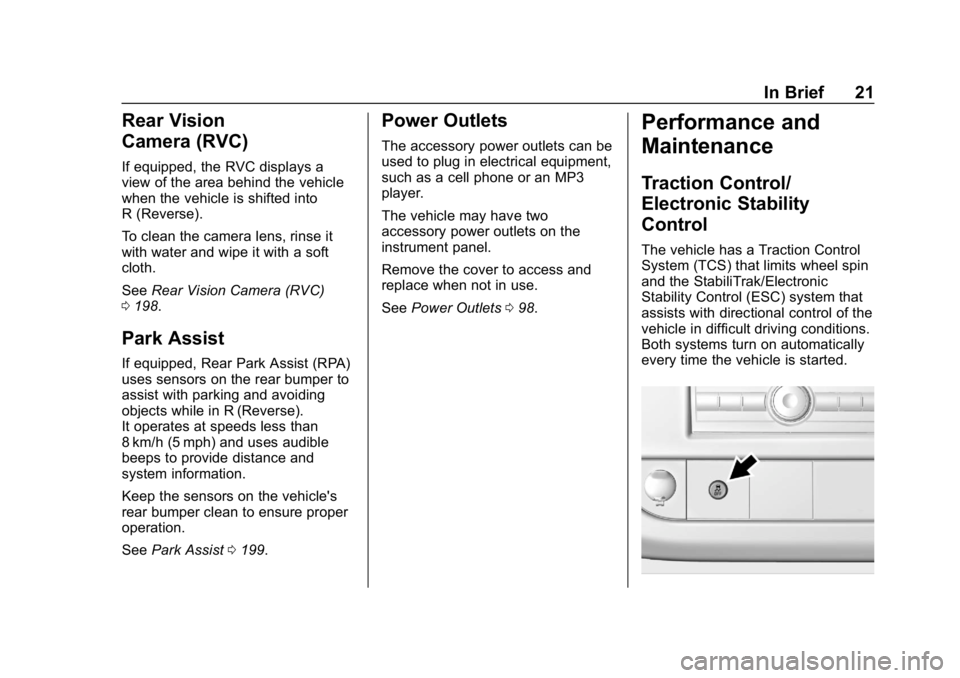
The vehicle has a Traction Control
System (TCS) that limits wheel spin
and the StabiliTrak/Electronic
Stability Control (ESC) system that
assists with directional control of the
vehicle in difficult driving conditions.
Both systems turn on automatically
every time the vehicle is started.
Page 116 of 373
Chevrolet Express Owner Manual (GMNA-Localizing-U.S./Canada/Mexico-
12146162) - 2019 - crc - 11/26/18
Instruments and Controls 115
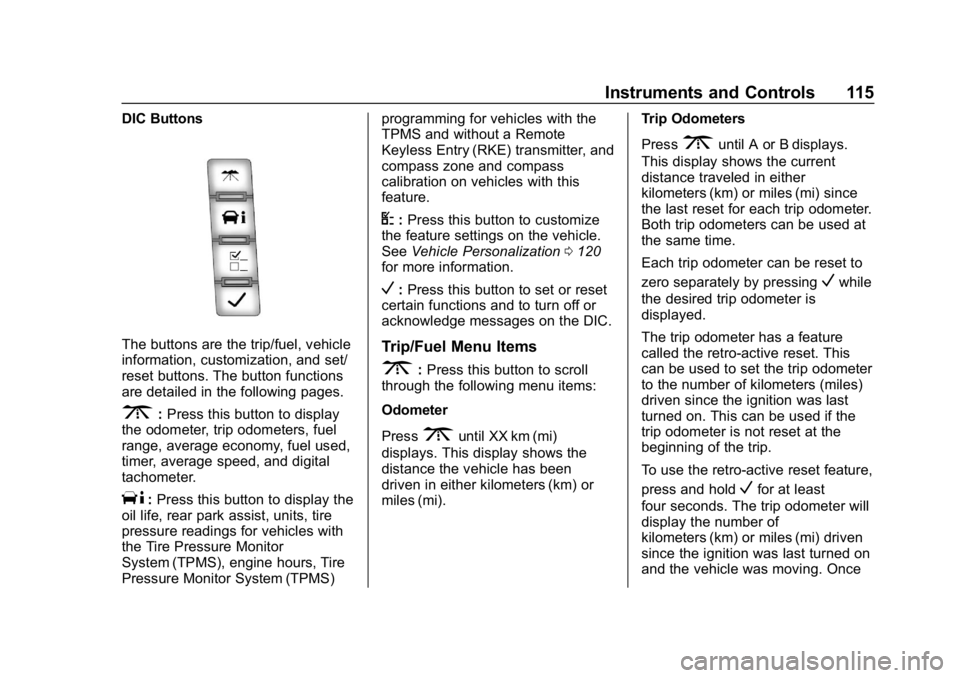
DIC Buttons
The buttons are the trip/fuel, vehicle
information, customization, and set/
reset buttons. The button functions
are detailed in the following pages.
3:Press this button to display
the odometer, trip odometers, fuel
range, average economy, fuel used,
timer, average speed, and digital
tachometer.
T: Press this button to display the
oil life, rear park assist, units, tire
pressure readings for vehicles with
the Tire Pressure Monitor
System (TPMS), engine hours, Tire
Pressure Monitor System (TPMS) programming for vehicles with the
TPMS and without a Remote
Keyless Entry (RKE) transmitter, and
compass zone and compass
calibration on vehicles with this
feature.
U:
Press this button to customize
the feature settings on the vehicle.
See Vehicle Personalization 0120
for more information.
V: Press this button to set or reset
certain functions and to turn off or
acknowledge messages on the DIC.
Trip/Fuel Menu Items
3: Press this button to scroll
through the following menu items:
Odometer
Press
3until XX km (mi)
displays. This display shows the
distance the vehicle has been
driven in either kilometers (km) or
miles (mi). Trip Odometers
Press
3until A or B displays.
This display shows the current
distance traveled in either
kilometers (km) or miles (mi) since
the last reset for each trip odometer.
Both trip odometers can be used at
the same time.
Each trip odometer can be reset to
zero separately by pressing
Vwhile
the desired trip odometer is
displayed.
The trip odometer has a feature
called the retro-active reset. This
can be used to set the trip odometer
to the number of kilometers (miles)
driven since the ignition was last
turned on. This can be used if the
trip odometer is not reset at the
beginning of the trip.
To use the retro-active reset feature,
press and hold
Vfor at least
four seconds. The trip odometer will
display the number of
kilometers (km) or miles (mi) driven
since the ignition was last turned on
and the vehicle was moving. Once
Page 118 of 373
Chevrolet Express Owner Manual (GMNA-Localizing-U.S./Canada/Mexico-
12146162) - 2019 - crc - 11/26/18
Instruments and Controls 117
To stop the timer, pressVbriefly
while TIMER is displayed.
To reset the timer to zero, press and
hold
Vwhile TIMER is displayed.
Average Speed
Press
3until AVERAGE SPEED
displays. This display shows the
average speed of the vehicle in
kilometers per hour (km/h) or miles
per hour (mph). This average is
calculated based on the various
vehicle speeds recorded since the
last reset of this value. To reset the
value, press and hold
V. The
display will return to zero.
Digital Tachometer
Press
3until
Tachometer ##00 RPM displays.
This display shows the engine
speed in revolutions per
minute (RPM).
Blank Display
This display shows no information.
Vehicle Information Menu
Items
T: Press this button to scroll
through the following menu items:
Oil Life
Press
Tuntil OIL LIFE
REMAINING displays. This display
shows an estimate of the oil's
remaining useful life. If you see
99% OIL LIFE REMAINING on the
display, that means 99% of the
current oil life remains. The engine
oil life system will alert you to
change the oil on a schedule
consistent with your driving
conditions.
When the remaining oil life is low,
the CHANGE ENGINE OIL SOON
message will appear on the display.
You should change the oil as soon
as possible. See Engine Oil0235.
In addition to the engine oil life
system monitoring the oil life,
additional maintenance is
recommended. See Maintenance
Schedule 0319. Remember, you must reset the OIL
LIFE yourself after each oil change.
It will not reset itself. Also, be
careful not to reset the OIL LIFE
accidentally at any time other than
when the oil has just been changed.
It cannot be reset accurately until
the next oil change. To reset the
engine oil life system, see
Engine
Oil Life System 0237.
Side Blind Zone Alert
If the vehicle has Side Blind Zone
Alert (SBZA), this display allows the
system to be turned on or off. Press
Tuntil SBZA displays. Once in
this display, press
Vto select
between ON or OFF. When the
SBZA system is turned off, a DIC
message will display. See Side
Blind Zone Alert (SBZA) 0202.
Park Assist
If the vehicle has the Rear Park
Assist (RPA) system, press
Tuntil
PARK ASSIST displays. This
display allows the system to be
turned on or off. Once in this
display, press to select between ON
Page 119 of 373
Chevrolet Express Owner Manual (GMNA-Localizing-U.S./Canada/Mexico-
12146162) - 2019 - crc - 11/26/18
118 Instruments and Controls
or OFF. The RPA system
automatically turns back on after
each vehicle start. When the RPA
system is turned off and the vehicle
is shifted out of P (Park), the DIC
will display the PARK ASSIST OFF
message as a reminder that the
system has been turned off. See
Park Assist0199.
Units
Press
Tuntil UNITS displays. This
display allows you to select between
metric or English units of
measurement. Once in this display,
press
Vto select between METRIC
or ENGLISH units.
Tire Pressure
If the vehicle has the Tire Pressure
Monitor System (TPMS), the
pressure for each tire can be viewed
in the DIC. The tire pressure will be
shown in either kilopascals (kPa) or
pounds per square inch (psi). Press
Tuntil the DIC displays FRONT
TIRES PSI (kPa) LEFT ## RIGHT ##. Press
Tagain until the
DIC displays REAR TIRES
PSI (kPa) LEFT ## RIGHT ##.
If a low tire pressure condition is
detected by the system while
driving, a message advising you to
check the pressure in a specific tire
will appear in the display. See Tire
Pressure 0278.
If the tire pressure display shows
dashes instead of a value, there
may be a problem with the vehicle.
If this consistently occurs, see your
dealer for service.
Engine Hours
Press
Tuntil ENGINE HOURS
displays. This display shows the
total number of hours the engine
has run.
Relearn Tire Positions
The vehicle may have this display.
To access this display, the vehicle
must be in P (Park). If the vehicle
has the Tire Pressure Monitor
System (TPMS), after rotating the
tires or after replacing a tire or
sensor, the system must re-learn the tire positions. To re-learn the tire
positions, see
Tire Pressure Monitor
System 0279.
See Tire Inspection 0283 andTire
Rotation 0283.
Change Compass Zone
The vehicle may have this feature.
To change the compass zone
through the DIC, see Compass
0 96.
Calibrate Compass
The vehicle may have this feature.
The compass can be manually
calibrated. To calibrate the compass
through the DIC, see Compass
0 96.
Blank Display
This display shows no information.
Page 152 of 373
Chevrolet Express Owner Manual (GMNA-Localizing-U.S./Canada/Mexico-
12146162) - 2019 - crc - 11/26/18
Infotainment System 151
OnStar System
OnStar with 4G LTE
If equipped with OnStar 4G LTE, up
to seven devices, such as
smartphones, tablets, and laptops,
can be connected to high-speed
Internet through the vehicle’s built-in
Wi-Fi hotspot.Call 1-888-4-ONSTAR
(1-888-466-7827) to connect to an
OnStar Advisor for assistance. See
www.onstar.com for a detailed
instruction guide, vehicle availability,
details, and system limitations.
Services and apps vary by make,
model, year, carrier, availability, and
conditions. 4G LTE service is
available in select markets. 4G LTE
performance is based on industry
averages and vehicle systems
design. Some services require a
data plan.
Phone
Bluetooth
For vehicles equipped with
Bluetooth capability, the system can
interact with many cell phones,
allowing:
.
Placement and receipt of calls in
a hands-free mode.
. Sharing of the cell phone’s
address book or contact list with
the vehicle.
To minimize driver distraction,
before driving, and with the vehicle
parked:
. Become familiar with the
features of the cell phone.
Organize the phone book and
contact lists clearly and delete
duplicate or rarely used entries.
If possible, program speed dial
or other shortcuts.
. Review the controls and
operation of the infotainment
system.
Page 166 of 373
Chevrolet Express Owner Manual (GMNA-Localizing-U.S./Canada/Mexico-
12146162) - 2019 - crc - 11/26/18
Driving and Operating 165
Driving and
Operating
Driving Information
Distracted Driving . . . . . . . . . . . . 166
Defensive Driving . . . . . . . . . . . . . 166
Drunk Driving . . . . . . . . . . . . . . . . . 167
Control of a Vehicle . . . . . . . . . . . 167
Braking . . . . . . . . . . . . . . . . . . . . . . . 167
Steering . . . . . . . . . . . . . . . . . . . . . . 167
Off-Road Recovery . . . . . . . . . . . 168
Loss of Control . . . . . . . . . . . . . . . 168
Driving on Wet Roads . . . . . . . . 169
Hill and Mountain Roads . . . . . 170
Winter Driving . . . . . . . . . . . . . . . . 170
If the Vehicle Is Stuck . . . . . . . . 172
Vehicle Load Limits . . . . . . . . . . . 172
Starting and Operating
New Vehicle Break-In . . . . . . . . . 176
Ignition Positions . . . . . . . . . . . . . 176
Starting the Engine . . . . . . . . . . . 178
Fast Idle System . . . . . . . . . . . . . 180
Retained AccessoryPower (RAP) . . . . . . . . . . . . . . . . 180
Engine Coolant Heater . . . . . . . 180
Shifting Into Park . . . . . . . . . . . . . 182
Shifting out of Park . . . . . . . . . . . 183 Parking over Things
That Burn . . . . . . . . . . . . . . . . . . . 184
Engine Exhaust
Engine Exhaust . . . . . . . . . . . . . . 184
Running the Vehicle WhileParked . . . . . . . . . . . . . . . . . . . . . . 185
Automatic Transmission
Automatic Transmission . . . . . . 185
Manual Mode . . . . . . . . . . . . . . . . . 188
Tow/Haul Mode . . . . . . . . . . . . . . . 189
Brakes
Antilock BrakeSystem (ABS) . . . . . . . . . . . . . . . 190
Parking Brake . . . . . . . . . . . . . . . . 191
Brake Assist . . . . . . . . . . . . . . . . . . 191
Hill Start Assist (HSA) . . . . . . . . 192
Ride Control Systems
Traction Control/Electronic Stability Control . . . . . . . . . . . . . 192
Locking Rear Axle . . . . . . . . . . . . 194
Cruise Control
Cruise Control . . . . . . . . . . . . . . . . 194
Driver Assistance Systems
Driver Assistance Systems . . . 197
Rear Vision Camera (RVC) . . . 198
Park Assist . . . . . . . . . . . . . . . . . . . 199 Forward Collision Alert (FCA)
System . . . . . . . . . . . . . . . . . . . . . . 201
Side Blind Zone Alert (SBZA) . . . . . . . . . . . . . . . . 202
Lane Departure
Warning (LDW) . . . . . . . . . . . . . 204
Fuel
Top Tier Fuel . . . . . . . . . . . . . . . . . 206
Recommended Fuel . . . . . . . . . . 206
Prohibited Fuels . . . . . . . . . . . . . . 206
Fuels in Foreign Countries . . . 207
Fuel Additives . . . . . . . . . . . . . . . . 207
E85 or FlexFuel . . . . . . . . . . . . . . 207
Filling the Tank . . . . . . . . . . . . . . . 208
Filling a Portable FuelContainer . . . . . . . . . . . . . . . . . . . 209
Trailer Towing
General Towing
Information . . . . . . . . . . . . . . . . . . 210
Driving Characteristics and Towing Tips . . . . . . . . . . . . . . . . . 210
Trailer Towing . . . . . . . . . . . . . . . . 215
Towing Equipment . . . . . . . . . . . . 222
Trailer Sway Control (TSC) . . . 225
Conversions and Add-Ons
Add-On Electrical Equipment . . . . . . . . . . . . . . . . . . 227
Page 178 of 373
Chevrolet Express Owner Manual (GMNA-Localizing-U.S./Canada/Mexico-
12146162) - 2019 - crc - 11/26/18
Driving and Operating 177
0 (Stopping the Engine/LOCK/
OFF) :This position turns off the
vehicle. It also locks the ignition, the
transmission, and the steering
column, if equipped with a locking
steering column.
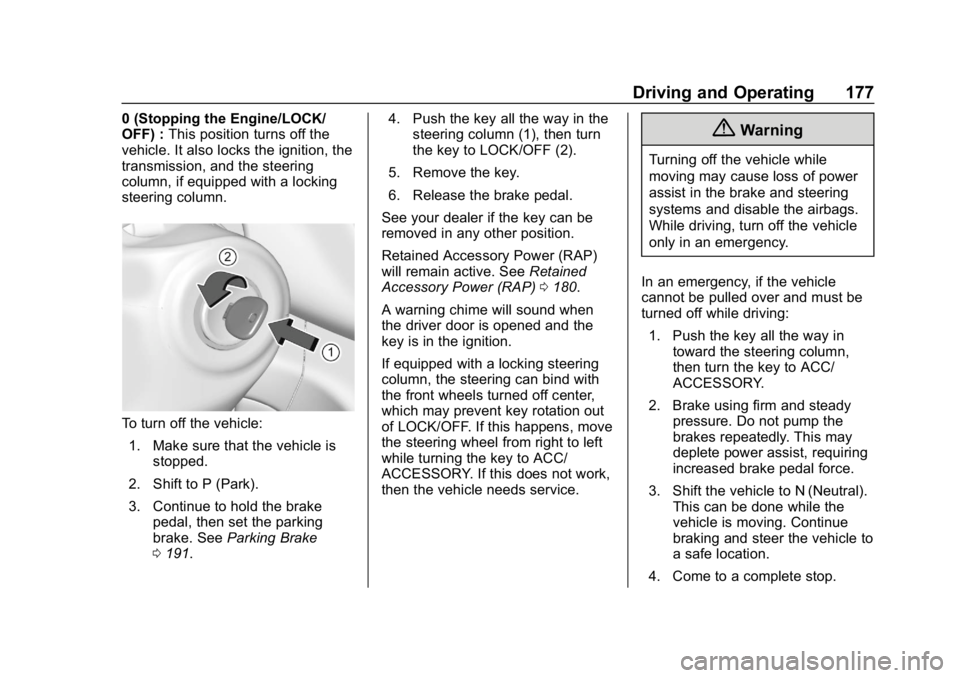
To turn off the vehicle:
1. Make sure that the vehicle is stopped.
2. Shift to P (Park).
3. Continue to hold the brake pedal, then set the parking
brake. See Parking Brake
0 191. 4. Push the key all the way in the
steering column (1), then turn
the key to LOCK/OFF (2).
5. Remove the key.
6. Release the brake pedal.
See your dealer if the key can be
removed in any other position.
Retained Accessory Power (RAP)
will remain active. See Retained
Accessory Power (RAP) 0180.
A warning chime will sound when
the driver door is opened and the
key is in the ignition.
If equipped with a locking steering
column, the steering can bind with
the front wheels turned off center,
which may prevent key rotation out
of LOCK/OFF. If this happens, move
the steering wheel from right to left
while turning the key to ACC/
ACCESSORY. If this does not work,
then the vehicle needs service.
{Warning
Turning off the vehicle while
moving may cause loss of power
assist in the brake and steering
systems and disable the airbags.
While driving, turn off the vehicle
only in an emergency.
In an emergency, if the vehicle
cannot be pulled over and must be
turned off while driving: 1. Push the key all the way in toward the steering column,
then turn the key to ACC/
ACCESSORY.
2. Brake using firm and steady pressure. Do not pump the
brakes repeatedly. This may
deplete power assist, requiring
increased brake pedal force.
3. Shift the vehicle to N (Neutral). This can be done while the
vehicle is moving. Continue
braking and steer the vehicle to
a safe location.
4. Come to a complete stop.
Page 180 of 373
Chevrolet Express Owner Manual (GMNA-Localizing-U.S./Canada/Mexico-
12146162) - 2019 - crc - 11/26/18
Driving and Operating 179
Caution
If you add electrical parts or
accessories, you could change
the way the engine operates. Any
resulting damage would not be
covered by the vehicle warranty.
SeeAdd-On Electrical Equipment
0 227.
Caution
Do not try to shift to P (Park) if the
vehicle is moving. If you do, you
could damage the transmission.
Shift to P (Park) only when the
vehicle is stopped.
Caution
If the steering wheel is turned
until it reaches the end of its
travel, and is held in that position
while starting the vehicle, damage
(Continued)
Caution (Continued)
may occur to the hydraulic power
steering system and there may be
loss of power steering assist.
Starting Procedure 1. With your foot off the accelerator pedal, turn the
ignition key to START. When
the engine starts, let go of the
key. The idle speed will go
down as your engine gets
warm. Do not race the engine
immediately after starting it.
Operate the engine and
transmission gently to allow the
oil to warm up and lubricate all
moving parts.
When the low fuel warning light
is on and the FUEL LEVEL
LOW message is displayed in
the Driver Information Center
(DIC), the Computer-Controlled
Cranking System is disabled to
prevent possible vehicle
component damage. When this happens, hold the ignition
switch in the START position to
continue engine cranking.
Caution
Cranking the engine for long
periods of time, by returning the
ignition to the START position
immediately after cranking has
ended, can overheat and damage
the cranking motor, and drain the
battery. Wait at least 15 seconds
between each try, to let the
cranking motor cool down.
2. If the engine does not start after five to 10 seconds,
especially in very cold weather
(below −18 °C or 0 °F), it could
be flooded with too much
gasoline. Try pushing the
accelerator pedal all the way to
the floor and holding it there as
you hold the key in START for
up to 15 seconds. Wait at least
15 seconds between each try,
to allow the cranking motor to
cool down. When the engine