change time CHEVROLET EXPRESS 2023 User Guide
[x] Cancel search | Manufacturer: CHEVROLET, Model Year: 2023, Model line: EXPRESS, Model: CHEVROLET EXPRESS 2023Pages: 283, PDF Size: 16.23 MB
Page 95 of 283
Chevrolet Express Owner Manual (GMNA-Localizing-U.S./Canada/Mexico-
16547501) - 2023 - CRC - 6/10/22
94 Lighting
G:An arrow on the instrument cluster
flashes in the direction of the turn or lane
change.
To signal a turn, move the lever all the way
up or down.
To signal a lane change, raise or lower the
lever until the arrow starts to flash. The
turn signal automatically flashes three times
and if the Tow/Haul Mode is active it
flashes six times. Holding the turn signal
lever for more than one second causes the
turn signals to flash continually until the
lever is released.
The lever returns to its starting position
when released.
If after signaling a turn or lane change the
arrow flashes rapidly or does not come on, a
signal bulb may be burned out.
Have any burned out bulbs replaced. If a
bulb is not burned out, check the fuse. See
Fuses and Circuit Breakers 0198.
Turn Signal On Chime
If the turn signal is left on for more than
1.2 km (0.75 mi), a chime sounds at each
flash of the turn signal and the message
TURN SIGNAL ON also appears in the Driver Information Center (DIC). To turn off the
chime and message, move the turn signal
lever to the off position.
Interior Lighting
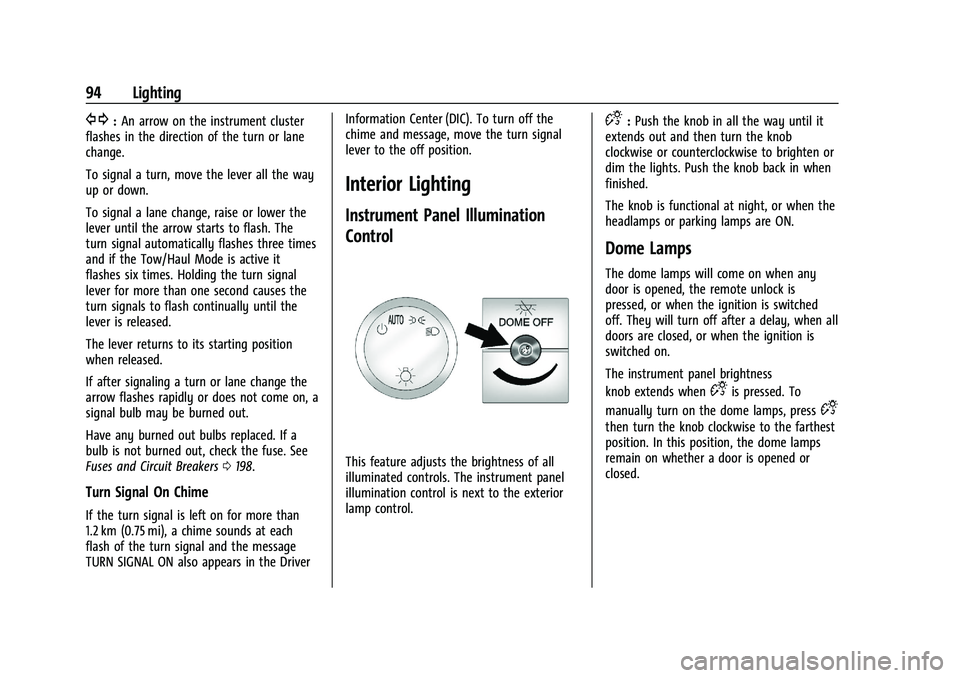
Instrument Panel Illumination
Control
This feature adjusts the brightness of all
illuminated controls. The instrument panel
illumination control is next to the exterior
lamp control.
D:
Push the knob in all the way until it
extends out and then turn the knob
clockwise or counterclockwise to brighten or
dim the lights. Push the knob back in when
finished.
The knob is functional at night, or when the
headlamps or parking lamps are ON.
Dome Lamps
The dome lamps will come on when any
door is opened, the remote unlock is
pressed, or when the ignition is switched
off. They will turn off after a delay, when all
doors are closed, or when the ignition is
switched on.
The instrument panel brightness
knob extends when
Dis pressed. To
manually turn on the dome lamps, press
D
then turn the knob clockwise to the farthest
position. In this position, the dome lamps
remain on whether a door is opened or
closed.
Page 96 of 283

Chevrolet Express Owner Manual (GMNA-Localizing-U.S./Canada/Mexico-
16547501) - 2023 - CRC - 6/10/22
Lighting 95
Dome Lamp Override
The dome lamp override sets the dome
lamps to remain off or come on
automatically when a door is opened, the
remote unlock is pressed, or when the
ignition is switched off.
EDOME OFF :Press this button in and the
dome lamps remain off when a door is
opened, the remote unlock is pressed, or the
ignition is switched off. Press the button
again to return it to the extended position
so that the dome lamps come on when a
door is opened, the remote unlock is
pressed, or when the ignition is
switched off.
Reading Lamps
If equipped with reading lamps, press the
button next to each lamp to turn it on
or off.
To operate, the ignition must be on, in ACC/
ACCESSORY, or using Retained Accessory
Power (RAP).
The vehicle may also have reading lamps in
other locations. The lamps cannot be
adjusted.
Lighting Features
Entry Lighting
The interior lamps turn on when pressingK
on the remote key or opening any doors,
and the dome lamp control is not in the
E
DOME OFF position.
Some exterior lamps also turn on when
pressing
Kon the remote key or opening
any doors. Low-Beam lamps will only turn
on briefly at night, or in areas with limited
lighting.
All lamps will gradually fade out after about
30 seconds. Entry lighting can be disabled manually by
closing all doors, pressing
Qon the remote
key, or starting the vehicle.
This feature can be changed. See “Exit
Lighting” underVehicle Personalization 087.
Exit Lighting
Some exterior lamps and interior lamps turn
on when the driver door is opened after the
vehicle is turned off.
The exterior and interior lamps remain on
for a set amount of time, then automatically
turn off.
The interior lights turn on when the vehicle
is turned off.
The exterior lamps turn off immediately by
turning the exterior lamp control off.
This feature can be changed. See Vehicle
Personalization 087.
Battery Load Management
The vehicle may have Electric Power
Management (EPM) that estimates the
battery's temperature and state of charge.
It then adjusts the voltage for best
performance and extended life of the
battery.
Page 100 of 283
Chevrolet Express Owner Manual (GMNA-Localizing-U.S./Canada/Mexico-
16547501) - 2023 - CRC - 6/10/22
Infotainment System 99
6.f
.Press to set the bass, midrange,
treble, fade, and balance.
.Turn to manually select radio
stations.
7. CAT
.Press to display a list of SXM
categories, if equipped.
8. Auxiliary Input Jack (If Equipped)
.Use to connect external audio
devices.
9. SRCE
.Press to scroll through auxiliary
devices, AM, FM, or SXM if equipped.
10.
\FWD
.Press and hold to fast forward
through a track.
11.
sREV
.Press and hold to go backward fast
through a track.
12.
P
.Press to turn the infotainment
system on or off.
.Turn to adjust the volume. 13.
¨SEEK
.Seeks or scans to the next station.
14.
©SEEK
.Seeks or scans to the previous
station.
15.
H
.Press to set the clock and date.
Operation
Using the Radio
O: Press to turn the system on and off.
Turn clockwise or counterclockwise to
increase or decrease the volume.
4: Press to switch the display between the
radio station frequency and the time. While
the ignition is off, press this button to
display the time. Press to display additional
text information related to the current
FM-RDS station or MP3 song. A choice of
additional information such as Channel,
Song, Artist, and CAT (category) can display.
Continue pressing to highlight the desired
tab, or press the softkey under any one of
the tabs and the information about that tab
displays. Speed Compensated Volume (SCV) :
SCV
automatically adjusts the radio volume to
compensate for road and wind noise as the
vehicle speed changes while driving, so that
the volume level stays consistent.
To activate SCV:
1. Set the radio volume to the desired level.
2. Press the MENU button to display the radio setup menu.
3. Press the softkey under the AUTO VOLUM (automatic volume) tab on the
infotainment display.
4. Press the softkey under the desired SCV setting (OFF, Low, Med, or High) to
select the level of radio volume
compensation. The display times out
after approximately 10 seconds. Each
higher setting allows for more radio
volume compensation at faster vehicle
speeds.
Setting the Tone (Bass/Treble)
To adjust the bass or treble:
1. Press the
fknob until Bass or Treble
displays.
2. To adjust the setting, do one of the following:
Page 109 of 283
Chevrolet Express Owner Manual (GMNA-Localizing-U.S./Canada/Mexico-
16547501) - 2023 - CRC - 6/10/22
108 Infotainment System
How to Speak :Speak clearly in a calm and
natural voice.
Audio System
When using the in-vehicle Bluetooth system,
sound comes through the vehicle's front
audio system speakers and overrides the
audio system. Use the audio system volume
knob, during a call, to change the volume
level. The adjusted volume level remains in
memory for later calls. To prevent missed
calls, a minimum volume level is used if the
volume is turned down too low.
Bluetooth Controls
Use the buttons on the steering wheel to
operate the in-vehicle Bluetooth system. See
Steering Wheel Controls 067.
b/g:Press to answer incoming calls,
confirm system information, and start
speech recognition.
c/x: Press to end a call, reject a call,
or cancel an operation.
Pairing
A Bluetooth-enabled cell phone must be
paired to the Bluetooth system and then
connected to the vehicle before it can be used. See the cell phone manufacturer's user
guide for Bluetooth functions before pairing
the cell phone.
Pairing Information
.A Bluetooth phone with MP3 capability
cannot be paired to the vehicle as a
phone and an MP3 player at the
same time.
.Up to five cell phones can be paired to
the Bluetooth system.
.The pairing process is disabled when the
vehicle is moving.
.Pairing only needs to be completed once,
unless the pairing information on the cell
phone changes or the cell phone is
deleted from the system.
.Only one paired cell phone can be
connected to the Bluetooth system at
a time.
.If multiple paired cell phones are within
range of the system, the system connects
to the first available paired cell phone in
the order that they were first paired to
the system. To connect to a different
paired phone, see
“Connecting to a
Different Phone” later in this section. Pairing a Phone
1. Press and hold
b/gfor two seconds.
2. Say “Bluetooth.” This command can be
skipped.
3. Say “Pair.”The system responds with
instructions and a four-digit Personal
Identification Number (PIN). The PIN is
used in Step 5.
4. Start the pairing process on the cell phone that you want to pair. For help
with this process, see the cell phone
manufacturer's user guide.
5. Locate the device named “Your Vehicle”
in the list on the cell phone. Follow the
instructions on the cell phone to enter
the PIN provided in Step 3. After the PIN
is successfully entered, the system
prompts you to provide a name for the
paired cell phone. This name will be used
to indicate which phones are paired and
connected to the vehicle. The system
responds with “
successfully paired” after the pairing
process is complete.
6. Repeat Steps 1–5 to pair additional phones.
Page 110 of 283
Chevrolet Express Owner Manual (GMNA-Localizing-U.S./Canada/Mexico-
16547501) - 2023 - CRC - 6/10/22
Infotainment System 109
Listing All Paired and Connected Phones
The system can list all cell phones paired to
it. If a paired cell phone is also connected to
the vehicle, the system responds with“is
connected” after that phone name.
1. Press and hold
b/gfor two seconds.
2. Say “Bluetooth.”
3. Say “List.”
Deleting a Paired Phone
If the phone name you want to delete is
unknown, see “Listing All Paired and
Connected Phones.”
1. Press and hold
b/gfor two seconds.
2. Say “Bluetooth.”
3. Say “Delete.” The system asks which
phone to delete.
4. Say the name of the phone you want to delete.
Connecting to a Different Phone
To connect to a different cell phone, the
Bluetooth system looks for the next
available cell phone in the order in which all
the available cell phones were paired.
Depending on which cell phone you want to
connect to, you may have to use this
command several times. 1. Press and hold
b/gfor two seconds.
2. Say “Bluetooth.”
3. Say “Change phone.”
.If another cell phone is found, the
response will be “
now connected.”
.If another cell phone is not found,
the original phone remains
connected.
Storing and Deleting Phone Numbers
The system can store up to 30 phone
numbers as name tags in the Hands-Free
Directory for Bluetooth.
The following commands are used to delete
and store phone numbers.
Store : This command will store a phone
number, or a group of numbers as a
name tag.
Digit Store : This command allows a phone
number to be stored as a name tag by
entering the digits one at a time.
Delete : This command is used to delete
individual name tags.
Delete All Name Tags : This command
deletes all stored name tags in the
Hands-Free Calling Directory. Using the
“Store”Command
1. Press and hold
b/gfor two seconds.
2. Say “Store.”
3. Say the phone number or group of numbers you want to store all at once
with no pauses, then follow the
directions given by the system to save a
name tag for this number.
Using the “Digit Store” Command
If an unwanted number is recognized by the
system, say “Clear”at any time to clear the
last number.
To hear all of the numbers recognized by
the system, say “Verify”at any time.
1. Press and hold
b/gfor two seconds.
2. Say “Digit Store.”
3. Say each digit, one at a time, that you want to store. After each digit is entered,
the system repeats back the digit it
heard followed by a tone. After the last
digit has been entered, say “Store,”and
then follow the directions given by the
system to save a name tag for this
number.
Using the “Delete”Command
1. Press and hold
b/gfor two seconds.
Page 111 of 283

Chevrolet Express Owner Manual (GMNA-Localizing-U.S./Canada/Mexico-
16547501) - 2023 - CRC - 6/10/22
110 Infotainment System
2. Say“Delete.”
3. Say the name tag you want to delete.
Using the “Delete All Name Tags” Command
This command deletes all stored name tags
in the Hands-Free Calling Directory.
To delete all name tags:
1. Press and hold
b/gfor two seconds.
2. Say “Delete all name tags.”
Listing Stored Numbers
The list command will list all stored
numbers and name tags.
Using the “List”Command
1. Press and hold
b/gfor two seconds.
2. Say “Directory.”
3. Say “Hands-Free Calling.”
4. Say “List.”
Making a Call
Calls can be made using the following
commands.
Dial or Call : The dial or call command can
be used interchangeably to dial a phone
number or a stored name tag. Digit Dial :
This command allows a phone
number to be dialed by entering the digits
one at a time.
Re-dial : This command is used to dial the
last number used on the cell phone.
Using the “Dial”or“Call” Command
1. Press and hold
b/gfor two seconds.
2. Say “Dial”or“Call.”
3. Say the entire number without pausing, or say the name tag.
Once connected, the person called will be
heard through the audio speakers.
Calling Emergency
1. Press and hold
b/gfor two seconds.
The system responds “Ready,”followed
by a tone.
2. Say “Dial”or“Call.”
3. Say [emergency number].
4. Say “Dial”or“Call.”
Once connected, the person called will be
heard through the audio speakers. Using the
“Digit Dial” Command
The digit dial command allows a phone
number to be dialed by entering the digits
one at a time. After each digit is entered,
the system repeats back the digit it heard
followed by a tone.
If an unwanted number is recognized by the
system, say “Clear”at any time to clear the
last number.
To hear all of the numbers recognized by
the system, say “Verify”at any time.
1. Press and hold
b/gfor two seconds.
2. Say “Digit Dial.”
3. Say each digit, one at a time, that you want to dial. After each digit is entered,
the system repeats back the digit it
heard followed by a tone. After the last
digit has been entered, say “Dial.”
Once connected, the person called will be
heard through the audio speakers.
Using the “Re-dial”Command
1. Press and hold
b/gfor two seconds.
2. After the tone, say “Re-dial.”
Once connected, the person called will be
heard through the audio speakers.
Page 133 of 283

Chevrolet Express Owner Manual (GMNA-Localizing-U.S./Canada/Mexico-
16547501) - 2023 - CRC - 6/10/22
132 Driving and Operating
be used for service and diagnostics, and to
verify the proper operation of the
malfunction indicator lamp as may be
required for emission inspection purposes.
The switch stays in this position when the
engine is running. The transmission is also
unlocked in this position.
If the key is left in ON/RUN with the engine
off, the battery could drain and the vehicle
may not start.
3 (START) :This is the position that starts
the engine. When the engine starts, release
the key. The ignition returns to ON/RUN for
driving.
Starting the Engine
To place the transmission in the
proper gear:
Move the shift lever to P (Park) or
N (Neutral). The engine will not start in any
other position. To restart the engine when
the vehicle is already moving, use
N (Neutral) only.
Caution
If you add electrical parts or accessories,
you could change the way the engine
operates. Any resulting damage would
not be covered by the vehicle warranty.
See Add-On Electrical Equipment 0171.
Caution
Do not try to shift to P (Park) if the
vehicle is moving. If you do, you could
damage the transmission. Shift to P (Park)
only when the vehicle is stopped.
Caution
If the steering wheel is turned until it
reaches the end of its travel, and is held
in that position while starting the vehicle,
damage may occur to the hydraulic
power steering system and there may be
loss of power steering assist.
Starting Procedure 1. With your foot off the accelerator pedal, turn the ignition key to START. When
the engine starts, let go of the key. The
idle speed will go down as your engine gets warm. Do not race the engine
immediately after starting it. Operate
the engine and transmission gently to
allow the oil to warm up and lubricate
all moving parts.
When the low fuel warning light is on
and the FUEL LEVEL LOW message is
displayed in the Driver Information
Center (DIC), the Computer-Controlled
Cranking System is disabled to prevent
possible vehicle component damage.
When this happens, hold the ignition
switch in the START position to continue
engine cranking.
Caution
Cranking the engine for long periods of
time, by returning the ignition to the
START position immediately after
cranking has ended, can overheat and
damage the cranking motor, and drain
the battery. Wait at least 15 seconds
between each try, to let the cranking
motor cool down.
2. If the engine does not start after five to 10 seconds, especially in very cold
weather (below −18 °C or 0 °F), it could
be flooded with too much gasoline. Try
Page 140 of 283

Chevrolet Express Owner Manual (GMNA-Localizing-U.S./Canada/Mexico-
16547501) - 2023 - CRC - 6/10/22
Driving and Operating 139
provides the lowest gear appropriate to
current road speed and continues to
downshift as the vehicle slows, eventually
downshifting to 1 (First) gear. The
transmission can be held in 1 (First) gear
using Range Selection Mode or the shift
lever. See“Range Selection Mode” under
Manual Mode 0139.
Caution
Spinning the tires or holding the vehicle
in one place on a hill using only the
accelerator pedal may damage the
transmission. The repair will not be
covered by the vehicle warranty. If the
vehicle is stuck, do not spin the tires.
When stopping on a hill, use the brakes
to hold the vehicle in place.
Normal Mode Grade Braking
This mode is enabled when the vehicle is
started, but is not enabled in Range
Selection Mode. It assists in maintaining
desired vehicle speeds when driving on
downhill grades by using the engine and
transmission to slow the vehicle. The first
time the system activates for each ignition
key cycle. To disable or enable Normal Mode Grade
Braking within the current ignition key cycle,
press and hold the Tow/Haul button for
three seconds.
For other forms of grade braking, see
Tow/
Haul Mode 0140 and Cruise Control 0143.
Manual Mode
Range Selection Mode
If equipped, Range Selection Mode helps
control the vehicle's transmission and vehicle
speed while driving downhill or towing a
trailer by letting you select a desired range
of gears.
To use this feature:
1. Move the shift lever to M (Manual Mode).
2. Press the +/− buttons on the shift lever
to select the desired range of gears for
current driving conditions. When M (Manual Mode) is selected, the
transmission will downshift and a number
displays in the Driver Information
Center (DIC) next to the M indicating the
current gear.
This number is the highest gear that can be
used. However, the vehicle can automatically
shift to lower gears as it adjusts to driving
conditions. This means that all gears below
that number are available. When 5 (Fifth) is
selected, 1 (First) through 5 (Fifth) gears are
automatically shifted by the vehicle, but
6 (Sixth) cannot be used until the +/−
button on the shift lever is used to change
to the gear.
Grade Braking is not available when Range
Selection Mode is active. See
Tow/Haul
Mode 0140.
While using Range Selection Mode, cruise
control and the Tow/Haul Mode can
be used.
Caution
Spinning the tires or holding the vehicle
in one place on a hill using only the
accelerator pedal may damage the
transmission. The repair will not be
(Continued)
Page 141 of 283

Chevrolet Express Owner Manual (GMNA-Localizing-U.S./Canada/Mexico-
16547501) - 2023 - CRC - 6/10/22
140 Driving and Operating
Caution (Continued)
covered by the vehicle warranty. If the
vehicle is stuck, do not spin the tires.
When stopping on a hill, use the brakes
to hold the vehicle in place.
Tow/Haul Mode
If equipped, Tow/Haul Mode adjusts the
transmission shift pattern to reduce shift
cycling, providing increased performance,
vehicle control, and transmission cooling
when towing or hauling heavy loads.Turn the Tow/Haul Mode on and off by
pressing the button on the instrument
panel. When Tow/Haul is on, a light on the
instrument cluster will come on.
See
Tow/Haul Mode Light 079.
Also see “Tow/Haul Mode” underTowing
Equipment 0167.
Tow/Haul Mode Grade Braking
Tow/Haul Mode Grade Braking is only
enabled while the Tow/Haul Mode is
selected and the vehicle is not in the Range
Selection Mode. See “Tow/Haul Mode”listed
previously and Manual Mode0139. Tow/
Haul Mode Grade Braking assists in
maintaining desired vehicle speeds when
driving on downhill grades by using the
engine and transmission to slow the vehicle.
To disable or enable Tow/Haul Mode Grade
Braking within the current ignition key cycle,
press and hold the Tow/Haul button for
three seconds.
See Towing Equipment 0167.
For other forms of grade braking, see
Automatic Transmission 0137.
Brakes
Antilock Brake System (ABS)
The Antilock Brake System (ABS) helps
prevent a braking skid and maintain steering
while braking hard.
ABS performs a system check when the
vehicle is first driven. A momentary motor
or clicking noise may be heard while this
test is going on, and the brake pedal may
move slightly. This is normal.
If there is a problem with ABS, this warning
light stays on. See Antilock Brake System
(ABS) Warning Light 079.
ABS does not change the time needed to
get a foot on the brake pedal and does not
always decrease stopping distance. If you
get too close to the vehicle ahead, there will
not be enough time to apply the brakes if
that vehicle suddenly slows or stops. Always
leave enough room ahead to stop, even
with ABS.
Page 144 of 283

Chevrolet Express Owner Manual (GMNA-Localizing-U.S./Canada/Mexico-
16547501) - 2023 - CRC - 6/10/22
Driving and Operating 143
Drive the vehicle. Ifdcomes on and stays
on, the vehicle may need more time to
diagnose the problem. If the condition
persists, see your dealer.
Turning the Systems Off and On
Caution
Do not repeatedly brake or accelerate
heavily when TCS is off. The vehicle
driveline could be damaged.
To turn off only TCS, press and release
g.
The appropriate message will display in the
DIC. To turn TCS on again, press and
release
g. If TCS is limiting wheel spin when
gis
pressed, the system will not turn off until
the wheels stop spinning.
To turn off both TCS and StabiliTrak/ESC,
press and hold
guntil the StabiliTrak/ESC
OFF light
gcomes on and stays on in the
instrument cluster, then release. The
appropriate message will display in the DIC.
To turn TCS and StabiliTrak/ESC on again,
press and release
g. The StabiliTrak/ESC OFF
light
gin the instrument cluster turns off.
StabiliTrak/ESC will automatically turn back
on if the vehicle exceeds 32 km/h (20 mph).
TCS will remain off until
gis pressed or the
ignition is cycled off then on.
The vehicle has a Trailer Sway Control (TSC)
feature and a Hill Start Assist (HSA) feature.
See Trailer Sway Control (TSC) 0170 or
Hill Start Assist (HSA) 0141.
Adding accessories can affect the vehicle
performance. See Accessories and
Modifications 0173.
Locking Rear Axle
Vehicles with a locking rear axle can give
more traction on snow, mud, ice, sand,
or gravel. It works like a standard axle most of the time, but when traction is low, this
feature will allow the rear wheel with the
most traction to move the vehicle.
Cruise Control
{
Warning
Cruise control can be dangerous where
you cannot drive safely at a steady
speed. Do not use cruise control on
winding roads or in heavy traffic.
Cruise control can be dangerous on
slippery roads. On such roads, fast
changes in tire traction can cause
excessive wheel slip, and you could lose
control. Do not use cruise control on
slippery roads.
If equipped with cruise control, a speed of
about 40 km/h (25 mph) or more can be
maintained without keeping your foot on
the accelerator. Cruise control does not work
at speeds below about 40 km/h (25 mph).
If the Traction Control System (TCS) or
StabiliTrak/Electronic Stability Control (ESC)
system begins to limit wheel spin while
using cruise control, the cruise control