door lock CHEVROLET EXPRESS 2023 Owner's Manual
[x] Cancel search | Manufacturer: CHEVROLET, Model Year: 2023, Model line: EXPRESS, Model: CHEVROLET EXPRESS 2023Pages: 283, PDF Size: 16.23 MB
Page 95 of 283
Chevrolet Express Owner Manual (GMNA-Localizing-U.S./Canada/Mexico-
16547501) - 2023 - CRC - 6/10/22
94 Lighting
G:An arrow on the instrument cluster
flashes in the direction of the turn or lane
change.
To signal a turn, move the lever all the way
up or down.
To signal a lane change, raise or lower the
lever until the arrow starts to flash. The
turn signal automatically flashes three times
and if the Tow/Haul Mode is active it
flashes six times. Holding the turn signal
lever for more than one second causes the
turn signals to flash continually until the
lever is released.
The lever returns to its starting position
when released.
If after signaling a turn or lane change the
arrow flashes rapidly or does not come on, a
signal bulb may be burned out.
Have any burned out bulbs replaced. If a
bulb is not burned out, check the fuse. See
Fuses and Circuit Breakers 0198.
Turn Signal On Chime
If the turn signal is left on for more than
1.2 km (0.75 mi), a chime sounds at each
flash of the turn signal and the message
TURN SIGNAL ON also appears in the Driver Information Center (DIC). To turn off the
chime and message, move the turn signal
lever to the off position.
Interior Lighting
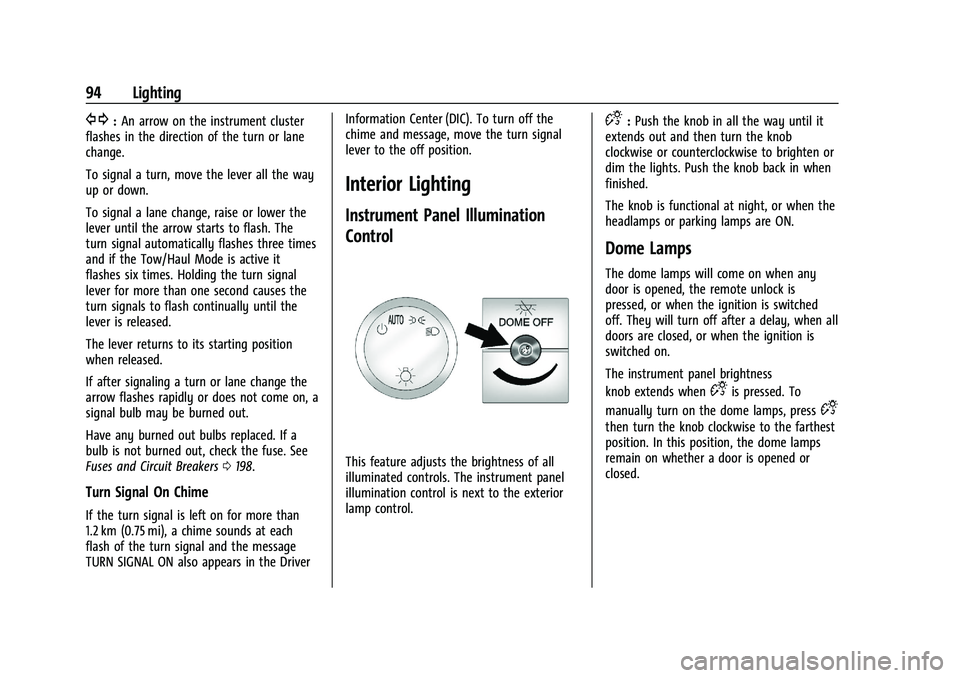
Instrument Panel Illumination
Control
This feature adjusts the brightness of all
illuminated controls. The instrument panel
illumination control is next to the exterior
lamp control.
D:
Push the knob in all the way until it
extends out and then turn the knob
clockwise or counterclockwise to brighten or
dim the lights. Push the knob back in when
finished.
The knob is functional at night, or when the
headlamps or parking lamps are ON.
Dome Lamps
The dome lamps will come on when any
door is opened, the remote unlock is
pressed, or when the ignition is switched
off. They will turn off after a delay, when all
doors are closed, or when the ignition is
switched on.
The instrument panel brightness
knob extends when
Dis pressed. To
manually turn on the dome lamps, press
D
then turn the knob clockwise to the farthest
position. In this position, the dome lamps
remain on whether a door is opened or
closed.
Page 96 of 283

Chevrolet Express Owner Manual (GMNA-Localizing-U.S./Canada/Mexico-
16547501) - 2023 - CRC - 6/10/22
Lighting 95
Dome Lamp Override
The dome lamp override sets the dome
lamps to remain off or come on
automatically when a door is opened, the
remote unlock is pressed, or when the
ignition is switched off.
EDOME OFF :Press this button in and the
dome lamps remain off when a door is
opened, the remote unlock is pressed, or the
ignition is switched off. Press the button
again to return it to the extended position
so that the dome lamps come on when a
door is opened, the remote unlock is
pressed, or when the ignition is
switched off.
Reading Lamps
If equipped with reading lamps, press the
button next to each lamp to turn it on
or off.
To operate, the ignition must be on, in ACC/
ACCESSORY, or using Retained Accessory
Power (RAP).
The vehicle may also have reading lamps in
other locations. The lamps cannot be
adjusted.
Lighting Features
Entry Lighting
The interior lamps turn on when pressingK
on the remote key or opening any doors,
and the dome lamp control is not in the
E
DOME OFF position.
Some exterior lamps also turn on when
pressing
Kon the remote key or opening
any doors. Low-Beam lamps will only turn
on briefly at night, or in areas with limited
lighting.
All lamps will gradually fade out after about
30 seconds. Entry lighting can be disabled manually by
closing all doors, pressing
Qon the remote
key, or starting the vehicle.
This feature can be changed. See “Exit
Lighting” underVehicle Personalization 087.
Exit Lighting
Some exterior lamps and interior lamps turn
on when the driver door is opened after the
vehicle is turned off.
The exterior and interior lamps remain on
for a set amount of time, then automatically
turn off.
The interior lights turn on when the vehicle
is turned off.
The exterior lamps turn off immediately by
turning the exterior lamp control off.
This feature can be changed. See Vehicle
Personalization 087.
Battery Load Management
The vehicle may have Electric Power
Management (EPM) that estimates the
battery's temperature and state of charge.
It then adjusts the voltage for best
performance and extended life of the
battery.
Page 132 of 283

Chevrolet Express Owner Manual (GMNA-Localizing-U.S./Canada/Mexico-
16547501) - 2023 - CRC - 6/10/22
Driving and Operating 131
6. Release the brake pedal.
See your dealer if the key can be removed
in any other position.
Retained Accessory Power (RAP) will remain
active. See Retained Accessory Power (RAP)
0 133.
A warning chime will sound when the driver
door is opened and the key is in the
ignition.
If equipped with a locking steering column,
the steering can bind with the front wheels
turned off center, which may prevent key
rotation out of LOCK/OFF. If this happens,
move the steering wheel from right to left
while turning the key to ACC/ACCESSORY.
If this does not work, then the vehicle needs
service.
{Warning
Turning off the vehicle while moving may
cause loss of power assist in the brake
and steering systems and disable the
airbags. While driving, turn off the
vehicle only in an emergency. In an emergency, if the vehicle cannot be
pulled over and must be turned off while
driving:
1. Push the key all the way in toward the steering column, then turn the key to
ACC/ACCESSORY.
2. Brake using firm and steady pressure. Do not pump the brakes repeatedly. This
may deplete power assist, requiring
increased brake pedal force.
3. Shift the vehicle to N (Neutral). This can be done while the vehicle is moving.
Continue braking and steer the vehicle to
a safe location.
4. Come to a complete stop.
5. Shift to P (Park).
6. Continue to hold the brake pedal, then set the parking brake. See Parking Brake
0 141.
7. Push the key all the way in toward the steering column, then turn the ignition
to LOCK/OFF.
8. Remove the key.
9. Release the brake pedal.
Caution
Use the correct key, make sure it is all
the way in —or pushed all the way in
toward the steering column when turning
off the vehicle —and turn it only with
your hand.
1 (ACC/ACCESSORY) : This position allows
features such as the infotainment system to
operate while the vehicle is off. It also
unlocks the steering column, if equipped
with a locking steering column. Use this
position if the vehicle must be pushed or
towed. See Retained Accessory Power (RAP)
0 133.
From ON/RUN, push the key all the way in
toward the steering column, then turn the
key to ACC/ACCESSORY.
If the key is left in ACC/ACCESSORY with the
engine off, the battery could drain and the
vehicle may not start.
A warning chime will sound when the driver
door is opened and the key is in the
ignition.
2 (ON/RUN) : This position can be used to
operate the electrical accessories and to
display some instrument cluster warning
and indicator lights. This position can also
Page 134 of 283

Chevrolet Express Owner Manual (GMNA-Localizing-U.S./Canada/Mexico-
16547501) - 2023 - CRC - 6/10/22
Driving and Operating 133
pushing the accelerator pedal all the way
to the floor and holding it there as you
hold the key in START for up to
15 seconds. Wait at least 15 seconds
between each try, to allow the cranking
motor to cool down. When the engine
starts, let go of the key and accelerator.
If the vehicle starts briefly but then
stops again, do the same thing. This
clears the extra gasoline from the
engine. Do not race the engine
immediately after starting it. Operate
the engine and transmission gently until
the oil warms up and lubricates all
moving parts.
Fast Idle System
If equipped, this feature is available only
with cruise control. The manual fast idle
switch is operated using the cruise control
buttons on the left side of the steering
wheel.
This system can be used to increase engine
idle speed whenever the following
conditions are met:
.The parking brake is set.
.The brake pedal is not pressed.
.The vehicle must not be moving and the
accelerator must not be pressed.To control the fast idle:
.To enable the Fast Idle System, press and
release the cruise control on/off button
and ensure that the switch indicator light
is lit.
.Press and release the cruise control SET-
button. Engine speed will be held at
approximately 1200 rpm.
When the fast idle is active, the Driver
Information Center (DIC) will display FAST
IDLE ON.
One of the following actions will turn off
the fast idle:
.Pressing the brake.
.Selecting the cruise control cancel button.
.Releasing the parking brake.
.Moving the transmission shift lever out of
P (Park) or N (Neutral).
.Selecting the cruise control on/off button
when it was previously on.
.Pressing the cruise control SET- button a
second time.
.Pressing the accelerator more than
one-quarter of the way down.
.Turning the ignition off.
Retained Accessory Power (RAP)
When the ignition is turned from on to off,
the following features (if equipped) will
continue to function for up to 10 minutes,
or until the driver door is opened. These
features will also work when the ignition is
in RUN or ACC/ACCESSORY:
.Infotainment System
.Power Windows (during RAP this
functionality will be lost when any door
is opened)
.Sunroof (during RAP this functionality will
be lost when any door is opened)
.Auxiliary Power Outlet
.Audio System
.OnStar System
Engine Coolant Heater
{Warning
Do not plug in the engine block heater
while the vehicle is parked in a garage or
under a carport. Property damage or
personal injury may result. Always park
the vehicle in a clear open area away
from buildings or structures.
Page 149 of 283

Chevrolet Express Owner Manual (GMNA-Localizing-U.S./Canada/Mexico-
16547501) - 2023 - CRC - 6/10/22
148 Driving and Operating
An obstacle detection is indicated by beeps.
The time between beeps gets shorter as the
vehicle approaches the obstacle. Repeated
beeps are heard when the distance is less
than 30 cm (12 in).
To be detected, objects must be at least
25 cm (10 in) off the ground and below rear
door level. Objects must also be within 2.5 m
(8 ft) from the rear bumper. This distance
may be less during warmer or humid
weather.
Turning the System On and Off
The system can be disabled through the
Driver Information Center (DIC). See“Park
Assist” underDriver Information Center (DIC)
0 82.
RPA defaults to the on setting each time the
vehicle is started.
Turn RPA off when towing a trailer.
When the System Does Not Seem to
Work Properly
The following messages may be displayed
on the DIC:
SERVICE PARK ASSIST : If this message
occurs, take the vehicle to your dealer for
repair. PARK ASSIST OFF :
This message occurs if
the driver disables the system or if the
vehicle is driven above 8 km/h (5 mph) in
R (Reverse).
PARK ASST BLOCKED SEE OWNERS
MANUAL : This message can occur under the
following conditions:
.The sensors are not clean. Keep the rear
bumper free of mud, dirt, snow, ice, slush,
and frost. The message may not clear
until frost or ice has melted all around
and inside the sensor.
.A trailer is attached to the vehicle, or a
bicycle or an object hanging out of the
rear door during the current or last drive
cycle. RPA will return to normal operation
after it is determined the object is
removed. This could take a few drive
cycles.
.A tow bar is attached to the vehicle.
Other conditions may affect system
performance, such as vibrations from a
jackhammer or the compression of air
brakes on a very large truck.
Forward Collision Alert (FCA)
System
If equipped, the FCA system may help to
avoid or reduce the harm caused by
front-end crashes. When approaching a
vehicle ahead too quickly, FCA provides a
red flashing alert on the windshield and
rapidly beeps. FCA also lights an amber
visual alert if following another vehicle
much too closely.
FCA detects vehicles within a distance of
approximately 60 m (197 ft) and operates at
speeds above 40 km/h (25 mph).
{Warning
FCA is a warning system and does not
apply the brakes. When approaching a
slower-moving or stopped vehicle ahead
too rapidly, or when following a vehicle
too closely, FCA may not provide a
warning with enough time to help avoid
a crash. It also may not provide any
warning at all. FCA does not warn of
pedestrians, animals, signs, guardrails,
bridges, construction barrels, or other (Continued)
Page 155 of 283

Chevrolet Express Owner Manual (GMNA-Localizing-U.S./Canada/Mexico-
16547501) - 2023 - CRC - 6/10/22
154 Driving and Operating
Warning (Continued)
.Before touching the fill nozzle, touch a
metallic object to discharge static
electricity from your body.
.Fuel can spray out if the fuel cap is
opened too quickly. This spray can
happen if the tank is nearly full, and is
more likely in hot weather. Open the
fuel cap slowly and wait for any hiss
noise to stop, then unscrew the cap all
the way.
Turn the fuel cap counterclockwise to
remove. When refueling, hang the fuel cap
from the hook on the fuel door. Fully insert
and latch the fill nozzle, begin fueling.
{Warning
Overfilling the fuel tank by more than
three clicks of a standard fill nozzle may
cause:
.Vehicle performance issues, including
engine stalling and damage to the fuel
system.
.Fuel spills.
.Under certain conditions, fuel fires.
Be careful not to spill fuel. Wait five seconds
after you have finished pumping before
removing the fill nozzle. Clean fuel from
painted surfaces as soon as possible. See
Exterior Care 0233. Reinstall the cap by
turning it clockwise until it clicks. Push the
fuel door closed.
{Warning
If a fire starts while you are refueling, do
not remove the fill nozzle. Shut off the
flow of fuel by shutting off the pump or
by notifying the station attendant. Leave
the area immediately.
Caution
If a new fuel cap is needed, get the right
type of cap from your dealer. The wrong
type of fuel cap may not fit properly,
may turn on the malfunction indicator
lamp, and could damage the fuel system
and emissions system. See Malfunction
Indicator Lamp (Check Engine Light) 077.
Filling a Portable Fuel Container
{Warning
Never fill a portable fuel container while
it is in the vehicle. Static electricity
discharge from the container can ignite
the fuel vapor. You or others could be
badly burned and the vehicle could be
damaged. To help avoid injury to you
and others:
.Dispense fuel only into approved
containers.
.Do not fill a container while it is
inside a vehicle, in a vehicle's trunk, in
a pickup bed, or on any surface other
than the ground.
(Continued)
Page 197 of 283

Chevrolet Express Owner Manual (GMNA-Localizing-U.S./Canada/Mexico-
16547501) - 2023 - CRC - 6/10/22
196 Vehicle Care
6. Remove the taillamp/turn signal lamp (1)or back-up lamp (2) bulb socket by
turning it counterclockwise one-quarter
turn and pulling it out of the lamp
assembly.
7. Remove the bulb by pulling it straight out.
8. Push the new bulb into the socket.
9. Reinstall the bulb socket by turning it clockwise into the lamp assembly.
10. Reverse Steps 1–5 to reinstall the taillamp assembly and applique.
Center High-Mounted Stoplamp
(CHMSL)
The Center High-Mounted Stoplamp (CHMSL)
is above the rear doors at the center of the
vehicle. To replace a bulb:
1. Remove the two screws from the CHMSL
assembly.
2. Remove the CHMSL assembly.
3. Turn the bulb socket counterclockwise one-quarter turn to remove it from the
lamp assembly.
4. Pull the old bulb straight out of the socket and push the new bulb into the
socket.
5. Turn the bulb socket clockwise one-quarter turn to install it in the lamp
assembly.
6. Reinstall the CHMSL assembly and two screws. Do not block or damage the CHMSL when
items are loaded on the roof of the vehicle.
License Plate Lamp
1. Bulb Socket
2. License Plate Bulb Assembly
3. Screws
To replace one of these bulbs:
1. Remove the screws (3) that secure the license plate bulb assembly (2).
2. Turn the bulb socket (1) counterclockwise and pull the bulb straight out of the
socket.
3. Install the new bulb.
Page 204 of 283

Chevrolet Express Owner Manual (GMNA-Localizing-U.S./Canada/Mexico-
16547501) - 2023 - CRC - 6/10/22
Vehicle Care 203
Mini-FusesUsage
F17 Heated Outside Mirrors
F18 Rear Window Defogger
F19 Compass
F20 Radio/Chime/SiriusXM Satellite Radio
F21 Remote Function Actuator/Tire Pressure
Monitor
F22 Ignition Switch/Discrete Logic Ignition Sensor/
Pass Key 3
F23 Instrument Cluster
F24 –
F25 HVAC Control
F26 Auxiliary/Trailer Reverse Lamps
F27 Reverse Tail Lamps
F28 Upfitter 2/Gas Ambulance
F29 Rear Blower
F30 Upfitter/Courtesy Lamps Mini-Fuses
Usage
F31 Front Door Lock
F32 Rear Door Lock
F33 Cargo Door Unlock
F34 Front Passenger Door Unlock
F35 Rear Passenger Door Unlock
F36 Driver Door Unlock F37 –
F38 –
Relays Usage
K1 Run
K2 –
K3 Parking Lamps
K4 Upfitter 2 K5 Rear Window Defogger
K6 Retained Accessory Power Circuit Breakers Usage
CB1 Power Seats
CB2 Power Windows
Wheels and Tires
Tires
Every new GM vehicle has high-quality
tires made by a leading tire
manufacturer. See the warranty manual
for information regarding the tire
warranty and where to get service. For
additional information refer to the tire
manufacturer.
{Warning
.Poorly maintained and improperly
used tires are dangerous.
.Overloading the tires can cause
overheating as a result of too
much flexing. There could be a
blowout and a serious crash. See
Vehicle Load Limits 0126.
(Continued)
Page 222 of 283

Chevrolet Express Owner Manual (GMNA-Localizing-U.S./Canada/Mexico-
16547501) - 2023 - CRC - 6/10/22
Vehicle Care 221
Remove the retaining wing bolt and lift it
out of the mounting bracket to access the
equipment.
The tools you will be using include:
1. Jack
2. Hoist Handle
3. Extension(s)
4. Wheel Wrench
5. Jack Handle
The spare tire is mounted in the rear
underbody of the vehicle.
Use the hoist handle, extension(s), and the
wheel wrench to remove the
underbody-mounted spare tire.
To lower the spare tire from the vehicle:
1. Spare Tire
2. Tire/Wheel Retainer
3. Hoist Cable
4. Hoist Assembly5. Hoist Shaft
6. Hoist Handle and Extension(s)
7. Wheel Wrench
1. Assemble the wheel wrench (7) to the
hoist handle and the extension(s) (6).
2. Open the passenger side rear door.
3. Insert the chisel end of the hoist handle, on an angle, through the hole in the rear
floor panel above the bumper.
Be sure the hoist handle connects to the
hoist shaft. The chiseled end of the hoist
handle is used to lower the spare tire.
4. Turn the wheel wrench counterclockwise to lower the spare tire to the ground.
Continue to turn the wheel wrench until
the spare tire can be pulled out from
under the vehicle.
5. Pull the spare tire out from under the vehicle.
Page 223 of 283

Chevrolet Express Owner Manual (GMNA-Localizing-U.S./Canada/Mexico-
16547501) - 2023 - CRC - 6/10/22
222 Vehicle Care
6. Tilt the tire toward the vehicle withsome slack in the cable to access the
tire/wheel retainer.
Tilt the retainer and pull it through the
center of the wheel along with the cable
and spring.
For a vehicle that was completed from a
cab and chassis, refer to the information
from the body supplier/installer.
The spare tire is a full-size tire, like the
other tires on the vehicle. 7. Put the spare tire near the flat tire.
8. Close the passenger side rear door.
Removing the Flat Tire and Installing the
Spare Tire
If the vehicle has plastic wheel nut caps,
loosen them by turning the wheel wrench
counterclockwise. The wheel nut caps are
designed to remain with the center cap.
Remove the center cap.
If the wheel has a smooth center piece,
place the chisel end of the wheel wrench in
the slot on the wheel and gently pry it out.
1. Jack
2. Hoist Handle
3. Extension(s) 4. Wheel Wrench
5. Jack Handle
1. Do a safety check before proceeding. See
If a Tire Goes Flat 0219.
2. Turn the wheel wrench counterclockwise
to loosen all the wheel nuts, but do not
remove them yet.
Caution
Make sure that the jack lift head is in the
correct position or you may damage your
vehicle. The repairs would not be covered
by your warranty.