lock CHEVROLET EXPRESS 2023 Repair Manual
[x] Cancel search | Manufacturer: CHEVROLET, Model Year: 2023, Model line: EXPRESS, Model: CHEVROLET EXPRESS 2023Pages: 283, PDF Size: 16.23 MB
Page 144 of 283

Chevrolet Express Owner Manual (GMNA-Localizing-U.S./Canada/Mexico-
16547501) - 2023 - CRC - 6/10/22
Driving and Operating 143
Drive the vehicle. Ifdcomes on and stays
on, the vehicle may need more time to
diagnose the problem. If the condition
persists, see your dealer.
Turning the Systems Off and On
Caution
Do not repeatedly brake or accelerate
heavily when TCS is off. The vehicle
driveline could be damaged.
To turn off only TCS, press and release
g.
The appropriate message will display in the
DIC. To turn TCS on again, press and
release
g. If TCS is limiting wheel spin when
gis
pressed, the system will not turn off until
the wheels stop spinning.
To turn off both TCS and StabiliTrak/ESC,
press and hold
guntil the StabiliTrak/ESC
OFF light
gcomes on and stays on in the
instrument cluster, then release. The
appropriate message will display in the DIC.
To turn TCS and StabiliTrak/ESC on again,
press and release
g. The StabiliTrak/ESC OFF
light
gin the instrument cluster turns off.
StabiliTrak/ESC will automatically turn back
on if the vehicle exceeds 32 km/h (20 mph).
TCS will remain off until
gis pressed or the
ignition is cycled off then on.
The vehicle has a Trailer Sway Control (TSC)
feature and a Hill Start Assist (HSA) feature.
See Trailer Sway Control (TSC) 0170 or
Hill Start Assist (HSA) 0141.
Adding accessories can affect the vehicle
performance. See Accessories and
Modifications 0173.
Locking Rear Axle
Vehicles with a locking rear axle can give
more traction on snow, mud, ice, sand,
or gravel. It works like a standard axle most of the time, but when traction is low, this
feature will allow the rear wheel with the
most traction to move the vehicle.
Cruise Control
{
Warning
Cruise control can be dangerous where
you cannot drive safely at a steady
speed. Do not use cruise control on
winding roads or in heavy traffic.
Cruise control can be dangerous on
slippery roads. On such roads, fast
changes in tire traction can cause
excessive wheel slip, and you could lose
control. Do not use cruise control on
slippery roads.
If equipped with cruise control, a speed of
about 40 km/h (25 mph) or more can be
maintained without keeping your foot on
the accelerator. Cruise control does not work
at speeds below about 40 km/h (25 mph).
If the Traction Control System (TCS) or
StabiliTrak/Electronic Stability Control (ESC)
system begins to limit wheel spin while
using cruise control, the cruise control
Page 147 of 283

Chevrolet Express Owner Manual (GMNA-Localizing-U.S./Canada/Mexico-
16547501) - 2023 - CRC - 6/10/22
146 Driving and Operating
Warning (Continued)
.Work if the area surrounding the
detection sensor is damaged or not
properly repaired.
Complete attention is always required
while driving, and you should be ready to
take action and apply the brakes and/or
steer the vehicle to avoid crashes.
Audible Alert
Some driver assistance features alert the
driver of obstacles by beeping. To view
available settings from the Driver
Information Center (DIC) press
Uto enter
the feature settings menu.
Cleaning
Depending on vehicle options, keep these
areas of the vehicle clean to ensure the best
driver assistance feature performance. Driver
Information Center (DIC) messages may
display when the systems are unavailable or
blocked.
.Front and rear bumpers and the area
below the bumpers
.Front grille and headlamps
.Front camera lens in the front grille or
near the front emblem
.Front side and rear side panels
.Outside of the windshield in front of the
rearview mirrors
.Side camera lens on the bottom of the
outside mirrors
.Rear side corner bumpers
.Rear Vision Camera above the license
plate
Radio Frequency
This vehicle may be equipped with driver
assistance systems that operate using radio
frequency. See Radio Frequency Statement
0 260.
Rear Vision Camera (RVC)
When the vehicle is shifted into R (Reverse),
the RVC displays an image of the area
behind the vehicle in the infotainment
display. The previous screen displays when
the vehicle is shifted out of R (Reverse) after
a short delay. To return to the previous
screen sooner, press Home or Back on the
infotainment system, shift into P (Park),
or reach a vehicle speed of approximately
12 km/h (8 mph) while in D (Drive).
Page 149 of 283

Chevrolet Express Owner Manual (GMNA-Localizing-U.S./Canada/Mexico-
16547501) - 2023 - CRC - 6/10/22
148 Driving and Operating
An obstacle detection is indicated by beeps.
The time between beeps gets shorter as the
vehicle approaches the obstacle. Repeated
beeps are heard when the distance is less
than 30 cm (12 in).
To be detected, objects must be at least
25 cm (10 in) off the ground and below rear
door level. Objects must also be within 2.5 m
(8 ft) from the rear bumper. This distance
may be less during warmer or humid
weather.
Turning the System On and Off
The system can be disabled through the
Driver Information Center (DIC). See“Park
Assist” underDriver Information Center (DIC)
0 82.
RPA defaults to the on setting each time the
vehicle is started.
Turn RPA off when towing a trailer.
When the System Does Not Seem to
Work Properly
The following messages may be displayed
on the DIC:
SERVICE PARK ASSIST : If this message
occurs, take the vehicle to your dealer for
repair. PARK ASSIST OFF :
This message occurs if
the driver disables the system or if the
vehicle is driven above 8 km/h (5 mph) in
R (Reverse).
PARK ASST BLOCKED SEE OWNERS
MANUAL : This message can occur under the
following conditions:
.The sensors are not clean. Keep the rear
bumper free of mud, dirt, snow, ice, slush,
and frost. The message may not clear
until frost or ice has melted all around
and inside the sensor.
.A trailer is attached to the vehicle, or a
bicycle or an object hanging out of the
rear door during the current or last drive
cycle. RPA will return to normal operation
after it is determined the object is
removed. This could take a few drive
cycles.
.A tow bar is attached to the vehicle.
Other conditions may affect system
performance, such as vibrations from a
jackhammer or the compression of air
brakes on a very large truck.
Forward Collision Alert (FCA)
System
If equipped, the FCA system may help to
avoid or reduce the harm caused by
front-end crashes. When approaching a
vehicle ahead too quickly, FCA provides a
red flashing alert on the windshield and
rapidly beeps. FCA also lights an amber
visual alert if following another vehicle
much too closely.
FCA detects vehicles within a distance of
approximately 60 m (197 ft) and operates at
speeds above 40 km/h (25 mph).
{Warning
FCA is a warning system and does not
apply the brakes. When approaching a
slower-moving or stopped vehicle ahead
too rapidly, or when following a vehicle
too closely, FCA may not provide a
warning with enough time to help avoid
a crash. It also may not provide any
warning at all. FCA does not warn of
pedestrians, animals, signs, guardrails,
bridges, construction barrels, or other (Continued)
Page 150 of 283

Chevrolet Express Owner Manual (GMNA-Localizing-U.S./Canada/Mexico-
16547501) - 2023 - CRC - 6/10/22
Driving and Operating 149
Warning (Continued)
objects. Be ready to take action and
apply the brakes. SeeDefensive Driving
0 121.
FCA can be disabled with the
[button on
the center stack.
Detecting the Vehicle Ahead
FCA warnings will not occur unless the FCA
system detects a vehicle ahead. When a
vehicle is detected, the vehicle ahead
indicator will display green. Vehicles may
not be detected on curves, highway exit
ramps, or hills, due to poor visibility; or if a
vehicle ahead is partially blocked by
pedestrians or other objects. FCA will not
detect another vehicle ahead until it is
completely in the driving lane.
{Warning
FCA does not provide a warning to help
avoid a crash, unless it detects a vehicle.
FCA may not detect a vehicle ahead if
the FCA sensor is blocked by dirt, snow,
or ice, or if the windshield is damaged.
It may also not detect a vehicle on
winding or hilly roads, or in conditions
that can limit visibility such as fog, rain,
or snow, or if the headlamps or
windshield are not cleaned or in proper
condition. Keep the windshield,
headlamps, and FCA sensors clean and in
good repair.
Collision Alert
When your vehicle approaches another
detected vehicle too rapidly, the red FCA
display will flash on the windshield. Also,
eight rapid high-pitched beeps will sound
from the front. When this Collision Alert occurs, the brake system may prepare for
driver braking to occur more rapidly which
can cause a brief, mild deceleration.
Continue to apply the brake pedal as
needed. Cruise control may be disengaged
when the Collision Alert occurs.
Tailgating Alert
The vehicle ahead indicator will display
amber when you are following a vehicle
much too closely.
Selecting the Alert Timing
The Collision Alert button is on the center
stack. Press
[to set the alert timing to
Far, Medium, Near, or Off. The first button
press shows the current control setting on
the DIC. Additional button presses will
change this setting. The chosen setting will
remain until it is changed and will affect the
timing of both the Collision Alert and the
Tailgating Alert features. The timing of both
alerts will vary based on vehicle speed. The
faster the vehicle speed, the farther away
Page 153 of 283

Chevrolet Express Owner Manual (GMNA-Localizing-U.S./Canada/Mexico-
16547501) - 2023 - CRC - 6/10/22
152 Driving and Operating
{Warning
The LDW system does not steer the
vehicle. The LDW system may not:
.Provide enough time to avoid a crash.
.Detect lane markings under poor
weather or visibility conditions. This
can occur if the windshield or
headlamps are blocked by dirt, snow,
or ice; if they are not in proper
condition; or if the sun shines directly
into the camera.
.Detect road edges.
.Detect lanes on winding or hilly roads.
If LDW only detects lane markings on one
side of the road, it will only warn you
when departing the lane on the side
where it has detected a lane marking.
Always keep your attention on the road
and maintain proper vehicle position
within the lane, or vehicle damage,
injury, or death could occur. Always keep
the windshield, headlamps, and camera
sensors clean and in good repair. Do not
use LDW in bad weather conditions.
How the System Works
LDW utilizes a camera sensor installed on
the windshield ahead of the rearview mirror
to detect lane markings.
To turn LDW on and off, press
@on the
center stack. The control indicator will light
when LDW is on. When LDW is on,
@is
green if LDW is available to warn of a lane
departure. If the vehicle crosses a detected
lane marking without using the turn signal
in that direction,
@changes to amber and
flashes. Additionally, there will be three
beeps on the right or left, depending on the
lane departure direction. LDW will not alert
if the turn signal is active in the direction of
lane departure, or if LDW detects that you
are accelerating, braking or actively steering.
Fuel
Top Tier Fuel
GM recommends the use of TOP TIER
Detergent Gasoline to keep the engine clean,
reduce engine deposits, and maintain
optimal vehicle performance. Look for the
TOP TIER Logo or see www.toptiergas.com
for a list of TOP TIER Detergent Gasoline
marketers and applicable countries.
Recommended Fuel
Regular unleaded gasoline meeting ASTM
specification D4814 with a posted octane
rating (R+M)/2 of 87 or greater is
recommended. Do not use gasoline with a
posted octane rating of less than 87, as this
will result in reduced performance and
driveability. If heavy knocking is heard when
using gasoline rated at 87 or greater, the
engine needs service.
Page 155 of 283

Chevrolet Express Owner Manual (GMNA-Localizing-U.S./Canada/Mexico-
16547501) - 2023 - CRC - 6/10/22
154 Driving and Operating
Warning (Continued)
.Before touching the fill nozzle, touch a
metallic object to discharge static
electricity from your body.
.Fuel can spray out if the fuel cap is
opened too quickly. This spray can
happen if the tank is nearly full, and is
more likely in hot weather. Open the
fuel cap slowly and wait for any hiss
noise to stop, then unscrew the cap all
the way.
Turn the fuel cap counterclockwise to
remove. When refueling, hang the fuel cap
from the hook on the fuel door. Fully insert
and latch the fill nozzle, begin fueling.
{Warning
Overfilling the fuel tank by more than
three clicks of a standard fill nozzle may
cause:
.Vehicle performance issues, including
engine stalling and damage to the fuel
system.
.Fuel spills.
.Under certain conditions, fuel fires.
Be careful not to spill fuel. Wait five seconds
after you have finished pumping before
removing the fill nozzle. Clean fuel from
painted surfaces as soon as possible. See
Exterior Care 0233. Reinstall the cap by
turning it clockwise until it clicks. Push the
fuel door closed.
{Warning
If a fire starts while you are refueling, do
not remove the fill nozzle. Shut off the
flow of fuel by shutting off the pump or
by notifying the station attendant. Leave
the area immediately.
Caution
If a new fuel cap is needed, get the right
type of cap from your dealer. The wrong
type of fuel cap may not fit properly,
may turn on the malfunction indicator
lamp, and could damage the fuel system
and emissions system. See Malfunction
Indicator Lamp (Check Engine Light) 077.
Filling a Portable Fuel Container
{Warning
Never fill a portable fuel container while
it is in the vehicle. Static electricity
discharge from the container can ignite
the fuel vapor. You or others could be
badly burned and the vehicle could be
damaged. To help avoid injury to you
and others:
.Dispense fuel only into approved
containers.
.Do not fill a container while it is
inside a vehicle, in a vehicle's trunk, in
a pickup bed, or on any surface other
than the ground.
(Continued)
Page 169 of 283
Chevrolet Express Owner Manual (GMNA-Localizing-U.S./Canada/Mexico-
16547501) - 2023 - CRC - 6/10/22
168 Driving and Operating
Tires
.Do not tow a trailer while using a
compact spare tire on the vehicle.
.Tires must be properly inflated to support
loads while towing a trailer. SeeTires
0 203 for instructions on proper tire
inflation.
Safety Chains
Always attach chains between the vehicle
and the trailer, and attach the chains to the
holes on the trailer hitch platform.
Instructions about safety chains may be
provided by the hitch manufacturer or by
the trailer manufacturer.
Cross the safety chains under the tongue of
the trailer to help prevent the tongue from
contacting the road if it becomes separated
from the hitch. Always leave just enough
slack so the combination can turn. Never
allow safety chains to drag on the ground.
Trailer Brakes
Loaded trailers over 675 kg (1,500 lb) must
be equipped with brake systems and with
brakes for each axle. Trailer braking
equipment conforming to Canadian Standards Association (CSA) requirement
CAN3-D313, or its equivalent, is
recommended.
State or local regulations may require the
trailer to have its own braking system if the
loaded weight of the trailer exceeds certain
minimums. These requirements vary from
state to state. Read and follow the
instructions for the trailer brakes so they are
installed, adjusted, and maintained properly.
Never attempt to tap into your vehicle's
hydraulic brake system. If you do, both the
vehicle anti-lock brakes and the trailer
brakes may not function, which could result
in a crash.
Trailer Wiring Harness
Basic Trailer Wiring
If the vehicle is not equipped with a trailer
connector on the rear bumper, a seven-wire
trailering harness is tied to the vehicle’s
frame. The harness requires the installation
of a trailer connector, which is available
through your dealer.
Use only a round, seven-wire connector with
flat blade terminals meeting SAE J2863
specifications for proper electrical
connectivity.The seven-wire harness connector contains
the following trailer circuits:
.Yellow: Stop/Turn Signal Left*
.Dark Green: Stop/Turn Signal Right*
.Brown: Tail/Parking Lamps**
.Light Green: Reverse Lamps**
.Red/Black: Battery Feed
.White: Ground
.Dark Blue: Electric Trailer Brake
* If the vehicle is a cutaway with trailer
provisions, each stop/turn signal has a
15 amp fuse. However, the cutaway lighting
connector will have a 10 amp fuse for each
signal.
**If the vehicle is a cutaway with trailer
provisions, there is a 15 amp fuse for the
trailer park lamps and a 15 amp fuse for the
cutaway rear lighting connector park lamps.
Also, a 10 amp fuse will be shared for trailer
back-up lamps and cutaway rear lighting
connector back-up lamps.
Heavy-Duty Trailer Wiring Harness Package
lf equipped, the trailer wiring harness, with
a seven-pin connector is mounted on the
trailer hitch.
Page 170 of 283
Chevrolet Express Owner Manual (GMNA-Localizing-U.S./Canada/Mexico-
16547501) - 2023 - CRC - 6/10/22
Driving and Operating 169
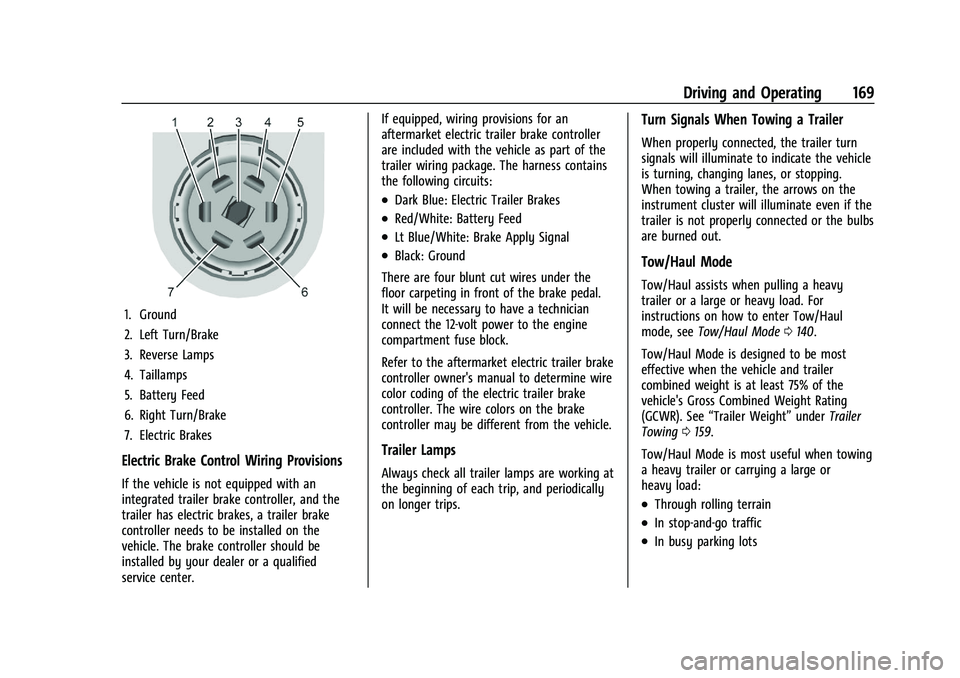
1. Ground
2. Left Turn/Brake
3. Reverse Lamps
4. Taillamps
5. Battery Feed
6. Right Turn/Brake
7. Electric Brakes
Electric Brake Control Wiring Provisions
If the vehicle is not equipped with an
integrated trailer brake controller, and the
trailer has electric brakes, a trailer brake
controller needs to be installed on the
vehicle. The brake controller should be
installed by your dealer or a qualified
service center.If equipped, wiring provisions for an
aftermarket electric trailer brake controller
are included with the vehicle as part of the
trailer wiring package. The harness contains
the following circuits:
.Dark Blue: Electric Trailer Brakes
.Red/White: Battery Feed
.Lt Blue/White: Brake Apply Signal
.Black: Ground
There are four blunt cut wires under the
floor carpeting in front of the brake pedal.
It will be necessary to have a technician
connect the 12-volt power to the engine
compartment fuse block.
Refer to the aftermarket electric trailer brake
controller owner's manual to determine wire
color coding of the electric trailer brake
controller. The wire colors on the brake
controller may be different from the vehicle.
Trailer Lamps
Always check all trailer lamps are working at
the beginning of each trip, and periodically
on longer trips.
Turn Signals When Towing a Trailer
When properly connected, the trailer turn
signals will illuminate to indicate the vehicle
is turning, changing lanes, or stopping.
When towing a trailer, the arrows on the
instrument cluster will illuminate even if the
trailer is not properly connected or the bulbs
are burned out.
Tow/Haul Mode
Tow/Haul assists when pulling a heavy
trailer or a large or heavy load. For
instructions on how to enter Tow/Haul
mode, see Tow/Haul Mode 0140.
Tow/Haul Mode is designed to be most
effective when the vehicle and trailer
combined weight is at least 75% of the
vehicle's Gross Combined Weight Rating
(GCWR). See “Trailer Weight” underTrailer
Towing 0159.
Tow/Haul Mode is most useful when towing
a heavy trailer or carrying a large or
heavy load:
.Through rolling terrain
.In stop-and-go traffic
.In busy parking lots
Page 173 of 283
Chevrolet Express Owner Manual (GMNA-Localizing-U.S./Canada/Mexico-
16547501) - 2023 - CRC - 6/10/22
172 Vehicle Care
Vehicle Care
General Information
General Information . . . . . . . . . . . . . . . . . . . 173
California Perchlorate MaterialsRequirements . . . . . . . . . . . . . . . . . . . . . . . . 173
Accessories and Modifications . . . . . . . . . . 173
Vehicle Checks
Doing Your Own Service Work . . . . . . . . . 173
Hood . . . . . . . . . . . . . . . . . . . . . . . . . . . . . . . . . . 174
Engine Compartment Overview . . . . . . . . 176
Engine Oil . . . . . . . . . . . . . . . . . . . . . . . . . . . . . 179
Engine Oil Life System . . . . . . . . . . . . . . . . . 181
Automatic Transmission Fluid . . . . . . . . . . 181
Engine Air Cleaner/Filter . . . . . . . . . . . . . . . 182
Cooling System . . . . . . . . . . . . . . . . . . . . . . . . 183
Engine Overheating . . . . . . . . . . . . . . . . . . . 186
Engine Fan . . . . . . . . . . . . . . . . . . . . . . . . . . . . 188
Power Steering Fluid . . . . . . . . . . . . . . . . . . 188
Washer Fluid . . . . . . . . . . . . . . . . . . . . . . . . . . 189
Brakes . . . . . . . . . . . . . . . . . . . . . . . . . . . . . . . . . 189
Brake Fluid . . . . . . . . . . . . . . . . . . . . . . . . . . . . 190
Battery - North America . . . . . . . . . . . . . . . 191
Rear Axle . . . . . . . . . . . . . . . . . . . . . . . . . . . . . . 191
Noise Control System . . . . . . . . . . . . . . . . . . 191
Starter Switch Check . . . . . . . . . . . . . . . . . . . 192
Automatic Transmission Shift Lock Control Function Check . . . . . . . . . . . . . . 193
Ignition Transmission Lock Check . . . . . . 193 Park Brake and P (Park) Mechanism
Check . . . . . . . . . . . . . . . . . . . . . . . . . . . . . . . . 193
Wiper Blade Replacement . . . . . . . . . . . . . 193
Windshield Replacement . . . . . . . . . . . . . . 194
Headlamp Aiming
Front Headlamp Aiming . . . . . . . . . . . . . . . 194
Bulb Replacement
Bulb Replacement . . . . . . . . . . . . . . . . . . . . . 194
Halogen Bulbs . . . . . . . . . . . . . . . . . . . . . . . . . 194
Front Turn Signal, Sidemarker, and Parking Lamps . . . . . . . . . . . . . . . . . . . . . . . 194
Taillamps . . . . . . . . . . . . . . . . . . . . . . . . . . . . . . 195
Center High-Mounted Stoplamp (CHMSL) . . . . . . . . . . . . . . . . . . . . . . . . . . . . . 196
License Plate Lamp . . . . . . . . . . . . . . . . . . . . 196
Electrical System
Electrical System Overload . . . . . . . . . . . . . 197
Fuses and Circuit Breakers . . . . . . . . . . . . . 198
Engine Compartment Fuse Block . . . . . . 198
Floor Console Fuse Block . . . . . . . . . . . . . . 202
Wheels and Tires
Tires . . . . . . . . . . . . . . . . . . . . . . . . . . . . . . . . . . 203
All-Season Tires . . . . . . . . . . . . . . . . . . . . . . . 204
Winter Tires . . . . . . . . . . . . . . . . . . . . . . . . . . . 204
Tire Sidewall Labeling . . . . . . . . . . . . . . . . . 205
Tire Designations . . . . . . . . . . . . . . . . . . . . . 206
Tire Terminology and Definitions . . . . . 206
Tire Pressure . . . . . . . . . . . . . . . . . . . . . . . . . . 208 Tire Pressure Monitor System . . . . . . . . . 209
Tire Pressure Monitor Operation . . . . . . . 210
Tire Inspection . . . . . . . . . . . . . . . . . . . . . . . . . 212
Tire Rotation . . . . . . . . . . . . . . . . . . . . . . . . . . . 212
When It Is Time for New Tires . . . . . . . . . 214
Buying New Tires . . . . . . . . . . . . . . . . . . . . . . 215
Different Size Tires and Wheels . . . . . . . . 216
Uniform Tire Quality Grading . . . . . . . . . . 216
Wheel Alignment and Tire Balance . . . . 217
Wheel Replacement . . . . . . . . . . . . . . . . . . . 218
Tire Chains . . . . . . . . . . . . . . . . . . . . . . . . . . . . 218
If a Tire Goes Flat . . . . . . . . . . . . . . . . . . . . . 219
Tire Changing . . . . . . . . . . . . . . . . . . . . . . . . . 220
Full-Size Spare Tire . . . . . . . . . . . . . . . . . . . . . 227
Jump Starting
Jump Starting - North America . . . . . . . . 228
Towing the Vehicle
Transporting a Disabled Vehicle . . . . . . . . 231
Recreational Vehicle Towing . . . . . . . . . . . 232
Appearance Care
Exterior Care . . . . . . . . . . . . . . . . . . . . . . . . . . 233
Interior Care . . . . . . . . . . . . . . . . . . . . . . . . . . . 237
Floor Mats . . . . . . . . . . . . . . . . . . . . . . . . . . . . 240
Page 174 of 283

Chevrolet Express Owner Manual (GMNA-Localizing-U.S./Canada/Mexico-
16547501) - 2023 - CRC - 6/10/22
Vehicle Care 173
General Information
For service and parts needs, visit your
dealer. You will receive genuine GM parts
and GM-trained and supported service
people.
Genuine GM parts have one of these marks:
California Perchlorate Materials
Requirements
Certain types of automotive applications,
such as airbag initiators, seat belt
pretensioners, and lithium batteries
contained in electronic keys, may contain
perchlorate materials. Perchlorate Material–special handling may apply. See
www.dtsc.ca.gov/hazardouswaste/
perchlorate.
Accessories and Modifications
Adding non-dealer accessories or making
modifications to the vehicle can affect
vehicle performance and safety, including
such things as airbags, braking, stability,
ride and handling, emissions systems,
aerodynamics, durability, Driver Assistance
Systems, and electronic systems like antilock
brakes, traction control, and stability control.
These accessories or modifications could
even cause malfunction or damage not
covered by the vehicle warranty.
Damage to suspension components caused
by modifying vehicle height outside of
factory settings will not be covered by the
vehicle warranty.
Damage to vehicle components resulting
from modifications or the installation or use
of non-GM certified parts, including control
module or software modifications, is not
covered under the terms of the vehicle
warranty and may affect remaining
warranty coverage for affected parts.
GM Accessories are designed to complement
and function with other systems on the
vehicle. See your dealer to accessorize the
vehicle using genuine GM Accessories
installed by a dealer technician.
Also, see
Adding Equipment to the
Airbag-Equipped Vehicle 044.
Vehicle Checks
Doing Your Own Service Work
{Warning
It can be dangerous to work on your
vehicle if you do not have the proper
knowledge, service manual, tools,
or parts. Always follow owner’s manual
procedures and consult the service
manual for your vehicle before doing any
service work.
If doing some of your own service work, use
the proper service manual. It tells you much
more about how to service the vehicle than
this manual can. To order the proper service
manual, see Publication Ordering
Information 0260.