ignition CHEVROLET EXPRESS CARGO VAN 2007 1.G Workshop Manual
[x] Cancel search | Manufacturer: CHEVROLET, Model Year: 2007, Model line: EXPRESS CARGO VAN, Model: CHEVROLET EXPRESS CARGO VAN 2007 1.GPages: 458, PDF Size: 2.62 MB
Page 255 of 458
{CAUTION:
Coasting downhill in NEUTRAL (N) or with
the ignition off is dangerous. The brakes
will have to do all the work of slowing
down. They could get so hot that they
would not work well. You would then have
poor braking or even none going down a
hill. You could crash. Always have the
engine running and your vehicle in gear
when you go downhill.
•Know how to go down hills. The most important
thing to know is this: let the engine do some of
the slowing down. Shift to a lower gear when
you go down a steep or long hill.
•Stay in your own lane when driving on two-lane
roads in hills or mountains. Do not swing wide
or cut across the center of the road. Drive at
speeds that let you stay in your own lane.
•As you go over the top of a hill, be alert. There
could be something in your lane, like a stalled
car or an accident.
•You might see highway signs on mountains that
warn of special problems. Examples are long
grades, passing or no-passing zones, a falling
rocks area, or winding roads. Be alert to these
and take appropriate action.
255
Page 268 of 458
Dolly Towing
Rear Towing (Rear Wheels Off the Ground)
Two-Wheel-Drive Vehicles
Use the following procedure to tow your vehicle
from the rear:
1. Drive the vehicle onto the dolly.
2. Firmly set the parking brake. SeeParking
Brake on page 128for more information.
3. Put the automatic transmission in PARK (P).
4. Follow the dolly manufacturer’s instructions to
attach and secure the vehicle being towed to
the dolly and then the loaded dolly to the tow
vehicle. Make sure the wheels are straight
before towing.
Use an adequate clamping device to ensure
that the front wheels are locked into the
straight position.5. Release the parking brake only after the
vehicle being towed is firmly attached to
the tow vehicle.
6. Turn the ignition to LOCK.
If the tow vehicle will not be started or driven
for six weeks or more, remove the battery
cable from the negative terminal (post) of the
battery to prevent your battery from draining
while towing.
All-Wheel-Drive Vehicles
Your vehicle was not designed to be towed with
two wheels on the ground. To properly tow
these vehicles, they should be placed on a
platform trailer with all four wheels off the ground.
Notice:Towing an all-wheel-drive vehicle
with all four wheels on the ground, or even
with only two of its wheels on the ground, will
damage drivetrain components. Do not tow
an all-wheel-drive vehicle if any of its wheels
will be on the ground.
268
Page 271 of 458
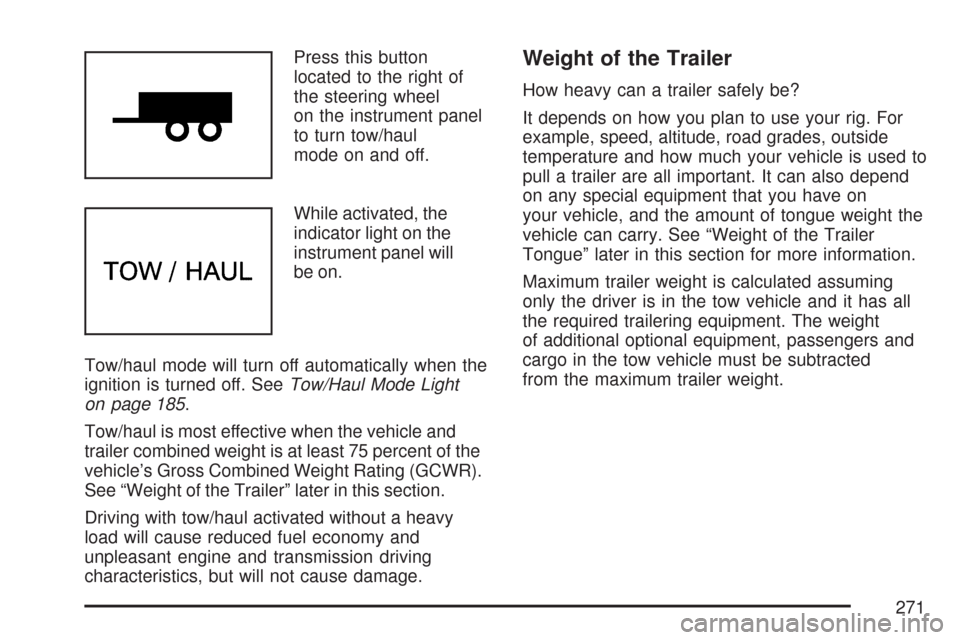
Press this button
located to the right of
the steering wheel
on the instrument panel
to turn tow/haul
mode on and off.
While activated, the
indicator light on the
instrument panel will
be on.
Tow/haul mode will turn off automatically when the
ignition is turned off. SeeTow/Haul Mode Light
on page 185.
Tow/haul is most effective when the vehicle and
trailer combined weight is at least 75 percent of the
vehicle’s Gross Combined Weight Rating (GCWR).
See “Weight of the Trailer” later in this section.
Driving with tow/haul activated without a heavy
load will cause reduced fuel economy and
unpleasant engine and transmission driving
characteristics, but will not cause damage.Weight of the Trailer
How heavy can a trailer safely be?
It depends on how you plan to use your rig. For
example, speed, altitude, road grades, outside
temperature and how much your vehicle is used to
pull a trailer are all important. It can also depend
on any special equipment that you have on
your vehicle, and the amount of tongue weight the
vehicle can carry. See “Weight of the Trailer
Tongue” later in this section for more information.
Maximum trailer weight is calculated assuming
only the driver is in the tow vehicle and it has all
the required trailering equipment. The weight
of additional optional equipment, passengers and
cargo in the tow vehicle must be subtracted
from the maximum trailer weight.
271
Page 307 of 458
How to Reset the Engine Oil
Life System
The Engine Oil Life System calculates when to
change the engine oil and filter based on vehicle
use. Anytime the oil is changed, reset the
system so it can calculate when the next oil
change is required. If a situation occurs where you
change the oil prior to a change engine oil light
being turned on, reset the system.
To reset the change engine oil light:
1. Turn the ignition key to RUN with the
engine off.
2. Fully press and release the accelerator pedal
slowly three times within five seconds.
3. If the Change Engine Oil light flashes for
five seconds, the system is reset.
4. Turn the key to LOCK.
If the change engine oil light comes back on when
you start your vehicle, the engine oil life system
has not reset. Repeat the procedure. If it still does
not reset, see your dealer/retailer for service.
SeeChange Engine Oil Light on page 183.
What to Do with Used Oil
Used engine oil contains certain elements that can
be unhealthy for your skin and could even cause
cancer. Do not let used oil stay on your skin for very
long. Clean your skin and nails with soap and
water, or a good hand cleaner. Wash or properly
dispose of clothing or rags containing used engine
oil. See the manufacturer’s warnings about the use
and disposal of oil products.
Used oil can be a threat to the environment.
If you change your own oil, be sure to drain all
the oil from the filter before disposal. Never
dispose of oil by putting it in the trash, pouring it
on the ground, into sewers, or into streams or
bodies of water. Instead, recycle it by taking it
to a place that collects used oil. If you have
a problem properly disposing of used oil, ask
your dealer/retailer, a service station, or a local
recycling center for help.
307
Page 331 of 458
Notice:Ignoring these steps could result in
costly damage to your vehicle that would
not be covered by your warranty.
Trying to start your vehicle by pushing or
pulling it will not work, and it could damage
your vehicle.
1. Check the other vehicle. It must have a
12-volt battery with a negative ground system.
Notice:If the other vehicle’s system is not
a 12-volt system with a negative ground, both
vehicles can be damaged. Only use vehicles
with 12-volt systems with negative grounds to
jump start your vehicle.
2. Get the vehicles close enough so the jumper
cables can reach, but be sure the vehicles are
not touching each other. If they are, it could
cause a ground connection you do not
want. You would not be able to start your
vehicle, and the bad grounding could damage
the electrical systems.To avoid the possibility of the vehicles rolling,
set the parking brake firmly on both vehicles
involved in the jump start procedure. Put
an automatic transmission in PARK (P) or a
manual transmission in NEUTRAL before
setting the parking brake.
Notice:If you leave your radio or other
accessories on during the jump starting
procedure, they could be damaged. The
repairs would not be covered by your
warranty. Always turn off your radio and
other accessories when jump starting
your vehicle.
3. Turn off the ignition on both vehicles.
Unplug unnecessary accessories plugged
into the cigarette lighter or the accessory
power outlet. Turn off the radio and all
lamps that are not needed. This will avoid
sparks and help save both batteries.
And it could save the radio!
331
Page 396 of 458
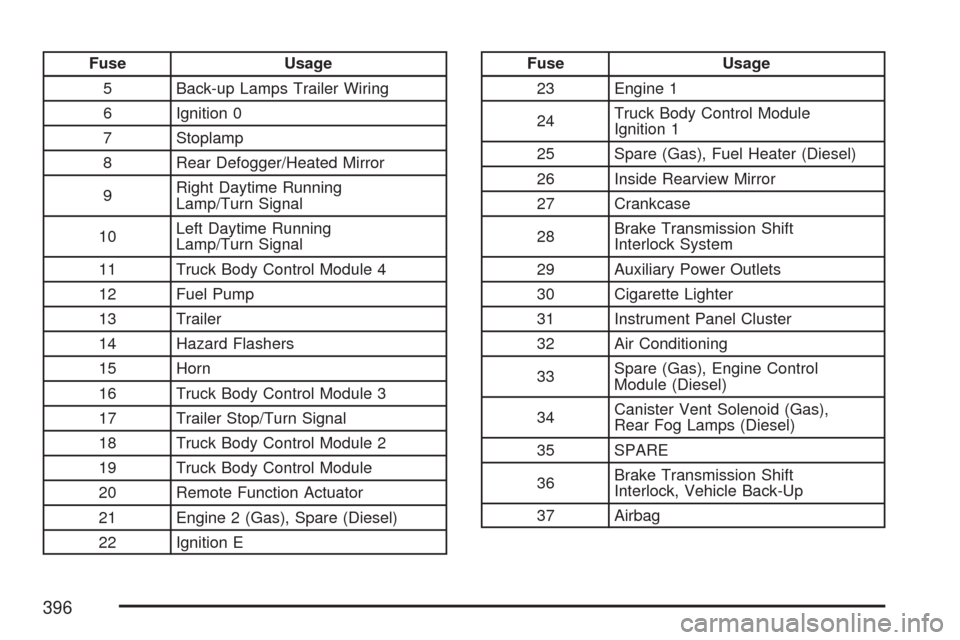
Fuse Usage
5 Back-up Lamps Trailer Wiring
6 Ignition 0
7 Stoplamp
8 Rear Defogger/Heated Mirror
9Right Daytime Running
Lamp/Turn Signal
10Left Daytime Running
Lamp/Turn Signal
11 Truck Body Control Module 4
12 Fuel Pump
13 Trailer
14 Hazard Flashers
15 Horn
16 Truck Body Control Module 3
17 Trailer Stop/Turn Signal
18 Truck Body Control Module 2
19 Truck Body Control Module
20 Remote Function Actuator
21 Engine 2 (Gas), Spare (Diesel)
22 Ignition EFuse Usage
23 Engine 1
24Truck Body Control Module
Ignition 1
25 Spare (Gas), Fuel Heater (Diesel)
26 Inside Rearview Mirror
27 Crankcase
28Brake Transmission Shift
Interlock System
29 Auxiliary Power Outlets
30 Cigarette Lighter
31 Instrument Panel Cluster
32 Air Conditioning
33Spare (Gas), Engine Control
Module (Diesel)
34Canister Vent Solenoid (Gas),
Rear Fog Lamps (Diesel)
35 SPARE
36Brake Transmission Shift
Interlock, Vehicle Back-Up
37 Airbag
396
Page 397 of 458
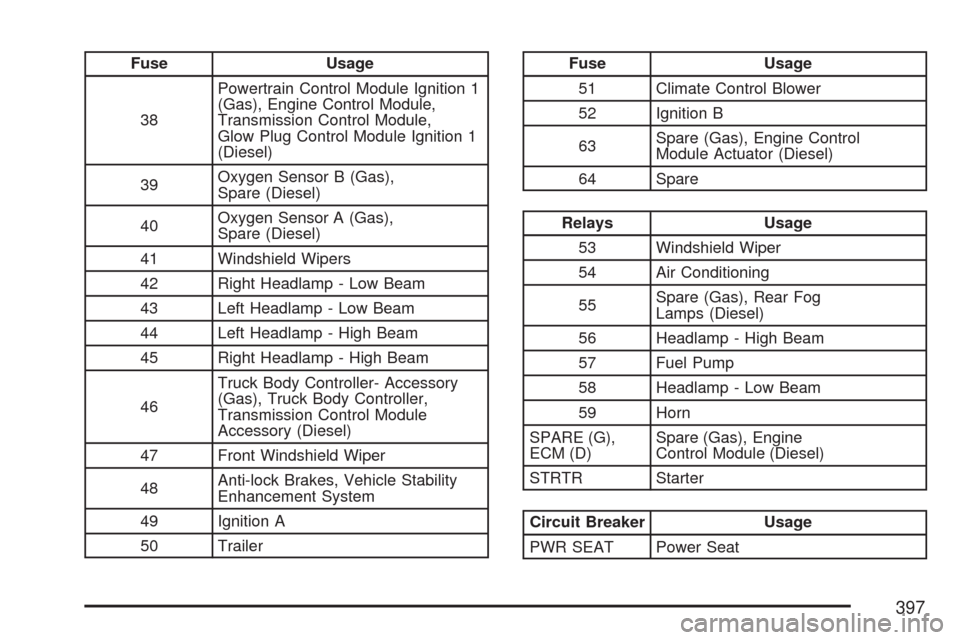
Fuse Usage
38Powertrain Control Module Ignition 1
(Gas), Engine Control Module,
Transmission Control Module,
Glow Plug Control Module Ignition 1
(Diesel)
39Oxygen Sensor B (Gas),
Spare (Diesel)
40Oxygen Sensor A (Gas),
Spare (Diesel)
41 Windshield Wipers
42 Right Headlamp - Low Beam
43 Left Headlamp - Low Beam
44 Left Headlamp - High Beam
45 Right Headlamp - High Beam
46Truck Body Controller- Accessory
(Gas), Truck Body Controller,
Transmission Control Module
Accessory (Diesel)
47 Front Windshield Wiper
48Anti-lock Brakes, Vehicle Stability
Enhancement System
49 Ignition A
50 TrailerFuse Usage
51 Climate Control Blower
52 Ignition B
63Spare (Gas), Engine Control
Module Actuator (Diesel)
64 Spare
Relays Usage
53 Windshield Wiper
54 Air Conditioning
55Spare (Gas), Rear Fog
Lamps (Diesel)
56 Headlamp - High Beam
57 Fuel Pump
58 Headlamp - Low Beam
59 Horn
SPARE (G),
ECM (D)Spare (Gas), Engine
Control Module (Diesel)
STRTR Starter
Circuit Breaker Usage
PWR SEAT Power Seat
397
Page 413 of 458
At Least Once a Year
Starter Switch Check
{CAUTION:
When you are doing this inspection, the
vehicle could move suddenly. If the vehicle
moves, you or others could be injured.
1. Before you start, be sure you have enough
room around the vehicle.
2. Firmly apply both the parking brake and the
regular brake. SeeParking Brake on page 128.
Do not use the accelerator pedal, and be ready
to turn off the engine immediately if it starts.
3. Try to start the engine in each gear. The
vehicle should start only in PARK (P) or
NEUTRAL (N). If the vehicle starts in any
other position, contact your GM Goodwrench
®
dealer for service.
Automatic Transmission Shift Lock
Control System Check
{CAUTION:
When you are doing this inspection, the
vehicle could move suddenly. If the vehicle
moves, you or others could be injured.
1. Before you start, be sure you have enough
room around the vehicle. It should be parked
on a level surface.
2. Firmly apply the parking brake. SeeParking
Brake on page 128.
Be ready to apply the regular brake
immediately if the vehicle begins to move.
3. With the engine off, turn the ignition to RUN,
but do not start the engine. Without applying
the regular brake, try to move the shift
lever out of PARK (P) with normal effort. If the
shift lever moves out of PARK (P), contact
your GM Goodwrench
®dealer for service.
413
Page 414 of 458
Ignition Transmission Lock Check
While parked, and with the parking brake set,
try to turn the ignition to LOCK in each shift
lever position.
•The ignition should turn to LOCK only when
the shift lever is in PARK (P).
•The ignition key should come out only in LOCK.
Contact your GM Goodwrench®dealer if service
is required.
Parking Brake and Automatic
Transmission Park (P) Mechanism Check
{CAUTION:
When you are doing this check, your
vehicle could begin to move. You or others
could be injured and property could be
damaged. Make sure there is room in front
of your vehicle in case it begins to roll.
Be ready to apply the regular brake at
once should the vehicle begin to move.Park on a fairly steep hill, with the vehicle facing
downhill. Keeping your foot on the regular
brake, set the parking brake.
•To check the parking brake’s holding ability:
With the engine running and transmission in
NEUTRAL (N), slowly remove foot pressure
from the regular brake pedal. Do this until the
vehicle is held by the parking brake only.
•To check the PARK (P) mechanism’s holding
ability: With the engine running, shift to
PARK (P). Then release the parking brake
followed by the regular brake.
Contact your GM Goodwrench
®dealer if service
is required.
Underbody Flushing Service
At least every spring, use plain water to flush
any corrosive materials from the underbody.
Take care to clean thoroughly any areas where
mud and other debris can collect.
414
Page 443 of 458
OnStar
If your vehicle has OnStar®and you subscribe
to the OnStar®services, please refer to the
OnStar®Terms and Conditions for information
on data collection and use.
Navigation System
If your vehicle has anavigation system,
use of the system may result in the storage of
destinations, addresses, telephone numbers,
and other trip information.Please refer to
the navigation system operating manual for
information on stored data and for deletion
instructions.
Radio Frequency
Identication (RFID)
RFIDtechnology is used in some vehicles for
functions such as tire pressure monitoring
and ignition system security, as well as in
connection with conveniences such as key fobs
for remote door locking/unlocking and starting,
and in-vehicle transmitters for garage door
openers. RFID technology in GM vehicles does
not use or record personal information or link
with any other GM system containing personal
information.
443