radio CHEVROLET EXPRESS CARGO VAN 2012 1.G User Guide
[x] Cancel search | Manufacturer: CHEVROLET, Model Year: 2012, Model line: EXPRESS CARGO VAN, Model: CHEVROLET EXPRESS CARGO VAN 2012 1.GPages: 430, PDF Size: 6.35 MB
Page 120 of 430
Black plate (8,1)Chevrolet Express Owner Manual - 2012
5-8 Instruments and Controls
Clock
AM/FM Radio with Optional CD
Player
If the vehicle has an AM/FM radio
with an optional CD player, it has a
Hbutton for setting the time. With
these types of radios, the clock can
be set with either the radio turned
on or off.
Set the time by following these
steps:
1. Press
Huntil the hour begins
flashing on display. Press this
button a second time and the
minutes begin flashing on
display.
Press
Ha third time and the
12HR or 24HR time format
begins flashing. 2. While either the hour or the
minutes are flashing, turn the
f
knob, located on the upper right
side of the radio, clockwise or
counterclockwise to increase or
decrease the time. While the
12HR or 24HR time format is
flashing, turn the
fknob
clockwise or counterclockwise to
select the default time settings.
3. Press
Hagain until the clock
display stops flashing to set
the currently displayed time;
otherwise, the flashing stops
after five seconds and the
current time displayed is
automatically set.
MP3 Radio with a Single CD
Player
If the vehicle has a radio with a
single CD (MP3) player, the
radio has a
Hbutton for setting
the time and date. To set the time and date, follow the
instructions:
1. Press
Hand the HR, MIN, MM,
DD, YYYY (hour, minute, month,
day, and year) displays.
2. Press the softkey located under any one of the tabs that you
want to change. Every time the
softkey is pressed again, the
time or the date if selected,
increases by one.
Another way to increase the time
or date, is to press
¨SEEK or
\FWD (forward).
3. To decrease, press
©SEEK or
sREV. You can also turn thefknob, located on the upper right
side of the radio, to adjust the
selected setting.
Page 121 of 430
Black plate (9,1)Chevrolet Express Owner Manual - 2012
Instruments and Controls 5-9
Changing the Time and Date
Default Settings
You can change the time default
setting from 12 hours to 24 hours or
change the date default setting from
month/day/year to day/month/year.
To change the time or date default
settings, follow these instructions:
1. Press
Hand then the softkey
located under the forward arrow
that is currently displayed on
the radio screen until the time
12H (hour) and 24H (hour), and
the date MM/DD (month and
day) and DD/MM (day and
month) are displayed.
2. Press the softkey located under the desired option.
3. Press
Hagain to apply the
selected default, or let the
screen time out.
MP3 Radio with a Six-Disc CD
Player
If the vehicle has a radio with a
six-disc CD player, the radio has a
MENU button instead of
Hto set
the time and date.
To set the time and date, follow
these instructions:
1. Press the MENU button. Once
the
Hoption displays, press the
softkey located under that tab.
The HR, MIN, MM, DD, YYYY
(hour, minute, month, day, and
year) displays.
2. Press the softkey located under any one of the tabs to change.
Every time the softkey is
pressed again, the time or the
date if selected, increases
by one.
Another way to increase the time
or date, is to press
¨SEEK or
\FWD (forward). 3. To decrease, press
©SEEK or
sREV, or turn thefknob,
located on the upper right side of
the radio, to adjust the selected
setting.
Changing the Time and Date
Default Settings
To change the time default setting
from 12 hours to 24 hours or
change the date default setting from
month/day/year to day/month/year.
To change the time or date default
settings, follow these instructions:
1. Press the MENU button. Once
the
Hoption displays, press
the softkey located under the
forward arrow that is currently
displayed on the radio screen
until the 12H (hour) and
24H (hour), and the date
MM/DD (month and day) and
DD/MM (day and month)
displays.
2. Press the softkey located under the desired option.
Page 133 of 430
Black plate (21,1)Chevrolet Express Owner Manual - 2012
Instruments and Controls 5-21
If it does not, have the vehicle
serviced by your dealer.
The light should go out once the
engine starts. If it stays on,
or comes on while driving, there
could be a problem with the
charging system. A charging system
message in the Driver Information
Center (DIC) can also appear. See
Battery Voltage and Charging
Messages on page 5‑34for more
information. This light could indicate
that there are problems with a
generator drive belt, or that there is
an electrical problem. Have it
checked right away. If the vehicle
must be driven a short distance with
the light on, turn off accessories,
such as the radio and air
conditioner.
Malfunction
Indicator Lamp
A computer system called OBD II
(On-Board Diagnostics-Second
Generation) monitors the operation
of the vehicle to ensure emissions are at acceptable levels, to produce
a cleaner environment. This light
comes on when the vehicle is
placed in ON/RUN, as a check to
show it is working. If it does not,
have the vehicle serviced by your
dealer. See
Ignition Positions on
page 9‑16 for more information.
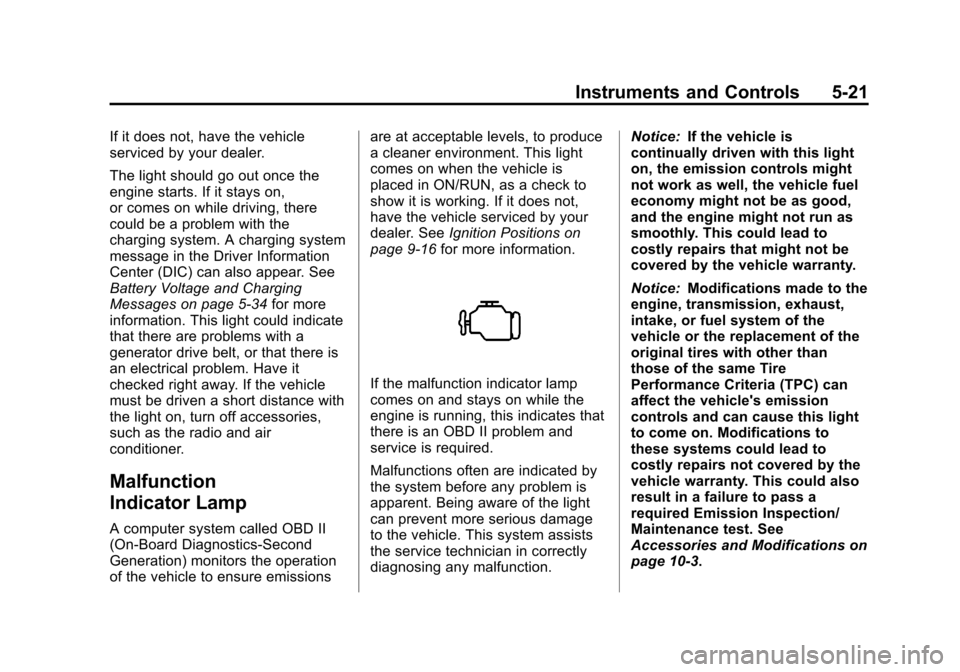
If the malfunction indicator lamp
comes on and stays on while the
engine is running, this indicates that
there is an OBD II problem and
service is required.
Malfunctions often are indicated by
the system before any problem is
apparent. Being aware of the light
can prevent more serious damage
to the vehicle. This system assists
the service technician in correctly
diagnosing any malfunction. Notice:
If the vehicle is
continually driven with this light
on, the emission controls might
not work as well, the vehicle fuel
economy might not be as good,
and the engine might not run as
smoothly. This could lead to
costly repairs that might not be
covered by the vehicle warranty.
Notice: Modifications made to the
engine, transmission, exhaust,
intake, or fuel system of the
vehicle or the replacement of the
original tires with other than
those of the same Tire
Performance Criteria (TPC) can
affect the vehicle's emission
controls and can cause this light
to come on. Modifications to
these systems could lead to
costly repairs not covered by the
vehicle warranty. This could also
result in a failure to pass a
required Emission Inspection/
Maintenance test. See
Accessories and Modifications on
page 10‑3.
Page 164 of 430
Black plate (4,1)Chevrolet Express Owner Manual - 2012
6-4 Lighting
Automatic Headlamp
System
When it is dark enough outside and
the headlamp switch is in AUTO,
the automatic headlamp system
turns on the headlamps, along with
the taillamps, sidemarker lamps,
parking lamps, and the instrument
panel lights. The radio lights will
also be dim.
To turn off the automatic headlamp
system, turn the exterior lamp
control to the off position and then
release. For vehicles first sold in
Canada, the transmission must be
in the P (Park) position, before the
automatic headlamp system can be
turned off.
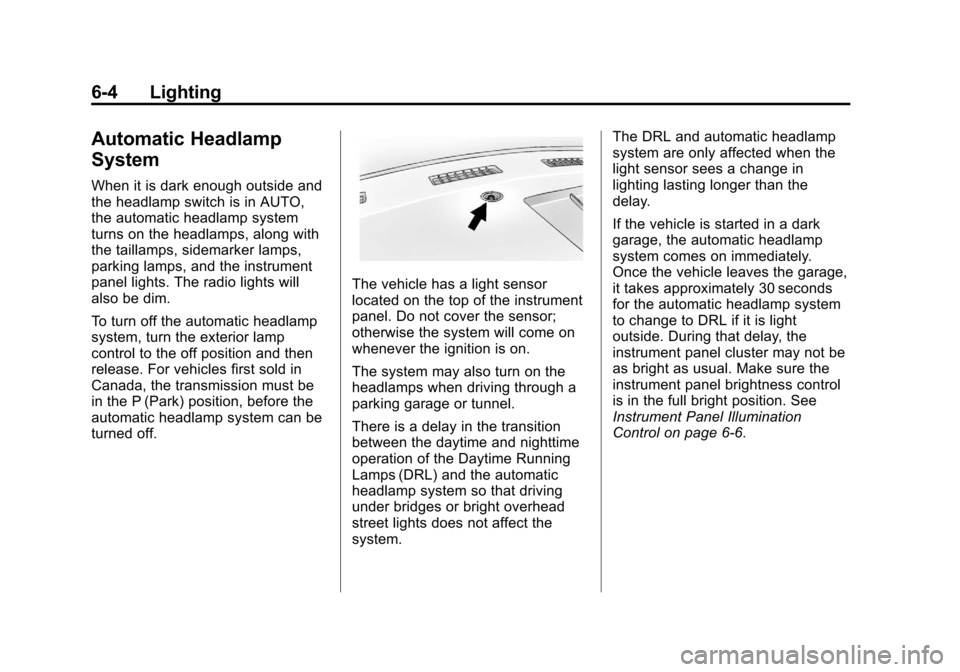
The vehicle has a light sensor
located on the top of the instrument
panel. Do not cover the sensor;
otherwise the system will come on
whenever the ignition is on.
The system may also turn on the
headlamps when driving through a
parking garage or tunnel.
There is a delay in the transition
between the daytime and nighttime
operation of the Daytime Running
Lamps (DRL) and the automatic
headlamp system so that driving
under bridges or bright overhead
street lights does not affect the
system.The DRL and automatic headlamp
system are only affected when the
light sensor sees a change in
lighting lasting longer than the
delay.
If the vehicle is started in a dark
garage, the automatic headlamp
system comes on immediately.
Once the vehicle leaves the garage,
it takes approximately 30 seconds
for the automatic headlamp system
to change to DRL if it is light
outside. During that delay, the
instrument panel cluster may not be
as bright as usual. Make sure the
instrument panel brightness control
is in the full bright position. See
Instrument Panel Illumination
Control on page 6‑6.
Page 166 of 430
Black plate (6,1)Chevrolet Express Owner Manual - 2012
6-6 Lighting
Interior Lighting
Instrument Panel
Illumination Control
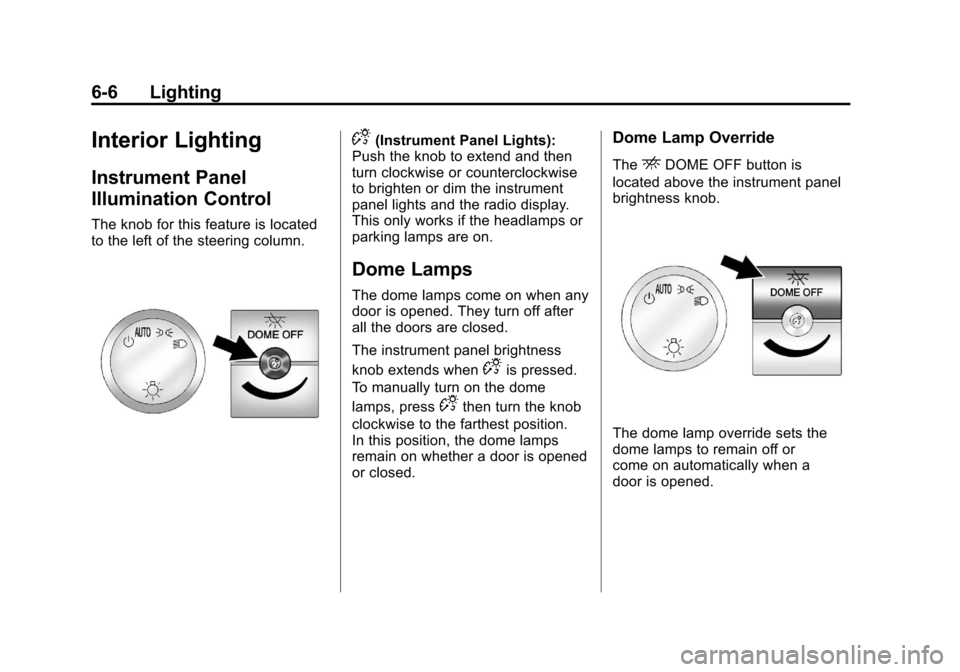
The knob for this feature is located
to the left of the steering column.
D(Instrument Panel Lights):
Push the knob to extend and then
turn clockwise or counterclockwise
to brighten or dim the instrument
panel lights and the radio display.
This only works if the headlamps or
parking lamps are on.
Dome Lamps
The dome lamps come on when any
door is opened. They turn off after
all the doors are closed.
The instrument panel brightness
knob extends when
Dis pressed.
To manually turn on the dome
lamps, press
Dthen turn the knob
clockwise to the farthest position.
In this position, the dome lamps
remain on whether a door is opened
or closed.
Dome Lamp Override
TheEDOME OFF button is
located above the instrument panel
brightness knob.
The dome lamp override sets the
dome lamps to remain off or
come on automatically when a
door is opened.
Page 169 of 430
Black plate (1,1)Chevrolet Express Owner Manual - 2012
Infotainment System 7-1
Infotainment
System
Introduction
Infotainment . . . . . . . . . . . . . . . . . . . 7-1
Theft-Deterrent Feature . . . . . . . 7-2
Operation . . . . . . . . . . . . . . . . . . . . . 7-3
Radio
AM-FM Radio . . . . . . . . . . . . . . . . . 7-8
Satellite Radio . . . . . . . . . . . . . . . 7-10
Radio Reception . . . . . . . . . . . . . 7-12
Fixed Mast Antenna(Multi-Band) . . . . . . . . . . . . . . . . 7-12
Fixed Mast Antenna (Care) . . . . . . . . . . . . . 7-12
Audio Players
CD Player . . . . . . . . . . . . . . . . . . . 7-13
Auxiliary Devices . . . . . . . . . . . . 7-19
Phone
Bluetooth . . . . . . . . . . . . . . . . . . . . 7-24
Introduction
Infotainment
If the vehicle came without a radio,
the wiring provisions for a radio and
an antenna were installed at the
assembly plant, so that if you want,
a radio can be installed at the
dealer.
Determine which radio the vehicle
has and read the following pages to
become familiar with its features.
{WARNING
Taking your eyes off the road for
extended periods could cause a
crash resulting in injury or death
to you or others. Do not give
extended attention to
entertainment tasks while driving.
This system provides access to
many audio and non‐audio listings.
Page 170 of 430
Black plate (2,1)Chevrolet Express Owner Manual - 2012
7-2 Infotainment System
To minimize taking your eyes off the
road while driving, do the following
while the vehicle is parked:
.Become familiar with the
operation and controls of the
audio system.
.Set up the tone, speaker
adjustments, and preset radio
stations.
For more information, see Defensive
Driving on page 9‑3.
Notice: Contact your dealer
before adding any equipment.
Adding audio or communication
equipment could interfere with
the operation of the engine, radio,
or other systems, and could
damage them. Follow federal
rules covering mobile radio and
telephone equipment. Notice:
The chime signals related
to safety belts, parking brake, and
other functions of the vehicle
operate through the radio/
entertainment system. If that
equipment is replaced or
additional equipment is added to
the vehicle, the chimes may not
work. Make sure that replacement
or additional equipment is
compatible with the vehicle
before installing it. See
Accessories and Modifications on
page 10‑3.
The vehicle has Retained
Accessory Power (RAP). With RAP,
the audio system can be played
even after the ignition is turned off.
See Retained Accessory Power
(RAP) on page 9‑21 for more
information.
Theft-Deterrent Feature
The theft-deterrent feature works by
learning a portion of the Vehicle
Identification Number (VIN) to the
infotainment system. The
infotainment system does not
operate if it is stolen or moved to a
different vehicle.
Page 171 of 430
Black plate (3,1)Chevrolet Express Owner Manual - 2012
Infotainment System 7-3
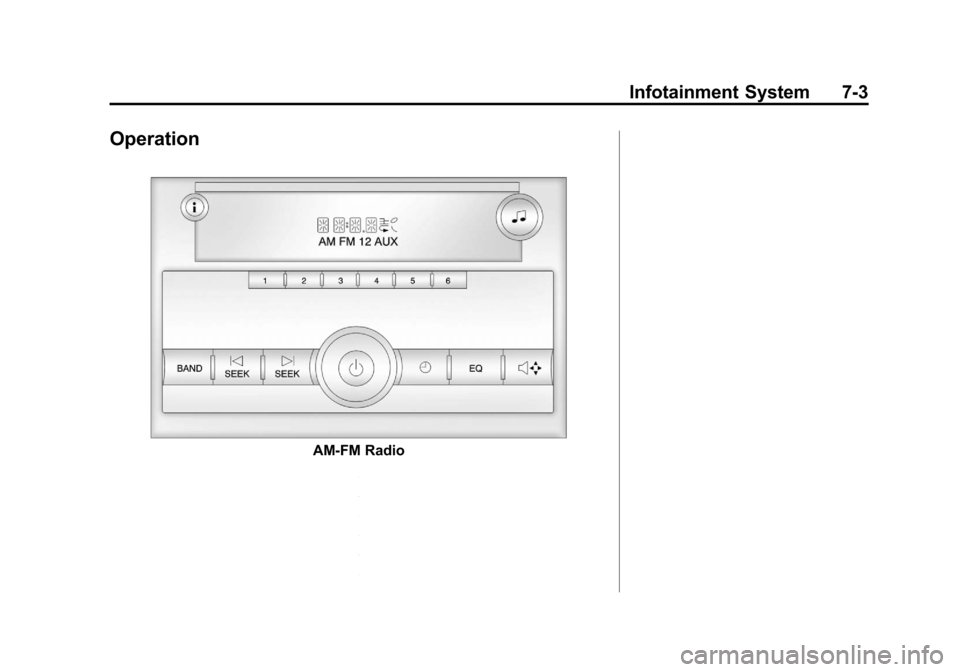
Operation
AM-FM Radio
Page 172 of 430
Black plate (4,1)Chevrolet Express Owner Manual - 2012
7-4 Infotainment System
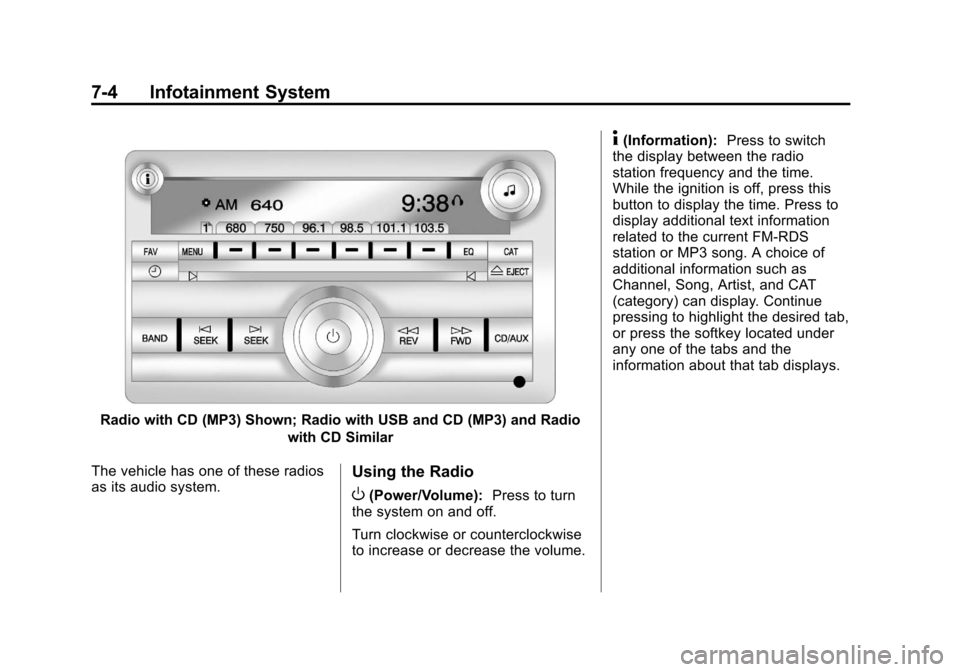
Radio with CD (MP3) Shown; Radio with USB and CD (MP3) and Radiowith CD Similar
The vehicle has one of these radios
as its audio system.
Using the Radio
O(Power/Volume): Press to turn
the system on and off.
Turn clockwise or counterclockwise
to increase or decrease the volume.
4(Information): Press to switch
the display between the radio
station frequency and the time.
While the ignition is off, press this
button to display the time. Press to
display additional text information
related to the current FM-RDS
station or MP3 song. A choice of
additional information such as
Channel, Song, Artist, and CAT
(category) can display. Continue
pressing to highlight the desired tab,
or press the softkey located under
any one of the tabs and the
information about that tab displays.
Page 173 of 430
Black plate (5,1)Chevrolet Express Owner Manual - 2012
Infotainment System 7-5
Speed Compensated
Volume (SCV):Radios with
SCV automatically adjust the radio
volume to compensate for road and
wind noise as the vehicle speed
changes while driving, so that the
volume level stays consistent.
To activate SCV:
1. Set the radio volume to the desired level.
2. Press the MENU button to display the radio setup menu.
3. Press the softkey under the AUTO VOLUM (automatic
volume) tab on the radio display. 4. Press the softkey under the
desired Speed Compensated
Volume setting (OFF, Low, Med,
or High) to select the level of
radio volume compensation.
The display times out after
approximately 10 seconds. Each
higher setting allows for more
radio volume compensation at
faster vehicle speeds.Setting the Tone (Bass/Treble)
(AM-FM Radio and AM-FM
Radio with CD)
To adjust the bass or treble:
1. Press the
fknob until Bass or
Treble displays.
2. To adjust the setting, do one of the following:
.Turn thefknob.
.Press either¨SEEK,
or
©SEEK.
EQ (Equalization): Press this
button to choose bass and treble
equalization settings designed for
different types of music. Selecting
MANUAL, or changing bass or
treble, returns the EQ to the manual
bass and treble settings.
Unique EQ settings can be saved
for each source.