lock CHEVROLET EXPRESS CARGO VAN 2013 1.G Workshop Manual
[x] Cancel search | Manufacturer: CHEVROLET, Model Year: 2013, Model line: EXPRESS CARGO VAN, Model: CHEVROLET EXPRESS CARGO VAN 2013 1.GPages: 402, PDF Size: 6.46 MB
Page 153 of 402
Black plate (7,1)Chevrolet Express Owner Manual - 2013 - 1stPrintReady - 6/19/12
Lighting 6-7
has a voltmeter gauge or a voltage
display on the Driver Information
Center (DIC), you may see the
voltage move up or down. This is
normal. If there is a problem, an
alert will be displayed.
The battery can be discharged at
idle if the electrical loads are very
high. This is true for all vehicles.
This is because the generator
(alternator) may not be spinning fast
enough at idle to produce all the
power that is needed for very high
electrical loads.
A high electrical load occurs when
several of the following are on, such
as: headlamps, high beams, fog
lamps, rear window defogger,
climate control fan at high speed,
heated seats, engine cooling fans,
trailer loads, and loads plugged into
accessory power outlets.EPM works to prevent excessive
discharge of the battery. It does this
by balancing the generator's output
and the vehicle's electrical needs.
It can increase engine idle speed to
generate more power, whenever
needed. It can temporarily reduce
the power demands of some
accessories.
Normally, these actions occur in
steps or levels, without being
noticeable. In rare cases at the
highest levels of corrective action,
this action may be noticeable to the
driver. If so, a Driver Information
Center (DIC) message might be
displayed, such as SERVICE
BATTERY CHARGING SYSTEM.
If this messages displays, it is
recommended that the driver reduce
the electrical loads as much as
possible. See
Battery Voltage and
Charging Messages on page 5‑30.Battery Power Protection
This feature shuts off the dome
lamps if they are left on for more
than 10 minutes when the ignition is
in LOCK/OFF. This helps to prevent
the battery from running down.
Page 157 of 402
Black plate (3,1)Chevrolet Express Owner Manual - 2013 - 1stPrintReady - 6/19/12
Infotainment System 7-3
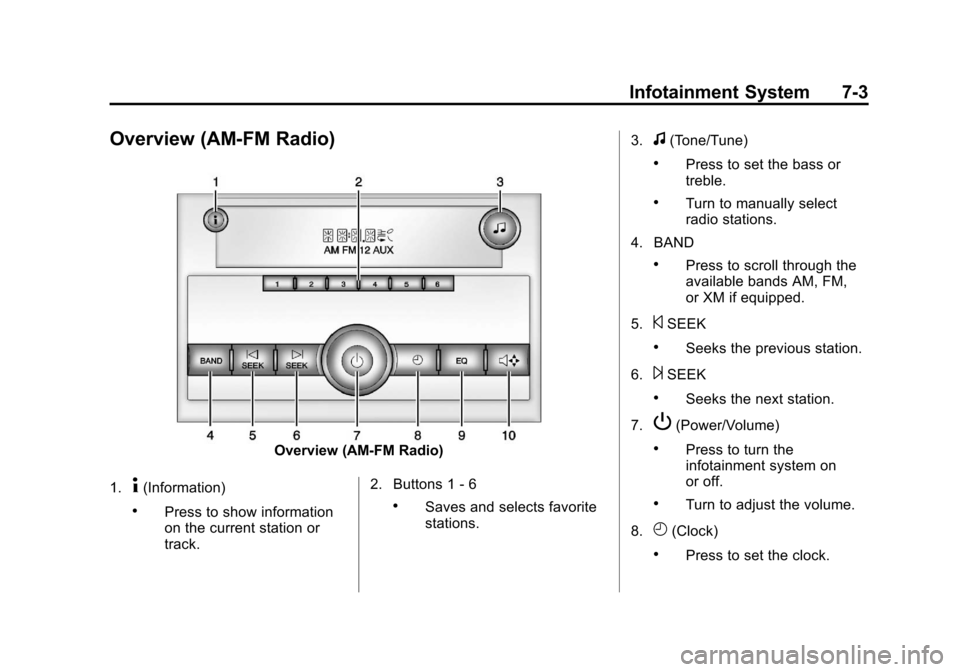
Overview (AM-FM Radio)
Overview (AM-FM Radio)
1.
4(Information)
.Press to show information
on the current station or
track. 2. Buttons 1 - 6.Saves and selects favorite
stations.3.
f(Tone/Tune)
.Press to set the bass or
treble.
.Turn to manually select
radio stations.
4. BAND
.Press to scroll through the
available bands AM, FM,
or XM if equipped.
5.
©SEEK
.Seeks the previous station.
6.
¨SEEK
.Seeks the next station.
7.
P(Power/Volume)
.Press to turn the
infotainment system on
or off.
.Turn to adjust the volume.
8.
H(Clock)
.Press to set the clock.
Page 159 of 402
Black plate (5,1)Chevrolet Express Owner Manual - 2013 - 1stPrintReady - 6/19/12
Infotainment System 7-5
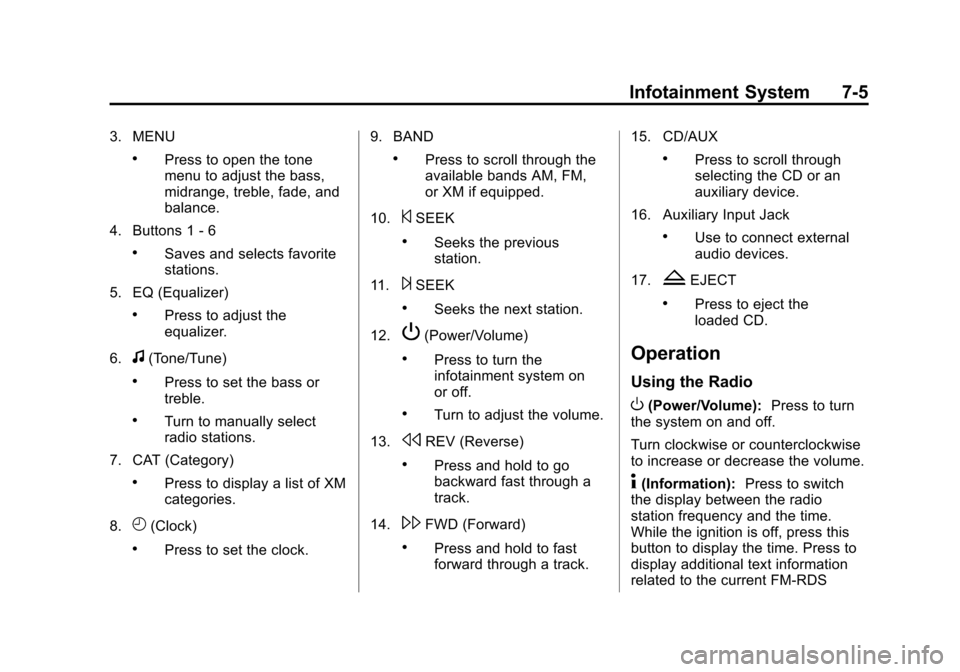
3. MENU
.Press to open the tone
menu to adjust the bass,
midrange, treble, fade, and
balance.
4. Buttons 1 - 6
.Saves and selects favorite
stations.
5. EQ (Equalizer)
.Press to adjust the
equalizer.
6.
f(Tone/Tune)
.Press to set the bass or
treble.
.Turn to manually select
radio stations.
7. CAT (Category)
.Press to display a list of XM
categories.
8.
H(Clock)
.Press to set the clock. 9. BAND
.Press to scroll through the
available bands AM, FM,
or XM if equipped.
10.
©SEEK
.Seeks the previous
station.
11.
¨SEEK
.Seeks the next station.
12.
P(Power/Volume)
.Press to turn the
infotainment system on
or off.
.Turn to adjust the volume.
13.
sREV (Reverse)
.Press and hold to go
backward fast through a
track.
14.
\FWD (Forward)
.Press and hold to fast
forward through a track. 15. CD/AUX
.Press to scroll through
selecting the CD or an
auxiliary device.
16. Auxiliary Input Jack
.Use to connect external
audio devices.
17.
ZEJECT
.Press to eject the
loaded CD.
Operation
Using the Radio
O(Power/Volume): Press to turn
the system on and off.
Turn clockwise or counterclockwise
to increase or decrease the volume.
4(Information): Press to switch
the display between the radio
station frequency and the time.
While the ignition is off, press this
button to display the time. Press to
display additional text information
related to the current FM-RDS
Page 161 of 402
Black plate (7,1)Chevrolet Express Owner Manual - 2013 - 1stPrintReady - 6/19/12
Infotainment System 7-7
VIN or NO VIN:One of these
messages will display when the
TheftLock system has locked up the
radio. Take the vehicle to your
dealer for service.
If any error occurs repeatedly or if
an error cannot be corrected,
contact your dealer.Radio
AM-FM Radio
Radio Data System (RDS)
The radio may have an RDS. The
RDS feature is available for use
only on FM stations that broadcast
RDS information. This system relies
upon receiving specific information
from these stations and only works
when the information is available.
While the radio is tuned to an
FM-RDS station, the station name
or call letters display. In rare cases,
a radio station could broadcast
incorrect information that causes the
radio features to work improperly.
If this happens, contact the radio
station.
Finding a Station
BAND: Press to switch between
FM1, FM2, AM, and XM. The
selection displays.
f(Tune): Turn clockwise or
counterclockwise to increase or
decrease the station frequency.
©SEEK or¨SEEK: Press©
SEEK to go to the previous or¨
SEEK to go to the next station and
stay there.
To scan stations, press and hold
either button for two seconds until a
beep sounds. The radio goes to a
station, plays for a few seconds,
then goes to the next station. For
AM-FM Radio and Radio with CD,
the station frequency flashes while
the radio is in the scan mode. Press
either button again to stop scanning.
The radio seeks and scans stations
only with a strong signal that are in
the selected band.
For AM-FM Radio and Radio with
CD, scan presets within the current
selected band by pressing and
holding either SEEK button for
four seconds until a double beep
sounds. The radio goes to a stored
preset, plays for a few seconds if a
Page 163 of 402
Black plate (9,1)Chevrolet Express Owner Manual - 2013 - 1stPrintReady - 6/19/12
Infotainment System 7-9
4. Press the FAV button, or let themenu time out, to return to the
original main radio screen
showing the radio station
frequency tabs and to begin the
process of programming
favorites for the chosen number
of numbered pages.
Satellite Radio
SiriusXM®, if equipped, is a satellite
radio service based in the United
States and Canada only.
Finding a Category (CAT)
Station
CAT (Category): The CAT button is
used to find XM stations (if
equipped) while the radio is in the
XM mode.
Finding a Station
BAND: Press to switch between
FM1, FM2, AM, and XM. The
selection displays.
f(Tune): Turn clockwise or
counterclockwise to increase or
decrease the station frequency.
©SEEK or¨SEEK: Press©
SEEK to go to the previous or¨
SEEK to go to the next station and
stay there.
To scan stations, press and hold
either button for two seconds until a
beep sounds. The radio goes to a
station, plays for a few seconds,
then goes to the next station. The
station frequency flashes while the
radio is in the scan mode. Press
either button again to stop scanning.
The radio seeks and scans stations
only with a strong signal that are in
the selected band.
To scan presets within the current
selected band by pressing and
holding either SEEK button for
four seconds until a double beep
sounds. The radio goes to a stored
preset, plays for a few seconds if a
strong signal is present, then goes to the next stored preset. The
station frequency flashes while the
radio is in the scan mode.
Setting Preset Stations
If the radio does not have a FAV
button, up to 18 stations (six FM1,
six FM2, and six AM), can be
programmed on the six numbered
softkeys, by performing the following
steps:
1. Turn the radio on.
2. Press BAND to select FM1,
FM2, or AM.
3. Tune in the desired station.
4. Press and hold one of the six numbered softkeys for
three seconds until a beep
sounds. When that softkey is
pressed and released, the
station that was set, returns.
5. Repeat Steps 2–4 for each softkey.
Page 171 of 402
Black plate (17,1)Chevrolet Express Owner Manual - 2013 - 1stPrintReady - 6/19/12
Infotainment System 7-17
displays an error message, write it
down and provide it to your dealer
when reporting the problem.
Auxiliary Devices
Using the Auxiliary Input Jack
Radios with an auxiliary input jack
on the lower right side of the
faceplate can connect to an external
audio device such as an iPod
®,
MP3 player, or CD player, for use as
another source for audio listening.
This input jack is not an audio
output; do not plug headphones into
the front auxiliary input jack.
Drivers are encouraged to set up
any auxiliary device while the
vehicle is in P (Park). See
Defensive Driving on page 9‑3 for
more information on driver
distraction.
To use a portable audio player,
connect a 3.5 mm (1/8 in) cable to
the radio's front auxiliary input jack. When a device is connected, press
the radio CD/AUX button to begin
playing audio from the device over
the vehicle speakers.
For optimal sound quality, increase
the portable audio device's volume
to the loudest level.
It is always best to power the
portable audio device through its
own battery while playing.O(Power/Volume):
Turn clockwise
or counterclockwise to increase or
decrease the volume of the portable
player. Additional volume
adjustments might have to be made
from the portable device if the
volume is not loud or soft enough.
BAND: Press to listen to the radio
when a portable audio device is
playing. The portable audio device
continues playing.
CD/AUX (CD/Auxiliary): Press to
play a CD when a portable audio
device is playing. Press again and
the system begins playing audio
from the connected portable audio player. If a portable audio player is
not connected,
“No Input Device
Found” displays.
Using the USB Port
Radios with a USB port can control
a USB storage device or an iPod®
using the radio buttons and knobs.
See“Playing an MP3” inCD Player
on page 7‑12 for information about
how to connect and control a USB
storage device or an iPod.
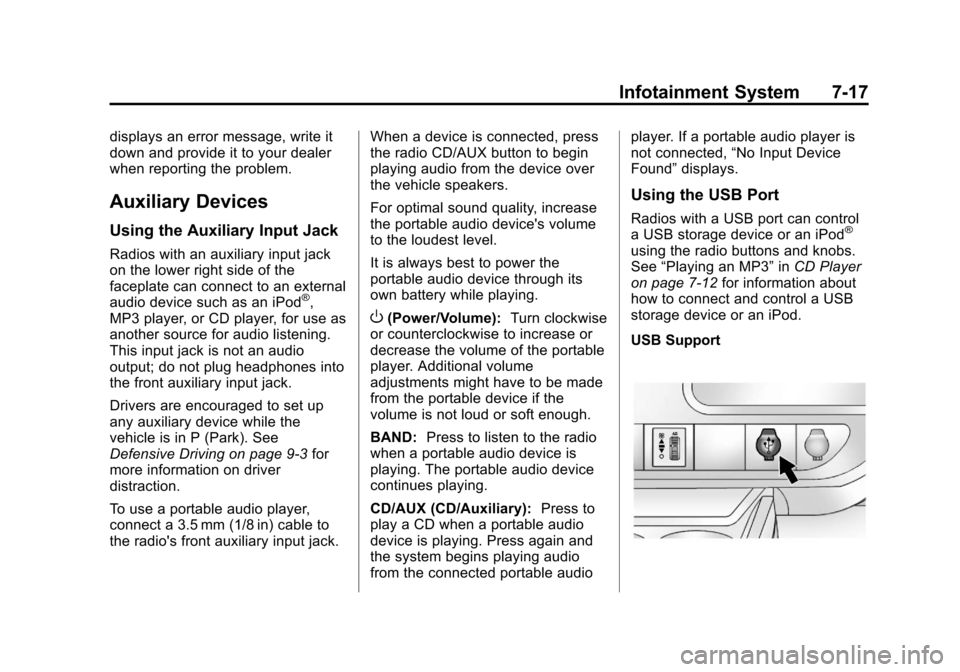
USB Support
Page 183 of 402
Black plate (1,1)Chevrolet Express Owner Manual - 2013 - 1stPrintReady - 6/19/12
Climate Controls 8-1
Climate Controls
Climate Control Systems
Climate Control Systems . . . . . . 8-1
Rear Heating System . . . . . . . . . 8-4
Rear Climate ControlSystem . . . . . . . . . . . . . . . . . . . . . . 8-5
Air Vents
Air Vents . . . . . . . . . . . . . . . . . . . . . . 8-7
Climate Control Systems
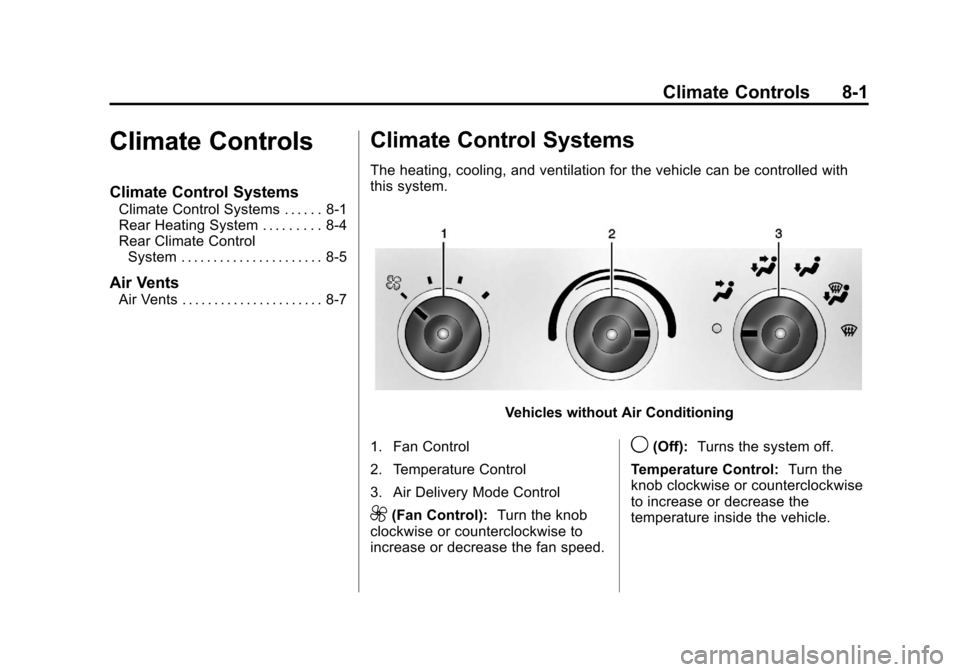
The heating, cooling, and ventilation for the vehicle can be controlled with
this system.
Vehicles without Air Conditioning
1. Fan Control
2. Temperature Control
3. Air Delivery Mode Control
9(Fan Control): Turn the knob
clockwise or counterclockwise to
increase or decrease the fan speed.
9(Off): Turns the system off.
Temperature Control: Turn the
knob clockwise or counterclockwise
to increase or decrease the
temperature inside the vehicle.
Page 184 of 402

Black plate (2,1)Chevrolet Express Owner Manual - 2013 - 1stPrintReady - 6/19/12
8-2 Climate Controls
Air Delivery Mode Control:Turn
the knob clockwise or
counterclockwise to change the
current airflow mode.
H(Vent): Air is directed to the
instrument panel outlets.
)(Bi-Level): Air is divided
between the instrument panel and
floor outlets, with some air directed
toward the windshield.
6(Floor): Air is directed to the
floor outlets with some air directed
to the windshield and side windows.
-(Defog): This mode clears the
windows of fog or moisture. Outside
air is directed to the floor and
defroster outlets. Adjust the
temperature knob for warmer or
cooler air. The air conditioning
compressor might turn on in this
setting to dehumidify the air.
1(Defrost): This mode clears the
windshield of fog or frost more
quickly. Air is directed to the
windshield, with some to the floor
outlets and front side windows. The
air conditioning compressor might
turn on in this setting to dehumidify
the air.
Do not drive the vehicle until all the
windows are clear.
Page 188 of 402
Black plate (6,1)Chevrolet Express Owner Manual - 2013 - 1stPrintReady - 6/19/12
8-6 Climate Controls
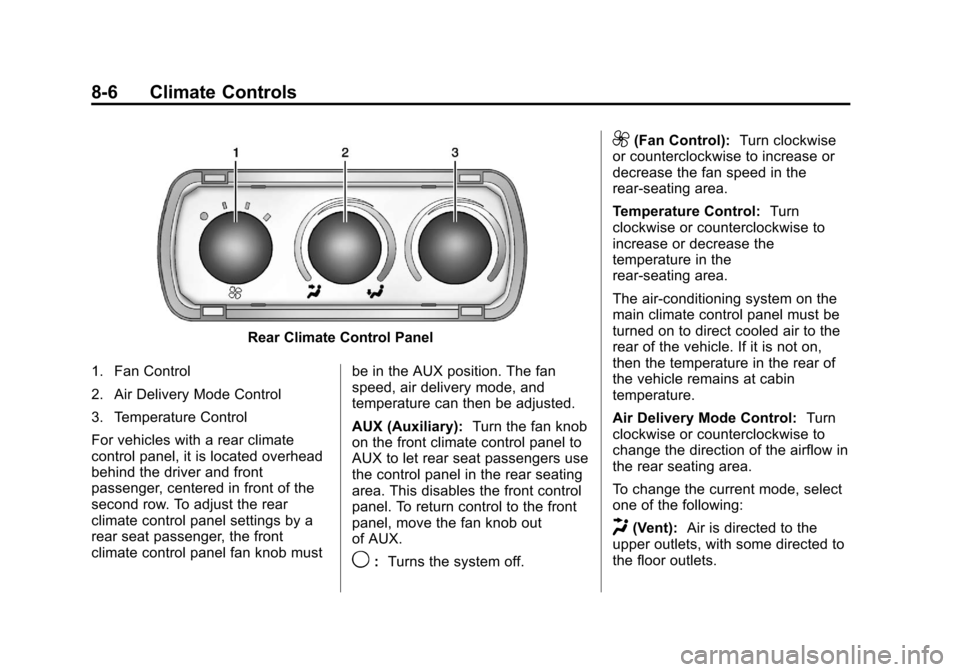
Rear Climate Control Panel
1. Fan Control
2. Air Delivery Mode Control
3. Temperature Control
For vehicles with a rear climate
control panel, it is located overhead
behind the driver and front
passenger, centered in front of the
second row. To adjust the rear
climate control panel settings by a
rear seat passenger, the front
climate control panel fan knob must be in the AUX position. The fan
speed, air delivery mode, and
temperature can then be adjusted.
AUX (Auxiliary):
Turn the fan knob
on the front climate control panel to
AUX to let rear seat passengers use
the control panel in the rear seating
area. This disables the front control
panel. To return control to the front
panel, move the fan knob out
of AUX.
9: Turns the system off.
9(Fan Control): Turn clockwise
or counterclockwise to increase or
decrease the fan speed in the
rear-seating area.
Temperature Control: Turn
clockwise or counterclockwise to
increase or decrease the
temperature in the
rear-seating area.
The air-conditioning system on the
main climate control panel must be
turned on to direct cooled air to the
rear of the vehicle. If it is not on,
then the temperature in the rear of
the vehicle remains at cabin
temperature.
Air Delivery Mode Control: Turn
clockwise or counterclockwise to
change the direction of the airflow in
the rear seating area.
To change the current mode, select
one of the following:
H(Vent): Air is directed to the
upper outlets, with some directed to
the floor outlets.
Page 189 of 402
Black plate (7,1)Chevrolet Express Owner Manual - 2013 - 1stPrintReady - 6/19/12
Climate Controls 8-7
2(Floor):Air is directed to the
floor outlets.
Be sure to keep the area under the
front seats clear of any objects so
that the air inside of the vehicle can
circulate effectively.
For information on how to use the
main climate control system, see
Climate Control Systems on
page 8‑1. For information on
ventilation, see Air Vents on
page 8‑7.Air Vents
Use the outlets located near the
center and on the sides of the
instrument panel to change the
direction of airflow.
Operation Tips
.Clear away any ice, snow or
leaves from the air inlets at the
base of the windshield that may
block the flow of air into the
vehicle.
.Use of non-GM approved hood
deflectors may adversely affect
the performance of the system.
.Keep the path under the front
seats clear of objects to help
circulate the air inside of the
vehicle more effectively.