ECU CHEVROLET EXPRESS CARGO VAN 2017 1.G Owner's Manual
[x] Cancel search | Manufacturer: CHEVROLET, Model Year: 2017, Model line: EXPRESS CARGO VAN, Model: CHEVROLET EXPRESS CARGO VAN 2017 1.GPages: 346, PDF Size: 6.54 MB
Page 81 of 346
Chevrolet Express Owner Manual (GMNA-Localizing-U.S./Canada/Mexico-9967827) - 2017 - crc - 5/2/16
80 Seats and Restraints
If the child restraint or vehicle seatposition does not have the LATCHsystem, you will be using the safetybelt to secure the child restraint.Be sure to follow the instructionsthat came with the child restraint.
If more than one child restraintneeds to be installed in the rearseat, be sure to readWhere to Putthe Restraint072.
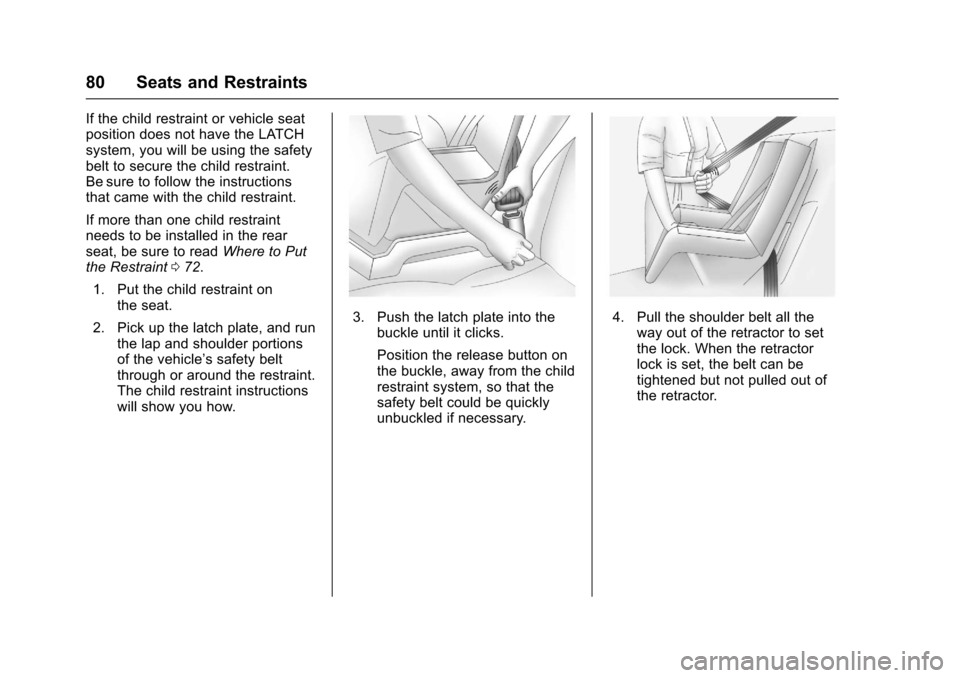
1. Put the child restraint onthe seat.
2. Pick up the latch plate, and runthe lap and shoulder portionsof the vehicle’ssafetybeltthrough or around the restraint.The child restraint instructionswill show you how.
3. Push the latch plate into thebuckle until it clicks.
Position the release button onthe buckle, away from the childrestraint system, so that thesafety belt could be quicklyunbuckled if necessary.
4. Pull the shoulder belt all theway out of the retractor to setthe lock. When the retractorlock is set, the belt can betightened but not pulled out ofthe retractor.
Page 82 of 346
Chevrolet Express Owner Manual (GMNA-Localizing-U.S./Canada/Mexico-9967827) - 2017 - crc - 5/2/16
Seats and Restraints 81
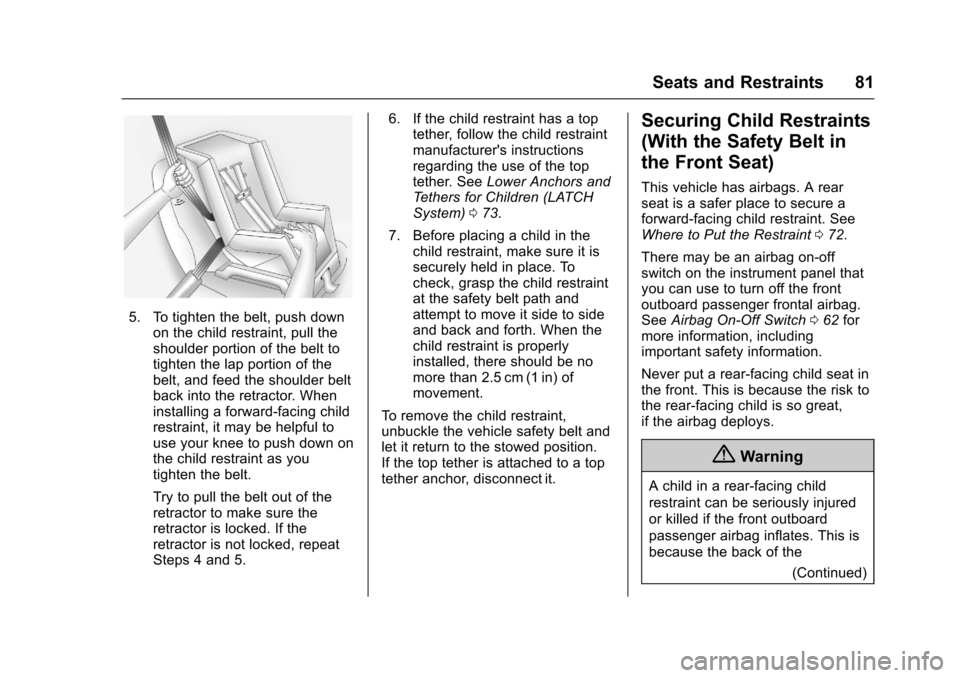
5. To tighten the belt, push downon the child restraint, pull theshoulder portion of the belt totighten the lap portion of thebelt, and feed the shoulder beltback into the retractor. Wheninstalling a forward-facing childrestraint, it may be helpful touse your knee to push down onthe child restraint as youtighten the belt.
Try to pull the belt out of theretractor to make sure theretractor is locked. If theretractor is not locked, repeatSteps 4 and 5.
6. If the child restraint has a toptether, follow the child restraintmanufacturer's instructionsregarding the use of the toptether. SeeLower Anchors andTe t h e r s f o r C h i l d r e n ( L AT C HSystem)073.
7. Before placing a child in thechild restraint, make sure it issecurely held in place. Tocheck, grasp the child restraintat the safety belt path andattempt to move it side to sideand back and forth. When thechild restraint is properlyinstalled, there should be nomore than 2.5 cm (1 in) ofmovement.
To r e m o v e t h e c h i l d r e s t r a i n t ,unbuckle the vehicle safety belt andlet it return to the stowed position.If the top tether is attached to a toptether anchor, disconnect it.
Securing Child Restraints
(With the Safety Belt in
the Front Seat)
This vehicle has airbags. A rearseat is a safer place to secure aforward-facing child restraint. SeeWhere to Put the Restraint072.
There may be an airbag on-offswitch on the instrument panel thatyou can use to turn off the frontoutboard passenger frontal airbag.SeeAirbag On-Off Switch062formore information, includingimportant safety information.
Never put a rear-facing child seat inthe front. This is because the risk tothe rear-facing child is so great,if the airbag deploys.
{Warning
Achildinarear-facingchild
restraint can be seriously injured
or killed if the front outboard
passenger airbag inflates. This is
because the back of the
(Continued)
Page 83 of 346
Chevrolet Express Owner Manual (GMNA-Localizing-U.S./Canada/Mexico-9967827) - 2017 - crc - 5/2/16
82 Seats and Restraints
Warning (Continued)
rear-facing child restraint would
be very close to the inflating
airbag. A child in a forward-facing
child restraint can be seriously
injured or killed if the front
outboard passenger airbag
inflates and the passenger seat is
in a forward position.
Even if the airbag switch has
turned off the front outboard
passenger frontal airbag, no
system is fail-safe. No one can
guarantee that an airbag will not
deploy under some unusual
circumstance, even though it is
turned off.
Secure rear-facing child restraints
in a rear seat, even if the airbag
is off. If you secure a
forward-facing child restraint in
the front outboard passenger
seat, always move the seat as far
back as it will go. It is better to
secure the child restraint in a
rear seat.
{Warning
If the airbag readiness light ever
comes on and stays on, it means
that something may be wrong
with the airbag system. For
example, the front outboard
passenger frontal airbag could
inflate even though the airbag
on-off switch is turned off.
To h e l p a v o i d i n j u r y t o y o u r s e l f o r
others, have the vehicle serviced
right away. SeeAirbag Readiness
Light099for more information,
including important safety
information.
If the vehicle does not have a rearseat that will accommodate arear-facing child restraint, arear-facing child restraint should notbe installed in the vehicle, even ifthe airbag is off.
If the child restraint uses a toptether, seeLower Anchors andTe t h e r s f o r C h i l d r e n ( L AT C HSystem)073for top tether anchorlocations.
Do not secure a child seat in aposition without a top tether anchorif a national or local law requiresthat the top tether be anchored, or ifthe instructions that come with thechild restraint say that the top strapmust be anchored.
In Canada, the law requires thatforward-facing child restraints haveatoptether,andthatthetetherbeattached.
When using the lap-shoulder belt tosecure the child restraint in thisposition, follow the instructions thatcame with the child restraint and thefollowing instructions:
1. Move the seat as far back as itwill go before securing theforward-facing child restraint.Move the seat upward or theseatback to an upright position,if needed, to get a tightinstallation of the childrestraint.
When the airbag off switch hasturned off the front outboardpassenger frontal airbag, theoff indicator in the airbag off
Page 85 of 346
Chevrolet Express Owner Manual (GMNA-Localizing-U.S./Canada/Mexico-9967827) - 2017 - crc - 5/2/16
84 Seats and Restraints
7. If the vehicle does not have arear seat and the child restraintmanufacturer recommendsusing a top tether anchor,attach the top tether to the toptether anchor. Refer to theinstructions that came with thechild restraint and toLowerAnchors and Tethers forChildren (LATCH System)073.
8. Before placing a child in thechild restraint, make sure it issecurely held in place. Tocheck, grasp the child restraintat the safety belt path andattempt to move it side to sideand back and forth. When thechild restraint is properlyinstalled, there should be nomore than 2.5 cm (1 in) ofmovement.
To r e m o v e t h e c h i l d r e s t r a i n t ,unbuckle the vehicle safety belt andlet it return to the stowed position.If the top tether is attached to a toptether anchor, disconnect it.
If you turned the airbag off with theswitch, turn on the front outboardpassenger airbag when you remove
the child restraint from the vehicleunless the person who will be sittingthere is a member of a passengerairbag risk group. SeeAirbagOn-Off Switch062for moreinformation, including importantsafety information.
Page 86 of 346
Chevrolet Express Owner Manual (GMNA-Localizing-U.S./Canada/Mexico-9967827) - 2017 - crc - 5/2/16
Storage 85
Storage
Storage Compartments
Storage Compartments . . . . . . . . 85Front Storage . . . . . . . . . . . . . . . . . . 85
Additional Storage Features
Cargo Tie-Downs . . . . . . . . . . . . . . 85
Storage
Compartments
{Warning
Do not store heavy or sharp
objects in storage compartments.
In a crash, these objects may
cause the cover to open and
could result in injury.
Front Storage
This vehicle may have a frontstorage compartment. It is located atthe center of the instrument panelextension, by the floor. To open thecompartment, pull up on the latch.The compartment will openautomatically.
Storage compartments may also beincluded on the inside of eachfront door.
Additional Storage
Features
Cargo Tie-Downs
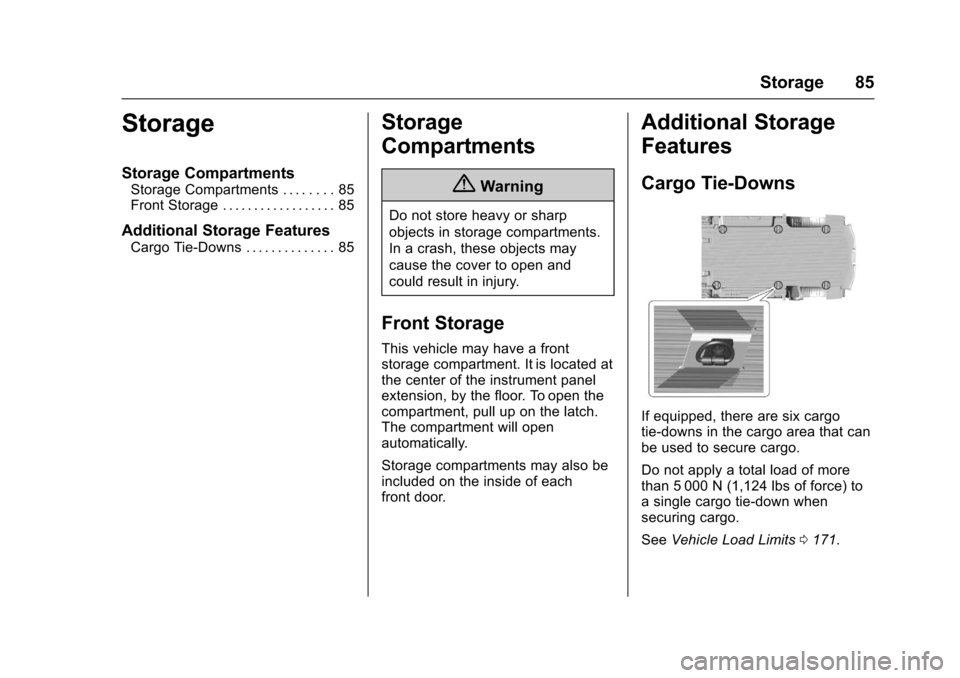
If equipped, there are six cargotie-downs in the cargo area that canbe used to secure cargo.
Do not apply a total load of morethan 5 000 N (1,124 lbs of force) toasinglecargotie-downwhensecuring cargo.
SeeVehicle Load Limits0171.
Page 87 of 346
Chevrolet Express Owner Manual (GMNA-Localizing-U.S./Canada/Mexico-9967827) - 2017 - crc - 5/2/16
86 Storage
{Warning
The child restraint top tether strap
may be damaged by contact with
items in the cargo area. Your child
could be seriously injured or killed
in a collision if the top tether strap
is damaged. Properly secure all
cargo.
{Warning
Properly secure all cargo with
ropes or straps to help prevent it
from sliding or shifting. Do not
place cargo higher than the
seatbacks. In a sudden stop or
collision, unsecured cargo could
cause personal injury. Use
suitable ropes or straps to secure
cargo.
{Warning
Never allow anyone to ride in the
cargo area. It is extremely
dangerous to ride in the cargo
area of a vehicle. In a collision,
people riding in these areas are
more likely to be seriously injured
or killed.
Do not allow people to ride in any
area of the vehicle that is not
equipped with seats and safety
belts. Be sure everyone in the
vehicle is in a seat and using a
safety belt properly.
Page 88 of 346
Chevrolet Express Owner Manual (GMNA-Localizing-U.S./Canada/Mexico-9967827) - 2017 - crc - 5/2/16
Instruments and Controls 87
Instruments and
Controls
Controls
Steering Wheel Adjustment . . . . 88Steering Wheel Controls . . . . . . . 88Horn . . . . . . . . . . . . . . . . . . . . . . . . . . . 89Windshield Wiper/Washer . . . . . . 89Compass . . . . . . . . . . . . . . . . . . . . . . 90Clock . . . . . . . . . . . . . . . . . . . . . . . . . . 92Power Outlets . . . . . . . . . . . . . . . . . 93Cigarette Lighter . . . . . . . . . . . . . . . 94Ashtrays . . . . . . . . . . . . . . . . . . . . . . . 94
Warning Lights, Gauges, and
Indicators
Warning Lights, Gauges, andIndicators . . . . . . . . . . . . . . . . . . . . 94Instrument Cluster . . . . . . . . . . . . . 95Speedometer . . . . . . . . . . . . . . . . . . 96Odometer . . . . . . . . . . . . . . . . . . . . . . 96Trip Odometer . . . . . . . . . . . . . . . . . 96Fuel Gauge . . . . . . . . . . . . . . . . . . . . 96Engine Oil Pressure Gauge . . . . 97Engine Coolant TemperatureGauge . . . . . . . . . . . . . . . . . . . . . . . . 98Voltmeter Gauge . . . . . . . . . . . . . . . 99Safety Belt Reminders . . . . . . . . . 99Airbag Readiness Light . . . . . . . . 99
Airbag On-Off Light . . . . . . . . . . . 100Charging System Light . . . . . . . 101Malfunction Indicator Lamp(Check Engine Light) . . . . . . . . 102Brake System WarningLight . . . . . . . . . . . . . . . . . . . . . . . . 104Antilock Brake System (ABS)Warning Light . . . . . . . . . . . . . . . 104To w / H a u l M o d e L i g h t . . . . . . . . . 1 0 5StabiliTrak®OFF Light . . . . . . . . 105Traction Control System (TCS)/StabiliTrak®Light . . . . . . . . . . . 105Tire Pressure Light . . . . . . . . . . . 106Engine Oil Pressure Light . . . . 106Low Fuel Warning Light . . . . . . 107Security Light . . . . . . . . . . . . . . . . . 107High-Beam On Light . . . . . . . . . . 107Cruise Control Light . . . . . . . . . . 107
Information Displays
Driver InformationCenter (DIC) . . . . . . . . . . . . . . . . 108
Vehicle Messages
Vehicle Messages . . . . . . . . . . . . 112Battery Voltage and ChargingMessages . . . . . . . . . . . . . . . . . . . 112Brake System Messages . . . . . 112Compass Messages . . . . . . . . . . 113Door Ajar Messages . . . . . . . . . . 113
Engine Cooling SystemMessages . . . . . . . . . . . . . . . . . . . 113Engine Oil Messages . . . . . . . . . 114Engine Power Messages . . . . . 114Fuel System Messages . . . . . . . 115Key and Lock Messages . . . . . . 115Lamp Messages . . . . . . . . . . . . . . 115Object Detection SystemMessages . . . . . . . . . . . . . . . . . . . 115Ride Control SystemMessages . . . . . . . . . . . . . . . . . . . 116Airbag System Messages . . . . . 117Security Messages . . . . . . . . . . . 117Service Vehicle Messages . . . . 117Tire Messages . . . . . . . . . . . . . . . . 118Transmission Messages . . . . . . 118Vehicle ReminderMessages . . . . . . . . . . . . . . . . . . . 119
Vehicle Personalization
Vehicle Personalization . . . . . . . 119
Page 93 of 346
Chevrolet Express Owner Manual (GMNA-Localizing-U.S./Canada/Mexico-9967827) - 2017 - crc - 5/2/16
92 Instruments and Controls
Clock
The clock can be set with either theradio turned on or off.
AM-FM Radio
To s e t t h e t i m e :
1. PressHuntil the hour begins
flashing on the display. Pressthis button a second time andthe minutes begin flashing ondisplay.
PressHathirdtimeandthe
12HR or 24HR time formatbegins flashing.
2. While either the hour or the
minutes are flashing, turn thef
knob, on the upper right side ofthe radio, clockwise orcounterclockwise to increase ordecrease the time. While the12HR or 24HR time format is
flashing, turn thefknob
clockwise or counterclockwiseto select the default timesettings.
3. PressHagain until the clock
display stops flashing to set thecurrently displayed time;otherwise, the flashing stopsafter five seconds and thecurrent time displayed isautomatically set.
Radio with CD/MP3
To s e t t h e t i m e a n d d a t e :
1. PressHand the HR, MIN, MM,
DD, and YYYY (hour, minute,month, day, and year) display.
2. Press the softkey under anyone of the tabs to be changed.Every time the softkey ispressed again, the time or thedate if selected, increasesby one.
Another way to increase the
time or date is to press¨
SEEK or\FWD (forward).
3. To decrease, press©SEEK or
sREV. Turn thefknob, onthe upper right side of theradio, to adjust the selectedsetting.
Changing the Time and DateDefault Settings
To c h a n g e t h e t i m e o r d a t e d e f a u l tsettings:
1. PressHand then the softkey
under the forward arrow that iscurrently displayed on the radioscreen until the time 12H(hour) and 24H (hour), and thedate MM/DD (month and day)and DD/MM (day and month)are displayed.
2. Press the softkey under thedesired option.
3. PressHagain to apply the
selected default, or let thescreen time out.
Page 108 of 346
Chevrolet Express Owner Manual (GMNA-Localizing-U.S./Canada/Mexico-9967827) - 2017 - crc - 5/2/16
Instruments and Controls 107
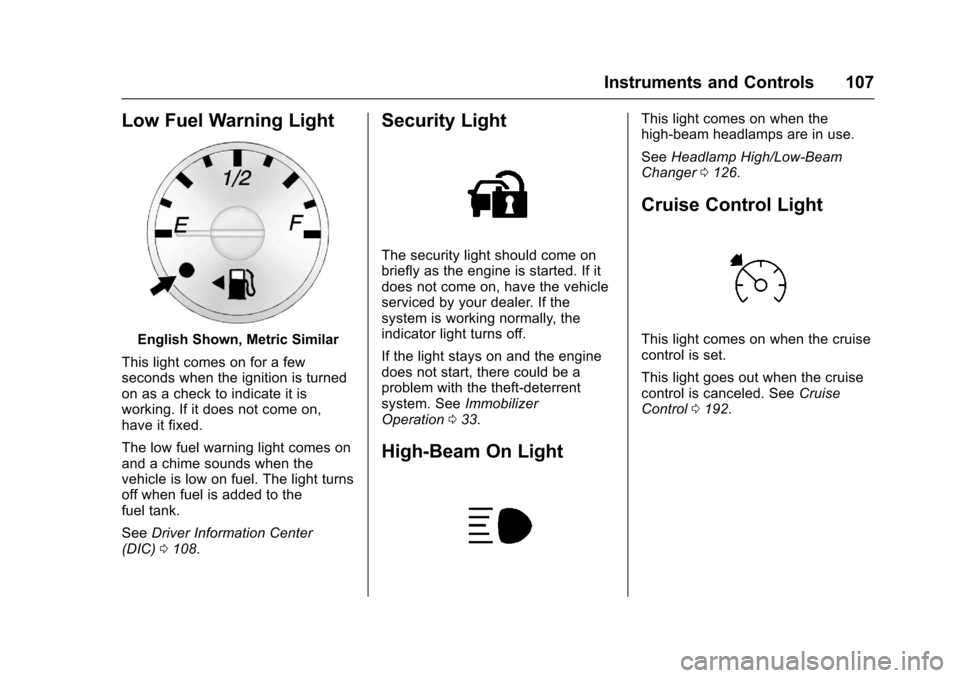
Low Fuel Warning Light
English Shown, Metric Similar
This light comes on for a fewseconds when the ignition is turnedon as a check to indicate it isworking. If it does not come on,have it fixed.
The low fuel warning light comes onand a chime sounds when thevehicle is low on fuel. The light turnsoff when fuel is added to thefuel tank.
SeeDriver Information Center(DIC)0108.
Security Light
The security light should come onbriefly as the engine is started. If itdoes not come on, have the vehicleserviced by your dealer. If thesystem is working normally, theindicator light turns off.
If the light stays on and the enginedoes not start, there could be aproblem with the theft-deterrentsystem. SeeImmobilizerOperation033.
High-Beam On Light
This light comes on when thehigh-beam headlamps are in use.
SeeHeadlamp High/Low-BeamChanger0126.
Cruise Control Light
This light comes on when the cruisecontrol is set.
This light goes out when the cruisecontrol is canceled. SeeCruiseControl0192.
Page 111 of 346
Chevrolet Express Owner Manual (GMNA-Localizing-U.S./Canada/Mexico-9967827) - 2017 - crc - 5/2/16
110 Instruments and Controls
Average Economy
Press3until AVG ECONOMY
displays. This display shows theapproximate average liters per100 kilometers (L/100 km) or milesper gallon (mpg). This number iscalculated based on the number ofL/100 km (mpg) recorded since thelast time this menu item was reset.To r e s e t AV G E C O N O M Y, p r e s s a n d
holdV.Thedisplaywillreturn
to zero.
Fuel Used
Press3until FUEL USED
displays. This display shows thenumber of liters (L) or gallons (gal)of fuel used since the last reset ofthis menu item. To reset the fuel
used information, press and holdV
while FUEL USED is displayed.
Timer
Press3until TIMER displays.
This display can be used as a timer.
To s t a r t t h e t i m e r , p r e s sVwhile
TIMER is displayed. The display willshow the amount of time that has
passed since the timer was lastreset, not including time the ignitionis off. Time will continue to becounted as long as the ignition ison, even if another display is beingshown on the DIC. The timer willrecord up to 99 hours, 59 minutesand 59 seconds (99:59:59) afterwhich the display will return to zero.
To s t o p t h e t i m e r, p r e s sVbriefly
while TIMER is displayed.
To r e s e t t h e t i m e r t o z e r o , p r e s s a n d
holdVwhile TIMER is displayed.
Average Speed
Press3until AVERAGE SPEED
displays. This display shows theaverage speed of the vehicle inkilometers per hour (km/h) or milesper hour (mph). This average iscalculated based on the variousvehicle speeds recorded since thelast reset of this value. To reset the
value, press and holdV.The
display will return to zero.
Digital Tachometer
Press3until
Ta c h o m e t e r # # 0 0 R P M d i s p l a y s .This display shows the enginespeed in revolutions perminute (RPM).
Blank Display
This display shows no information.
Vehicle Information Menu
Items
T:Press this button to scrollthrough the following menu items:
Oil Life
PressTuntil OIL LIFE
REMAINING displays. This displayshows an estimate of the oil'sremaining useful life. If you see99% OIL LIFE REMAINING on thedisplay, that means 99% of thecurrent oil life remains. The engineoil life system will alert you tochange the oil on a scheduleconsistent with your drivingconditions.