ESP CHEVROLET EXPRESS CARGO VAN 2017 1.G Owner's Manual
[x] Cancel search | Manufacturer: CHEVROLET, Model Year: 2017, Model line: EXPRESS CARGO VAN, Model: CHEVROLET EXPRESS CARGO VAN 2017 1.GPages: 346, PDF Size: 6.54 MB
Page 158 of 346
Chevrolet Express Owner Manual (GMNA-Localizing-U.S./Canada/Mexico-9967827) - 2017 - crc - 5/2/16
Infotainment System 157
Transferring Audio to theBluetooth System from a CellPhone
During a call with the audio on the
cell phone, pressb/g.Theaudio
transfers to the vehicle. If the audiodoes not transfer to the vehicle, usethe audio transfer feature on the cellphone. See your cell phonemanufacturer's user guide for moreinformation.
Voice Pass-Thru
Voice pass-thru allows access to thevoice recognition commands on thecell phone. See your cell phonemanufacturer's user guide to see ifthe cell phone supports this feature.
To a c c e s s c o n t a c t s s t o r e d i n t h e c e l lphone:
1. Press and holdb/gfor
two seconds.
2. Say“Bluetooth.”This commandcan be skipped.
3. Say“Vo i c e .”The systemresponds“OK, accessing
The cell phone's normal promptmessages will go through their cycleaccording to the phone's operatinginstructions.
Dual Tone Multi-Frequency
(DTMF) Tones
The Bluetooth system can sendnumbers and the numbers stored asname tags during a call. You canuse this feature when calling amenu-driven phone system.Account numbers can also bestored for use.
Sending a Number or Name TagDuring a Call
1. Pressb/g.Thesystem
responds“Ready,”followed byatone.
2. Say“Dial.”
3. Say the number or name tagto send.
Clearing the System
Unless information is deleted out ofthe in-vehicle Bluetooth system, itwill be retained indefinitely. Thisincludes all saved name tags in the
phone book and phone pairinginformation. For information on howto delete this information, see theprevious section“Deleting a PairedPhone”and the previous sectionson deleting name tags.
Other Information
The Bluetooth®word mark andlogos are owned by the Bluetooth®
SIG, Inc. and any use of such marksby General Motors is under license.Other trademarks and trade namesare those of their respective owners.
SeeRadio FrequencyStatement0322.
Page 168 of 346
Chevrolet Express Owner Manual (GMNA-Localizing-U.S./Canada/Mexico-9967827) - 2017 - crc - 5/6/16
Driving and Operating 167
Curve Tips
.Ta k e c u r v e s a t a r e a s o n a b l espeed.
.Reduce speed before entering acurve.
.Maintain a reasonable steadyspeed through the curve
.Wait until the vehicle is out ofthe curve before acceleratinggently into the straightaway.
Steering in Emergencies
.There are some situations whensteering around a problem maybe more effective than braking.
.Holding both sides of thesteering wheel allows you to turn180 degrees without removingahand.
.Antilock Brake System (ABS)allows steering while braking.
Off-Road Recovery
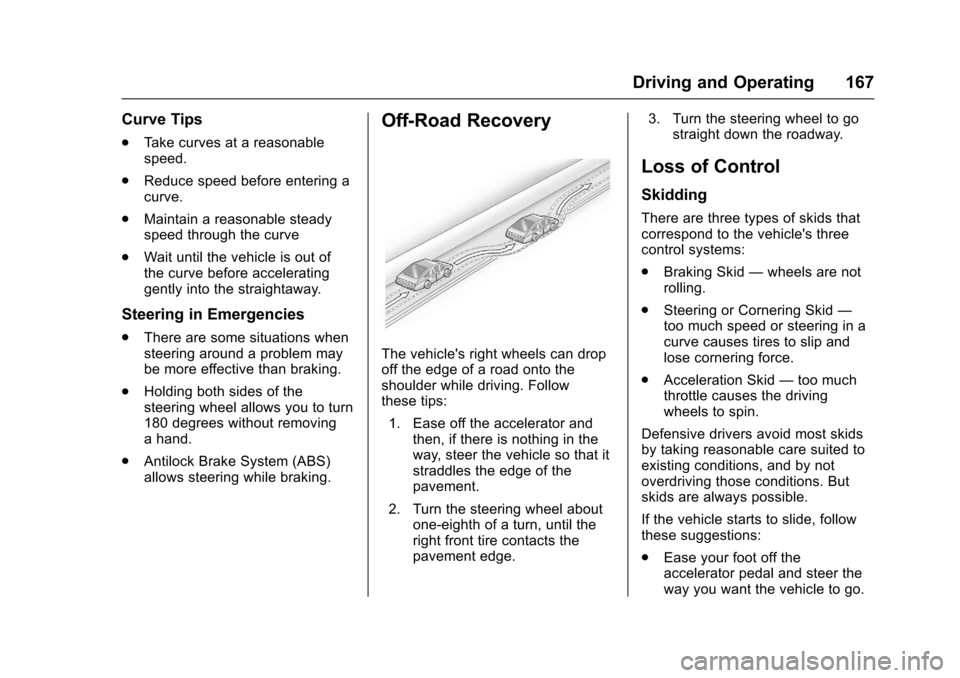
The vehicle's right wheels can dropoff the edge of a road onto theshoulder while driving. Followthese tips:
1. Ease off the accelerator andthen, if there is nothing in theway, steer the vehicle so that itstraddles the edge of thepavement.
2. Turn the steering wheel aboutone-eighth of a turn, until theright front tire contacts thepavement edge.
3. Turn the steering wheel to gostraight down the roadway.
Loss of Control
Skidding
There are three types of skids thatcorrespond to the vehicle's threecontrol systems:
.Braking Skid—wheels are notrolling.
.Steering or Cornering Skid—too much speed or steering in acurve causes tires to slip andlose cornering force.
.Acceleration Skid—too muchthrottle causes the drivingwheels to spin.
Defensive drivers avoid most skidsby taking reasonable care suited toexisting conditions, and by notoverdriving those conditions. Butskids are always possible.
If the vehicle starts to slide, followthese suggestions:
.Ease your foot off theaccelerator pedal and steer theway you want the vehicle to go.
Page 171 of 346
Chevrolet Express Owner Manual (GMNA-Localizing-U.S./Canada/Mexico-9967827) - 2017 - crc - 5/6/16
170 Driving and Operating
when on dry pavement. SeeAntilock Brake System(ABS)0188.
.Allow greater following distanceand watch for slippery spots. Icypatches can occur on otherwiseclear roads in shaded areas.The surface of a curve or anoverpass can remain icy whenthe surrounding roads are clear.Avoid sudden steeringmaneuvers and braking whileon ice.
.Turn off cruise control.
Blizzard Conditions
Stop the vehicle in a safe place andsignal for help. Stay with the vehicleunless there is help nearby.If possible, use RoadsideAssistance. SeeRoadsideAssistance Program0316.Togethelp and keep everyone in thevehicle safe:
.Turn on the hazard warningflashers.
.Tie a red cloth to an outsidemirror.
{Warning
Snow can trap engine exhaust
under the vehicle. This may
cause exhaust gases to get
inside. Engine exhaust contains
carbon monoxide (CO), which
cannot be seen or smelled. It can
cause unconsciousness and even
death.
If the vehicle is stuck in snow:
.Clear snow from the base ofthe vehicle, especially anyblocking the exhaust pipe.
.Open a window about 5 cm(2 in) on the vehicle sidethat is away from the wind,to bring in fresh air.
.Fully open the air outlets onor under the instrumentpanel.
.Adjust the climate controlsystem to circulate the airinside the vehicle and set
(Continued)
Warning (Continued)
the fan speed to the highestsetting. See“ClimateControl Systems.”
For more information about CO,
seeEngine Exhaust0182.
To s a v e f u e l , r u n t h e e n g i n e f o rshort periods to warm the vehicleand then shut the engine off andpartially close the window. Movingabout to keep warm also helps.
If it takes time for help to arrive,when running the engine, push theaccelerator pedal slightly so theengine runs faster than the idlespeed. This keeps the batterycharged to restart the vehicle and tosignal for help with the headlamps.Do this as little as possible, tosave fuel.
Page 173 of 346
Chevrolet Express Owner Manual (GMNA-Localizing-U.S./Canada/Mexico-9967827) - 2017 - crc - 5/6/16
172 Driving and Operating
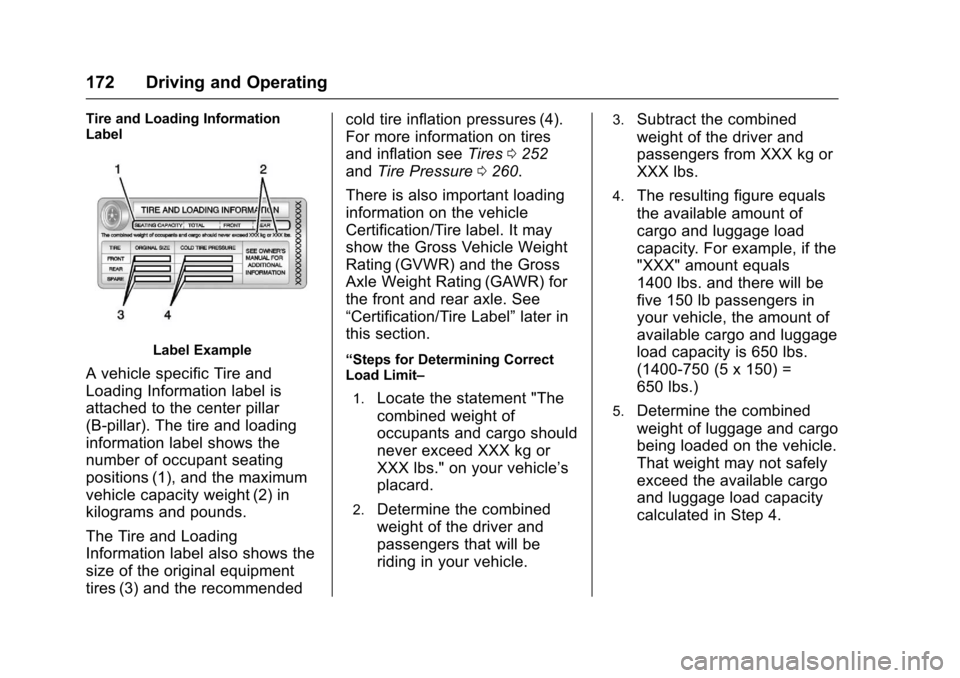
Tire and Loading InformationLabel
Label Example
AvehiclespecificTireand
Loading Information label is
attached to the center pillar
(B-pillar). The tire and loading
information label shows the
number of occupant seating
positions (1), and the maximum
vehicle capacity weight (2) in
kilograms and pounds.
The Tire and Loading
Information label also shows the
size of the original equipment
tires (3) and the recommended
cold tire inflation pressures (4).
For more information on tires
and inflation seeTires0252
andTire Pressure0260.
There is also important loading
information on the vehicle
Certification/Tire label. It may
show the Gross Vehicle Weight
Rating (GVWR) and the Gross
Axle Weight Rating (GAWR) for
the front and rear axle. See
“Certification/Tire Label”later in
this section.
“Steps for Determining CorrectLoad Limit–
1.Locate the statement "The
combined weight of
occupants and cargo should
never exceed XXX kg or
XXX lbs." on your vehicle’s
placard.
2.Determine the combined
weight of the driver and
passengers that will be
riding in your vehicle.
3.Subtract the combined
weight of the driver and
passengers from XXX kg or
XXX lbs.
4.The resulting figure equals
the available amount of
cargo and luggage load
capacity. For example, if the
"XXX" amount equals
1400 lbs. and there will be
five 150 lb passengers in
your vehicle, the amount of
available cargo and luggage
load capacity is 650 lbs.
(1400-750 (5 x 150) =
650 lbs.)
5.Determine the combined
weight of luggage and cargo
being loaded on the vehicle.
That weight may not safely
exceed the available cargo
and luggage load capacity
calculated in Step 4.
Page 175 of 346
Chevrolet Express Owner Manual (GMNA-Localizing-U.S./Canada/Mexico-9967827) - 2017 - crc - 5/6/16
174 Driving and Operating
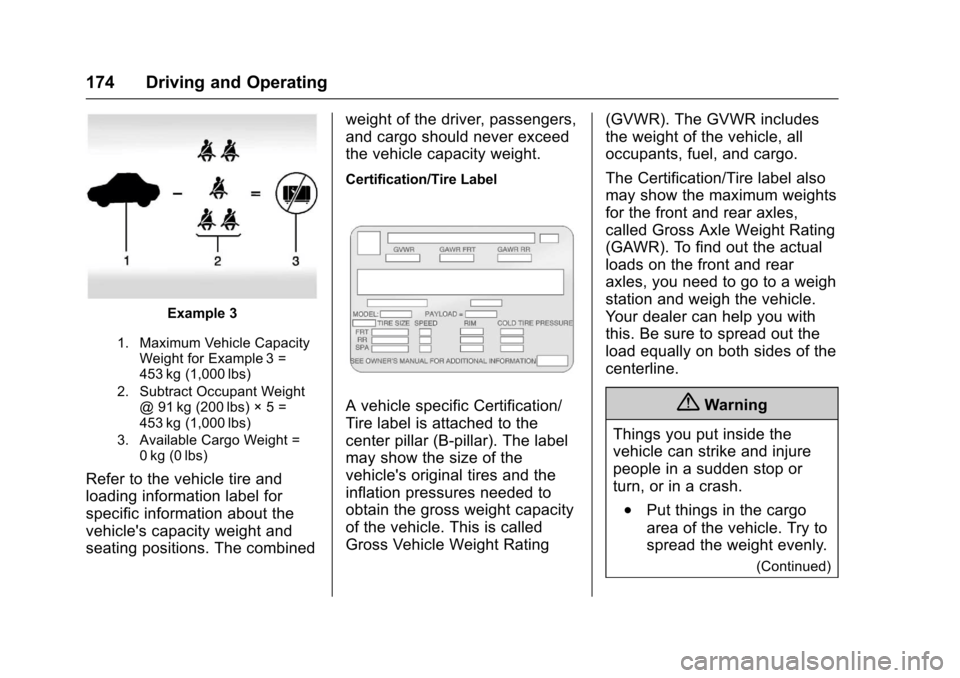
Example 3
1. Maximum Vehicle CapacityWeight for Example 3 =453 kg (1,000 lbs)
2. Subtract Occupant Weight@91kg(200lbs)◊5=453 kg (1,000 lbs)
3. Available Cargo Weight =0kg (0lbs)
Refer to the vehicle tire and
loading information label for
specific information about the
vehicle's capacity weight and
seating positions. The combined
weight of the driver, passengers,
and cargo should never exceed
the vehicle capacity weight.
Certification/Tire Label
AvehiclespecificCertification/
Tire label is attached to the
center pillar (B-pillar). The label
may show the size of the
vehicle's original tires and the
inflation pressures needed to
obtain the gross weight capacity
of the vehicle. This is called
Gross Vehicle Weight Rating
(GVWR). The GVWR includes
the weight of the vehicle, all
occupants, fuel, and cargo.
The Certification/Tire label also
may show the maximum weights
for the front and rear axles,
called Gross Axle Weight Rating
(GAWR). To find out the actual
loads on the front and rear
axles, you need to go to a weigh
station and weigh the vehicle.
Yo u r d e a l e r c a n h e l p y o u w i t h
this. Be sure to spread out the
load equally on both sides of the
centerline.
{Warning
Things you put inside the
vehicle can strike and injure
people in a sudden stop or
turn, or in a crash.
.Put things in the cargo
area of the vehicle. Try to
spread the weight evenly.
(Continued)
Page 179 of 346
Chevrolet Express Owner Manual (GMNA-Localizing-U.S./Canada/Mexico-9967827) - 2017 - crc - 5/6/16
178 Driving and Operating
Operate the engine andtransmission gently to allow theoil to warm up and lubricate allmoving parts.
When the Low Fuel warninglamp is on and the FUELLEVEL LOW message isdisplayed in the DriverInformation Center (DIC), theComputer-Controlled CrankingSystem is disabled to preventpossible vehicle componentdamage. When this happens,hold the ignition switch in theSTART position to continueengine cranking.
Caution
Cranking the engine for long
periods of time, by returning the
ignition to the START position
immediately after cranking has
ended, can overheat and damage
the cranking motor, and drain the
battery. Wait at least 15 seconds
between each try, to let the
cranking motor cool down.
2. If the engine does not startafter 5-10 seconds, especiallyin very cold weather (below✓18 °C or 0 °F), it could beflooded with too muchgasoline. Try pushing theaccelerator pedal all the way tothe floor and holding it there asyou hold the key in START forup to 15 seconds. Wait at least15 seconds between each try,to allow the cranking motor tocool down. When the enginestarts, let go of the key andaccelerator. If the vehicle startsbriefly but then stops again, dothe same thing. This clears theextra gasoline from the engine.Do not race the engineimmediately after starting it.Operate the engine andtransmission gently until the oilwarms up and lubricates allmoving parts.
Fast Idle System
If equipped, this feature is availableonly with cruise control. The manualfast idle switch is operated using thecruise control buttons on the leftside of the steering wheel.
This system can be used toincrease engine idle speedwhenever the following conditionsare met:
.The parking brake is set.
.The brake pedal is not pressed.
.The vehicle must not be movingand the accelerator must not bepressed.
To c o n t r o l t h e f a s t i d l e :
.To e n a b l e t h e F a s t I d l e S y s t e m ,press and release the cruisecontrol on/off button and ensurethat the switch indicator lightis lit.
.Press and release the cruisecontrol SET- button. Enginespeed will be held atapproximately 1200 rpm.
Page 184 of 346
Chevrolet Express Owner Manual (GMNA-Localizing-U.S./Canada/Mexico-9967827) - 2017 - crc - 5/6/16
Driving and Operating 183
Warning (Continued)
.There are holes or openingsin the vehicle body fromdamage or aftermarketmodifications that are notcompletely sealed.
If unusual fumes are detected or
if it is suspected that exhaust is
coming into the vehicle:
.Drive it only with thewindows completely down.
.Have the vehicle repairedimmediately.
Never park the vehicle with the
engine running in an enclosed
area such as a garage or a
building that has no fresh air
ventilation.
Running the Vehicle
While Parked
It is better not to park with theengine running.
If the vehicle is left with the enginerunning, follow the proper steps tobe sure the vehicle will not move.SeeShifting Into Park0180andEngine Exhaust0182.
If parking on a hill and pulling atrailer, seeDriving Characteristicsand Towing Tips0202.
Automatic
Transmission
Ashiftpositionindicatorisintheinstrument cluster.
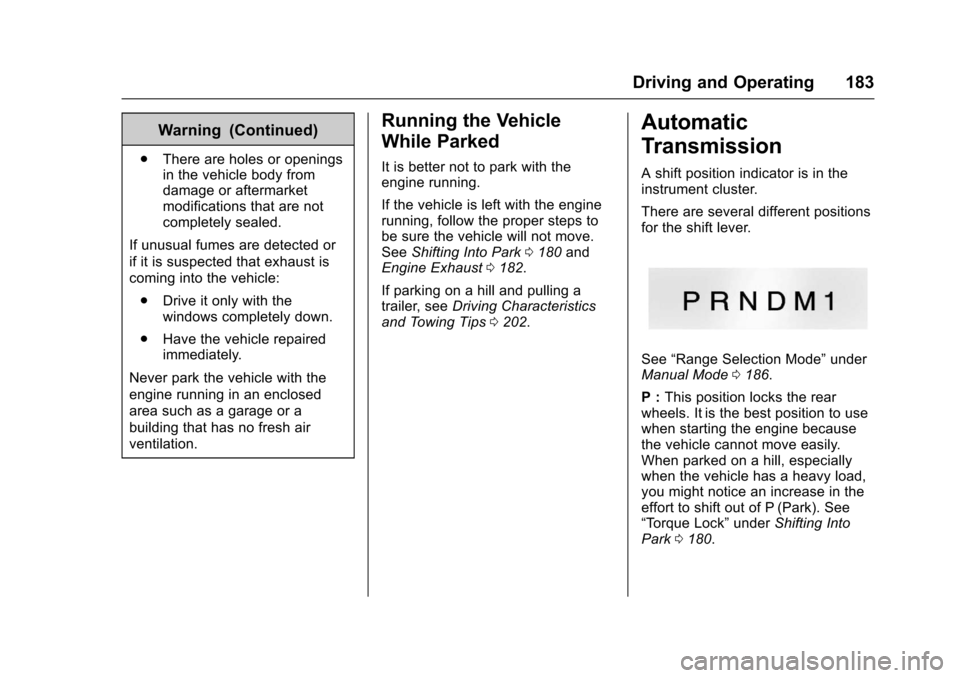
There are several different positionsfor the shift lever.
See“Range Selection Mode”underManual Mode0186.
P:This position locks the rearwheels. It is the best position to usewhen starting the engine becausethe vehicle cannot move easily.When parked on a hill, especiallywhen the vehicle has a heavy load,you might notice an increase in theeffort to shift out of P (Park). See“To r q u e L o c k”underShifting IntoPark0180.
Page 186 of 346
Chevrolet Express Owner Manual (GMNA-Localizing-U.S./Canada/Mexico-9967827) - 2017 - crc - 5/6/16
Driving and Operating 185
By doing this, the vehicle shiftsdown to the next gear and hasmore power.
D(Drive) can be used when towingatrailer,carryingaheavyload,or driving on steep hills. You mightwant to shift the transmission to alower gear selection if thetransmission shifts too often.
Downshifting the transmission inslippery road conditions could resultin skidding. See“Skidding”underLoss of Control0167.
The vehicle has a shift stabilizationfeature that adjusts the transmissionshifting to the current drivingconditions in order to reduce rapidupshifts and downshifts. This shiftstabilization feature is designed todetermine, before making anupshift, if the engine is able tomaintain vehicle speed by analyzingthings such as vehicle speed,throttle position, and vehicle load.If the shift stabilization featuredetermines that a current vehiclespeed cannot be maintained, thetransmission does not upshift andinstead holds the current gear.
In some cases, this could appear tobe a delayed shift, however thetransmission is operating normally.
The transmission uses adaptiveshift controls. Adaptive shift controlscontinually compare key shiftparameters to pre-programmedideal shifts stored in thetransmission’scomputer.Thetransmission constantly makesadjustments to improve vehicleperformance according to how thevehicle is being used, such as withaheavyloadorwhenthetemperature changes. During thisadaptive shift control process,shifting might feel different as thetransmission determines the bestsettings.
The shift quality of a new vehiclemay not be ideal because theadaptive shift control process maynot have determined the bestsettings for a particular shift orcondition. Shift quality will improvewith continued driving.
When temperatures are very cold,the transmission's gear shiftingcould be delayed, providing more
stable shifts until the engine warmsup. Shifts could be more noticeablewith a cold transmission. Thisdifference in shifting is normal.
M:This position lets drivers selectthe range of gears appropriate forcurrent driving conditions. If thevehicle has this feature, see“RangeSelection Mode”underManualMode0186.
3:This position is also used fornormal driving. It reduces vehiclespeed more than D (Drive) withoutusing the brakes. You might choose3(Third) instead of D(Drive) whendriving on hilly, winding roads; whentowing a trailer, so there is lessshifting between gears; and whengoing down a steep hill. See“RangeSelection Mode”underManualMode0186.
2:This position reduces vehiclespeed even more than 3 (Third)without using the brakes. You canuse 2 (Second) on hills. It can helpcontrol vehicle speed as you godown steep mountain roads, butthen you would also want to use the
Page 187 of 346
Chevrolet Express Owner Manual (GMNA-Localizing-U.S./Canada/Mexico-9967827) - 2017 - crc - 5/6/16
186 Driving and Operating
brakes off and on. See“RangeSelection Mode”underManualMode0186.
If you manually select 2 (Second) inan automatic transmission, thetransmission will start insecond gear. You can use thisfeature for reducing the speed of therear wheels when trying to start thevehicle from a stop on slippery roadsurfaces.
1:This position reduces vehiclespeed without using the brakes.Yo u c a n u s e i t f o r m a j o r / s e v e r edowngrades where the vehiclewould otherwise accelerate due tosteepness of grade. When you shiftto 1 (First) it provides the lowestgear appropriate to current roadspeed and continues to downshiftas the vehicle slows, eventuallydownshifting to 1 (First) gear. Thetransmission can be held in 1 (First)gear using Range Selection Modeor the shift lever. See“RangeSelection Mode”underManualMode0186.
Caution
Spinning the tires or holding the
vehicle in one place on a hill
using only the accelerator pedal
may damage the transmission.
The repair will not be covered by
the vehicle warranty. If you are
stuck, do not spin the tires. When
stopping on a hill, use the brakes
to hold the vehicle in place.
Normal Mode Grade Braking
This mode is enabled when thevehicle is started, but is not enabledin Range Selection Mode. It assistsin maintaining desired vehiclespeeds when driving on downhillgrades by using the engine andtransmission to slow the vehicle.The first time the system activatesfor each ignition key cycle, a DICmessage will be displayed. SeeTr a n s m i s s i o n M e s s a g e s011 8.
To d i s a b l e o r e n a b l e N o r m a l M o d eGrade Braking within the currentignition key cycle, press and holdthe Tow/Haul button for
three seconds. A DIC messagedisplays. SeeTr a n s m i s s i o nMessages011 8.
For other forms of grade braking,seeTo w / H a u l M o d e0187andCruise Control0192.
Manual Mode
Range Selection Mode
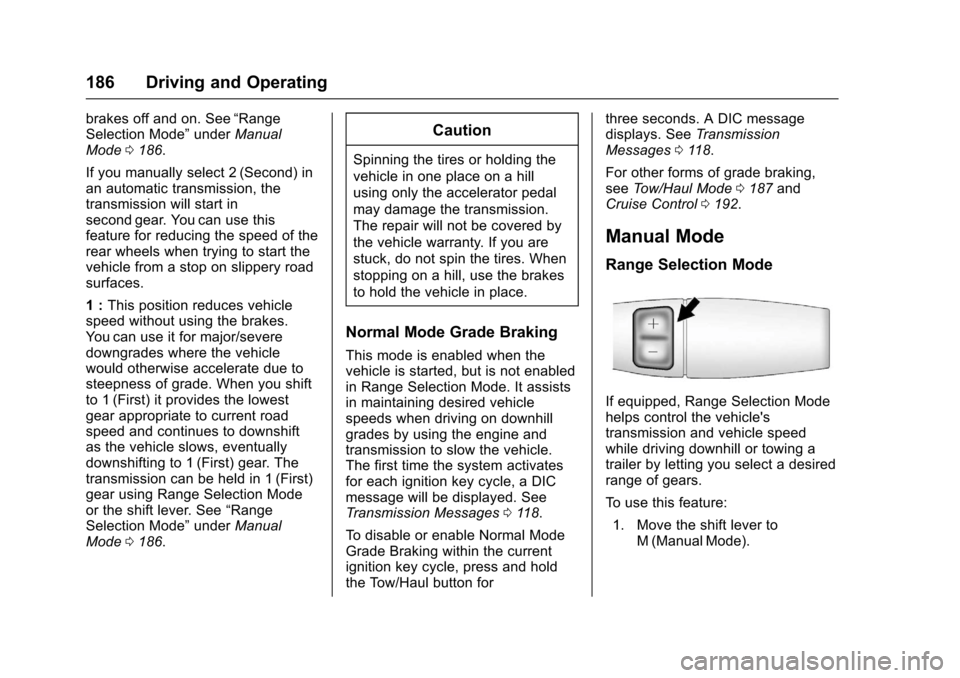
If equipped, Range Selection Modehelps control the vehicle'stransmission and vehicle speedwhile driving downhill or towing atrailer by letting you select a desiredrange of gears.
To u s e t h i s f e a t u r e :
1. Move the shift lever toM(ManualMode).
Page 193 of 346
Chevrolet Express Owner Manual (GMNA-Localizing-U.S./Canada/Mexico-9967827) - 2017 - crc - 5/6/16
192 Driving and Operating
Cruise Control
{Warning
Cruise control can be dangerous
where you cannot drive safely at
asteadyspeed.Donotuse
cruise control on winding roads or
in heavy traffic.
Cruise control can be dangerous
on slippery roads. On such roads,
fast changes in tire traction can
cause excessive wheel slip, and
you could lose control. Do not use
cruise control on slippery roads.
If equipped with cruise control, aspeed of about 40 km/h (25 mph) ormore can be maintained withoutkeeping your foot on theaccelerator. Cruise control does notwork at speeds below about 40 km/h(25 mph).
If the vehicle has StabiliTrak and thesystem begins to limit wheel spin,cruise control will automaticallydisengage. SeeTr a c t i o n C o n t r o l /Electronic Stability Control0190.
When road conditions allow cruisecontrol to be safely used again,cruise control can be turnedback on.
If the brakes are applied, cruisecontrol disengages.
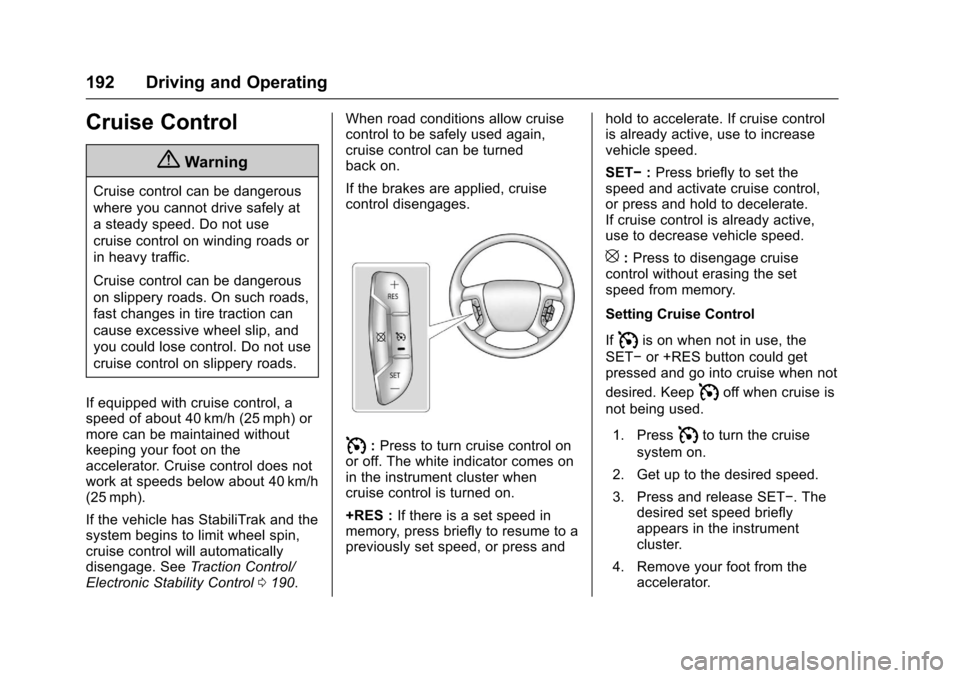
I:Press to turn cruise control onor off. The white indicator comes onin the instrument cluster whencruise control is turned on.
+RES :If there is a set speed inmemory, press briefly to resume to apreviously set speed, or press and
hold to accelerate. If cruise controlis already active, use to increasevehicle speed.
SET✓:Press briefly to set thespeed and activate cruise control,or press and hold to decelerate.If cruise control is already active,use to decrease vehicle speed.
[:Press to disengage cruisecontrol without erasing the setspeed from memory.
Setting Cruise Control
IfIis on when not in use, the
SET✓or +RES button could getpressed and go into cruise when not
desired. KeepIoff when cruise is
not being used.
1. PressIto turn the cruise
system on.
2. Get up to the desired speed.
3. Press and release SET✓.Thedesired set speed brieflyappears in the instrumentcluster.
4. Remove your foot from theaccelerator.