service CHEVROLET EXPRESS CARGO VAN 2017 1.G Owner's Guide
[x] Cancel search | Manufacturer: CHEVROLET, Model Year: 2017, Model line: EXPRESS CARGO VAN, Model: CHEVROLET EXPRESS CARGO VAN 2017 1.GPages: 346, PDF Size: 6.54 MB
Page 119 of 346
Chevrolet Express Owner Manual (GMNA-Localizing-U.S./Canada/Mexico-9967827) - 2017 - crc - 5/2/16
118 Instruments and Controls
Tire Messages
CHECK TIRE PRESSURE or
TIRE LOW ADD AIR TO TIRE
If the vehicle has the Tire PressureMonitor System (TPMS), thismessage displays when thepressure in one or more of the tiresis low. The low tire pressure warninglight will also come on. SeeTirePressure Light0106.Thismessagewill also indicate which tire needs tobe checked. You can receive morethan one tire pressure message at atime. To read the other messagesthat may have been sent at thesame time, press the set/resetbutton. If a tire pressure messageappears on the DIC, stop as soonas you can. Have the tire pressureschecked and set to those shown onthe Tire Loading Information label.SeeTires0252,Vehicle LoadLimits0171,andTire Pressure0260.TheDICalsoshowsthetirepressure values. SeeDriverInformation Center (DIC)0108.
SERVICE TIRE MONITOR
SYSTEM
If the vehicle has the Tire PressureMonitor System (TPMS), thismessage displays if a part on thesystem is not working properly. Thetire pressure light also flashes andthen remains on during the sameignition cycle. SeeTire PressureLight0106.Severalconditionsmaycause this message to appear. SeeTire Pressure Monitor Operation0262for more information. If thewarning comes on and stays on,there may be a problem with theTPMS. See your dealer.
TIRE LEARNING ACTIVE
If the vehicle has the Tire PressureMonitor System (TPMS), thismessage displays when the systemis re-learning the tire positions onthe vehicle. SeeDriver InformationCenter (DIC)0108for moreinformation. The tire positions mustbe re-learned after rotating the tiresor after replacing a tire or sensor.
SeeTire Inspection0265,TireRotation0265,Tire PressureMonitor Operation0262,andTirePressure0260for moreinformation.
Transmission Messages
GRADE BRAKING DISABLED
This message displays when thegrade braking has been disabledwith the Tow/Haul Mode button. SeeTo w / H a u l M o d e0187,AutomaticTr a n s m i s s i o n0183,andCruiseControl0192.
GRADE BRAKING ENABLED
This message displays when thegrade braking has been enabledwith the Tow/Haul Mode button. SeeTo w / H a u l M o d e0187,AutomaticTr a n s m i s s i o n0183,andCruiseControl0192.
Page 120 of 346
Chevrolet Express Owner Manual (GMNA-Localizing-U.S./Canada/Mexico-9967827) - 2017 - crc - 5/2/16
Instruments and Controls 119
GRADE BRAKING ON
This message displays when thegrade braking has been activatedwhile driving on downhill grades.This message will only appear thefirst time the feature is activated inan ignition cycle. SeeTo w / H a u lMode0187,AutomaticTr a n s m i s s i o n0183,andCruiseControl0192.
SERVICE TRANSMISSION
This message displays when thereis a problem with the transmission.See your dealer for service.
TRANSMISSION HOT IDLE
ENGINE
Caution
Do not drive the vehicle while the
transmission fluid is overheating,
or the transmission can be
damaged. This could lead to
costly repairs that would not be
covered by the warranty.
This message displays along with achime if the transmission fluid in thevehicle gets hot. Driving with thetransmission fluid temperature highcan cause damage to the vehicle.Stop the vehicle and let it idle toallow the transmission to cool. Thismessage clears and the chimestops when the fluid temperaturereaches a safe level.
Vehicle Reminder
Messages
ICE POSSIBLE DRIVE
WITH CARE
This message displays when theoutside air temperature is coldenough to create icy roadconditions. Adjust your drivingaccordingly.
Vehicle
Personalization
This vehicle may havecustomization capabilities that allowyou to program certain features toone preferred setting. Customizationfeatures can only be programmed toone setting on the vehicle andcannot be programmed to apreferred setting for two differentdrivers.
All of the customization options maynot be available on your vehicle.Only the options available will bedisplayed on the DIC.
The default settings for thecustomization features were setwhen the vehicle left the factory, butmay have been changed from theirdefault state since then.
The customization preferences areautomatically recalled.
To c h a n g e c u s t o m i z a t i o npreferences, use the followingprocedure.
Page 132 of 346
Chevrolet Express Owner Manual (GMNA-Localizing-U.S./Canada/Mexico-9967827) - 2017 - crc - 5/2/16
Lighting 131
Normally, these actions occur insteps or levels, without beingnoticeable. In rare cases at thehighest levels of corrective action,this action may be noticeable to thedriver. If so, a Driver InformationCenter (DIC) message might bedisplayed, such as SERVICEBATTERY CHARGING SYSTEM.If this messages displays, it isrecommended that the driver reducethe electrical loads as much aspossible. SeeBattery Voltage andCharging Messages011 2.
Battery Power Protection
This feature shuts off the domelamps if they are left on for morethan 10 minutes when the ignition isin LOCK/OFF. This helps to preventthe battery from running down.
Page 138 of 346
Chevrolet Express Owner Manual (GMNA-Localizing-U.S./Canada/Mexico-9967827) - 2017 - crc - 5/2/16
Infotainment System 137
Setting the Tone (Bass/Treble)
To a d j u s t t h e b a s s o r t r e b l e :
1. Press thefknob until Bass or
Treble displays.
2. To adjust the setting, do one ofthe following:
.Turn thefknob.
.Press either¨SEEK,
or©SEEK.
EQ :Press this button to choosebass and treble equalizationsettings designed for different typesof music. Selecting MANUAL,or changing bass or treble, returnsthe EQ to the manual bass andtreble settings.
Unique EQ settings can be savedfor each source.
Adjusting the Speakers
(Balance/Fade)
BAL/FADE :To a d j u s t t h e b a l a n c eor fade:
1. Press thefknob until the
speaker control tabs display.
2. Highlight the desired speakercontrol tab by doing one of thefollowing:
.Press thefknob.
.Press the softkey under thedesired tab.
3. Adjust the setting by doing oneof the following:
.Turn thefknob clockwise
or counterclockwise.
.Press¨SEEK or©SEEK.
.Press\FWD orsREV.
To q u i c k l y a d j u s t a l l s p e a k e r a n dtone controls to the middle position,
press thefknob for more than
two seconds.
If the Rear Seat Audio (RSA) isturned on, the radio disables FADEand mutes the rear speakers.
Radio Messages
Calibration Error :The audiosystem has been calibrated for thevehicle from the factory.If Calibration Error displays, itmeans that the radio has not beenconfigured properly for the vehicleand it must be returned to yourdealer for service.
VIN or NO VIN :One of thesemessages will display when theTheftLock system has locked up theradio. Take the vehicle to yourdealer for service.
If any error occurs repeatedly or ifan error cannot be corrected,contact your dealer.
Page 140 of 346
Chevrolet Express Owner Manual (GMNA-Localizing-U.S./Canada/Mexico-9967827) - 2017 - crc - 5/2/16
Infotainment System 139
2. Press FAV to display the pagewhere the station is to bestored.
3. Press and hold one of thesix softkeys until a beepsounds. When that softkey ispressed and released, thestation that was set, returns.
4. Repeat the steps for eachsoftkey radio station to bestored as a favorite.
The number of favorites pages canbe set up using the MENU button.To s e t u p t h e n u m b e r o f f a v o r i t e spages:
1. Press MENU to display theradio setup menu.
2. Press the softkey below theFAV 1 - 6 t a b .
3. Select the desired number offavorites pages by pressing thesoftkey below the displayedpage numbers.
4. Press FAV , or let the menutime out, to return to theoriginal main radio screenshowing the radio stationfrequency tabs and to begin
the process of programmingfavorites for the chosennumber of numbered pages.
Satellite Radio
SiriusXM®,ifequipped,isasatelliteradio service based in the UnitedStates and Canada only.
Finding a Category (CAT)
Station
CAT :The CAT button is used tofind SXM channels (if equipped)while the radio is in the SXM mode.
Finding a Channel
BAND or SRCE :Press to switchbetween FM1, FM2, AM, and SXM ifequipped. The selection displays.
f:Turn clockwise orcounterclockwise to increase ordecrease the station frequency.
©SEEK or¨SEEK :Press©
SEEK to go to the previous or¨
SEEK to go to the next station andstay there.
To s c a n s t a t i o n s , p r e s s a n d h o l deither button for two seconds until abeep sounds. The radio goes to astation, plays for a few seconds,then goes to the next station. Thestation frequency flashes while theradio is in the scan mode. Presseither button again to stop scanning.
The radio seeks and scans stationsonly with a strong signal that are inthe selected band.
To s c a n p r e s e t s w i t h i n t h e c u r r e n tselected band by pressing andholding either SEEK button forfour seconds until a double beepsounds. The radio goes to a storedpreset, plays for a few seconds if astrong signal is present, then goesto the next stored preset. Thestation frequency flashes while theradio is in the scan mode.
Storing a Radio Station as a
Favorite
Drivers are encouraged to set upradio station favorites while thevehicle is parked. Tune to favoritestations using the presets, favorites
Page 142 of 346
Chevrolet Express Owner Manual (GMNA-Localizing-U.S./Canada/Mexico-9967827) - 2017 - crc - 5/2/16
Infotainment System 141
FM Stereo
FM stereo gives the best sound, butFM signals reach only about 16 to65 km (10 to 40 mi). Tall buildings orhills can interfere with FM signals,causing the sound to fade inand out.
Cellular Phone Usage
Cellular phone usage may causeinterference with the radio. Thisinterference may occur whenmaking or receiving phone calls,charging the phone's battery,or simply having the phone on. Thisinterference causes an increasedlevel of static while listening to theradio. If static is received whilelistening to the radio, unplug thecellular phone and turn it off.
Multi-Band Antenna
The multi-band antenna is on theroof of the vehicle. The antenna isused for the Navigation System,OnStar®and the SiriusXM®SatelliteRadio Service System if the vehiclehas these features. Tall buildings,hills, trees, heavy foliage, tunnels,bridges, and garages will affectreception. Keep the antenna clear ofobstructions for clear reception.Make sure there is sufficientclearance when entering garages orparking structures.
Audio Players
Avoiding Untrusted Media
Devices
When using media devices such asCDs, DVDs, Blu-Ray Discs®,SDcards, USB drives, and mobiledevices, consider the source.Untrusted media devices couldcontain files that affect systemoperation or performance. Avoid useif the content or origin cannot betrusted.
CD Player
Care of the CD Player
Do not add any label to a CD.It could get caught in the CD player.If a CD is recorded on a personalcomputer and a description label isneeded, try labeling the top of therecorded CD with a marking pen.
The use of CD lens cleaners is notadvised, due to the risk ofcontaminating the lens of the CDoptics with lubricants internal to theCD player mechanism.
Page 152 of 346
Chevrolet Express Owner Manual (GMNA-Localizing-U.S./Canada/Mexico-9967827) - 2017 - crc - 5/2/16
Infotainment System 151
Call 1-888-4-ONSTAR(1-888-466-7827) to connect to anOnStar Advisor for assistance. Seewww.onstar.com for a detailedinstruction guide, vehicle availability,details, and system limitations.Services and apps vary by make,model, year, carrier, availability, andconditions. 4G LTE service isavailable in select markets. 4G LTEperformance is based on industryaverages and vehicle systemsdesign. Some services require adata plan.
Phone
Bluetooth
For vehicles equipped withBluetooth capability, the system caninteract with many cell phones,allowing:
.Placement and receipt of calls inahands-freemode.
.Sharing of the cell phone’saddress book or contact list withthe vehicle.
To m i n i m i z e d r i v e r d i s t r a c t i o n ,before driving, and with the vehicleparked:
.Become familiar with thefeatures of the cell phone.Organize the phone book andcontact lists clearly and deleteduplicate or rarely used entries.If possible, program speed dialor other shortcuts.
.Review the controls andoperation of the infotainmentsystem.
.Pair cell phone(s) to the vehicle.The system may not work withall cell phones. See“Pairing”inthis section for more information.
.If the cell phone has voicedialing capability, learn to usethat feature to access theaddress book or contact list. See“Vo i c e P a s s - T h r u”in this sectionfor more information.
.See“Storing and Deleting PhoneNumbers”in this section formore information.
{Warning
When using a cell phone, it can
be distracting to look too long or
too often at the screen of the
phone or the infotainment system.
Ta k i n g y o u r e y e s o f f t h e r o a d t o o
long or too often could cause a
crash resulting in injury or death.
Focus your attention on driving.
ABluetoothsystemcanuseaBluetooth-capable cell phone with aHands-Free Profile to make andreceive phone calls. The system
Page 157 of 346
Chevrolet Express Owner Manual (GMNA-Localizing-U.S./Canada/Mexico-9967827) - 2017 - crc - 5/2/16
156 Infotainment System
Using the“Re-dial”Command
1. Press and holdb/gfor
two seconds.
2. After the tone, say“Re-dial.”
Once connected, the person calledwill be heard through the audiospeakers.
Receiving a Call
When an incoming call is received,the audio system mutes and a ringtone is heard in the vehicle.
.Pressb/gto answer the call.
.Pressc/xto ignore a call.
Call Waiting
Call waiting must be supported onthe cell phone and enabled by thewireless service carrier.
.Pressb/gto answer an
incoming call when another callis active. The original call isplaced on hold.
.Pressb/gagain to return to
the original call.
.To i g n o r e t h e i n c o m i n g c a l l , n oaction is required.
.Pressc/xto disconnect the
current call and switch to the callon hold.
Three-Way Calling
Three-way calling must besupported on the cell phone andenabled by the wireless servicecarrier.
1. While on a call, pressb/g.
2. Say“Three-way call.”
3. Use the dial or call commandto dial the number of the thirdparty to be called.
4. Once the call is connected,
pressb/gto link all callers
together.
Ending a Call
Pressc/xto end a call.
Muting a Call
During a call, all sounds from insidethe vehicle can be muted so that theperson on the other end of the callcannot hear them.
.To m u t e a c a l l , p r e s sb/g,and
then say“Mute call.”
.To c a n c e l m u t e , p r e s sb/g,
and then say“Un-mute call.”
Transferring a Call
Audio can be transferred betweenthe Bluetooth system and the cellphone.
The cell phone must be paired andconnected with the Bluetoothsystem before a call can betransferred. The connection processcan take up to two minutes after theignition is turned to ON/RUN.
Transferring Audio from theBluetooth System to a Cell Phone
During a call with the audio in thevehicle:
1. Pressb/g.
2. Say“Transfer Call.”
Page 159 of 346
Chevrolet Express Owner Manual (GMNA-Localizing-U.S./Canada/Mexico-9967827) - 2017 - crc - 5/2/16
158 Climate Controls
Climate Controls
Climate Control Systems
Climate Control Systems . . . . . 158Rear Heating System . . . . . . . . . 160Rear Climate ControlSystem . . . . . . . . . . . . . . . . . . . . . . 161
Air Vents
Air Vents . . . . . . . . . . . . . . . . . . . . . 163
Maintenance
Service . . . . . . . . . . . . . . . . . . . . . . . 163
Climate Control Systems
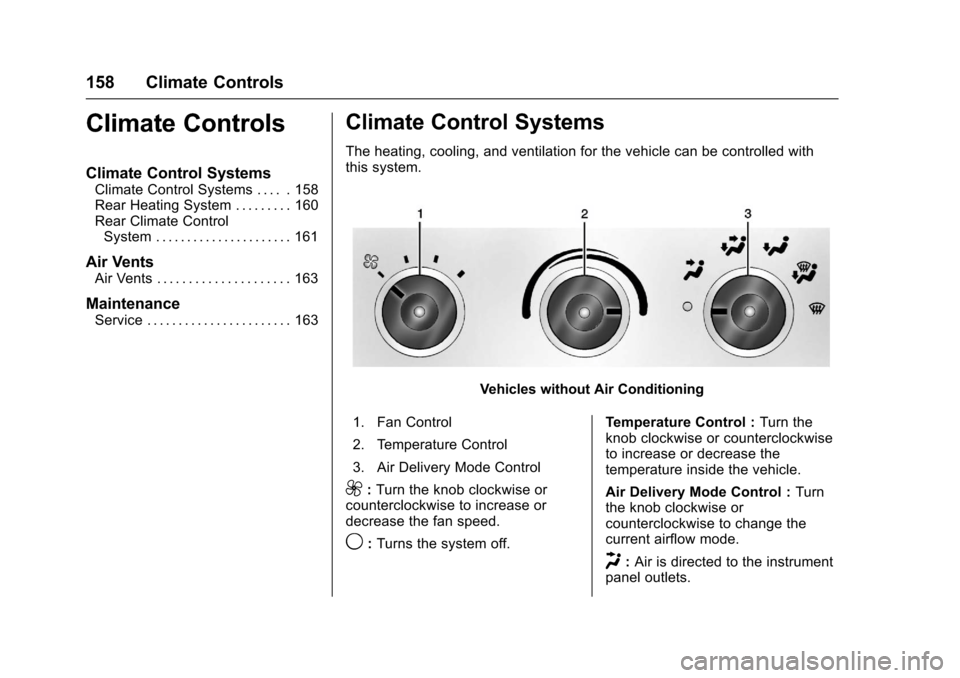
The heating, cooling, and ventilation for the vehicle can be controlled withthis system.
Vehicles without Air Conditioning
1. Fan Control
2. Temperature Control
3. Air Delivery Mode Control
9:Turn the knob clockwise orcounterclockwise to increase ordecrease the fan speed.
9:Turns the system off.
Te m p e r a t u r e C o n t r o l :Turn theknob clockwise or counterclockwiseto increase or decrease thetemperature inside the vehicle.
Air Delivery Mode Control :Turnthe knob clockwise orcounterclockwise to change thecurrent airflow mode.
H:Air is directed to the instrumentpanel outlets.
Page 164 of 346
Chevrolet Express Owner Manual (GMNA-Localizing-U.S./Canada/Mexico-9967827) - 2017 - crc - 5/2/16
Climate Controls 163
2:Air is directed to the flooroutlets.
Be sure to keep the area under thefront seats clear of any objects sothat the air inside of the vehicle cancirculate effectively.
For information on how to use themain climate control system, seeClimate Control Systems0158.Forinformation on ventilation, seeAirVents0163.
Air Vents
Use the outlets located near thecenter and on the sides of theinstrument panel to change thedirection of airflow.
Operation Tips
.Clear away any ice, snow orleaves from the air inlets at thebase of the windshield that mayblock the flow of air into thevehicle.
.Use of non-GM approved hooddeflectors may adversely affectthe performance of the system.
.Keep the path under the frontseats clear of objects to helpcirculate the air inside of thevehicle more effectively.
Maintenance
Service
All vehicles have a label underhoodthat identifies the refrigerant used inthe vehicle. The refrigerant systemshould only be serviced by trainedand certified technicians. The airconditioning evaporator shouldnever be repaired or replaced byone from a salvage vehicle.It should only be replaced by a newevaporator to ensure proper andsafe operation.
During service, all refrigerantsshould be reclaimed with properequipment. Venting refrigerantsdirectly to the atmosphere is harmfulto the environment and may alsocreate unsafe conditions based oninhalation, combustion, frostbite,or other health-based concerns.