engine CHEVROLET EXPRESS CARGO VAN 2017 1.G Owners Manual
[x] Cancel search | Manufacturer: CHEVROLET, Model Year: 2017, Model line: EXPRESS CARGO VAN, Model: CHEVROLET EXPRESS CARGO VAN 2017 1.GPages: 346, PDF Size: 6.54 MB
Page 3 of 346
Chevrolet Express Owner Manual (GMNA-Localizing-U.S./Canada/Mexico-9967827) - 2017 - crc - 5/2/16
2 Introduction
Introduction
The names, logos, emblems,slogans, vehicle model names, andvehicle body designs appearing inthis manual including, but not limitedto, GM, the GM logo, CHEVROLET,the CHEVROLET Emblem, andEXPRESS are trademarks and/orservice marks of General MotorsLLC, its subsidiaries, affiliates,or licensors.
For vehicles first sold in Canada,substitute the name“GeneralMotors of Canada Company”forChevrolet Motor Division wherever itappears in this manual.
This manual describes features thatmay or may not be on the vehiclebecause of optional equipment thatwas not purchased on the vehicle,model variants, countryspecifications, features/applicationsthat may not be available in yourregion, or changes subsequent tothe printing of this owner manual.
If the vehicle has the Duramax®
Diesel engine, see the Duramaxdiesel supplement for additional andspecific information on this engine.
If the vehicle has the CNG engine,see the Express/Savana CNGCompressed Natural Gassupplement for additional andspecific information on this engine.
Refer to the purchasedocumentation relating to yourspecific vehicle to confirm thefeatures.
Keep this manual in the vehicle forquick reference.
Canadian Vehicle Owners
AFrenchlanguagemanualcanbeobtained from your dealer, atwww.helminc.com, or from:
Propriétaires Canadiens
On peut obtenir un exemplaire dece guide en français auprès duconcessionnaire ou à l'adressesuivante:
Helm, IncorporatedAttention: Customer Service47911 Halyard DrivePlymouth, MI 48170USA
Using this Manual
To q u i c k l y l o c a t e i n f o r m a t i o n a b o u tthe vehicle, use the Index in theback of the manual. It is analphabetical list of what is in themanual and the page number whereit can be found.
Litho in U.S.A.Part No. 23213070 A First Printing©2016 General Motors LLC. All Rights Reserved.
Page 4 of 346
Chevrolet Express Owner Manual (GMNA-Localizing-U.S./Canada/Mexico-9967827) - 2017 - crc - 5/2/16
Introduction 3
Danger, Warning, and
Caution
Warning messages found on vehiclelabels and in this manual describehazards and what to do to avoid orreduce them.
{Danger
Danger indicates a hazard with a
high level of risk which will result
in serious injury or death.
{Warning
Warning indicates a hazard that
could result in injury or death.
Caution
Caution indicates a hazard that
could result in property or vehicle
damage.
Acirclewithaslashthroughitisasafety symbol which means“DoNot,”“Do not do this,”or“Do not letthis happen.”
Symbols
The vehicle has components andlabels that use symbols instead oftext. Symbols are shown along withthe text describing the operation orinformation relating to a specificcomponent, control, message,gauge, or indicator.
M:Shown when the ownermanual has additional instructionsor information.
*:Shown when the servicemanual has additional instructionsor information.
0:Shown when there is moreinformation on another page—“see page.”
Vehicle Symbol Chart
Here are some additional symbolsthat may be found on the vehicleand what they mean. For moreinformation on the symbol, refer tothe Index.
9:Airbag Readiness Light
#:Air Conditioning
!:Antilock Brake System (ABS)
%:Audio Steering Wheel Controlsor OnStar®(if equipped)
J:Brake System Warning Light
":Charging System
I:Cruise Control
`:Do Not Puncture
^:Do Not Service
B:Engine Coolant Temperature
O:Exterior Lamps
_:Flame/Fire Prohibited
.:Fuel Gauge
+:Fuses
3:Headlamp High/Low-BeamChanger
Page 6 of 346
Chevrolet Express Owner Manual (GMNA-Localizing-U.S./Canada/Mexico-9967827) - 2017 - crc - 5/2/16
In Brief 5
In Brief
Instrument Panel
Instrument Panel . . . . . . . . . . . . . . . . 6
Initial Drive Information
Initial Drive Information . . . . . . . . . . 8Remote Keyless Entry (RKE)System . . . . . . . . . . . . . . . . . . . . . . . . 8Remote Vehicle Start . . . . . . . . . . . 8Door Locks . . . . . . . . . . . . . . . . . . . . . 9Windows . . . . . . . . . . . . . . . . . . . . . . . . 9Seat Adjustment . . . . . . . . . . . . . . . 10Safety Belts . . . . . . . . . . . . . . . . . . . . 11Airbag On-Off Switch . . . . . . . . . . 11Mirror Adjustment . . . . . . . . . . . . . . 12Steering Wheel Adjustment . . . . 13Interior Lighting . . . . . . . . . . . . . . . . 13Exterior Lighting . . . . . . . . . . . . . . . 14Windshield Wiper/Washer . . . . . . 14Climate Controls . . . . . . . . . . . . . . . 15Transmission . . . . . . . . . . . . . . . . . . 16
Vehicle Features
Infotainment System . . . . . . . . . . . 17Radio(s) . . . . . . . . . . . . . . . . . . . . . . . 17Satellite Radio . . . . . . . . . . . . . . . . . 18Portable Audio Devices . . . . . . . . 18Bluetooth®..................... 19Steering Wheel Controls . . . . . . . 19
Cruise Control . . . . . . . . . . . . . . . . . 19Rear Vision Camera (RVC) . . . . 20Parking Assist . . . . . . . . . . . . . . . . . 20Power Outlets . . . . . . . . . . . . . . . . . 20
Performance and Maintenance
Traction Control/ElectronicStability Control . . . . . . . . . . . . . . 20Tire Pressure Monitor . . . . . . . . . . 21Fuel . . . . . . . . . . . . . . . . . . . . . . . . . . . 21E85 or FlexFuel . . . . . . . . . . . . . . . . 21Engine Oil Life System . . . . . . . . 22Driving for Better FuelEconomy . . . . . . . . . . . . . . . . . . . . . 22Roadside AssistanceProgram . . . . . . . . . . . . . . . . . . . . . . 22
Page 8 of 346

Chevrolet Express Owner Manual (GMNA-Localizing-U.S./Canada/Mexico-9967827) - 2017 - crc - 5/2/16
In Brief 7
1.Air Vents0163.
2. Driver Information Center (DIC)Buttons (Out of View). SeeDriver Information Center(DIC)0108.
3. Turn Signal Lever. SeeTu r nand Lane-ChangeSignals0128.
Windshield Wiper/Washer089.
4.Horn089.
5.Hazard WarningFlashers0128.
6.Instrument Cluster095.
7. Shift Lever. SeeAutomaticTr a n s m i s s i o n0183.
Manual Mode0186(IfEquipped).
8.Climate ControlSystems0158.
9.Infotainment0132.
10.Power Outlets093.
11 . U S B P o r t ( I f E q u i p p e d ) . S e eAuxiliary Devices0146.
12. Power Outlet 110 VoltAlternating Current. SeePowerOutlets093.
13.Rear Heating System0160(If Equipped).
14. Passenger Airbag On-OffSwitch (If Equipped). SeeAirbag On-Off Switch062.
15.Tr a c t i o n C o n t r o l / E l e c t r o n i cStability Control0190(If Equipped).
16. Tow/Haul Mode Button(If Equipped). SeeTo w / H a u lMode0187.
17.Steering Wheel Controls088(If Equipped).
18.Steering Wheel Adjustment088(Out of View),(If Equipped).
19. Hood Release. SeeHood0217.
20.Cruise Control0192(If Equipped).
Fast Idle System0178(If Equipped).
21.Parking Brake0189.
22. Data Link Connector (DLC)(Out of View). SeeMalfunctionIndicator Lamp (Check EngineLight)0102.
23.Instrument Panel IlluminationControl0129.
Dome Lamp Override. SeeDome Lamps0129.
24.Exterior Lamp Controls0125.
Page 9 of 346
Chevrolet Express Owner Manual (GMNA-Localizing-U.S./Canada/Mexico-9967827) - 2017 - crc - 5/2/16
8 In Brief
Initial Drive
Information
This section provides a briefoverview about some of theimportant features that may or maynot be on your specific vehicle.
For more detailed information, referto each of the features which can befound later in this owner manual.
Remote Keyless Entry
(RKE) System
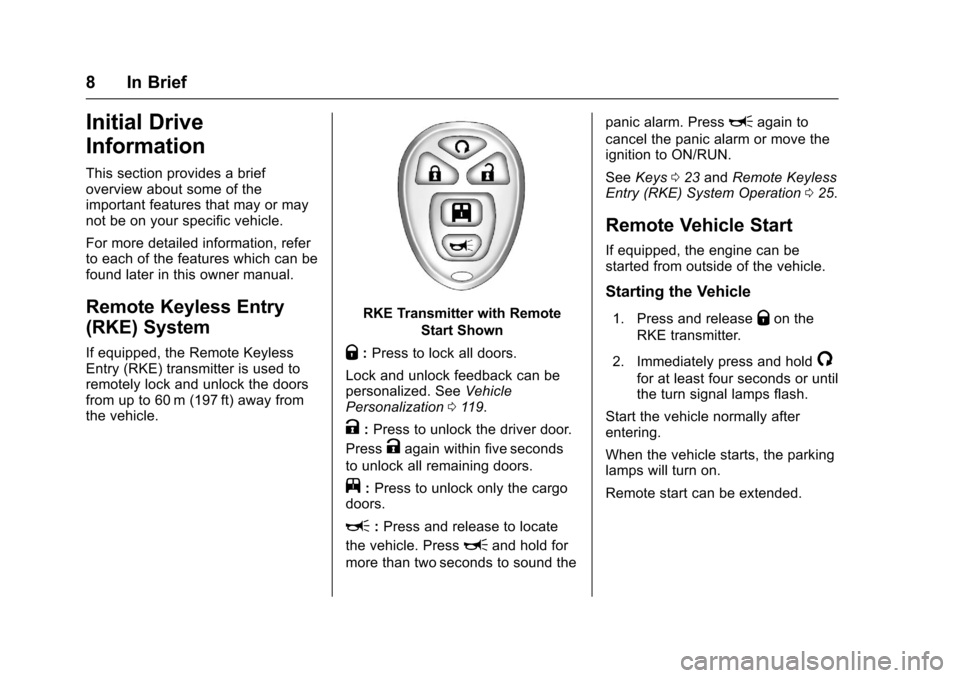
If equipped, the Remote KeylessEntry (RKE) transmitter is used toremotely lock and unlock the doorsfrom up to 60 m (197 ft) away fromthe vehicle.
RKE Transmitter with Remote
Start Shown
Q:Press to lock all doors.
Lock and unlock feedback can bepersonalized. SeeVehiclePersonalization011 9.
K:Press to unlock the driver door.
PressKagain within five seconds
to unlock all remaining doors.
j:Press to unlock only the cargodoors.
L:Press and release to locate
the vehicle. PressLand hold for
more than two seconds to sound the
panic alarm. PressLagain to
cancel the panic alarm or move theignition to ON/RUN.
SeeKeys023andRemote KeylessEntry (RKE) System Operation025.
Remote Vehicle Start
If equipped, the engine can bestarted from outside of the vehicle.
Starting the Vehicle
1. Press and releaseQon the
RKE transmitter.
2. Immediately press and hold/
for at least four seconds or untilthe turn signal lamps flash.
Start the vehicle normally afterentering.
When the vehicle starts, the parkinglamps will turn on.
Remote start can be extended.
Page 23 of 346
Chevrolet Express Owner Manual (GMNA-Localizing-U.S./Canada/Mexico-9967827) - 2017 - crc - 5/2/16
22 In Brief
Engine Oil Life System
The engine oil life system calculatesengine oil life based on vehicle useand displays a DIC message whenit is necessary to change the engineoil and filter. The oil life systemshould be reset to 100% onlyfollowing an oil change.
Resetting the Oil Life System
1. Turn the ignition to ON/RUN,with the engine off.
2. Fully press and release theaccelerator pedal slowly threetimes within five seconds.
3. Turn the key to LOCK/OFF.
SeeEngine Oil Life System0221.
Driving for Better Fuel
Economy
Driving habits can affect fuelmileage. Here are some driving tipsto get the best fuel economypossible.
.Avoid fast starts and acceleratesmoothly.
.Brake gradually and avoidabrupt stops.
.Avoid idling the engine for longperiods of time.
.When road and weatherconditions are appropriate, usecruise control.
.Always follow posted speedlimits or drive more slowly whenconditions require.
.Keep vehicle tires properlyinflated.
.Combine several trips into asingle trip.
.Replace the vehicle's tires withthe same TPC Spec numbermolded into the tire's sidewallnear the size.
.Follow recommended scheduledmaintenance.
Roadside Assistance
Program
U.S.: 1-800-243-8872
TTY Users (U.S. Only):1-888-889-2438
Canada: 1-800-268-6800
New Chevrolet owners areautomatically enrolled in theRoadside Assistance Program.
SeeRoadside AssistanceProgram0316.
Page 25 of 346
Chevrolet Express Owner Manual (GMNA-Localizing-U.S./Canada/Mexico-9967827) - 2017 - crc - 5/2/16
24 Keys, Doors, and Windows
{Warning
If the key is unintentionally
rotated while the vehicle is
running, the ignition could be
moved out of the RUN position.
This could be caused by heavy
items hanging from the key ring,
or by large or long items attached
to the key ring that could be
contacted by the driver or
steering wheel. If the ignition
moves out of the RUN position,
the engine will shut off, braking
and steering power assist may be
(Continued)
Warning (Continued)
impacted, and airbags may not
deploy. To reduce the risk of
unintentional rotation of the
ignition key, do not change the
way the ignition key and Remote
Keyless Entry (RKE) transmitter,
if equipped, are connected to the
provided key rings.
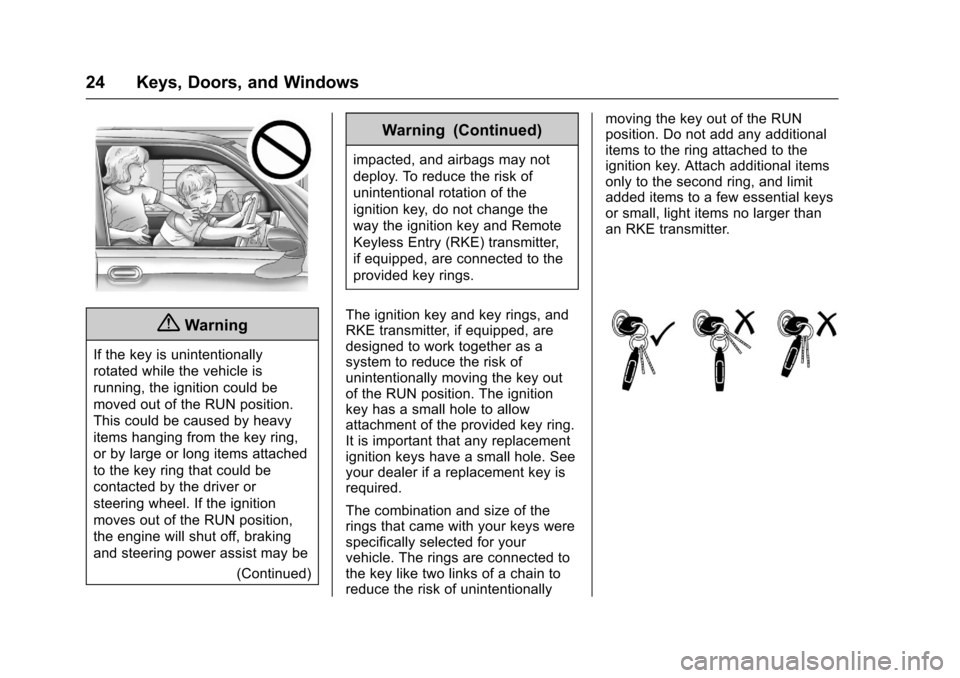
The ignition key and key rings, andRKE transmitter, if equipped, aredesigned to work together as asystem to reduce the risk ofunintentionally moving the key outof the RUN position. The ignitionkey has a small hole to allowattachment of the provided key ring.It is important that any replacementignition keys have a small hole. Seeyour dealer if a replacement key isrequired.
The combination and size of therings that came with your keys werespecifically selected for yourvehicle. The rings are connected tothe key like two links of a chain toreduce the risk of unintentionally
moving the key out of the RUNposition. Do not add any additionalitems to the ring attached to theignition key. Attach additional itemsonly to the second ring, and limitadded items to a few essential keysor small, light items no larger thanan RKE transmitter.
Page 27 of 346
Chevrolet Express Owner Manual (GMNA-Localizing-U.S./Canada/Mexico-9967827) - 2017 - crc - 5/2/16
26 Keys, Doors, and Windows
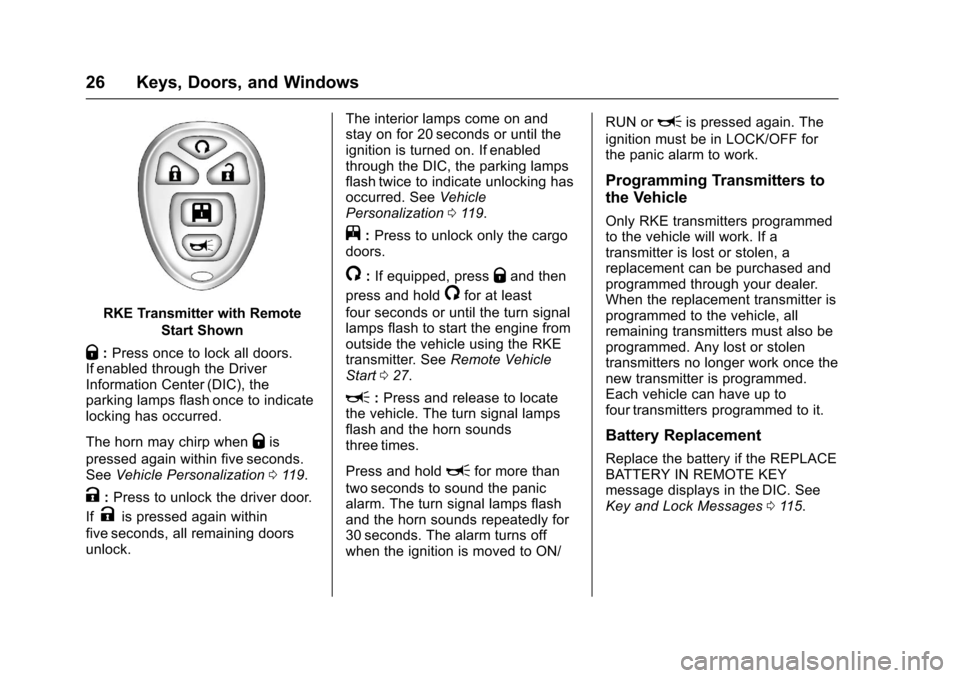
RKE Transmitter with Remote
Start Shown
Q:Press once to lock all doors.If enabled through the DriverInformation Center (DIC), theparking lamps flash once to indicatelocking has occurred.
The horn may chirp whenQis
pressed again within five seconds.SeeVehicle Personalization011 9.
K:Press to unlock the driver door.
IfKis pressed again within
five seconds, all remaining doorsunlock.
The interior lamps come on andstay on for 20 seconds or until theignition is turned on. If enabledthrough the DIC, the parking lampsflash twice to indicate unlocking hasoccurred. SeeVehiclePersonalization011 9.
j:Press to unlock only the cargodoors.
/:If equipped, pressQand then
press and hold/for at least
four seconds or until the turn signallamps flash to start the engine fromoutside the vehicle using the RKEtransmitter. SeeRemote VehicleStart027.
L:Press and release to locatethe vehicle. The turn signal lampsflash and the horn soundsthree times.
Press and holdLfor more than
two seconds to sound the panicalarm. The turn signal lamps flashand the horn sounds repeatedly for30 seconds. The alarm turns offwhen the ignition is moved to ON/
RUN orLis pressed again. The
ignition must be in LOCK/OFF forthe panic alarm to work.
Programming Transmitters to
the Vehicle
Only RKE transmitters programmedto the vehicle will work. If atransmitter is lost or stolen, areplacement can be purchased andprogrammed through your dealer.When the replacement transmitter isprogrammed to the vehicle, allremaining transmitters must also beprogrammed. Any lost or stolentransmitters no longer work once thenew transmitter is programmed.Each vehicle can have up tofour transmitters programmed to it.
Battery Replacement
Replace the battery if the REPLACEBATTERY IN REMOTE KEYmessage displays in the DIC. SeeKey and Lock Messages011 5.
Page 28 of 346
Chevrolet Express Owner Manual (GMNA-Localizing-U.S./Canada/Mexico-9967827) - 2017 - crc - 5/2/16
Keys, Doors, and Windows 27
Caution
When replacing the battery, do
not touch any of the circuitry on
the transmitter. Static from your
body could damage the
transmitter.
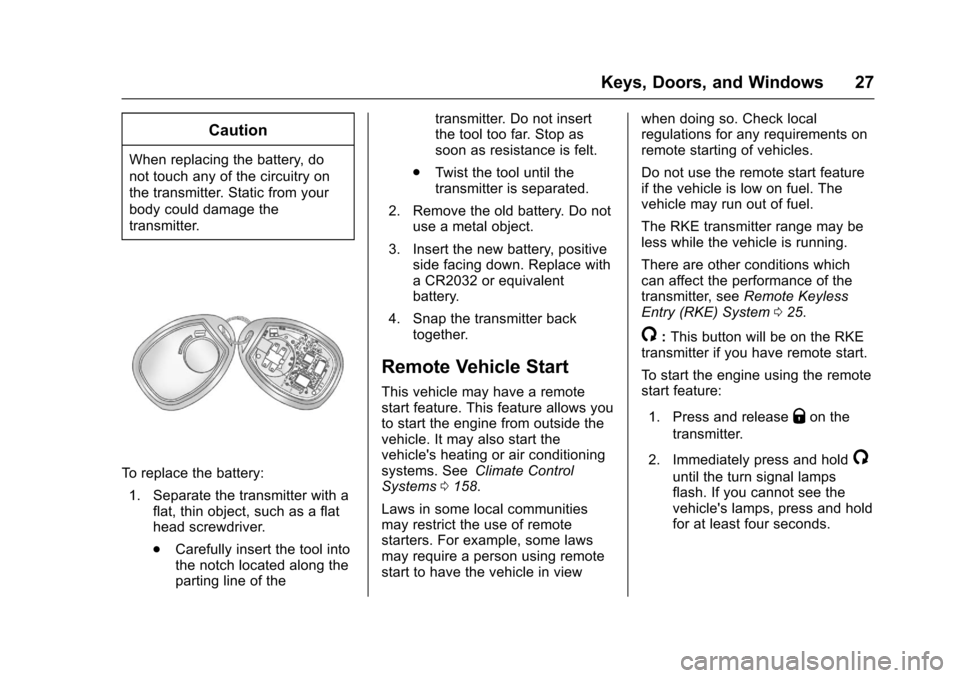
To r e p l a c e t h e b a t t e r y :
1. Separate the transmitter with aflat, thin object, such as a flathead screwdriver.
.Carefully insert the tool intothe notch located along theparting line of the
transmitter. Do not insertthe tool too far. Stop assoon as resistance is felt.
.Tw i s t t h e t o o l u n t i l t h etransmitter is separated.
2. Remove the old battery. Do notuse a metal object.
3. Insert the new battery, positiveside facing down. Replace withaCR2032orequivalentbattery.
4. Snap the transmitter backtogether.
Remote Vehicle Start
This vehicle may have a remotestart feature. This feature allows youto start the engine from outside thevehicle. It may also start thevehicle's heating or air conditioningsystems. SeeClimate ControlSystems0158.
Laws in some local communitiesmay restrict the use of remotestarters. For example, some lawsmay require a person using remotestart to have the vehicle in view
when doing so. Check localregulations for any requirements onremote starting of vehicles.
Do not use the remote start featureif the vehicle is low on fuel. Thevehicle may run out of fuel.
The RKE transmitter range may beless while the vehicle is running.
There are other conditions whichcan affect the performance of thetransmitter, seeRemote KeylessEntry (RKE) System025.
/:This button will be on the RKEtransmitter if you have remote start.
To s t a r t t h e e n g i n e u s i n g t h e r e m o t estart feature:
1. Press and releaseQon the
transmitter.
2. Immediately press and hold/
until the turn signal lampsflash. If you cannot see thevehicle's lamps, press and holdfor at least four seconds.
Page 29 of 346
Chevrolet Express Owner Manual (GMNA-Localizing-U.S./Canada/Mexico-9967827) - 2017 - crc - 5/2/16
28 Keys, Doors, and Windows
When the engine starts, theparking lamps will turn on andremain on while the engine isrunning. The doors will belocked.
The engine will continue to runfor 10 minutes. After30 seconds, repeat the steps ifa10-minuteextensionisdesired. Remote start can beextended only once.
After entering the vehicle during aremote start, insert and turn the keyto ON/RUN to drive the vehicle.
The maximum number of remotestarts between ignition cycles withthe key is two.
If the remote start procedure is usedagain before the first 10 minute timeframe has ended, the first10 minutes will immediately expireand the second 10 minute timeframe will start.
After the engine has been remotestarted two times, the ignition switchmust be turned to ON/RUN and then
back to LOCK/OFF using the keybefore the remote start procedurecan be used again.
To c a n c e l a r e m o t e s t a r t d o a n y o fthe following:
.Press and hold/until the
parking lamps turn off.
.Turn on the hazard warningflashers.
.Turn the ignition on and thenback off.
The remote vehicle start feature willnot operate if:
.The key is in the ignition.
.The hood is open.
.The hazard warning flashersare on.
.There is an emission controlsystem malfunction. SeeMalfunction Indicator Lamp(Check Engine Light)0102.
.The engine coolant temperatureis too high.
.The oil pressure is low.
.Tw o r e m o t e v e h i c l e s t a r t s h a v ealready been provided.
Door Locks
{Warning
Unlocked doors can be
dangerous.
.Passengers, especiallychildren, can easily openthe doors and fall out of amoving vehicle. When adoor is locked, the handlewill not open it. The chanceof being thrown out of thevehicle in a crash isincreased if the doors arenot locked. So, allpassengers should wearsafety belts properly and thedoors should be lockedwhenever the vehicle isdriven.
.Yo u n g c h i l d r e n w h o g e t i n t ounlocked vehicles may beunable to get out. A childcan be overcome by
(Continued)