window CHEVROLET EXPRESS CARGO VAN 2017 1.G Owners Manual
[x] Cancel search | Manufacturer: CHEVROLET, Model Year: 2017, Model line: EXPRESS CARGO VAN, Model: CHEVROLET EXPRESS CARGO VAN 2017 1.GPages: 346, PDF Size: 6.54 MB
Page 2 of 346
Chevrolet Express Owner Manual (GMNA-Localizing-U.S./Canada/Mexico-9967827) - 2017 - crc - 5/2/16
ContentsIntroduction . . . . . . . . . . . . . . . . . . . . . . 2
In Brief . . . . . . . . . . . . . . . . . . . . . . . . . . . 5
Keys, Doors, and Windows . . . . . 23
Seats and Restraints . . . . . . . . . . . 40
Storage . . . . . . . . . . . . . . . . . . . . . . . . . 85
Instruments and Controls . . . . . . . 87
Lighting . . . . . . . . . . . . . . . . . . . . . . . 125
Infotainment System . . . . . . . . . . 132
Climate Controls . . . . . . . . . . . . . . 158
Driving and Operating . . . . . . . . . 164
Vehicle Care . . . . . . . . . . . . . . . . . . 214
Service and Maintenance . . . . . 296
Te c h n i c a l D a t a . . . . . . . . . . . . . . . . 3 0 8
Customer Information . . . . . . . . . 312
Reporting Safety Defects . . . . . . 323
OnStar . . . . . . . . . . . . . . . . . . . . . . . . 326
Index . . . . . . . . . . . . . . . . . . . . 336
Page 6 of 346
Chevrolet Express Owner Manual (GMNA-Localizing-U.S./Canada/Mexico-9967827) - 2017 - crc - 5/2/16
In Brief 5
In Brief
Instrument Panel
Instrument Panel . . . . . . . . . . . . . . . . 6
Initial Drive Information
Initial Drive Information . . . . . . . . . . 8Remote Keyless Entry (RKE)System . . . . . . . . . . . . . . . . . . . . . . . . 8Remote Vehicle Start . . . . . . . . . . . 8Door Locks . . . . . . . . . . . . . . . . . . . . . 9Windows . . . . . . . . . . . . . . . . . . . . . . . . 9Seat Adjustment . . . . . . . . . . . . . . . 10Safety Belts . . . . . . . . . . . . . . . . . . . . 11Airbag On-Off Switch . . . . . . . . . . 11Mirror Adjustment . . . . . . . . . . . . . . 12Steering Wheel Adjustment . . . . 13Interior Lighting . . . . . . . . . . . . . . . . 13Exterior Lighting . . . . . . . . . . . . . . . 14Windshield Wiper/Washer . . . . . . 14Climate Controls . . . . . . . . . . . . . . . 15Transmission . . . . . . . . . . . . . . . . . . 16
Vehicle Features
Infotainment System . . . . . . . . . . . 17Radio(s) . . . . . . . . . . . . . . . . . . . . . . . 17Satellite Radio . . . . . . . . . . . . . . . . . 18Portable Audio Devices . . . . . . . . 18Bluetooth®..................... 19Steering Wheel Controls . . . . . . . 19
Cruise Control . . . . . . . . . . . . . . . . . 19Rear Vision Camera (RVC) . . . . 20Parking Assist . . . . . . . . . . . . . . . . . 20Power Outlets . . . . . . . . . . . . . . . . . 20
Performance and Maintenance
Traction Control/ElectronicStability Control . . . . . . . . . . . . . . 20Tire Pressure Monitor . . . . . . . . . . 21Fuel . . . . . . . . . . . . . . . . . . . . . . . . . . . 21E85 or FlexFuel . . . . . . . . . . . . . . . . 21Engine Oil Life System . . . . . . . . 22Driving for Better FuelEconomy . . . . . . . . . . . . . . . . . . . . . 22Roadside AssistanceProgram . . . . . . . . . . . . . . . . . . . . . . 22
Page 10 of 346
Chevrolet Express Owner Manual (GMNA-Localizing-U.S./Canada/Mexico-9967827) - 2017 - crc - 5/2/16
In Brief 9
Canceling a Remote Start
To c a n c e l a r e m o t e s t a r t , d o o n e o fthe following:
.Press and hold/until the
parking lamps turn off.
.Turn on the hazard warningflashers.
.Turn the vehicle on and then off.
SeeRemote Vehicle Start027.
Door Locks
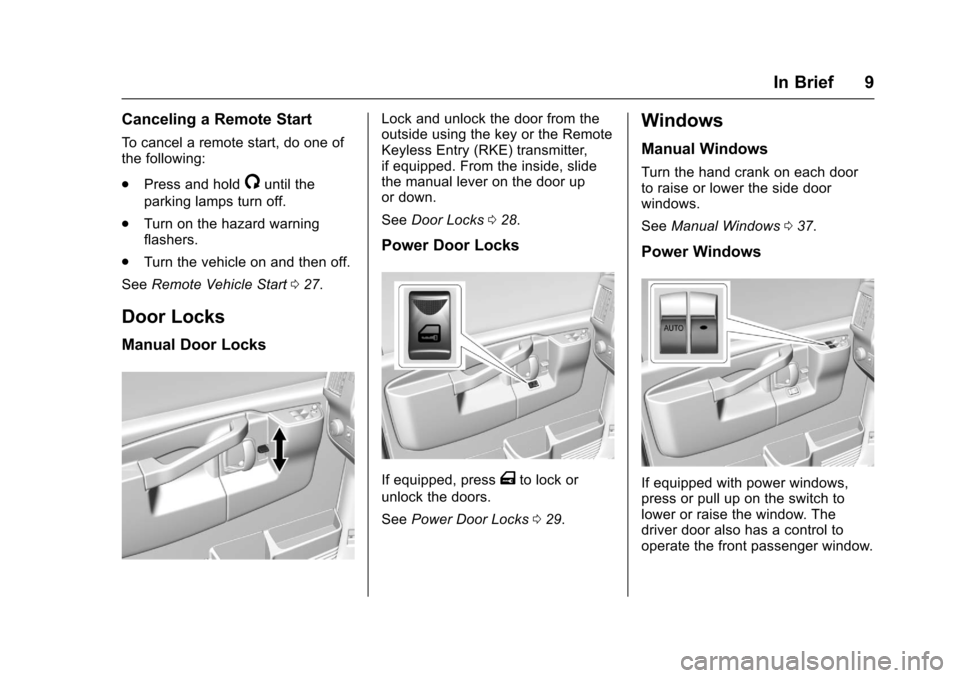
Manual Door Locks
Lock and unlock the door from theoutside using the key or the RemoteKeyless Entry (RKE) transmitter,if equipped. From the inside, slidethe manual lever on the door upor down.
SeeDoor Locks028.
Power Door Locks
If equipped, pressTto lock or
unlock the doors.
SeePower Door Locks029.
Windows
Manual Windows
Turn the hand crank on each doorto raise or lower the side doorwindows.
SeeManual Windows037.
Power Windows
If equipped with power windows,press or pull up on the switch tolower or raise the window. Thedriver door also has a control tooperate the front passenger window.
Page 11 of 346
Chevrolet Express Owner Manual (GMNA-Localizing-U.S./Canada/Mexico-9967827) - 2017 - crc - 5/2/16
10 In Brief
Express-Down
The driver window switch also hasan express-down feature that allowsthe window to be lowered withoutholding the switch. Press fully andrelease the window switch markedAUTO to activate the express-downmode. This mode can be canceledat any time by pulling up on theswitch. To open the window partway, lightly tap the switch until thewindow is at the desired position.
SeePower Windows037.
Seat Adjustment
Manual Seats
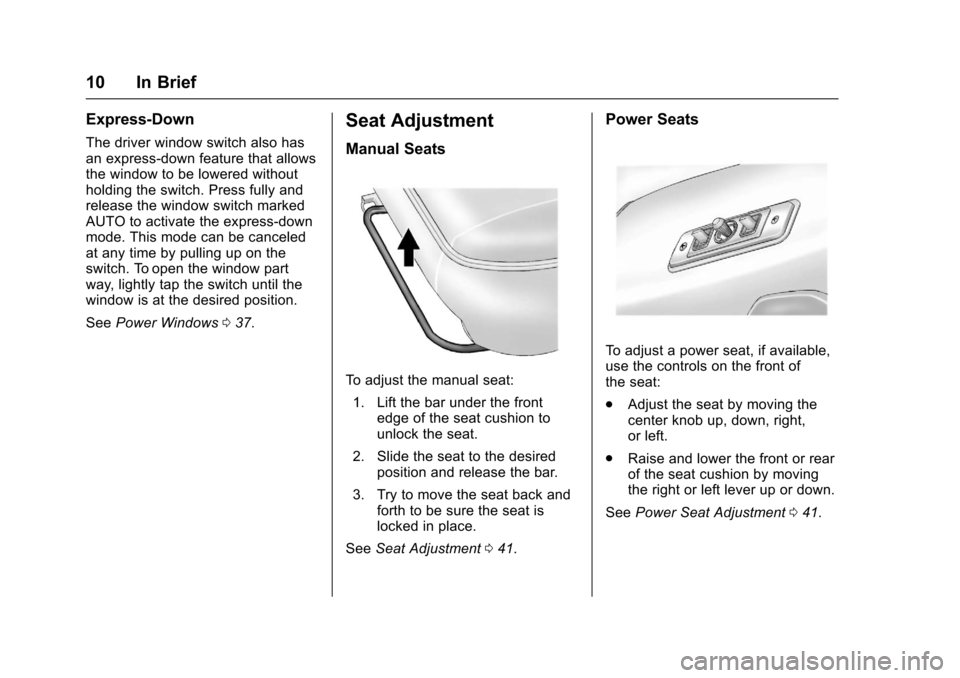
To a d j u s t t h e m a n u a l s e a t :
1. Lift the bar under the frontedge of the seat cushion tounlock the seat.
2. Slide the seat to the desiredposition and release the bar.
3. Try to move the seat back andforth to be sure the seat islocked in place.
SeeSeat Adjustment041.
Power Seats
To a d j u s t a p o w e r s e a t , i f a v a i l a b l e ,use the controls on the front ofthe seat:
.Adjust the seat by moving thecenter knob up, down, right,or left.
.Raise and lower the front or rearof the seat cushion by movingthe right or left lever up or down.
SeePower Seat Adjustment041.
Page 17 of 346
Chevrolet Express Owner Manual (GMNA-Localizing-U.S./Canada/Mexico-9967827) - 2017 - crc - 5/2/16
16 In Brief
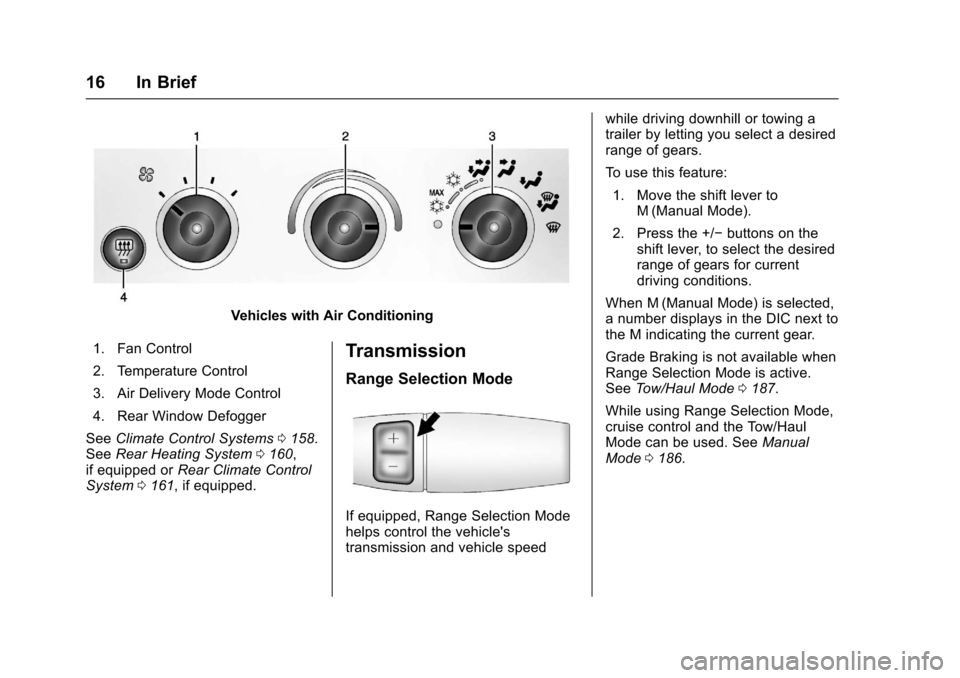
Vehicles with Air Conditioning
1. Fan Control
2. Temperature Control
3. Air Delivery Mode Control
4. Rear Window Defogger
SeeClimate Control Systems0158.SeeRear Heating System0160,if equipped orRear Climate ControlSystem0161,ifequipped.
Transmission
Range Selection Mode
If equipped, Range Selection Modehelps control the vehicle'stransmission and vehicle speed
while driving downhill or towing atrailer by letting you select a desiredrange of gears.
To u s e t h i s f e a t u r e :
1. Move the shift lever toM(Manual Mode).
2. Press the +/✓buttons on theshift lever, to select the desiredrange of gears for currentdriving conditions.
When M (Manual Mode) is selected,anumberdisplaysintheDICnexttothe M indicating the current gear.
Grade Braking is not available whenRange Selection Mode is active.SeeTo w / H a u l M o d e0187.
While using Range Selection Mode,cruise control and the Tow/HaulMode can be used. SeeManualMode0186.
Page 24 of 346
Chevrolet Express Owner Manual (GMNA-Localizing-U.S./Canada/Mexico-9967827) - 2017 - crc - 5/2/16
Keys, Doors, and Windows 23
Keys, Doors, and
Windows
Keys and Locks
Keys . . . . . . . . . . . . . . . . . . . . . . . . . . . 23Remote Keyless Entry (RKE)System . . . . . . . . . . . . . . . . . . . . . . . 25Remote Keyless Entry (RKE)System Operation . . . . . . . . . . . . 25Remote Vehicle Start . . . . . . . . . . 27Door Locks . . . . . . . . . . . . . . . . . . . . 28Power Door Locks . . . . . . . . . . . . . 29Cargo Door Relocking . . . . . . . . . 29Delayed Locking . . . . . . . . . . . . . . . 29Automatic Door Locks . . . . . . . . . 30Lockout Protection . . . . . . . . . . . . . 30Safety Locks . . . . . . . . . . . . . . . . . . . 30
Doors
Side Door (60/40Swing-Out) . . . . . . . . . . . . . . . . . . . 31Sliding Door . . . . . . . . . . . . . . . . . . . 32Rear Doors . . . . . . . . . . . . . . . . . . . . 32
Vehicle Security
Vehicle Security . . . . . . . . . . . . . . . . 33Immobilizer . . . . . . . . . . . . . . . . . . . . 33Immobilizer Operation . . . . . . . . . 33
Exterior Mirrors
Convex Mirrors . . . . . . . . . . . . . . . . 35Manual Mirrors . . . . . . . . . . . . . . . . . 35Trailer-Tow Mirrors . . . . . . . . . . . . . 35Power Mirrors . . . . . . . . . . . . . . . . . . 35Heated Mirrors . . . . . . . . . . . . . . . . . 36
Interior Mirrors
Interior Rearview Mirrors . . . . . . . 36Manual Rearview Mirror . . . . . . . . 36
Windows
Windows . . . . . . . . . . . . . . . . . . . . . . . 36Manual Windows . . . . . . . . . . . . . . 37Power Windows . . . . . . . . . . . . . . . 37Swing-Out Windows . . . . . . . . . . . 37Enhanced Technology Glass . . . 38Sun Visors . . . . . . . . . . . . . . . . . . . . . 39
Keys and Locks
Keys
{Warning
Leaving children in a vehicle with
the ignition key is dangerous and
children or others could be
seriously injured or killed. They
could operate the power windows
or other controls or make the
vehicle move. The windows will
function with the keys in the
ignition, and children or others
could be caught in the path of a
closing window. Do not leave
children in a vehicle with the
ignition key.
Page 25 of 346
Chevrolet Express Owner Manual (GMNA-Localizing-U.S./Canada/Mexico-9967827) - 2017 - crc - 5/2/16
24 Keys, Doors, and Windows
{Warning
If the key is unintentionally
rotated while the vehicle is
running, the ignition could be
moved out of the RUN position.
This could be caused by heavy
items hanging from the key ring,
or by large or long items attached
to the key ring that could be
contacted by the driver or
steering wheel. If the ignition
moves out of the RUN position,
the engine will shut off, braking
and steering power assist may be
(Continued)
Warning (Continued)
impacted, and airbags may not
deploy. To reduce the risk of
unintentional rotation of the
ignition key, do not change the
way the ignition key and Remote
Keyless Entry (RKE) transmitter,
if equipped, are connected to the
provided key rings.
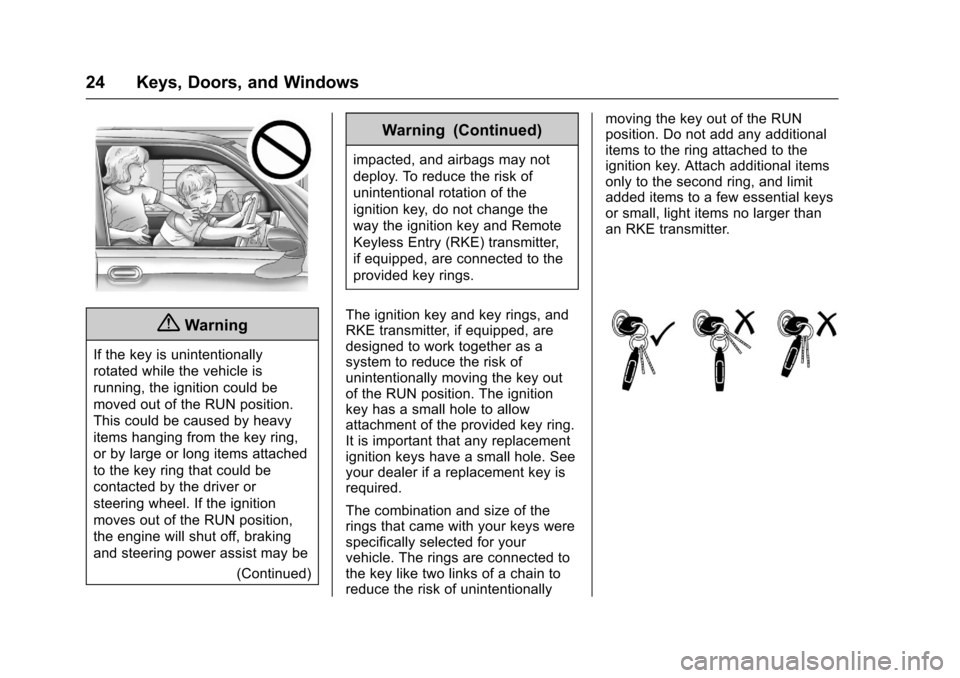
The ignition key and key rings, andRKE transmitter, if equipped, aredesigned to work together as asystem to reduce the risk ofunintentionally moving the key outof the RUN position. The ignitionkey has a small hole to allowattachment of the provided key ring.It is important that any replacementignition keys have a small hole. Seeyour dealer if a replacement key isrequired.
The combination and size of therings that came with your keys werespecifically selected for yourvehicle. The rings are connected tothe key like two links of a chain toreduce the risk of unintentionally
moving the key out of the RUNposition. Do not add any additionalitems to the ring attached to theignition key. Attach additional itemsonly to the second ring, and limitadded items to a few essential keysor small, light items no larger thanan RKE transmitter.
Page 26 of 346
Chevrolet Express Owner Manual (GMNA-Localizing-U.S./Canada/Mexico-9967827) - 2017 - crc - 5/2/16
Keys, Doors, and Windows 25
Interference from radio-frequencyidentification (RFID) tags mayprevent the key from starting thevehicle. Keep RFID tags away fromthe key when starting the vehicle.
The key is used for the ignition andall door locks.
The key has a bar-coded key tagthat the dealer or qualified locksmithcan use to make new keys. Storethis information in a safe place, notin the vehicle.
See your dealer if a replacementkey or additional key is needed.
If it becomes difficult to turn a key,inspect the key blade for debris.Periodically clean with a brushor pick.
With an active OnStar subscription,an OnStar Advisor may remotelyunlock the vehicle. SeeOnStarOverview0326.
Remote Keyless Entry
(RKE) System
SeeRadio FrequencyStatement0322.
If there is a decrease in the RemoteKeyless Entry (RKE) operatingrange:
.Check the distance. Thetransmitter may be too far fromthe vehicle.
.Check the location. Othervehicles or objects may beblocking the signal.
.Check the transmitter's battery.See“Battery Replacement”laterin this section.
.If the transmitter is still notworking correctly, see yourdealer or a qualified technicianfor service.
Remote Keyless Entry
(RKE) System Operation
If equipped, the RKE transmitterfunctions work up to 60 m (197 ft)away from the vehicle.
Other conditions can affect theperformance of the transmitter. SeeRemote Keyless Entry (RKE)System025.
Page 27 of 346
Chevrolet Express Owner Manual (GMNA-Localizing-U.S./Canada/Mexico-9967827) - 2017 - crc - 5/2/16
26 Keys, Doors, and Windows
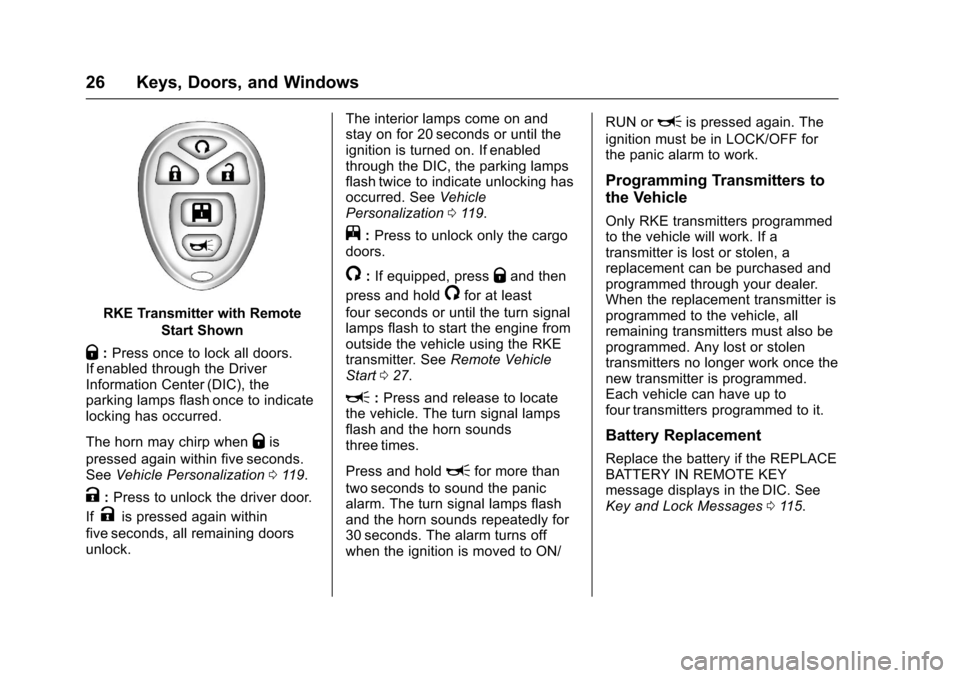
RKE Transmitter with Remote
Start Shown
Q:Press once to lock all doors.If enabled through the DriverInformation Center (DIC), theparking lamps flash once to indicatelocking has occurred.
The horn may chirp whenQis
pressed again within five seconds.SeeVehicle Personalization011 9.
K:Press to unlock the driver door.
IfKis pressed again within
five seconds, all remaining doorsunlock.
The interior lamps come on andstay on for 20 seconds or until theignition is turned on. If enabledthrough the DIC, the parking lampsflash twice to indicate unlocking hasoccurred. SeeVehiclePersonalization011 9.
j:Press to unlock only the cargodoors.
/:If equipped, pressQand then
press and hold/for at least
four seconds or until the turn signallamps flash to start the engine fromoutside the vehicle using the RKEtransmitter. SeeRemote VehicleStart027.
L:Press and release to locatethe vehicle. The turn signal lampsflash and the horn soundsthree times.
Press and holdLfor more than
two seconds to sound the panicalarm. The turn signal lamps flashand the horn sounds repeatedly for30 seconds. The alarm turns offwhen the ignition is moved to ON/
RUN orLis pressed again. The
ignition must be in LOCK/OFF forthe panic alarm to work.
Programming Transmitters to
the Vehicle
Only RKE transmitters programmedto the vehicle will work. If atransmitter is lost or stolen, areplacement can be purchased andprogrammed through your dealer.When the replacement transmitter isprogrammed to the vehicle, allremaining transmitters must also beprogrammed. Any lost or stolentransmitters no longer work once thenew transmitter is programmed.Each vehicle can have up tofour transmitters programmed to it.
Battery Replacement
Replace the battery if the REPLACEBATTERY IN REMOTE KEYmessage displays in the DIC. SeeKey and Lock Messages011 5.
Page 28 of 346
Chevrolet Express Owner Manual (GMNA-Localizing-U.S./Canada/Mexico-9967827) - 2017 - crc - 5/2/16
Keys, Doors, and Windows 27
Caution
When replacing the battery, do
not touch any of the circuitry on
the transmitter. Static from your
body could damage the
transmitter.
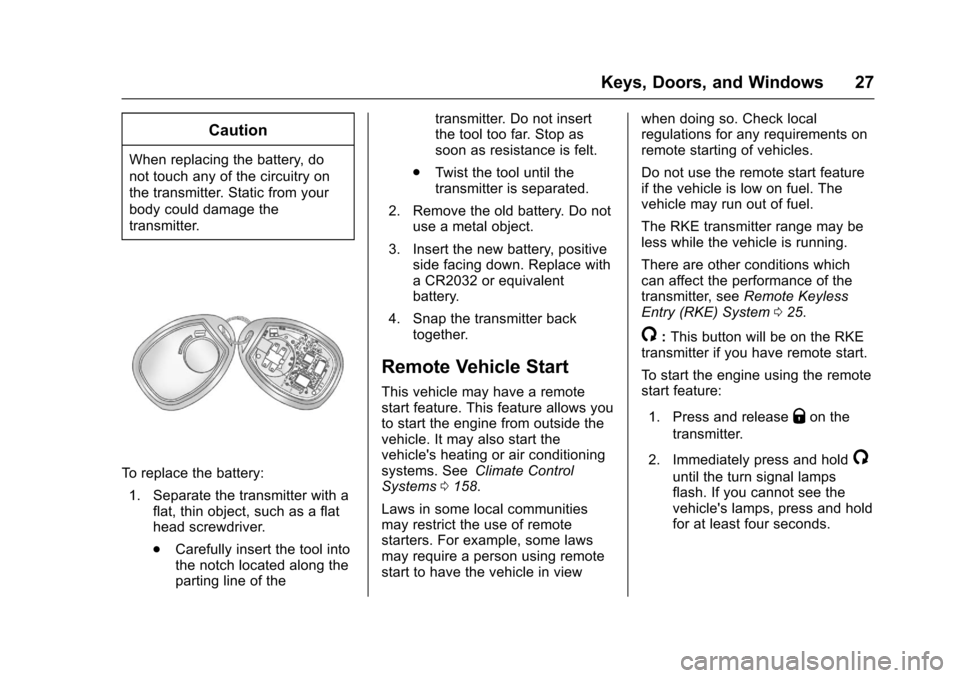
To r e p l a c e t h e b a t t e r y :
1. Separate the transmitter with aflat, thin object, such as a flathead screwdriver.
.Carefully insert the tool intothe notch located along theparting line of the
transmitter. Do not insertthe tool too far. Stop assoon as resistance is felt.
.Tw i s t t h e t o o l u n t i l t h etransmitter is separated.
2. Remove the old battery. Do notuse a metal object.
3. Insert the new battery, positiveside facing down. Replace withaCR2032orequivalentbattery.
4. Snap the transmitter backtogether.
Remote Vehicle Start
This vehicle may have a remotestart feature. This feature allows youto start the engine from outside thevehicle. It may also start thevehicle's heating or air conditioningsystems. SeeClimate ControlSystems0158.
Laws in some local communitiesmay restrict the use of remotestarters. For example, some lawsmay require a person using remotestart to have the vehicle in view
when doing so. Check localregulations for any requirements onremote starting of vehicles.
Do not use the remote start featureif the vehicle is low on fuel. Thevehicle may run out of fuel.
The RKE transmitter range may beless while the vehicle is running.
There are other conditions whichcan affect the performance of thetransmitter, seeRemote KeylessEntry (RKE) System025.
/:This button will be on the RKEtransmitter if you have remote start.
To s t a r t t h e e n g i n e u s i n g t h e r e m o t estart feature:
1. Press and releaseQon the
transmitter.
2. Immediately press and hold/
until the turn signal lampsflash. If you cannot see thevehicle's lamps, press and holdfor at least four seconds.