lock CHEVROLET HHR 2008 1.G Service Manual
[x] Cancel search | Manufacturer: CHEVROLET, Model Year: 2008, Model line: HHR, Model: CHEVROLET HHR 2008 1.GPages: 430, PDF Size: 5.63 MB
Page 122 of 430
OnStar®System
OnStar uses several innovative technologies and live
advisors to provide you with a wide range of safety,
security, information, and convenience services. If your
airbags deploy, the system is designed to make an
automatic call to OnStar Emergency advisors who can
request emergency services be sent to your location.
If you lock your keys in the vehicle, call OnStar at
1-888-4-ONSTAR and they can send a signal to unlock
your doors. If you need roadside assistance, press
the OnStar button and they can contact Roadside
Service for you.
OnStar service is provided to you subject to the OnStar
Terms and Conditions. You may cancel your OnStar
service at any time by contacting OnStar. A complete
OnStar Owner’s Guide and the OnStar Terms and
Conditions are included in the vehicle’s OnStar
Subscriber glove box literature.For more information, visit onstar.com or onstar.ca,
contact OnStar at 1-888-4-ONSTAR (1-888-466-7827)
or TTY 1-877-248-2080, or press the OnStar button
to speak with an OnStar advisor 24 hours a day, 7 days
a week.
Not all OnStar features are available on all vehicles.
To check if your vehicle is equipped to provide the
services described below, or for a full description of
OnStar services and system limitations, see the OnStar
Owner’s Guide in your glove box or visit onstar.com.OnStar Services
For new vehicles with OnStar, the Safe & Sound Plan,
or the Directions & Connections Plan is included for
one year from the date of purchase. You can extend this
plan beyond the rst year, or upgrade to the Directions
& Connections Plan. For more information, press
the OnStar button to speak with an advisor. Some
OnStar services (such as Remote Door Unlock or Stolen
Vehicle Location Assistance) may not be available
until you register with OnStar.
2-44
Page 123 of 430
Available Services with Safe & Sound Plan
Automatic Notication of Airbag Deployment
Advanced Automatic Crash Notication (AACN)
(If equipped)
Link to Emergency Services
Roadside Assistance
Stolen Vehicle Location Assistance
AccidentAssist
Remote Door Unlock/Vehicle Alert
OnStar Vehicle Diagnostics
GM Goodwrench®On Demand Diagnostics
OnStar Hands-Free Calling with 30 complimentary
minutes
OnStar Virtual Advisor (U.S. Only)
Available Services included with Directions
& Connections Plan
All Safe and Sound Plan Services
Driving Directions - Advisor delivered or OnStar
Turn-by-Turn Navigation (If equipped)
RideAssist
Information and Convenience Services
OnStar Hands-Free Calling
OnStar Hands-Free Calling allows eligible OnStar
subscribers to make and receive calls using voice
commands. Hands-Free Calling is fully integrated into
the vehicle, and can be used with OnStar Pre-Paid
Minute Packages. Hands-Free Calling may also
be linked to a Verizon Wireless service plan in the U.S.
or a Bell Mobility service plan in Canada, depending
on eligibility. To nd out more, refer to the OnStar
Owner’s Guide in the vehicle’s glove box, visit
www.onstar.com or www.onstar.ca, or speak with an
OnStar advisor by pressing the OnStar button or calling
1-888-4-ONSTAR (1-888-466-7827).
OnStar Virtual Advisor
OnStar Virtual Advisor is a feature of OnStar
Hands-Free Calling that uses your minutes to access
location-based weather, local traffic reports, and
stock quotes. By pressing the phone button and giving
a few simple voice commands, you can browse
through the various topics. See the OnStar Owner’s
Guide for more information (Only available in the
continental U.S.).
2-45
Page 126 of 430
Rear Storage Area
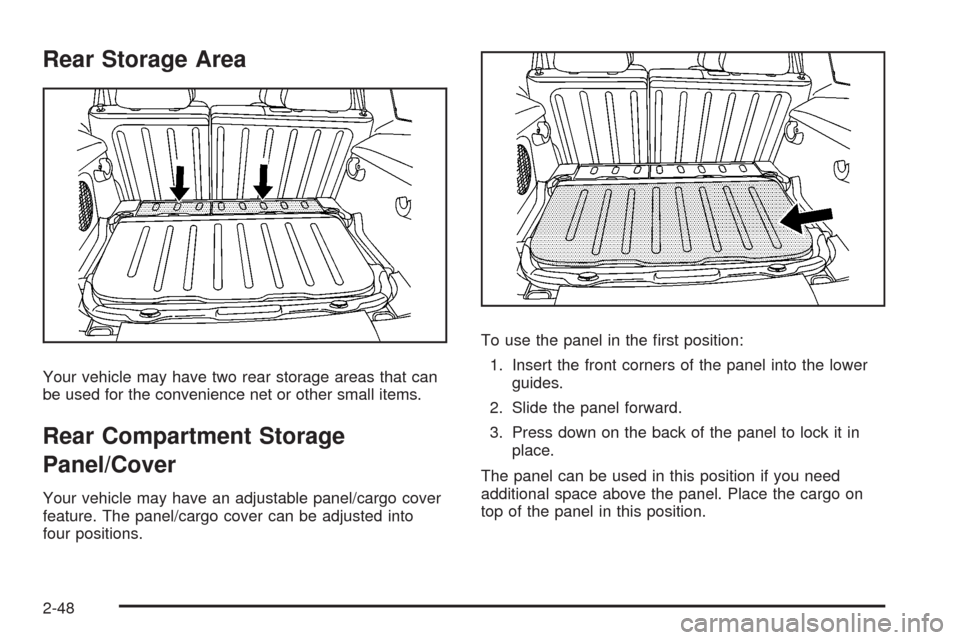
Your vehicle may have two rear storage areas that can
be used for the convenience net or other small items.
Rear Compartment Storage
Panel/Cover
Your vehicle may have an adjustable panel/cargo cover
feature. The panel/cargo cover can be adjusted into
four positions.To use the panel in the rst position:
1. Insert the front corners of the panel into the lower
guides.
2. Slide the panel forward.
3. Press down on the back of the panel to lock it in
place.
The panel can be used in this position if you need
additional space above the panel. Place the cargo on
top of the panel in this position.
2-48
Page 127 of 430
{CAUTION:
If you were to carry things on the adjustable
panel when it is in the upper (cargo cover) or
center positions, during a sudden vehicle
movement or a crash, those things could be
thrown around in the vehicle. You or others
could be injured. When it is in the upper or
center position, always secure any cargo on
the oor beneath the panel/cover.
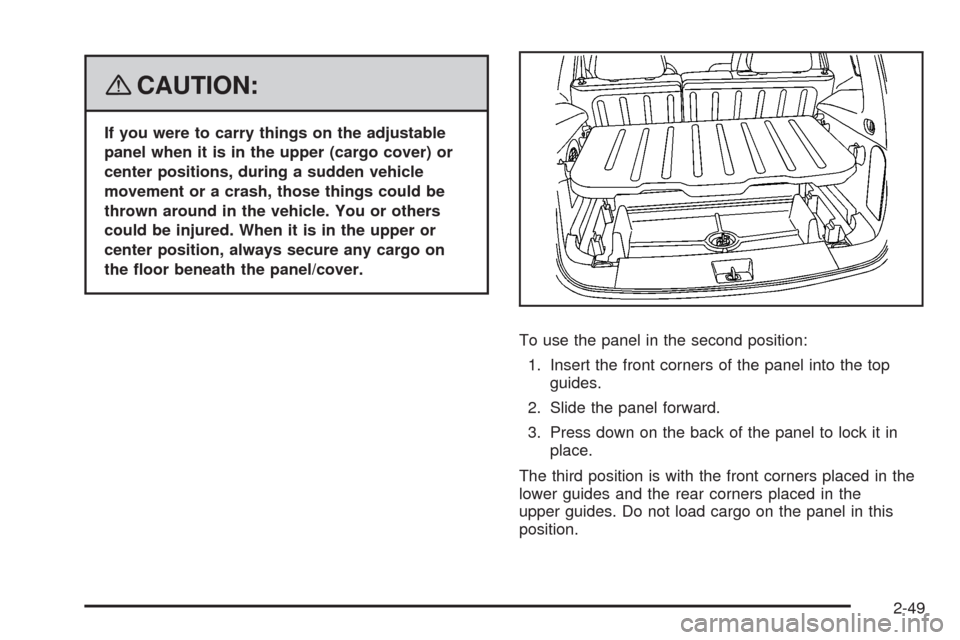
To use the panel in the second position:
1. Insert the front corners of the panel into the top
guides.
2. Slide the panel forward.
3. Press down on the back of the panel to lock it in
place.
The third position is with the front corners placed in the
lower guides and the rear corners placed in the
upper guides. Do not load cargo on the panel in this
position.
2-49
Page 129 of 430
To prevent damage or loss of cargo as you are driving,
check frequently to ensure your cargo is securely
fastened.
The roof rack system has siderails that are attached to
the roof. All cargo must be loaded on the luggage
carrier crossrails only.
Use GM accessory racks that are compatible with
your roof rack system, these are available at your
GM dealer.
Convenience Net
Your vehicle may have a convenience net. The metal
rings in the cargo area can be used to attach the
convenience net for several uses. The net can be used
to attach items secured to the oor, to the rear liftgate
or liftgate glass. The net is not for larger, heavier loads.
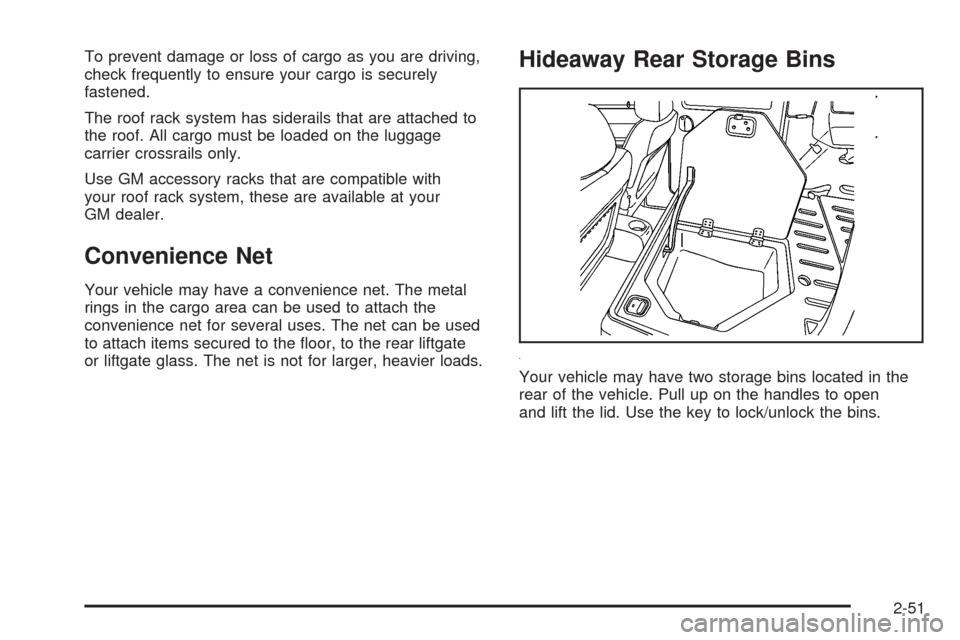
Hideaway Rear Storage Bins
Your vehicle may have two storage bins located in the
rear of the vehicle. Pull up on the handles to open
and lift the lid. Use the key to lock/unlock the bins.
2-51
Page 133 of 430
Instrument Panel Overview...............................3-4
Hazard Warning Flashers................................3-6
Other Warning Devices...................................3-6
Horn.............................................................3-6
Tilt Wheel.....................................................3-6
Turn Signal/Multifunction Lever.........................3-7
Turn and Lane-Change Signals........................3-8
Headlamp High/Low-Beam Changer..................3-8
Flash-to-Pass.................................................3-8
Windshield Wipers..........................................3-9
Windshield Washer.......................................3-10
Rear Window Wiper/Washer...........................3-11
Cruise Control..............................................3-12
Headlamps..................................................3-15
Wiper Activated Headlamps............................3-16
Headlamps on Reminder................................3-16
Daytime Running Lamps (DRL).......................3-16
Automatic Headlamp System..........................3-17
Fog Lamps..................................................3-18
Instrument Panel Brightness...........................3-18
Dome Lamp.................................................3-19
Entry/Exit Lighting.........................................3-19
Mirror Reading Lamps...................................3-19
Rear Reading Lamps....................................3-19
Electric Power Management...........................3-20
Battery Run-Down Protection..........................3-20Accessory Power Outlet(s).............................3-20
Ashtray(s) and Cigarette Lighter......................3-22
Climate Controls............................................3-23
Climate Control System.................................3-23
Outlet Adjustment.........................................3-26
Passenger Compartment Air Filter...................3-26
Warning Lights, Gages, and Indicators............3-28
Instrument Panel Cluster...............................
.3-29
Speedometer and Odometer...........................3-30
Tachometer.................................................3-30
Safety Belt Reminders...................................3-30
Airbag Readiness Light..................................3-31
Passenger Airbag Status Indicator...................3-32
Charging System Light..................................3-34
Up-Shift Light...............................................3-35
Brake System Warning Light..........................3-35
Antilock Brake System Warning Light...............3-36
Enhanced Traction System Warning Light.........3-37
Electronic Stability Control (ESC)/Traction
Control System (TCS) Indicator/Warning
Light........................................................3-37
Engine Coolant Temperature Warning Light......3-38
Engine Coolant Temperature Gage..................3-39
Tire Pressure Light.......................................3-39
Malfunction Indicator Lamp.............................3-40
Section 3 Instrument Panel
3-1
Page 134 of 430
Oil Pressure Light.........................................3-43
Security Light...............................................3-44
Fog Lamp Light............................................3-44
Highbeam On Light.......................................3-44
Fuel Gage...................................................3-44
Boost Gage.................................................3-45
Driver Information Center (DIC).......................3-46
DIC Operation and Displays...........................3-46
DIC Warnings and Messages.........................3-48
DIC Vehicle Personalization............................3-54Audio System(s).............................................3-59
Setting the Clock..........................................3-60
Radio(s)......................................................3-62
Using an MP3..............................................3-72
XM Radio Messages.....................................3-77
Theft-Deterrent Feature..................................3-78
Audio Steering Wheel Controls.......................3-79
Radio Reception...........................................3-79
Fixed Mast Antenna......................................3-80
XM™ Satellite Radio Antenna System.............3-80
Section 3 Instrument Panel
3-2
Page 139 of 430
To tilt the wheel, pull the lever down. Then, move the
wheel to a comfortable position and raise the lever
to lock the wheel in place.
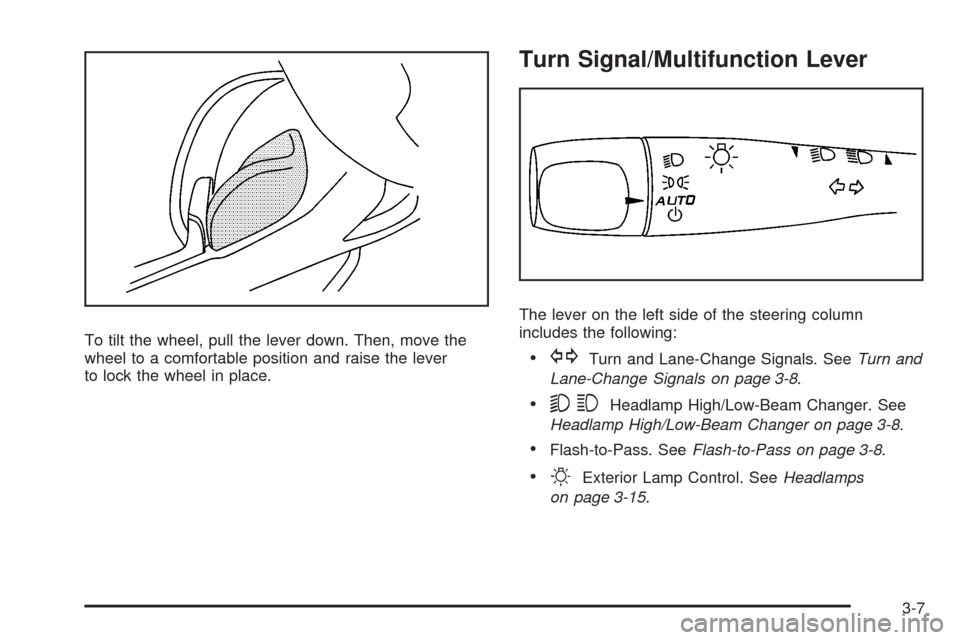
Turn Signal/Multifunction Lever
The lever on the left side of the steering column
includes the following:
GTurn and Lane-Change Signals. SeeTurn and
Lane-Change Signals on page 3-8.
53Headlamp High/Low-Beam Changer. See
Headlamp High/Low-Beam Changer on page 3-8.
Flash-to-Pass. SeeFlash-to-Pass on page 3-8.
OExterior Lamp Control. SeeHeadlamps
on page 3-15.
3-7
Page 142 of 430
6(Delay/Intermittent Speed Sensitive):When the
lever is in the delay position, move the intermittent adjust
band to set for shorter or longer delay cycles. To the
left of the adjust band are bars that indicate the
frequency of the wipes. Smaller bars mean the wiper
movement is less frequent. Larger bars mean the wiper
movement is more frequent.
During intermittent wiping mode, the delay cycle time is
sensitive to vehicle speed. As the vehicle speed
increases your delay cycle time will decrease and wiper
movement will occur more frequently.
9(Off):Move the lever to this position to turn off the
windshield wipers.
8(Mist):Move the lever all the way down to mist
and release for a single wiping cycle. The windshield
wipers will stop after one wipe and the lever will return to
its original position. If additional wipes are needed,
hold the band on mist longer.
As an added safety feature, if the wipers are on for
more than 15 seconds, the vehicle’s headlamps will turn
on automatically. They will turn off 15 seconds after
the wipers are turned off.
Windshield Washer
To wash your windshield, press the button at the end of
the lever until the washers begin.
{CAUTION:
In freezing weather, do not use your washer
until the windshield is warmed. Otherwise the
washer uid can form ice on the windshield,
blocking your vision.
When you release the button, the washers will stop, but
the wipers will continue to wipe for about three times
or will resume the speed you were using before.
3-10
Page 143 of 430
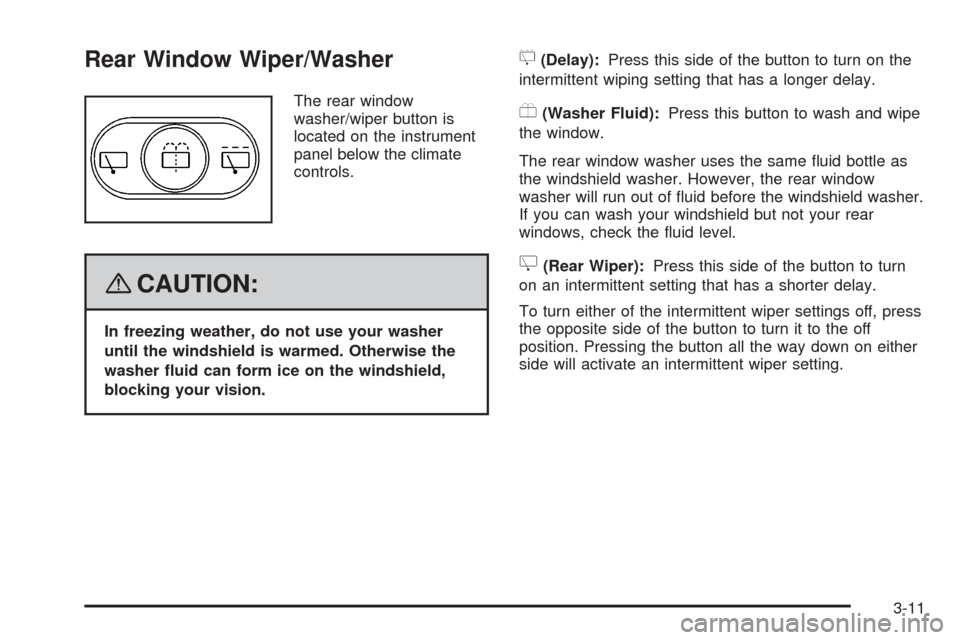
Rear Window Wiper/Washer
The rear window
washer/wiper button is
located on the instrument
panel below the climate
controls.
{CAUTION:
In freezing weather, do not use your washer
until the windshield is warmed. Otherwise the
washer uid can form ice on the windshield,
blocking your vision.
5(Delay):Press this side of the button to turn on the
intermittent wiping setting that has a longer delay.
Y(Washer Fluid):Press this button to wash and wipe
the window.
The rear window washer uses the same uid bottle as
the windshield washer. However, the rear window
washer will run out of uid before the windshield washer.
If you can wash your windshield but not your rear
windows, check the uid level.
Z(Rear Wiper):Press this side of the button to turn
on an intermittent setting that has a shorter delay.
To turn either of the intermittent wiper settings off, press
the opposite side of the button to turn it to the off
position. Pressing the button all the way down on either
side will activate an intermittent wiper setting.
3-11