oil level CHEVROLET HHR 2008 1.G Owners Manual
[x] Cancel search | Manufacturer: CHEVROLET, Model Year: 2008, Model line: HHR, Model: CHEVROLET HHR 2008 1.GPages: 430, PDF Size: 5.63 MB
Page 181 of 430
AUTO (Automatic) LIGHTS ON
This message displays if the automatic headlamp
system is enabled with the headlamp switch. See
Automatic Headlamp System on page 3-17for more
information.
BRAKE FLUID
This message displays, while the ignition is on, when
the brake uid level is low. The brake system warning
light on the instrument panel cluster also comes on. See
Brake System Warning Light on page 3-35for more
information. Have the brake system serviced by
your dealer/retailer as soon as possible.
CHANGE OIL SOON
This message displays when the life of the engine oil
has expired and it should be changed.
When this message is acknowledged and cleared from
the display, the engine oil life system must still be
reset separately. SeeEngine Oil Life System on
page 5-19andScheduled Maintenance on page 6-4for
more information.
CHECK GAS CAP
This message displays if the fuel cap has not been fully
tightened. Recheck the fuel cap to make sure that it
is on properly. A few driving trips with the cap properly
installed should turn the message off.
CHECK TIRE PRESS (Pressure)
If your vehicle has a Tire Pressure Monitor System
(TPMS), this message displays when the pressure in one
or more of the vehicle’s tires needs to be checked. If a tire
pressure message appears on the DIC, stop as soon as
you can. Have the tire pressures checked and set to
those shown on the Tire Loading Information label. See
Tires on page 5-52,Loading Your Vehicle on page 4-27,
andInflation - Tire Pressure on page 5-60. The DIC also
shows the tire pressure values. SeeDIC Operation and
Displays on page 3-46. If the tire pressure is low, the low
tire pressure warning light comes on. SeeTire Pressure
Light on page 3-39.
COMPETITIVE MODE
If your vehicle has this feature, this message displays
when the Competitive Driving mode is selected.
The Traction Control System (TCS) will not be operating
while in the Competitive Driving mode and the
ESC/TCS light on the instrument panel cluster will be on
solid. Adjust your driving accordingly. SeeTraction
Control System (TCS) on page 4-6,Electronic Stability
Control (ESC) on page 4-10, andElectronic Stability
Control (ESC)/Traction Control System (TCS)
Indicator/Warning Light on page 3-37for more
information.
3-49
Page 232 of 430
Before Leaving on a Long Trip
To prepare your vehicle for a long trip, consider having
it serviced by your dealer/retailer before departing.
Things to check on your own include:
Windshield Washer Fluid:Reservoir full? Windows
clean — inside and outside?
Wiper Blades:In good shape?
Fuel, Engine Oil, Other Fluids:All levels checked?
Lamps:Do they all work and are lenses clean?
Tires:Are treads good? Are tires inated to
recommended pressure?
Weather and Maps:Safe to travel? Have
up-to-date maps?
Highway Hypnosis
Always be alert and pay attention to your surroundings
while driving. If you become tired or sleepy, nd a
safe place to park your vehicle and rest.
Other driving tips include:
Keep the vehicle well ventilated.
Keep interior temperature cool.
Keep your eyes moving — scan the road ahead
and to the sides.
Check the rearview mirror and vehicle instruments
often.
Hill and Mountain Roads
Driving on steep hills or through mountains is different
than driving on at or rolling terrain. Tips for driving
in these conditions include:
Keep your vehicle serviced and in good shape.
Check all uid levels and brakes, tires, cooling
system, and transmission.
Going down steep or long hills, shift to a
lower gear.
4-20
Page 269 of 430
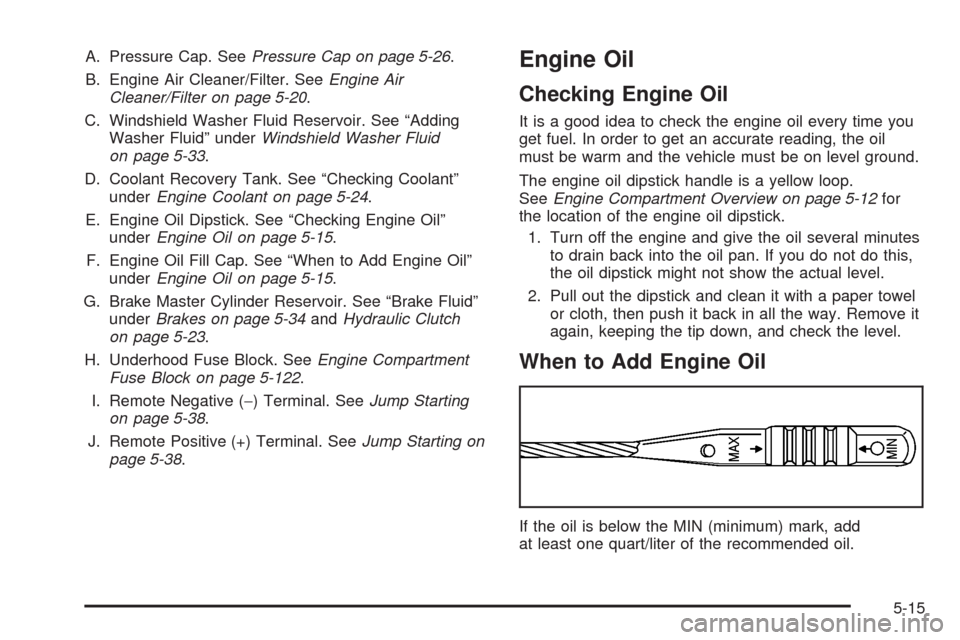
A. Pressure Cap. SeePressure Cap on page 5-26.
B. Engine Air Cleaner/Filter. SeeEngine Air
Cleaner/Filter on page 5-20.
C. Windshield Washer Fluid Reservoir. See “Adding
Washer Fluid” underWindshield Washer Fluid
on page 5-33.
D. Coolant Recovery Tank. See “Checking Coolant”
underEngine Coolant on page 5-24.
E. Engine Oil Dipstick. See “Checking Engine Oil”
underEngine Oil on page 5-15.
F. Engine Oil Fill Cap. See “When to Add Engine Oil”
underEngine Oil on page 5-15.
G. Brake Master Cylinder Reservoir. See “Brake Fluid”
underBrakes on page 5-34andHydraulic Clutch
on page 5-23.
H. Underhood Fuse Block. SeeEngine Compartment
Fuse Block on page 5-122.
I. Remote Negative (−) Terminal. SeeJump Starting
on page 5-38.
J. Remote Positive (+) Terminal. SeeJump Starting on
page 5-38.Engine Oil
Checking Engine Oil
It is a good idea to check the engine oil every time you
get fuel. In order to get an accurate reading, the oil
must be warm and the vehicle must be on level ground.
The engine oil dipstick handle is a yellow loop.
SeeEngine Compartment Overview on page 5-12for
the location of the engine oil dipstick.
1. Turn off the engine and give the oil several minutes
to drain back into the oil pan. If you do not do this,
the oil dipstick might not show the actual level.
2. Pull out the dipstick and clean it with a paper towel
or cloth, then push it back in all the way. Remove it
again, keeping the tip down, and check the level.
When to Add Engine Oil
If the oil is below the MIN (minimum) mark, add
at least one quart/liter of the recommended oil.
5-15
Page 270 of 430
This section explains what kind of oil to use.
For engine oil crankcase capacity, seeCapacities
and Specifications on page 5-125.
Notice:Do not add too much oil. If the engine
has so much oil that the oil level gets above the
upper mark that shows the proper operating range,
the engine could be damaged.
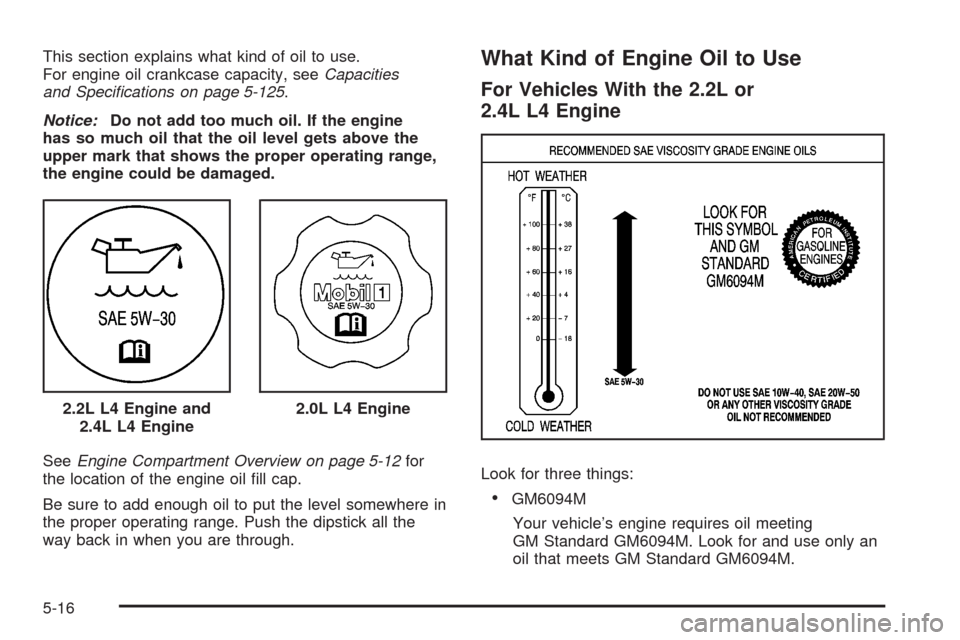
SeeEngine Compartment Overview on page 5-12for
the location of the engine oil ll cap.
Be sure to add enough oil to put the level somewhere in
the proper operating range. Push the dipstick all the
way back in when you are through.What Kind of Engine Oil to Use
For Vehicles With the 2.2L or
2.4L L4 Engine
Look for three things:
GM6094M
Your vehicle’s engine requires oil meeting
GM Standard GM6094M. Look for and use only an
oil that meets GM Standard GM6094M. 2.2L L4 Engine and
2.4L L4 Engine
2.0L L4 Engine
5-16
Page 273 of 430
Your vehicle’s engine is lled at the factory with a
synthetic oil which meets all requirements for your
vehicle.
Substitute Engine Oil: When adding oil to maintain
engine oil level, oil meeting GM Standard GM4718M
may not be available. You can add substitute oil
designated SAE 5W-30 with the starburst symbol at all
temperatures. Substitute oil not meeting GM Standard
GM4718M should not be used for an oil change.
Engine Oil Additives
Do not add anything to the oil. The recommended oils
with the starburst symbol that meet GM standards are all
you need for good performance and engine protection.
Engine Oil Life System
When to Change Engine Oil
Your vehicle has the Engine Oil Life System, a computer
system that lets you know when to change the engine
oil and lter. This is based on engine revolutions
and engine temperature, and not on mileage.Based on driving conditions, the mileage at which
an oil change will be indicated can vary considerably.
For the oil life system to work properly, you must
reset the system every time the oil is changed.
When the system has calculated that oil life has been
diminished, it will indicate that an oil change is
necessary. A CHANGE OIL SOON message will come
on. SeeDIC Warnings and Messages on page 3-48.
Change the oil as soon as possible within the next
600 miles (1 000 km). It is possible that, if you are
driving under the best conditions, the oil life system
might not indicate that an oil change is necessary
for over a year. However, the engine oil and lter must
be changed at least once a year and at this time the
system must be reset. Your dealer/retailer has trained
service people who will perform this work using genuine
parts and reset the system. It is also important to
check the oil regularly and keep it at the proper level.
If the system is ever reset accidentally, you must
change the oil at 3,000 miles (5 000 km) since the last
oil change. Remember to reset the oil life system
whenever the oil is changed.
5-19
Page 277 of 430
Automatic Transmission Fluid
It is not necessary to check the transmission uid
level. A transmission uid leak is the only reason for
uid loss. If a leak occurs, take your vehicle to a
dealer/retailer and have it repaired as soon as possible.
Change the uid and lter at the intervals listed in
the Maintenance Schedule. SeeScheduled Maintenance
on page 6-4. Be sure to use the transmission uid
listed inRecommended Fluids and Lubricants on
page 6-12.
Notice:Use of the incorrect automatic transmission
uid may damage your vehicle, and the damages
may not be covered by your warranty. Always
use the automatic transmission uid listed in
Recommended Fluids and Lubricants on page 6-12.
Manual Transmission Fluid
It is not necessary to check the manual transmission
uid level. A transmission uid leak is the only reason
for uid loss. If a leak occurs, take the vehicle to a
dealer/retailer for service. Have it repaired as soon as
possible. You may also have your uid level checked by
your dealer/retailer when you have your oil changed.
SeeRecommended Fluids and Lubricants on page 6-12
for the proper uid to use.
Hydraulic Clutch
The hydraulic clutch linkage in your vehicle is
self-adjusting. This system does not have its own
reservoir. It receives uid from the brake master
cylinder reservoir.
SeeBrakes on page 5-34for more information.
5-23
Page 283 of 430
{CAUTION:
An electric engine cooling fan under the hood
can start up even when the engine is not
running and can injure you. Keep hands,
clothing, and tools away from any underhood
electric fan.
If the coolant inside the coolant recovery tank is
boiling, do not do anything else until it cools down.
The vehicle should be parked on a level surface.
When the engine is cold, the coolant level should be at
or above the COLD FILL line. If it is not, you may
have a leak at the pressure cap or in the radiator hoses,
heater hoses, radiator, water pump, or somewhere in
the cooling system.
{CAUTION:
Heater and radiator hoses, and other engine
parts, can be very hot. Do not touch them.
If you do, you can be burned.
Do not run the engine if there is a leak. If you
run the engine, it could lose all coolant.
That could cause an engine re, and you could
be burned. Get any leak xed before you drive
the vehicle.
If there seems to be no leak, with the engine on, check
to see if the electric engine cooling fan is running.
If the engine is overheating, the fan should be running.
If it is not, than the vehicle needs service.
Notice:Engine damage from running the engine
without coolant is not covered by the warranty.
Notice:Using coolant other than DEX-COOL
®may
cause premature engine, heater core, or radiator
corrosion. In addition, the engine coolant could
require changing sooner, at 30,000 miles (50 000 km)
or 24 months, whichever occurs rst. Any repairs
would not be covered by the warranty. Always use
DEX-COOL
®(silicate-free) coolant in the vehicle.
5-29
Page 379 of 430
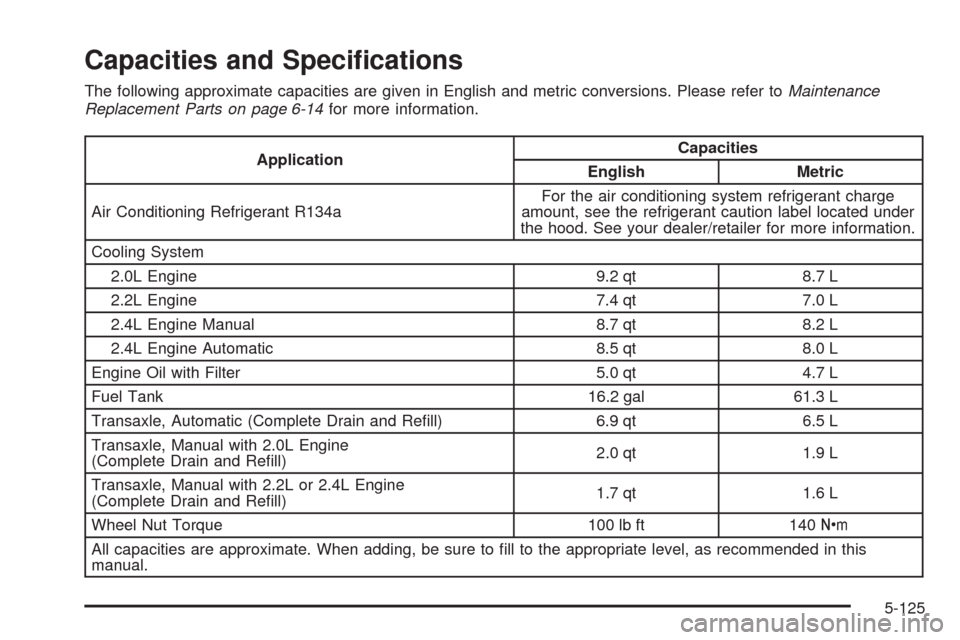
Capacities and Specications
The following approximate capacities are given in English and metric conversions. Please refer toMaintenance
Replacement Parts on page 6-14for more information.
ApplicationCapacities
English Metric
Air Conditioning Refrigerant R134aFor the air conditioning system refrigerant charge
amount, see the refrigerant caution label located under
the hood. See your dealer/retailer for more information.
Cooling System
2.0L Engine 9.2 qt 8.7 L
2.2L Engine 7.4 qt 7.0 L
2.4L Engine Manual 8.7 qt 8.2 L
2.4L Engine Automatic 8.5 qt 8.0 L
Engine Oil with Filter 5.0 qt 4.7 L
Fuel Tank 16.2 gal 61.3 L
Transaxle, Automatic (Complete Drain and Rell) 6.9 qt 6.5 L
Transaxle, Manual with 2.0L Engine
(Complete Drain and Rell)2.0 qt 1.9 L
Transaxle, Manual with 2.2L or 2.4L Engine
(Complete Drain and Rell)1.7 qt 1.6 L
Wheel Nut Torque 100 lb ft 140Y
All capacities are approximate. When adding, be sure to ll to the appropriate level, as recommended in this
manual.
5-125
Page 382 of 430
Maintenance Schedule
Introduction
Important: Keep engine oil at the proper level and
change as recommended.
Have you purchased the GM Protection Plan? The Plan
supplements your new vehicle warranties. See your
Warranty and Owner Assistance booklet or your
dealer/retailer for details.
Maintenance Requirements
Notice:Maintenance intervals, checks, inspections,
replacement parts, and recommended uids and
lubricants as prescribed in this manual are
necessary to keep your vehicle in good working
condition. Any damage caused by failure to follow
scheduled maintenance might not be covered
by warranty.
Your Vehicle and the Environment
Proper vehicle maintenance not only helps to keep your
vehicle in good working condition, but also helps the
environment. All recommended maintenance is
important. Improper vehicle maintenance can even
affect the quality of the air we breathe. Improper uid
levels or the wrong tire ination can increase the level of
emissions from your vehicle. To help protect our
environment, and to keep your vehicle in good condition,
be sure to maintain your vehicle properly.
Using the Maintenance Schedule
We want to help you keep your vehicle in good working
condition. But we do not know exactly how you will
drive it. You might drive very short distances only a few
times a week. Or you might drive long distances all
the time in very hot, dusty weather. You might use your
vehicle in making deliveries. Or you might drive it to
work, to do errands, or in many other ways.
Because of all the different ways people use their
vehicles, maintenance needs vary. You might need more
frequent checks and replacements. So please read
the following and note how you drive. If you have any
questions on how to keep your vehicle in good condition,
see your dealer/retailer.
6-2
Page 385 of 430
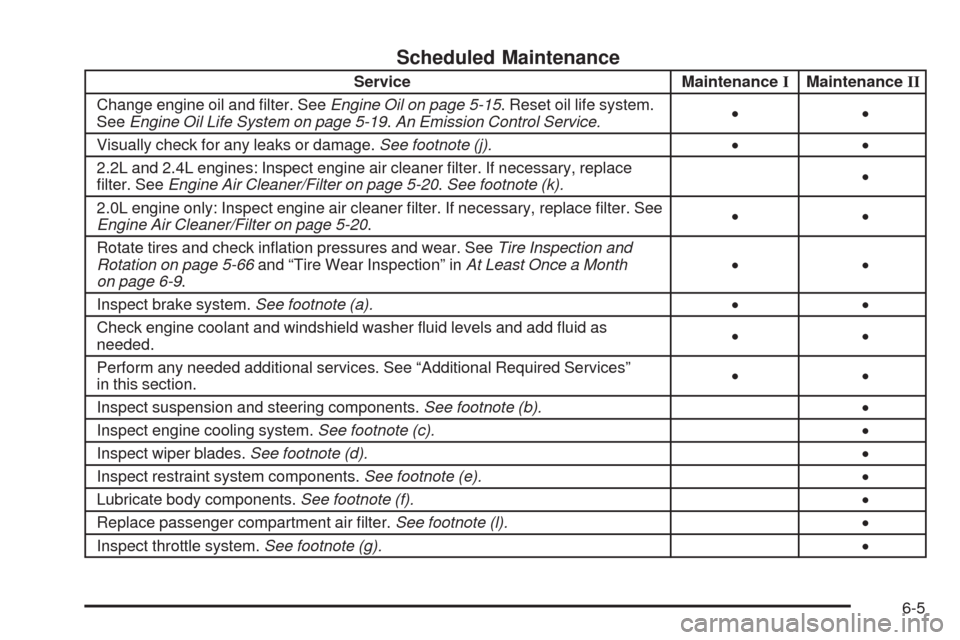
Scheduled Maintenance
Service MaintenanceIMaintenanceII
Change engine oil and lter. SeeEngine Oil on page 5-15. Reset oil life system.
SeeEngine Oil Life System on page 5-19.An Emission Control Service.••
Visually check for any leaks or damage.See footnote (j).••
2.2L and 2.4L engines: Inspect engine air cleaner lter. If necessary, replace
lter. SeeEngine Air Cleaner/Filter on page 5-20.See footnote (k).•
2.0L engine only: Inspect engine air cleaner lter. If necessary, replace lter. See
Engine Air Cleaner/Filter on page 5-20.••
Rotate tires and check ination pressures and wear. SeeTire Inspection and
Rotation on page 5-66and “Tire Wear Inspection” inAt Least Once a Month
on page 6-9.••
Inspect brake system.See footnote (a).••
Check engine coolant and windshield washer uid levels and add uid as
needed.••
Perform any needed additional services. See “Additional Required Services”
in this section.••
Inspect suspension and steering components.See footnote (b).•
Inspect engine cooling system.See footnote (c).•
Inspect wiper blades.See footnote (d).•
Inspect restraint system components.See footnote (e).•
Lubricate body components.See footnote (f).•
Replace passenger compartment air lter.See footnote (l).•
Inspect throttle system.See footnote (g).•
6-5