lights CHEVROLET HHR 2009 1.G Owners Manual
[x] Cancel search | Manufacturer: CHEVROLET, Model Year: 2009, Model line: HHR, Model: CHEVROLET HHR 2009 1.GPages: 450, PDF Size: 2.49 MB
Page 1 of 450
Seats and Restraint System............................. 1-1
Front Seats
............................................... 1-2
Rear Seats
..............................................1-10
Safety Belts
.............................................1-13
Child Restraints
.......................................1-32
Airbag System
.........................................1-58
Restraint System Check
............................1-79
Features and Controls..................................... 2-1
Keys
........................................................ 2-3
Doors and Locks
....................................... 2-9
Windows
.................................................2-16
Theft-Deterrent Systems
............................2-18
Starting and Operating Your Vehicle
...........2-22
Mirrors
....................................................2-39
Object Detection Systems
..........................2-44
OnStar
®System
......................................2-47
Storage Areas
.........................................2-51
Sunroof
..................................................2-56
Instrument Panel............................................. 3-1
Instrument Panel Overview
.......................... 3-4
Climate Controls
......................................3-21
Warning Lights, Gages, and Indicators
........3-26
Driver Information Center (DIC)
..................3-48
Audio System(s)
.......................................3-61Driving Your Vehicle....................................... 4-1
Your Driving, the Road, and the Vehicle
....... 4-2
Towing
...................................................4-31
Service and Appearance Care.......................... 5-1
Service
..................................................... 5-3
Fuel
......................................................... 5-5
Checking Things Under the Hood
...............5-12
Headlamp Aiming
.....................................5-44
Bulb Replacement
....................................5-47
Windshield Wiper Blade Replacement
.........5-52
Tires
......................................................5-53
Appearance Care
.....................................5-99
Vehicle Identication
...............................5-107
Electrical System
....................................5-108
Capacities and Specications
...................5-114
Maintenance Schedule..................................... 6-1
Maintenance Schedule
................................ 6-2
Customer Assistance Information.................... 7-1
Customer Assistance and Information
........... 7-2
Reporting Safety Defects
...........................7-16
Vehicle Data Recording and Privacy
...........7-18
Index................................................................ 1
2009 Chevrolet HHR Owner ManualM
Page 8 of 450
Power Lumbar
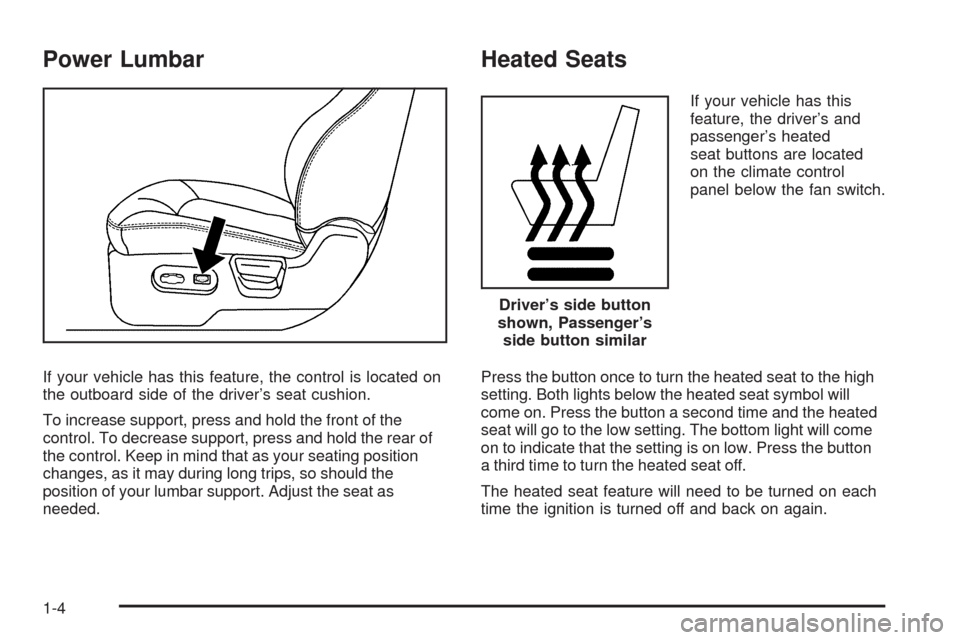
If your vehicle has this feature, the control is located on
the outboard side of the driver’s seat cushion.
To increase support, press and hold the front of the
control. To decrease support, press and hold the rear of
the control. Keep in mind that as your seating position
changes, as it may during long trips, so should the
position of your lumbar support. Adjust the seat as
needed.
Heated Seats
If your vehicle has this
feature, the driver’s and
passenger’s heated
seat buttons are located
on the climate control
panel below the fan switch.
Press the button once to turn the heated seat to the high
setting. Both lights below the heated seat symbol will
come on. Press the button a second time and the heated
seat will go to the low setting. The bottom light will come
on to indicate that the setting is on low. Press the button
a third time to turn the heated seat off.
The heated seat feature will need to be turned on each
time the ignition is turned off and back on again.
Driver’s side button
shown, Passenger’s
side button similar
1-4
Page 89 of 450
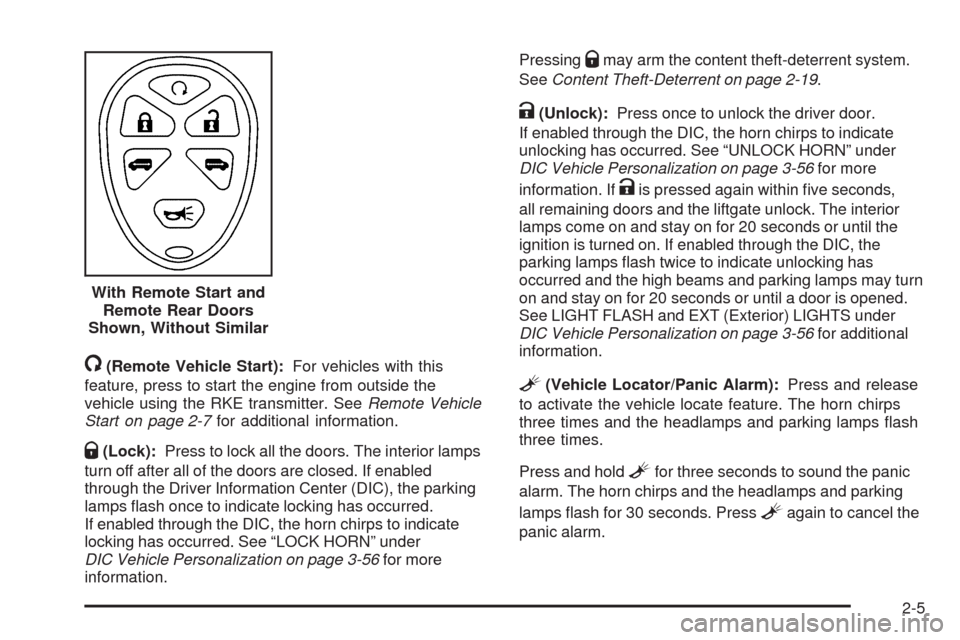
/(Remote Vehicle Start):For vehicles with this
feature, press to start the engine from outside the
vehicle using the RKE transmitter. SeeRemote Vehicle
Start on page 2-7for additional information.
Q(Lock):Press to lock all the doors. The interior lamps
turn off after all of the doors are closed. If enabled
through the Driver Information Center (DIC), the parking
lamps ash once to indicate locking has occurred.
If enabled through the DIC, the horn chirps to indicate
locking has occurred. See “LOCK HORN” under
DIC Vehicle Personalization on page 3-56for more
information.Pressing
Qmay arm the content theft-deterrent system.
SeeContent Theft-Deterrent on page 2-19.
K(Unlock):Press once to unlock the driver door.
If enabled through the DIC, the horn chirps to indicate
unlocking has occurred. See “UNLOCK HORN” under
DIC Vehicle Personalization on page 3-56for more
information. If
Kis pressed again within ve seconds,
all remaining doors and the liftgate unlock. The interior
lamps come on and stay on for 20 seconds or until the
ignition is turned on. If enabled through the DIC, the
parking lamps ash twice to indicate unlocking has
occurred and the high beams and parking lamps may turn
on and stay on for 20 seconds or until a door is opened.
See LIGHT FLASH and EXT (Exterior) LIGHTS under
DIC Vehicle Personalization on page 3-56for additional
information.
L(Vehicle Locator/Panic Alarm):Press and release
to activate the vehicle locate feature. The horn chirps
three times and the headlamps and parking lamps ash
three times.
Press and hold
Lfor three seconds to sound the panic
alarm. The horn chirps and the headlamps and parking
lamps ash for 30 seconds. Press
Lagain to cancel the
panic alarm. With Remote Start and
Remote Rear Doors
Shown, Without Similar
2-5
Page 104 of 450
How the System Alarm is Activated
If the system is armed, it can be activated by either:
Opening the driver’s door or tailgate. This causes a
10 second pre-alarm chirp followed by a 30 second
full alarm of horn and lights.
Opening any other door. This immediately causes a
full alarm of horn and lights for 30 seconds.
When an alarm event has nished, the system re-arms
itself automatically.
How to Turn Off the System Alarm
To turn off the system alarm, do one of the following:
Press the lock button on the RKE transmitter.
The system will then re-arm itself.
Press the unlock button on the RKE transmitter.
This will also disarm the system.
Insert the key in the ignition and turn it on. This will
also disarm the system.
How to Detect a Tamper Condition
The content theft security system alarm was previously
activated if three chirps sound when you press the
lock or unlock buttons on the RKE transmitter.
PASS-Key®III+ Electronic
Immobilizer
The PASS-Key III+ system operates on a radio
frequency subject to Federal Communications
Commission (FCC) Rules and with Industry Canada.
This device complies with Part 15 of the FCC Rules.
Operation is subject to the following two conditions:
1. This device may not cause harmful interference.
2. This device must accept any interference received,
including interference that may cause undesired
operation.
This device complies with RSS-210 of Industry Canada.
Operation is subject to the following two conditions:
1. This device may not cause interference.
2. This device must accept any interference received,
including interference that may cause undesired
operation of the device.
Changes or modications to this system by other than
an authorized service facility could void authorization to
use this equipment.
PASS-Key III+ uses a radio frequency transponder in
the key that matches a decoder in the vehicle.
2-20
Page 108 of 450
R(ON/RUN):This is the position in which you can
operate the electrical accessories and to display some
instrument panel cluster warning and indicator lights. The
switch stays in this position when the engine is running.
If you leave the key in the ACC/ACCESSORY or ON/
RUN position with the engine off, the battery could be
drained. You may not be able to start the vehicle if the
battery is allowed to drain for an extended period of time.
/(START):This position starts the engine. When the
engine starts, release the key. The ignition switch will
return to ON/RUN for driving.
A warning tone will sound when the driver door is opened,
the ignition is in LOCK/OFF or ACC/ACCESSORY and
the key is in the ignition.
Column Lock Release
For vehicles with an automatic transmission, the
following procedure allows the ignition to be turned to
LOCK/OFF and ignition key to be removed in case of a
dead battery or low voltage battery.
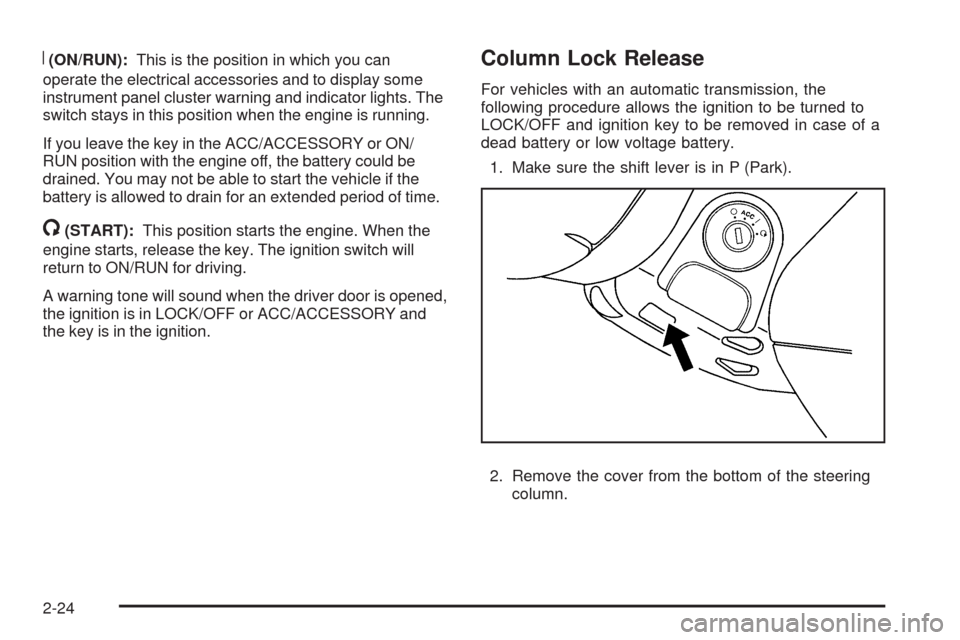
1. Make sure the shift lever is in P (Park).
2. Remove the cover from the bottom of the steering
column.
2-24
Page 123 of 450
Mirrors
Manual Rearview Mirror
Hold the inside rearview mirror in the center to move it for
a clearer view behind your vehicle. Adjust the mirror to
avoid glare from the headlamps behind you. Push the tab
forward for daytime use and pull it for nighttime use.
If the vehicle has map lamps, press the buttons located
at the bottom of the mirror to turn them on or off.
Automatic Dimming Rearview Mirror
The vehicle may have an automatic dimming inside
rearview mirror with a compass and map lights and/or
OnStar
®.
Vehicles with OnStar have three additional control
buttons located at the bottom of the mirror. See your
dealer/retailer for more information on the system
and how to subscribe to OnStar
®. SeeOnStar®System
on page 2-47for more information about the services
OnStar provides.
Press the buttons located at the bottom of the mirror to
turn the map lights on or off.
O(On/Off):Press to turn the dimming feature on
or off.Your vehicle may also have a Rear Vision Camera.
SeeRear Vision Camera (RVC) on page 2-44for more
information.
Automatic Dimming Mirror Operation
Automatic dimming reduces the glare of lights from
behind the vehicle. The dimming feature comes on and
the indicator light illuminates each time the vehicle is
started.
Cleaning the Mirror
Do not spray glass cleaner directly on the mirror.
Use a soft towel dampened with water.
Compass
Compass Operation
Y
/O(On/Off):If the vehicle has one of these
buttons, press to turn the compass on or off.
With the compass feature on, each time the vehicle is
started, the compass displays the current compass
direction after a few seconds.
2-39
Page 130 of 450
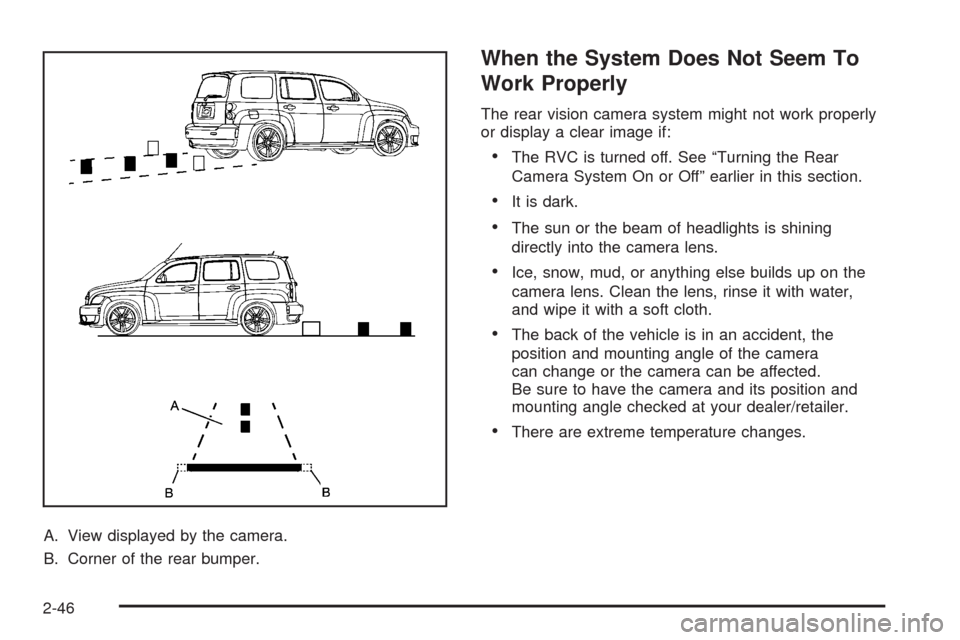
A. View displayed by the camera.
B. Corner of the rear bumper.
When the System Does Not Seem To
Work Properly
The rear vision camera system might not work properly
or display a clear image if:
The RVC is turned off. See “Turning the Rear
Camera System On or Off” earlier in this section.
It is dark.
The sun or the beam of headlights is shining
directly into the camera lens.
Ice, snow, mud, or anything else builds up on the
camera lens. Clean the lens, rinse it with water,
and wipe it with a soft cloth.
The back of the vehicle is in an accident, the
position and mounting angle of the camera
can change or the camera can be affected.
Be sure to have the camera and its position and
mounting angle checked at your dealer/retailer.
There are extreme temperature changes.
2-46
Page 141 of 450
Instrument Panel Overview...............................3-4
Hazard Warning Flashers................................3-6
Horn .............................................................3-6
Tilt Wheel.....................................................3-6
Turn Signal/Multifunction Lever.........................3-7
Turn and Lane-Change Signals........................3-7
Headlamp High/Low-Beam Changer..................3-8
Flash-to-Pass.................................................3-8
Windshield Wipers..........................................3-8
Windshield Washer.........................................3-9
Rear Window Wiper/Washer...........................3-10
Cruise Control..............................................3-10
Headlamps..................................................3-14
Wiper Activated Headlamps............................3-15
Headlamps on Reminder................................3-15
Daytime Running Lamps (DRL).......................3-15
Automatic Headlamp System..........................3-16
Fog Lamps ..................................................3-16
Instrument Panel Brightness...........................3-17
Dome Lamp .................................................3-17
Entry/Exit Lighting.........................................3-17
Mirror Reading Lamps...................................3-17
Rear Reading Lamps....................................3-17
Electric Power Management...........................3-18
Battery Run-Down Protection..........................3-18
Accessory Power Outlet(s).............................3-19
Ashtray(s) and Cigarette Lighter......................3-21Climate Controls............................................3-21
Climate Control System.................................3-21
Outlet Adjustment.........................................3-24
Passenger Compartment Air Filter...................3-24
Warning Lights, Gages, and Indicators............3-26
Instrument Panel Cluster................................3-27
Speedometer and Odometer...........................3-28
Tachometer................................................
.3-28
Safety Belt Reminders...................................3-29
Airbag Readiness Light..................................3-30
Passenger Airbag Status Indicator...................3-31
Charging System Light..................................3-32
Up-Shift Light...............................................3-32
Brake System Warning Light..........................3-33
Antilock Brake System (ABS) Warning Light.....3-34
Enhanced Traction System (ETS)
Indicator/Warning Light...............................3-34
Electronic Stability Control (ESC)/
Traction Control System (TCS) Indicator/
Warning Light............................................3-35
Engine Coolant Temperature Warning Light......3-36
Engine Coolant Temperature Gage..................3-36
Tire Pressure Light.......................................3-37
Malfunction Indicator Lamp.............................3-37
Oil Pressure Light.........................................3-40
Security Light...............................................3-41
Fog Lamp Light............................................3-41
Section 3 Instrument Panel
3-1
Page 154 of 450
Headlamps
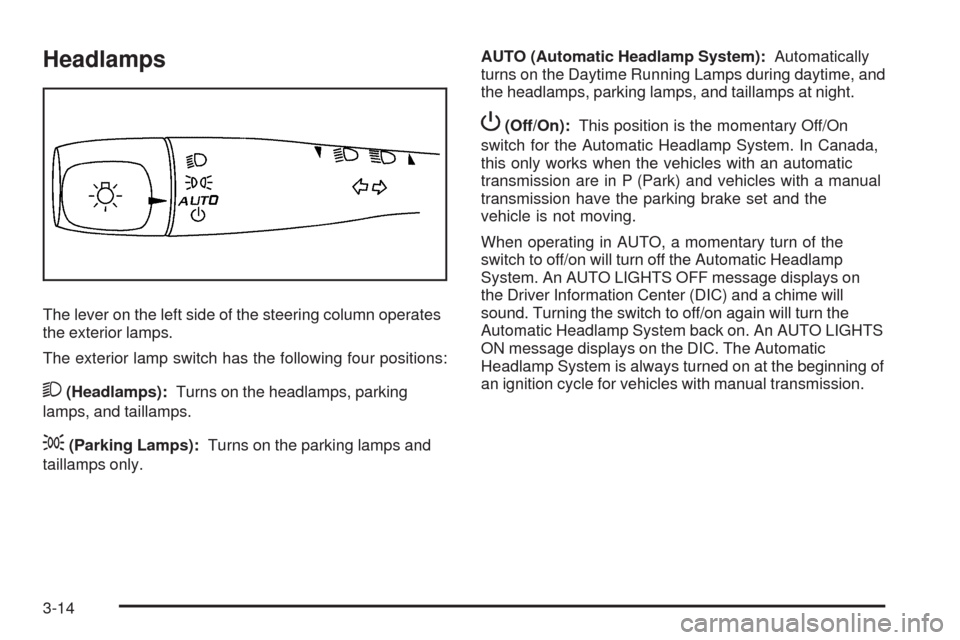
The lever on the left side of the steering column operates
the exterior lamps.
The exterior lamp switch has the following four positions:
2(Headlamps):Turns on the headlamps, parking
lamps, and taillamps.
;(Parking Lamps):Turns on the parking lamps and
taillamps only.AUTO (Automatic Headlamp System):Automatically
turns on the Daytime Running Lamps during daytime, and
the headlamps, parking lamps, and taillamps at night.
P(Off/On):This position is the momentary Off/On
switch for the Automatic Headlamp System. In Canada,
this only works when the vehicles with an automatic
transmission are in P (Park) and vehicles with a manual
transmission have the parking brake set and the
vehicle is not moving.
When operating in AUTO, a momentary turn of the
switch to off/on will turn off the Automatic Headlamp
System. An AUTO LIGHTS OFF message displays on
the Driver Information Center (DIC) and a chime will
sound. Turning the switch to off/on again will turn the
Automatic Headlamp System back on. An AUTO LIGHTS
ON message displays on the DIC. The Automatic
Headlamp System is always turned on at the beginning of
an ignition cycle for vehicles with manual transmission.
3-14
Page 155 of 450
Wiper Activated Headlamps
The headlamps and parking lamps are activated
15 seconds after the windshield wipers are turned on.
For this feature to work, automatic lighting must be
enabled. SeeHeadlamps on page 3-14for additional
information.
When the ignition is turned off, the wiper-activated
headlamps will immediately turn off. They also turn off
15 seconds after the windshield wiper control is
turned off.
Headlamps on Reminder
If the drivers door is opened with the ignition off and the
lamps on, a warning chime will sound. This indicates
that the headlamps are still on.
Daytime Running Lamps (DRL)
Daytime Running Lamps (DRL) can make it easier for
others to see the front of your vehicle during the day.
Fully functional daytime running lamps are required on
all vehicles rst sold in Canada.The vehicle has a light sensor on top of the instrument
panel. Do not cover this sensor or the headlamps
will come on when they are not needed.
The DRL system will make the headlamps come on
at reduced brightness when the following conditions
are met:
The ignition is on.
The exterior lamp control is turned to AUTO.
The light sensor detects daytime light.
The shift lever is not in P (Park).
While the DRL system is on, the taillamps, sidemarker
lamps, and instrument panel lights will not be on.
For vehicles with an Automatic Transmission, the
DRL system is off any time the vehicle is in P (Park).
For vehicles with a Manual Transmission, the DRL
system will be off when the vehicle is rst started, the
park brake is applied, and the vehicle has not moved.
The DRL system on U.S. vehicles can also be turned
off by using the off/on switch for one ignition cycle.
The regular headlamp system should be turned on when
needed.
3-15