keyless CHEVROLET HHR 2010 1.G User Guide
[x] Cancel search | Manufacturer: CHEVROLET, Model Year: 2010, Model line: HHR, Model: CHEVROLET HHR 2010 1.GPages: 480, PDF Size: 5.25 MB
Page 180 of 480
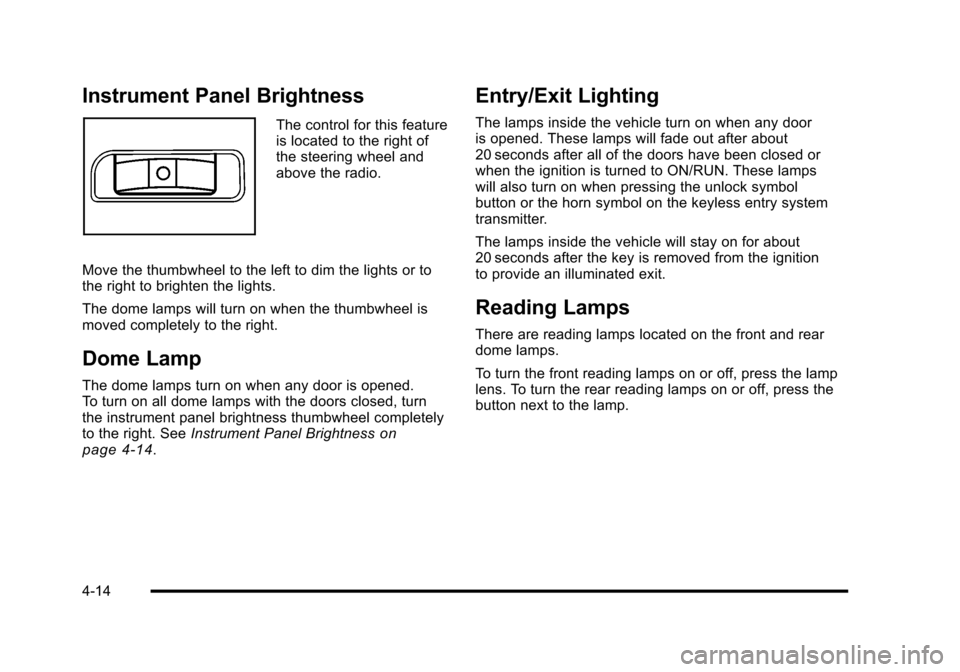
Instrument Panel Brightness
The control for this feature
is located to the right of
the steering wheel and
above the radio.
Move the thumbwheel to the left to dim the lights or to
the right to brighten the lights.
The dome lamps will turn on when the thumbwheel is
moved completely to the right.
Dome Lamp
The dome lamps turn on when any door is opened.
To turn on all dome lamps with the doors closed, turn
the instrument panel brightness thumbwheel completely
to the right. See Instrument Panel Brightness
on
page 4‑14.
Entry/Exit Lighting
The lamps inside the vehicle turn on when any door
is opened. These lamps will fade out after about
20 seconds after all of the doors have been closed or
when the ignition is turned to ON/RUN. These lamps
will also turn on when pressing the unlock symbol
button or the horn symbol on the keyless entry system
transmitter.
The lamps inside the vehicle will stay on for about
20 seconds after the key is removed from the ignition
to provide an illuminated exit.
Reading Lamps
There are reading lamps located on the front and rear
dome lamps.
To turn the front reading lamps on or off, press the lamp
lens. To turn the rear reading lamps on or off, press the
button next to the lamp.
4-14
Page 187 of 480
The rear window defogger turns off approximately
15 minutes after the button is pressed. If turned on
again, the defogger only runs for approximately seven
minutes before turning off.
If the vehicle speed is greater than 80 km/h (50 mph)
and the rear defogger is on, it remains on as long as the
speed is greater than 80 km/h (50 mph). The defogger
can also be turned off by turning off the engine.
For vehicles with the remote start feature, the rear
defogger automatically turns on if it is cold outside.
When the vehicle transitions out of the remote start
mode, the rear defogger turns off. SeeRemote Keyless
Entry (RKE) System Operation on page 3‑4
Notice: Do not use anything sharp on the inside of
the rear window. If you do, you could cut or damage
the warming grid, and the repairs would not be
covered by the vehicle warranty. Do not attach a
temporary vehicle license, tape, a decal or anything
similar to the defogger grid.Outlet Adjustment
Turn the outlets and move the outlet vanes to change
the direction of the airflow and to open and close the
outlets.
Operation Tips
.Clear away any ice, snow or leaves from the air
inlets at the base of the windshield that may block
the flow of air into the vehicle.
.Use of non-GM approved hood deflectors may
adversely affect the performance of the system.
.Keep the path under the front seats clear of
objects to help circulate the air inside of the vehicle
more effectively.
Passenger Compartment Air Filter
The filter removes dust and pollen from the air which is
drawn into the vehicle. Airflow reduction is an indication
that the filter needs to be replaced.
The filter should be replaced as part of routine
scheduled maintenance. See Scheduled Maintenance
on page 7‑3for replacement intervals. To find out
what type of filter to use, see Maintenance
Replacement Parts on page 7‑12.
4-21
Page 217 of 480
ESC (Electronic Stability Control) OFF
If your vehicle has Electronic Stability Control (ESC),
this message displays and the ESC/TCS light on the
instrument panel cluster comes on solid when ESC
is turned off. Adjust your driving accordingly. See
Electronic Stability Control (ESC)
on page 5‑6and
Electronic Stability Control (ESC)/Traction Control
System (TCS) Indicator/Warning Light
on page 4‑33for more information.
GATE AJAR
This message displays when the liftgate is open. Make
sure that the liftgate is closed completely. See Liftgate
on page 3‑13for more information.
ICE POSSIBLE
This message displays when the outside air
temperature is cold enough to create icy road
conditions. Adjust your driving accordingly.
KEY FOB BATT (Battery) LOW
This message displays if the Remote Keyless Entry
(RKE) transmitter battery is low. Replace the battery in
the transmitter. See“Battery Replacement” under
Remote Keyless Entry (RKE) System Operation
on
page 3‑4.
LAUNCH CONTROL
If your vehicle has this feature, this message displays
after the COMPETITIVE MODE message when the
vehicle is stopped. Launch control is a form of traction
control to control wheel spin while launching the vehicle
during closed track events and competitive driving
venues. The system will exit to COMPETITIVE MODE
after the vehicle is launched. See “COMPETITIVE
MODE” earlier in this section. See “Launch Control”
under Electronic Stability Control (ESC)
on page 5‑6for more information.
LOW FUEL
This message displays when your vehicle is low on fuel.
Refill the fuel tank as soon as possible. See Fuel
Gauge
on page 4‑40, Fuelon page 6‑5, and Filling
the Tankon page 6‑10for more information.
4-51
Page 221 of 480
Personalization Menu Modes
OIL LIFE RESET
When this feature is displayed, you can reset the
engine oil life system. To reset the system, seeEngine
Oil Life System
on page 6‑23. See “OIL LIFE” under
DIC Operation and Displayson page 4‑46for more
information.
UNITS
This feature allows you to select the units of
measurement in which the DIC will display the vehicle
information. When UNITS appears on the display, press
and hold the reset button for at least one second to
scroll through the available settings:
ENGLISH (default in United States): All information
will be displayed in English units.
METRIC (default in Canada): All information will be
displayed in metric units.
To select a setting and move on to the next feature,
press the information button while the desired setting is
displayed on the DIC.
REMOTE START
If your vehicle has remote start, this feature allows
remote start to be turned off or on. Remote start allows
you to start the engine from outside of the vehicle using
your Remote Keyless Entry (RKE) transmitter. When
REMOTE START appears on the display, press and
hold the reset button for at least one second to scroll
through the available settings:
OFF: The remote start feature will be disabled.
ON (default): The remote start feature will be enabled.
See Remote Vehicle Start
on page 3‑7for more
information.
To select a setting and move on to the next feature,
press the information button while the desired setting is
displayed on the DIC.
4-55
Page 222 of 480
LOCK HORN
This feature, which allows the vehicle's horn to chirp
every time the lock button on the Remote Keyless
Entry (RKE) transmitter is pressed, can be enabled or
disabled. When LOCK HORN appears on the display,
press and hold the reset button for at least one second
to scroll through the available settings:
OFF (default):The horn will not chirp on the first press
of the lock button on the RKE transmitter. The horn will
still chirp on the second press.
ON: The horn will chirp on the first press of the lock
button on the RKE transmitter.
See Remote Keyless Entry (RKE) System Operation
on
page 3‑4for more information.
To select a setting and move on to the next feature,
press the information button while the desired setting is
displayed on the DIC.
UNLOCK HORN
This feature, which allows the vehicle's horn to chirp
on the first press of the unlock button on the Remote
Keyless Entry (RKE) transmitter, can be enabled or
disabled. When UNLOCK HORN appears on the
display, press and hold the reset button for at least
one second to scroll through the available settings:
OFF (default): The horn will not chirp when the unlock
button on the RKE transmitter is pressed.
ON: The horn will chirp on the first press of the unlock
button on the RKE transmitter.
See Remote Keyless Entry (RKE) System Operation
on
page 3‑4for more information.
To select a setting and move on to the next feature,
press the information button while the desired setting is
displayed on the DIC.
4-56
Page 223 of 480
LIGHT FLASH
This feature, which allows the vehicle's exterior hazard/
turn signal lighting to flash every time the lock or unlock
button on the Remote Keyless Entry (RKE) transmitter
is pressed, can be enabled or disabled. When LIGHT
FLASH appears on the display, press and hold the reset
button for at least one second to scroll through the
available settings:
OFF:The exterior hazard/turn signal lighting will not
flash when the lock or unlock button on the RKE
transmitter is pressed.
ON (default): The exterior hazard/turn signal lighting
will flash when the lock or unlock button on the RKE
transmitter is pressed.
See Remote Keyless Entry (RKE) System Operation
on
page 3‑4for more information.
To select a setting and move on to the next feature,
press the information button while the desired setting is
displayed on the DIC.
DELAY LOCK
This feature, which delays the actual locking of the
vehicle, can be enabled or disabled. When DELAY
LOCK appears on the display, press and hold the
reset button for at least one second to scroll through
the available settings:
ON (default): The doors will not lock until five seconds
after the last door is closed. You can temporarily
override delayed locking by pressing the power lock
switch or the lock button on the Remote Keyless Entry
(RKE) transmitter a second time.
OFF: The doors will lock immediately when pressing
the power lock switch or the lock button on the RKE
transmitter.
See Power Door Locks
on page 3‑10,Delayed Lockingon page 3‑10, and Remote Keyless Entry (RKE)
System Operationon page 3‑4for more information.
To select a setting and move on to the next feature,
press the information button while the desired setting is
displayed on the DIC.
4-57
Page 225 of 480
EXT (Exterior) LIGHTS
This feature, which allows the vehicle's exterior
perimeter lighting to turn on each time the unlock
button on the Remote Keyless Entry (RKE) transmitter
is pressed, can be enabled or disabled. When EXT
LIGHTS appears on the display, press and hold the
reset button for at least one second to scroll through the
available settings:
OFF:The exterior perimeter lighting will not turn on
when the unlock button on the RKE transmitter is
pressed.
ON (default): The exterior perimeter lighting will turn
on when the unlock button on the RKE transmitter is
pressed.
See Remote Keyless Entry (RKE) System Operation
on
page 3‑4for more information.
To select a setting and move on to the next feature,
press the information button while the desired setting
is displayed on the DIC.
LANGUAGE
This feature allows you to select the language in which
the DIC will display. When LANGUAGE appears on the
display, press and hold the reset button for at least
one second to scroll through the available settings:
ENGLISH (default): All messages will appear in
English.
FRENCH: All messages will appear in French.
SPANISH: All messages will appear in Spanish.
GERMAN: All messages will appear in German.
To select a setting and exit out of the personalization
menu mode, press the information button while the
desired setting is displayed on the DIC.
Exiting Personalization Menu
The personalization menu will be exited when any of
the following conditions occur:
.A ten second time period has elapsed.
.The ignition is turned off.
.The end of the personalization menu list is
reached.
4-59
Page 306 of 480
California Proposition 65 Warning
Most motor vehicles, including this one, contain and/or
emit chemicals known to the State of California to
cause cancer and birth defects or other reproductive
harm. Engine exhaust, many parts and systems, many
fluids, and some component wear by-products contain
and/or emit these chemicals.
California Perchlorate Materials
Requirements
Certain types of automotive applications, such as
airbag initiators, seat belt pretensioners, and lithium
batteries contained in remote keyless transmitters,
may contain perchlorate materials. Special handling
may be necessary. For additional information, see
www.dtsc.ca.gov/hazardouswaste/perchlorate.
Doing Your Own Service Work
{WARNING:
You can be injured and the vehicle could be
damaged if you try to do service work on a
vehicle without knowing enough about it.
.Be sure you have sufficient knowledge,
experience, the proper replacement parts,
and tools before attempting any vehicle
maintenance task.
.Be sure to use the proper nuts, bolts, and
other fasteners. English and metric fasteners
can be easily confused. If the wrong fasteners
are used, parts can later break or fall off. You
could be hurt.
If doing some of your own service work, use the proper
service manual. It tells you much more about how to
service the vehicle than this manual can. To order the
proper service manual, see Service Publications
Ordering Information on page 8‑14.
This vehicle has an airbag system. Before attempting
to do your own service work, see Servicing Your
Airbag-Equipped Vehicle on page 2‑76.
6-4
Page 370 of 480
TPMS Sensor Matching Process
Each TPMS sensor has a unique identification code.
Any time you replace one or more of the TPMS sensors
or rotate the vehicle's tires, the identification codes
need to be matched to the new tire/wheel location. The
sensors are matched, to the tire/wheel locations, in the
following order: driver side front tire, passenger side
front tire, passenger side rear tire, and driver side rear
tire using a TPMS diagnostic tool. See your dealer/
retailer for service.
The TPMS sensors can also be matched to each
tire/wheel position by increasing or decreasing the tire's
air pressure. When increasing the tire's pressure, do not
exceed the maximum inflation pressure indicated on the
tire's sidewall. To decrease the tire's air-pressure use
the pointed end of the valve cap, a pencil-style air
pressure gauge, or a key.
You have two minutes to match each tire and wheel
position. If it takes longer than two minutes to match
any tire and wheel position, the matching process stops
and you need to start over.
The TPMS matching process is outlined below:1. Set the parking brake.
2. Turn the ignition switch to ON/RUN with the engine off. 3. Press and hold the Remote Keyless Entry (RKE)
transmitter's LOCK and UNLOCK buttons, at the
same time, for about five seconds to start the
TPMS learn mode. The horn sounds twice
indicating the TPMS receiver is ready and in
learn mode.
4. Start with the driver side front tire. The driver side front turn signal also comes on to indicate that
corner's sensor is ready to be learned.
5. Remove the valve cap from the tire's valve stem. Activate the TPMS sensor by increasing or
decreasing the tire's air pressure for about
eight seconds. The horn chirp, can take up to
30 seconds to sound. It chirps one time and then
all the turn signals flash one time to confirm the
sensor identification code has been matched to the
tire/wheel position.
6. The passenger side front turn signal comes on to indicate that corner sensor is ready to be learned.
Proceed to the passenger side front tire and repeat
the procedure in Step 5.
7. The passenger side rear turn signal comes on to indicate that corner sensor is ready to be learned.
Proceed to the passenger side rear tire and repeat
the procedure in Step 5.
6-68
Page 469 of 480

Headlamps (cont.)High/Low Beam Changer . . . . . . . . . . . . . . . . . . . . . . . . . . 4-5
On Reminder . . . . . . . . . . . . . . . . . . . . . . . . . . . . . . . . . . . . . 4-12
Wiper Activated . . . . . . . . . . . . . . . . . . . . . . . . . . . . . . . . . . . 4-11
Heated Seats . . . . . . . . . . . . . . . . . . . . . . . . . . . . . . . . . . . . . . . .2-6
Heater . . . . . . . . . . . . . . . . . . . . . . . . . . . . . . . . . . . . . . . . . . . . . 4-18 Engine Coolant . . . . . . . . . . . . . . . . . . . . . . . . . . . . . . . . . . . 3-27
Height Adjuster, Driver Seat . . . . . . . . . . . . . . . . . . . . . . . . .2-5
Hideaway Rear Storage Bins . . . . . . . . . . . . . . . . . . . . . . 3-51
Highbeam On Light . . . . . . . . . . . . . . . . . . . . . . . . . . . . . . . . 4-39
Highway Hypnosis . . . . . . . . . . . . . . . . . . . . . . . . . . . . . . . . . 5-19
Hill and Mountain Roads . . . . . . . . . . . . . . . . . . . . . . . . . . . 5-20
Hood Checking Things Under . . . . . . . . . . . . . . . . . . . . . . . . . . . 6-14
Release . . . . . . . . . . . . . . . . . . . . . . . . . . . . . . . . . . . . . . . . . . 6-15
Horn . . . . . . . . . . . . . . . . . . . . . . . . . . . . . . . . . . . . . . . . . . . . . . . . .4-3
How to Wear Safety Belts Properly . . . . . . . . . . . . . . . . 2-19
Hydraulic Clutch . . . . . . . . . . . . . . . . . . . . . . . . . . . . . . . . . . . 6-28
I
Ignition Positions . . . . . . . . . . . . . . . . . . . . . . . . . . . . . . . . . . 3-23
Indicator/Warning LIghts Enhanced Traction System (ETS) . . . . . . . . . . . . . . . . 4-32
Infants and Young Children, Restraints . . . . . . . . . . . . 2-38
Inflation - Tire Pressure . . . . . . . . . . . . . . . . . . . . . . . . . . . . 6-63 Instrument Panel
Brightness . . . . . . . . . . . . . . . . . . . . . . . . . . . . . . . . . . . . . . . . 4-14
Storage Area . . . . . . . . . . . . . . . . . . . . . . . . . . . . . . . . . . . . . 3-47
Instrument Panel Cluster . . . . . . . . . . . . . . . . . . . . . . . . . . 4-24
Integrated Trailer Brake Control System (ITBC) . . . . . . . . . . . . . . . . . . . . . . . . . . . . . 5-32, 5-40
Introduction . . . . . . . . . . . . . . . . . . . . . . . . . . . . . . . . . . . . . . . . . .7-2
J
Jump Starting . . . . . . . . . . . . . . . . . . . . . . . . . . . . . . . . . . . . . . 6-41
K
Keyless Entry
Remote (RKE) System . . . . . . . . . . . . . . . . . . . . . . . . . . . . 3-4
Keyless Entry System . . . . . . . . . . . . . . . . . . . . . . . . . . . . . . .3-4
Keys . . . . . . . . . . . . . . . . . . . . . . . . . . . . . . . . . . . . . . . . . . . . . . . . .3-3
L
Labeling, Tire Sidewall . . . . . . . . . . . . . . . . . . . . . . . . . . . . . 6-56
Lamps Daytime Running (DRL) . . . . . . . . . . . . . . . . . . . . . . . . . . 4-12
Dome . . . . . . . . . . . . . . . . . . . . . . . . . . . . . . . . . . . . . . . . . . . . . 4-14
License Plate . . . . . . . . . . . . . . . . . . . . . . . . . . . . . . . . . . . . . 6-52
Malfunction Indicator . . . . . . . . . . . . . . . . . . . . . . . . . . . . . 4-35
Reading . . . . . . . . . . . . . . . . . . . . . . . . . . . . . . . . . . . . . . . . . . 4-14
i - 7