light CHEVROLET HHR 2010 1.G Owner's Manual
[x] Cancel search | Manufacturer: CHEVROLET, Model Year: 2010, Model line: HHR, Model: CHEVROLET HHR 2010 1.GPages: 480, PDF Size: 5.25 MB
Page 111 of 480
Replacing Restraint System Parts
After a Crash
{WARNING:
A crash can damage the restraint systems in your
vehicle. A damaged restraint system may not
properly protect the person using it, resulting in
serious injury or even death in a crash. To help
make sure your restraint systems are working
properly after a crash, have them inspected and
any necessary replacements made as soon as
possible.
If the vehicle has been in a crash, do you need new
safety belts or LATCH system (if equipped) parts?
After a very minor crash, nothing may be necessary.
But the safety belt assemblies that were used during
any crash may have been stressed or damaged. See
your dealer/retailer to have the safety belt assemblies
inspected or replaced. If the vehicle has the LATCH system and it was being
used during a crash, you may need new LATCH system
parts.
New parts and repairs may be necessary even if the
safety belt or LATCH system (if equipped), was not
being used at the time of the crash.
If an airbag inflates, you will need to replace airbag
system parts. See the part on the airbag system earlier
in this section.
Have the safety belt pretensioners checked if the
vehicle has been in a crash, if the airbag readiness light
stays on after the vehicle is started, or while you are
driving. See
Airbag Readiness Light
on page 4‑27.
2-79
Page 117 of 480
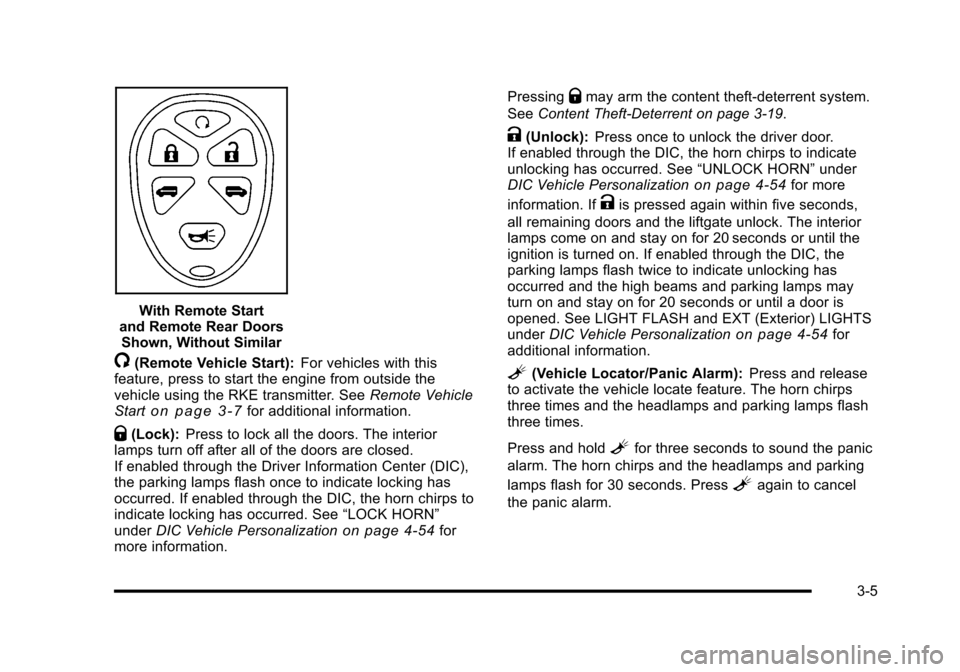
With Remote Start
and Remote Rear Doors Shown, Without Similar
/(Remote Vehicle Start): For vehicles with this
feature, press to start the engine from outside the
vehicle using the RKE transmitter. See Remote Vehicle
Start
on page 3‑7for additional information.
Q(Lock): Press to lock all the doors. The interior
lamps turn off after all of the doors are closed.
If enabled through the Driver Information Center (DIC),
the parking lamps flash once to indicate locking has
occurred. If enabled through the DIC, the horn chirps to
indicate locking has occurred. See “LOCK HORN”
under DIC Vehicle Personalization
on page 4‑54for
more information. Pressing
Qmay arm the content theft-deterrent system.
See Content Theft-Deterrent on page 3‑19.
K(Unlock): Press once to unlock the driver door.
If enabled through the DIC, the horn chirps to indicate
unlocking has occurred. See “UNLOCK HORN”under
DIC Vehicle Personalization
on page 4‑54for more
information. If
Kis pressed again within five seconds,
all remaining doors and the liftgate unlock. The interior
lamps come on and stay on for 20 seconds or until the
ignition is turned on. If enabled through the DIC, the
parking lamps flash twice to indicate unlocking has
occurred and the high beams and parking lamps may
turn on and stay on for 20 seconds or until a door is
opened. See LIGHT FLASH and EXT (Exterior) LIGHTS
under DIC Vehicle Personalization
on page 4‑54for
additional information.
L(Vehicle Locator/Panic Alarm): Press and release
to activate the vehicle locate feature. The horn chirps
three times and the headlamps and parking lamps flash
three times.
Press and hold
Lfor three seconds to sound the panic
alarm. The horn chirps and the headlamps and parking
lamps flash for 30 seconds. Press
Lagain to cancel
the panic alarm.
3-5
Page 125 of 480
Liftgate
To lock the liftgate from the outside, press the lock
button on the Remote Keyless Entry (RKE) transmitter.
To unlock the liftgate with the RKE, press the unlock
button twice within five seconds. For more information,
seeRemote Keyless Entry (RKE) System Operation
on
page 3‑4. You can also use the power door lock
switch to lock and unlock the liftgate.
Open the liftgate by pressing the touchpad located in
the handle above the license plate. Once slightly
opened, the liftgate will rise by itself. Lamps in the rear
of the vehicle will come on, illuminating the rear cargo
area, unless the dome lamp lever is in the off position.
For more information, see Dome Lamp on page 4‑14.
Notice: If you open the liftgate without checking for
overhead obstructions such as a garage door, you
could damage the liftgate or the liftgate glass.
Always check to make sure the area above and
behind the liftgate is clear before opening it.
{WARNING:
Exhaust gases can enter the vehicle if it is driven
with the liftgate, trunk/hatch open, or with any
objects that pass through the seal between the
body and the trunk/hatch or liftgate. Engine
exhaust contains Carbon Monoxide (CO) which
cannot be seen or smelled. It can cause
unconsciousness and even death.
If the vehicle must be driven with the liftgate,
or trunk/hatch open:
.Close all of the windows.
.Fully open the air outlets on or under the
instrument panel.
.Adjust the Climate Control system to a setting
that brings in only outside air and set the fan
speed to the highest setting. See Climate
Control System in the Index.
.If the vehicle is equipped with a power liftgate,
disable the power liftgate function.
For more information about carbon monoxide, see
Engine Exhaust on page 3‑39.
3-13
Page 131 of 480
Content Theft-Deterrent
Your vehicle may have a
content theft-deterrent
alarm system.
Arming the System
To arm the system:1. Turn the ignition off.
2. Press lock on the RKE transmitter.
The system will arm after either of the following occur:
.30 seconds after all the doors are closed.
.60 seconds with any door open.
Press the lock button on the RKE transmitter a second
time, while all the doors are closed, to immediately arm
the system. The system still arms in 60 seconds if a
door is open. When the open door is closed, it
also arms. The security light turns on to indicate that arming has
been initiated. Once the system is armed, the security
light flashes once every three seconds.
If the security light flashes twice per second, a door
is open.
Locking the vehicle with the manual lock knobs on the
doors will not arm the system.
Disarming the System
Disarm the system by doing any one of the following:
.Press the RKE transmitter unlock button.
.Turn the ignition on.
Once the system is disarmed, the security light stops
flashing.
How the System Alarm is Activated
If the system is armed, it can be activated by either:
.Opening the driver's door or tailgate. This causes a
10 second pre-alarm chirp followed by a 30 second
full alarm of horn and lights.
.Opening any other door. This immediately causes
a full alarm of horn and lights for 30 seconds.
When an alarm event has finished, the system re-arms
itself automatically.
3-19
Page 132 of 480
How to Turn Off the System Alarm
To turn off the system alarm, do one of the following:
.Press the lock button on the RKE transmitter.
The system will then re-arm itself.
.Press the unlock button on the RKE transmitter.
This will also disarm the system.
.Insert the key in the ignition and turn it on. This
will also disarm the system.
How to Detect a Tamper Condition
The content theft security system alarm was previously
activated if three chirps sound when you press the lock
or unlock buttons on the RKE transmitter.
PASS-Key®III+ Electronic
Immobilizer
See Radio Frequency Statementon page 8‑17for information regarding Part 15 of the Federal
Communications Commission (FCC) Rules and
RSS-210/211 of Industry Canada.
PASS-Key®III+ Electronic
Immobilizer Operation
Your vehicle has PASS-Key®III+ (Personalized
Automotive Security System) theft-deterrent system.
PASS-Key
®III+ is a passive theft-deterrent system.
The system is automatically armed when the key is
removed from the ignition.
You do not have to manually arm or disarm the system.
The security light will come on if there is a problem with
arming or disarming the theft-deterrent system.
When the PASS-Key
®III+ system senses that someone
is using the wrong key, it prevents the vehicle from
starting. Anyone using a trial-and-error method to start
the vehicle will be discouraged because of the high
number of electrical key codes.
When trying to start the vehicle if the engine does not
start and the security light comes on, there may be a
problem with your theft-deterrent system. Turn the
ignition off and try again.
3-20
Page 133 of 480
If the engine still does not start, and the key appears to
be undamaged, try another ignition key. At this time,
you may also want to check the fuse, seeFuses and
Circuit Breakers
on page 6‑119. If the engine still does
not start with the other key, your vehicle needs service.
If your vehicle does start, the first key may be faulty.
See your dealer/retailer who can service the
PASS-Key
®III+ to have a new key made. In an
emergency, contact Roadside Assistance. See
Roadside Assistance Program
on page 8‑6, for
more information.
It may be possible for the PASS-Key
®III+ decoder to
“learn” the transponder value of a new or replacement
key. Up to 10 keys may be programmed for the vehicle.
The following procedure is for programming additional
keys only. If all the currently programmed keys are lost
or do not operate, you must see your dealer/retailer or a
locksmith who can service PASS-Key
®III+ to have keys
made and programmed to the system.
See your dealer/retailer or a locksmith who can service
PASS-Key
®III+ to get a new key blank that is cut
exactly as the ignition key that operates the system. To program the new key:
1. Verify that the new key has a
1stamped on it.
2. Insert the already programmed key in the ignition and start the engine. If the engine will not start,
see your dealer/retailer for service.
3. After the engine has started, turn the key to LOCK/OFF, and remove the key.
4. Insert the key to be programmed and turn it to the ON/RUN position within five seconds of the original
key being turned to the LOCK/OFF position.
The security light will turn off once the key has
been programmed.
5. Repeat Steps 1 through 4 if additional keys are to be programmed.
If you are ever driving and the security light comes on
and stays on, you may be able to restart your engine
if you turn it off. Your PASS-Key
®III+ system, however,
is not working properly and must be serviced by your
dealer/retailer. Your vehicle is not protected by the
PASS-Key
®III+ system at this time.
If you lose or damage your PASS-Key
®III+ key, see
your dealer/retailer or a locksmith who can service
PASS-Key
®III+ to have a new key made.
Do not leave the key or device that disarms or
deactivates the theft deterrent system in the vehicle.
3-21
Page 136 of 480
R(ON/RUN): This is the position in which you can
operate the electrical accessories and to display some
instrument panel cluster warning and indicator lights.
The switch stays in this position when the engine is
running.
If you leave the key in the ACC/ACCESSORY or
ON/RUN position with the engine off, the battery could
be drained. You may not be able to start the vehicle if
the battery is allowed to drain for an extended period
of time.
/ (START): This position starts the engine. When the
engine starts, release the key. The ignition switch will
return to ON/RUN for driving.
A warning tone will sound when the driver door is
opened, the ignition is in LOCK/OFF or ACC/
ACCESSORY and the key is in the ignition.Column Lock Release
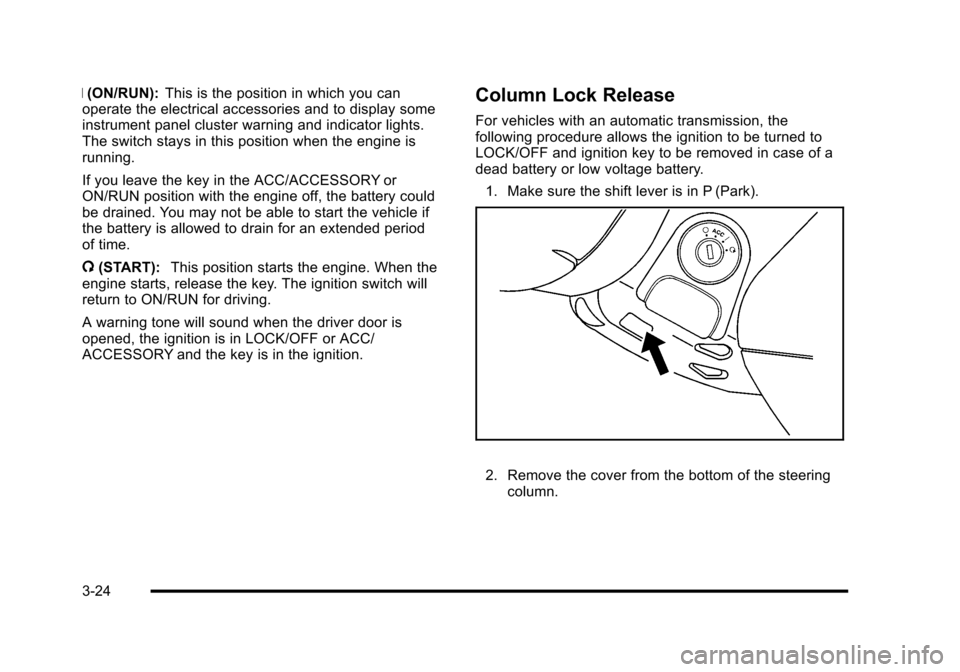
For vehicles with an automatic transmission, the
following procedure allows the ignition to be turned to
LOCK/OFF and ignition key to be removed in case of a
dead battery or low voltage battery.
1. Make sure the shift lever is in P (Park).
2. Remove the cover from the bottom of the steering column.
3-24
Page 142 of 480
D (Drive):This position is for normal driving with the
automatic transmission. It provides the best fuel
economy. If you need more power for passing and
you are:
.Going less than about 35 mph (55 km/h), push
the accelerator pedal about halfway down.
.Going about 35 mph (55 km/h), push the
accelerator all the way down.
Downshifting the transmission in slippery road
conditions could result in skidding, see “Skidding”
under Loss of Control on page 5‑15.
I (Intermediate): This position is also used for normal
driving. However, it reduces vehicle speed without using
the brakes for slight downgrades where the vehicle
would otherwise accelerate due to steepness of grade.
If constant upshifting or downshifting occurs while
driving up steep hills, this position can be used to
prevent repetitive types of shifts. You might choose
I (Intermediate) instead of D (Drive) when driving on
hilly, winding roads and when towing a trailer, so that
there is less shifting between gears. PERFORMANCE SHIFTING:
If the vehicle has this
feature, it can detect a change in driving patterns
while in the Intermediate position. If you make an
aggressive driving maneuver, the vehicle's transmission
automatically shifts to the lowest possible gear to
maximize vehicle performance. The vehicle will
automatically return to normal operation when you
return to normal driving patterns.
L (Low): This position reduces vehicle speed more than
I (Intermediate) without actually using the brakes. You
can use it on very steep hills, or in deep snow or mud.
If the shift lever is put in L (Low), the transmission will
not shift into L (Low) until the vehicle is going slowly
enough.
Notice: Spinning the tires or holding the vehicle in
one place on a hill using only the accelerator pedal
may damage the transmission. The repair will not be
covered by the vehicle warranty. If you are stuck, do
not spin the tires. When stopping on a hill, use the
brakes to hold the vehicle in place.
3-30
Page 145 of 480
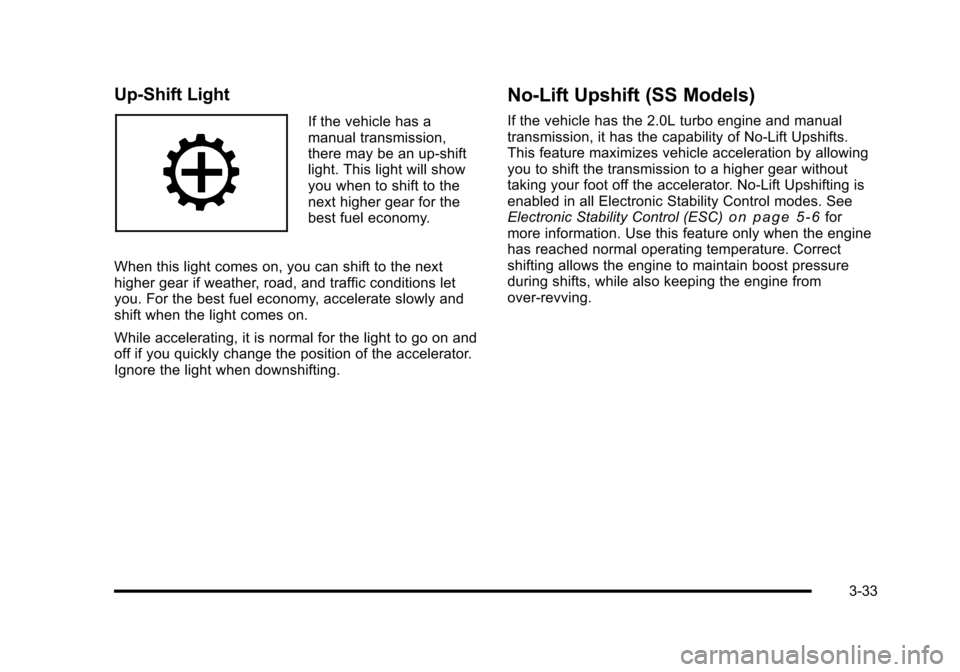
Up-Shift Light
If the vehicle has a
manual transmission,
there may be an up-shift
light. This light will show
you when to shift to the
next higher gear for the
best fuel economy.
When this light comes on, you can shift to the next
higher gear if weather, road, and traffic conditions let
you. For the best fuel economy, accelerate slowly and
shift when the light comes on.
While accelerating, it is normal for the light to go on and
off if you quickly change the position of the accelerator.
Ignore the light when downshifting.
No‐Lift Upshift (SS Models)
If the vehicle has the 2.0L turbo engine and manual
transmission, it has the capability of No-Lift Upshifts.
This feature maximizes vehicle acceleration by allowing
you to shift the transmission to a higher gear without
taking your foot off the accelerator. No‐Lift Upshifting is
enabled in all Electronic Stability Control modes. See
Electronic Stability Control (ESC)
on page 5‑6for
more information. Use this feature only when the engine
has reached normal operating temperature. Correct
shifting allows the engine to maintain boost pressure
during shifts, while also keeping the engine from
over-revving.
3-33
Page 147 of 480
{WARNING:
If the front passenger seat back is folded down,
the armrest may make it awkward to grab and
pull up the parking brake lever. If the lever is not
pulled up far enough, the vehicle may roll and you
or others could be injured. Move your hand lower
on the lever or raise the seat back so that you can
set the brake.
To set the parking brake, hold the brake pedal down
and pull up on the parking brake lever. If the ignition is
on, the brake system warning light will come on. See
Brake System Warning Light on page 4‑30. To release the parking brake, hold the brake pedal
down. Pull the parking brake lever up until you can
press the release button. Hold the release button in
as you move the brake lever all the way down.
If you forget to release your parking brake, a chime will
sound and a warning message will be displayed when
the parking brake is applied and the vehicle is moving
faster than 5 mph (8 km/h). See
DIC Warnings and
Messages on page 4‑48.
Notice: Driving with the parking brake on can
overheat the brake system and cause premature
wear or damage to brake system parts. Make sure
that the parking brake is fully released and the
brake warning light is off before driving.
3-35