oil reset CHEVROLET HHR 2010 1.G Owners Manual
[x] Cancel search | Manufacturer: CHEVROLET, Model Year: 2010, Model line: HHR, Model: CHEVROLET HHR 2010 1.GPages: 480, PDF Size: 5.25 MB
Page 24 of 480
Driver Information Center (DIC)
The DIC display is located at the bottom of the
instrument panel cluster. It shows the status of
many vehicle systems and enables access to the
personalization menu.
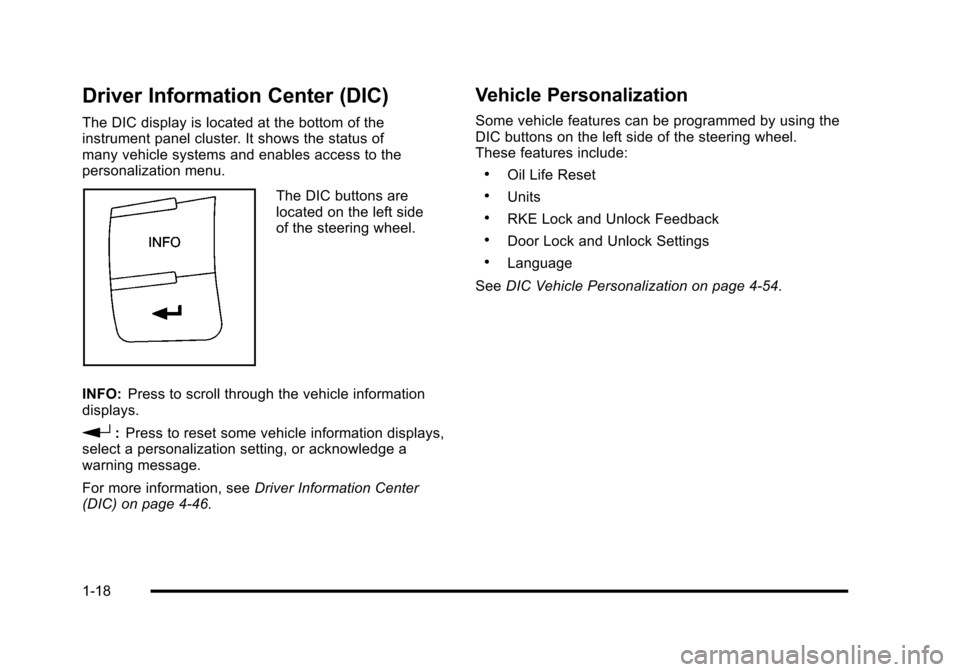
The DIC buttons are
located on the left side
of the steering wheel.
INFO: Press to scroll through the vehicle information
displays.
r: Press to reset some vehicle information displays,
select a personalization setting, or acknowledge a
warning message.
For more information, see Driver Information Center
(DIC) on page 4‑46.
Vehicle Personalization
Some vehicle features can be programmed by using the
DIC buttons on the left side of the steering wheel.
These features include:
.Oil Life Reset
.Units
.RKE Lock and Unlock Feedback
.Door Lock and Unlock Settings
.Language
See DIC Vehicle Personalization on page 4‑54.
1-18
Page 29 of 480

Engine Oil Life System
The engine oil life system calculates engine oil life
based on vehicle use and displays a DIC message
when it is necessary to change the engine oil and filter.
The oil life system should be reset to 100% only
following an oil change.
Resetting the Oil Life System
1. Turn the ignition to ON/RUN, with the engine off.
2. Press the information and reset buttons on theDriver Information Center (DIC) at the same time
to enter the personalization menu.
3. Press the information button to scroll through the available personalization menu modes until the
DIC display shows OIL-LIFE RESET.
4. Press and hold the reset button until the DIC display shows ACKNOWLEDGED. This will tell
you the system has been reset.
5. Turn the key to LOCK/OFF. For vehicles with the 2.2L (VIN Code V) or
2.4L (VIN Code B) engines, you can also reset
the system as follows:
1. Turn the ignition key to ON/RUN with the engine off.
2. Fully press and release the accelerator pedal slowly three times within five seconds.
3. Turn the key to LOCK/OFF, then start the engine.
See Engine Oil Life System on page 6‑23.
Fuel E85 (85% Ethanol)
Vehicles that have the 2.2L L4 engine (VIN Code B) or
the 2.4L L4 engine (VIN Code V) have a yellow fuel cap
and can use either unleaded gasoline or ethanol fuel
containing up to 85% ethanol (E85). See Fuel E85
(85% Ethanol)
on page 6‑8. In all other engines,
use only the unleaded gasoline described under
Gasoline Octane on page 6‑6.
1-23
Page 214 of 480
AV (Average) SPEED
Press the information button until AV SPEED displays.
This mode shows the vehicle's average speed in miles
per hour (mph) or kilometers per hour (km/h).
To reset the average vehicle speed, press and hold the
reset button while AV SPEED is displayed.
OIL LIFE
Press the information button until OIL LIFE displays.
The engine oil life system shows an estimate of the oil's
remaining useful life. It shows 100% when the system is
reset after an oil change. It alerts you to change the oil
on a schedule consistent with your driving conditions.
In addition to the engine oil life system monitoring the
oil life, additional maintenance is recommended in the
Maintenance Schedule in this manual. SeeEngine Oil
on page 6‑19andScheduled Maintenanceon
page 7‑3.
Always reset the engine oil life system after an oil
change. See “How to Reset the Engine Oil Life
System” underEngine Oil Life System on page 6‑23.
COOLANT
Press the information button until COOLANT displays.
This mode shows the temperature of the engine
coolant in either degrees Fahrenheit (°F) or degrees
Celsius (°C).
Tire Pressure
If your vehicle has a Tire Pressure Monitor System
(TPMS), the pressure for each tire can be viewed in the
DIC. The tire pressure is shown in either pounds per
square inch (psi) or kilopascals (kPa). Press the
information button until LF ## PSI (kPa) ## RF displays
for the front tires. Press the information button again
until LR ## PSI (kPa) ## RR displays for the rear tires.
If a low tire pressure condition is detected by the
system while driving, a message advising you to
check the tire pressure appears in the display. See
Inflation - Tire Pressure
on page 6‑63andDIC
Warnings and Messageson page 4‑48for more
information.
DIC Warnings and Messages
These messages appear if there is a problem detected
in one of your vehicle's systems.
A message clears when the vehicle's condition is no
longer present. To acknowledge a message and clear it
from the display, press and hold any of the DIC buttons.
If the condition is still present, the warning message
comes back on the next time the vehicle is turned off
and back on. With most messages, a warning chime
sounds when the message displays. Your vehicle may
have other warning messages.
4-48
Page 215 of 480
AUTO (Automatic) LIGHTS OFF
This message displays if the automatic headlamp
system is disabled with the headlamp switch. See
Automatic Headlamp System
on page 4‑12for more
information.
AUTO (Automatic) LIGHTS ON
This message displays if the automatic headlamp
system is enabled with the headlamp switch. See
Automatic Headlamp System
on page 4‑12for more
information.
BRAKE FLUID
This message displays, while the ignition is on, when
the brake fluid level is low. The brake system warning
light on the instrument panel cluster also comes on.
See Brake System Warning Light
on page 4‑30for
more information. Have the brake system serviced by
your dealer/retailer as soon as possible.
CHANGE OIL SOON
This message displays when the life of the engine oil
has expired and it should be changed.
When this message is acknowledged and cleared from
the display, the engine oil life system must still be reset
separately. See Engine Oil Life System
on page 6‑23andScheduled Maintenanceon page 7‑3for more
information.
CHECK GAS CAP
This message displays if the fuel cap has not been fully
tightened. Recheck the fuel cap to make sure that it is
on properly. A few driving trips with the cap properly
installed should turn the message off.
COMPETITIVE MODE
If your vehicle has this feature, this message displays
when the Competitive Driving mode is selected. The
Traction Control System (TCS) will not be operating
while in the Competitive Driving mode and the ESC/
TCS light on the instrument panel cluster will be on
solid. Adjust your driving accordingly. See Traction
Control System (TCS)
on page 5‑9, Electronic
Stability Control (ESC)on page 5‑6, and Electronic
Stability Control (ESC)/Traction Control System (TCS)
Indicator/Warning Light
on page 4‑33for more
information.
COOLING MODE ON
This message may display on some vehicles. Under
severe conditions, hot ambient temperatures, steep
grades, and towing, your vehicle may experience more
transmission shifting. This is temporary and normal
under these conditions. This does not require engine or
transmission service.
4-49
Page 221 of 480
Personalization Menu Modes
OIL LIFE RESET
When this feature is displayed, you can reset the
engine oil life system. To reset the system, seeEngine
Oil Life System
on page 6‑23. See “OIL LIFE” under
DIC Operation and Displayson page 4‑46for more
information.
UNITS
This feature allows you to select the units of
measurement in which the DIC will display the vehicle
information. When UNITS appears on the display, press
and hold the reset button for at least one second to
scroll through the available settings:
ENGLISH (default in United States): All information
will be displayed in English units.
METRIC (default in Canada): All information will be
displayed in metric units.
To select a setting and move on to the next feature,
press the information button while the desired setting is
displayed on the DIC.
REMOTE START
If your vehicle has remote start, this feature allows
remote start to be turned off or on. Remote start allows
you to start the engine from outside of the vehicle using
your Remote Keyless Entry (RKE) transmitter. When
REMOTE START appears on the display, press and
hold the reset button for at least one second to scroll
through the available settings:
OFF: The remote start feature will be disabled.
ON (default): The remote start feature will be enabled.
See Remote Vehicle Start
on page 3‑7for more
information.
To select a setting and move on to the next feature,
press the information button while the desired setting is
displayed on the DIC.
4-55
Page 325 of 480
Cold Temperature Operation
For Vehicles With the 2.2L or
2.4L L4 Engine
If in an area of extreme cold, where the temperature
falls below−20°F (−29°C), use either an SAE 5W-30
synthetic oil or an SAE 0W-30 engine oil. Both provide
easier cold starting for the engine at extremely low
temperatures. Always use an oil that meets the required
specification, GM6094M. See “What Kind of Engine Oil
to Use” for more information.
Engine Oil Additives / Engine Oil
Flushes
Do not add anything to the oil. The recommended oils
with the starburst symbol that meet GM standards are
all that is needed for good performance and engine
protection.
Engine oil system flushes are not recommended and
could cause engine damage not covered by the vehicle
warranty.
Engine Oil Life System
When to Change Engine Oil
This vehicle has the Engine Oil Life System, a computer
system that indicates when to change the engine oil
and filter. This is based on engine revolutions and
engine temperature, and not on mileage. Based on
driving conditions, the mileage at which an oil change is
indicated can vary considerably. For the oil life system
to work properly, the system must be reset every time
the oil is changed.
When the system has calculated that oil life has been
diminished, it indicates that an oil change is necessary.
A CHANGE OIL SOON message comes on. See DIC
Warnings and Messages
on page 4‑48. Change the
oil as soon as possible within the next 600 miles
(1 000 km). It is possible that, if driving under the best
conditions, the oil life system might not indicate that an
oil change is necessary for over a year. However, the
engine oil and filter must be changed at least once a
year and at this time the system must be reset. Your
dealer/retailer has trained service people who will
perform this work using genuine parts and reset the
system. It is also important to check the oil regularly
and keep it at the proper level.
6-23
Page 326 of 480
If the system is ever reset accidentally, the oil must
be changed at 3,000 miles (5 000 km) since the last
oil change. Remember to reset the oil life system
whenever the oil is changed.
How to Reset the Engine Oil Life
System
The Engine Oil Life System calculates when to change
your engine oil and filter based on vehicle use.
Whenever the oil is changed, reset the system so it
can calculate when the next oil change is required. If a
situation occurs where the oil is changed prior to a
CHANGE OIL SOON message being turned on, reset
the system.
After changing the engine oil, the system must be reset:1. Turn the ignition to ON/RUN, with the engine off.
2. Press the information and reset buttons on the Driver Information Center (DIC) at the same time to
enter the personalization menu. See DIC Vehicle
Personalization on page 4‑54. 3. Press the information button to scroll through the
available personalization menu modes until the
DIC display shows OIL‐LIFE RESET.
4. Press and hold the reset button until the DIC display shows ACKNOWLEDGED. This will tell
you the system has been reset.
5. Turn the key to LOCK/OFF.
For vehicles with the 2.2L (VIN Code V) or 2.4L
(VIN Code B) engines, you can also reset the system
as follows: 1. Turn the ignition key to ON/RUN with the engine off.
2. Fully press and release the accelerator pedal slowly three times within five seconds.
3. Turn the key to LOCK/OFF, then start the engine.
If the CHANGE OIL SOON message comes back on
when the vehicle is started, the engine oil life system
has not reset. Repeat the reset procedure.
6-24
Page 431 of 480
Rotation of New Tires
To maintain ride, handling, and performance of the
vehicle, it is important that the first rotation service
for new tires be performed when they have 8 000 to
13 000 km (5,000 to 8,000 miles). SeeTire Inspection
and Rotation on page 6‑69.
Scheduled Maintenance
When the Change Oil Soon Message
Displays
Change engine oil and filter. See Engine Oilon
page 6‑19. An Emission Control Service.
When the Change Oil Soon message displays, service
is required for the vehicle as soon as possible, within
the next 1 000 km/600 miles. If driving under the best
conditions, the engine oil life system might not indicate
the need for vehicle service for more than a year. The
engine oil and filter must be changed at least once a
year and the oil life system must be reset. Your dealer/retailer has trained service technicians
who will perform this work and reset the system. If the
engine oil life system is reset accidentally, service the
vehicle within 5 000 km/3,000 miles since the last
service. Reset the oil life system whenever the oil is
changed. See
Engine Oil Life System on page 6‑23.
When the Change Oil Soon message displays, certain
services, checks, and inspections are required. The
services described for Maintenance Ishould be
performed at every engine oil change. The services
described for Maintenance IIshould be
performed when:
.Maintenance Iwas performed the last time the
engine oil was changed.
.It has been 10 months or more since the Change
Oil Soon message has displayed or since the last
service.
7-3
Page 435 of 480
Scheduled Maintenance
ServiceMaintenanceIMaintenance II
Change engine oil and filter. Reset oil life system. ••
Engine coolant level check. ••
Windshield washer fluid level check. ••
Tire inflation pressures check. ••
Tire wear inspection. ••
Rotate tires. ••
Fluids visual leak check. ••
2.2L and 2.4L Engines: Engine air cleaner filter inspection (vehicles driven in dusty
conditions only). •
•
2.0L Engine: Engine air cleaner filter inspection. ••
Brake system inspection. ••
Steering and suspension inspection. •
Engine cooling system inspection. •
Windshield wiper blades inspection. •
Body components lubrication. •
Restraint system components check. •
Passenger compartment air filter replacement. •
2.2L and 2.4L Engines: Engine air cleaner filter inspection (vehicles not driven in
dusty conditions). •
7-7