Remote CHEVROLET HHR 2011 1.G User Guide
[x] Cancel search | Manufacturer: CHEVROLET, Model Year: 2011, Model line: HHR, Model: CHEVROLET HHR 2011 1.GPages: 430, PDF Size: 4.57 MB
Page 113 of 430
Black plate (7,1)Chevrolet HHR Owner Manual - 2011
To start the engine using the remote start feature:1. Aim the RKE transmitter at the vehicle.
2. Press and release the transmitter's lock button, then immediately press and hold the remote
vehicle start button for four seconds or until the
vehicle's turn signal lamps flash.
When the vehicle's engine starts, the parking
lamps will turn on and remain on while the engine
is running. The vehicle's doors will be locked.
3. If it is the first remote start since the vehicle has been driven, repeat these steps, while the engine
is still running, to extend the engine running time
by 10 minutes. Remote start can be extended
one time.
After entering the vehicle during a remote start, insert
and turn the key to ON/RUN to drive the vehicle.
After a remote start, the engine will automatically shut
off after 10 minutes unless a time extension has been
done or the vehicle's key is inserted into the ignition
switch and turned to ON/RUN.
The maximum number of remote starts between ignition
cycles with the key is two.
If the remote start procedure is used again before the
first 10 minute time frame has ended, the first
10 minutes will immediately expire and the second
10 minute time frame will start. After your vehicle's engine has been started two times
using the remote start button, the vehicle's ignition
switch must be turned to ON/RUN and then back to
LOCK/OFF using the key before the remote start
procedure can be used again.
To manually shut off the engine after a remote start:
.Aim the RKE transmitter at the vehicle and press
the remote start button until the parking lamps
turn off.
.Turn on the hazard warning flashers. See
Hazard
Warning Flashers on page 4‑3.
.Insert the vehicle's key into the ignition switch and
turn the switch to ON/RUN and then back to
LOCK/OFF.
The remote vehicle start feature will not operate if:
.The vehicle's key is in the ignition.
.The vehicle's hood is open
.The hazard warning flashers are on.
.There is an emission control system malfunction.
See Malfunction Indicator Lamp on page 4‑33.
.The engine coolant temperature is too high.
.The oil pressure is low.
.Two remote vehicle starts have already been
provided.
3-7
Page 114 of 430
Black plate (8,1)Chevrolet HHR Owner Manual - 2011
Doors and Locks
Door Locks
{WARNING:
Unlocked doors can be dangerous.
.Passengers, especially children, can easily
open the doors and fall out of a moving
vehicle. When a door is locked, the handle will
not open it. The chance of being thrown out of
the vehicle in a crash is increased if the doors
are not locked. So, all passengers should
wear safety belts properly and the doors
should be locked whenever the vehicle is
driven.
.Young children who get into unlocked vehicles
may be unable to get out. A child can be
overcome by extreme heat and can suffer
permanent injuries or even death from heat
stroke. Always lock the vehicle whenever
leaving it.(Continued)
WARNING: (Continued)
.Outsiders can easily enter through an
unlocked door when you slow down or stop
your vehicle. Locking your doors can help
prevent this from happening.
There are several ways to lock and unlock your vehicle.
To lock the driver's door from the outside, turn the key
clockwise. To unlock the door, turn the key
counterclockwise.
You can also use the remote keyless entry transmitter
to lock and unlock the doors.
From the inside, use the manual lock knobs on each
door or the power door lock switch to lock and unlock
all doors.
3-8
Page 115 of 430
Black plate (9,1)Chevrolet HHR Owner Manual - 2011
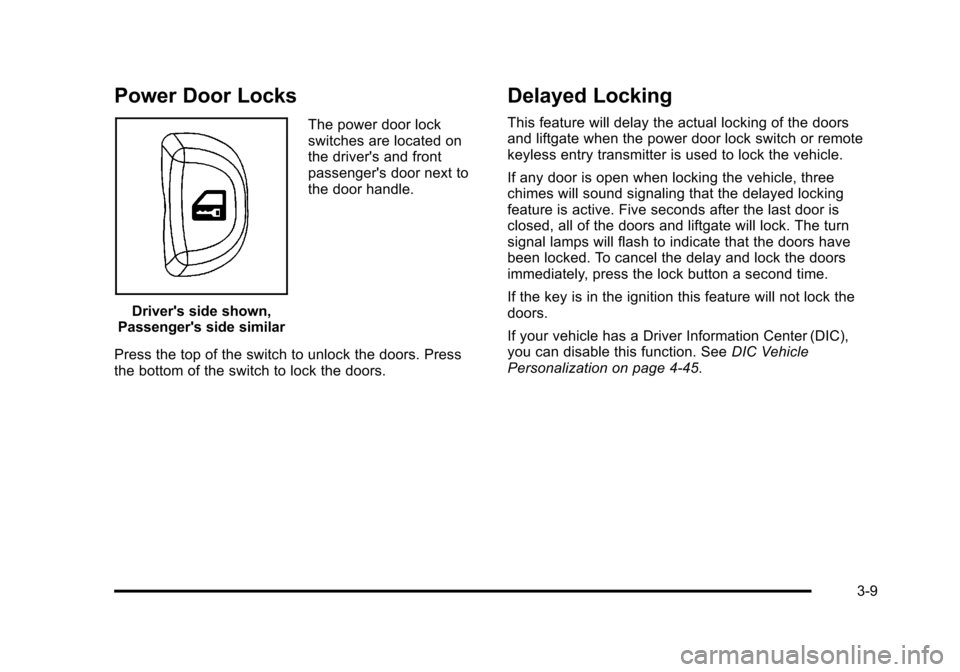
Power Door Locks
Driver's side shown,
Passenger's side similar The power door lock
switches are located on
the driver's and front
passenger's door next to
the door handle.
Press the top of the switch to unlock the doors. Press
the bottom of the switch to lock the doors.
Delayed Locking
This feature will delay the actual locking of the doors
and liftgate when the power door lock switch or remote
keyless entry transmitter is used to lock the vehicle.
If any door is open when locking the vehicle, three
chimes will sound signaling that the delayed locking
feature is active. Five seconds after the last door is
closed, all of the doors and liftgate will lock. The turn
signal lamps will flash to indicate that the doors have
been locked. To cancel the delay and lock the doors
immediately, press the lock button a second time.
If the key is in the ignition this feature will not lock the
doors.
If your vehicle has a Driver Information Center (DIC),
you can disable this function. See DIC Vehicle
Personalization on page 4‑45.
3-9
Page 117 of 430
Black plate (11,1)Chevrolet HHR Owner Manual - 2011
To open a rear door while the security lock is on, do the
following:1. Unlock the door using the remote keyless entry transmitter, the power door lock switch, or by lifting
the rear door manual lock.
2. Open the door from the outside.
To cancel the rear door security lock, do the following: 1. Unlock the door and open it from the outside.
2. Insert the key into the lock below the rear door security lock label and turn it to the vertical
position.
3. Repeat the steps for the other lock.
Lockout Protection
If you press the power door lock switch when the key is
in the ignition and any door is open, all the doors will
lock and the driver's door will unlock. Be sure to remove
the key from the ignition when locking your vehicle.
The lockout protection can be overridden by pressing
and holding the power door lock in the lock position for
three seconds.
Rear Side Cargo Door
The rear side cargo doors can be opened by pressing
the buttons located on the driver and passenger sides
of the instrument panel, or by using the Remote Keyless
Entry (RKE) transmitter. See Instrument Panel
on
page 1‑2, and Remote Keyless Entry (RKE) System
Operationon page 3‑4for more information.
To use the buttons on the instrument panel, the driver
side door must be unlocked.
Push the door to close.
Liftgate
To lock the liftgate from the outside, press the lock
button on the Remote Keyless Entry (RKE) transmitter.
To unlock the liftgate with the RKE, press the unlock
button twice within five seconds. For more information,
see Remote Keyless Entry (RKE) System Operation
on
page 3‑4. You can also use the power door lock
switch to lock and unlock the liftgate.
3-11
Page 170 of 430
Black plate (14,1)Chevrolet HHR Owner Manual - 2011
Instrument Panel Brightness
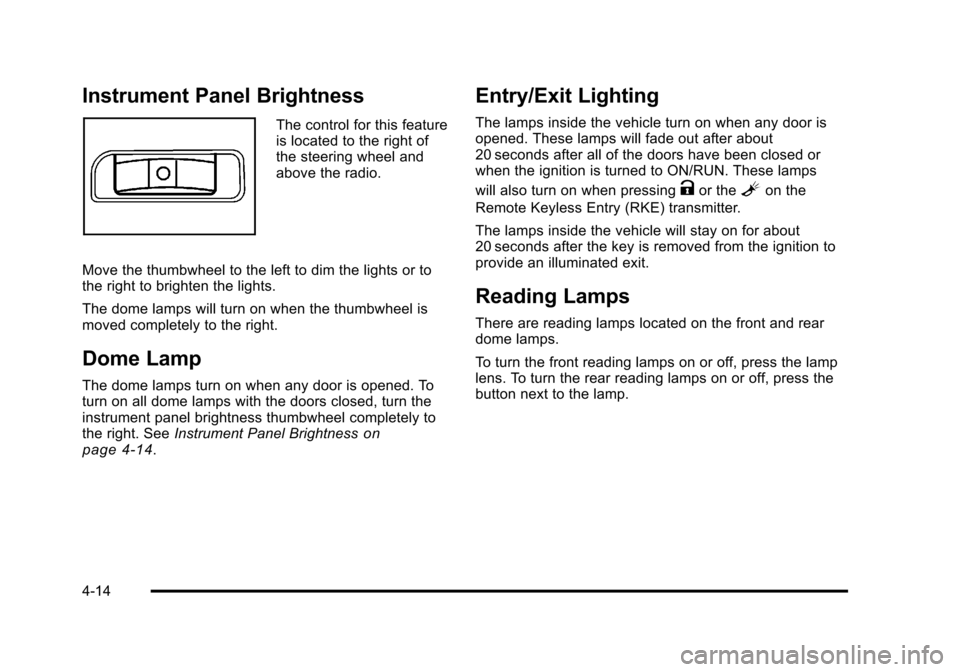
The control for this feature
is located to the right of
the steering wheel and
above the radio.
Move the thumbwheel to the left to dim the lights or to
the right to brighten the lights.
The dome lamps will turn on when the thumbwheel is
moved completely to the right.
Dome Lamp
The dome lamps turn on when any door is opened. To
turn on all dome lamps with the doors closed, turn the
instrument panel brightness thumbwheel completely to
the right. See Instrument Panel Brightness
on
page 4‑14.
Entry/Exit Lighting
The lamps inside the vehicle turn on when any door is
opened. These lamps will fade out after about
20 seconds after all of the doors have been closed or
when the ignition is turned to ON/RUN. These lamps
will also turn on when pressing
Kor theLon the
Remote Keyless Entry (RKE) transmitter.
The lamps inside the vehicle will stay on for about
20 seconds after the key is removed from the ignition to
provide an illuminated exit.
Reading Lamps
There are reading lamps located on the front and rear
dome lamps.
To turn the front reading lamps on or off, press the lamp
lens. To turn the rear reading lamps on or off, press the
button next to the lamp.
4-14
Page 174 of 430
Black plate (18,1)Chevrolet HHR Owner Manual - 2011
Climate Controls
Climate Control System
The heating, cooling, and ventilation for the vehicle can
be controlled with this system.
For vehicles with remote start, the climate control
system comes on and uses the prior temperature
settings selected before exiting the vehicle.
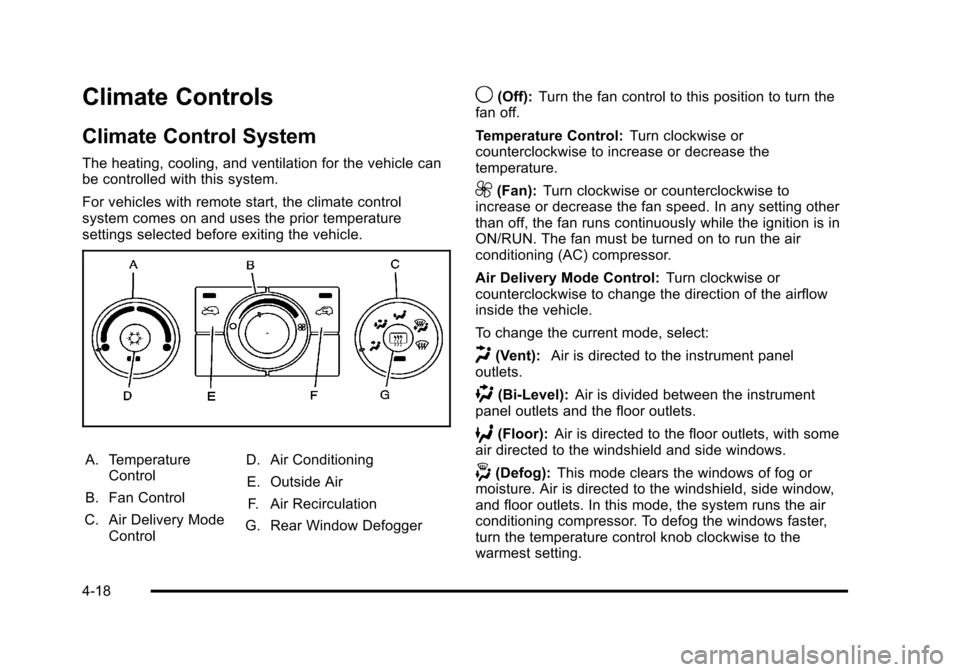
A. TemperatureControl
B. Fan Control
C. Air Delivery Mode Control D. Air Conditioning
E. Outside Air F. Air Recirculation
G. Rear Window Defogger
9(Off): Turn the fan control to this position to turn the
fan off.
Temperature Control: Turn clockwise or
counterclockwise to increase or decrease the
temperature.
9(Fan): Turn clockwise or counterclockwise to
increase or decrease the fan speed. In any setting other
than off, the fan runs continuously while the ignition is in
ON/RUN. The fan must be turned on to run the air
conditioning (AC) compressor.
Air Delivery Mode Control: Turn clockwise or
counterclockwise to change the direction of the airflow
inside the vehicle.
To change the current mode, select:
H(Vent): Air is directed to the instrument panel
outlets.
)(Bi-Level): Air is divided between the instrument
panel outlets and the floor outlets.
6(Floor): Air is directed to the floor outlets, with some
air directed to the windshield and side windows.
-(Defog): This mode clears the windows of fog or
moisture. Air is directed to the windshield, side window,
and floor outlets. In this mode, the system runs the air
conditioning compressor. To defog the windows faster,
turn the temperature control knob clockwise to the
warmest setting.
4-18
Page 176 of 430
Black plate (20,1)Chevrolet HHR Owner Manual - 2011
Rear Window Defogger
The rear window defogger uses a warming grid to
remove fog from the rear window.
The rear window defogger only works when the ignition
is in ON/RUN.
<(Rear):Press to turn the rear window defogger on
or off. Be sure to clear as much snow from the rear
window as possible. An indicator light comes on to
show that the rear window defogger is on.
The rear window defogger turns off approximately
15 minutes after the button is pressed. If turned on
again, the defogger only runs for approximately
seven minutes before turning off.
If the vehicle speed is greater than 80 km/h (50 mph)
and the rear defogger is on, it remains on as long as the
speed is greater than 80 km/h (50 mph). The defogger
can also be turned off by turning off the engine.
For vehicles with the remote start feature, the rear
defogger automatically turns on if it is cold outside.
When the vehicle transitions out of the remote start
mode, the rear defogger turns off. See Remote Keyless
Entry (RKE) System Operation on page 3‑4 Notice:
Do not use anything sharp on the inside of
the rear window. If you do, you could cut or damage
the warming grid, and the repairs would not be
covered by the vehicle warranty. Do not attach a
temporary vehicle license, tape, a decal or anything
similar to the defogger grid.Outlet Adjustment
Turn the outlets and move the outlet vanes to change
the direction of the airflow and to open and close the
outlets.
Operation Tips
.Clear away any ice, snow or leaves from the air
inlets at the base of the windshield that may block
the flow of air into the vehicle.
.Use of non-GM approved hood deflectors may
adversely affect the performance of the system.
.Keep the path under the front seats clear of
objects to help circulate the air inside of the vehicle
more effectively.
4-20
Page 183 of 430
Black plate (27,1)Chevrolet HHR Owner Manual - 2011
Passenger Airbag Status Indicator
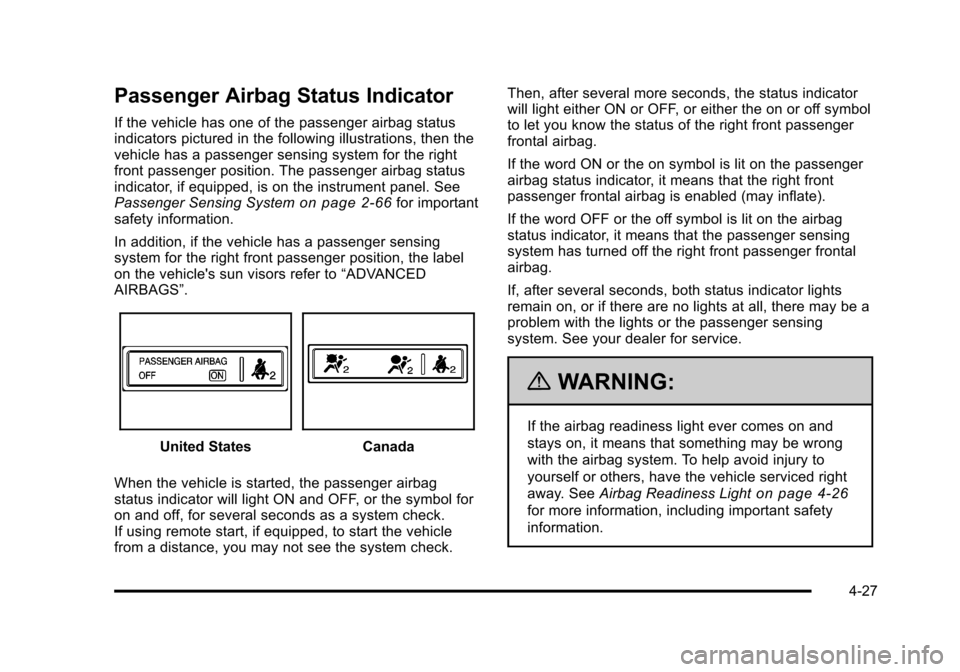
If the vehicle has one of the passenger airbag status
indicators pictured in the following illustrations, then the
vehicle has a passenger sensing system for the right
front passenger position. The passenger airbag status
indicator, if equipped, is on the instrument panel. See
Passenger Sensing System
on page 2‑66for important
safety information.
In addition, if the vehicle has a passenger sensing
system for the right front passenger position, the label
on the vehicle's sun visors refer to “ADVANCED
AIRBAGS”.
United StatesCanada
When the vehicle is started, the passenger airbag
status indicator will light ON and OFF, or the symbol for
on and off, for several seconds as a system check.
If using remote start, if equipped, to start the vehicle
from a distance, you may not see the system check. Then, after several more seconds, the status indicator
will light either ON or OFF, or either the on or off symbol
to let you know the status of the right front passenger
frontal airbag.
If the word ON or the on symbol is lit on the passenger
airbag status indicator, it means that the right front
passenger frontal airbag is enabled (may inflate).
If the word OFF or the off symbol is lit on the airbag
status indicator, it means that the passenger sensing
system has turned off the right front passenger frontal
airbag.
If, after several seconds, both status indicator lights
remain on, or if there are no lights at all, there may be a
problem with the lights or the passenger sensing
system. See your dealer for service.
{WARNING:
If the airbag readiness light ever comes on and
stays on, it means that something may be wrong
with the airbag system. To help avoid injury to
yourself or others, have the vehicle serviced right
away. See
Airbag Readiness Light
on page 4‑26
for more information, including important safety
information.
4-27
Page 199 of 430
Black plate (43,1)Chevrolet HHR Owner Manual - 2011
ICE POSSIBLE
This message displays when the outside air
temperature is cold enough to create icy road
conditions. Adjust your driving accordingly.
KEY FOB BATT (Battery) LOW
This message displays if the Remote Keyless Entry
(RKE) transmitter battery is low. Replace the battery in
the transmitter. See“Battery Replacement” under
Remote Keyless Entry (RKE) System Operation
on
page 3‑4.
LOW FUEL
This message displays when your vehicle is low on fuel.
Refill the fuel tank as soon as possible. See Fuel
Gauge
on page 4‑37, Fuelon page 6‑5, and Filling
the Tankon page 6‑9for more information.
LOW TRACTION
If your vehicle has the Enhanced Traction System
(ETS) or Traction Control System (TCS), this message
displays and the ETS light or the ESC/TCS light on the
instrument panel cluster flashes when the system is
actively limiting wheel spin. Slippery road conditions may exist if this message is displayed, so adjust your
driving accordingly. This message stays on for a few
seconds after the system stops limiting wheel spin. See
Enhanced Traction System (ETS)
on page 5‑10or
Traction Control System (TCS)on page 5‑8and
Enhanced Traction System (ETS) Indicator/Warning
Light
on page 4‑30or Electronic Stability Control
(ESC)/Traction Control System (TCS) Indicator/Warning
Light
on page 4‑31for more information.
PARKING BRAKE
This message displays if the parking brake is left
engaged. See Parking Brakeon page 3‑30for more
information.
POWER STEERING
This message displays if a problem has been detected
with the electric power steering. Have your vehicle
serviced by your dealer immediately.
SERVICE AIR BAG
This message displays when there is a problem with the
airbag system. Have your vehicle serviced by your
dealer immediately.
4-43
Page 202 of 430
Black plate (46,1)Chevrolet HHR Owner Manual - 2011
To change feature settings, use the following procedure:
Entering Personalization Menu
1. Turn the ignition on while the vehicle is stopped.To avoid excessive drain on the battery, it is
recommended that the headlamps are turned off.
2. Press and hold the information and reset buttons at the same time for one second, then release to
enter the personalization menu.
If the vehicle speed is greater than 2 mph (3 km/h),
only the UNITS menu will be accessible.
3. Press the information button to scroll through the available personalization menu modes.
Press the reset button to scroll through the
available settings for each mode.
If you do not make a selection within ten seconds,
the display will go back to the previous information
displayed.
Personalization Menu Modes
OIL LIFE RESET
When this feature is displayed, you can reset the
engine oil life system. To reset the system, see Engine
Oil Life System
on page 6‑19. See “OIL LIFE” under
DIC Operation and Displayson page 4‑38for more
information.
UNITS
This feature allows you to select the units of
measurement in which the DIC will display the vehicle
information. When UNITS appears on the display, press
and hold the reset button for at least one second to
scroll through the available settings:
ENGLISH (default in United States): All information
will be displayed in English units.
METRIC (default in Canada): All information will be
displayed in metric units.
To select a setting and move on to the next feature,
press the information button while the desired setting is
displayed on the DIC.
LOCK HORN
This feature, which allows the vehicle's horn to chirp
every time the lock button on the Remote Keyless Entry
(RKE) transmitter is pressed, can be enabled or
disabled. When LOCK HORN appears on the display,
press and hold the reset button for at least one second
to scroll through the available settings:
OFF (default): The horn will not chirp on the first press
of the lock button on the RKE transmitter. The horn will
still chirp on the second press.
4-46