Remote CHEVROLET HHR 2011 1.G Owner's Manual
[x] Cancel search | Manufacturer: CHEVROLET, Model Year: 2011, Model line: HHR, Model: CHEVROLET HHR 2011 1.GPages: 430, PDF Size: 4.57 MB
Page 203 of 430
Black plate (47,1)Chevrolet HHR Owner Manual - 2011
ON:The horn will chirp on the first press of the lock
button on the RKE transmitter.
See Remote Keyless Entry (RKE) System Operation
on
page 3‑4for more information.
To select a setting and move on to the next feature,
press the information button while the desired setting is
displayed on the DIC.
UNLOCK HORN
This feature, which allows the vehicle's horn to chirp on
the first press of the unlock button on the Remote
Keyless Entry (RKE) transmitter, can be enabled or
disabled. When UNLOCK HORN appears on the
display, press and hold the reset button for at least
one second to scroll through the available settings:
OFF (default): The horn will not chirp when the unlock
button on the RKE transmitter is pressed.
ON: The horn will chirp on the first press of the unlock
button on the RKE transmitter.
See Remote Keyless Entry (RKE) System Operation
on
page 3‑4for more information.
To select a setting and move on to the next feature,
press the information button while the desired setting is
displayed on the DIC.
LIGHT FLASH
This feature, which allows the vehicle's exterior hazard/
turn signal lighting to flash every time the lock or unlock
button on the Remote Keyless Entry (RKE) transmitter
is pressed, can be enabled or disabled. When LIGHT
FLASH appears on the display, press and hold the reset
button for at least one second to scroll through the
available settings:
OFF: The exterior hazard/turn signal lighting
will not flash when the lock or unlock button on
the RKE transmitter is pressed.
ON (default): The exterior hazard/turn signal lighting
will flash when the lock or unlock button on the
RKE transmitter is pressed.
See Remote Keyless Entry (RKE) System Operation
on
page 3‑4for more information.
To select a setting and move on to the next feature,
press the information button while the desired setting is
displayed on the DIC.
4-47
Page 204 of 430
Black plate (48,1)Chevrolet HHR Owner Manual - 2011
DELAY LOCK
This feature, which delays the actual locking of the
vehicle, can be enabled or disabled. When DELAY
LOCK appears on the display, press and hold the reset
button for at least one second to scroll through the
available settings:
ON (default):The doors will not lock until five seconds
after the last door is closed. You can temporarily
override delayed locking by pressing the power lock
switch or the lock button on the Remote Keyless Entry
(RKE) transmitter a second time.
OFF: The doors will lock immediately when pressing
the power lock switch or the lock button on the
RKE transmitter.
See Power Door Locks
on page 3‑9,Delayed Lockingon page 3‑9, and Remote Keyless Entry (RKE)
System Operationon page 3‑4for more information.
To select a setting and move on to the next feature,
press the information button while the desired setting is
displayed on the DIC.
AUTO UNLK (Unlock)
This feature, which allows the vehicle to automatically
unlock certain doors, can be enabled or disabled. When
AUTO UNLK appears on the display, press and hold the
reset button for at least one second to scroll through the
available settings:
ALL (default): All of the doors will automatically unlock.
DRIVER: The driver's door will automatically unlock.
NONE: None of the doors will automatically unlock.
You will need to manually unlock the doors.
If you have a manual transmission vehicle, the door(s)
will automatically unlock when the key is turned off.
If you have an automatic transmission vehicle, you can
select when the automatic unlocking will occur. See
“UNLK (Unlock) (Automatic Transmission Only)”
following.
See Programmable Automatic Door Unlock
on
page 3‑10for more information.
To select a setting and move on to the next feature,
press the information button while the desired setting is
displayed on the DIC.
4-48
Page 205 of 430
Black plate (49,1)Chevrolet HHR Owner Manual - 2011
UNLK (Unlock) (Automatic
Transmission Only)
This screen displays only if your vehicle has an
automatic transmission and DRIVER or ALL is selected
for the AUTO UNLK feature. This feature determines
when the automatic door unlocking will occur. When
UNLK appears on the display, press and hold the reset
button for at least one second to scroll through the
available settings:
KEY OFF:The door(s) will unlock when the key is
turned off.
SHIFT TO P (Park) (default): The door(s) will unlock
when the vehicle is shifted into P (Park).
See Programmable Automatic Door Unlock
on
page 3‑10for more information.
To select a setting and move on to the next feature,
press the information button while the desired setting is
displayed on the DIC.
EXT (Exterior) LIGHTS
This feature, which allows the vehicle's exterior
perimeter lighting to turn on each time the unlock
button on the Remote Keyless Entry (RKE) transmitter
is pressed, can be enabled or disabled. When
EXT LIGHTS appears on the display, press and hold
the reset button for at least one second to scroll through
the available settings:
OFF: The exterior perimeter lighting will not turn on
when the unlock button on the RKE transmitter is
pressed.
ON (default): The exterior perimeter lighting will turn on
when the unlock button on the RKE transmitter is
pressed.
See Remote Keyless Entry (RKE) System Operation
on
page 3‑4for more information.
To select a setting and move on to the next feature,
press the information button while the desired setting is
displayed on the DIC.
4-49
Page 280 of 430
Black plate (4,1)Chevrolet HHR Owner Manual - 2011
California Proposition 65 Warning
Most motor vehicles, including this one, contain and/or
emit chemicals known to the State of California to
cause cancer and birth defects or other reproductive
harm. Engine exhaust, many parts and systems, many
fluids, and some component wear by-products contain
and/or emit these chemicals.
California Perchlorate Materials
Requirements
Certain types of automotive applications, such as airbag
initiators, seat belt pretensioners, and lithium batteries
contained in remote keyless transmitters, may contain
perchlorate materials. Special handling may be
necessary. For additional information, see
www.dtsc.ca.gov/hazardouswaste/perchlorate.
Doing Your Own Service Work
{WARNING:
You can be injured and the vehicle could be
damaged if you try to do service work on a vehicle
without knowing enough about it.(Continued)
WARNING: (Continued)
.Be sure you have sufficient knowledge,
experience, the proper replacement parts, and
tools before attempting any vehicle
maintenance task.
.Be sure to use the proper nuts, bolts, and
other fasteners. English and metric fasteners
can be easily confused. If the wrong fasteners
are used, parts can later break or fall off. You
could be hurt.
If doing some of your own service work, use the proper
service manual. It tells you much more about how to
service the vehicle than this manual can. To order the
proper service manual, see Service Publications
Ordering Information on page 8‑14.
This vehicle has an airbag system. Before attempting to
do your own service work, see Servicing Your
Airbag-Equipped Vehicle on page 2‑72.
Keep a record with all parts receipts and list the mileage
and the date of any service work performed. See
Maintenance Record on page 7‑12.
6-4
Page 291 of 430

Black plate (15,1)Chevrolet HHR Owner Manual - 2011
A. Windshield Washer Fluid Reservoir. See“Adding
Washer Fluid” underWindshield Washer Fluidon
page 6‑30.
B. Pressure Cap. See Cooling System on page 6‑22.
C. Coolant Recovery Tank. See “Checking Coolant”
under Engine Coolant on page 6‑24.
D. Engine Air Cleaner/Filter. See Engine Air Cleaner/
Filter on page 6‑20.
E. Electric Engine Cooling Fan (Out of View). See Cooling System Cooling System on page 6‑22.
F. Engine Oil Fill Cap. See “When to Add Engine Oil”
under Engine Oil on page 6‑16. G. Engine Oil Dipstick (Out of View). See
“Checking
Engine Oil” underEngine Oil on page 6‑16.
H. Brake Master Cylinder Reservoir. See Brakeson
page 6‑30and Hydraulic Clutch on page 6‑22.
I. Remote Positive (+) Terminal. See Jump Starting
on page 6‑34.
J. Engine Compartment Fuse Block. See Engine
Compartment Fuse Block on page 6‑104.
K. Remote Negative (−) Terminal (Out of View). See Jump Starting on page 6‑34.
6-15
Page 311 of 430
Black plate (35,1)Chevrolet HHR Owner Manual - 2011
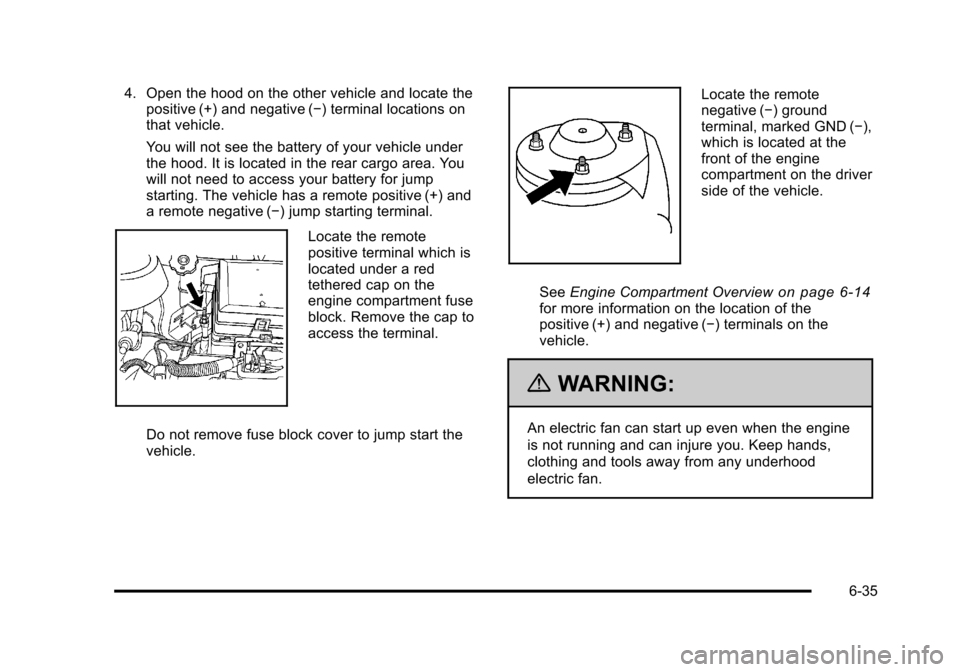
4. Open the hood on the other vehicle and locate thepositive (+) and negative (−) terminal locations on
that vehicle.
You will not see the battery of your vehicle under
the hood. It is located in the rear cargo area. You
will not need to access your battery for jump
starting. The vehicle has a remote positive (+) and
a remote negative (−) jump starting terminal.
Locate the remote
positive terminal which is
located under a red
tethered cap on the
engine compartment fuse
block. Remove the cap to
access the terminal.
Do not remove fuse block cover to jump start the
vehicle.
Locate the remote
negative (−) ground
terminal, marked GND (−),
which is located at the
front of the engine
compartment on the driver
side of the vehicle.
See Engine Compartment Overview
on page 6‑14for more information on the location of the
positive (+) and negative (−) terminals on the
vehicle.
{WARNING:
An electric fan can start up even when the engine
is not running and can injure you. Keep hands,
clothing and tools away from any underhood
electric fan.
6-35
Page 312 of 430
Black plate (36,1)Chevrolet HHR Owner Manual - 2011
{WARNING:
Using a match near a battery can cause battery
gas to explode. People have been hurt doing this,
and some have been blinded. Use a flashlight if
you need more light.
Be sure the battery has enough water. You do not
need to add water to the battery installed in your
new vehicle. But if a battery has filler caps, be
sure the right amount of fluid is there. If it is low,
add water to take care of that first. If you don't,
explosive gas could be present.
Battery fluid contains acid that can burn you. Do
not get it on you. If you accidentally get it in your
eyes or on your skin, flush the place with water
and get medical help immediately.
{WARNING:
Fans or other moving engine parts can injure you
badly. Keep your hands away from moving parts
once the engine is running.
5. Check that the jumper cables do not have loose or missing insulation. If they do, you could get a
shock. The vehicles could be damaged too.
Before you connect the cables, here are some
basic things you should know. Positive (+) will go to
positive (+) or to a remote positive (+) terminal if
the vehicle has one. Negative (−) will go to a
heavy, unpainted metal engine part or to a remote
negative (−) terminal if the vehicle has one.
Do not connect positive (+) to negative (−) or you
will get a short that would damage the battery and
maybe other parts too. And do not connect the
negative (−) cable to the negative (−) terminal on
the dead battery because this can cause sparks.
6. Connect the red positive (+) cable to the positive (+) terminal location on the vehicle with the
dead battery. Use a remote positive (+) terminal if
the vehicle has one.
6-36
Page 313 of 430
Black plate (37,1)Chevrolet HHR Owner Manual - 2011
7. Do not let the other end touch metal. Connect it tothe positive (+) terminal of the good battery. Use a
remote positive (+) terminal if the vehicle has one.
8. Now connect the black negative (−) cable to the negative (−) terminal of the good battery. Use a
remote negative (−) terminal if the vehicle has one.
Do not let the other end touch anything until the
next step. The other end of the negative (−) cable
does not go to the dead battery. It goes to a heavy,
unpainted metal engine part or to a remote
negative (−) terminal on the vehicle with the dead
battery.
9. Connect the other end of the negative (−) cable to the negative (−) terminal location on the vehicle
with the dead battery. Your vehicle has a remote
negative (−) ground terminal marked GND (−).
10. Now start the vehicle with the good battery and run the engine for a while.
11. Try to start the vehicle that had the dead battery. If it will not start after a few tries, it probably needs
service.
Notice: If the jumper cables are connected or
removed in the wrong order, electrical shorting may
occur and damage the vehicle. The repairs would
not be covered by the vehicle warranty. Always
connect and remove the jumper cables in the
correct order, making sure that the cables do not
touch each other or other metal.
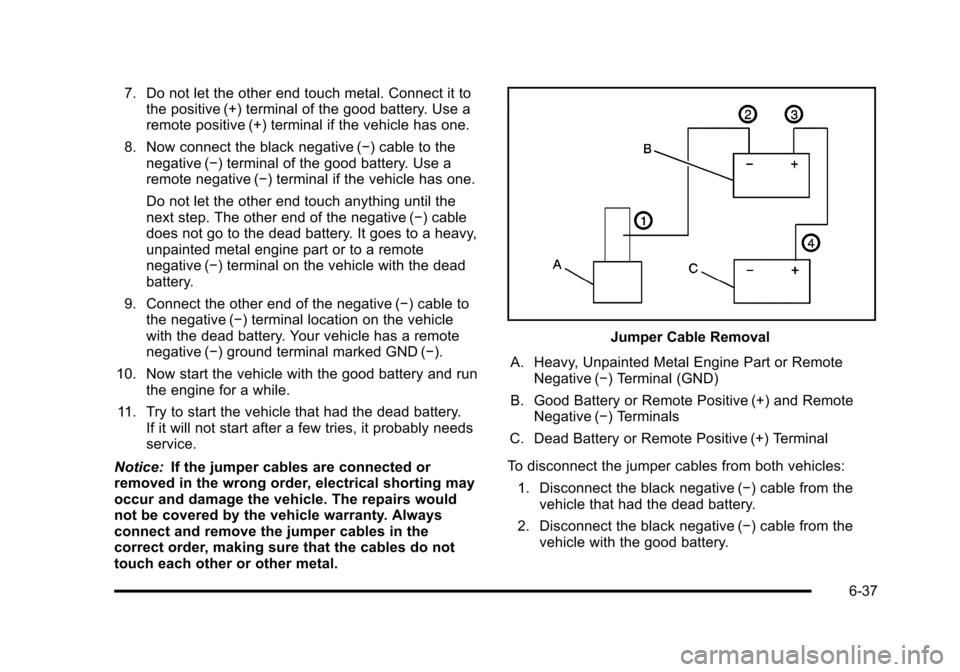
Jumper Cable Removal
A. Heavy, Unpainted Metal Engine Part or Remote Negative (−) Terminal (GND)
B. Good Battery or Remote Positive (+) and Remote Negative (−) Terminals
C. Dead Battery or Remote Positive (+) Terminal
To disconnect the jumper cables from both vehicles: 1. Disconnect the black negative (−) cable from the vehicle that had the dead battery.
2. Disconnect the black negative (−) cable from the vehicle with the good battery.
6-37
Page 335 of 430
Black plate (59,1)Chevrolet HHR Owner Manual - 2011
TPMS Sensor Matching Process
Each TPMS sensor has a unique identification code.
Any time you replace one or more of the TPMS sensors
or rotate the vehicle's tires, the identification codes
need to be matched to the new tire/wheel location. The
sensors are matched, to the tire/wheel locations, in the
following order: driver side front tire, passenger side
front tire, passenger side rear tire, and driver side rear
tire using a TPMS diagnostic tool. See your dealer for
service.
The TPMS sensors can also be matched to each tire/
wheel position by increasing or decreasing the tire's air
pressure. When increasing the tire's pressure, do not
exceed the maximum inflation pressure indicated on the
tire's sidewall. To decrease the tire's air-pressure use
the pointed end of the valve cap, a pencil-style air
pressure gauge, or a key.
You have two minutes to match each tire and wheel
position. If it takes longer than two minutes to match
any tire and wheel position, the matching process stops
and you need to start over.
The TPMS matching process is outlined below:1. Set the parking brake.
2. Turn the ignition switch to ON/RUN with the engine off. 3. Press and hold the Remote Keyless Entry (RKE)
transmitter's LOCK and UNLOCK buttons, at the
same time, for about five seconds to start the
TPMS learn mode. The horn sounds twice
indicating the TPMS receiver is ready and in
learn mode.
4. Start with the driver side front tire. The driver side front turn signal also comes on to indicate that
corner's sensor is ready to be learned.
5. Remove the valve cap from the tire's valve stem. Activate the TPMS sensor by increasing or
decreasing the tire's air pressure for about
eight seconds. The horn chirp, can take up to
30 seconds to sound. It chirps one time and then
all the turn signals flash one time to confirm the
sensor identification code has been matched to the
tire/wheel position.
6. The passenger side front turn signal comes on to indicate that corner sensor is ready to be learned.
Proceed to the passenger side front tire and repeat
the procedure in Step 5.
7. The passenger side rear turn signal comes on to indicate that corner sensor is ready to be learned.
Proceed to the passenger side rear tire and repeat
the procedure in Step 5.
6-59
Page 405 of 430
Black plate (7,1)Chevrolet HHR Owner Manual - 2011
Coverage
Services are provided up to 5 years/160 000 km
(100,000 miles), whichever comes first.
In the U.S., anyone driving the vehicle is covered. In
Canada, a person driving the vehicle without permission
from the owner is not covered.
Roadside Assistance is not a part of the New Vehicle
Limited Warranty. Chevrolet and General Motors of
Canada Limited reserve the right to make any changes
or discontinue the Roadside Assistance program at any
time without notification.
Chevrolet and General Motors of Canada Limited
reserve the right to limit services or payment to an
owner or driver if they decide the claims are made too
often, or the same type of claim is made many times.
Services Provided
.Emergency Fuel Delivery:Delivery of enough
fuel for the vehicle to get to the nearest service
station.
.Lock‐Out Service: Service to unlock the vehicle if
you are locked out. A remote unlock may be
available if you have OnStar
®. For security
reasons, the driver must present identification
before this service is given.
.Emergency Tow From a Public Road or
Highway: Tow to the nearest Chevrolet dealer for
warranty service, or if the vehicle was in a crash
and cannot be driven. Assistance is also given
when the vehicle is stuck in the sand, mud,
or snow.
.Flat Tire Change: Service to change a flat tire
with the spare tire. The spare tire, if equipped,
must be in good condition and properly inflated.
It is the owner's responsibility for the repair or
replacement of the tire if it is not covered by the
warranty.
.Battery Jump Start: Service to jump start a dead
battery.
Services Not Included in Roadside
Assistance
.Impound towing caused by violation of any laws.
.Legal fines.
.Mounting, dismounting, or changing of snow tires,
chains, or other traction devices.
.Towing or services for vehicles driven on a
non-public road or highway.
8-7