recommended oil CHEVROLET HHR 2011 1.G Owners Manual
[x] Cancel search | Manufacturer: CHEVROLET, Model Year: 2011, Model line: HHR, Model: CHEVROLET HHR 2011 1.GPages: 430, PDF Size: 4.57 MB
Page 27 of 430
Black plate (21,1)Chevrolet HHR Owner Manual - 2011
Tire Pressure Monitor
This vehicle may have a Tire Pressure Monitor
System (TPMS).
The TPMS warming light
alerts you to a significant
loss in pressure of one of
the vehicles tires.
If the warning light comes on, stop as soon as possible
and inflate the tires to the recommended pressure
shown on the tire loading information label. See
Loading the Vehicle
on page 5‑22. The warning light
will remain on until the tire pressure is corrected.
During cooler conditions, the low tire pressure warning
light may appear when the vehicle is first started and
then turn off. This may be an early indicator that the tire
pressures are getting low and the tires need to be
inflated to the proper pressure.
The TPMS does not replace normal monthly tire
maintenance. It is the driver ’s responsibility to maintain
correct tire pressures.
See Tire Pressure Monitor System
on page 6‑55and
Tire Pressure Monitor Operation on page 6‑57.
Tire Sealant and Compressor Kit
This vehicle may come with a jack and spare tire or a
tire sealant and compressor kit. The kit can be used to
seal small punctures in the tread area of the tire.
See Tire Sealant and Compressor Kit
on page 6‑70for
complete operating information.
If the vehicle came with a jack and spare tire, see
Changing a Flat Tire on page 6‑78.
Engine Oil Life System
The engine oil life system calculates engine oil life
based on vehicle use and displays a DIC message
when it is necessary to change the engine oil and filter.
The oil life system should be reset to 100% only
following an oil change.
Resetting the Oil Life System
1. Turn the ignition to ON/RUN, with the engine off.
2. Press the information and reset buttons on the Driver Information Center (DIC) at the same time to
enter the personalization menu.
3. Press the information button to scroll through the available personalization menu modes until the
DIC display shows OIL-LIFE RESET.
1-21
Page 28 of 430
Black plate (22,1)Chevrolet HHR Owner Manual - 2011
4. Press and hold the reset button until the DICdisplay shows ACKNOWLEDGED. This will tell you
the system has been reset.
5. Turn the key to LOCK/OFF.
For vehicles with the 2.2L (VIN Code V) or 2.4L
(VIN Code B) engines, you can also reset the
system as follows: 1. Turn the ignition key to ON/RUN with the engine off.
2. Fully press and release the accelerator pedal slowly three times within five seconds.
3. Turn the key to LOCK/OFF, then start the engine.
See Engine Oil Life System on page 6‑19.
Fuel E85 (85% Ethanol)
Vehicles that have a FlexFuel badge and a yellow fuel
cap can use either unleaded gasoline or ethanol fuel
containing up to 85% ethanol (E85). See Fuel E85
(85% Ethanol)
on page 6‑8. For all other vehicles,
use only the unleaded gasoline described under
Gasoline Octane on page 6‑6.
Driving for Better Fuel Economy
Driving habits can affect fuel mileage. Here are some
driving tips to get the best fuel economy possible.
.Avoid fast starts and accelerate smoothly.
.Brake gradually and avoid abrupt stops.
.Avoid idling the engine for long periods of time.
.When road and weather conditions are
appropriate, use cruise control, if equipped.
.Always follow posted speed limits or drive more
slowly when conditions require.
.Keep vehicle tires properly inflated.
.Combine several trips into a single trip.
.Replace the vehicle's tires with the same TPC
Spec number molded into the tire's sidewall near
the size.
.Follow recommended scheduled maintenance.
1-22
Page 196 of 430
Black plate (40,1)Chevrolet HHR Owner Manual - 2011
AV (Average) SPEED
Press the information button until AV SPEED displays.
This mode shows the vehicle's average speed in miles
per hour (mph) or kilometers per hour (km/h).
To reset the average vehicle speed, press and hold the
reset button while AV SPEED is displayed.
OIL LIFE
Press the information button until OIL LIFE displays.
The engine oil life system shows an estimate of the oil's
remaining useful life. It shows 100% when the system is
reset after an oil change. It alerts you to change the oil
on a schedule consistent with your driving conditions.
In addition to the engine oil life system monitoring the
oil life, additional maintenance is recommended in the
Maintenance Schedule in this manual. SeeEngine Oil
on page 6‑16andScheduled Maintenanceon
page 7‑3.
Always reset the engine oil life system after an oil
change. See “How to Reset the Engine Oil Life System”
under Engine Oil Life System on page 6‑19.
COOLANT
Press the information button until COOLANT displays.
This mode shows the temperature of the engine coolant
in either degrees Fahrenheit (°F) or degrees
Celsius (°C).
Tire Pressure
If your vehicle has a Tire Pressure Monitor System
(TPMS), the pressure for each tire can be viewed in the
DIC. The tire pressure is shown in either pounds per
square inch (psi) or kilopascals (kPa). Press the
information button until LF ## PSI (kPa) ## RF displays
for the front tires. Press the information button again
until LR ## PSI (kPa) ## RR displays for the rear tires.
If a low tire pressure condition is detected by the
system while driving, a message advising you to check
the tire pressure appears in the display. See Inflation -
Tire Pressure
on page 6‑54and DIC Warnings and
Messageson page 4‑40for more information.
DIC Warnings and Messages
These messages appear if there is a problem detected
in one of your vehicle's systems.
A message clears when the vehicle's condition is no
longer present. To acknowledge a message and clear it
from the display, press and hold any of the DIC buttons.
If the condition is still present, the warning message
comes back on the next time the vehicle is turned off
and back on. With most messages, a warning chime
sounds when the message displays. Your vehicle may
have other warning messages.
4-40
Page 202 of 430
Black plate (46,1)Chevrolet HHR Owner Manual - 2011
To change feature settings, use the following procedure:
Entering Personalization Menu
1. Turn the ignition on while the vehicle is stopped.To avoid excessive drain on the battery, it is
recommended that the headlamps are turned off.
2. Press and hold the information and reset buttons at the same time for one second, then release to
enter the personalization menu.
If the vehicle speed is greater than 2 mph (3 km/h),
only the UNITS menu will be accessible.
3. Press the information button to scroll through the available personalization menu modes.
Press the reset button to scroll through the
available settings for each mode.
If you do not make a selection within ten seconds,
the display will go back to the previous information
displayed.
Personalization Menu Modes
OIL LIFE RESET
When this feature is displayed, you can reset the
engine oil life system. To reset the system, see Engine
Oil Life System
on page 6‑19. See “OIL LIFE” under
DIC Operation and Displayson page 4‑38for more
information.
UNITS
This feature allows you to select the units of
measurement in which the DIC will display the vehicle
information. When UNITS appears on the display, press
and hold the reset button for at least one second to
scroll through the available settings:
ENGLISH (default in United States): All information
will be displayed in English units.
METRIC (default in Canada): All information will be
displayed in metric units.
To select a setting and move on to the next feature,
press the information button while the desired setting is
displayed on the DIC.
LOCK HORN
This feature, which allows the vehicle's horn to chirp
every time the lock button on the Remote Keyless Entry
(RKE) transmitter is pressed, can be enabled or
disabled. When LOCK HORN appears on the display,
press and hold the reset button for at least one second
to scroll through the available settings:
OFF (default): The horn will not chirp on the first press
of the lock button on the RKE transmitter. The horn will
still chirp on the second press.
4-46
Page 255 of 430
Black plate (17,1)Chevrolet HHR Owner Manual - 2011
Hydroplaning
Hydroplaning is dangerous. Water can build up under
your vehicle's tires so they actually ride on the water.
This can happen if the road is wet enough and you are
going fast enough. When your vehicle is hydroplaning, it
has little or no contact with the road.
There is no hard and fast rule about hydroplaning. The
best advice is to slow down when the road is wet.
Other Rainy Weather Tips
Besides slowing down, other wet weather driving tips
include:
.Allow extra following distance.
.Pass with caution.
.Keep windshield wiping equipment in good shape.
.Keep the windshield washer fluid reservoir filled.
.Have good tires with proper tread depth. SeeTireson page 6‑47.
.Turn off cruise control.
Before Leaving on a Long Trip
To prepare your vehicle for a long trip, consider having
it serviced by your dealer before departing.
Things to check on your own include:
.Windshield Washer Fluid:Reservoir full? Windows
clean —inside and outside?
.Wiper Blades: In good shape?
.Fuel, Engine Oil, Other Fluids: All levels checked?
.Lamps:Do they all work and are lenses clean?
.Tires:Are treads good? Are tires inflated to
recommended pressure?
.Weather and Maps: Safe to travel? Have
up-to-date maps?
5-17
Page 283 of 430
Black plate (7,1)Chevrolet HHR Owner Manual - 2011
Additives
To provide cleaner air, all gasolines in the United States
are now required to contain additives that help prevent
engine and fuel system deposits from forming, allowing
the emission control system to work properly. In most
cases, nothing should have to be added to the fuel.
However, some gasolines contain only the minimum
amount of additive required to meet U.S. Environmental
Protection Agency regulations. To help keep fuel
injectors and intake valves clean, or if the vehicle
experiences problems due to dirty injectors or valves,
look for gasoline that is advertised as TOP TIER
Detergent Gasoline.
For customers who do not use TOP TIER Detergent
Gasoline regularly, one bottle of GM Fuel System
Treatment PLUS, added to the fuel tank at every engine
oil change, can help clean deposits from fuel injectors
and intake valves. GM Fuel System Treatment PLUS is
the only gasoline additive recommended by General
Motors. It is available at your dealer.Gasolines containing oxygenates, such as ethers and
ethanol, and reformulated gasolines might be available
in your area. We recommend that you use these
gasolines, if they comply with the specifications
described earlier. However, E85 (85% ethanol) and
other fuels containing more than 10% ethanol must not
be used in vehicles that were not designed for those
fuels.
Notice:
This vehicle was not designed for fuel that
contains methanol. Do not use fuel containing
methanol. It can corrode metal parts in the fuel
system and also damage plastic and rubber parts.
That damage would not be covered under the
vehicle warranty.
Some gasolines that are not reformulated for low
emissions can contain an octane-enhancing additive
called methylcyclopentadienyl manganese tricarbonyl
(MMT); ask the attendant where you buy gasoline
whether the fuel contains MMT. We recommend against
the use of such gasolines. Fuels containing MMT can
reduce the life of spark plugs and the performance of
the emission control system could be affected. The
malfunction indicator lamp might turn on. If this occurs,
return to your dealer for service.
6-7
Page 285 of 430
Black plate (9,1)Chevrolet HHR Owner Manual - 2011
Fuels in Foreign Countries
If you plan on driving in another country outside the
United States or Canada, the proper fuel might be hard
to find. Never use leaded gasoline or any other fuel not
recommended in the previous text on fuel. Costly
repairs caused by use of improper fuel would not be
covered by the vehicle warranty.
To check the fuel availability, ask an auto club,
or contact a major oil company that does business in
the country where you will be driving.
Filling the Tank
{WARNING:
Fuel vapor burns violently and a fuel fire can
cause bad injuries. To help avoid injuries to you
and others, read and follow all the instructions on
the fuel pump island. Turn off the engine when
refueling. Do not smoke near fuel or when
refueling the vehicle. Do not use cellular phones.
Keep sparks, flames, and smoking materials away(Continued)
WARNING: (Continued)
from fuel. Do not leave the fuel pump unattended
when refueling the vehicle. This is against the law
in some places. Do not re-enter the vehicle while
pumping fuel. Keep children away from the fuel
pump; never let children pump fuel.
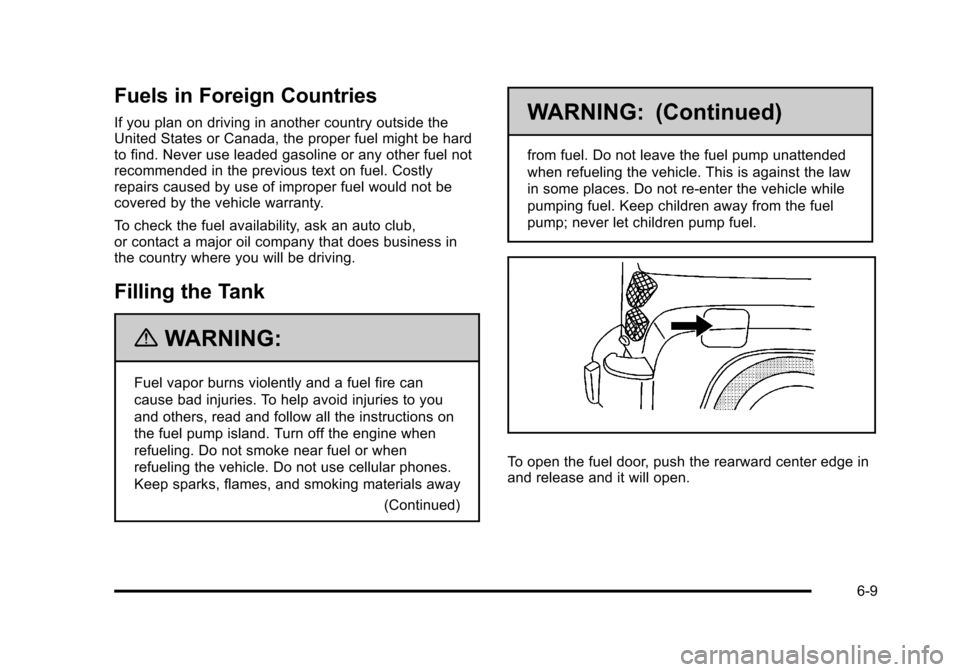
To open the fuel door, push the rearward center edge in
and release and it will open.
6-9
Page 292 of 430
Black plate (16,1)Chevrolet HHR Owner Manual - 2011
Engine Oil
To ensure proper engine performance and long life,
careful attention must be paid to engine oil. Following
these simple, but important steps will help protect your
investment:
.Always use engine oil approved to the proper
specification and of the proper viscosity grade.
See“Selecting the Right Engine Oil.”
.Check the engine oil level regularly and maintain
the proper oil level. See “Checking Engine Oil”and
“When to Add Engine Oil.”
.Change the engine oil at the appropriate time.
See Engine Oil Life System on page 6‑19.
.Always dispose of engine oil properly. See “What
to Do With Used Oil.”
Checking Engine Oil
It is a good idea to check the engine oil level at each
fuel fill. In order to get an accurate reading, the vehicle
must be on level ground. The engine oil dipstick handle
is a yellow loop. See Engine Compartment Overview
on
page 6‑14for the location of the engine oil dipstick.
Obtaining an accurate oil level reading is essential:
1. If the engine has been running recently, turn off the engine and allow several minutes for the oil to
drain back into the oil pan. Checking your oil level
too soon after engine shut off will not provide an
accurate oil level reading. 2. Pull out the dipstick and clean it with a paper towel
or cloth, then push it back in all the way. Remove it
again, keeping the tip down, and check the level.
When to Add Engine Oil
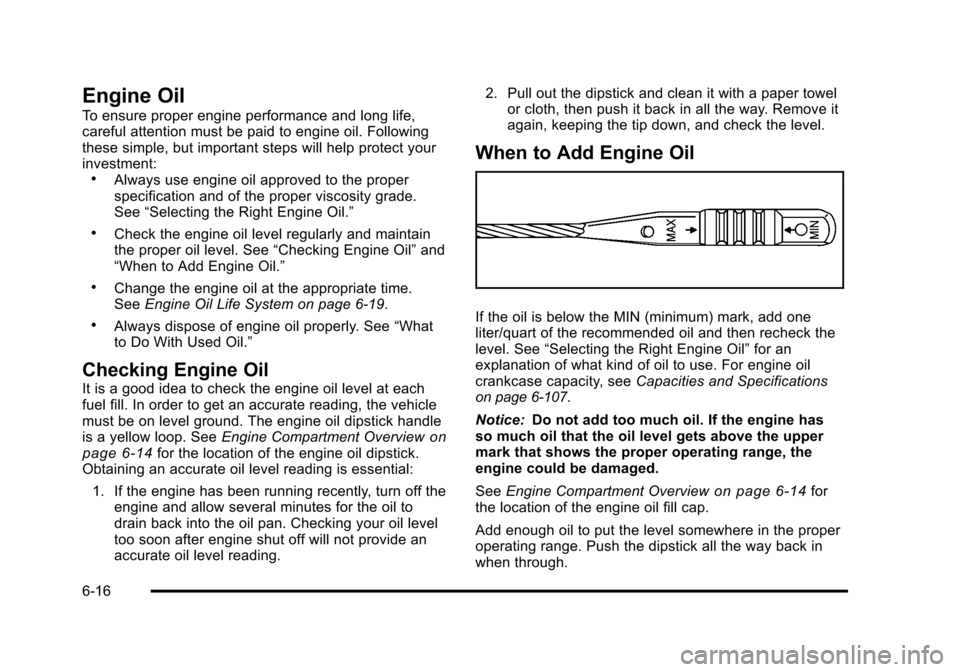
If the oil is below the MIN (minimum) mark, add one
liter/quart of the recommended oil and then recheck the
level. See “Selecting the Right Engine Oil” for an
explanation of what kind of oil to use. For engine oil
crankcase capacity, see Capacities and Specifications
on page 6‑107.
Notice: Do not add too much oil. If the engine has
so much oil that the oil level gets above the upper
mark that shows the proper operating range, the
engine could be damaged.
See Engine Compartment Overview
on page 6‑14for
the location of the engine oil fill cap.
Add enough oil to put the level somewhere in the proper
operating range. Push the dipstick all the way back in
when through.
6-16
Page 293 of 430
Black plate (17,1)Chevrolet HHR Owner Manual - 2011
Selecting the Right Engine Oil
Selecting the right engine oil depends on both the
proper oil specification and viscosity grade:
Specification
Use and ask for engine oils with the dexos™
certification mark. Oils meeting the requirements of your
vehicle should have the dexos™certification mark on
the container. This certification mark indicates that the
oil has been approved to the dexos™ specification.
Your vehicle was filled at the factory with dexos™
approved engine oil. Notice:
Use only engine oil that is approved to the
dexos™ specification or an equivalent engine oil of
the appropriate viscosity grade. Engine oils
approved to the dexos™ specification will show the
dexos™ symbol on the container. Failure to use the
recommended engine oil or equivalent can result in
engine damage not covered by the vehicle warranty.
If you are unsure whether your oil is approved to
the dexos™ specification, ask your service provider.
Use of Substitute Engine Oils if dexos™ is unavailable:
In the event that dexos™ approved engine oil is not
available at an oil change or for maintaining proper oil
level, you may use substitute engine oil displaying the
API Starburst symbol and of SAE 5W-30 viscosity
grade. Use of oils that do not meet the dexos™
specification, however, may result in reduced
performance under certain circumstances.
6-17
Page 294 of 430
Black plate (18,1)Chevrolet HHR Owner Manual - 2011
Viscosity Grade
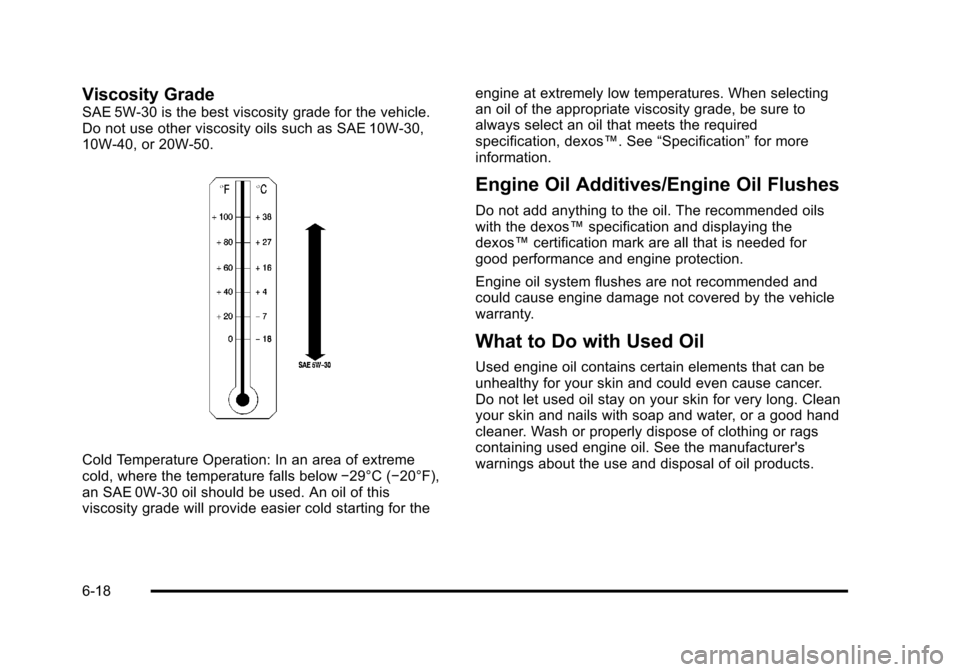
SAE 5W-30 is the best viscosity grade for the vehicle.
Do not use other viscosity oils such as SAE 10W‐30,
10W‐40, or 20W-50.
Cold Temperature Operation: In an area of extreme
cold, where the temperature falls below−29°C (−20°F),
an SAE 0W-30 oil should be used. An oil of this
viscosity grade will provide easier cold starting for the engine at extremely low temperatures. When selecting
an oil of the appropriate viscosity grade, be sure to
always select an oil that meets the required
specification, dexos™. See
“Specification”for more
information.
Engine Oil Additives/Engine Oil Flushes
Do not add anything to the oil. The recommended oils
with the dexos™ specification and displaying the
dexos™ certification mark are all that is needed for
good performance and engine protection.
Engine oil system flushes are not recommended and
could cause engine damage not covered by the vehicle
warranty.
What to Do with Used Oil
Used engine oil contains certain elements that can be
unhealthy for your skin and could even cause cancer.
Do not let used oil stay on your skin for very long. Clean
your skin and nails with soap and water, or a good hand
cleaner. Wash or properly dispose of clothing or rags
containing used engine oil. See the manufacturer's
warnings about the use and disposal of oil products.
6-18