buttons CHEVROLET IMPALA 2003 8.G Owner's Manual
[x] Cancel search | Manufacturer: CHEVROLET, Model Year: 2003, Model line: IMPALA, Model: CHEVROLET IMPALA 2003 8.GPages: 408, PDF Size: 2.75 MB
Page 212 of 408
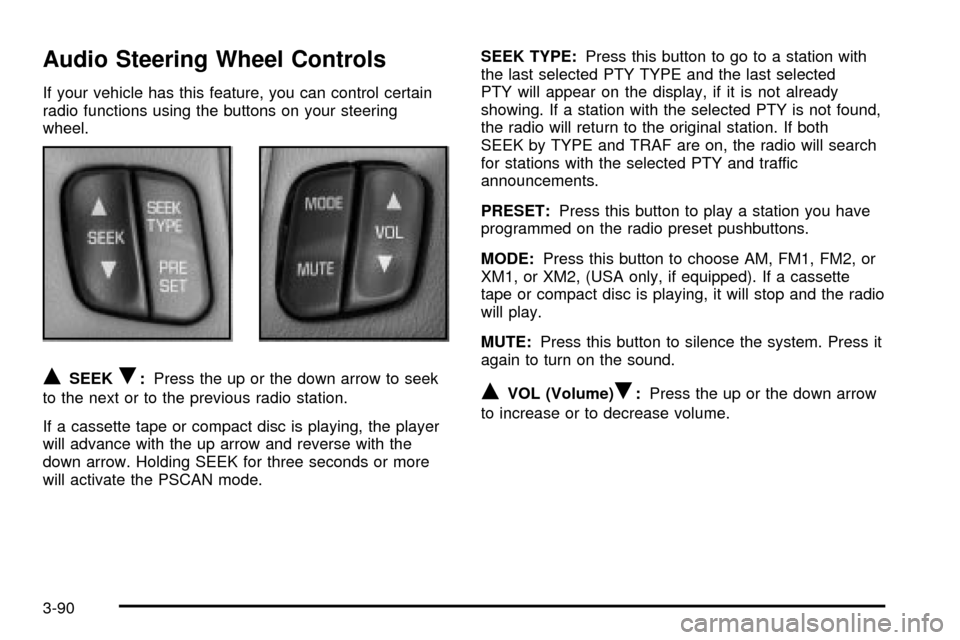
Audio Steering Wheel Controls
If your vehicle has this feature, you can control certain
radio functions using the buttons on your steering
wheel.
QSEEKR:Press the up or the down arrow to seek
to the next or to the previous radio station.
If a cassette tape or compact disc is playing, the player
will advance with the up arrow and reverse with the
down arrow. Holding SEEK for three seconds or more
will activate the PSCAN mode.SEEK TYPE:Press this button to go to a station with
the last selected PTY TYPE and the last selected
PTY will appear on the display, if it is not already
showing. If a station with the selected PTY is not found,
the radio will return to the original station. If both
SEEK by TYPE and TRAF are on, the radio will search
for stations with the selected PTY and traffic
announcements.
PRESET:Press this button to play a station you have
programmed on the radio preset pushbuttons.
MODE:Press this button to choose AM, FM1, FM2, or
XM1, or XM2, (USA only, if equipped). If a cassette
tape or compact disc is playing, it will stop and the radio
will play.
MUTE:Press this button to silence the system. Press it
again to turn on the sound.QVOL (Volume)R:Press the up or the down arrow
to increase or to decrease volume.
3-90
Page 277 of 408

How to Reset the Change Engine Oil
Message
The GM Oil Life System calculates when to change
your engine oil and ®lter based on vehicle use. Anytime
your oil is changed, reset the system so it can
calculate when the next oil change is required. If a
situation occurs where you change your oil prior to a
CHANGE ENGINE OIL message being turned on, reset
the system.
After changing the engine oil, the system must be reset.
To reset the CHANGE ENGINE OIL message use
one of the following procedures:
Using the Radio
1. Turn the ignition to ACC or ON, with the radio off.
2. Press and hold the TUNE DISP button on the radio
for at least ®ve seconds until SETTINGS is
displayed.
3. Press the SEEK PSCAN up or down arrow to scroll
through the main menu.
4. Scroll until OIL LIFE appears on the display.
5. Press the 1 PREV or 2 NEXT buttons to enter the
submenu. RESET will be displayed.
6. Press the TUNE DISP button to reset. A chime will
be heard to verify the new setting and DONE will
be displayed for one second.
7. Once the indicator has been reset, scroll until EXIT
appears on the display.
8. Press the TUNE DISP button to exit programming.
A chime will be heard to verify the exit.
5-21
Page 397 of 408

Door (cont.)
Driver Information Center (DIC).........................3-49
Driver............................................................1-15
Position, Safety Belt.....................................1-15
Driver's Side Instrument Panel Fuse Block.........5-96
Driving On Grades..........................................4-39
Driving on Snow or Ice....................................4-26
Driving Through Deep Standing Water...............4-19
Driving Through Flowing Water.........................4-19
Driving with a Trailer.......................................4-38
Driving..........................................................4-16
At Night.....................................................4-16
City...........................................................4-20
Defensive..................................................... 4-2
Drunken....................................................... 4-2
Freeway.....................................................4-21
Hill and Mountain Roads..............................4-23
In Rain and on Wet Roads...........................4-17
Winter........................................................4-25
Dual Climate Control System............................3-22
E
Electrical System............................................5-94
Add-On Equipment......................................5-94
Fuses and Circuit Breakers...........................5-95
Headlamp Wiring.........................................5-94
Power Windows and Other Power Options......5-95
Windshield Wiper Fuses...............................5-94Electrical System (cont.)
Emergency Trunk Release Handle.....................2-12
Emissions Inspection and
Maintenance Programs.................................3-39
Engine Coolant Level Check.............................6-10
Engine Cooling When Trailer Towing..................4-40
Engine Oil Additives........................................5-20
Engine Oil Level Check...................................6-10
Engine..........................................................5-22
Air Cleaner/Filter.........................................5-22
Battery.......................................................5-48
Change Oil Message...................................3-44
Check and Service Engine Soon Light............3-37
Compartment Overview................................5-12
Coolant Heater............................................2-22
Coolant Temperature Gage...........................3-36
Coolant......................................................5-27
Cooling System Inspection............................6-15
Exhaust.....................................................2-31
Low Oil Level Message................................3-43
Oil .............................................................5-16
Overheating................................................5-30
Starting......................................................2-19
Entry Lighting.................................................3-17
Erasing HomeLinkžButtons..............................2-42
EXIT (Exit Feature Customization Mode)............2-53
Express-Down Window....................................2-14
Extender, Safety Belt.......................................1-30
Exterior Lamps...............................................3-14
5