lock CHEVROLET IMPALA 2003 8.G Workshop Manual
[x] Cancel search | Manufacturer: CHEVROLET, Model Year: 2003, Model line: IMPALA, Model: CHEVROLET IMPALA 2003 8.GPages: 408, PDF Size: 2.75 MB
Page 146 of 408

On hot days, open the windows to let hot inside air
escape; then close them. This helps to reduce the time
it takes for your vehicle to cool down. It also helps
the system to operate more efficiently.
For quick cool down on hot days, do the following:
1. Select the vent mode.
2. Select the recirculation mode.
3. Select A/C.
4. Select the coolest temperature for both zones.
5. Select the highest fan speeds.
Using these settings together for long periods of time
may cause the air inside of your vehicle to become too
dry. To prevent this from happening, after the air
inside of your vehicle has cooled, turn the recirculation
mode off.
The air-conditioning system removes moisture from the
air, so you may sometimes notice a small amount of
water dripping underneath your vehicle while idling
or after turning off the engine. This is normal.Defogging and Defrosting
Fog on the inside of the windows is a result of high
humidity (moisture) condensing on the cool window
glass. This can be minimized if the climate control
system is used properly. There are two modes to clear
fog or frost from your windshield. Use the defog
mode to clear the windows of fog or moisture and warm
the passengers. Use the defrost mode to remove fog
or frost from the windshield more quickly.
Turn the right knob clockwise to select the defog or
defrost mode.
-(Defog):This mode directs air equally to the
windshield and the ¯oor outlets. When you select this
mode, the system turns off recirculation and runs
the air-conditioning compressor unless the outside
temperature is below 40ÉF (4ÉC). The recirculation mode
cannot be selected while in the defog mode.
Do not drive the vehicle until all the windows are clear.
0(Defrost):This mode directs half of the air to
the windshield and side window vents and half to the
¯oor vents. In this mode, the system will automatically
force outside air into your vehicle. The recirculation
mode cannot be selected while in the defog mode. The
air conditioning compressor will run automatically in
this setting, unless the outside temperature is below
40ÉF (4ÉC).
Do not drive the vehicle until all the windows are clear.
3-24
Page 148 of 408

Operation Tips
·Clear away any ice, snow or leaves from the air
inlets at the base of the windshield that may
block the ¯ow of air into your vehicle.
·Use of non-GM approved hood de¯ectors may
adversely affect the performance of the system.
·Keep the path under the front seats clear of objects
to help circulate the air inside your vehicle more
effectively.
·If the air¯ow seems low when the fan is at the
highest setting, the passenger compartment
air ®lter, if equipped, may need to replaced. For
more information, see
Passenger Compartment Air
Filter on page 3-26andPart A: Scheduled
Maintenance Services on page 6-4.
Passenger Compartment Air Filter
Your vehicle may be equipped with a passenger
compartment particulate air ®lter. It is located
underneath the hood just below the windshield wiper
arm on the passenger's side of the vehicle, underneath
the air inlet grille.
The ®lter traps most of the pollen from air entering the
Climate Control System. Like your engine's air
cleaner/®lter, it may need to be changed periodically to
insure system performance. For information on how
often to change the passenger compartment air
®lter, see
Scheduled Maintenance on page 6-5.
3-26
Page 157 of 408

Anti-Lock Brake System
Warning Light
If your vehicle is equipped
with anti-lock brakes, the
anti-lock brake system
warning light should come
on for a few seconds
when you turn the ignition
key to ON.
If the anti-lock brake system warning light stays on
longer than normal after you've started your engine, turn
the ignition off. Or, if the light comes on and stays on
when you're driving, stop as soon as possible and turn
the ignition off. Then start the engine again to reset
the system. If the light still stays on, or comes on again
while you're driving, the anti-lock brake system needs
service and you don't have anti-lock brakes.
The anti-lock brake system warning light should come
on brie¯y when you turn the ignition key to ON. This
is normal. If the light doesn't come on then, have it ®xed
so it will be ready to warn you if there is a problem.
Traction Control System (TCS)
Warning Light
Your vehicle may have the
traction control system. If it
does, this warning light
may come on for the
following reasons:
·If you turn the system off by pressing the TRAC
OFF button located on the instrument panel, a
chime will sound and the warning light will come on
and stay on. To turn the system back on, press
the button again. The warning light should go off.
·If there's a brake system problem that is speci®cally
related to traction control, the traction control
system will turn off and the warning light will come
on. If your brakes begin to overheat, the traction
control system will turn off and the warning light will
come on until your brakes cool down.
If the traction control system warning light comes on
and stays on for an extended period of time when the
system is turned on, your vehicle needs service.
3-35
Page 168 of 408
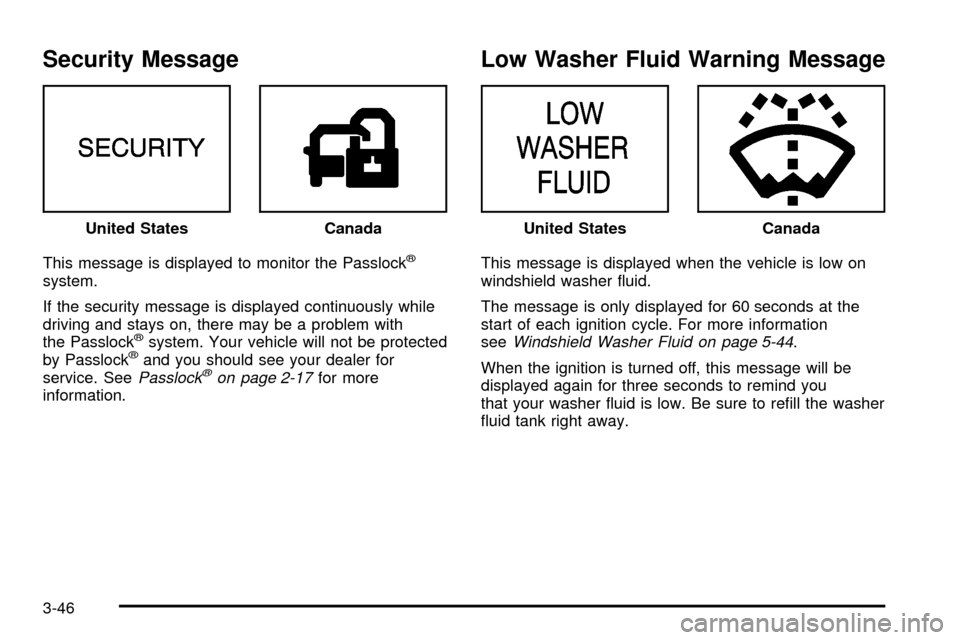
Security Message
This message is displayed to monitor the Passlockž
system.
If the security message is displayed continuously while
driving and stays on, there may be a problem with
the Passlock
žsystem. Your vehicle will not be protected
by Passlockžand you should see your dealer for
service. SeePasslockžon page 2-17for more
information.
Low Washer Fluid Warning Message
This message is displayed when the vehicle is low on
windshield washer ¯uid.
The message is only displayed for 60 seconds at the
start of each ignition cycle. For more information
see
Windshield Washer Fluid on page 5-44.
When the ignition is turned off, this message will be
displayed again for three seconds to remind you
that your washer ¯uid is low. Be sure to re®ll the washer
¯uid tank right away. United States
CanadaUnited StatesCanada
3-46
Page 175 of 408

Audio System(s)
Notice:Before you add any sound equipment to
your vehicle ± like a tape player, CB radio, mobile
telephone or two-way radio ± be sure you can
add what you want. If you can, it's very important to
do it properly. Added sound equipment may
interfere with the operation of your vehicle's engine,
radio or other systems, and even damage them.
Your vehicle's systems may interfere with the
operation of sound equipment that has been added
improperly.
So, before adding sound equipment, check with
your dealer and be sure to check federal rules
covering mobile radio and telephone units.
Your audio system has been designed to operate easily
and to give years of listening pleasure. You will get
the most enjoyment out of it if you acquaint yourself with
it ®rst. Figure out which radio you have in your vehicle,
®nd out what your audio system can do and how to
operate all of its controls to be sure you're getting the
most out of the advanced engineering that went into it.
Your vehicle has a feature called Retained Accessory
Power (RAP). With RAP, you can play your audio
system even after the ignition is turned off. See
ªRetained Accessory Power (RAP)º under
Ignition
Positions on page 2-18.
Setting the Time
Press and hold the HR or MN buttons, located below
the tune knob, for two seconds. Then press and hold HR
until the correct hour appears on the display. AM or
PM will also appear. Press and hold MN until the correct
minute appears on the display. The time may be set
with the ignition on or off. The clock symbol will appear
on the display in time-set mode.
To synchronize the time with an FM station broadcasting
Radio Data System (RDS) information, press and
hold HR and MN at the same time for two seconds until
UPDATED and the clock symbol appear on the
display. If the time is not available from the station, NO
UPDAT will appear on the display instead.
3-53
Page 181 of 408

INFO (Information):If the current station has a
message, INFO will appear on the display. Press this
button to see the message. The message may display
the artist and song title, call in phone numbers, etc.
If the whole message is not displayed, parts of it
will appear every three seconds. To scroll through the
message at your own speed, press the INFO button
repeatedly. A new group of words will appear on
the display with each press. Once the complete
message has been displayed, INFO will disappear from
the display until another new message is received.
The old message can be displayed by pressing
the INFO button until a new message is received or a
different station is tuned to.
When a message is not available from a station, NO
INFO will be displayed.
TRAF (Traffic):If TRAF appears on the display, the
tuned station broadcasts traffic announcements
and when a traffic announcement comes on the tuned
radio station you will hear it.
If the current tuned station does not broadcast traffic
announcements, press this button and the radio will seek
to a station that does. When the radio ®nds a station that
broadcasts traffic announcements, it will stop and TRAFwill be displayed. When a traffic announcement come on
the tuned radio station you will hear it. If no station is
found, NO TRAF will appear on the display.
If TRAF is on the display you can press the TRAF button
to turn off the traffic announcements.
Your radio will play the traffic announcement even if the
volume is muted or interrupt the play of a cassette tape if
the last tuned station broadcasts traffic announcements.
This function does not apply to XMŸ Satellite
Radio Service.
Radio Messages
CAL ERR (Calibration Error):This message is
displayed when the radio has not been calibrated
properly for the vehicle. You must return to the
dealership for service.
LOCKED:This message is displayed when the
THEFTLOCK
žsystem has locked up. You must return
to the dealership for service.
If any error occurs repeatedly or if an error can not be
corrected, contact your dealer.
3-59
Page 182 of 408
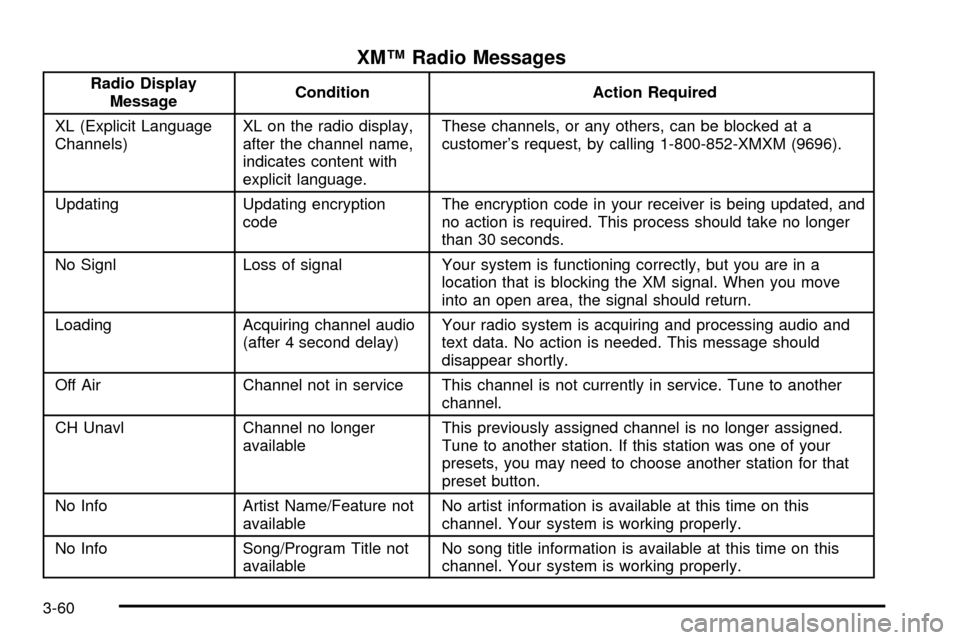
XMŸ Radio Messages
Radio Display
MessageCondition Action Required
XL (Explicit Language
Channels)XL on the radio display,
after the channel name,
indicates content with
explicit language.These channels, or any others, can be blocked at a
customer's request, by calling 1-800-852-XMXM (9696).
Updating Updating encryption
codeThe encryption code in your receiver is being updated, and
no action is required. This process should take no longer
than 30 seconds.
No Signl Loss of signal Your system is functioning correctly, but you are in a
location that is blocking the XM signal. When you move
into an open area, the signal should return.
Loading Acquiring channel audio
(after 4 second delay)Your radio system is acquiring and processing audio and
text data. No action is needed. This message should
disappear shortly.
Off Air Channel not in service This channel is not currently in service. Tune to another
channel.
CH Unavl Channel no longer
availableThis previously assigned channel is no longer assigned.
Tune to another station. If this station was one of your
presets, you may need to choose another station for that
preset button.
No Info Artist Name/Feature not
availableNo artist information is available at this time on this
channel. Your system is working properly.
No Info Song/Program Title not
availableNo song title information is available at this time on this
channel. Your system is working properly.
3-60
Page 183 of 408
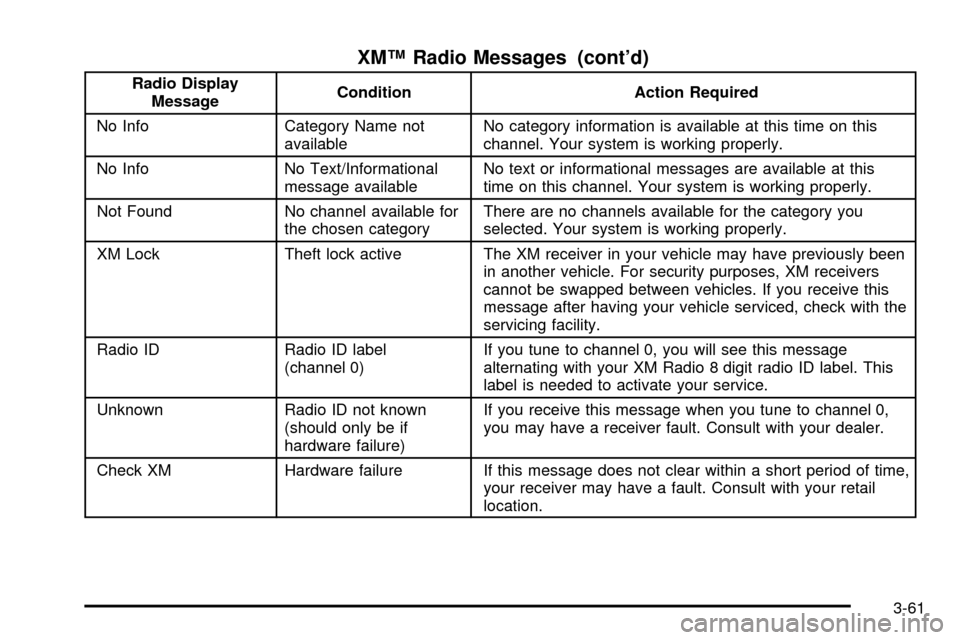
XMŸ Radio Messages (cont'd)
Radio Display
MessageCondition Action Required
No Info Category Name not
availableNo category information is available at this time on this
channel. Your system is working properly.
No Info No Text/Informational
message availableNo text or informational messages are available at this
time on this channel. Your system is working properly.
Not Found No channel available for
the chosen categoryThere are no channels available for the category you
selected. Your system is working properly.
XM Lock Theft lock active The XM receiver in your vehicle may have previously been
in another vehicle. For security purposes, XM receivers
cannot be swapped between vehicles. If you receive this
message after having your vehicle serviced, check with the
servicing facility.
Radio ID Radio ID label
(channel 0)If you tune to channel 0, you will see this message
alternating with your XM Radio 8 digit radio ID label. This
label is needed to activate your service.
Unknown Radio ID not known
(should only be if
hardware failure)If you receive this message when you tune to channel 0,
you may have a receiver fault. Consult with your dealer.
Check XM Hardware failure If this message does not clear within a short period of time,
your receiver may have a fault. Consult with your retail
location.
3-61
Page 185 of 408

pressed more than once, the player will continue
moving forward or backward through the tape. SEEK
and a positive or a negative number will appear on the
display.
BAND:Press this button to listen to the radio when a
tape is playing. The tape will stop but remain in the
player.
TAPE AUX (Auxiliary):Press this button to play a
cassette tape when listening to the radio.
ZEJT (Eject):Press this button to eject a tape.
Eject may be activated with the radio off. Cassette tapes
may be loaded with the radio off if this button is
pressed ®rst.
Cassette Tape Messages
CHK TAPE (Check Tape):If this message appears on
the radio display, the tape won't play because of one
of the following errors.
·The tape is tight and the player can't turn the tape
hubs. Remove the tape. Hold the tape with the
open end down and try to turn the right hub
counterclockwise with a pencil. Turn the tape over
and repeat. If the hubs do not turn easily, your
tape may be damaged and should not be used in
the player. Try a new tape to make sure your player
is working properly.
·The tape is broken. Try a new tape.
·The tape is wrapped around the tape head. Attempt
to get the cassette out. Try a new tape.
CLEAN:If this message appears on the display, the
cassette tape player needs to be cleaned. It will still play
tapes, but you should clean it as soon as possible to
prevent damage to the tapes and player. See
Care
of Your Cassette Tape Player on page 3-91.
If any error occurs repeatedly or if an error can't be
corrected, contact your dealer.
CD Adapter Kits
It is possible to use a portable CD player adapter kit
with your cassette tape player after activating the bypass
feature on your tape player.
To activate the bypass feature, use the following steps:
1. Turn the radio off.
2. Press and hold the TAPE AUX button for ®ve
seconds. READY will appear on the display for
®ve seconds, indicating the feature is active.
3. Insert the adapter into the cassette slot. It will
power up the radio and begin playing.
The override feature will remain active until EJT
is pressed.
3-63
Page 192 of 408

TRAF (Traffic):If TRAF appears on the display, the
tuned station broadcasts traffic announcements
and when a traffic announcement comes on the tuned
radio station you will hear it.
If the current tuned station does not broadcast traffic
announcements, press this button and the radio
will seek to a station that does. When the radio ®nds a
station that broadcasts tra®ic announcements, it will
stop and TRAF will be displayed. When a traffic
announcement comes on the tuned radio station you
will hear it. If no station is found, NO TRAF will appear
on the display.
If TRAF is on the display you can press the TRAF
button to turn of the traffic announcements.
Your radio will play the traffic announcement even if the
volume is muted or interrupt the play of a CD if the
last tuned station broadcasts traffic announcements.
This function does not apply to XMŸ Satellite
Radio Service.Radio Messages
CAL ERR (Calibration Error):This message is
displayed when the radio has not been calibrated
properly for the vehicle. You must return to the
dealership for service.
LOCKED:This message is displayed when the
THEFTLOCK
žsystem has locked up. You must return
to the dealership for service.
If any error occurs repeatedly or if an error can not be
corrected, contact your dealer.
3-70