buttons CHEVROLET IMPALA 2007 9.G User Guide
[x] Cancel search | Manufacturer: CHEVROLET, Model Year: 2007, Model line: IMPALA, Model: CHEVROLET IMPALA 2007 9.GPages: 460, PDF Size: 2.56 MB
Page 137 of 460
Reprogramming a Single Universal
Home Remote Button
To program a device to Universal Home Remote
using a Universal Home Remote button
previously trained, follow these steps:
1. Press and hold the desired Universal Home
Remote button. Do not release the button.
2. The indicator light will begin to ash after
20 seconds. While still holding the Universal
Home Remote button, proceed with
Step 2 under “Programming Universal
Home Remote” shown earlier in this section.
For help or information on the Universal Home
Remote System, call the customer assistance
phone number underCustomer Assistance Offices
on page 430.
Universal Home Remote System
Operation (With Three Round LED)
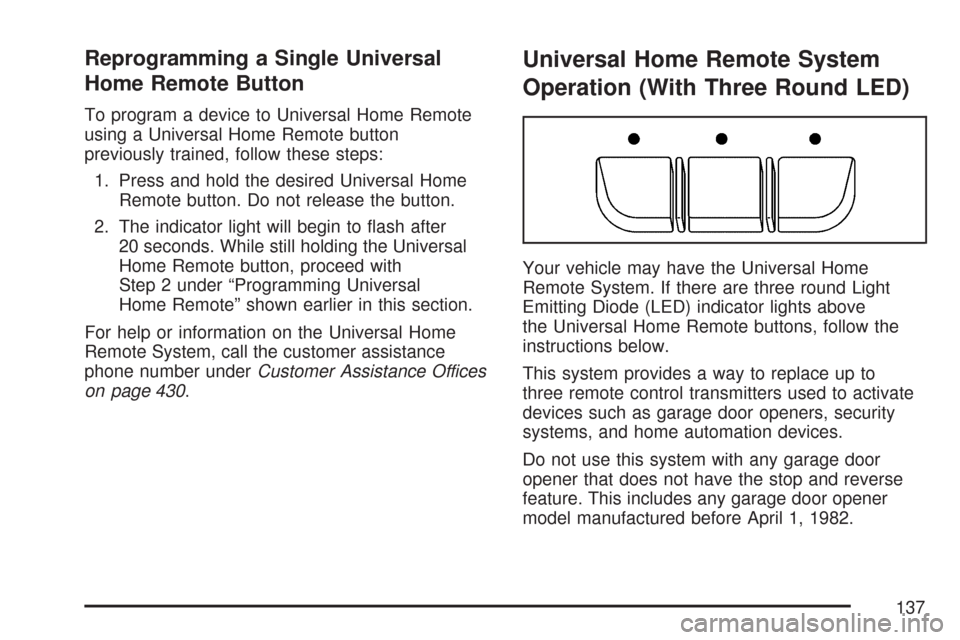
Your vehicle may have the Universal Home
Remote System. If there are three round Light
Emitting Diode (LED) indicator lights above
the Universal Home Remote buttons, follow the
instructions below.
This system provides a way to replace up to
three remote control transmitters used to activate
devices such as garage door openers, security
systems, and home automation devices.
Do not use this system with any garage door
opener that does not have the stop and reverse
feature. This includes any garage door opener
model manufactured before April 1, 1982.
137
Page 138 of 460
Read the instructions completely before attempting
to program the transmitter. Because of the steps
involved, it may be helpful to have another person
available to assist you in programming the
transmitter.
Be sure to keep the original remote control
transmitter for use in other vehicles, as well as,
for future programming. You only need the original
remote control transmitter for Fixed Code
programming. It is also recommended that upon
the sale or lease termination of the vehicle, the
programmed buttons should be erased for security
purposes. See “Erasing Universal Home Remote
Buttons” later in this section.
When programming a garage door, it is advised to
park outside of the garage. Be sure that people
and objects are clear of the garage door or
security device you are programming.
Programming Universal Home
Remote — Rolling Code
Most garage door openers sold after 1996 are
Rolling Code units.Programming a garage door opener involves
time-sensitive actions, so read the entire procedure
before you begin. If you do not follow these actions,
the device will time out and you will have to repeat
the procedure.
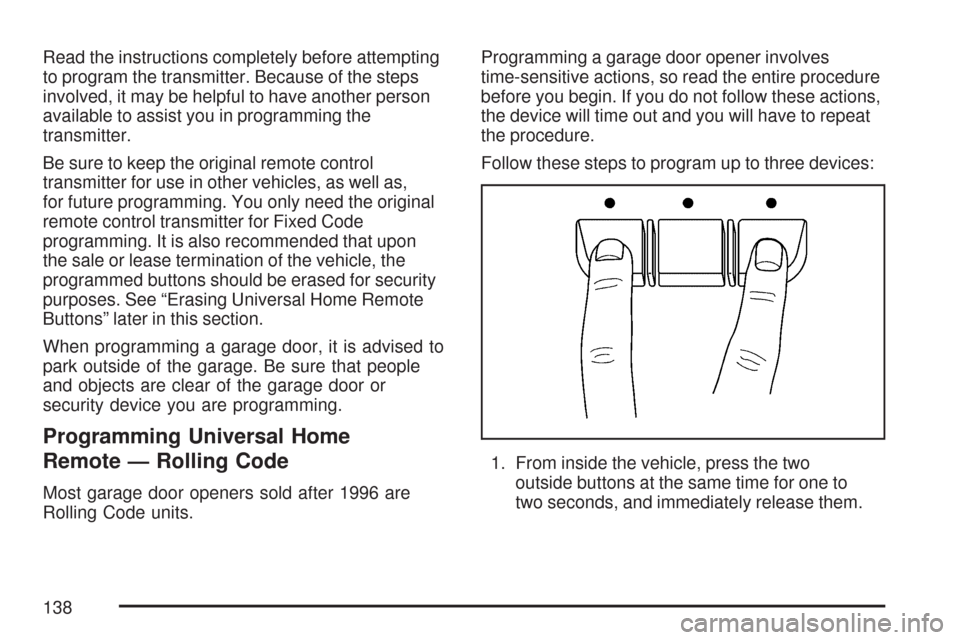
Follow these steps to program up to three devices:
1. From inside the vehicle, press the two
outside buttons at the same time for one to
two seconds, and immediately release them.
138
Page 142 of 460
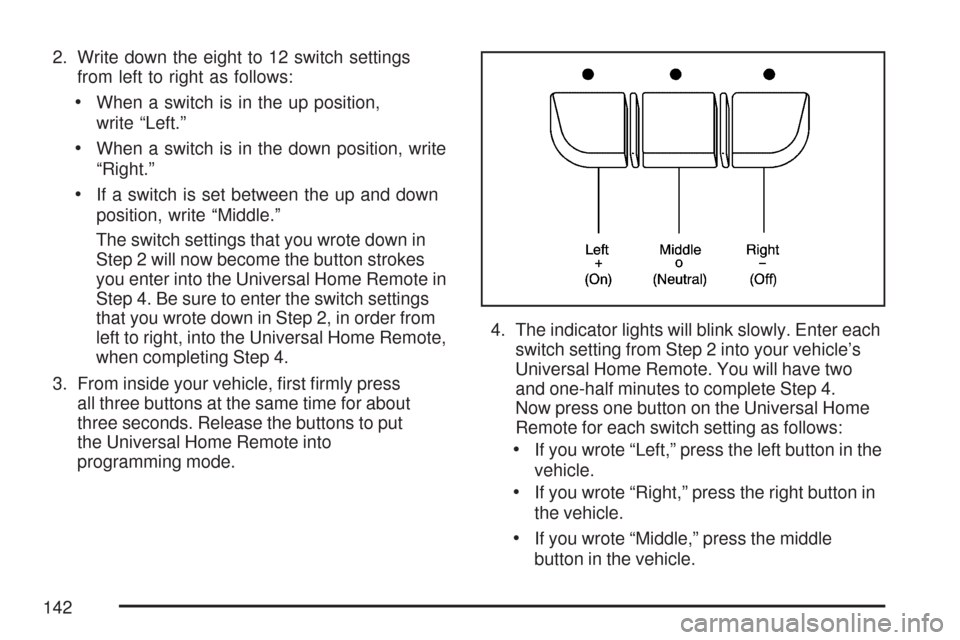
2. Write down the eight to 12 switch settings
from left to right as follows:
When a switch is in the up position,
write “Left.”
When a switch is in the down position, write
“Right.”
If a switch is set between the up and down
position, write “Middle.”
The switch settings that you wrote down in
Step 2 will now become the button strokes
you enter into the Universal Home Remote in
Step 4. Be sure to enter the switch settings
that you wrote down in Step 2, in order from
left to right, into the Universal Home Remote,
when completing Step 4.
3. From inside your vehicle, rst rmly press
all three buttons at the same time for about
three seconds. Release the buttons to put
the Universal Home Remote into
programming mode.4. The indicator lights will blink slowly. Enter each
switch setting from Step 2 into your vehicle’s
Universal Home Remote. You will have two
and one-half minutes to complete Step 4.
Now press one button on the Universal Home
Remote for each switch setting as follows:
If you wrote “Left,” press the left button in the
vehicle.
If you wrote “Right,” press the right button in
the vehicle.
If you wrote “Middle,” press the middle
button in the vehicle.
142
Page 143 of 460
5. After entering all of the switch positions,
again, rmly press and release all three
buttons at the same time. The indicator lights
will turn on.
6. Press and hold the button you would like to use
to control the garage door until the garage door
moves. The indicator light above the selected
button should slowly blink. You may need to
hold the button from ve to 55 seconds.
7. Immediately release the button when the
garage door moves. The indicator light will
blink rapidly until programming is complete.
8. Press and release the same button again.
The garage door should move, conrming
that programming is successful and complete.
To program another Fixed Code device such as an
additional garage door opener, a security device,
or home automation device, repeat Steps 1-8,
choosing a different button in Step 6 than what you
used for the garage door opener.
Using Universal Home Remote
Press and hold the appropriate button for at least
half of a second. The indicator light will come
on while the signal is being transmitted.
Reprogramming Universal Home
Remote Buttons
You can reprogram any of the three buttons by
repeating the instructions.
Erasing Universal Home Remote
Buttons
You should erase the programmed buttons when
you sell or terminate your lease.
To erase either Rolling Code or Fixed Code on
the Universal Home Remote device, do the
following:
1. Press and hold the two outside buttons at the
same time for approximately 20 seconds, until
the indicator lights, located directly above
the buttons, begin to blink rapidly.
2. Once the indicator lights begin to blink,
release both buttons. The codes from all
buttons will be erased.
For help or information on the Universal Home
Remote System, call the customer assistance
phone number underCustomer Assistance Offices
on page 430.
143
Page 158 of 460
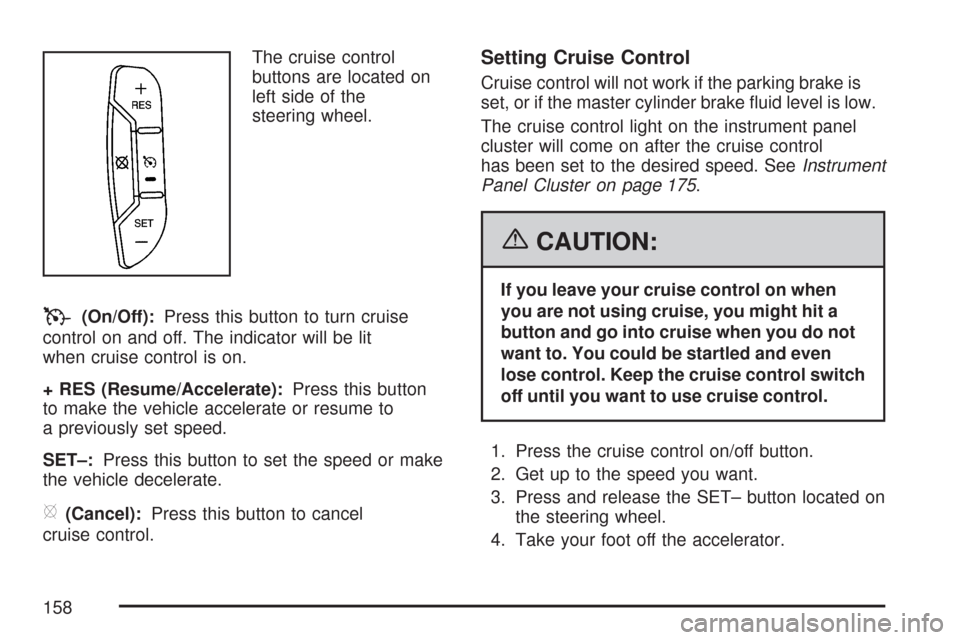
The cruise control
buttons are located on
left side of the
steering wheel.
T(On/Off):Press this button to turn cruise
control on and off. The indicator will be lit
when cruise control is on.
+ RES (Resume/Accelerate):Press this button
to make the vehicle accelerate or resume to
a previously set speed.
SET–:Press this button to set the speed or make
the vehicle decelerate.
[(Cancel):Press this button to cancel
cruise control.
Setting Cruise Control
Cruise control will not work if the parking brake is
set, or if the master cylinder brake uid level is low.
The cruise control light on the instrument panel
cluster will come on after the cruise control
has been set to the desired speed. SeeInstrument
Panel Cluster on page 175.
{CAUTION:
If you leave your cruise control on when
you are not using cruise, you might hit a
button and go into cruise when you do not
want to. You could be startled and even
lose control. Keep the cruise control switch
off until you want to use cruise control.
1. Press the cruise control on/off button.
2. Get up to the speed you want.
3. Press and release the SET– button located on
the steering wheel.
4. Take your foot off the accelerator.
158
Page 190 of 460
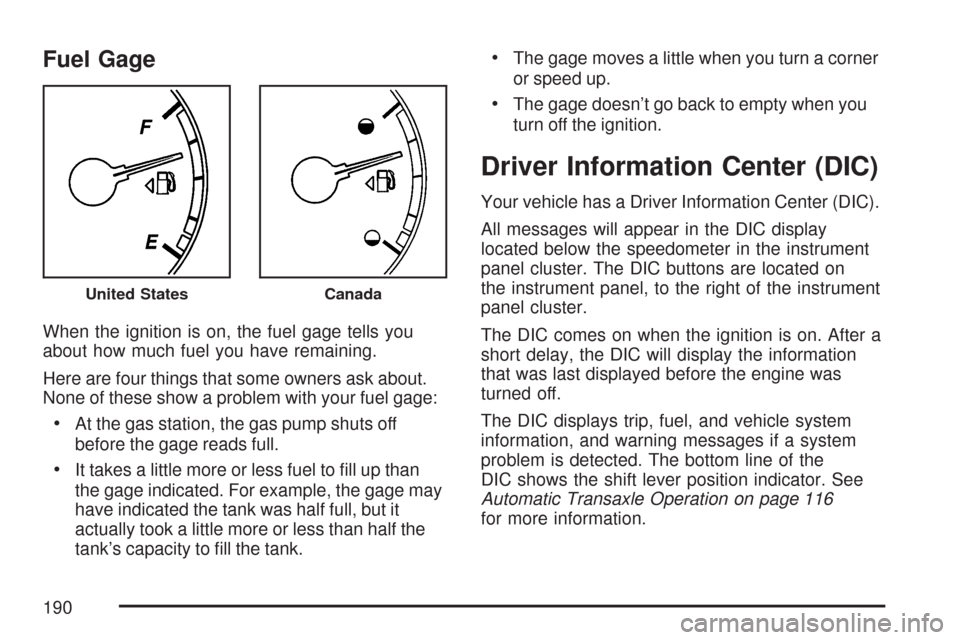
Fuel Gage
When the ignition is on, the fuel gage tells you
about how much fuel you have remaining.
Here are four things that some owners ask about.
None of these show a problem with your fuel gage:
At the gas station, the gas pump shuts off
before the gage reads full.
It takes a little more or less fuel to ll up than
the gage indicated. For example, the gage may
have indicated the tank was half full, but it
actually took a little more or less than half the
tank’s capacity to ll the tank.
The gage moves a little when you turn a corner
or speed up.
The gage doesn’t go back to empty when you
turn off the ignition.
Driver Information Center (DIC)
Your vehicle has a Driver Information Center (DIC).
All messages will appear in the DIC display
located below the speedometer in the instrument
panel cluster. The DIC buttons are located on
the instrument panel, to the right of the instrument
panel cluster.
The DIC comes on when the ignition is on. After a
short delay, the DIC will display the information
that was last displayed before the engine was
turned off.
The DIC displays trip, fuel, and vehicle system
information, and warning messages if a system
problem is detected. The bottom line of the
DIC shows the shift lever position indicator. See
Automatic Transaxle Operation on page 116
for more information.
United StatesCanada
190
Page 191 of 460
If your vehicle has these features, the DIC also
displays the compass direction and the outside
air temperature when viewing the trip and fuel
information. The compass direction appears on the
top right corner of the DIC display. The outside air
temperature automatically appears in the bottom
right corner of the DIC display. If there is a problem
with the system that controls the temperature
display, the numbers will be replaced with dashes.
If this occurs, have the vehicle serviced by your
dealer.
The DIC also allows some features to be
customized. SeeDIC Vehicle Customization on
page 208for more information.
DIC Operation and Displays
The DIC has different displays which can be
accessed by pressing the DIC buttons located
on the instrument panel, to the right of the
instrument panel cluster.
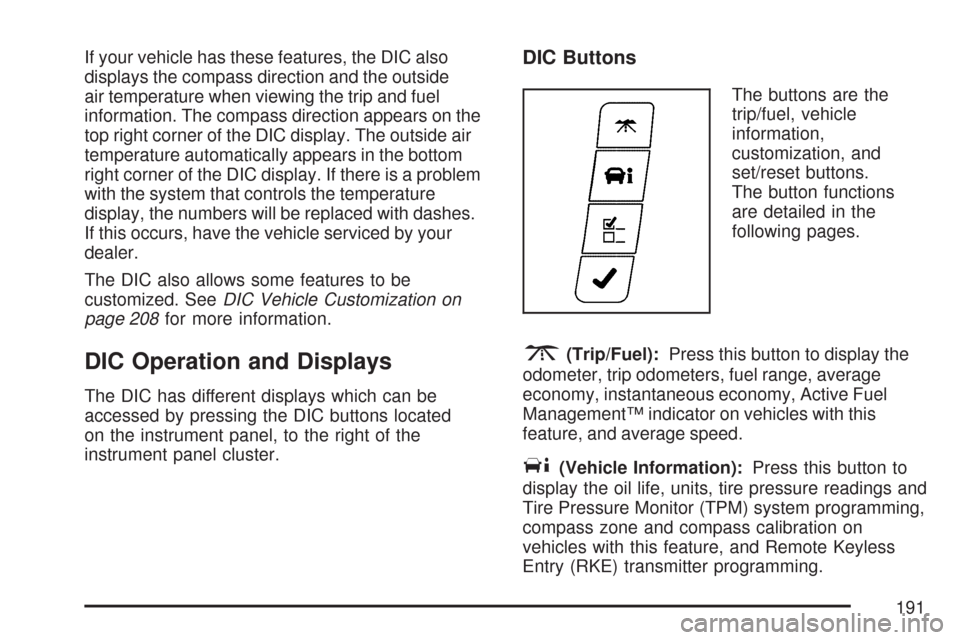
DIC Buttons
The buttons are the
trip/fuel, vehicle
information,
customization, and
set/reset buttons.
The button functions
are detailed in the
following pages.
3(Trip/Fuel):Press this button to display the
odometer, trip odometers, fuel range, average
economy, instantaneous economy, Active Fuel
Management™ indicator on vehicles with this
feature, and average speed.
T(Vehicle Information):Press this button to
display the oil life, units, tire pressure readings and
Tire Pressure Monitor (TPM) system programming,
compass zone and compass calibration on
vehicles with this feature, and Remote Keyless
Entry (RKE) transmitter programming.
191
Page 197 of 460
3. Press and hold the lock and unlock buttons
on the rst transmitter at the same time for
about 15 seconds.
A chime will sound indicating that the
transmitter is matched.
4. To match additional transmitters at this time,
repeat Step 3.
Each vehicle can have a maximum of
eight transmitters matched to it.
5. To exit the programming mode, you must
cycle the key to OFF.
Blank Display
This display shows no information.
Customization Menu Items
U
(Customization):Press this button to enter the
feature settings menu. This display allows you
to customize the feature settings on your vehicle.
SeeDIC Vehicle Customization on page 208
for more information.
DIC Compass
Your vehicle may have a compass in the Driver
Information Center (DIC).
Compass Zone
Under certain circumstances, such as during a
long distance cross-country trip, it will be
necessary to compensate for compass variance
and reset the zone through the DIC.
Compass variance is the difference between the
earth’s magnetic north and true geographic
north. If not adjusted to account for compass
variance, the compass in the vehicle could give
false readings.
In order to do this, the compass must be set or
calibrated to the variance zone in which the vehicle
is traveling.
197
Page 199 of 460
To calibrate the compass, use the following
procedure:
Compass Calibration Procedure
1. Before calibrating the compass, make sure
the compass zone is set to the variance
zone in which the vehicle is traveling. See
“Compass Variance Procedure” earlier in
this section.
2. Press the vehicle information button until the
PRESS
VTO CALIBRATE COMPASS
screen is displayed.
3. Press the set/reset button to start the compass
calibration.
4. The DIC will display CALIBRATING: DRIVE
IN CIRCLES. Drive the vehicle in circles at
less than 5 mph (8 km/h) to complete
the calibration. The DIC will display
CALIBRATION COMPLETE when the
calibration is complete.
DIC Warnings and Messages
Messages are displayed on the DIC to notify the
driver that the status of the vehicle has changed
and that some action may be needed by the driver
to correct the condition. Multiple messages may
appear one after another. Some messages
may not require immediate action, but you can
press the set/reset button to acknowledge that you
received the message and clear it from the DIC
display. Pressing any of the DIC buttons also
acknowledges and clears any messages. Some
messages cannot be cleared from the DIC display
because they are more urgent. These messages
require action before they can be cleared.
You should take any messages that appear on the
display seriously and remember that clearing
the messages will only make the messages
disappear, not correct the problem. The following
are the possible messages that can be displayed
and some information about them.
199
Page 214 of 460
FACTORY SETTINGS
This feature allows you to set all of the
customization features back to their factory
default settings.
Press the customization button until FACTORY
SETTINGS appears on the DIC display. Press the
set/reset button to access the settings for this
feature. Then press the customization button to
scroll through the following choices:
RESTORE ALL (default):The customization
features will be set to their factory default settings.
DO NOT RESTORE:The customization features
will not be set to their factory default settings.
Select one of the available choices and press the
set/reset button while it is displayed on the
DIC to select it.
EXIT FEATURE SETTINGS
This feature allows you to exit the FEATURE
SETTINGS menu.
Press the customization button until FEATURE
SETTINGS PRESS
VTO EXIT appears in
the DIC display. Press the set/reset button to exit
the menu.
If you do not exit, pressing the customization
button again will return you to the beginning of the
FEATURE SETTINGS menu.
Exiting the Feature Settings Menu
The feature settings menu will be exited when any
of the following occurs:
The vehicle is shifted out of PARK (P).
The vehicle is no longer in RUN.
The trip/fuel or vehicle information DIC buttons
are pressed.
The end of the feature settings menu is
reached and exited.
A 40 second time period has elapsed with no
selection made.
214