light CHEVROLET IMPALA 2008 9.G Owner's Manual
[x] Cancel search | Manufacturer: CHEVROLET, Model Year: 2008, Model line: IMPALA, Model: CHEVROLET IMPALA 2008 9.GPages: 400, PDF Size: 5.37 MB
Page 117 of 400
Programming Universal Home
Remote — Rolling Code
If you have questions or need help programming the
Universal Home Remote System, call 1-866-572-2728.
Most garage door openers sold after 1996 are Rolling
Code units.
Programming a garage door opener involves
time-sensitive actions, so read the entire procedure
before you begin. If you do not follow these actions,
the device will time out and you will have to repeat the
procedure.
To program up to three devices:
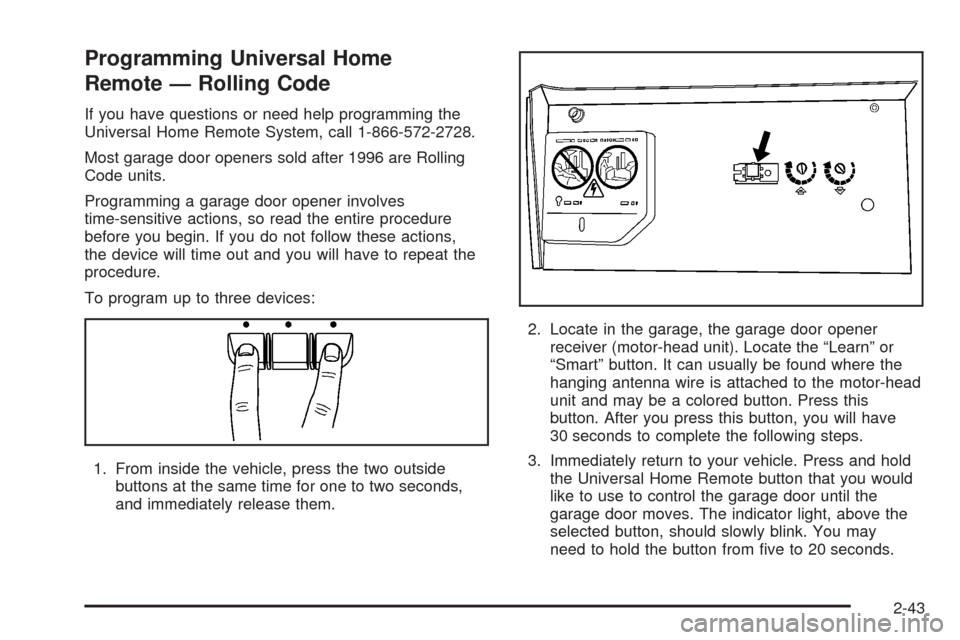
1. From inside the vehicle, press the two outside
buttons at the same time for one to two seconds,
and immediately release them.2. Locate in the garage, the garage door opener
receiver (motor-head unit). Locate the “Learn” or
“Smart” button. It can usually be found where the
hanging antenna wire is attached to the motor-head
unit and may be a colored button. Press this
button. After you press this button, you will have
30 seconds to complete the following steps.
3. Immediately return to your vehicle. Press and hold
the Universal Home Remote button that you would
like to use to control the garage door until the
garage door moves. The indicator light, above the
selected button, should slowly blink. You may
need to hold the button from ve to 20 seconds.
2-43
Page 118 of 400
4. Immediately, within one second, release the button
when the garage door moves. The indicator light
will blink rapidly until programming is complete.
5. Press and release the same button again.
The garage door should move, conrming
that programming is successful and complete.
To program another Rolling Code device such as an
additional garage door opener, a security device,
or home automation device, repeat Steps 1-5, choosing
a different function button in Step 3 than what you
used for the garage door opener.
If these instructions do not work, you probably have
a Fixed Code garage door opener. Follow the
Programming instructions that follow for a Fixed Code
garage door opener.
Programming Universal Home
Remote — Fixed Code
If you have questions or need help programming the
Universal Home Remote System, call 1-866-572-2728.
Most garage door openers sold before 1996 are
Fixed Code units.Programming a garage door opener involves
time-sensitive actions, so read the entire procedure
before you begin. If you do not follow these actions,
the device will time out and you will have to repeat
the procedure.
To program up to three devices:
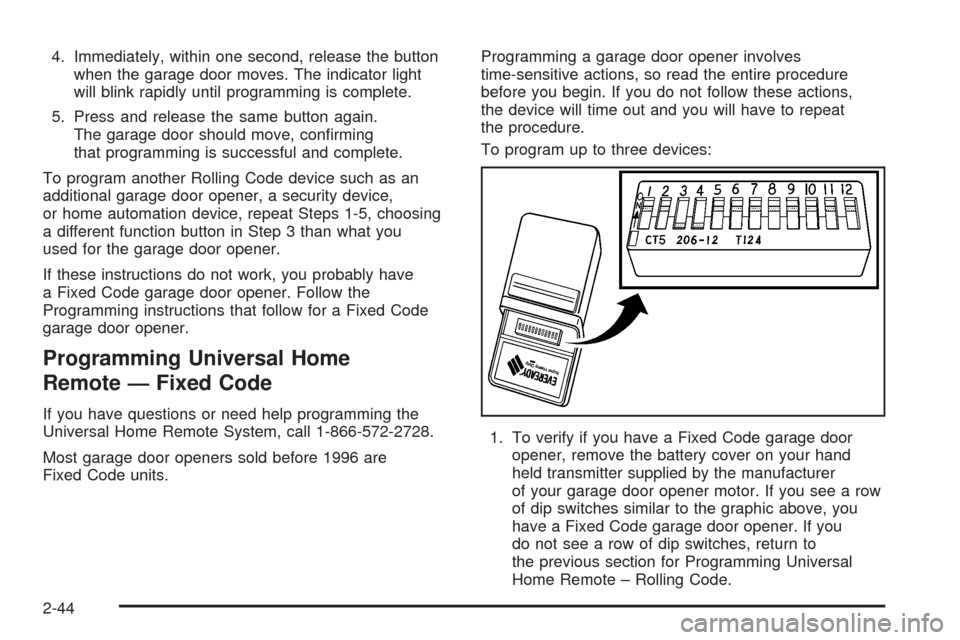
1. To verify if you have a Fixed Code garage door
opener, remove the battery cover on your hand
held transmitter supplied by the manufacturer
of your garage door opener motor. If you see a row
of dip switches similar to the graphic above, you
have a Fixed Code garage door opener. If you
do not see a row of dip switches, return to
the previous section for Programming Universal
Home Remote – Rolling Code.
2-44
Page 120 of 400
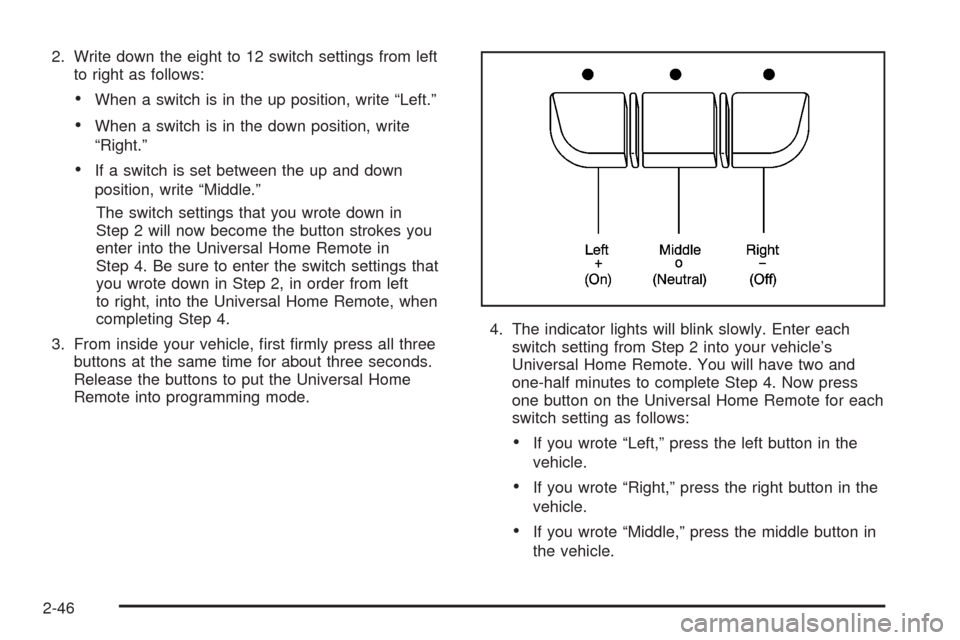
2. Write down the eight to 12 switch settings from left
to right as follows:
When a switch is in the up position, write “Left.”
When a switch is in the down position, write
“Right.”
If a switch is set between the up and down
position, write “Middle.”
The switch settings that you wrote down in
Step 2 will now become the button strokes you
enter into the Universal Home Remote in
Step 4. Be sure to enter the switch settings that
you wrote down in Step 2, in order from left
to right, into the Universal Home Remote, when
completing Step 4.
3. From inside your vehicle, rst rmly press all three
buttons at the same time for about three seconds.
Release the buttons to put the Universal Home
Remote into programming mode.4. The indicator lights will blink slowly. Enter each
switch setting from Step 2 into your vehicle’s
Universal Home Remote. You will have two and
one-half minutes to complete Step 4. Now press
one button on the Universal Home Remote for each
switch setting as follows:
If you wrote “Left,” press the left button in the
vehicle.
If you wrote “Right,” press the right button in the
vehicle.
If you wrote “Middle,” press the middle button in
the vehicle.
2-46
Page 121 of 400
5. After entering all of the switch positions, again,
rmly press and release all three buttons at the
same time. The indicator lights will turn on.
6. Press and hold the button you would like to use to
control the garage door until the garage door
moves. The indicator light above the selected button
should slowly blink. You may need to hold the
button from ve to 55 seconds.
7. Immediately release the button when the garage
door moves. The indicator light will blink rapidly
until programming is complete.
8. Press and release the same button again.
The garage door should move, conrming
that programming is successful and complete.
To program another Fixed Code device such as an
additional garage door opener, a security device,
or home automation device, repeat Steps 1-8, choosing
a different button in Step 6 than what you used for
the garage door opener.
Using Universal Home Remote
Press and hold the appropriate button for at least half of
a second. The indicator light will come on while the
signal is being transmitted.
Reprogramming Universal Home
Remote Buttons
You can reprogram any of the three buttons by repeating
the instructions.
Erasing Universal Home Remote
Buttons
You should erase the programmed buttons when you
sell or terminate your lease.
To erase either Rolling Code or Fixed Code on the
Universal Home Remote device:
1. Press and hold the two outside buttons at the same
time for approximately 20 seconds, until the
indicator lights, located directly above the buttons,
begin to blink rapidly.
2. Once the indicator lights begin to blink, release both
buttons. The codes from all buttons will be erased.
For help or information on the Universal Home Remote
System, call the customer assistance phone number
underCustomer Assistance Offices on page 7-5.
2-47
Page 125 of 400
Instrument Panel Overview...............................3-4
Hazard Warning Flashers................................3-6
Other Warning Devices...................................3-6
Horn.............................................................3-6
Tilt Wheel.....................................................3-6
Turn Signal/Multifunction Lever.........................3-7
Turn and Lane-Change Signals........................3-8
Headlamp High/Low-Beam Changer...................3-8
Flash-to-Pass.................................................3-9
Windshield Wipers..........................................3-9
Windshield Washer.......................................3-10
Cruise Control..............................................3-10
Exterior Lamps.............................................3-14
Delayed Headlamps......................................3-15
Daytime Running Lamps (DRL)/
Automatic Headlamp System.......................3-16
Fog Lamps..................................................3-16
Instrument Panel Brightness...........................3-17
Courtesy Lamps...........................................3-17
Dome Lamp.................................................3-17
Entry Lighting...............................................3-17Delayed Entry Lighting...................................3-18
Delayed Exit Lighting.....................................3-18
Parade Dimming...........................................3-18
Reading Lamps............................................3-19
Mirror Reading Lamps...................................3-19
Electric Power Management...........................3-19
Battery Run-Down Protection..........................3-20
Accessory Power Outlet(s).............................3-20
Ashtray(s) and Cigarette Lighter......................3-21
Climate Controls............................................3-22
Climate Control System.................................3-22
Outlet Adjustment.........................................3-25
Passenger Compartment Air Filter...................3-26
Warning Lights, Gages, and Indicators
............3-27
Instrument Panel Cluster................................3-28
Speedometer and Odometer...........................3-29
Tachometer.................................................3-29
Safety Belt Reminders...................................3-30
Airbag Readiness Light..................................3-31
Passenger Airbag Status Indicator...................3-32
Charging System Light..................................3-34
Section 3 Instrument Panel
3-1
Page 126 of 400
Brake System Warning Light..........................3-34
Antilock Brake System Warning Light...............3-35
Traction Control System (TCS) Warning Light......3-36
Electronic Stability Control Indicator Light.........3-36
Engine Coolant Temperature Warning Light......3-37
Engine Coolant Temperature Gage..................3-38
Tire Pressure Light.......................................3-38
Malfunction Indicator Lamp.............................3-39
Oil Pressure Light.........................................3-42
Security Light...............................................3-42
Fog Lamp Light............................................3-42
Cruise Control Light......................................3-43
Highbeam On Light.......................................3-43
Fuel Gage...................................................3-43Driver Information Center (DIC).......................3-44
DIC Operation and Displays...........................3-44
DIC Compass..............................................3-49
DIC Warnings and Messages.........................3-52
DIC Vehicle Customization.............................3-60
Audio System(s).............................................3-66
Setting the Time...........................................3-67
Radio(s)......................................................3-69
Using an MP3..............................................3-80
XM Radio Messages.....................................3-84
Theft-Deterrent Feature..................................3-85
Audio Steering Wheel Controls.......................3-86
Radio Reception...........................................3-87
Backglass Antenna.......................................3-88
XM™ Satellite Radio Antenna System.............3-88
Section 3 Instrument Panel
3-2
Page 132 of 400
Turn and Lane-Change Signals
The turn signal has two upward (for right) and
two downward (for left) positions. These positions
allow you to signal a turn or a lane change.
To signal a turn, move the lever all the way up or
down. When the turn is nished, the lever will return
automatically.
An arrow on the instrument
panel cluster will ash in
the direction of the
turn or lane change.
To signal a lane change, raise or lower the lever until
the arrow starts to ash. Hold it there until you complete
your lane change. The lever will return by itself when
you release it. If you momentarily press and release the
lever, the turn signal will ash three times.
If the arrow ashes faster than normal as you signal a
turn or a lane change, a signal bulb may be burned
out and other drivers will not see your turn signal.If a bulb is burned out, replace it to help avoid an
accident. If the arrows do not go on at all when you
signal a turn, check for burned-out bulbs and then check
the fuse. SeeFuses and Circuit Breakers on page 5-99.
Turn Signal On Chime
If either one of the turn signals are left on and you have
drove more than 3/4 mile (1.2 km), a chime will sound.
Headlamp High/Low-Beam Changer
To change the headlamps from low beam to high beam,
push the turn signal/multifunction lever toward the
front of the vehicle.
This light on the instrument
panel cluster comes on if
the high beam lamps
are turned on while the
ignition is on.
To change the headlamps from high beam to low beam,
pull the turn signal lever toward the rear of the vehicle.
3-8
Page 133 of 400
Flash-to-Pass
With the turn signal lever in the low-beam position,
pull the lever toward you momentarily to switch
to high-beam, to signal that you are going to pass.
If the headlamps are on, they will return to low-beam
when the lever is released.
Windshield Wipers
Clear ice and snow from the wiper blades before using
them. If they are frozen to the windshield, gently
loosen or thaw them. Damaged wiper blades may not
clear the windshield well, making it harder to see
and drive safely. If the blades do become damaged,
install new blades or blade inserts. For more information,
seeWindshield Wiper Blade Replacement on page 5-52.
Heavy snow or ice can overload the wiper motor.
A circuit breaker will stop the motor until it cools down.
Clear away snow or ice to prevent an overload.Turn the band with the wiper symbol to control the
windshield wipers.
8(Mist):Turn the band to mist for a single wiping
cycle. Hold it there until the wipers start. Then let go.
The wipers stop after one wipe. Hold the band on mist
longer, for more wipe cycles.
9(Off):To stop the wipers, move the band to off.
6(Delay):Turn the band to adjust the delay time.
The delay between wiping cycles becomes shorter as
the band is moved to the top of the lever. This can
be very useful in light rain or snow.
6(Low Speed):Turn the band away from you to
the rst solid band past the delay settings, for steady
wiping at low speed.
?(High Speed):Turn the band further, to the
second solid band past the delay settings, for
high-speed wiping.
3-9
Page 136 of 400
Setting Cruise Control
Cruise control will not work if the parking brake is set,
or if the master cylinder brake uid level is low.
The cruise control light on the instrument panel cluster
comes on after the cruise control has been set to the
desired speed. SeeInstrument Panel Cluster on
page 3-28.
{CAUTION:
If you leave your cruise control on when you
are not using cruise, you might hit a button
and go into cruise when you do not want to.
You could be startled and even lose control.
Keep the cruise control switch off until you
want to use cruise control.
1. Press the cruise control on/off button.
2. Get up to the desired speed.
3. Press and release the SET– button located on the
steering wheel.
4. Take your foot off the accelerator.
Resuming a Set Speed
If cruise control is set at a desired speed and the
brakes are applied, this shuts off the cruise control.
However, it does not need to be reset.
Once your vehicle reaches a speed of about 25 mph
(40 km/h) or more, press the +RES button on the
steering wheel. The vehicle goes back to the previously
selected speed and stays there.
Increasing Speed While Using Cruise
Control
To increase the cruise speed while using cruise control:
Press and hold the +RES button on the steering
wheel until you reach your new desired speed,
then release it.
To increase vehicle speed in small increments,
press the +RES button. Each time this is done,
the vehicle will go about 1 mph (1.6 km/h) faster.
3-12
Page 137 of 400
Reducing Speed While Using Cruise
Control
To reduce your speed while using cruise control:
Press and hold the SET– button on the steering
wheel until you reach the desired lower speed,
then release it.
To slow down in very small amounts, press the
SET– button on the steering wheel briey.
Each time this is done, the vehicle will go about
1 mph (1.6 km/h) slower.
Passing Another Vehicle While Using
Cruise Control
Use the accelerator pedal to increase vehicle speed.
When you take your foot off the pedal, the vehicle
will slow down to the cruise speed you set earlier.
Using Cruise Control on Hills
How well the cruise control will work on hills depends
upon the vehicle speed, load and the steepness of
the hills. When going up steep hills, you might have to
step on the accelerator pedal to maintain your speed.
When going downhill, you might have to brake or shift to
a lower gear to keep your speed down. If the brakes
are applied the cruise control will turn off. Many drivers
nd this to be too much trouble and do not use
cruise control on steep hills.
Ending Cruise Control
There are three ways to end cruise control:
Step lightly on the brake pedal.
Press the[button on the steering wheel.
Press theTbutton on the steering wheel.
Erasing Speed Memory
The cruise control set speed memory is erased by
turning off the cruise control or the ignition.
3-13