audio CHEVROLET IMPALA 2010 9.G User Guide
[x] Cancel search | Manufacturer: CHEVROLET, Model Year: 2010, Model line: IMPALA, Model: CHEVROLET IMPALA 2010 9.GPages: 432, PDF Size: 1.89 MB
Page 207 of 432
Exiting the Feature Settings MenuThe feature settings menu will be exited when any of
the following occurs:•
The vehicle is shifted out of P (Park).
•
The vehicle is no longer in ON/RUN.
•
The trip/fuel or vehicle information DIC buttons are
pressed.
•
The end of the feature settings menu is reached
and exited.
•
A 40 second time period has elapsed with no
selection made.
Audio System(s)Determine which radio the vehicle has and read the
following pages to become familiar with its features.
{
WARNING:
Taking your eyes off the road for extended periods
could cause a crash resulting in injury or death to
you or others. Do not give extended attention to
entertainment tasks while driving.This system provides access to many audio and non
audio listings.
To minimize taking your eyes off the road while driving,
do the following while the vehicle is parked:
•
Become familiar with the operation and controls of
the audio system.
•
Set up the tone, speaker adjustments, and preset
radio stations.
For more information, seeDefensive Driving on
page 5-2.
Notice:Contact your dealer/retailer before adding
any equipment.
Adding audio or communication equipment could
interfere with the operation of the vehicle’s engine,
radio, or other systems, and could damage them.
Follow federal rules covering mobile radio and
telephone equipment.
The vehicle has Retained Accessory Power (RAP).
With RAP, the audio system can be played even after
the ignition is turned off. SeeRetained Accessory Power
(RAP) on page 3-21for more information.
4-57
Page 210 of 432
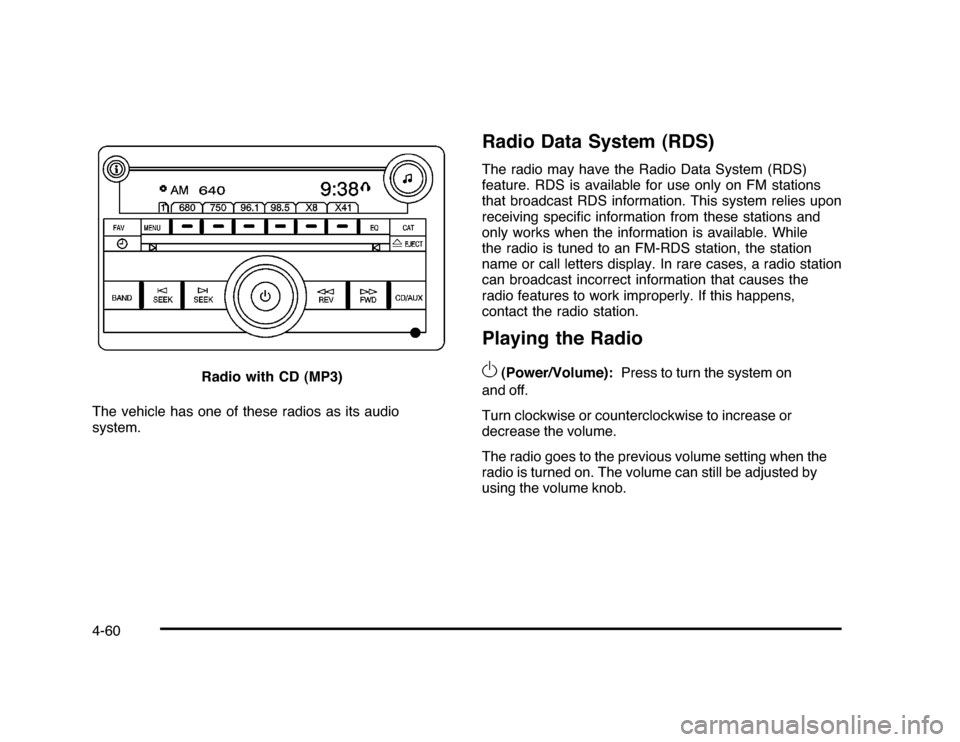
The vehicle has one of these radios as its audio
system.
Radio Data System (RDS)The radio may have the Radio Data System (RDS)
feature. RDS is available for use only on FM stations
that broadcast RDS information. This system relies upon
receiving specific information from these stations and
only works when the information is available. While
the radio is tuned to an FM-RDS station, the station
name or call letters display. In rare cases, a radio station
can broadcast incorrect information that causes the
radio features to work improperly. If this happens,
contact the radio station.Playing the Radio
O
(Power/Volume):Press to turn the system on
and off.
Turn clockwise or counterclockwise to increase or
decrease the volume.
The radio goes to the previous volume setting when the
radio is turned on. The volume can still be adjusted by
using the volume knob. Radio with CD (MP3)
4-60
Page 214 of 432
Finding a Category (CAT) Station
(XM™ Satellite Radio Service Only)CAT (Category):The radio may have the CAT button
feature. To select and find a desired category:
1. Press the BAND button until the XM frequency
displays. Press the CAT button to display the
category tabs on the radio display. Continue
pressing the CAT button until the desired category
name displays.
2. Press either of the two buttons below the desired
category tab to immediately tune to the first XM
station associated with that category.
3. Turn the
f
knob, press the buttons below the right
or left arrows displayed, or press the SEEK arrows
to go to the previous or to the next XM station
within the selected category.
4. To exit the category search mode, press the FAV
button or BAND button to display favorites again.
Undesired XM categories can be removed through the
setup menu. To remove an undesired category:
1. Press the MENU button to display the radio
setup menu.
2. Press the softkey below the XM CAT tab.3. Turn the
f
knob to display the category to be
removed.
4. Press the softkey located under the Remove tab
until the category name along with the word
Removed displays.
5. Repeat the steps to remove more categories.
Removed categories can be restored by pressing the
softkey under the Add tab when a removed category
displays or by pressing the softkey under the Restore
All tab.
Categories cannot be removed or added while the
vehicle is moving faster than 5 mph (8 km/h).
Radio MessagesCalibration Error:The audio system has been
calibrated for the vehicle from the factory. If Calibration
Error displays, it means that the radio has not been
configured properly for the vehicle and it must be
returned to your dealer/retailer for service.
Loc or Locked:If Loc or Locked displays, it means
the THEFTLOCK
®
system has locked up. Take the
vehicle to your dealer/retailer for service.
If any error occurs repeatedly or if an error cannot be
corrected, contact your dealer/retailer.
4-64
Page 215 of 432
XM™ Satellite Radio ServiceXM is a satellite radio service that is based in the
48 contiguous United States and 10 Canadian provinces.
XM Satellite Radio has a wide variety of programming
and commercial-free music, coast-to-coast, and in
digital-quality sound. A service fee is required to receive
the XM service. For more information, contact XM at
www.xmradio.com or call 1-800-929-2100 in the U.S.
and www.xmradio.ca or call 1-877-438-9677 in Canada.Radio Messages for XM™ OnlySeeXM Radio Messages on page 4-72later in this
section for further detail.Playing a CDInsert a CD partway into the slot, label side up.
The player pulls it in and the CD should begin playing.
If the ignition or radio is turned off while a CD in the
player it stays in the player. When the ignition or radio
is turned on, the CD starts to play where it stopped,
if it was the last selected audio source.
When the CD is inserted, the CD symbol displays. As
each new track starts to play, the track number displays.
The CD player can play the smaller 3 inch (8 cm)
single CDs with an adapter ring. Full-size CDs and
the smaller CDs are loaded in the same manner.If the ignition or radio is turned off, while a CD is in
the player, it stays in the player. When the ignition
or radio is turned on, the CD starts playing where it
stopped, if it was the last selected audio source.
Z
EJECT:Press to eject the CD. If the CD is not
removed, after several seconds, the CD automatically
pulls back into the player.
f
(Tune):Turn to select tracks on the CD currently
playing.
©
SEEK
¨
:Press the left arrow to go to the start of
the current track, if more than ten seconds have played.
Press the right arrow to go to the next track. If either
arrow is held, or pressed multiple times, the player
continues moving backward or forward through
the tracks on the CD.
s
REV (Fast Reverse):Press and hold to reverse
playback quickly within a track. Sound is heard at
a reduced volume. Release to resume playing the
track. The elapsed time of the track displays.
\
FWD (Fast Forward):Press and hold to advance
playback quickly within a track. Sound is heard at a
reduced volume. Release to resume playing the track.
The elapsed time of the track displays.
4-65
Page 216 of 432

RDM (Random):Tracks can be listened to in random,
rather than sequential order.
To use random on the Radio with CD, press the RDM
button to play tracks from a CD in random order. The
random icon displays. Press again to turn off random
play. The random icon disappears from the display.
To use random on the Radio with CD (MP3):
1. Press the CD/AUX button, insert a disc partway into
the slot of the CD player. A RDM tab displays.
2. To play the tracks in random order, press the
softkey under the RDM tab until Random Current
Disc displays. Press the softkey again to turn
off random play.
RPT (Repeat):With repeat, one track or an entire CD
can be repeated.
To use repeat on the Radio with CD:•
Press and release the RPT button to repeat the
current track. An arrow symbol displays. Press
again to turn off repeat play.
•
Press and hold the RPT button for a few seconds
to repeat the CD. An arrow symbol displays.
Press again to turn off repeat play. When repeat
is off, the symbol no longer displays.BAND:Press to listen to the radio while a CD is
playing. The CD remains inside the radio for future
listening.
CD/AUX (CD/Auxiliary):Press to play a CD while
listening to the radio. The CD icon and a message
showing disc and/or track number displays when a
CD is in the player. Press this button again and
the system automatically searches for an auxiliary input
device, such as a portable audio player. If a portable
audio player is not connected, No Aux Input Device
Found may display.
Care of CDsIf playing a CD-R, the sound quality can be reduced due
to CD-R quality, the method of recording, the quality of
the music that has been recorded, and the way the CD-R
has been handled. Handle them carefully. Store CD-R(s)
in their original cases or other protective cases and away
from direct sunlight and dust. The CD player scans the
bottom surface of the disc. If the surface of a CD is
damaged, such as cracked, broken, or scratched, the
CD does not play properly or not at all. Do not touch the
bottom side of a CD while handling it; this could damage
the surface. Pick up CDs by grasping the outer edges or
the edge of the hole and the outer edge.
4-66
Page 218 of 432
Using the Auxiliary Input JackThe radio system has an auxiliary input jack located on
the lower right side of the faceplate. This is not an audio
output; do not plug the headphone set into the front
auxiliary input jack. However, an external audio device
such as an iPod, laptop computer, MP3 player, CD
changer, or cassette tape player, etc. can be connected
to the auxiliary input jack for use as another source for
audio listening.
Drivers are encouraged to set up any auxiliary device
while the vehicle is in P (Park). SeeDefensive
Driving on page 5-2for more information on driver
distraction.
To use a portable audio player, connect a 3.5 mm
(1/8 in) cable to the radio’s front auxiliary input jack.
While a device is connected, press the radio CD/AUX
button to begin playing audio from the device over
the vehicle speakers.O
(Power/Volume):Turn to increase or decrease
the volume of the portable player. Additional volume
adjustments might need to be made from the portable
device.BAND:Press to listen to the radio while a portable
audio device is playing. The portable audio device
continues playing until it is stopped or turned off.
CD/AUX (CD/Auxiliary):Press to play a CD while a
portable audio device is playing. Press again and
the system begins playing audio from the connected
portable audio player. If a portable audio player is
not connected, No Aux Input Device Found may display.
Using an MP3MP3 CD-R or CD-RW DiscThe radio may have MP3 capability. With this feature,
the radio plays MP3 files that were recorded on a CD-R
or CD-RW disc. Song title, artist name, and album
can display when files are recorded using ID3 tags
version 1 and 2.Compressed AudioThe radio also plays discs that contain both
uncompressed CD audio (.CDA files) and MP3 files.
By default the radio reads only the uncompressed audio
and ignore the MP3 files. Pressing the CAT button
toggles between compressed and uncompressed audio
format.
4-68
Page 219 of 432

MP3 FormatIf you burn your own MP3 disc on a personal computer:•
Make sure the MP3 files are recorded on a CD-R
or CD-RW disc.
•
Do not mix standard audio and MP3 files on
one disc.
•
The CD player is able to read and play a maximum
of 50 folders, 50 playlists, and 255 files.
•
Create a folder structure that makes it easy to find
songs while driving. Organize songs by albums using
one folder for each album. Each folder or album
should contain 18 songs or less.
•
Avoid subfolders. The system can support up to
8 subfolders deep, however, keep the total number
of folders to a minimum in order to reduce the
complexity and confusion in trying to locate a
particular folder during playback.
•
Make sure playlists have a .mp3 or .wpl extension
(other file extensions might not work).
•
Minimize the length of the file, folder or playlist
names. Long file, folder, or playlist names, or a
combination of a large number of files and folders,
or playlists can cause the player to be unable to play
up to the maximum number of files, folders, playlists,
or sessions. If you wish to play a large number of
files, folders, playlists, or sessions, minimize the
length of the file, folder, or playlist name. Long
names also take up more space on the display,
potentially getting cut off.
•
Finalize the audio disc before burning it. Trying to
add music to an existing disc can cause the disc not
to function in the player.
Playlists can be changed by using the previous and
next folder buttons, the
f
knob, or the seek buttons.
An MP3 CD-R or CD-RW that was recorded using no
file folders can also be played. If a CD contains
more than the maximum of 50 folders, 50 playlists, and
255 files, the player lets you access and navigate up
to the maximum, but all items over the maximum cannot
be accessed.
4-69
Page 220 of 432

Root DirectoryThe root directory of the CD is treated as a folder. If the
root directory has compressed audio files, the directory
displays as F1 ROOT. All files contained directly under
the root directory are accessed prior to any root directory
folders. However, playlists (Px) are always accessed
before root folders or files.Empty Directory or FolderIf a root directory or a folder exists somewhere in the file
structure that contains only folders/subfolders and no
compressed files directly beneath them, the player
advances to the next folder in the file structure that
contains compressed audio files. The empty folder
does not display.No FolderWhen the CD contains only compressed files, the files
are located under the root folder. The next and previous
folder functions do not function on a CD that was
recorded without folders or playlists. When displaying
the name of the folder the radio displays ROOT.
When the CD contains only playlists and compressed
audio files, but no folders, all files are located under the
root folder. The folder down and the folder up buttons
searches playlists (Px) first and then goes to the root
folder. When the radio displays the name of the folder
the radio displays ROOT.
Order of PlayTracks recorded to the CD-R or CD-RW are played in
the following order:•
Play begins from the first track in the first playlist
and continues sequentially through all tracks in
each playlist. When the last track of the last playlist
has played, play continues from the first track of
the first playlist.
•
Play begins from the first track in the first folder and
continues sequentially through all tracks in each
folder. When the last track of the last folder has
played, play continues from the first track of the
first folder.
When play enters a new folder, the display does not
automatically show the new folder name unless the folder
mode has been chosen as the default display. The new
track name displays.
File System and NamingThe song name that displays is the song name that is
contained in the ID3 tag. If the song name is not present
in the ID3 tag, then the radio displays the file name
without the extension (such as .mp3) as the track name.
Track names longer than 32 characters or four pages are
shortened. The display does not show parts of words on
the last page of text and the extension of the filename is
not displayed.
4-70
Page 221 of 432

Preprogrammed PlaylistsPreprogrammed playlists that were created using
WinAmp™, MusicMatch™, or Real Jukebox™ software
can be accessed, however, you do not have playlist
editing capability using the radio. These playlists
are treated as special folders containing compressed
audio song files.Playing an MP3f
(Tune):Turn this knob to select MP3 files on the CD
currently playing.
©
SEEK
¨
:Press the left SEEK arrow to go to the
start of the current MP3 file, if more than ten seconds
have played. Press the right SEEK arrow to go to
the next MP3 file. If either SEEK arrow is held or
pressed multiple times, the player continues moving
backward or forward through MP3 files on the CD.
Sc
(Previous Folder):Press the softkey under the
Folder tab to go to the first track in the previous folder.
cT
(Next Folder):Press the softkey under the
Folder tab to go to the first track in the next folder.
s
REV (Reverse):Press and hold to reverse playback
quickly within an MP3 file. Sound is heard at a reduced
volume. Release this button to resume playing the
file. The elapsed time of the file displays.
\
FWD (Fast Forward):Press and hold to advance
playback quickly within an MP3 file. Sound is heard
at a reduced volume. Release this button to resume
playing the file. The elapsed time of the file displays.
RDM (Random):MP3 files can be listened to
on a CD in random, rather than sequential order.
To use random:
1. To play MP3 files in random order from the CD that
is currently playing, press the softkey under the
RDM tab until Random Current Disc displays. Press
the same softkey again to turn off random play.
h
(Music Navigator):If the radio has the MP3
feature, it has the music navigator feature to play MP3
files on the CD-R or CD-RW in order by artist or album.
Press the softkey below the music navigator tab. The
player scans the disc to sort the files by artist and album
ID3 tag information. It can take several minutes to scan
the disc depending on the number of MP3 files recorded
to the CD-R or CD-RW. The radio might begin playing
while it is scanning the disc in the background. When the
scan is finished, the CD begins playing again.
4-71
Page 222 of 432
Once the disc has scanned, the player defaults to playing
MP3 files in order by artist. The current artist playing is
shown on the second line of the display between the
arrows. Once all songs by that artist are played, the
player moves to the next artist in alphabetical order on
the CD and begins playing MP3 files by that artist. If you
want to listen to MP3 files by another artist, press the
softkey below either arrow button. The CD goes to the
next or previous artist in alphabetical order. Continue
pressing either button until the desired artist displays.
To change from playback by artist to playback by album,
press the softkey below the Sort By tab. From the sort
screen, push one of the softkeys below the album button.
Press the softkey below the back tab to return to the main
music navigator screen. Now the album name displays on
the second line between the arrows and songs from the
current album begins to play. Once all songs from that
album have played, the player moves to the next album
in alphabetical order on the CD and begins playing MP3
files from that album.
To exit music navigator mode, press the softkey below
the Back tab to return to normal MP3 playback.
XM Radio MessagesXL (Explicit Language Channels):These channels,
or any others, can be blocked at a customer’s request,
by calling 1-800-852-XMXM (9696).
XM Updating:The encryption code in the receiver is
being updated, and no action is required. This process
should take no longer than 30 seconds.
No XM Signal:The system is functioning correctly,
but the vehicle is in a location that is blocking the XM™
signal. When the vehicle is moved into an open area,
the signal should return.
Loading XM:The audio system is acquiring and
processing audio and text data. No action is needed.
This message should disappear shortly.
Channel Off Air:This channel is not currently in
service. Tune in to another channel.
Channel Unauth:This channel is blocked or cannot be
received with your XM Subscription package.
4-72