audio CHEVROLET IMPALA 2010 9.G Owner's Manual
[x] Cancel search | Manufacturer: CHEVROLET, Model Year: 2010, Model line: IMPALA, Model: CHEVROLET IMPALA 2010 9.GPages: 432, PDF Size: 1.89 MB
Page 224 of 432
Bluetooth
®
Vehicles with a Bluetooth system can use a Bluetooth
capable cell phone with a Hands Free Profile to make and
receive phone calls. The system can be used while the
key is in ON/RUN or ACC/ACCESSORY position. The
range of the Bluetooth system can be up to 9.1 m (30 ft).
Not all phones support all functions, and not all phones
are guaranteed to work with the in-vehicle Bluetooth
system. See www.gm.com/bluetooth for more information
on compatible phones.Voice RecognitionThe Bluetooth system uses voice recognition to interpret
voice commands to dial phone numbers and name tags.
Noise:Keep interior noise levels to a minimum.
The system may not recognize voice commands
if there is too much background noise.
When to Speak:A short tone sounds after the system
responds indicating when it is waiting for a voice
command. Wait until the tone and then speak.
How to Speak:Speak clearly in a calm and natural
voice.
Audio SystemWhen using the in-vehicle Bluetooth system, sound
comes through the vehicle’s front audio system speakers
and overrides the audio system. Use the audio system
volume knob, during a call, to change the volume level.
The adjusted volume level remains in memory for later
calls. To prevent missed calls, a minimum volume level
is used if the volume is turned down too low.Bluetooth ControlsUse the buttons located on the steering wheel to
operate the in-vehicle Bluetooth system. SeeAudio
Steering Wheel Controls on page 4-84for more
information.bg
(Push To Talk):Press to answer incoming calls,
to confirm system information, and to start speech
recognition.
cx
(Phone On Hook):Press to end a call, reject a
call, or to cancel an operation.
4-74
Page 230 of 432

4. Continue entering digits until the number to be
dialed is complete. After the whole number has
been entered, say “Dial”. The system responds
with “OK, Dialing” and dials the number.
•
If an unwanted number is recognized by the
system, say “Clear” at any time to clear the
last number.
•
To hear all of the numbers recognized by the
system, say “Verify” at any time and the
system will repeat them.
Using the Call Command1. Press and hold
bg
for two seconds. The system
responds with “Ready” followed by a tone.
2. Say “Call”. The system responds with “Call using
by a tone.3. Say the name tag of the person to call.
•
If the system clearly recognizes the name tag it
responds with “OK, calling,
dials the number.
•
If the system is unsure it recognizes the right
name tag, it confirms the name tag followed
by a tone. If the name tag is correct, say “Yes”.
The system responds with “OK, calling,
tag is not correct, say “No”. The system will
ask for the name tag to be re-entered.
Once connected, the person called will be heard
through the audio speakers.
Using the Re-dial Command1. Press and hold
bg
for two seconds. The system
responds with “Ready” followed by a tone.
2. After the tone, say “Re-dial”. The system responds
with “Re-dial using
last number called from the connected Bluetooth
phone.
Once connected, the person called will be heard
through the audio speakers.
4-80
Page 231 of 432
Receiving a CallWhen an incoming call is received, the audio system
mutes and a ring tone is heard in the vehicle.•
Press
bg
and begin speaking to answer the call.
•
Press
cx
to ignore a call.
Call WaitingCall waiting must be supported on the Bluetooth phone
and enabled by the wireless service carrier to work.•
Press
bg
to answer an incoming call when
another call is active. The original call is placed
on hold.
•
Press
bg
again to return to the original call.
•
To ignore the incoming call, continue with the
original call with no action.
•
Press
cx
to disconnect the current call and
switch to the call on hold.
Three-Way CallingThree-Way Calling must be supported on the Bluetooth
phone and enabled by the wireless service carrier
to work.
1. While on a call press
bg
. The system responds
with “Ready” followed by a tone.
2. Say “Three-way call”. The system responds with
“Three-way call, please say dial or call”.
3. Use the dial or call command to dial the number of
the third party to be called.
4. Once the call is connected, press
bg
to link all
the callers together.
Ending a CallPress
cx
to end a call.
Muting a CallDuring a call, all sounds from inside the vehicle can
be muted so that the person on the other end of the
call cannot hear them.
4-81
Page 232 of 432
To Mute a call1. Press
bg
. The system responds with “Ready”
followed by a tone.
2. Say “Mute Call”. The system responds with “Call
muted”.
To Cancel Mute1. Press
bg
. The system responds with “Ready”
followed by a tone.
2. After the tone, say “Mute Call”. The system
responds with “Resuming call”.
Transferring a CallAudio can be transferred between the in-vehicle
Bluetooth system and the cell phone.To Transfer Audio to the Cell PhoneDuring a call with the audio in the vehicle:
1. Press
bg
. The system responds with “Ready”
followed by a tone.
2. Say “Transfer Call.” The system responds with
“Transferring call” and the audio will switch from
the vehicle to the cell phone.
To Transfer Audio to the In-Vehicle
Bluetooth SystemThe cellular phone must be paired and connected with
the Bluetooth system before a call can be transferred.
The connection process can take up to two minutes after
the key is turned to the ON/RUN or ACC/ACCESSORY
position.
During a call with the audio on the cell phone,
press
bg
for more than two seconds. The audio
switches from the cell phone to the vehicle.
Voice Pass-ThruVoice Pass-Thru allows access to the voice recognition
commands on the cell phone. See the cell phone
manufacturers user guide to see if the cell phone
supports this feature. This feature can be used to
verbally access contacts stored in the cell phone.
1. Press and hold
bg
for two seconds. The system
responds with “Ready” followed by a tone.
2. Say “Bluetooth”. The system responds with
“Bluetooth ready” followed by a tone.
3. Say “Voice”. The system responds with
“OK, accessing
•
The cell phone’s normal prompt messages will
go through its cycle according to the phone’s
operating instructions.
4-82
Page 234 of 432
Other InformationThe Bluetooth
®
word mark and logos are owned by
the Bluetooth
®
SIG, Inc. and any use of such marks
by General Motors is under license. Other trademarks
and trade names are those of their respective owners.
SeeRadio Frequency Statement on page 8-20for
FCC information.
Theft-Deterrent FeatureTHEFTLOCK
®
is designed to discourage theft of the
vehicle’s radio by learning a portion of the Vehicle
Identification Number (VIN). The radio does not operate
if it is stolen or moved to a different vehicle.
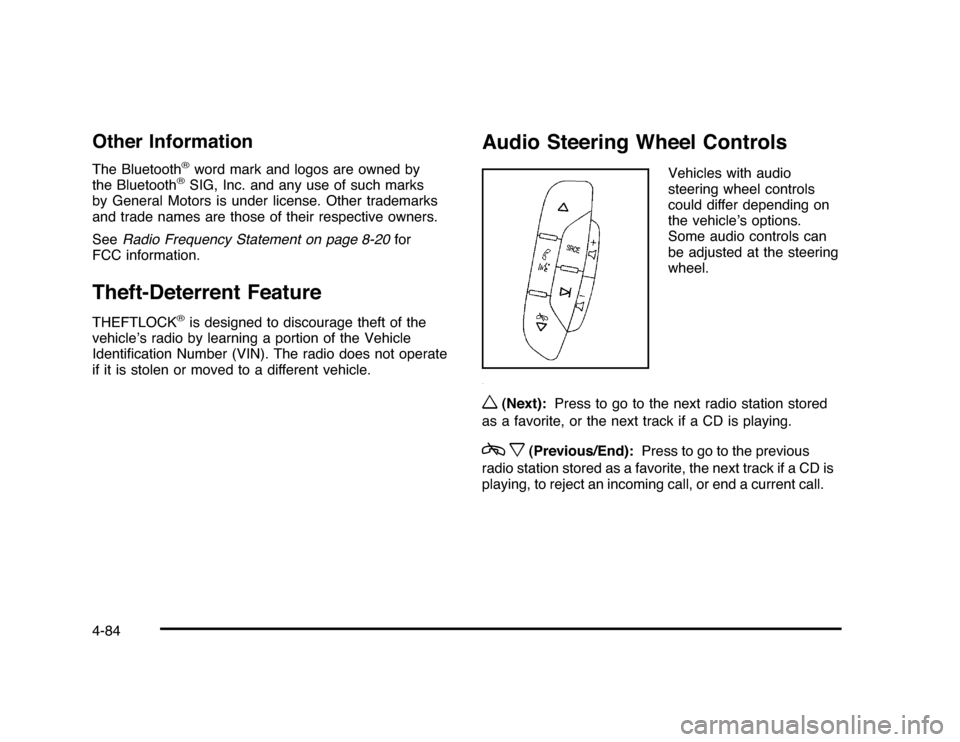
Audio Steering Wheel Controls
Vehicles with audio
steering wheel controls
could differ depending on
the vehicle’s options.
Some audio controls can
be adjusted at the steering
wheel.
w
(Next):Press to go to the next radio station stored
as a favorite, or the next track if a CD is playing.
cx
(Previous/End):Press to go to the previous
radio station stored as a favorite, the next track if a CD is
playing, to reject an incoming call, or end a current call.
4-84
Page 369 of 432
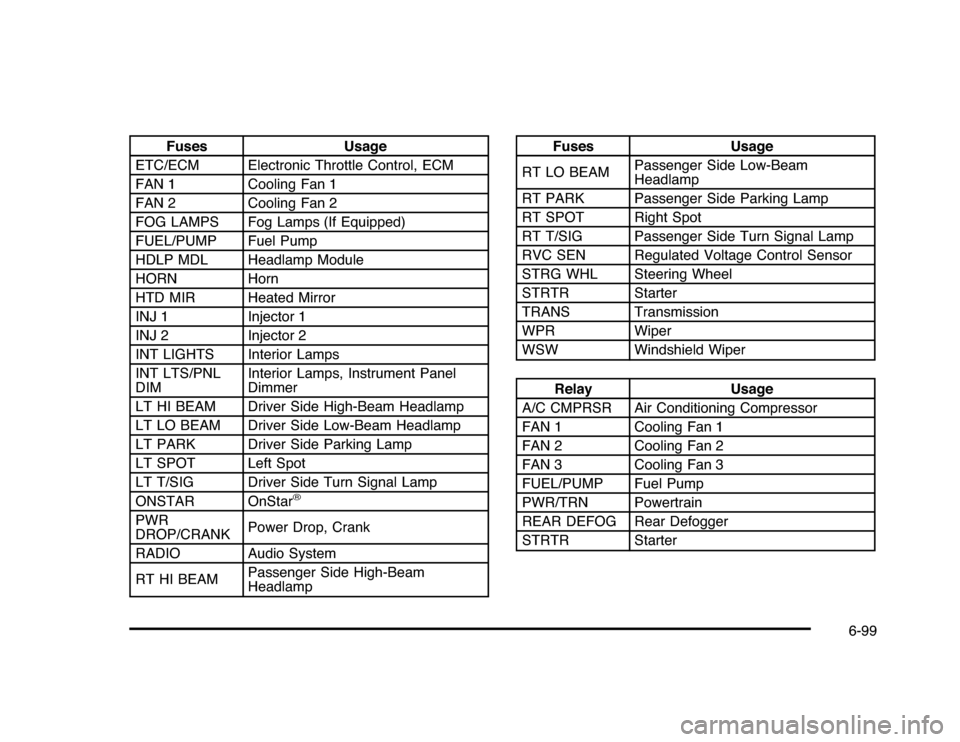
Fuses Usage
ETC/ECM Electronic Throttle Control, ECM
FAN 1 Cooling Fan 1
FAN 2 Cooling Fan 2
FOG LAMPS Fog Lamps (If Equipped)
FUEL/PUMP Fuel Pump
HDLP MDL Headlamp Module
HORN Horn
HTD MIR Heated Mirror
INJ 1 Injector 1
INJ 2 Injector 2
INT LIGHTS Interior Lamps
INT LTS/PNL
DIMInterior Lamps, Instrument Panel
Dimmer
LT HI BEAM Driver Side High-Beam Headlamp
LT LO BEAM Driver Side Low-Beam Headlamp
LT PARK Driver Side Parking Lamp
LT SPOT Left Spot
LT T/SIG Driver Side Turn Signal Lamp
ONSTAR OnStar
®
PWR
DROP/CRANKPower Drop, Crank
RADIO Audio System
RT HI BEAMPassenger Side High-Beam
Headlamp
Fuses Usage
RT LO BEAMPassenger Side Low-Beam
Headlamp
RT PARK Passenger Side Parking Lamp
RT SPOT Right Spot
RT T/SIG Passenger Side Turn Signal Lamp
RVC SEN Regulated Voltage Control Sensor
STRG WHL Steering Wheel
STRTR Starter
TRANS Transmission
WPR Wiper
WSW Windshield WiperRelay Usage
A/C CMPRSR Air Conditioning Compressor
FAN 1 Cooling Fan 1
FAN 2 Cooling Fan 2
FAN 3 Cooling Fan 3
FUEL/PUMP Fuel Pump
PWR/TRN Powertrain
REAR DEFOG Rear Defogger
STRTR Starter
6-99
Page 409 of 432

A
Accessories and Modifications............................ 6-3
Accessory Power............................................3-21
Accessory Power Outlets . ................................4-15
Additives, Fuel................................................. 6-7
Add-On Electrical Equipment............................6-95
Air Cleaner/Filter, Engine . ................................6-19
Air Conditioning..............................................4-16
Air Filter, Passenger Compartment . . ..................4-20
Airbag
Adding Equipment to Your Airbag-Equipped
Vehicle ...................................................2-73
Airbag System
How Does an Airbag Restrain?......................2-63
Passenger Sensing System...........................2-66
Servicing Your Airbag-Equipped Vehicle..........2-72
What Makes an Airbag Inflate?......................2-63
What Will You See After an Airbag Inflates? . . . . 2-64
When Should an Airbag Inflate? . . ..................2-61
Where Are the Airbags?...............................2-59
Airbags
Passenger Status Indicator...........................4-25
Readiness Light..........................................4-24
System Check.............................................2-56
Antenna
Backglass ...................................................4-86
Antenna, XM™ Satellite Radio Antenna
System . . ....................................................4-86Antilock Brake System (ABS)............................. 5-5
Warning Light.............................................4-28
Appearance Care
Aluminum Wheels........................................6-93
Care of Safety Belts....................................6-90
Chemical Paint Spotting . . . . . ..........................6-94
Cleaning Exterior Lamps/Lenses....................6-91
Fabric/Carpet..............................................6-88
Finish Care.................................................6-92
Finish Damage............................................6-94
Instrument Panel, Vinyl, and Other Plastic
Surfaces.................................................6-90
Interior Cleaning..........................................6-87
Leather......................................................6-89
Sheet Metal Damage . . .................................6-94
Tires..........................................................6-93
Underbody Maintenance . . . . . ..........................6-94
Washing Your Vehicle . . . . ...............................6-91
Weatherstrips..............................................6-90
Windshield and Wiper Blades........................6-92
Ashtray.........................................................4-16
Assistance Program, Roadside........................... 8-7
Audio System.................................................4-57
Audio Steering Wheel Controls . . ....................4-84
Radio Reception..........................................4-85
Setting the Clock.........................................4-58
Theft-Deterrent Feature................................4-84
XM™ Satellite Radio Antenna System . . . . . . . . . . . . 4-86
Audio System(s).............................................4-59
1
Page 420 of 432

Split Folding Rear Seat....................................2-10
StabiliTrak Control Indicator Light, Electronic.......4-29
Start Vehicle, Remote....................................... 3-7
Starting the Engine.........................................3-21
Steering.......................................................... 5-9
Steering Wheel Controls, Audio.........................4-84
Steering Wheel, Tilt Wheel................................. 4-3
Storage Areas
Center Console...........................................3-42
Convenience Net.........................................3-42
Cupholders . . . . . . ...........................................3-42
Glove Box . . . . . . . . . . ........................................3-42
Rear . . . . . . . ...................................................3-42
Rear Seat Armrest.......................................3-42
Sunglasses Storage Compartment..................3-42
Stuck in Sand, Mud, Ice, or Snow.....................5-19
Sun Visors .....................................................3-16
Sunroof . . . . . ....................................................3-43
T
Tachometer ....................................................4-23
Taillamps
Turn Signal, Sidemarker, Stoplamps, and
Back-Up Lamps.......................................6-47
Text Telephone (TTY) Users............................... 8-6Theft-Deterrent Feature....................................4-84
Theft-Deterrent Systems...................................3-16
Content Theft-Deterrent................................3-17
PASS-Key
®
III+ Electronic Immobilizer............3-18
PASS-Key
®
III+ Electronic Immobilizer
Operation................................................3-18
Tilt Wheel........................................................ 4-3
Time, Setting..................................................4-58
Tires . . ...........................................................6-51
Aluminum Wheels, Cleaning..........................6-93
Buying New Tires........................................6-68
Chains.......................................................6-73
Changing a Flat Tire....................................6-75
Cleaning....................................................6-93
Compact Spare...........................................6-86
Different Size . . ............................................6-69
If a Tire Goes Flat.......................................6-74
Inflation - Tire Pressure................................6-59
Inspection and Rotation................................6-65
Installing the Spare Tire................................6-77
Pressure Light.............................................4-31
Pressure Monitor Operation ...........................6-62
Pressure Monitor System..............................6-60
Removing the Flat Tire.................................6-77
Removing the Spare Tire and Tools...............6-76
Sidewall Labeling.........................................6-52
12