ignition CHEVROLET IMPALA 2010 9.G Owner's Manual
[x] Cancel search | Manufacturer: CHEVROLET, Model Year: 2010, Model line: IMPALA, Model: CHEVROLET IMPALA 2010 9.GPages: 432, PDF Size: 1.89 MB
Page 134 of 432
Shifting Into Park
{
WARNING:
It can be dangerous to get out of the vehicle if the
shift lever is not fully in P (Park) with the parking
brake firmly set. The vehicle can roll. If you have
left the engine running, the vehicle can move
suddenly. You or others could be injured. To be
sure the vehicle will not move, even when you are
on fairly level ground, use the steps that follow.
If you are pulling a trailer, seeTowing a Trailer on
page 5-28.
Steering Column Shift LeverIf the vehicle has a steering column shift lever, use this
procedure to shift the vehicle into P (Park):
1. Hold the brake pedal down.
2. Move the shift lever into P (Park) by pulling the shift
lever toward you and moving it up as far as it will go.3. With your foot still holding the brake pedal down,
set the parking brake. SeeParking Brake on
page 3-27for more information.
4. Turn the ignition key to LOCK/OFF.
5. Remove the key and take it with you. If you can
leave the vehicle with the ignition key in your
hand, the vehicle is in P (Park).
Console Shift LeverIf the vehicle is equipped with a console shift lever, use
this procedure to shift the vehicle into P (Park):
1. Hold the brake pedal down.
2. Move the shift lever into P (Park) by pushing the
lever all the way toward the front of the vehicle.
3. While keeping the brake pedal applied, set the
parking brake. SeeParking Brake on page 3-27
for more information.
4. Turn the ignition key to LOCK/OFF.
5. Remove the key and take it with you. If you can
leave the vehicle with the ignition key in your
hand, the vehicle is in P (Park).
3-28
Page 135 of 432
Leaving the Vehicle With the Engine
Running
{
WARNING:
It can be dangerous to leave the vehicle with the
engine running. The vehicle could move suddenly if
the shift lever is not fully in P (Park) with the parking
brake firmly set. And, if you leave the vehicle with
the engine running, it could overheat and even
catch fire. You or others could be injured. Do not
leave the vehicle with the engine running.
If you have to leave the vehicle with the engine running,
be sure your vehicle is in P (Park) and the parking
brake is firmly set before you leave it. SeeParking Brake
on page 3-27for more information.
Torque LockTorque lock is when the weight of the vehicle puts too
much force on the parking pawl in the transmission.
This happens when parking on a hill and shifting the
transmission into P (Park) is not done properly and then it
is difficult to shift out of P (Park). To prevent torque lock,
set the parking brake and then shift into P (Park). To find
out how, see “Shifting Into Park” in this section.
If torque lock does occur, your vehicle may need to be
pushed uphill by another vehicle to relieve the parking
pawl pressure, so you can shift out of P (Park).Shifting Out of ParkAutomatic Transmission Shift LockThe vehicle has an electronic shift lock release system.
The shift lock release is designed to:•
Prevent ignition key removal unless the shift lever is
in P (Park)
•
Prevent movement of the shift lever out of P (Park),
unless the ignition is in ON/RUN and the regular
brake pedal is applied.
3-29
Page 136 of 432

The shift lock is always functional except in the case of a
an uncharged or low voltage (less than 9 volt) battery.
If the vehicle has an uncharged battery or a battery with
low voltage, try charging or jump starting the battery.
SeeJump Starting on page 6-39.Console ShiftIf the console shift lever cannot be moved out of
P (Park):
1. Apply and maintain the regular brakes.
2. Turn the ignition to ON/RUN position. SeeIgnition
Positions on page 3-20for more information.
3. Let up on the shift lever and make sure the shift
lever is pushed all the way into P (Park).
4. Press the shift lever button
5. Then, move the shift into the desired gear.
If you still cannot move the shift lever from P (Park),
consult your dealer/retailer or a professional towing
service.
Column ShiftIf the column shift lever cannot be moved out of
P (Park):
1. Apply and maintain the regular brakes.
2. Turn the ignition key to the ON/RUN position. See
Ignition Positions on page 3-20for more information.
3. Shift out of the P (Park) position to the N (Neutral)
position.
4. Move the vehicle to a safe location.
If you still cannot move the shift lever from P (Park),
consult your dealer/retailer or a professional towing
service.Parking Over Things That Burn
{
WARNING:
Things that can burn could touch hot exhaust
parts under the vehicle and ignite. Do not park
over papers, leaves, dry grass, or other things that
can burn.
3-30
Page 149 of 432

Sunroof
On vehicles with a sunroof,
the sunroof switches are
located on the overhead
console.
The sunroof can only be operated when the ignition
is in ON/RUN, ACC/ACCESSORY, or when Retained
Accessory Power (RAP) is active. SeeRetained
Accessory Power (RAP) on page 3-21.
Q
(Vent/Express-Open):Press this switch once to
vent the sunroof when it is closed. When using the vent,
the sunshade should be fully opened. The sunshade
can be opened or closed manually by sliding it rearward
or forward.
From the vent position, press this switch again to
activate the express-open feature. Press the close
switch to stop movement of the sunroof. The sunshade
will automatically open when using express-open.
A deflector will automatically pop up when the sunroof is
opened. The deflector will retract when the sunroof is
closed.
R
(Close):Press and hold this switch until the sunroof
motor stops to close the sunroof, or release the
switch when the desired position has been reached.
3-43
Page 155 of 432
Turn Signal On ChimeIf either one of the turn signals are left on and the
vehicle has been driven more than 3/4 mile (1.2 km),
a chime will sound.Headlamp High/Low-Beam ChangerTo change the headlamps from low beam to high
beam, push the turn signal/multifunction lever away
from you.
This instrument panel cluster light
3
comes on if the
high beam lamps are turned on while the ignition is
in ON/RUN.
To change the headlamps from high beam to low beam,
pull the turn signal lever toward you.
Flash-to-PassThis feature is used to signal to the vehicle ahead that
you want to pass.
If the headlamps are off or in the low-beam position,
pull the turn signal lever toward you to momentarily
switch to high-beams.
Release the lever to turn the high-beam headlamps off.
Windshield WipersTurn the band with the wiper symbol to control the
windshield wipers.8
(Mist):Single wipe, turn to
8
, then release.
Several wipes, hold the band on
8
longer.
9
(Off):Turns the windshield wipers off.
6(Adjustable Interval Wipes):Turn the band up for
more frequent wipes or down for less frequent wipes.6
(Low Speed):Slow wipes.
?
(High Speed):Fast wipes.
Clear ice and snow from the wiper blades before using
them. If frozen to the windshield, carefully loosen or
thaw them. Damaged wiper blades should be replaced.
SeeWindshield Wiper Blade Replacement on
page 6-49.
Heavy snow or ice can overload the wiper motor.
A circuit breaker will stop the motor until it cools down.
4-5
Page 156 of 432
Windshield WasherAt the top of the multifunction lever, there is a paddle
with
L
on it. Push the paddle to spray washer fluid on
the windshield. The wipers run for several sweeps and
then either stop or return to the preset speed. The ignition
key must be in ACC/ACCESSORY or ON/RUN for this to
work. SeeWindshield Washer Fluid on page 6-33.
{
WARNING:
In freezing weather, do not use your washer until
the windshield is warmed. Otherwise the washer
fluid can form ice on the windshield, blocking your
vision.
When the vehicle is low on washer fluid, the WASHER
FLUID LOW ADD FLUID displays in the Driver
Information Center (DIC) for 60 seconds. When the
ignition is turned off, this message displays again for
three seconds to remind you that the fluid level is low.
Until the fluid reservoir is refilled, every time the vehicle
is started, the WASHER FLUID LOW ADD FLUID
message displays in the Driver Information Center (DIC)
for 60 seconds. SeeDIC Warnings and Messages on
page 4-44.
Cruise ControlWith cruise control, you can maintain a speed of about
40 km/h (25 mph) or more without keeping your foot
on the accelerator. Cruise control does not work
at speeds below about 40 km/h (25 mph).
{
WARNING:
Cruise control can be dangerous where you
cannot drive safely at a steady speed. So, do
not use the cruise control on winding roads or
in heavy traffic.
Cruise control can be dangerous on slippery roads.
On such roads, fast changes in tire traction can
cause excessive wheel slip, and you could lose
control. Do not use cruise control on slippery roads.
If your vehicle has the Traction Control System (TCS)
and the cruise control is on, TCS will begin to limit
wheel spin and the cruise control automatically turns off.
SeeTraction Control System (TCS) on page 5-7. When
road conditions allow you to safely use it again, the cruise
control can be turned back on.
4-6
Page 159 of 432
Ending Cruise ControlThere are three ways to end cruise control:•
Step lightly on the brake pedal.
•
Press the
[
button on the steering wheel.
•
Press the
T
button on the steering wheel.
Erasing Speed MemoryThe cruise control set speed memory is erased by
turning off the cruise control or the ignition.Exterior Lamps
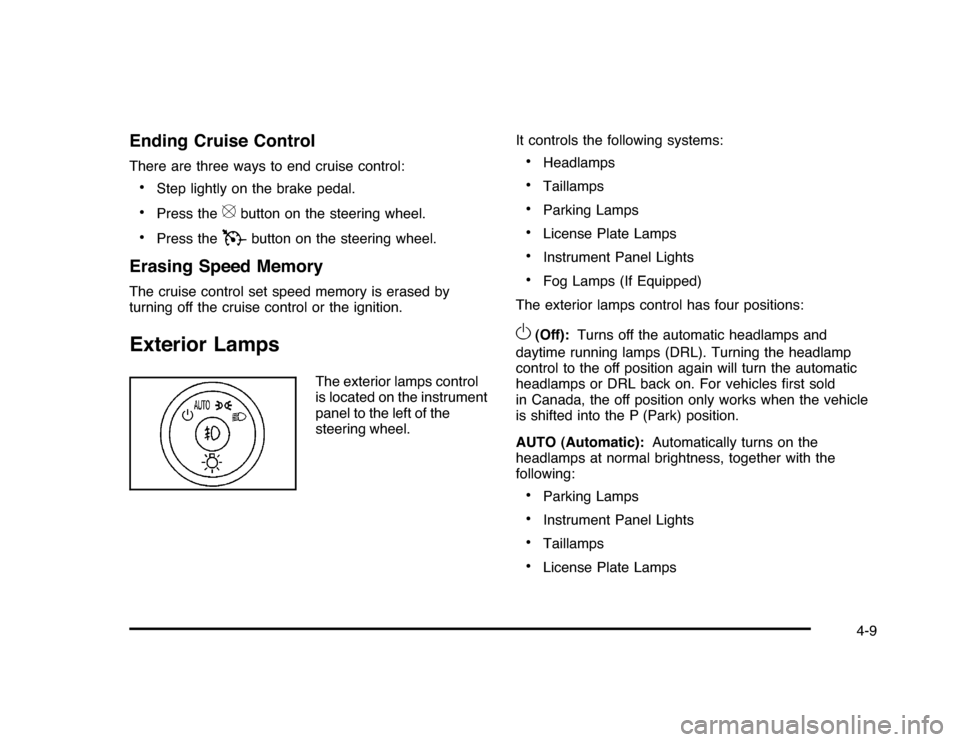
The exterior lamps control
is located on the instrument
panel to the left of the
steering wheel.It controls the following systems:
•
Headlamps
•
Taillamps
•
Parking Lamps
•
License Plate Lamps
•
Instrument Panel Lights
•
Fog Lamps (If Equipped)
The exterior lamps control has four positions:
O
(Off):Turns off the automatic headlamps and
daytime running lamps (DRL). Turning the headlamp
control to the off position again will turn the automatic
headlamps or DRL back on. For vehicles first sold
in Canada, the off position only works when the vehicle
is shifted into the P (Park) position.
AUTO (Automatic):Automatically turns on the
headlamps at normal brightness, together with the
following:•
Parking Lamps
•
Instrument Panel Lights
•
Taillamps
•
License Plate Lamps
4-9
Page 160 of 432

;
(Parking Lamps):Turns on the parking lamps
together with the following:
•
Instrument Panel Lights
•
Taillamps
•
License Plate Lamps
2
(Headlamps):Turns on the headlamps together with
the following lamps listed below. When the headlamps
are turned on while the vehicle is on, the headlamps will
turn off automatically 10 minutes after the ignition is
turned off. When the headlamps are turned on while the
vehicle is off, the headlamps will stay on for 10 minutes
before automatically turning off to prevent the battery
from being drained. Turn the headlamp control to off
and then back to the headlamp on position to make
the headlamps stay on for an additional 10 minutes.•
Parking Lamps
•
Taillamps
•
License Plate Lamps
•
Instrument Panel Lights
#
(Fog Lamps) (If Equipped):Turns on the fog
lamps.
SeeFog Lamps on page 4-11.
Daytime Running Lamps (DRL)/
Automatic Headlamp SystemDaytime Running Lamps (DRL) can make it easier for
others to see the front of your vehicle during the day.
Fully functional daytime running lamps are required
on all vehicles first sold in Canada.
The DRL system makes the low-beam headlamps
come on at a reduced brightness when the following
conditions are met:•
The ignition is in the ON/RUN position.
•
The exterior lamps control is in AUTO.
•
The engine is running.
When the DRL are on, the regular headlamps, taillamps,
sidemarker, and other lamps are not on. The instrument
panel and cluster are also not on.
The headlamps automatically change from DRL to
the regular headlamps depending on the darkness of
the surroundings. The other lamps that come on with
the headlamps will also come on.
When it is bright enough outside, the headlamps go off
and the DRL come on.
The regular headlamp system should be turned on
when needed.
Do not cover the light sensor on top of the instrument
panel because it works with the DRL.
4-10
Page 161 of 432

Fog Lamps#
(Fog Lamps):For vehicles with fog lamps,
the button is located on the exterior lamps control.
The exterior lamps control is located on the instrument
panel to the left of the steering column.
The ignition must be in the ON/RUN position for the fog
lamps to come on.
Press
#
to turn the fog lamps on or off. A light will
come on in the instrument panel cluster.
When the headlamps are changed to high-beam, the
fog lamps also go off.
Some localities have laws that require the headlamps to
be on along with the fog lamps.
Instrument Panel BrightnessD
(Instrument Panel Brightness):The knob with this
symbol on it is located next to the exterior lamps control
to the left of the steering wheel. Push the knob in all the
way until it extends out and then turn the knob clockwise
or counterclockwise to brighten or dim the lights. Push
the knob back in when finished.
Courtesy LampsWhen a door is opened, the courtesy lamps
automatically come on. They make it easy for you to
enter and leave your vehicle. You can also manually
turn these lamps on by fully turning the instrument
panel brightness control clockwise.
The reading lamps, located on the rearview mirror,
can be turned on or off independent of the automatic
courtesy lamps, when the doors are closed.Dome LampThe center mounted dome lamp overhead comes on
when a door is opened. This lamp can also be turned
on by turning the instrument panel brightness control
clockwise.
4-11
Page 162 of 432

Entry LightingFor vehicles with courtesy lamps, they come on and
stay on for a set time whenever the unlock symbol
is pressed on the Remote Keyless Entry (RKE)
transmitter, if the vehicle has one.
If a door is opened, the lamps stay on while it is open
and then turn off automatically about 20 seconds
after the door is closed. If the unlock symbol is pressed
and no door is opened, the lamps turn off after about
20 seconds.
Entry lighting includes a feature called theater dimming.
With theater dimming, the lamps do not turn off at
the end of the delay time. Instead, they slowly dim and
then go out. The delay time is canceled if the ignition
key is turned to ON/RUN or the power door lock switch
is pressed. The lamps will dim right away.
When the ignition is on, illuminated entry is inactive,
which means the courtesy lamps will not come on unless
a door is opened.
Delayed Entry LightingDelayed entry lighting illuminates the interior for a
period of time after all the doors have been closed.
The ignition must be off for delayed entry lighting
to work. Immediately after all the doors have been
closed, the delayed entry lighting feature continues to
work until one of the following occurs:•
The ignition is in ON/RUN.
•
The doors are locked.
•
An illumination period of about 25 seconds has
elapsed.
If during the illumination period a door is opened, the
timed illumination period is canceled and the interior
lamps remain on.
4-12