air CHEVROLET IMPALA 2010 9.G Owners Manual
[x] Cancel search | Manufacturer: CHEVROLET, Model Year: 2010, Model line: IMPALA, Model: CHEVROLET IMPALA 2010 9.GPages: 432, PDF Size: 1.89 MB
Page 1 of 432

In Brief........................................................... 1-1
Instrument Panel
........................................ 1-2
Initial Drive Information
............................... 1-4
Vehicle Features
......................................1-15
Performance and Maintenance
...................1-19
Seats and Restraint System............................. 2-1
Head Restraints
......................................... 2-2
Front Seats
............................................... 2-4
Rear Seats
..............................................2-10
Safety Belts
.............................................2-12
Child Restraints
.......................................2-32
Airbag System
.........................................2-56
Restraint System Check
............................2-74
Features and Controls..................................... 3-1
Keys
........................................................ 3-3
Doors and Locks
....................................... 3-9
Windows
.................................................3-14
Theft-Deterrent Systems
............................3-16
Starting and Operating Your Vehicle
...........3-19
Mirrors
....................................................3-33Universal Home Remote System
................3-35
Storage Areas
.........................................3-42
Sunroof
..................................................3-43
Instrument Panel............................................. 4-1
Instrument Panel Overview
.......................... 4-3
Climate Controls
......................................4-16
Warning Lights, Gages, and Indicators
. . . . . . . . 4-21
Driver Information Center (DIC)
..................4-37
Audio System(s)
.......................................4-57
Driving Your Vehicle....................................... 5-1
Your Driving, the Road, and the Vehicle
....... 5-2
Towing
...................................................5-26
Service and Appearance Care.......................... 6-1
Service
..................................................... 6-3
Fuel
......................................................... 6-5
Checking Things Under the Hood
...............6-12
Headlamp Aiming
.....................................6-43
Bulb Replacement
....................................6-43
Windshield Wiper Blade Replacement
. . . . . . . . . 6-49
2010 Chevrolet Impala Owner Manual
M
Page 3 of 432

GENERAL MOTORS, GM, the GM Emblem,
CHEVROLET, the CHEVROLET Emblem, the IMPALA
Emblem, and the name IMPALA are registered
trademarks of General Motors Corporation.
This manual describes features that may or may not be
on your specific vehicle either because they are options
that you did not purchase or due to changes subsequent
to the printing of this owner manual. Please refer to the
purchase documentation relating to your specific vehicle
to confirm each of the features found on your vehicle.
For vehicles first sold in Canada, substitute the name
‘‘General Motors of Canada Limited’’ for Chevrolet Motor
Division wherever it appears in this manual.
Keep this manual in the vehicle for quick reference.
Canadian OwnersPropriétaires CanadiensA French language copy of this manual can be obtained
from your dealer/retailer or from:
On peut obtenir un exemplaire de ce guide en français
auprès du concessionnaire ou à l’adresse suivante:
Helm, Incorporated
P.O. Box 07130
Detroit, MI 48207
1-800-551-4123
Numéro de poste 6438 de langue française
www.helminc.comIndexTo quickly locate information about the vehicle, use the
index in the back of the manual. It is an alphabetical
list of what is in the manual and the page number where
it can be found.
Litho in U.S.A.
Part No. 25896384 A First Printing©2009 General Motors Corporation. All Rights Reserved.
iii
Page 5 of 432

Vehicle Symbol ChartHere are some additional symbols that may be found on
the vehicle and what they mean. For more information
on the symbol, refer to the index.9
:Airbag Readiness Light
#
:Air Conditioning
!
:Antilock Brake System (ABS)
g
:Audio Steering Wheel Controls or OnStar
®
$
:Brake System Warning Light
"
:Charging System
I
:Cruise Control
B
:Engine Coolant Temperature
O
:Exterior Lamps
#
:Fog Lamps
.
:Fuel Gage
+
:Fuses
i
:Headlamp High/Low-Beam Changer
j
:LATCH System Child Restraints
*
:Malfunction Indicator Lamp
:
:Oil Pressure
}
:Power
/
:Remote Vehicle Start
>
:Safety Belt Reminders
7
:Tire Pressure Monitor
F
:Traction Control
M
:Windshield Washer Fluid
v
Page 7 of 432

Instrument Panel..............................................1-2
Initial Drive Information....................................1-4
Remote Keyless Entry (RKE) System................1-4
Remote Vehicle Start......................................1-4
Door Locks....................................................1-5
Trunk Release...............................................1-5
Windows.......................................................1-6
Seat Adjustment.............................................1-6
Second Row Seats.........................................1-8
Head Restraint Adjustment...............................1-8
Safety Belt....................................................1-9
Sensing System for Passenger Airbag...............1-9
Mirror Adjustment.........................................1-10
Steering Wheel Adjustment............................1-11
Interior Lighting............................................1-11
Exterior Lighting...........................................1-12
Windshield Wiper/Washer...............................1-13
Climate Controls...........................................1-14Vehicle Features.............................................1-15
Radio(s)......................................................1-15
Satellite Radio..............................................1-16
Portable Audio Devices ..................................1-16
Steering Wheel Controls . . ..............................1-17
Bluetooth
®
...................................................1-17
Cruise Control..............................................1-18
Power Outlets..............................................1-18
Performance and Maintenance.........................1-19
Traction Control System (TCS).......................1-19
Electronic Stability Control (ESC)....................1-19
Tire Pressure Monitor....................................1-20
Engine Oil Life System ..................................1-20
Fuel E85 (85% Ethanol) . . ..............................1-20
Driving for Better Fuel Economy . . ...................1-21
Roadside Assistance Program........................1-21
OnStar
®
......................................................1-22
Section 1 In Brief
1-1
Page 9 of 432

A.Outlet Adjustment on page 4-20.
B. Remote Trunk Release Button. SeeTrunk on
page 3-12.
C.Turn Signal/Multifunction Lever on page 4-4.
D.Instrument Panel Cluster on page 4-22.
E.Hazard Warning Flashers on page 4-3.
F.Driver Information Center (DIC) on page 4-37.
G.Passenger Airbag Status Indicator on page 4-25.
H.Audio System(s) on page 4-57.
I.Exterior Lamps on page 4-9.
J.Instrument Panel Brightness on page 4-11.
K.Traction Control System (TCS) on page 5-7
(If Equipped).L.Tilt Wheel on page 4-3.
M.Cruise Control on page 4-6.
N.Hood Release on page 6-13.
O.Horn on page 4-3.
P.Audio Steering Wheel Controls on page 4-84
(If Equipped).
Q.Ignition Positions on page 3-20.
R.Climate Control System on page 4-16.
S.Accessory Power Outlet(s) on page 4-15.
T. Center Console Shift Lever (If Equipped).
SeeShifting Into Park on page 3-28.
U.Glove Box on page 3-42.
1-3
Page 15 of 432
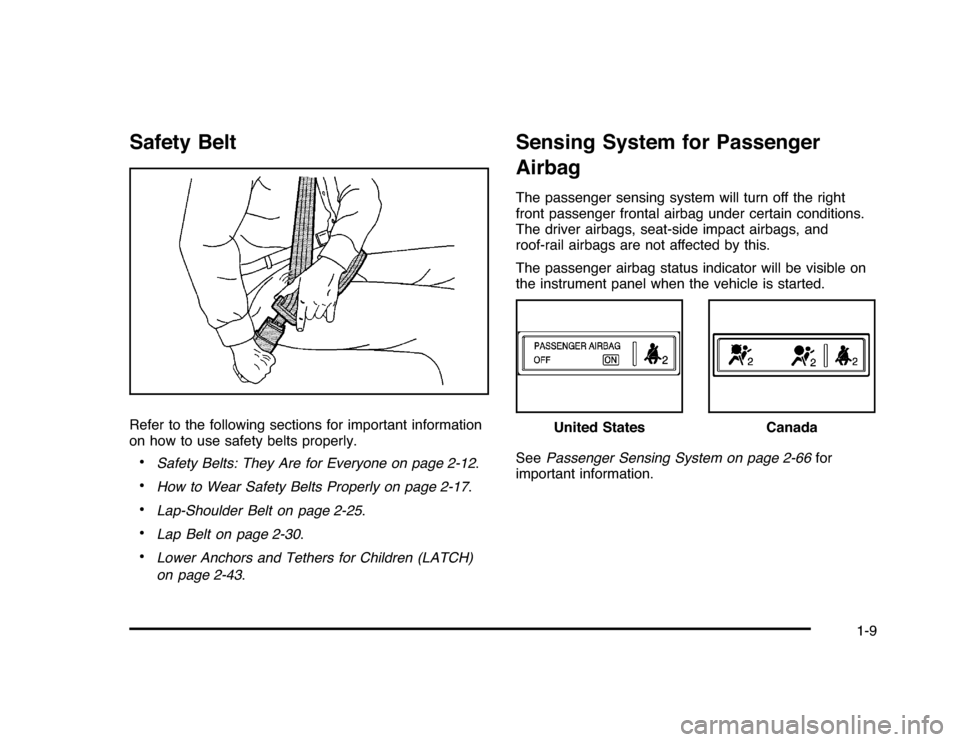
Safety BeltRefer to the following sections for important information
on how to use safety belts properly.•
Safety Belts: They Are for Everyone on page 2-12.
•
How to Wear Safety Belts Properly on page 2-17.
•
Lap-Shoulder Belt on page 2-25.
•
Lap Belt on page 2-30.
•
Lower Anchors and Tethers for Children (LATCH)
on page 2-43.
Sensing System for Passenger
AirbagThe passenger sensing system will turn off the right
front passenger frontal airbag under certain conditions.
The driver airbags, seat-side impact airbags, and
roof-rail airbags are not affected by this.
The passenger airbag status indicator will be visible on
the instrument panel when the vehicle is started.
SeePassenger Sensing System on page 2-66for
important information.
United States
Canada
1-9
Page 20 of 432

Climate ControlsThis vehicle may have a dual or single climate control
system. The heating, cooling, defrost, defog and
ventilation can be controlled with either of these systems.
A. Fan Control
B. Outside Air
C. Recirculation
D. Air Delivery Mode
Control
E. Air Conditioning
F. Driver and
Passenger
Heated SeatsG. Driver and
Passenger
Temperature
Controls
H. Rear Window
DefoggerA. Fan Control
B. Outside Air
C. Temperature
Control
D. RecirculationE. Air Delivery Mode
Control
F. Air Conditioning
G. Rear Window
Defogger
SeeClimate Control System on page 4-16. Dual Zone with Optional Heated Seat Controls
Single Zone
1-14
Page 23 of 432
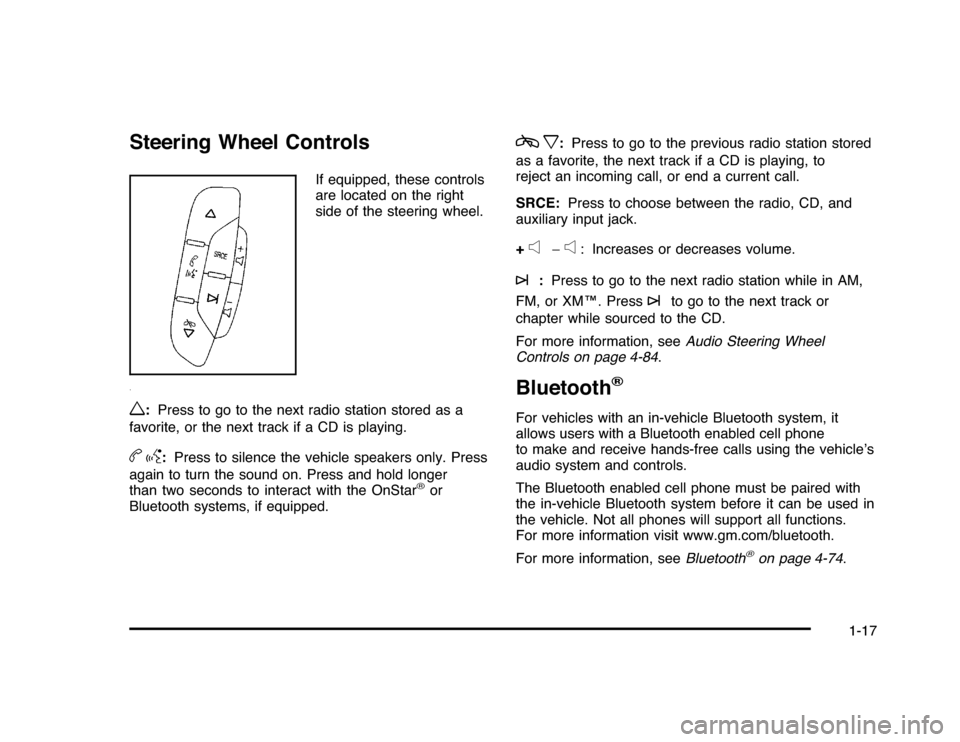
Steering Wheel Controls
If equipped, these controls
are located on the right
side of the steering wheel.
w
:Press to go to the next radio station stored as a
favorite, or the next track if a CD is playing.
bg
:Press to silence the vehicle speakers only. Press
again to turn the sound on. Press and hold longer
than two seconds to interact with the OnStar
®
or
Bluetooth systems, if equipped.
cx
:Press to go to the previous radio station stored
as a favorite, the next track if a CD is playing, to
reject an incoming call, or end a current call.
SRCE:Press to choose between the radio, CD, and
auxiliary input jack.
+
e
−
e
: Increases or decreases volume.
¨
:Press to go to the next radio station while in AM,
FM, or XM™. Press
¨
to go to the next track or
chapter while sourced to the CD.
For more information, seeAudio Steering Wheel
Controls on page 4-84.
Bluetooth
®
For vehicles with an in-vehicle Bluetooth system, it
allows users with a Bluetooth enabled cell phone
to make and receive hands-free calls using the vehicle’s
audio system and controls.
The Bluetooth enabled cell phone must be paired with
the in-vehicle Bluetooth system before it can be used in
the vehicle. Not all phones will support all functions.
For more information visit www.gm.com/bluetooth.
For more information, seeBluetooth
®
on page 4-74.
1-17
Page 27 of 432
Driving for Better Fuel EconomyDriving habits can affect fuel mileage. Here are some
driving tips to get the best fuel economy possible.•
Avoid fast starts and accelerate smoothly.
•
Brake gradually and avoid abrupt stops.
•
Avoid idling the engine for long periods of time.
•
When road and weather conditions are appropriate,
use cruise control, if equipped.
•
Always follow posted speed limits or drive more
slowly when conditions require.
•
Keep vehicle tires properly inflated.
•
Combine several trips into a single trip.
•
Replace the vehicle’s tires with the same TPC Spec
number molded into the tire’s sidewall near the size.
•
Follow recommended scheduled maintenance.
Roadside Assistance ProgramU.S.:1-800-CHEV-USA (1-800-243-8872)
TTY Users:1-888-889-2438
Canada:1-800-268-6800
As the owner of a new Chevrolet, you are automatically
enrolled in the Roadside Assistance program. This
program provides technically trained advisors who are
available 24 hours a day, 365 days a year, minor repair
information or towing arrangements.Roadside Assistance and OnStarIf you have a current OnStar subscription, press the
OnStar button and the current GPS location will be sent
to an OnStar Advisor who will assess your problem,
contact Roadside Assistance, and relay exact location
to get you the help you need.Online Owner CenterThe Online Owner Center is a complimentary service
that includes online service reminders, vehicle
maintenance tips, online owner manual, special
privileges and more.
Sign up today at:www.gmownercenter.com/chevrolet
(U.S.) orwww.gm.ca(Canada).
1-21
Page 29 of 432
![CHEVROLET IMPALA 2010 9.G Owners Manual The OnStar system can record and transmit vehicle
information. This information is automatically sent to an
OnStar call center when
Q
is pressed,
]
is pressed, or
if the airbags or ACR system deploy.](/img/24/8202/w960_8202-28.png "CHEVROLET IMPALA 2010 9.G Owners Manual The OnStar system can record and transmit vehicle
information. This information is automatically sent to an
OnStar call center when
Q
is pressed,
]
is pressed, or
if the airbags or ACR system deploy.")
The OnStar system can record and transmit vehicle
information. This information is automatically sent to an
OnStar call center when
Q
is pressed,
]
is pressed, or
if the airbags or ACR system deploy. This information
usually includes the vehicle’s GPS location and, in the
event of a crash, additional information regarding the
crash that the vehicle was involved in (e.g. the direction
from which the vehicle was hit). When the virtual advisor
feature of OnStar hands-free calling is used, the vehicle
also sends OnStar the vehicle’s GPS location so they can
provide services where it is located.
Location information about the vehicle is only available
if the GPS satellite signals are unobstructed and
available.
The vehicle must have a working electrical system,
including adequate battery power, for the OnStar
equipment to operate. There are other problems OnStar
cannot control that may prevent OnStar from providing
OnStar service at any particular time or place. Some
examples are damage to important parts of the vehicle
in a crash, hills, tall buildings, tunnels, weather or
wireless phone network congestion.
OnStar Steering Wheel ControlsThis vehicle may have a Talk/Mute button that can be
used to interact with OnStar hands-free calling. See
Audio Steering Wheel Controls on page 4-84for more
information.
On some vehicles, the mute button can be used to dial
numbers into voice mail systems, or to dial phone
extensions. See the OnStar Owner’s Guide for more
information.Your ResponsibilityIncrease the volume of the radio if the OnStar advisor
cannot be heard.
If the light next to the OnStar buttons is red, the system
may not be functioning properly. Press
Q
and request
a vehicle diagnostic. If the light appears clear (no light is
appearing), your OnStar subscription has expired and
all services have been deactivated. PressQ
to confirm
that the OnStar equipment is active.
1-23