maintenance CHEVROLET IMPALA 2011 9.G User Guide
[x] Cancel search | Manufacturer: CHEVROLET, Model Year: 2011, Model line: IMPALA, Model: CHEVROLET IMPALA 2011 9.GPages: 376, PDF Size: 5.71 MB
Page 133 of 376
Black plate (23,1)Chevrolet Impala Owner Manual - 2011
Instruments and Controls 5-23
A tire pressure message can
accompany the light. SeeTire
Messages on page 5‑34 for more
information. Stop as soon as
possible, and inflate the tires to the
pressure value shown on the Tire
and Loading Information Label.
See Tire Pressure on page 10‑44
for more information.
When the Light Flashes First and
Then is On Steady
This indicates that there may be a
problem with the Tire Pressure
Monitor System. The light flashes
for about a minute and stays on
steady for the remainder of the
ignition cycle. This sequence
repeats with every ignition cycle.
See Tire Pressure Monitor
Operation on page 10‑47 for
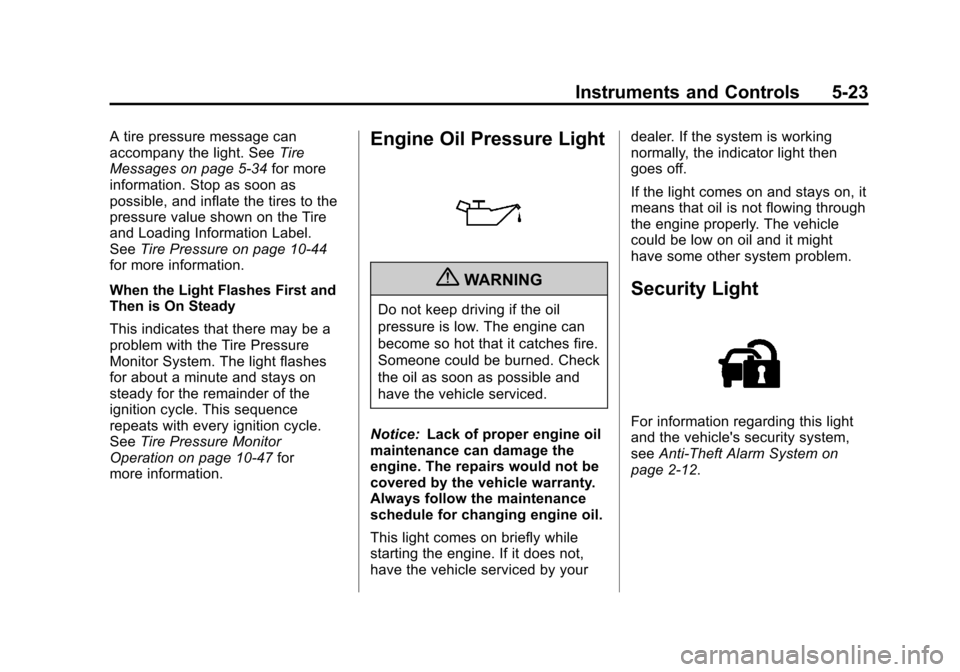
more information.Engine Oil Pressure Light
{WARNING
Do not keep driving if the oil
pressure is low. The engine can
become so hot that it catches fire.
Someone could be burned. Check
the oil as soon as possible and
have the vehicle serviced.
Notice: Lack of proper engine oil
maintenance can damage the
engine. The repairs would not be
covered by the vehicle warranty.
Always follow the maintenance
schedule for changing engine oil.
This light comes on briefly while
starting the engine. If it does not,
have the vehicle serviced by your dealer. If the system is working
normally, the indicator light then
goes off.
If the light comes on and stays on, it
means that oil is not flowing through
the engine properly. The vehicle
could be low on oil and it might
have some other system problem.
Security Light
For information regarding this light
and the vehicle's security system,
see
Anti-Theft Alarm System on
page 2‑12.
Page 137 of 376
Black plate (27,1)Chevrolet Impala Owner Manual - 2011
Instruments and Controls 5-27
Average Economy
Press the trip/fuel button until AVG
ECONOMY displays. This display
shows the approximate average
miles per gallon (mpg) or liters per
100 kilometers (L/100 km). This
number is calculated based on the
number of mpg (L/100 km) recorded
since the last time this menu item
was reset. To reset this display
to zero, press and hold the
set/reset button.
Instantaneous Economy
Press the trip/fuel button until INST
ECONOMY displays. This display
shows the current fuel economy at a
particular moment and will change
frequently as driving conditions
change. This display shows the
instantaneous fuel economy in
miles per gallon (mpg) or liters per
100 kilometers (L/100 km). Unlike
average economy, this screen
cannot be reset.Average Speed
Press the trip/fuel button until
AVERAGE SPEED displays. This
display shows the average speed of
the vehicle in miles per hour (mph)
or kilometers per hour (km/h). This
average is calculated based on the
various vehicle speeds recorded
since the last reset of this value.
To reset the value, press and hold
the set/reset button. The display will
return to zero.
Blank Display
This display shows no information.
Vehicle Information Menu
Items
T(Vehicle Information):
Press
this button to scroll through the
following menu items:
Oil Life
Press the vehicle information
button until OIL LIFE REMAINING
displays. This display shows an
estimate of the oil's remaining useful life. If you see 99% OIL LIFE
REMAINING on the display, that
means 99% of the current oil life
remains. The engine oil life system
will alert you to change the oil on a
schedule consistent with your
driving conditions.
When the remaining oil life is low,
the CHANGE ENGINE OIL SOON
message will appear on the display.
See
Engine Oil Messages on
page 5‑31. You should change the
oil as soon as possible. See Engine
Oil on page 10‑8. In addition to the
engine oil life system monitoring the
oil life, additional maintenance is
recommended in the Maintenance
Schedule in this manual. See
Scheduled Maintenance on
page 11‑2 for more information.
Remember, you must reset the OIL
LIFE yourself after each oil change.
It will not reset itself. Also, be
careful not to reset the OIL LIFE
accidentally at any time other than
when the oil has just been changed.
Page 141 of 376
Black plate (31,1)Chevrolet Impala Owner Manual - 2011
Instruments and Controls 5-31
Have the climate control system
serviced by your dealer if you notice
a drop in heating and air
conditioning efficiency.
Engine Oil Messages
CHANGE ENGINE OIL SOON
This message displays when
service is required for the vehicle.
See your dealer. SeeEngine Oil on
page 10‑8 andScheduled
Maintenance on page 11‑2 for more
information.
Acknowledging the CHANGE
ENGINE OIL SOON message will
not reset the OIL LIFE REMAINING.
That must be done at the OIL LIFE
screen under the vehicle information
menu. See “Oil Life”underDriver
Information Center (DIC) on
page 5‑24 andEngine Oil Life
System on page 10‑10.
OIL PRESSURE LOW
STOP ENGINE
Notice: If you drive the vehicle
while the engine oil pressure is
low, severe engine damage may
occur. If a low oil pressure
warning appears on the Driver
Information Center (DIC), stop the
vehicle as soon as possible.
Do not drive the vehicle until the
cause of the low oil pressure is
corrected. See Engine Oil on
page 10‑8 for more information.
This message displays when the
vehicle's engine oil pressure is low.
The oil pressure light also appears
on the instrument panel cluster.
See Engine Oil Pressure Light on
page 5‑23.
Stop the vehicle immediately, as
engine damage can result from
driving a vehicle with low oil
pressure. Have the vehicle serviced
by your dealer as soon as possible
when this message is displayed.
Engine Power Messages
ENGINE POWER IS REDUCED
This message displays when the
vehicle's engine power is reduced.
Reduced engine power can affect
the vehicle's ability to accelerate.
If this message is on, but there is no
reduction in performance, proceed
to your destination. The
performance may be reduced the
next time the vehicle is driven. The
vehicle may be driven at a reduced
speed while this message is on, but
acceleration and speed may be
reduced. Anytime this message
stays on, the vehicle should be
taken to your dealer for service as
soon as possible.
Page 193 of 376
Black plate (1,1)Chevrolet Impala Owner Manual - 2011
Climate Controls 8-1
Climate Controls
Climate Control Systems
Climate Control Systems . . . . . . 8-1
Air Vents
Air Vents . . . . . . . . . . . . . . . . . . . . . . 8-5
Maintenance
Passenger Compartment AirFilter . . . . . . . . . . . . . . . . . . . . . . . . . 8-6
Climate Control Systems
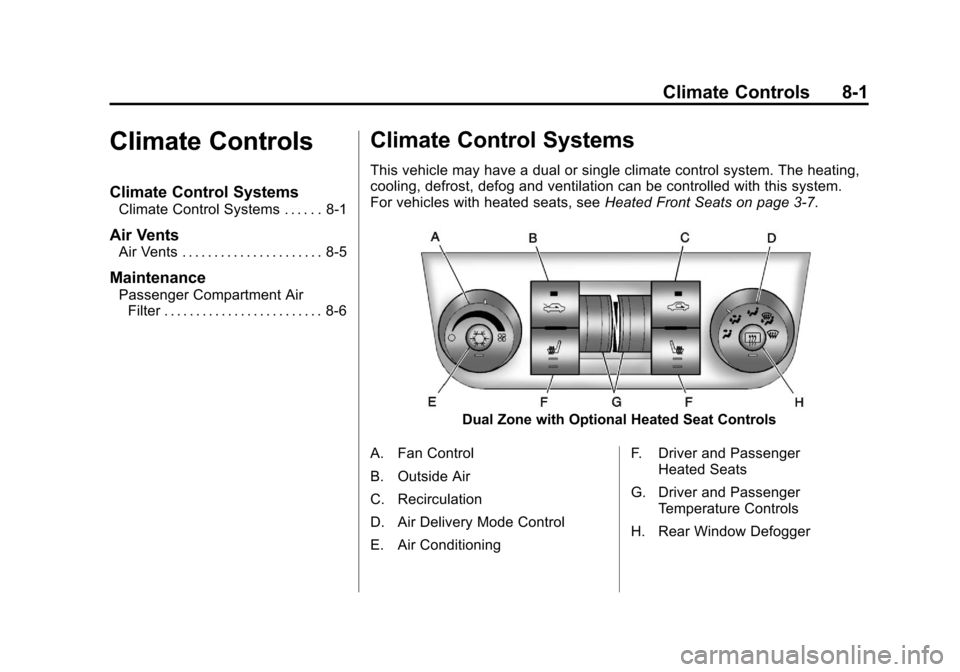
This vehicle may have a dual or single climate control system. The heating,
cooling, defrost, defog and ventilation can be controlled with this system.
For vehicles with heated seats, see Heated Front Seats on page 3‑7.
Dual Zone with Optional Heated Seat Controls
A. Fan Control
B. Outside Air
C. Recirculation
D. Air Delivery Mode Control
E. Air Conditioning F. Driver and Passenger
Heated Seats
G. Driver and Passenger Temperature Controls
H. Rear Window Defogger
Page 194 of 376
Black plate (2,1)Chevrolet Impala Owner Manual - 2011
8-2 Climate Controls
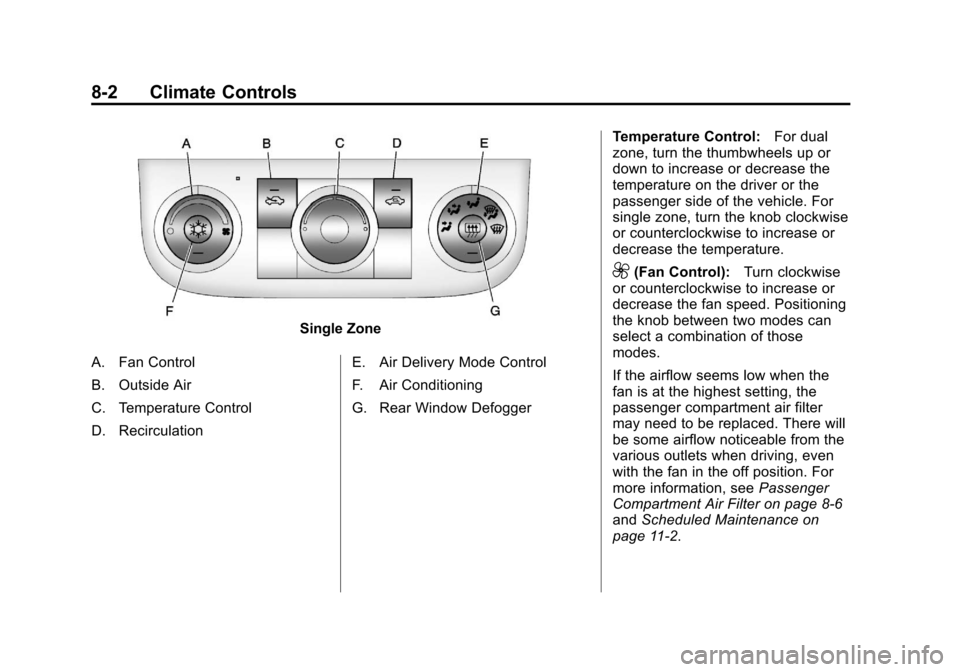
Single Zone
A. Fan Control
B. Outside Air
C. Temperature Control
D. Recirculation E. Air Delivery Mode Control
F. Air Conditioning
G. Rear Window DefoggerTemperature Control:
For dual
zone, turn the thumbwheels up or
down to increase or decrease the
temperature on the driver or the
passenger side of the vehicle. For
single zone, turn the knob clockwise
or counterclockwise to increase or
decrease the temperature.
9(Fan Control): Turn clockwise
or counterclockwise to increase or
decrease the fan speed. Positioning
the knob between two modes can
select a combination of those
modes.
If the airflow seems low when the
fan is at the highest setting, the
passenger compartment air filter
may need to be replaced. There will
be some airflow noticeable from the
various outlets when driving, even
with the fan in the off position. For
more information, see Passenger
Compartment Air Filter on page 8‑6
and Scheduled Maintenance on
page 11‑2.
Page 197 of 376
Black plate (5,1)Chevrolet Impala Owner Manual - 2011
Climate Controls 8-5
For vehicles with heated outside
rearview mirrors, the mirrors heat to
help clear fog or frost from the
surface of the mirror when the rear
window defog button is pressed.
SeePower Mirrors on page 2‑15.
Do not drive the vehicle until all the
windows are clear.
Notice: Do not use anything
sharp on the inside of the rear
window. If you do, you could cut
or damage the warming grid, and
the repairs would not be covered
by the vehicle warranty. Do not
attach a temporary vehicle
license, tape, a decal or anything
similar to the defogger grid.Air Vents
Use the thumbwheel located below
or to the side of the outlet, to
change the direction of the air flow.
Operation Tips
.Clear away any ice, snow,
or leaves from the air inlets at
the base of the windshield that
may block the flow of air into
the vehicle.
.Use of non-GM approved hood
deflectors may adversely affect
the performance of the system.
.Keep the path under the front
seats clear of objects to help
circulate the air inside the
vehicle more effectively.
.If the airflow seems low when
the fan is at the highest setting,
the passenger compartment air
filter, if equipped, may need to
replaced. For more information,
see Passenger Compartment Air
Filter on page 8‑6 and
Scheduled Maintenance on
page 11‑2.
.If fogging reoccurs while in vent
or bi-level modes with mild
temperature throughout the
vehicle, turn on the air
conditioner to reduce
windshield fogging.
Page 198 of 376
Black plate (6,1)Chevrolet Impala Owner Manual - 2011
8-6 Climate Controls
Maintenance
Passenger Compartment
Air Filter
The vehicle has a passenger
compartment particulate air filter.
It is located in the engine
compartment, below the air inlet
grille on the passenger side.
The filter traps most of the pollen
from air entering the climate control
system. It needs to be changed
periodically to ensure system
performance. For information on
how often to change the passenger
compartment air filter, see
Scheduled Maintenance on
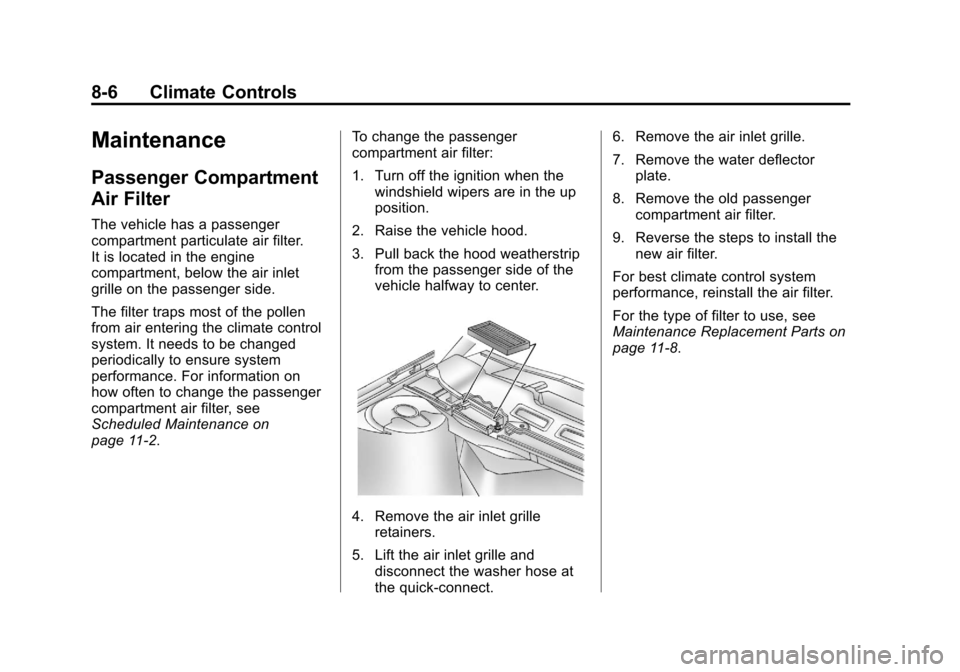
page 11‑2.To change the passenger
compartment air filter:
1. Turn off the ignition when the
windshield wipers are in the up
position.
2. Raise the vehicle hood.
3. Pull back the hood weatherstrip from the passenger side of the
vehicle halfway to center.
4. Remove the air inlet grilleretainers.
5. Lift the air inlet grille and disconnect the washer hose at
the quick-connect. 6. Remove the air inlet grille.
7. Remove the water deflector
plate.
8. Remove the old passenger compartment air filter.
9. Reverse the steps to install the new air filter.
For best climate control system
performance, reinstall the air filter.
For the type of filter to use, see
Maintenance Replacement Parts on
page 11‑8.
Page 233 of 376
Black plate (35,1)Chevrolet Impala Owner Manual - 2011
Driving and Operating 9-35
Fuel
Use of the recommended fuel is an
important part of the proper
maintenance of this vehicle. To help
keep the engine clean and maintain
optimum vehicle performance, we
recommend the use of gasoline
advertised as TOP TIER Detergent
Gasoline.
Look for the TOP TIER label on the
fuel pump to ensure gasoline meets
enhanced detergency standards
developed by auto companies. A list
of marketers providing TOP TIER
Detergent Gasoline can be found at
www.toptiergas.com.
Vehicles that have a FlexFuel badge
and a yellow fuel cap can use either
unleaded gasoline or ethanol fuel
containing up to 85% ethanol (E85).
SeeFuel E85 (85% Ethanol) on
page 9‑37. For all other vehicles,
use only the unleaded gasoline
described under Recommended
Fuel on page 9‑35.
Recommended Fuel
Use regular unleaded gasoline with
a posted octane rating of 87 or
higher. If the octane rating is less
than 87, an audible knocking noise,
commonly referred to as spark
knock, might be heard when driving.
If this occurs, use a gasoline rated
at 87 octane or higher as soon as
possible. If heavy knocking is heard
when using gasoline rated at
87 octane or higher, the engine
needs service.
Page 242 of 376
Black plate (44,1)Chevrolet Impala Owner Manual - 2011
9-44 Driving and Operating
Maintenance When Trailer
Towing
The vehicle needs service more
often when pulling a trailer. See
Scheduled Maintenance on
page 11‑2for more information.
Things that are especially important
in trailer operation are automatic
transmission fluid, engine oil, belts,
cooling system and brake system.
It is a good idea to inspect these
before and during the trip.
Check periodically to see that all
hitch nuts and bolts are tight.
Engine Cooling When Trailer
Towing
The cooling system may temporarily
overheat during severe operating
conditions. See Engine Overheating
on page 10‑19.
Changing a Tire When Trailer
Towing
If the vehicle gets a flat tire while
towing a trailer, be sure to secure
the trailer and disconnect it from the
vehicle before changing the tire.
Trailer Towing
{WARNING
The driver can lose control when
pulling a trailer if the correct
equipment is not used or the
vehicle is not driven properly.
For example, if the trailer is too
heavy, the brakes may not work
well —or even at all. The driver
and passengers could be
seriously injured. The vehicle may
also be damaged; the resulting
repairs would not be covered by
the vehicle warranty. Pull a trailer
only if all the steps in this section
have been followed.
(Continued)
WARNING (Continued)
Ask your dealer for advice and
information about towing a trailer
with the vehicle.
Notice: Pulling a trailer
improperly can damage the
vehicle and result in costly
repairs not covered by the
vehicle warranty. To pull a trailer
correctly, follow the advice in this
section and see your dealer for
important information about
towing a trailer with the vehicle.
The vehicle can tow a trailer if it is
equipped with the proper trailer
towing equipment. To identify the
trailering capacity of the vehicle,
read the information in “Weight of
the Trailer” that appears later in this
section. Trailering is different than
just driving the vehicle by itself.
Trailering means changes in
handling, acceleration, braking,
durability and fuel economy.
Page 250 of 376
Black plate (4,1)Chevrolet Impala Owner Manual - 2011
10-4 Vehicle Care
GM Accessories are designed to
complement and function with other
systems on the vehicle. Your GM
dealer can accessorize the vehicle
using genuine GM Accessories.
When you go to your GM dealer and
ask for GM Accessories, you will
know that GM-trained and
supported service technicians will
perform the work using genuine
GM Accessories.
Also, seeAdding Equipment to the
Airbag-Equipped Vehicle on
page 3‑39.Vehicle Checks
Doing Your Own
Service Work
{WARNING
You can be injured and the
vehicle could be damaged if you
try to do service work on a vehicle
without knowing enough about it.
.Be sure you have sufficient
knowledge, experience,
the proper replacement
parts, and tools before
attempting any vehicle
maintenance task.
(Continued)
WARNING (Continued)
.Be sure to use the proper
nuts, bolts, and other
fasteners. English and metric
fasteners can be easily
confused. If the wrong
fasteners are used, parts can
later break or fall off.
You could be hurt.
If doing some of your own service
work, use the proper service
manual. It tells you much more
about how to service the vehicle
than this manual can. To order the
proper service manual, see Service
Publications Ordering Information
on page 13‑13.