clock CHEVROLET IMPALA 2012 9.G User Guide
[x] Cancel search | Manufacturer: CHEVROLET, Model Year: 2012, Model line: IMPALA, Model: CHEVROLET IMPALA 2012 9.GPages: 374, PDF Size: 5.73 MB
Page 188 of 374
Black plate (2,1)Chevrolet Impala Owner Manual - 2012
8-2 Climate Controls
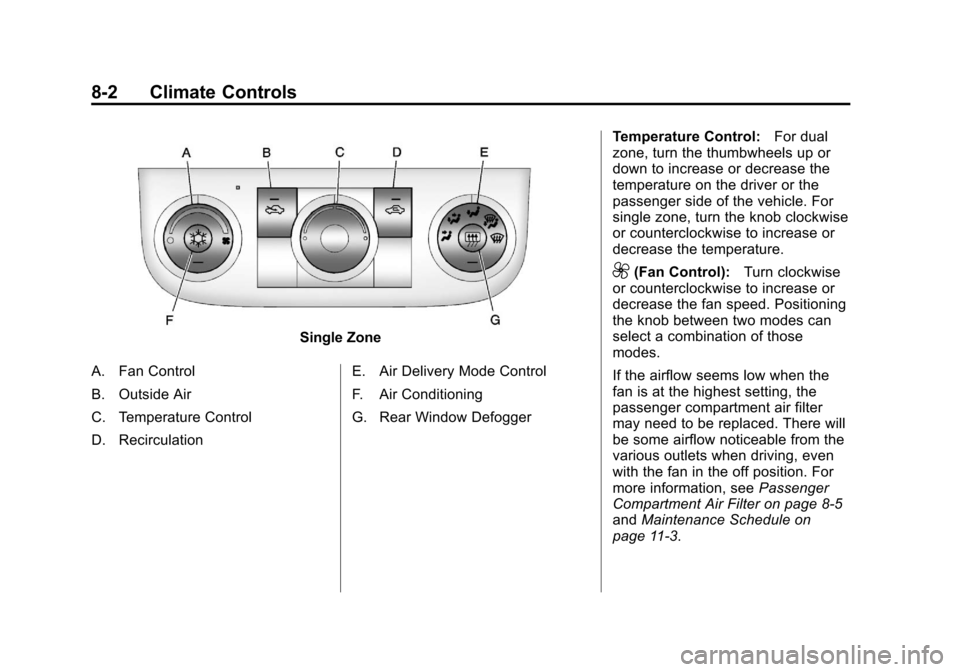
Single Zone
A. Fan Control
B. Outside Air
C. Temperature Control
D. Recirculation E. Air Delivery Mode Control
F. Air Conditioning
G. Rear Window DefoggerTemperature Control:
For dual
zone, turn the thumbwheels up or
down to increase or decrease the
temperature on the driver or the
passenger side of the vehicle. For
single zone, turn the knob clockwise
or counterclockwise to increase or
decrease the temperature.
9(Fan Control): Turn clockwise
or counterclockwise to increase or
decrease the fan speed. Positioning
the knob between two modes can
select a combination of those
modes.
If the airflow seems low when the
fan is at the highest setting, the
passenger compartment air filter
may need to be replaced. There will
be some airflow noticeable from the
various outlets when driving, even
with the fan in the off position. For
more information, see Passenger
Compartment Air Filter on page 8‑5
and Maintenance Schedule on
page 11‑3.
Page 189 of 374
Black plate (3,1)Chevrolet Impala Owner Manual - 2012
Climate Controls 8-3
Air Delivery Mode Control:Turn
clockwise or counterclockwise to
change the direction of the airflow
inside the vehicle.
To change the current mode, select
one of the following:
H(Vent): Air is directed to the
instrument panel outlets.
)(Bi-Level): Air is divided
between the instrument panel
outlets and the floor outlets.
6(Floor): Air is directed to the
floor outlets, with some of the air
directed to the windshield and side
window outlets. In this mode, the
system automatically selects
outside air.
-(Defog): This mode clears the
windshield of fog or moisture. Air is
directed equally to the windshield
and the floor outlets. When defog is
selected, the system turns off
recirculation and runs the air
conditioning compressor unless the
outside temperature is below
4°C (40°F).
0(Defrost): This mode clears the
windshield of fog or frost more
quickly. Air is directed to the
windshield with some air to the side
window vents and the floor vents.
When defrost is selected, the
system automatically forces outside
air into the vehicle. The air
conditioning compressor will run
automatically in this setting, unless
the outside temperature is below
4°C (40°F).
#(Air Conditioning): Press to
turn the air conditioning system
on or off. An indicator light comes
on to show that it is on. The air
conditioning can be selected in any
mode as long as the fan is on and
the outside temperature is above
freezing. A flashing indicator light
indicates that the air conditioning
compressor is currently not
available.
On hot days, open the windows to
let hot inside air escape; then close
them. This helps to reduce the time it takes for the vehicle to cool down.
It also helps the system to operate
more efficiently.
For quick cool down on hot days, do
the following:
1. Select the
Hmode.
2. Press the
#button.
3. Select the coolest temperature for both zones.
4. Select the highest
9speed.
5. When the coolest temperature is selected in the A/C mode, the
system automatically goes into
the recirculation mode to
improve cooling.
Using these settings together for
long periods of time may cause the
air inside the vehicle to become too
dry. To prevent this from happening,
after the air inside the vehicle has
cooled, turn the recirculation
mode off.
Page 210 of 374

Black plate (18,1)Chevrolet Impala Owner Manual - 2012
9-18 Driving and Operating
B (ACC/ACCESSORY):This is the
position in which you can operate
the radio and windshield wipers
while the engine is off. To use ACC/
ACCESSORY, turn the key
clockwise.
C (ON/RUN): This position can be
used to operate the electrical
accessories and to display some
instrument panel cluster warning
and indicator lights. This position
can also be used for service and
diagnostics, and to verify the proper
operation of the malfunction
indicator lamp as may be required
for emission inspection purposes.
The switch stays in this position
when the engine is running.
If you leave the key in the ACC/
ACCESSORY or ON/RUN position
with the engine off, the battery could
be drained. You may not be able to
start the vehicle if the battery is
allowed to drain for an extended
period of time. D (START):
This is the position that
starts the engine. When the engine
starts, release the key. The ignition
switch returns to ON/RUN for
driving.
A warning chime will sound and the
Driver Information Center (DIC) will
display DRIVER DOOR OPEN
when the driver door is opened, the
ignition is in ACC/ACCESSORY or
LOCK/OFF, and the key is in the
ignition. See Door Ajar Messages
on page 5‑30 for more information.
Starting the Engine
Move the shift lever to P (Park) or
N (Neutral). The engine will not start
in any other position. To restart the
engine when the vehicle is already
moving, use N (Neutral) only. Notice:
Do not try to shift to
P (Park) if the vehicle is moving.
If you do, you could damage the
transmission. Shift to P (Park)
only when the vehicle is stopped.
Starting Procedure
1. With your foot off the accelerator pedal, turn the ignition to START.
When the engine starts, let go of
the key. The idle speed will slow
down as the engine warms. Do
not race the engine immediately
after starting it. Operate the
engine and transmission gently
to allow the oil to warm up and
lubricate all moving parts.
The vehicle has a
Computer-Controlled Cranking
System. This feature assists in
starting the engine and protects
components. If the ignition key is
turned to the START position,
and then released when the
engine begins cranking, the
engine will continue cranking for
a few seconds or until the
vehicle starts. If the engine does
Page 232 of 374
Black plate (40,1)Chevrolet Impala Owner Manual - 2012
9-40 Driving and Operating
Filling the Tank
{WARNING
Fuel vapor burns violently and a
fuel fire can cause bad injuries.
To help avoid injuries to you and
others, read and follow all the
instructions on the fuel pump
island. Turn off the engine when
refueling. Do not smoke near fuel
or when refueling the vehicle. Do
not use cellular phones. Keep(Continued)
WARNING (Continued)
sparks, flames, and smoking
materials away from fuel. Do not
leave the fuel pump unattended
when refueling the vehicle. This is
against the law in some places.
Do not re-enter the vehicle while
pumping fuel. Keep children away
from the fuel pump; never let
children pump fuel.
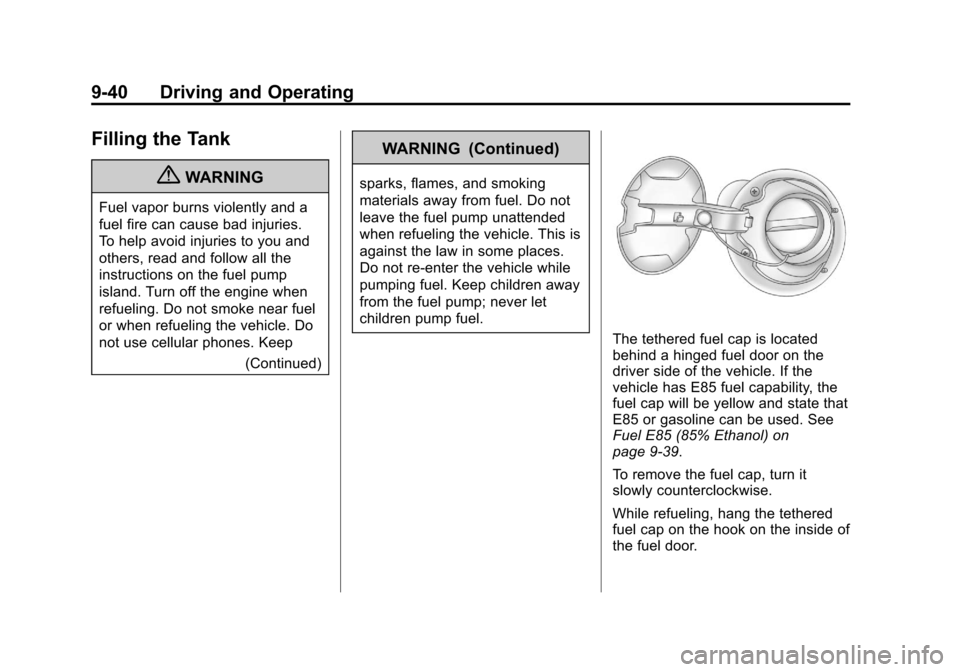
The tethered fuel cap is located
behind a hinged fuel door on the
driver side of the vehicle. If the
vehicle has E85 fuel capability, the
fuel cap will be yellow and state that
E85 or gasoline can be used. See
Fuel E85 (85% Ethanol) on
page 9‑39.
To remove the fuel cap, turn it
slowly counterclockwise.
While refueling, hang the tethered
fuel cap on the hook on the inside of
the fuel door.
Page 233 of 374
Black plate (41,1)Chevrolet Impala Owner Manual - 2012
Driving and Operating 9-41
{WARNING
Fuel can spray out on you if you
open the fuel cap too quickly.
If you spill fuel and then
something ignites it, you could be
badly burned. This spray can
happen if the tank is nearly full,
and is more likely in hot weather.
Open the fuel cap slowly and wait
for any hiss noise to stop. Then
unscrew the cap all the way.
Be careful not to spill fuel. Do not
top off or overfill the tank and wait a
few seconds after you have finished
pumping before removing the
nozzle. Clean fuel from painted
surfaces as soon as possible. See
Exterior Care on page 10‑69. When replacing the fuel cap, turn it
clockwise until it clicks. Make sure
the cap is fully installed. The
diagnostic system can determine if
the fuel cap has been left off or
improperly installed. This would
allow fuel to evaporate into the
atmosphere. See
Malfunction
Indicator Lamp on page 5‑16.
The TIGHTEN GAS CAP message
displays on the Driver Information
Center (DIC) if the fuel cap is not
properly installed. See Fuel System
Messages on page 5‑32 for more
information.
{WARNING
If a fire starts while you are
refueling, do not remove the
nozzle. Shut off the flow of fuel by
shutting off the pump or by
notifying the station attendant.
Leave the area immediately.
Notice: If a new fuel cap is
needed, be sure to get the right
type of cap from your dealer. The
wrong type of fuel cap might not
fit properly, might cause the
malfunction indicator lamp to
light, and could damage the fuel
tank and emissions system. See
Malfunction Indicator Lamp on
page 5‑16.
Page 257 of 374
Black plate (15,1)Chevrolet Impala Owner Manual - 2012
Vehicle Care 10-15
{WARNING
An electric engine cooling fan
under the hood can start up even
when the engine is not running
and can cause injury. Keep
hands, clothing, and tools away
from any underhood electric fan.
{WARNING
Steam and scalding liquids from a
hot cooling system can blow out
and burn you badly. They are
under pressure, and if you turn
the surge tank pressure
cap—even a little —they can
come out at high speed. Never
turn the cap when the cooling
system, including the surge tank
pressure cap, is hot. Wait for the
cooling system and surge tank
pressure cap to cool if you ever
have to turn the pressure cap.
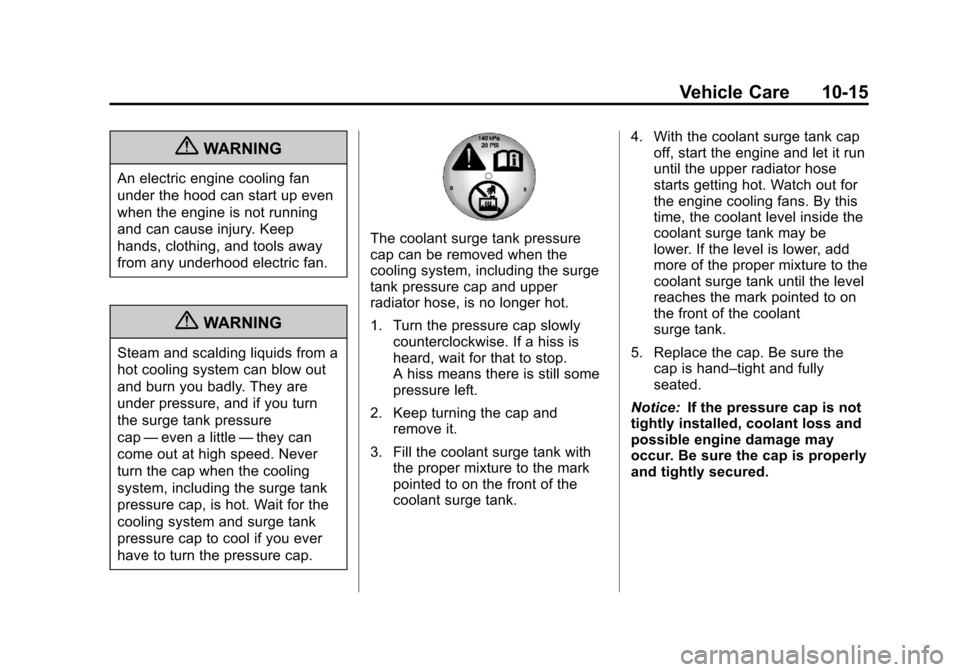
The coolant surge tank pressure
cap can be removed when the
cooling system, including the surge
tank pressure cap and upper
radiator hose, is no longer hot.
1. Turn the pressure cap slowly counterclockwise. If a hiss is
heard, wait for that to stop.
A hiss means there is still some
pressure left.
2. Keep turning the cap and remove it.
3. Fill the coolant surge tank with the proper mixture to the mark
pointed to on the front of the
coolant surge tank. 4. With the coolant surge tank cap
off, start the engine and let it run
until the upper radiator hose
starts getting hot. Watch out for
the engine cooling fans. By this
time, the coolant level inside the
coolant surge tank may be
lower. If the level is lower, add
more of the proper mixture to the
coolant surge tank until the level
reaches the mark pointed to on
the front of the coolant
surge tank.
5. Replace the cap. Be sure the cap is hand–tight and fully
seated.
Notice: If the pressure cap is not
tightly installed, coolant loss and
possible engine damage may
occur. Be sure the cap is properly
and tightly secured.
Page 268 of 374
Black plate (26,1)Chevrolet Impala Owner Manual - 2012
10-26 Vehicle Care
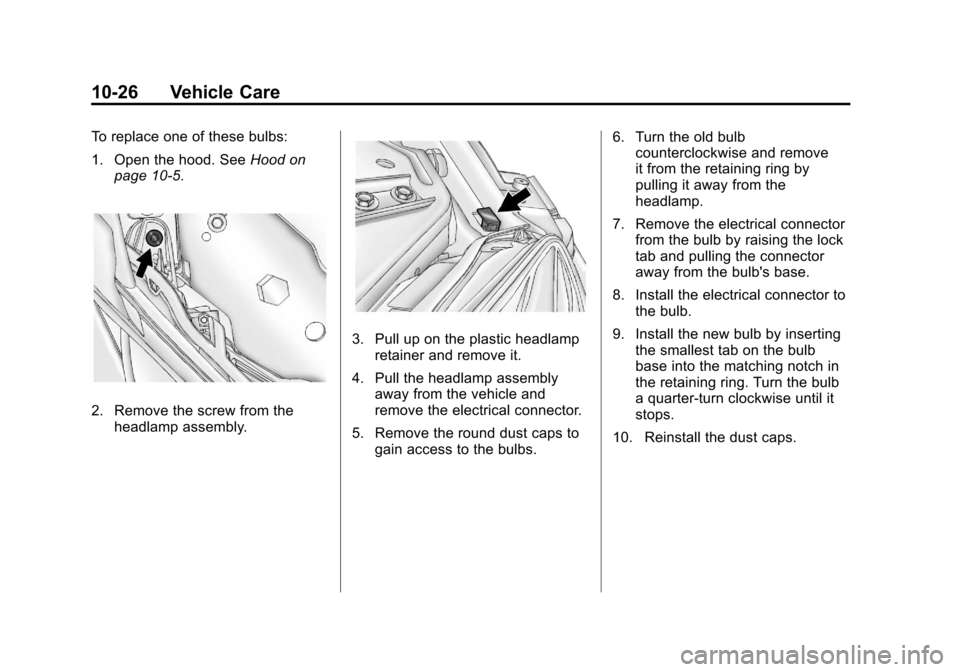
To replace one of these bulbs:
1. Open the hood. SeeHood on
page 10‑5.
2. Remove the screw from the headlamp assembly.
3. Pull up on the plastic headlampretainer and remove it.
4. Pull the headlamp assembly away from the vehicle and
remove the electrical connector.
5. Remove the round dust caps to gain access to the bulbs. 6. Turn the old bulb
counterclockwise and remove
it from the retaining ring by
pulling it away from the
headlamp.
7. Remove the electrical connector from the bulb by raising the lock
tab and pulling the connector
away from the bulb's base.
8. Install the electrical connector to the bulb.
9. Install the new bulb by inserting the smallest tab on the bulb
base into the matching notch in
the retaining ring. Turn the bulb
a quarter-turn clockwise until it
stops.
10. Reinstall the dust caps.
Page 270 of 374
Black plate (28,1)Chevrolet Impala Owner Manual - 2012
10-28 Vehicle Care
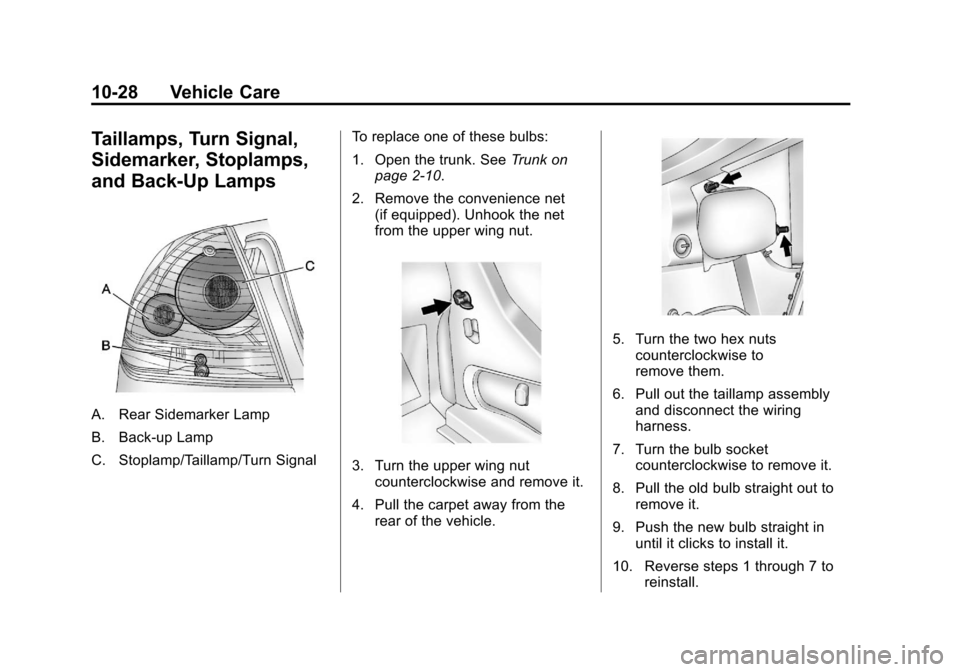
Taillamps, Turn Signal,
Sidemarker, Stoplamps,
and Back-Up Lamps
A. Rear Sidemarker Lamp
B. Back-up Lamp
C. Stoplamp/Taillamp/Turn SignalTo replace one of these bulbs:
1. Open the trunk. See
Trunk on
page 2‑10.
2. Remove the convenience net (if equipped). Unhook the net
from the upper wing nut.
3. Turn the upper wing nutcounterclockwise and remove it.
4. Pull the carpet away from the rear of the vehicle.
5. Turn the two hex nutscounterclockwise to
remove them.
6. Pull out the taillamp assembly and disconnect the wiring
harness.
7. Turn the bulb socket counterclockwise to remove it.
8. Pull the old bulb straight out to remove it.
9. Push the new bulb straight in until it clicks to install it.
10. Reverse steps 1 through 7 to reinstall.
Page 271 of 374
Black plate (29,1)Chevrolet Impala Owner Manual - 2012
Vehicle Care 10-29
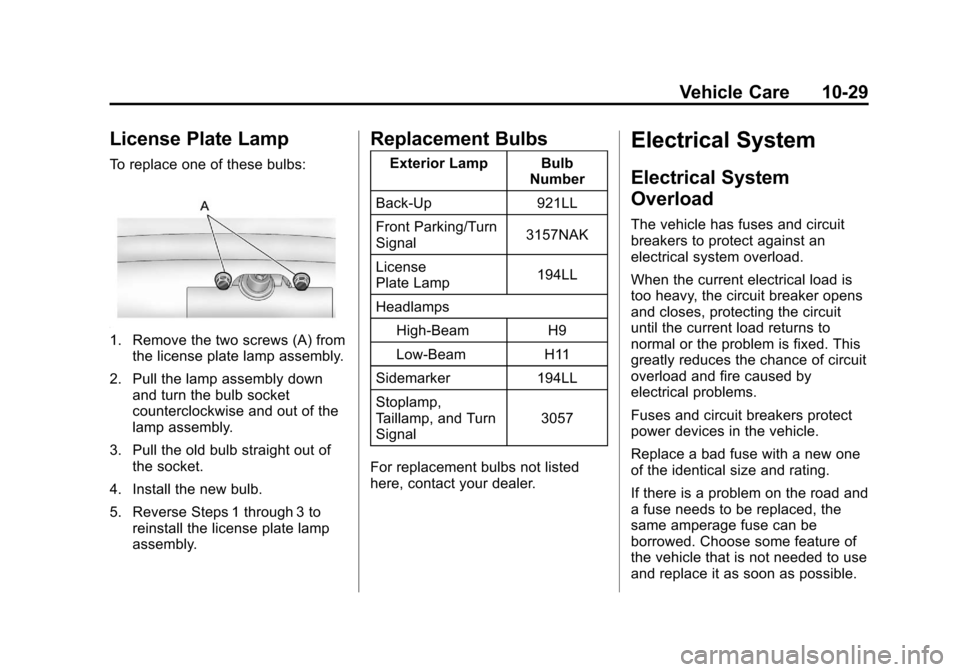
License Plate Lamp
To replace one of these bulbs:
1. Remove the two screws (A) fromthe license plate lamp assembly.
2. Pull the lamp assembly down and turn the bulb socket
counterclockwise and out of the
lamp assembly.
3. Pull the old bulb straight out of the socket.
4. Install the new bulb.
5. Reverse Steps 1 through 3 to reinstall the license plate lamp
assembly.
Replacement Bulbs
Exterior Lamp Bulb Number
Back-Up 921LL
Front Parking/Turn
Signal 3157NAK
License
Plate Lamp 194LL
Headlamps High-Beam H9
Low-Beam H11
Sidemarker 194LL
Stoplamp,
Taillamp, and Turn
Signal 3057
For replacement bulbs not listed
here, contact your dealer.
Electrical System
Electrical System
Overload
The vehicle has fuses and circuit
breakers to protect against an
electrical system overload.
When the current electrical load is
too heavy, the circuit breaker opens
and closes, protecting the circuit
until the current load returns to
normal or the problem is fixed. This
greatly reduces the chance of circuit
overload and fire caused by
electrical problems.
Fuses and circuit breakers protect
power devices in the vehicle.
Replace a bad fuse with a new one
of the identical size and rating.
If there is a problem on the road and
a fuse needs to be replaced, the
same amperage fuse can be
borrowed. Choose some feature of
the vehicle that is not needed to use
and replace it as soon as possible.
Page 298 of 374
Black plate (56,1)Chevrolet Impala Owner Manual - 2012
10-56 Vehicle Care
Tire Changing
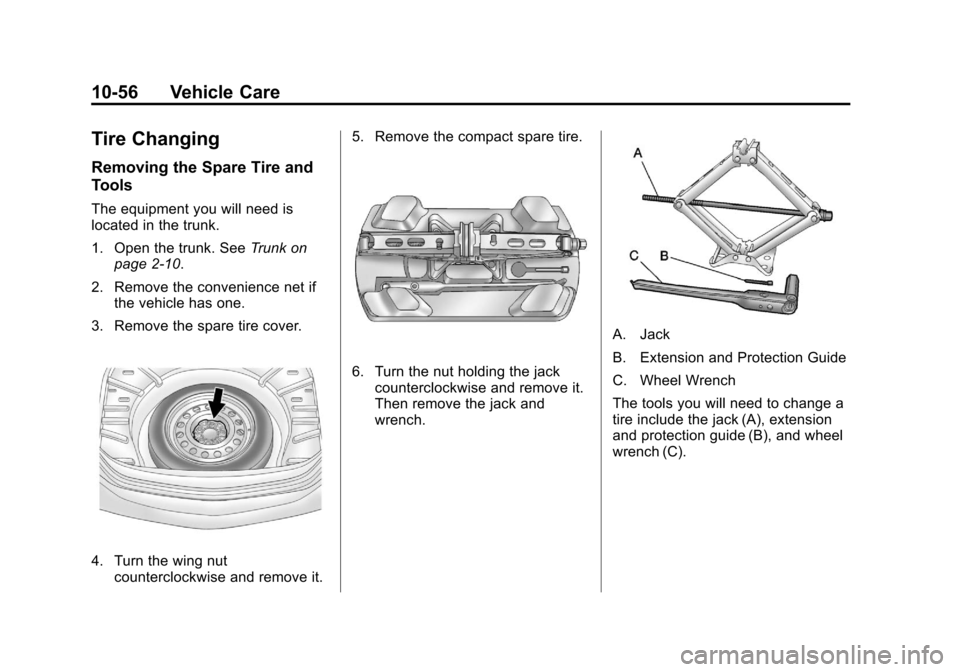
Removing the Spare Tire and
Tools
The equipment you will need is
located in the trunk.
1. Open the trunk. SeeTrunk on
page 2‑10.
2. Remove the convenience net if the vehicle has one.
3. Remove the spare tire cover.
4. Turn the wing nut counterclockwise and remove it. 5. Remove the compact spare tire.
6. Turn the nut holding the jack
counterclockwise and remove it.
Then remove the jack and
wrench.
A. Jack
B. Extension and Protection Guide
C. Wheel Wrench
The tools you will need to change a
tire include the jack (A), extension
and protection guide (B), and wheel
wrench (C).