infotainment CHEVROLET IMPALA 2014 10.G Owners Manual
[x] Cancel search | Manufacturer: CHEVROLET, Model Year: 2014, Model line: IMPALA, Model: CHEVROLET IMPALA 2014 10.GPages: 422, PDF Size: 5.62 MB
Page 1 of 422

Black plate (1,1)Chevrolet Impala Owner Manual (GMNA-Localizing-U.S./Canada-5772216) -
2014 - 2nd crc - 5/14/13
2014 Chevrolet Impala Owner ManualM
In Brief. . . . . . . . . . . . . . . . . . . . . . . . 1-1
Instrument Panel . . . . . . . . . . . . . . 1-2
Initial Drive Information . . . . . . . . 1-4
Vehicle Features . . . . . . . . . . . . . 1-18
eAssist Features . . . . . . . . . . . . . 1-23
Performance and
Maintenance . . . . . . . . . . . . . . . . 1-25
Keys, Doors, and Windows . . . . . . . . . . . . . . . . . . . . 2-1
Keys and Locks . . . . . . . . . . . . . . . 2-1
Doors . . . . . . . . . . . . . . . . . . . . . . . . 2-14
Vehicle Security . . . . . . . . . . . . . . 2-16
Exterior Mirrors . . . . . . . . . . . . . . . 2-19
Interior Mirrors . . . . . . . . . . . . . . . . 2-20
Windows . . . . . . . . . . . . . . . . . . . . . 2-21
Roof . . . . . . . . . . . . . . . . . . . . . . . . . . 2-23
Seats and Restraints . . . . . . . . . 3-1
Head Restraints . . . . . . . . . . . . . . . 3-2
Front Seats . . . . . . . . . . . . . . . . . . . . 3-4
Rear Seats . . . . . . . . . . . . . . . . . . . 3-11
Safety Belts . . . . . . . . . . . . . . . . . . 3-13
Airbag System . . . . . . . . . . . . . . . . 3-20
Child Restraints . . . . . . . . . . . . . . 3-34 Storage
. . . . . . . . . . . . . . . . . . . . . . . 4-1
Storage Compartments . . . . . . . . 4-1
Additional Storage Features . . . 4-3
Instruments and Controls . . . . 5-1
Controls . . . . . . . . . . . . . . . . . . . . . . . 5-2
Warning Lights, Gauges, and
Indicators . . . . . . . . . . . . . . . . . . . . 5-8
Information Displays . . . . . . . . . . 5-26
Vehicle Messages . . . . . . . . . . . . 5-30
Vehicle Personalization . . . . . . . 5-40
Universal Remote System . . . . 5-46
Lighting . . . . . . . . . . . . . . . . . . . . . . . 6-1
Exterior Lighting . . . . . . . . . . . . . . . 6-1
Interior Lighting . . . . . . . . . . . . . . . . 6-4
Lighting Features . . . . . . . . . . . . . . 6-5
Infotainment System . . . . . . . . . 7-1
Introduction . . . . . . . . . . . . . . . . . . . . 7-1
Radio . . . . . . . . . . . . . . . . . . . . . . . . . . 7-7
Audio Players . . . . . . . . . . . . . . . . 7-12
Phone . . . . . . . . . . . . . . . . . . . . . . . . 7-18
Trademarks and License Agreements . . . . . . . . . . . . . . . . . 7-29 Climate Controls
. . . . . . . . . . . . . 8-1
Climate Control Systems . . . . . . 8-1
Air Vents . . . . . . . . . . . . . . . . . . . . . . . 8-7
Maintenance . . . . . . . . . . . . . . . . . . . 8-8
Driving and Operating . . . . . . . . 9-1
Driving Information . . . . . . . . . . . . . 9-2
Starting and Operating . . . . . . . 9-15
Engine Exhaust . . . . . . . . . . . . . . 9-26
Automatic Transmission . . . . . . 9-27
Brakes . . . . . . . . . . . . . . . . . . . . . . . 9-30
Ride Control Systems . . . . . . . . 9-33
Cruise Control . . . . . . . . . . . . . . . . 9-35
Driver Assistance Systems . . . 9-45
Fuel . . . . . . . . . . . . . . . . . . . . . . . . . . 9-56
Towing . . . . . . . . . . . . . . . . . . . . . . . 9-61
Conversions and Add-Ons . . . 9-66
Vehicle Care . . . . . . . . . . . . . . . . . 10-1
General Information . . . . . . . . . . 10-2
Vehicle Checks . . . . . . . . . . . . . . . 10-3
Headlamp Aiming . . . . . . . . . . . 10-30
Bulb Replacement . . . . . . . . . . 10-31
Electrical System . . . . . . . . . . . . 10-35
Wheels and Tires . . . . . . . . . . . 10-42
Jump Starting . . . . . . . . . . . . . . . 10-71
Page 7 of 422
Black plate (1,1)Chevrolet Impala Owner Manual (GMNA-Localizing-U.S./Canada-5772216) -
2014 - 2nd crc - 5/14/13
In Brief 1-1
In Brief
Instrument Panel
Instrument Panel . . . . . . . . . . . . . . 1-2
Initial Drive Information
Initial Drive Information . . . . . . . . 1-4
Remote Keyless Entry (RKE)System . . . . . . . . . . . . . . . . . . . . . . 1-4
Remote Vehicle Start . . . . . . . . . 1-5
Door Locks . . . . . . . . . . . . . . . . . . . 1-6
Trunk . . . . . . . . . . . . . . . . . . . . . . . . . 1-7
Windows . . . . . . . . . . . . . . . . . . . . . . 1-7
Seat Adjustment . . . . . . . . . . . . . . 1-8
Memory Features . . . . . . . . . . . . 1-10
Second Row Seats . . . . . . . . . . 1-10
Heated and Ventilated Seats . . . . . . . . . . . . . . . . . . . . . . . 1-11
Head Restraint Adjustment . . . . . . . . . . . . . . . . . 1-11
Safety Belts . . . . . . . . . . . . . . . . . . 1-11
Passenger Sensing System . . . . . . . . . . . . . . . . . . . . . 1-12
Mirror Adjustment . . . . . . . . . . . . 1-12 Steering Wheel
Adjustment . . . . . . . . . . . . . . . . . 1-13
Interior Lighting . . . . . . . . . . . . . . 1-13
Exterior Lighting . . . . . . . . . . . . . 1-14
Windshield Wiper/Washer . . . . 1-15
Climate Controls . . . . . . . . . . . . . 1-16
Transmission . . . . . . . . . . . . . . . . 1-17Vehicle Features
Radio(s) . . . . . . . . . . . . . . . . . . . . . 1-18
Satellite Radio . . . . . . . . . . . . . . . 1-18
Portable Audio Devices . . . . . . 1-18
Bluetooth
®. . . . . . . . . . . . . . . . . . . 1-19
Steering Wheel Controls . . . . . 1-19
Cruise Control . . . . . . . . . . . . . . . 1-20
Infotainment System . . . . . . . . . 1-20
Driver Information Center (DIC) . . . . . . . . . . . . . . . 1-20
Forward Collision Alert (FCA) System . . . . . . . . . . . . . . . . . . . . . 1-21
Lane Departure Warning (LDW) . . . . . . . . . . . . . 1-21
Side Blind Zone Alert (SBZA) . . . . . . . . . . . . . . . 1-21
Rear Vision Camera (RVC) . . . . . . . . . . . . . 1-21 Ultrasonic Parking Assist . . . . 1-21
Power Outlets . . . . . . . . . . . . . . . 1-22
Universal Remote System . . . 1-22
Sunroof . . . . . . . . . . . . . . . . . . . . . . 1-22
eAssist Features
eAssist®Overview . . . . . . . . . . . 1-23
High Voltage Safety Information . . . . . . . . . . . . . . . . . 1-24
Automatic Engine Start/Stop Feature . . . . . . . . . . . . . . . . . . . . . 1-24
Regenerative Braking . . . . . . . . 1-25
Battery . . . . . . . . . . . . . . . . . . . . . . . 1-25
Service . . . . . . . . . . . . . . . . . . . . . . 1-25
Performance and Maintenance
Traction Control/Electronic Stability Control . . . . . . . . . . . . 1-25
Tire Pressure Monitor . . . . . . . . 1-26
Engine Oil Life System . . . . . . 1-26
E85 or FlexFuel . . . . . . . . . . . . . . 1-27
Driving for Better Fuel Economy . . . . . . . . . . . . . . . . . . . 1-27
Roadside Assistance Program . . . . . . . . . . . . . . . . . . . . 1-27
OnStar
®. . . . . . . . . . . . . . . . . . . . . 1-28
Page 9 of 422

Black plate (3,1)Chevrolet Impala Owner Manual (GMNA-Localizing-U.S./Canada-5772216) -
2014 - 2nd crc - 5/14/13
In Brief 1-3
1.Instrument Panel Illumination
Control on page 6-4.
2. Air Vents on page 8-7.
3. Trunk Release. See Trunk on
page 2-14.
Parking Assist Button. See
Assistance Systems for Parking
or Backing on page 9-46 (If
Equipped).
Lane Departure Warning (LDW)
Button. See Lane Departure
Warning (LDW) on page 9-54.
4. Turn Signal Lever. See Turn and
Lane-Change Signals on
page 6-3.
5. Instrument Cluster on page 5-9.
Driver Information Center (DIC)
on page 5-27.
6. Windshield Wiper/Washer on
page 5-4.
7. Hazard Warning Flashers on
page 6-3.
8. Light Sensor. See Automatic
Headlamp System on page 6-2. 9. Storage Area with USB Port
Inside (If Equipped). See
Instrument Panel Storage on
page 4-1 andUSB Port on
page 7-14.
10. Infotainment on page 7-1.
11. CD Player on page 7-12.
12. Electric Parking Brake. See Parking Brake on page 9-31.
13. Data Link Connector (Out of View). See Malfunction
Indicator Lamp on page 5-17.
14. Hood Release. See Hood on
page 10-4.
15. Instrument Panel Storage on
page 4-1 (If Equipped).
Fuse Cover. See Instrument
Panel Fuse Block on
page 10-40. 16.
Cruise Control on page 9-35
(If Equipped).
Adaptive Cruise Control on
page 9-37 (If Equipped).
Heated Steering Wheel on
page 5-3 (If Equipped).
Forward Collision Alert (FCA)
System on page 9-48 (If
Equipped).
17. Steering Wheel Controls on
page 5-3 (Out of View).
18. Steering Wheel Adjustment on
page 5-2.
19. Horn on page 5-3.
20. Steering Wheel Controls on
page 5-3.
Driver Information Center
Buttons. See Driver Information
Center (DIC) on page 5-27.
21. Ignition Positions (Keyless
Access) on page 9-15 or
Ignition Positions (Key Access)
on page 9-17.
Page 25 of 422
Black plate (19,1)Chevrolet Impala Owner Manual (GMNA-Localizing-U.S./Canada-5772216) -
2014 - 2nd crc - 5/14/13
In Brief 1-19
laptop computers, MP3 players, CD
changers, and USB storage devices
may be connected, depending on
the audio system.
SeeUSB Port on page 7-14 and
Auxiliary Jack on page 7-17.
Bluetooth®
The Bluetooth®system allows users
with a Bluetooth-enabled cell phone
to make and receive hands-free
calls using the vehicle audio system
and controls.
The Bluetooth-enabled cell phone
must be paired with the in-vehicle
Bluetooth system before it can be
used in the vehicle. Not all phones
will support all functions.
See Bluetooth (Infotainment
Controls) on page 7-20 orBluetooth
(Voice Recognition) on page 7-24 or
Bluetooth (Overview) on page 7-18.
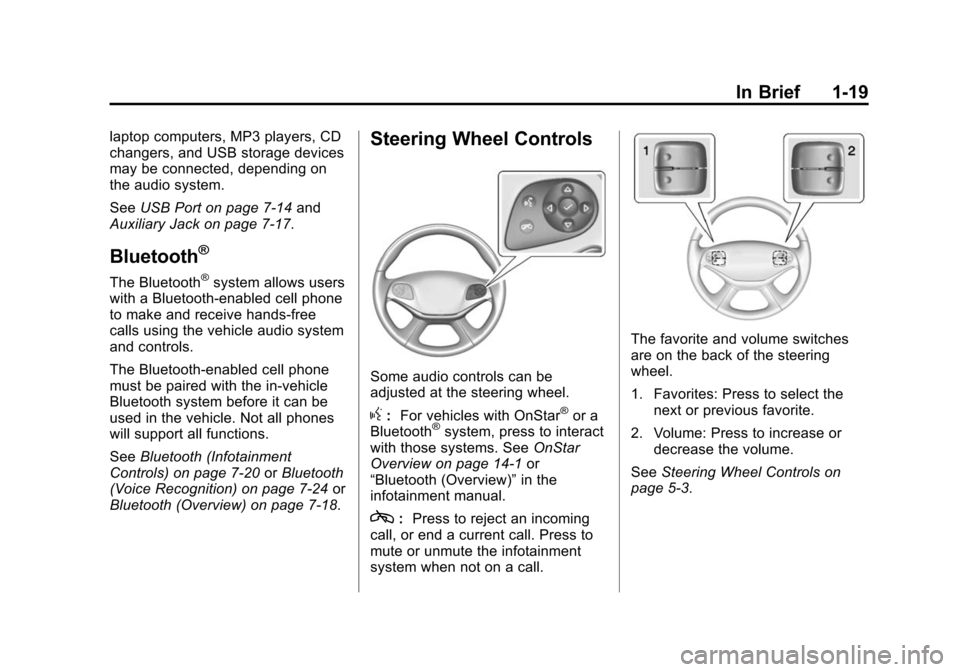
Steering Wheel Controls
Some audio controls can be
adjusted at the steering wheel.
g: For vehicles with OnStar®or a
Bluetooth®system, press to interact
with those systems. See OnStar
Overview on page 14-1 or
“Bluetooth (Overview)” in the
infotainment manual.
c: Press to reject an incoming
call, or end a current call. Press to
mute or unmute the infotainment
system when not on a call.
The favorite and volume switches
are on the back of the steering
wheel.
1. Favorites: Press to select the next or previous favorite.
2. Volume: Press to increase or decrease the volume.
See Steering Wheel Controls on
page 5-3.
Page 26 of 422
Black plate (20,1)Chevrolet Impala Owner Manual (GMNA-Localizing-U.S./Canada-5772216) -
2014 - 2nd crc - 5/14/13
1-20 In Brief
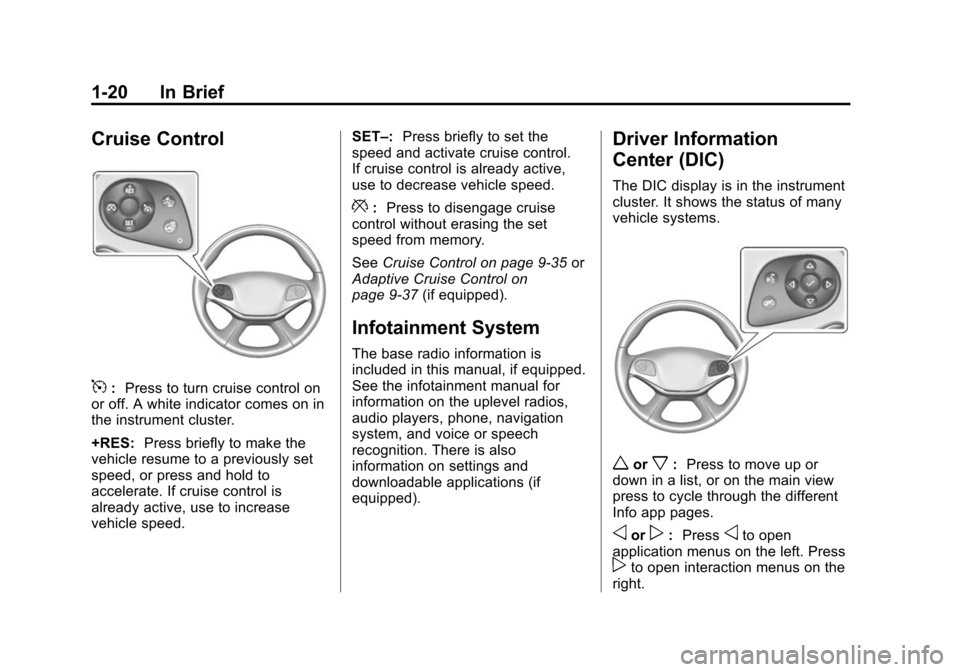
Cruise Control
5:Press to turn cruise control on
or off. A white indicator comes on in
the instrument cluster.
+RES: Press briefly to make the
vehicle resume to a previously set
speed, or press and hold to
accelerate. If cruise control is
already active, use to increase
vehicle speed. SET–:
Press briefly to set the
speed and activate cruise control.
If cruise control is already active,
use to decrease vehicle speed.
*: Press to disengage cruise
control without erasing the set
speed from memory.
See Cruise Control on page 9-35 or
Adaptive Cruise Control on
page 9-37 (if equipped).
Infotainment System
The base radio information is
included in this manual, if equipped.
See the infotainment manual for
information on the uplevel radios,
audio players, phone, navigation
system, and voice or speech
recognition. There is also
information on settings and
downloadable applications (if
equipped).
Driver Information
Center (DIC)
The DIC display is in the instrument
cluster. It shows the status of many
vehicle systems.
worx:Press to move up or
down in a list, or on the main view
press to cycle through the different
Info app pages.
oorp: Pressoto open
application menus on the left. Press
pto open interaction menus on the
right.
Page 111 of 422
Black plate (1,1)Chevrolet Impala Owner Manual (GMNA-Localizing-U.S./Canada-5772216) -
2014 - 2nd crc - 5/14/13
Storage 4-1
Storage
Storage Compartments
Storage Compartments . . . . . . . 4-1
Instrument Panel Storage . . . . . 4-1
Glove Box . . . . . . . . . . . . . . . . . . . . 4-2
Cupholders . . . . . . . . . . . . . . . . . . . 4-2
Center Console Storage . . . . . . 4-2
Umbrella Storage . . . . . . . . . . . . . 4-3
Additional Storage Features
Cargo ManagementSystem . . . . . . . . . . . . . . . . . . . . . . 4-3
Convenience Net . . . . . . . . . . . . . 4-4
Storage
Compartments
{Warning
Do not store heavy or sharp
objects in storage compartments.
In a crash, these objects may
cause the cover to open and
could result in injury.
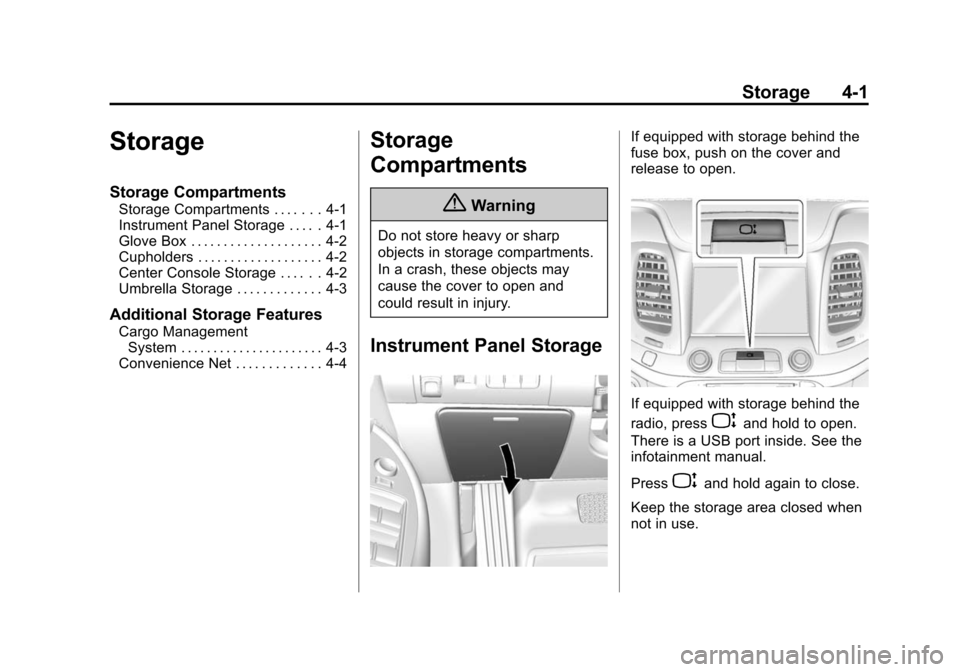
Instrument Panel Storage
If equipped with storage behind the
fuse box, push on the cover and
release to open.
If equipped with storage behind the
radio, press
Pand hold to open.
There is a USB port inside. See the
infotainment manual.
Press
Pand hold again to close.
Keep the storage area closed when
not in use.
Page 113 of 422

Black plate (3,1)Chevrolet Impala Owner Manual (GMNA-Localizing-U.S./Canada-5772216) -
2014 - 2nd crc - 5/14/13
Storage 4-3
Press the button and lift to access.
There is a removable tray on the top
of the console. There is an auxiliary
input jack, USB port, and accessory
power outlet inside.
If equipped, there may be an
additional USB port and an SD card
reader inside.
The rear of the center console has a
storage area and an accessory
power outlet.See
Power Outlets on page 5-6,
Auxiliary Jack on page 7-17, and
USB Port on page 7-14. If equipped
with uplevel auxiliary players, see
the infotainment manual.
Umbrella Storage
Slide an umbrella into the opening
on the driver or passenger door.
Additional Storage
Features
Cargo Management
System
There is storage under the load floor
for small items. Pull the load floor
handle to access.
Secure the load floor handle to seal
the access to the spare tire.
Page 117 of 422
Black plate (3,1)Chevrolet Impala Owner Manual (GMNA-Localizing-U.S./Canada-5772216) -
2014 - 2nd crc - 5/14/13
Instruments and Controls 5-3
Steering Wheel Controls
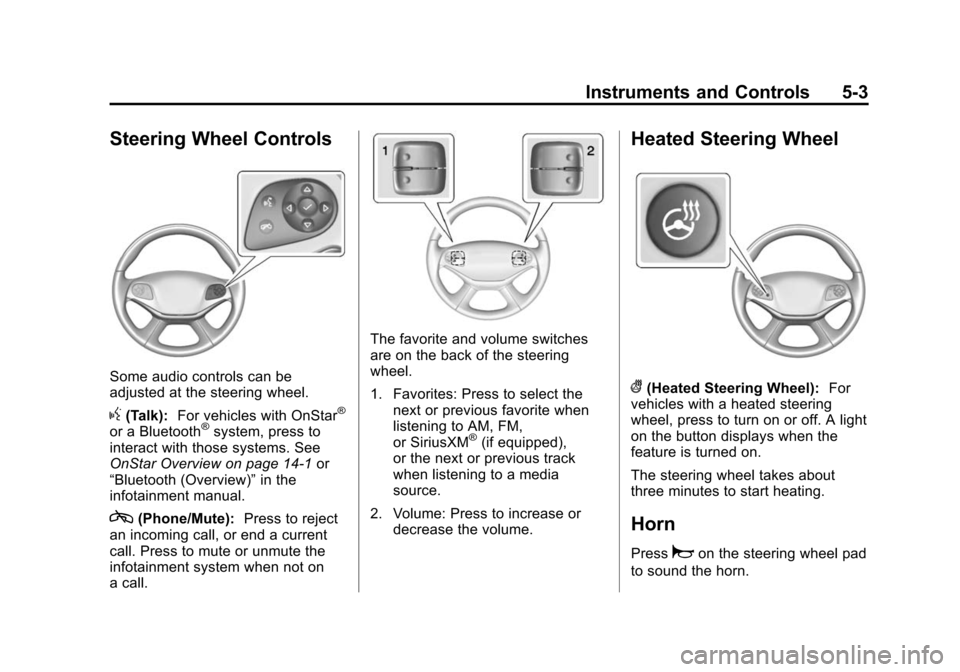
Some audio controls can be
adjusted at the steering wheel.
g(Talk):For vehicles with OnStar®
or a Bluetooth®system, press to
interact with those systems. See
OnStar Overview on page 14-1 or
“Bluetooth (Overview)” in the
infotainment manual.
c(Phone/Mute): Press to reject
an incoming call, or end a current
call. Press to mute or unmute the
infotainment system when not on
a call.
The favorite and volume switches
are on the back of the steering
wheel.
1. Favorites: Press to select the next or previous favorite when
listening to AM, FM,
or SiriusXM
®(if equipped),
or the next or previous track
when listening to a media
source.
2. Volume: Press to increase or decrease the volume.
Heated Steering Wheel
((Heated Steering Wheel): For
vehicles with a heated steering
wheel, press to turn on or off. A light
on the button displays when the
feature is turned on.
The steering wheel takes about
three minutes to start heating.
Horn
Pressaon the steering wheel pad
to sound the horn.
Page 140 of 422
Black plate (26,1)Chevrolet Impala Owner Manual (GMNA-Localizing-U.S./Canada-5772216) -
2014 - 2nd crc - 5/14/13
5-26 Instruments and Controls
turns green when the ACC is set
and active. SeeAdaptive Cruise
Control on page 9-37.
Door Ajar Light
This light comes on in the Driver
Information Center (DIC) when a
door is open or not securely latched.
Before driving, check that all doors
are properly closed.
Information Displays
Power Flows
(eAssist Only)
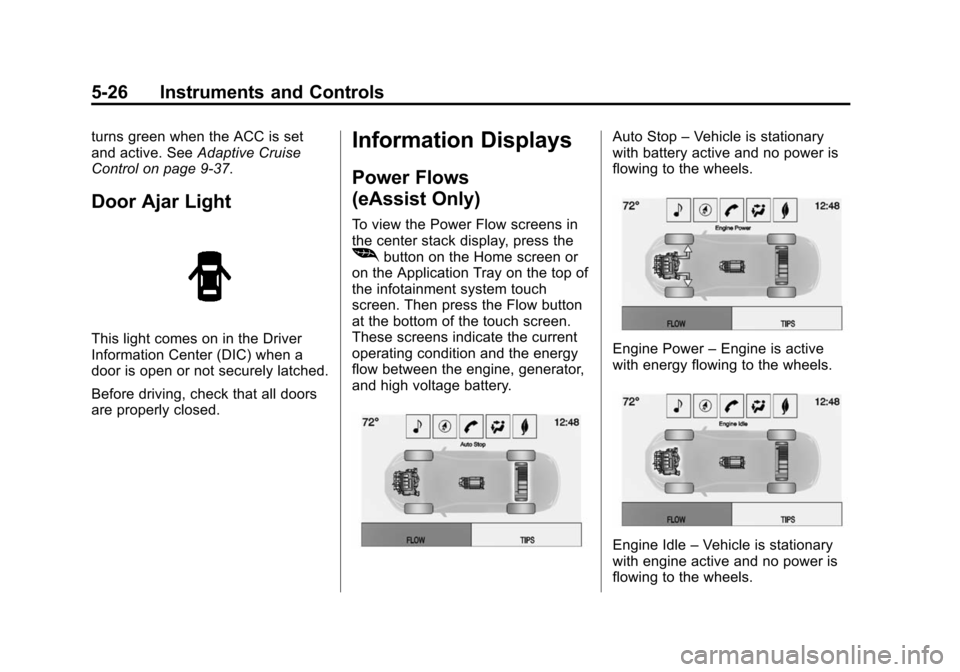
To view the Power Flow screens in
the center stack display, press the
[button on the Home screen or
on the Application Tray on the top of
the infotainment system touch
screen. Then press the Flow button
at the bottom of the touch screen.
These screens indicate the current
operating condition and the energy
flow between the engine, generator,
and high voltage battery.
Auto Stop –Vehicle is stationary
with battery active and no power is
flowing to the wheels.
Engine Power –Engine is active
with energy flowing to the wheels.
Engine Idle –Vehicle is stationary
with engine active and no power is
flowing to the wheels.
Page 141 of 422
Black plate (27,1)Chevrolet Impala Owner Manual (GMNA-Localizing-U.S./Canada-5772216) -
2014 - 2nd crc - 5/14/13
Instruments and Controls 5-27
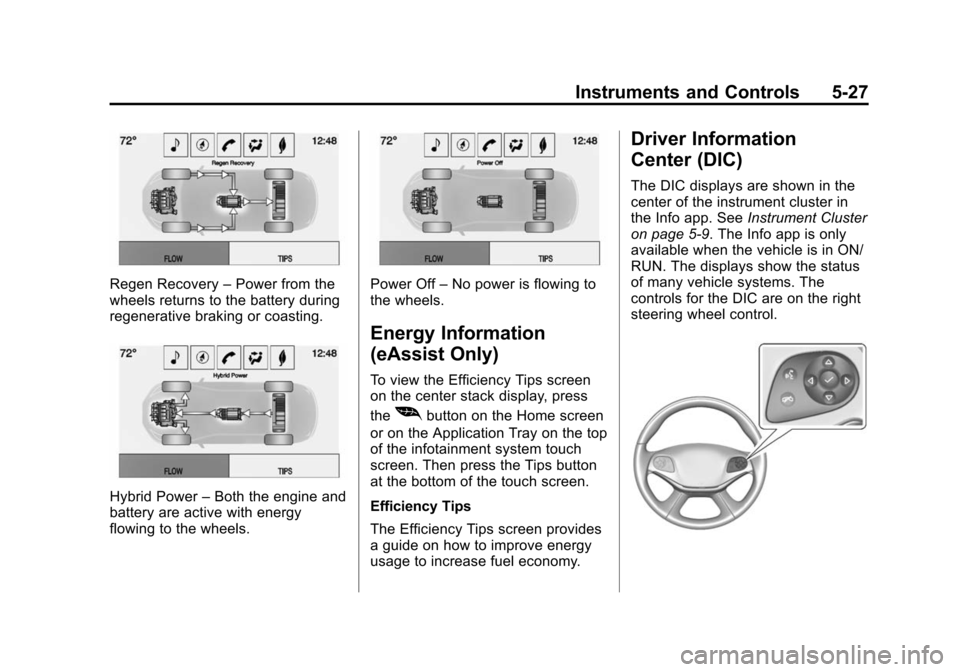
Regen Recovery–Power from the
wheels returns to the battery during
regenerative braking or coasting.
Hybrid Power –Both the engine and
battery are active with energy
flowing to the wheels.
Power Off –No power is flowing to
the wheels.
Energy Information
(eAssist Only)
To view the Efficiency Tips screen
on the center stack display, press
the
[button on the Home screen
or on the Application Tray on the top
of the infotainment system touch
screen. Then press the Tips button
at the bottom of the touch screen.
Efficiency Tips
The Efficiency Tips screen provides
a guide on how to improve energy
usage to increase fuel economy.
Driver Information
Center (DIC)
The DIC displays are shown in the
center of the instrument cluster in
the Info app. See Instrument Cluster
on page 5-9. The Info app is only
available when the vehicle is in ON/
RUN. The displays show the status
of many vehicle systems. The
controls for the DIC are on the right
steering wheel control.