ECO mode CHEVROLET IMPALA 2016 10.G User Guide
[x] Cancel search | Manufacturer: CHEVROLET, Model Year: 2016, Model line: IMPALA, Model: CHEVROLET IMPALA 2016 10.GPages: 377, PDF Size: 5.07 MB
Page 166 of 377
Chevrolet Impala Owner Manual (GMNA-Localizing-U.S/Canada-9086448) -
2016 - CRC - 5/20/15
Infotainment System 165
While the USB source is active, use
the icons on the screen to operate
USB function:
t(Seek Previous/Fast Reverse):
. Press to seek to the beginning of
the current or previous track.
If the track has been playing for
less than five seconds, it seeks
to the previous track. If longer
than five seconds, the current
track starts from the beginning.
. Press and hold to fast reverse
through a track. Release the
button to return to playing
speed. Elapsed time displays.
u(Seek Next/Fast Forward):
. Press to seek to the next track.
. Press and hold to fast forward
through a track. Release the
button to return to playing
speed. Elapsed time displays.
j/r(Pause/Play): Press to pause.
Press again to resume.
Z(Shuffle): PressZto play the
songs in random order. Press again
to turn off. USB Menu
Press the MENU knob to display the
USB menu and the following may
display:
Browse :
Select to display the files
and folders on the USB device.
Tone Settings : Select to adjust
Bass, Midrange, Treble, Balance,
Fade, and EQ (Equalizer). See
“Tone Settings” underAM-FM Radio
0 161.
Auto Volume : If equipped, this
feature adjusts the volume based on
the vehicle speed. Select the level
between off, low, medium-low,
medium, medium-high, and high.
Press
qBACK to go to the
previous menu.
EQ (Equalizer) Settings :
If equipped, this feature adjusts the
pre-defined EQ Modes. See “EQ
(Equalizer) Settings” inAM-FM
Radio 0161.
DSP Modes : If equipped, this
feature adjusts the DSP Modes.
See “DSP Modes” inAM-FM Radio
0 161.
Playing from an iPod®
This feature supports the following
iPod models:
.
iPod nano
®(1st, 2nd, 3rd, and
4th generation)
. iPod with video (5.0 and 5.5
generation).
. iPod classic
®(6th generation)
. iPod touch
®(1st and 2nd
generation)
There may be problems with
operation and function in the
following situations:
. When connecting an iPod on
which a more recent version of
the firmware is installed than is
supported by the infotainment
system.
. When connecting an iPod on
which firmware from other
providers is installed.
To connect and control an iPod: 1. Connect one end of the standard iPod USB cable to the
iPod's dock connector.
Page 169 of 377
Chevrolet Impala Owner Manual (GMNA-Localizing-U.S/Canada-9086448) -
2016 - CRC - 5/20/15
168 Infotainment System
Connect a 3.5 mm (1/8 in) cable
from the auxiliary device to the
auxiliary input jack.
If an auxiliary device has already
been connected, but a different
source is currently active, press the
MEDIA faceplate button repeatedly
to scroll through all of the available
audio source screens, until the AUX
source screen is shown.
Playing from the AUX Jack
An auxiliary device is played
through the audio system and
controlled through the device itself.
AUX Menu
Press the MENU knob to display the
AUX menu and the following may
display:
Tone Settings :Select to adjust
Bass, Midrange, Treble, Balance,
Fade, and EQ (Equalizer). See
“Tone Settings” underAM-FM Radio
0 161. Auto Volume :
If equipped, this
feature adjusts the volume based on
the vehicle speed. Select the level
between off, low, medium-low,
medium, medium-high, and high.
Press
qBACK to go to the
previous menu.
DSP : If equipped, this feature
adjusts the pre-defined settings.
See “DSP” inAM-FM Radio 0161.
EQ (Equalizer) : If equipped, this
feature adjusts the pre-defined
equalizer settings. See “EQ
(Equalizer)” inAM-FM Radio 0161.
Phone
Bluetooth (Overview)
Instructions for using the cell phone
may differ between infotainment
systems. For vehicles with an
uplevel radio, see the infotainment
manual.
Bluetooth-capable systems can
interact with many cell phones,
allowing:
.
Placement and receipt of calls in
a hands-free mode.
. Sharing of the cell phone’s
address book or contact list with
the vehicle.
To minimize driver distraction,
before driving, and with the vehicle
parked:
. Become familiar with the
features of the cell phone.
Organize the phone book and
contact lists clearly and delete
duplicate or rarely used entries.
If possible, program speed dial
or other shortcuts.
Page 171 of 377
Chevrolet Impala Owner Manual (GMNA-Localizing-U.S/Canada-9086448) -
2016 - CRC - 5/20/15
170 Infotainment System
Noise :The system may not
recognize voice commands if there
is too much background noise, such
as noise from open windows or loud
talking inside the vehicle.
When to Speak : A tone sounds to
indicate that the system is ready for
a voice command. Wait for the tone
and then speak.
How to Speak : Speak clearly in a
calm and natural voice.
Audio System
When using the Bluetooth system,
sound comes through the vehicle's
front audio system speakers and
overrides the audio system. Use the
Oknob during a call to change the
volume level. The system maintains
a minimum volume level.
Bluetooth Audio Quality
Turn off the Echo and Noise
cancellation feature on your phone,
if supported, for the best hands-free
performance.
See www.gm.com/bluetooth.
Other Information
The Bluetooth®word mark and
logos are owned by the Bluetooth®
SIG, Inc. and any use of such marks
by General Motors is under license.
Other trademarks and trade names
are those of their respective owners.
Bluetooth (Infotainment
Controls - Base Radio)
For information about how to
navigate the menu system using the
infotainment controls, see Overview
0 157.
Switching to Handset or
Hands-Free Mode
To switch between handset mode
and hands-free mode, use the
OnStar command, “transfer call.”
Pairing
A Bluetooth-enabled cell phone
must be paired to the Bluetooth
system and then connected to the
vehicle before it can be used. See
your cell phone manufacturer's user
guide for Bluetooth functions before
pairing the cell phone. If a Bluetooth phone is not connected, calls can
be made using OnStar Hands-Free
Calling, if available. See
OnStar
Overview 0355, if equipped.
Pairing Information
. Up to five cell phones can be
paired to the Bluetooth system.
. The pairing process is disabled
when the vehicle is moving.
. Pairing only needs to be
completed once per phone,
unless the pairing information on
the cell phone changes or the
cell phone is deleted from the
system.
. Only one paired cell phone can
be connected to the Bluetooth
system at a time.
. If multiple paired cell phones are
within range of the system, the
system connects to the first
available paired cell phone in the
order that they were newly
paired to the system. To connect
to a different paired phone, see
“Connecting to a Different
Phone” later in this section.
Page 182 of 377
Chevrolet Impala Owner Manual (GMNA-Localizing-U.S/Canada-9086448) -
2016 - CRC - 5/20/15
Climate Controls 181
Climate Controls
Climate Control Systems
Climate Control Systems . . . . . 181
Dual Automatic ClimateControl System . . . . . . . . . . . . . 184
Air Vents
Air Vents . . . . . . . . . . . . . . . . . . . . . 188
Maintenance
Passenger Compartment AirFilter . . . . . . . . . . . . . . . . . . . . . . . . 189
Service . . . . . . . . . . . . . . . . . . . . . . . 189
Climate Control Systems
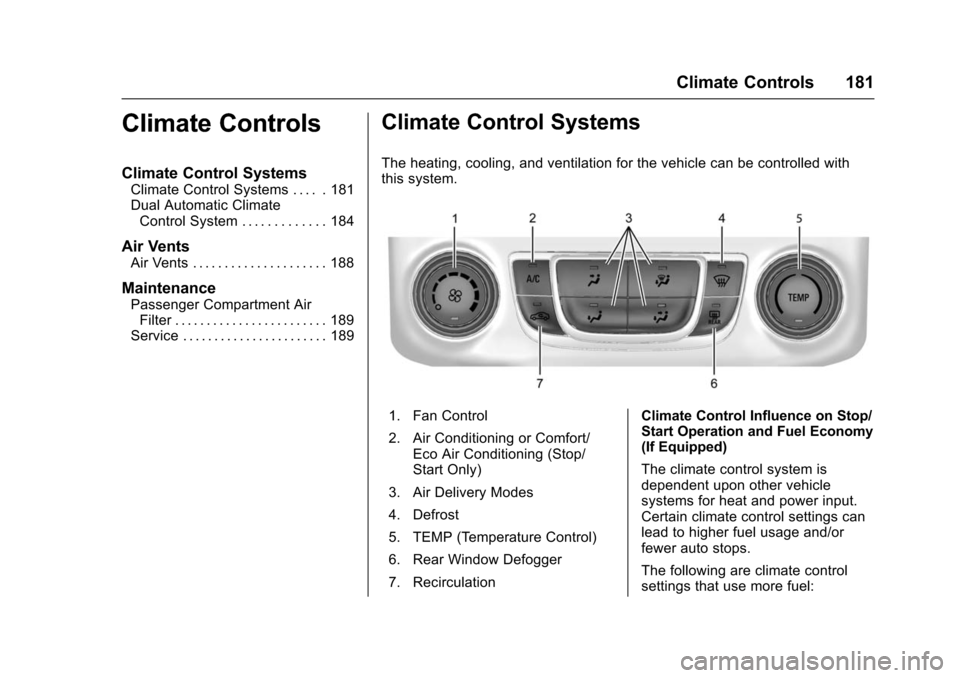
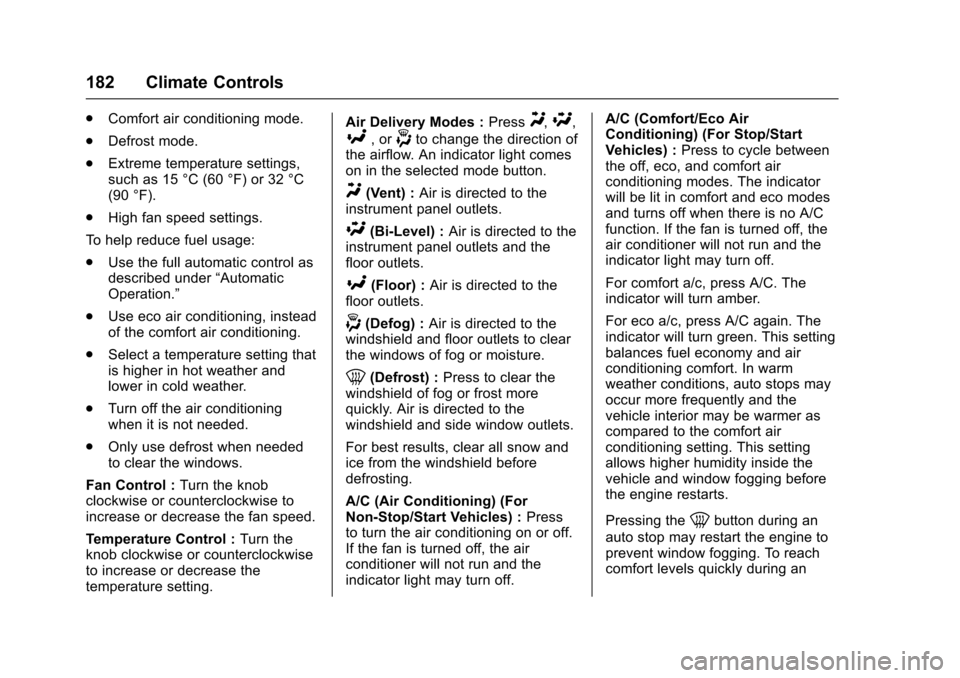
The heating, cooling, and ventilation for the vehicle can be controlled with
this system.
1. Fan Control
2. Air Conditioning or Comfort/
Eco Air Conditioning (Stop/
Start Only)
3. Air Delivery Modes
4. Defrost
5. TEMP (Temperature Control)
6. Rear Window Defogger
7. Recirculation Climate Control Influence on Stop/
Start Operation and Fuel Economy
(If Equipped)
The climate control system is
dependent upon other vehicle
systems for heat and power input.
Certain climate control settings can
lead to higher fuel usage and/or
fewer auto stops.
The following are climate control
settings that use more fuel:
Page 183 of 377
Chevrolet Impala Owner Manual (GMNA-Localizing-U.S/Canada-9086448) -
2016 - CRC - 5/20/15
182 Climate Controls
.Comfort air conditioning mode.
. Defrost mode.
. Extreme temperature settings,
such as 15 °C (60 °F) or 32 °C
(90 °F).
. High fan speed settings.
To help reduce fuel usage:
. Use the full automatic control as
described under “Automatic
Operation.”
. Use eco air conditioning, instead
of the comfort air conditioning.
. Select a temperature setting that
is higher in hot weather and
lower in cold weather.
. Turn off the air conditioning
when it is not needed.
. Only use defrost when needed
to clear the windows.
Fan Control : Turn the knob
clockwise or counterclockwise to
increase or decrease the fan speed.
Temperature Control : Turn the
knob clockwise or counterclockwise
to increase or decrease the
temperature setting. Air Delivery Modes :
PressY,\,
[, or-to change the direction of
the airflow. An indicator light comes
on in the selected mode button.
Y(Vent) : Air is directed to the
instrument panel outlets.
\(Bi-Level) : Air is directed to the
instrument panel outlets and the
floor outlets.
[(Floor) : Air is directed to the
floor outlets.
-(Defog) : Air is directed to the
windshield and floor outlets to clear
the windows of fog or moisture.
0(Defrost) : Press to clear the
windshield of fog or frost more
quickly. Air is directed to the
windshield and side window outlets.
For best results, clear all snow and
ice from the windshield before
defrosting.
A/C (Air Conditioning) (For
Non-Stop/Start Vehicles) : Press
to turn the air conditioning on or off.
If the fan is turned off, the air
conditioner will not run and the
indicator light may turn off. A/C (Comfort/Eco Air
Conditioning) (For Stop/Start
Vehicles) :
Press to cycle between
the off, eco, and comfort air
conditioning modes. The indicator
will be lit in comfort and eco modes
and turns off when there is no A/C
function. If the fan is turned off, the
air conditioner will not run and the
indicator light may turn off.
For comfort a/c, press A/C. The
indicator will turn amber.
For eco a/c, press A/C again. The
indicator will turn green. This setting
balances fuel economy and air
conditioning comfort. In warm
weather conditions, auto stops may
occur more frequently and the
vehicle interior may be warmer as
compared to the comfort air
conditioning setting. This setting
allows higher humidity inside the
vehicle and window fogging before
the engine restarts.
Pressing the
0button during an
auto stop may restart the engine to
prevent window fogging. To reach
comfort levels quickly during an
Page 185 of 377
Chevrolet Impala Owner Manual (GMNA-Localizing-U.S/Canada-9086448) -
2016 - CRC - 5/20/15
184 Climate Controls
Dual Automatic Climate Control System
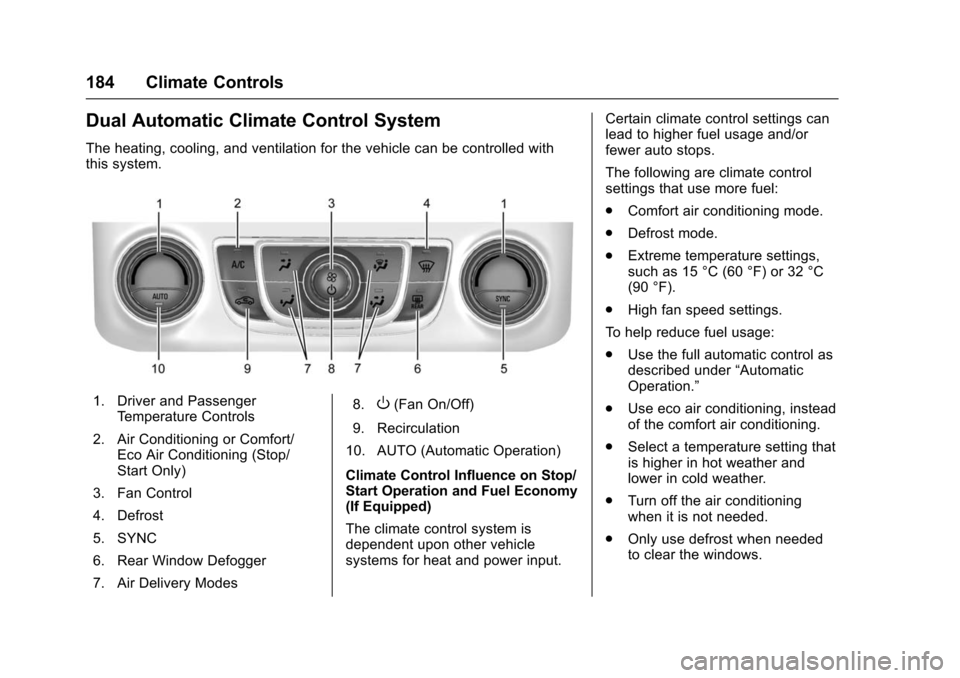
The heating, cooling, and ventilation for the vehicle can be controlled with
this system.
1. Driver and PassengerTemperature Controls
2. Air Conditioning or Comfort/ Eco Air Conditioning (Stop/
Start Only)
3. Fan Control
4. Defrost
5. SYNC
6. Rear Window Defogger
7. Air Delivery Modes 8.O(Fan On/Off)
9. Recirculation
10. AUTO (Automatic Operation)
Climate Control Influence on Stop/
Start Operation and Fuel Economy
(If Equipped)
The climate control system is
dependent upon other vehicle
systems for heat and power input. Certain climate control settings can
lead to higher fuel usage and/or
fewer auto stops.
The following are climate control
settings that use more fuel:
.
Comfort air conditioning mode.
. Defrost mode.
. Extreme temperature settings,
such as 15 °C (60 °F) or 32 °C
(90 °F).
. High fan speed settings.
To help reduce fuel usage:
. Use the full automatic control as
described under “Automatic
Operation.”
. Use eco air conditioning, instead
of the comfort air conditioning.
. Select a temperature setting that
is higher in hot weather and
lower in cold weather.
. Turn off the air conditioning
when it is not needed.
. Only use defrost when needed
to clear the windows.
Page 187 of 377
Chevrolet Impala Owner Manual (GMNA-Localizing-U.S/Canada-9086448) -
2016 - CRC - 5/20/15
186 Climate Controls
For best results, clear all snow and
ice from the windshield before
defrosting.
A/C (Air Conditioning) (For
Non-Stop/Start Vehicles) :Press
to turn the air conditioning on or off.
If the fan is turned off, the air
conditioner will not run and the
indicator light may turn off.
Press AUTO to return to automatic
operation and the air conditioner
runs as needed. When the indicator
light is on, the air conditioner runs
automatically to cool the air inside
the vehicle or to dry the air as
needed to defog the windshield
faster.
A/C (Comfort/Eco Air
Conditioning) (For Stop/Start
Vehicles) : Press to cycle between
the off, eco, and comfort air
conditioning modes. The indicator
will be lit in comfort and eco modes
and turns off when there is no A/C
function. If the fan is turned off, the
air conditioner will not run and the
indicator light may turn off. Press AUTO to return to automatic
operation and the air conditioner
runs automatically as needed. When
the indicator light is on, the air
conditioner runs automatically to
cool the air inside the vehicle or to
dry the air as needed to defog the
windshield faster.
For comfort a/c, press A/C. The
indicator will turn amber.
For eco a/c, press A/C again. The
indicator will turn green. This setting
balances fuel economy and air
conditioning comfort. In warm
weather conditions, auto stops may
occur more frequently and the
vehicle interior may be warmer as
compared to the comfort air
conditioning setting. This setting
allows higher humidity inside the
vehicle and window fogging before
the engine restarts.
Pressing the
0button during an
auto stop may restart the engine to
prevent window fogging. To reach
comfort levels quickly during an
auto stop, the engine will restart if
the air conditioner is off and AUTO
or A/C is selected. If temperature controls are adjusted
cooler during an auto stop, the
engine may restart to ensure that
comfort is reached.
L(Recirculation) :
Press to turn
on recirculation. An indicator light
comes on. Air is recirculated to
quickly cool the inside of the vehicle
or prevent outside air and odors
from entering.
Auto Defog : The climate control
system may have a sensor to
automatically detect high humidity
inside the vehicle. When high
humidity is detected, the climate
control system may adjust to
outside air supply and turn on the
air conditioner. The fan speed may
slightly increase to help prevent
fogging. If the climate control
system does not detect possible
window fogging, it returns to normal
operation. To turn Auto Defog off or
on, see “Climate and Air Quality”
under Vehicle Personalization
0 138.
Page 191 of 377
Chevrolet Impala Owner Manual (GMNA-Localizing-U.S/Canada-9086448) -
2016 - CRC - 5/20/15
190 Driving and Operating
Driving and
Operating
Driving Information
Distracted Driving . . . . . . . . . . . . 191
Defensive Driving . . . . . . . . . . . . . 192
Drunk Driving . . . . . . . . . . . . . . . . . 192
Control of a Vehicle . . . . . . . . . . . 192
Braking . . . . . . . . . . . . . . . . . . . . . . . 192
Steering . . . . . . . . . . . . . . . . . . . . . . 193
Off-Road Recovery . . . . . . . . . . . 193
Loss of Control . . . . . . . . . . . . . . . 194
Track Events and CompetitiveDriving . . . . . . . . . . . . . . . . . . . . . . 194
Driving on Wet Roads . . . . . . . . 195
Hill and Mountain Roads . . . . . 195
Winter Driving . . . . . . . . . . . . . . . . 196
If the Vehicle Is Stuck . . . . . . . . 197
Vehicle Load Limits . . . . . . . . . . . 198
Starting and Operating
New Vehicle Break-In . . . . . . . . . 201
Ignition Positions (Keyless Access) . . . . . . . . . . . . . . . . . . . . . 201
Ignition Positions (Key Access) . . . . . . . . . . . . . . . . . . . . . 203
Starting the Engine . . . . . . . . . . . 204
Engine Heater . . . . . . . . . . . . . . . . 207 Retained Accessory
Power (RAP) . . . . . . . . . . . . . . . . 208
Shifting Into Park . . . . . . . . . . . . . 208
Shifting out of Park . . . . . . . . . . . 209
Parking over Things That Burn . . . . . . . . . . . . . . . . . . . 210
Engine Exhaust
Engine Exhaust . . . . . . . . . . . . . . 210
Running the Vehicle WhileParked . . . . . . . . . . . . . . . . . . . . . . 210
Automatic Transmission
Automatic Transmission . . . . . . 211
Manual Mode . . . . . . . . . . . . . . . . . 212
Brakes
Antilock BrakeSystem (ABS) . . . . . . . . . . . . . . . 213
Parking Brake . . . . . . . . . . . . . . . . 214
Brake Assist . . . . . . . . . . . . . . . . . . 216
Hill Start Assist (HSA) . . . . . . . . 216
Ride Control Systems
Traction Control/Electronic Stability Control . . . . . . . . . . . . . 216
Cruise Control
Cruise Control . . . . . . . . . . . . . . . . 218
Adaptive Cruise Control . . . . . . 220
Driver Assistance Systems
Driver Assistance Systems . . . 227 Assistance Systems for
Parking or Backing . . . . . . . . . . 228
Assistance Systems for Driving . . . . . . . . . . . . . . . . . . . . . . 230
Forward Collision Alert (FCA)
System . . . . . . . . . . . . . . . . . . . . . . 230
Front Automatic Braking (FAB) System . . . . . . . . . . . . . . . . . . . . . . 232
Side Blind Zone Alert (SBZA) . . . . . . . . . . . . . . . . 233
Lane Change Alert (LCA) . . . . . 233
Lane Departure Warning (LDW) . . . . . . . . . . . . . 235
Fuel
Fuel . . . . . . . . . . . . . . . . . . . . . . . . . . 237
California FuelRequirements . . . . . . . . . . . . . . . 238
Fuels in Foreign Countries . . . 238
Fuel Additives . . . . . . . . . . . . . . . . 238
E85 or FlexFuel . . . . . . . . . . . . . . 239
Filling the Tank . . . . . . . . . . . . . . . 239
Filling a Portable Fuel Container . . . . . . . . . . . . . . . . . . . 241
Towing
General TowingInformation . . . . . . . . . . . . . . . . . . 242
Driving Characteristics and
Towing Tips . . . . . . . . . . . . . . . . . 242
Trailer Towing (Bi-Fuel) . . . . . . . 244
Page 203 of 377
Chevrolet Impala Owner Manual (GMNA-Localizing-U.S/Canada-9086448) -
2016 - CRC - 5/20/15
202 Driving and Operating
Pressing the button cycles it through
three modes: ACC/ACCESSORY,
ON/RUN/START, and Stopping the
Engine/OFF.
The transmitter must be in the
vehicle for the system to operate.
If the pushbutton start is not
working, the vehicle may be near a
strong radio antenna signal causing
interference to the Keyless Access
system. SeeRemote Keyless Entry
(RKE) System Operation 030.
To shift out of P (Park), the vehicle
must be in ACC/ACCESSORY or
ON/RUN and the brake pedal must
be applied.
Stopping the Engine/LOCK/
OFF (No Indicator Lights) : When
the vehicle is stopped, press the
ENGINE START/STOP button once
to turn the engine off.
If the vehicle is in P (Park), the
ignition will turn off, and Retained
Accessory Power (RAP) will remain
active. See Retained Accessory
Power (RAP) 0208. If the vehicle is not in P (Park), the
ignition will return to ACC/
ACCESSORY and display the
message SHIFT TO PARK in the
Driver Information Center (DIC).
See
Transmission Messages 0137.
When the vehicle is shifted into
P (Park), the ignition system will
switch to OFF.
Do not turn the engine off when the
vehicle is moving. This will cause a
loss of power assist in the brake
and steering systems and disable
the airbags.
If the vehicle must be shut off in an
emergency:
1. Brake using a firm and steady pressure. Do not pump the
brakes repeatedly. This may
deplete power assist, requiring
increased brake pedal force.
2. Shift the vehicle to N (Neutral). This can be done while the
vehicle is moving. After shifting
to N (Neutral), firmly apply the
brakes and steer the vehicle to
a safe location. 3. Come to a complete stop, shift
to P (Park), and turn the
ignition to OFF. On vehicles
with an automatic transmission,
the shift lever must be in
P (Park) to turn the ignition
switch to the OFF position.
4. Set the parking brake. See Parking Brake 0214.
{Warning
Turning off the vehicle while
moving may cause loss of power
assist in the brake and steering
systems and disable the airbags.
While driving, only shut the
vehicle off in an emergency.
If the vehicle cannot be pulled over,
and must be shut off while driving,
press and hold the ENGINE START/
STOP button for longer than
two seconds, or press twice in
five seconds.
ACC/ACCESSORY (Amber
Indicator Light) : This mode allows
some electrical accessories to be
used when the engine is off.
Page 204 of 377
Chevrolet Impala Owner Manual (GMNA-Localizing-U.S/Canada-9086448) -
2016 - CRC - 5/20/15
Driving and Operating 203
With the ignition off, pressing the
button one time without the brake
pedal applied will place the ignition
system in ACC/ACCESSORY.
The ignition will switch from ACC/
ACCESSORY to OFF after
five minutes to prevent battery
rundown.
ON/RUN/START (Green Indicator
Light) :This mode is for driving and
starting. With the ignition off, and
the brake pedal applied, pressing
the button once will place the
ignition system in ON/RUN/START.
Once engine cranking begins,
release the button. Engine cranking
will continue until the engine starts.
See Starting the Engine 0204. The
ignition will then remain in ON/RUN.
Service Only Mode
This power mode is available for
service and diagnostics, and to
verify the proper operation of the
malfunction indicator lamp as may
be required for emission inspection
purposes. With the vehicle off, and
the brake pedal not applied,
pressing and holding the button for
more than five seconds will place the vehicle in Service Only Mode.
The instruments and audio systems
will operate as they do in ON/RUN,
but the vehicle will not be able to be
driven. The engine will not start in
Service Only Mode. Press the
button again to turn the vehicle off.
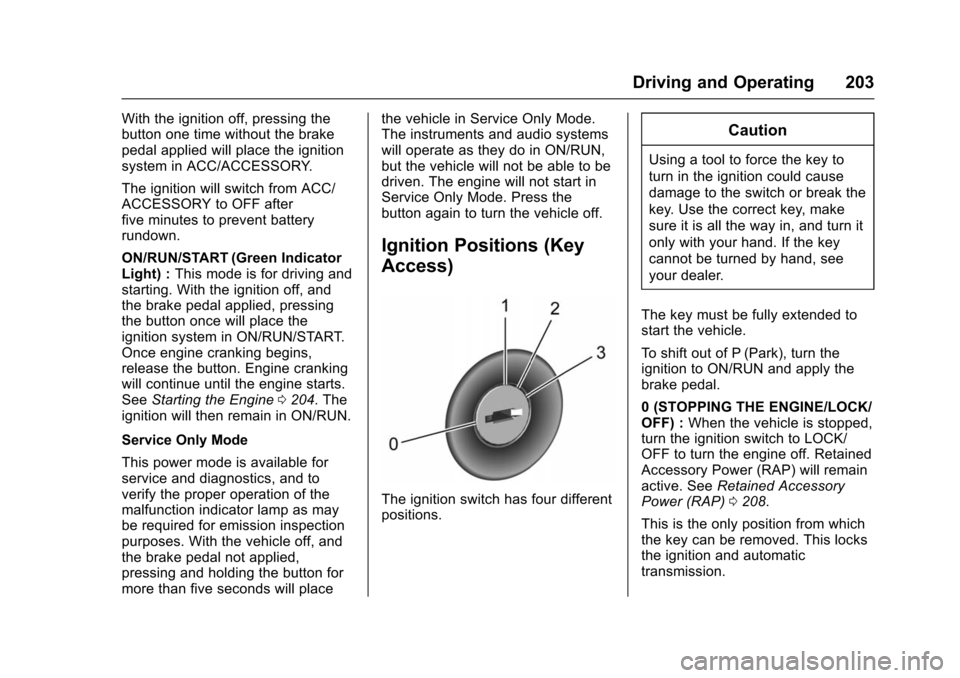
Ignition Positions (Key
Access)
The ignition switch has four different
positions.
Caution
Using a tool to force the key to
turn in the ignition could cause
damage to the switch or break the
key. Use the correct key, make
sure it is all the way in, and turn it
only with your hand. If the key
cannot be turned by hand, see
your dealer.
The key must be fully extended to
start the vehicle.
To shift out of P (Park), turn the
ignition to ON/RUN and apply the
brake pedal.
0 (STOPPING THE ENGINE/LOCK/
OFF) : When the vehicle is stopped,
turn the ignition switch to LOCK/
OFF to turn the engine off. Retained
Accessory Power (RAP) will remain
active. See Retained Accessory
Power (RAP) 0208.
This is the only position from which
the key can be removed. This locks
the ignition and automatic
transmission.