ignition CHEVROLET IMPALA 2016 10.G Owners Manual
[x] Cancel search | Manufacturer: CHEVROLET, Model Year: 2016, Model line: IMPALA, Model: CHEVROLET IMPALA 2016 10.GPages: 377, PDF Size: 5.07 MB
Page 8 of 377

Chevrolet Impala Owner Manual (GMNA-Localizing-U.S/Canada-9086448) -
2016 - CRC - 5/20/15
In Brief 7
1.Instrument Panel Illumination
Control 0151.
2. Air Vents 0188.
3. Trunk Release. See Trunk
0 41.
Parking Assist Button. See
Assistance Systems for
Parking or Backing 0228 (If
Equipped).
Lane Departure Warning
(LDW) Button. See Lane
Departure Warning (LDW)
0 235.
4. Turn Signal Lever. See Turn
and Lane-Change Signals
0 151.
5. Instrument Cluster 0112.
Driver Information Center (DIC)
0 127.
6. Windshield Wiper/Washer
0106.
7. Hazard Warning Flashers
0150.
8. Light Sensor. See Automatic
Headlamp System 0150. 9. Storage Area with USB Port
Inside (If Equipped). See
Instrument Panel Storage 099
and USB Port 0164.
10. Infotainment 0155.
11. Climate Control Systems
0181.
Dual Automatic Climate Control
System 0184.
12. Storage Area with Accessory Power Outlet Inside. See
Center Console Storage 0100
and Power Outlets 0108.
13. Heated and Ventilated Front
Seats 060 (If Equipped).
14. Traction Control/Electronic
Stability Control 0216.
15. Shift Lever. See Automatic
Transmission 0211.
16. Ignition Positions (Keyless
Access) 0201 orIgnition
Positions (Key Access) 0203.
17. Steering Wheel Controls 0105.
Driver Information Center
Buttons. See Driver Information
Center (DIC) 0127. 18.
Steering Wheel Controls 0105
(Out of View).
19. Horn 0105.
20. Steering Wheel Adjustment
0104.
21. Cruise Control 0218 (If
Equipped).
Adaptive Cruise Control 0220
(If Equipped).
Heated Steering Wheel 0105
(If Equipped).
Forward Collision Alert (FCA)
System 0230 (If Equipped).
22. Instrument Panel Storage 099
(If Equipped).
Fuse Cover. See Instrument
Panel Fuse Block 0280.
23. Hood Release. See Hood
0 250.
24. Data Link Connector (Out of View). See Malfunction
Indicator Lamp (Check Engine
Light) 0120.
25. Electric Parking Brake. See Parking Brake 0214.
Page 9 of 377
Chevrolet Impala Owner Manual (GMNA-Localizing-U.S/Canada-9086448) -
2016 - CRC - 5/20/15
8 In Brief
Initial Drive
Information
This section provides a brief
overview about some of the
important features that may or may
not be on your specific vehicle.
For more detailed information, refer
to each of the features which can be
found later in this owner manual.
Stop/Start System
The vehicle may have a fuel saving
stop/start system to shut off the
engine and help conserve fuel.
When the brakes are applied and
the vehicle is at a complete stop,
the engine may turn off. When the
brake pedal is released or the
accelerator pedal pushed, the
engine will restart.
SeeStarting the Engine 0204.
Remote Keyless Entry
(RKE) System
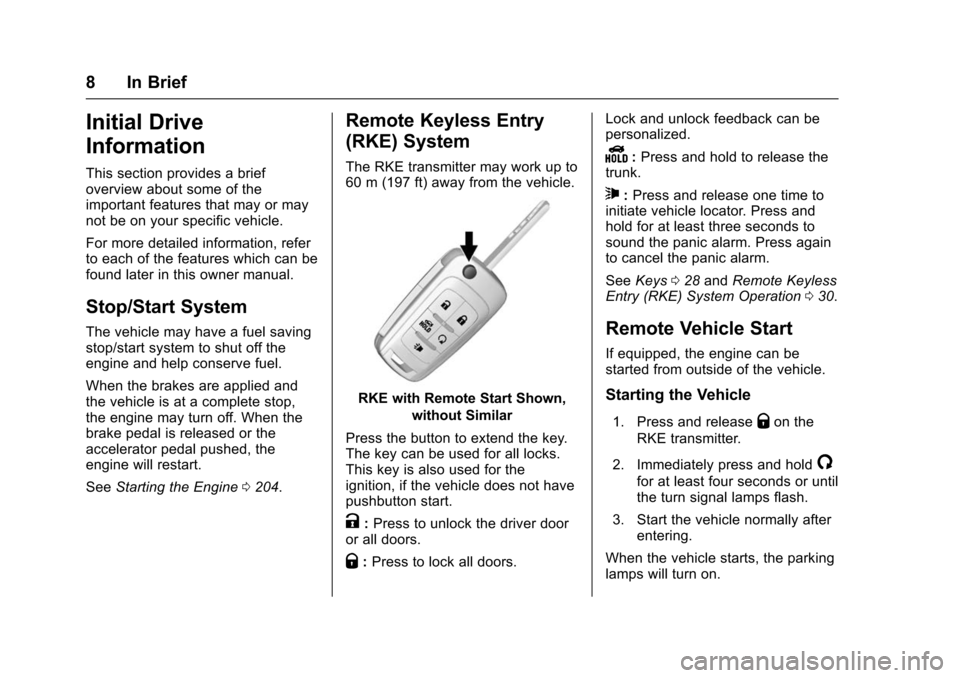
The RKE transmitter may work up to
60 m (197 ft) away from the vehicle.
RKE with Remote Start Shown,
without Similar
Press the button to extend the key.
The key can be used for all locks.
This key is also used for the
ignition, if the vehicle does not have
pushbutton start.
K: Press to unlock the driver door
or all doors.
Q: Press to lock all doors. Lock and unlock feedback can be
personalized.
Y:
Press and hold to release the
trunk.
7: Press and release one time to
initiate vehicle locator. Press and
hold for at least three seconds to
sound the panic alarm. Press again
to cancel the panic alarm.
See Keys 028 and Remote Keyless
Entry (RKE) System Operation 030.
Remote Vehicle Start
If equipped, the engine can be
started from outside of the vehicle.
Starting the Vehicle
1. Press and releaseQon the
RKE transmitter.
2. Immediately press and hold
/
for at least four seconds or until
the turn signal lamps flash.
3. Start the vehicle normally after entering.
When the vehicle starts, the parking
lamps will turn on.
Page 11 of 377
Chevrolet Impala Owner Manual (GMNA-Localizing-U.S/Canada-9086448) -
2016 - CRC - 5/20/15
10 In Brief
Trunk
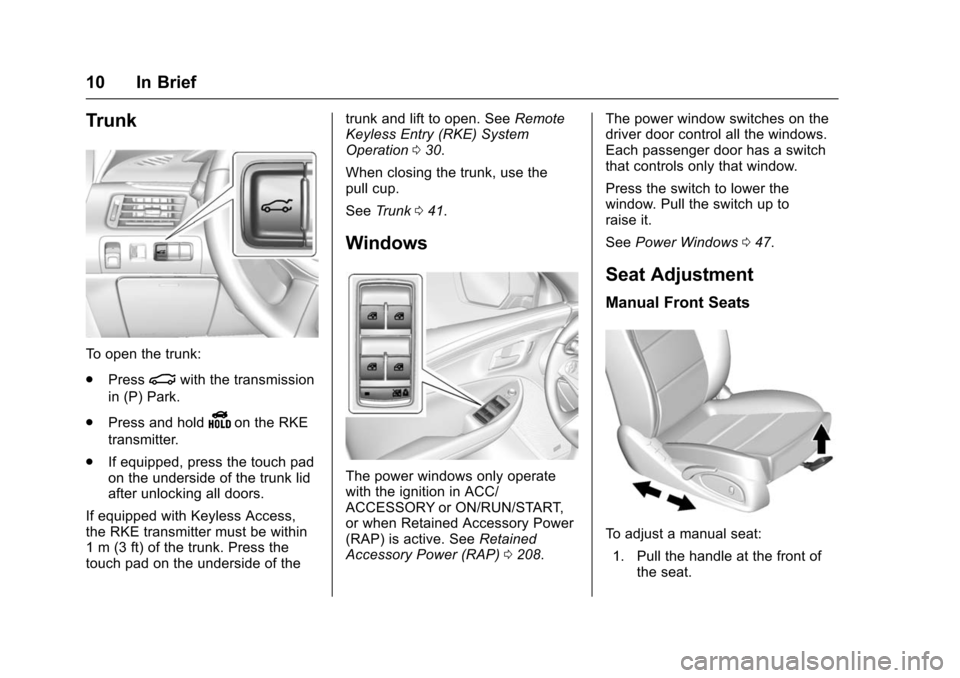
To open the trunk:
.Press
|with the transmission
in (P) Park.
. Press and hold
Yon the RKE
transmitter.
. If equipped, press the touch pad
on the underside of the trunk lid
after unlocking all doors.
If equipped with Keyless Access,
the RKE transmitter must be within
1 m (3 ft) of the trunk. Press the
touch pad on the underside of the trunk and lift to open. See
Remote
Keyless Entry (RKE) System
Operation 030.
When closing the trunk, use the
pull cup.
See Trunk 041.
Windows
The power windows only operate
with the ignition in ACC/
ACCESSORY or ON/RUN/START,
or when Retained Accessory Power
(RAP) is active. See Retained
Accessory Power (RAP) 0208. The power window switches on the
driver door control all the windows.
Each passenger door has a switch
that controls only that window.
Press the switch to lower the
window. Pull the switch up to
raise it.
See
Power Windows 047.
Seat Adjustment
Manual Front Seats
To adjust a manual seat:
1. Pull the handle at the front of the seat.
Page 14 of 377
Chevrolet Impala Owner Manual (GMNA-Localizing-U.S/Canada-9086448) -
2016 - CRC - 5/20/15
In Brief 13
Second Row Seats
The rear seatbacks can be folded
down to increase cargo space.
SeeRear Seats 061.
Heated and Ventilated
Seats
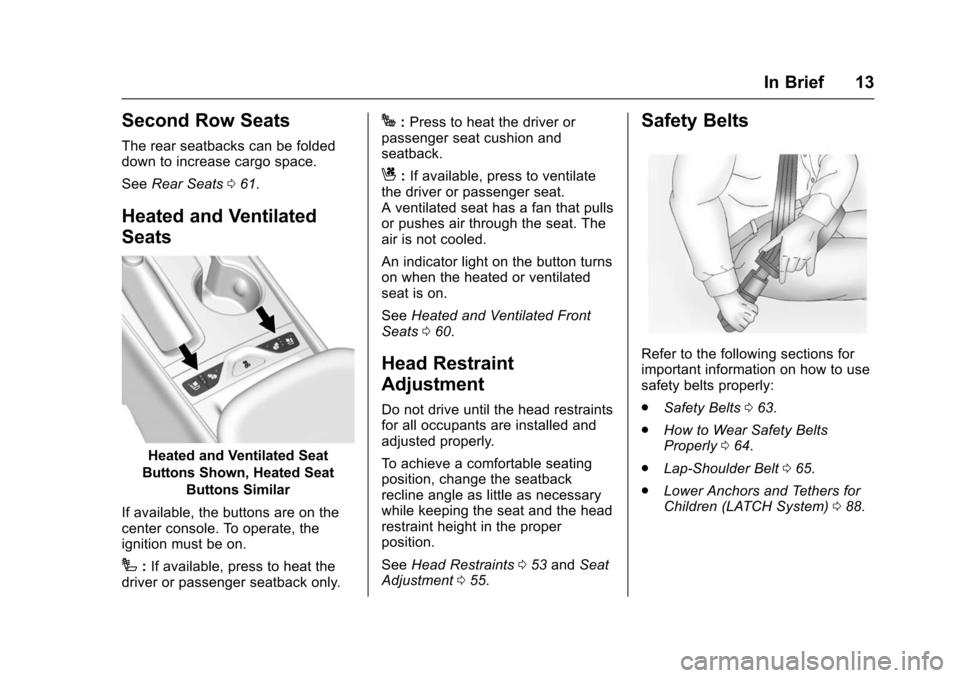
Heated and Ventilated Seat
Buttons Shown, Heated Seat
Buttons Similar
If available, the buttons are on the
center console. To operate, the
ignition must be on.
I: If available, press to heat the
driver or passenger seatback only.
J: Press to heat the driver or
passenger seat cushion and
seatback.
C: If available, press to ventilate
the driver or passenger seat.
A ventilated seat has a fan that pulls
or pushes air through the seat. The
air is not cooled.
An indicator light on the button turns
on when the heated or ventilated
seat is on.
See Heated and Ventilated Front
Seats 060.
Head Restraint
Adjustment
Do not drive until the head restraints
for all occupants are installed and
adjusted properly.
To achieve a comfortable seating
position, change the seatback
recline angle as little as necessary
while keeping the seat and the head
restraint height in the proper
position.
See Head Restraints 053 and Seat
Adjustment 055.
Safety Belts
Refer to the following sections for
important information on how to use
safety belts properly:
.
Safety Belts 063.
. How to Wear Safety Belts
Properly 064.
. Lap-Shoulder Belt 065.
. Lower Anchors and Tethers for
Children (LATCH System) 088.
Page 18 of 377
Chevrolet Impala Owner Manual (GMNA-Localizing-U.S/Canada-9086448) -
2016 - CRC - 5/20/15
In Brief 17
See:
.Exterior Lamp Controls 0148
Windshield Wiper/Washer
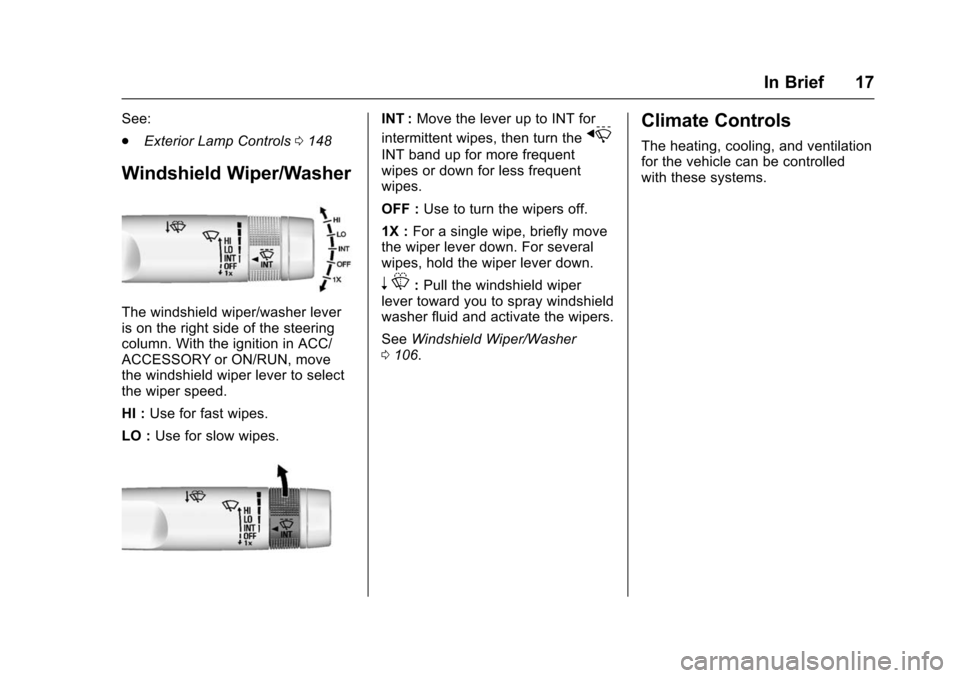
The windshield wiper/washer lever
is on the right side of the steering
column. With the ignition in ACC/
ACCESSORY or ON/RUN, move
the windshield wiper lever to select
the wiper speed.
HI : Use for fast wipes.
LO : Use for slow wipes.
INT : Move the lever up to INT for
intermittent wipes, then turn the
x
INT band up for more frequent
wipes or down for less frequent
wipes.
OFF : Use to turn the wipers off.
1X : For a single wipe, briefly move
the wiper lever down. For several
wipes, hold the wiper lever down.
n L: Pull the windshield wiper
lever toward you to spray windshield
washer fluid and activate the wipers.
See Windshield Wiper/Washer
0 106.
Climate Controls
The heating, cooling, and ventilation
for the vehicle can be controlled
with these systems.
Page 25 of 377
Chevrolet Impala Owner Manual (GMNA-Localizing-U.S/Canada-9086448) -
2016 - CRC - 5/20/15
24 In Brief
avoiding objects while in
R (Reverse). It operates at speeds
less than 8 km/h (5 mph). RPA may
display a warning triangle on the
Rear Vision Camera screen and/or
a graphic on the instrument cluster
to provide the object distance. In
addition, multiple beeps may occur
if very close to an object.
SeeAssistance Systems for Parking
or Backing 0228.
Power Outlets
The accessory power outlets can be
used to plug in electrical equipment,
such as a cell phone or MP3 player.
The vehicle has three accessory
power outlets:
.
Inside the front storage area
below the climate control
system.
. Inside the center console.
. On the rear of the center
console.
Lift the cover to access the
accessory power outlet.
See Power Outlets 0108.
Universal Remote System
This system provides a way to
replace up to three remote control
transmitters used to activate
devices such as garage door
openers, security systems, and
home automation devices.
Read the instructions completely
before attempting to program the
Universal Remote system. Because
of the steps involved, it may be
helpful to have another person
available to assist with programming
the Universal Remote system.
See Universal Remote System
0 144.
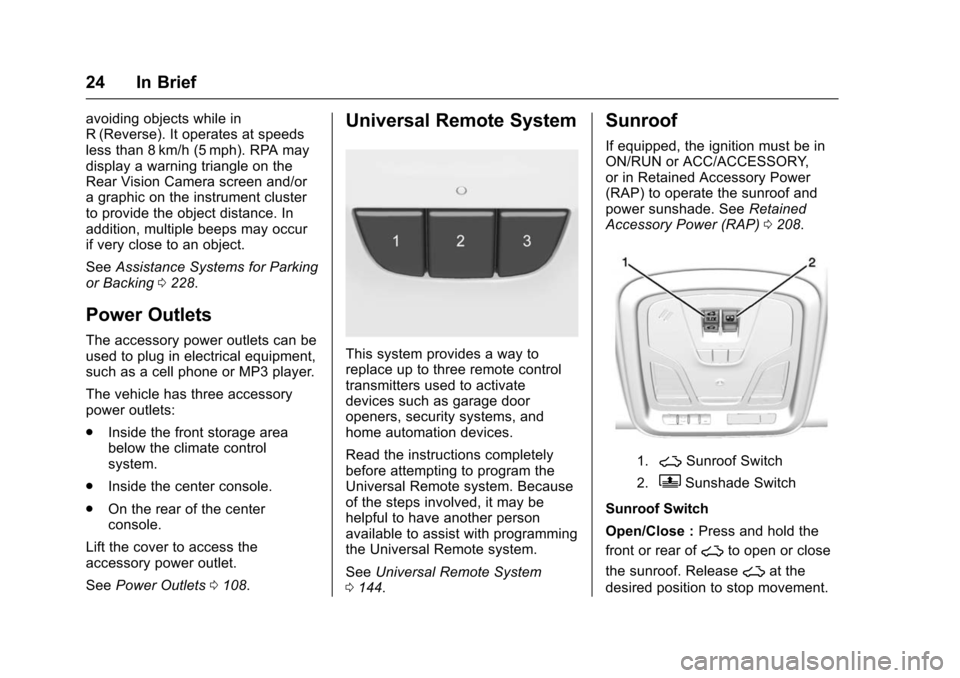
Sunroof
If equipped, the ignition must be in
ON/RUN or ACC/ACCESSORY,
or in Retained Accessory Power
(RAP) to operate the sunroof and
power sunshade. See Retained
Accessory Power (RAP) 0208.
1.~Sunroof Switch
2.QSunshade Switch
Sunroof Switch
Open/Close : Press and hold the
front or rear of
~to open or close
the sunroof. Release
~at the
desired position to stop movement.
Page 27 of 377
Chevrolet Impala Owner Manual (GMNA-Localizing-U.S/Canada-9086448) -
2016 - CRC - 5/20/15
26 In Brief
The low tire pressure warning light
may come on in cool weather when
the vehicle is first started, and then
turn off as the vehicle is driven. This
may be an early indicator that the
tire pressures are getting low and
the tires need to be inflated to the
proper pressure.
The TPMS does not replace normal
monthly tire maintenance. Maintain
the correct tire pressures.
SeeTire Pressure Monitor System
0 292.
Engine Oil Life System
The engine oil life system calculates
engine oil life based on vehicle use
and displays the CHANGE ENGINE
OIL SOON message when it is time
to change the engine oil and filter.
The oil life system should be reset
to 100% only following an oil
change.
Resetting the Oil Life System
1. Using the DIC controls on the right side of the steering wheel,
display REMAINING OIL LIFE
on the DIC. See Driver Information Center (DIC)
0127.
When remaining oil life is low,
the CHANGE ENGINE OIL
SOON message will appear on
the display. See Engine Oil
Messages 0132.
2. Press
Von the DIC controls
and hold down for a few
seconds to clear the CHANGE
ENGINE OIL SOON message
and reset the oil life at 100%.
Be careful not to reset the oil
life display accidentally at any
time other than after the oil is
changed. It cannot be reset
accurately until the next oil
change.
The oil life system can also be reset
as follows: 1. Turn the ignition on with the engine off.
2. Fully press and release the accelerator pedal three times
within five seconds.
If the CHANGE ENGINE OIL
SOON message is not on, the
system is reset. See
Engine Oil Life System 0257.
E85 or FlexFuel
Vehicles with a yellow fuel cap can
use either unleaded gasoline or
ethanol fuel containing up to 85%
ethanol (E85). See E85 or FlexFuel
0 239. For all other vehicles, use
only the unleaded gasoline
described under Fuel0237.
Driving for Better Fuel
Economy
Driving habits can affect fuel
mileage. Here are some driving tips
to get the best fuel economy
possible.
.
Avoid fast starts and accelerate
smoothly.
. Brake gradually and avoid
abrupt stops.
. Avoid idling the engine for long
periods of time.
. When road and weather
conditions are appropriate, use
cruise control.
Page 29 of 377
Chevrolet Impala Owner Manual (GMNA-Localizing-U.S/Canada-9086448) -
2016 - CRC - 5/20/15
28 Keys, Doors, and Windows
Keys, Doors, and
Windows
Keys and Locks
Keys . . . . . . . . . . . . . . . . . . . . . . . . . . . 28
Remote Keyless Entry (RKE)System . . . . . . . . . . . . . . . . . . . . . . . 30
Remote Keyless Entry (RKE) System Operation . . . . . . . . . . . . 30
Remote Vehicle Start . . . . . . . . . . 35
Door Locks . . . . . . . . . . . . . . . . . . . . 37
Power Door Locks . . . . . . . . . . . . . 39
Delayed Locking . . . . . . . . . . . . . . . 39
Automatic Door Locks . . . . . . . . . 39
Lockout Protection . . . . . . . . . . . . . 40
Safety Locks . . . . . . . . . . . . . . . . . . . 40
Doors
Trunk . . . . . . . . . . . . . . . . . . . . . . . . . . 41
Vehicle Security
Vehicle Security . . . . . . . . . . . . . . . . 42
Vehicle Alarm System . . . . . . . . . 42
Immobilizer . . . . . . . . . . . . . . . . . . . . 43
Immobilizer Operation (Key Access) . . . . . . . . . . . . . . . . . . . . . . 43
Immobilizer Operation (Keyless Access) . . . . . . . . . . . . . . . . . . . . . . 44
Exterior Mirrors
Convex Mirrors . . . . . . . . . . . . . . . . 45
Power Mirrors . . . . . . . . . . . . . . . . . . 45
Folding Mirrors . . . . . . . . . . . . . . . . . 46
Heated Mirrors . . . . . . . . . . . . . . . . . 46
Reverse Tilt Mirrors . . . . . . . . . . . . 46
Interior Mirrors
Interior Rearview Mirrors . . . . . . . 47
Manual Rearview Mirror . . . . . . . . 47
Automatic Dimming RearviewMirror . . . . . . . . . . . . . . . . . . . . . . . . . 47
Windows
Windows . . . . . . . . . . . . . . . . . . . . . . . 47
Power Windows . . . . . . . . . . . . . . . 47
Sun Visors . . . . . . . . . . . . . . . . . . . . . 49
Roof
Sunroof . . . . . . . . . . . . . . . . . . . . . . . . 50
Keys and Locks
Keys
{Warning
Leaving children in a vehicle with
an ignition key or Remote
Keyless Entry (RKE) transmitter is
dangerous and children or others
could be seriously injured or
killed. They could operate the
power window or other controls or
make the vehicle move. The
windows will function with the key
in the ignition or with the RKE
transmitter in the vehicle, and
children or others could be caught
in the path of a closing window.
Do not leave children in a vehicle
with the ignition key or an RKE
transmitter.
Page 30 of 377
Chevrolet Impala Owner Manual (GMNA-Localizing-U.S/Canada-9086448) -
2016 - CRC - 5/20/15
Keys, Doors, and Windows 29
{Warning
If the key is unintentionally
rotated while the vehicle is
running, the ignition could be
moved out of the RUN position.
This could be caused by heavy
items hanging from the key ring,
or by large or long items attached
to the key ring that could be
contacted by the driver or
steering wheel. If the ignition
moves out of the RUN position,
the engine will shut off, braking
and steering power assist may be(Continued)
Warning (Continued)
impacted, and airbags may not
deploy. To reduce the risk of
unintentional rotation of the
ignition key, do not change the
way the ignition key and Remote
Keyless Entry (RKE) transmitter,
if equipped, are connected to the
provided key rings.
If the vehicle is equipped with a
keyed ignition, the ignition key, key
rings, and RKE transmitter,
if equipped, are designed to work
together. As a system, it reduces
the risk of unintentionally moving
the key out of the RUN position.
If replacements or additions are
required, see your dealer. Limit
added items to a few essential keys
or small, light items no larger than
an RKE transmitter.
The key that is part of the Remote
Keyless Entry (RKE) transmitter can
be used for the ignition and all locks
if the vehicle is a Key Access vehicle. If the vehicle has the
keyless ignition, the key can be
used for the locks.
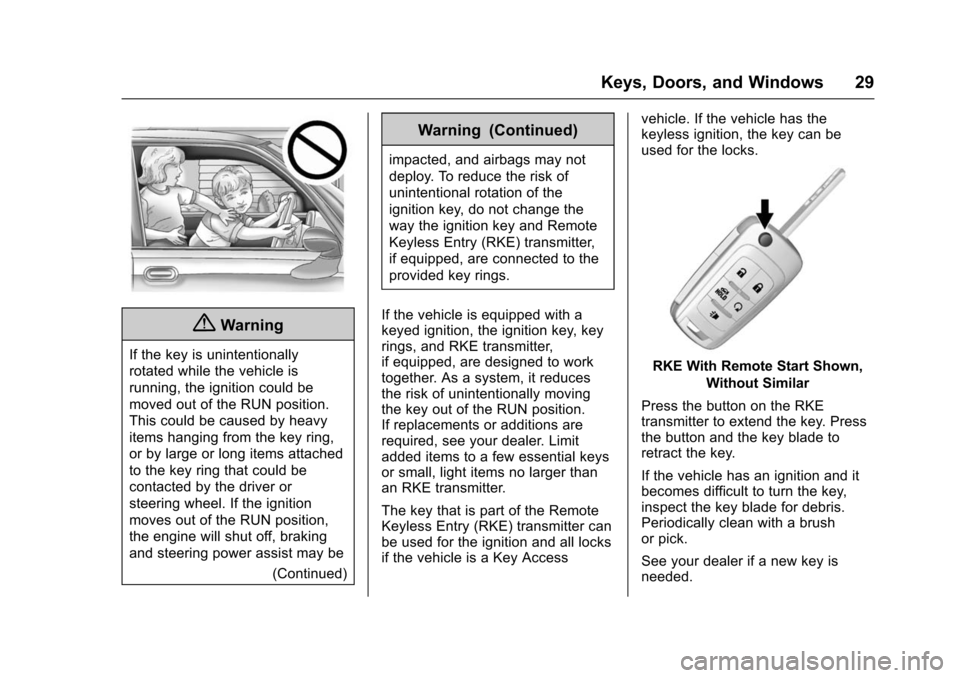
RKE With Remote Start Shown,
Without Similar
Press the button on the RKE
transmitter to extend the key. Press
the button and the key blade to
retract the key.
If the vehicle has an ignition and it
becomes difficult to turn the key,
inspect the key blade for debris.
Periodically clean with a brush
or pick.
See your dealer if a new key is
needed.
Page 32 of 377
Chevrolet Impala Owner Manual (GMNA-Localizing-U.S/Canada-9086448) -
2016 - CRC - 5/20/15
Keys, Doors, and Windows 31
7(Vehicle Locator/Panic
Alarm) : Press and release one
time to initiate vehicle locator. The
exterior lamps flash and the horn
chirps three times.
Press and hold
7for at least
three seconds to sound the panic
alarm. The horn sounds and the
turn signals flash for about
30 seconds until
7is pressed again
or the vehicle is started.
/(Remote Vehicle Start) :
If equipped, press
Qand release
and then immediately press and
hold
/for at least four seconds to
start the engine from outside the
vehicle using the RKE transmitter.
See Remote Vehicle Start 035.
If equipped with a keyed ignition,
the RKE transmitter buttons will not
operate when the key is in the
ignition.
Keyless Access Operation
Some vehicles have the Keyless
Access system that lets you lock
and unlock the doors and access
the trunk without removing the RKE transmitter from your pocket, purse,
briefcase, etc. The RKE transmitter
must be within 1 m (3 ft) of the door
being unlocked. If the vehicle has
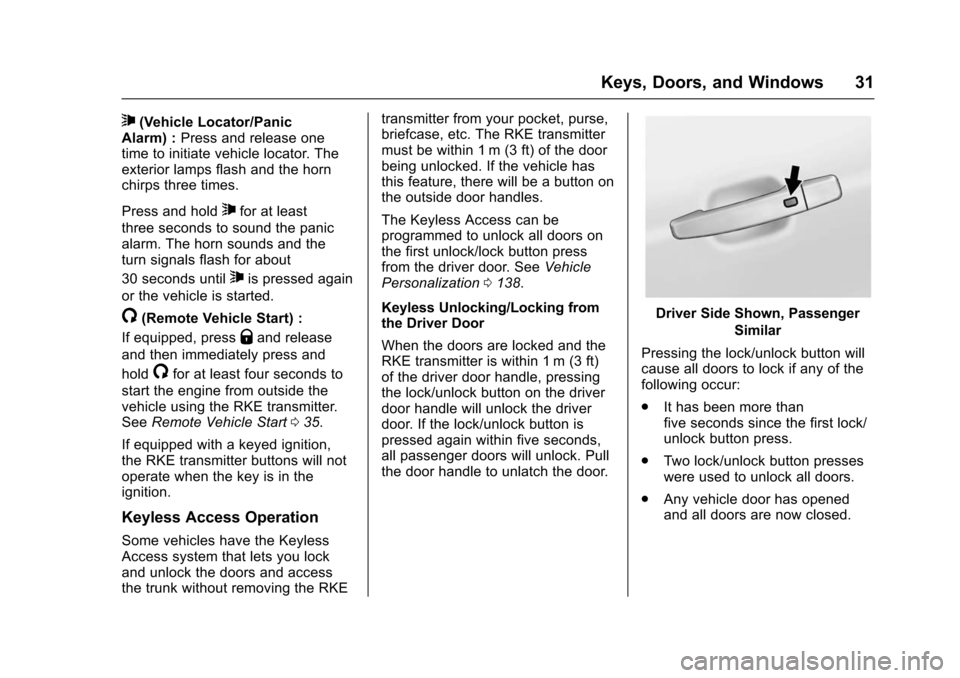
this feature, there will be a button on
the outside door handles.
The Keyless Access can be
programmed to unlock all doors on
the first unlock/lock button press
from the driver door. See
Vehicle
Personalization 0138.
Keyless Unlocking/Locking from
the Driver Door
When the doors are locked and the
RKE transmitter is within 1 m (3 ft)
of the driver door handle, pressing
the lock/unlock button on the driver
door handle will unlock the driver
door. If the lock/unlock button is
pressed again within five seconds,
all passenger doors will unlock. Pull
the door handle to unlatch the door.
Driver Side Shown, Passenger Similar
Pressing the lock/unlock button will
cause all doors to lock if any of the
following occur:
. It has been more than
five seconds since the first lock/
unlock button press.
. Two lock/unlock button presses
were used to unlock all doors.
. Any vehicle door has opened
and all doors are now closed.