center console CHEVROLET IMPALA 2017 10.G User Guide
[x] Cancel search | Manufacturer: CHEVROLET, Model Year: 2017, Model line: IMPALA, Model: CHEVROLET IMPALA 2017 10.GPages: 378, PDF Size: 6.09 MB
Page 102 of 378
Chevrolet Impala Owner Manual (GMNA-Localizing-U.S./Canada-9921197) -
2017 - crc - 3/30/16
Storage 101
The storage area cannot be
operated with
Pwhen valet mode
is enabled. See “Valet Mode”under
“Setting Radio Preferences” in
Home Page 0159.
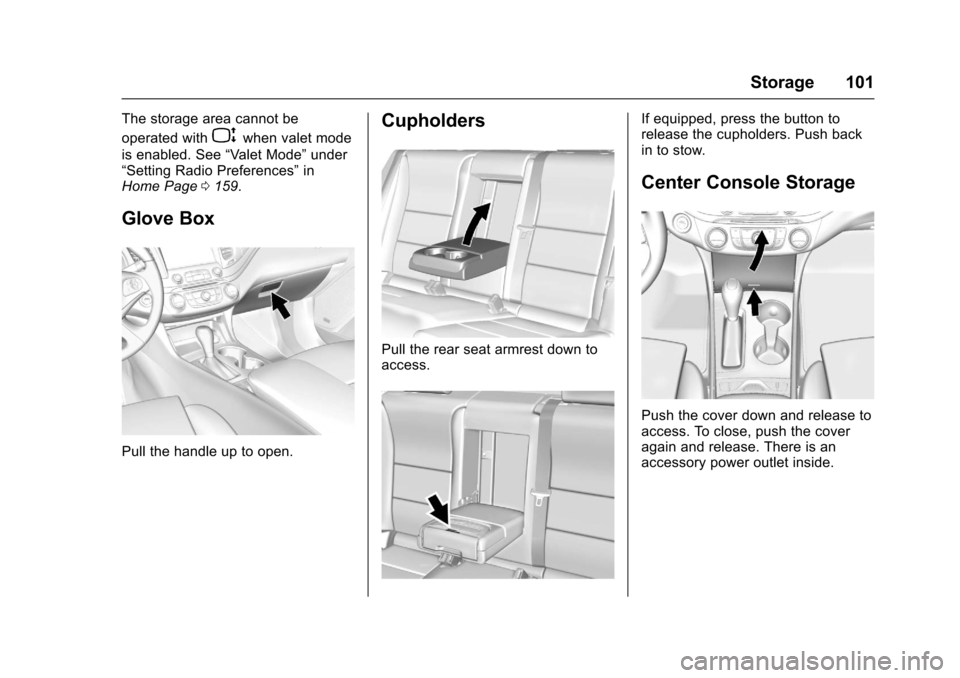
Glove Box
Pull the handle up to open.
Cupholders
Pull the rear seat armrest down to
access.
If equipped, press the button to
release the cupholders. Push back
in to stow.
Center Console Storage
Push the cover down and release to
access. To close, push the cover
again and release. There is an
accessory power outlet inside.
Page 103 of 378
Chevrolet Impala Owner Manual (GMNA-Localizing-U.S./Canada-9921197) -
2017 - crc - 3/30/16
102 Storage
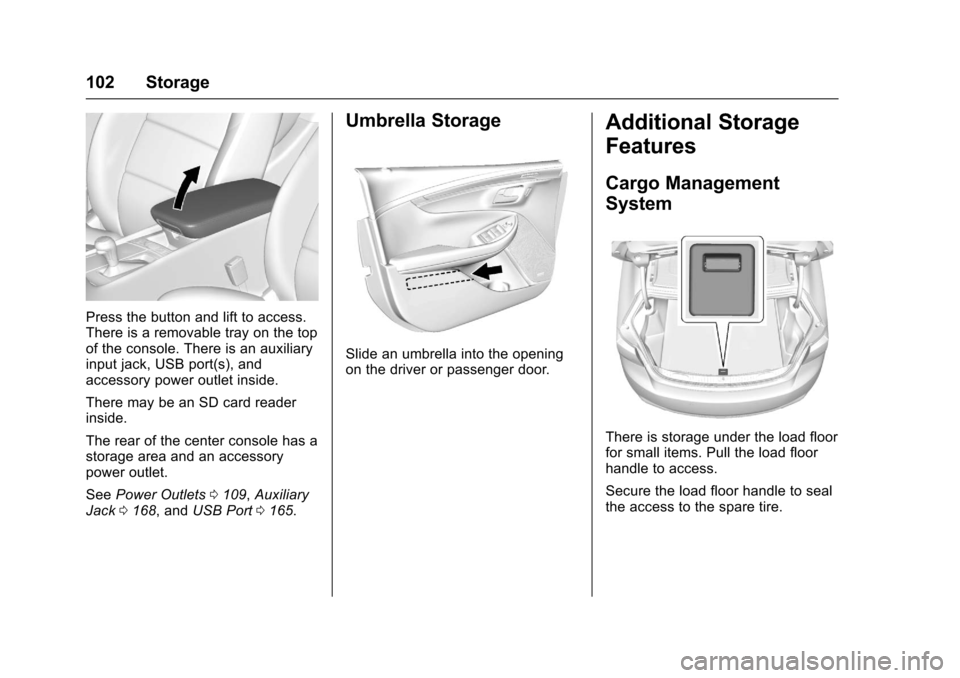
Press the button and lift to access.
There is a removable tray on the top
of the console. There is an auxiliary
input jack, USB port(s), and
accessory power outlet inside.
There may be an SD card reader
inside.
The rear of the center console has a
storage area and an accessory
power outlet.
SeePower Outlets 0109, Auxiliary
Jack 0168, and USB Port 0165.
Umbrella Storage
Slide an umbrella into the opening
on the driver or passenger door.
Additional Storage
Features
Cargo Management
System
There is storage under the load floor
for small items. Pull the load floor
handle to access.
Secure the load floor handle to seal
the access to the spare tire.
Page 110 of 378
Chevrolet Impala Owner Manual (GMNA-Localizing-U.S./Canada-9921197) -
2017 - crc - 3/30/16
Instruments and Controls 109
Clock (Uplevel Radio)
Setting the Time and Date
To set the time or date:1. Select Settings from the Home Page, then select Time and
Date Settings.
2. Select the desired function.
To set the time or date, press
«or
ªto change the hour, minutes,
AM, or PM.
To change the 12-24Hr setting,
press the 12-24Hr button.
To turn Auto Set on and off, press
the Auto Set screen button.
Auto Set requires an OnStar
subscription.
If Auto Set is on, the time displayed
on the clock may not update
immediately when driving into a new
time zone.
Press
qBACK to go to the last
menu and save the changes or
{to
return to the Home Page.
Power Outlets
Power Outlets 12 Volt Direct
Current
The accessory power outlets can be
used to plug in electrical equipment,
such as a cell phone or MP3 player.
There are three accessory power
outlets:
. Inside the front storage area
below the climate control
system.
. Inside the center console.
. On the rear of the center
console.
The outlet is powered when the
ignition is in ON/RUN or ACC/
ACCESSORY, or until the driver
door is opened within 10 minutes of
turning off the vehicle. See Retained
Accessory Power (RAP) 0209.
Open the protective cover to use the
accessory power outlet.
Certain electrical accessories may
not be compatible with the
accessory power outlets and could overload vehicle or adapter fuses.
If there is a problem, see your
dealer.
When adding electrical equipment,
be sure to follow the installation
instructions included with the
equipment. See
Add-On Electrical
Equipment 0247.
Caution
Hanging heavy equipment from
the power outlet can cause
damage not covered by the
vehicle warranty. The power
outlets are designed for
accessory power plugs only, such
as cell phone charge cords.
Always unplug electrical equipment
when not in use and do not plug in
equipment that exceeds the
maximum 20 amps rating.
Page 111 of 378
Chevrolet Impala Owner Manual (GMNA-Localizing-U.S./Canada-9921197) -
2017 - crc - 3/30/16
110 Instruments and Controls
Power Outlet 110/120 Volt
Alternating Current
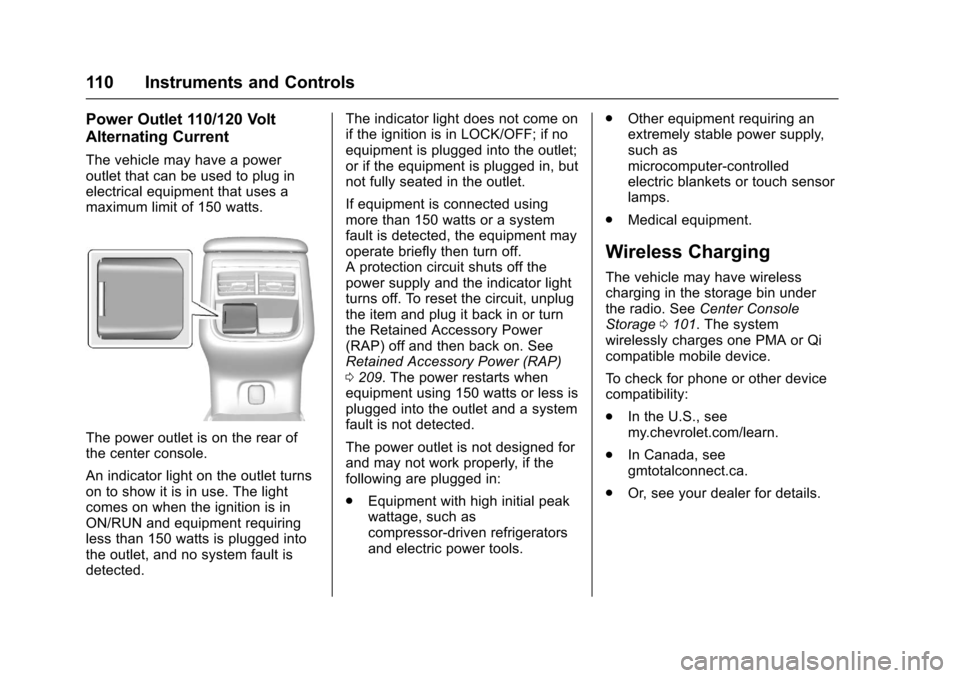
The vehicle may have a power
outlet that can be used to plug in
electrical equipment that uses a
maximum limit of 150 watts.
The power outlet is on the rear of
the center console.
An indicator light on the outlet turns
on to show it is in use. The light
comes on when the ignition is in
ON/RUN and equipment requiring
less than 150 watts is plugged into
the outlet, and no system fault is
detected.The indicator light does not come on
if the ignition is in LOCK/OFF; if no
equipment is plugged into the outlet;
or if the equipment is plugged in, but
not fully seated in the outlet.
If equipment is connected using
more than 150 watts or a system
fault is detected, the equipment may
operate briefly then turn off.
A protection circuit shuts off the
power supply and the indicator light
turns off. To reset the circuit, unplug
the item and plug it back in or turn
the Retained Accessory Power
(RAP) off and then back on. See
Retained Accessory Power (RAP)
0
209. The power restarts when
equipment using 150 watts or less is
plugged into the outlet and a system
fault is not detected.
The power outlet is not designed for
and may not work properly, if the
following are plugged in:
. Equipment with high initial peak
wattage, such as
compressor-driven refrigerators
and electric power tools. .
Other equipment requiring an
extremely stable power supply,
such as
microcomputer-controlled
electric blankets or touch sensor
lamps.
. Medical equipment.
Wireless Charging
The vehicle may have wireless
charging in the storage bin under
the radio. See Center Console
Storage 0101. The system
wirelessly charges one PMA or Qi
compatible mobile device.
To check for phone or other device
compatibility:
. In the U.S., see
my.chevrolet.com/learn.
. In Canada, see
gmtotalconnect.ca.
. Or, see your dealer for details.
Page 120 of 378
Chevrolet Impala Owner Manual (GMNA-Localizing-U.S./Canada-9921197) -
2017 - crc - 3/30/16
Instruments and Controls 119
grocery bag, laptop, or other
electronic device. To turn off the
reminder light and/or chime, remove
the object from the seat or buckle
the safety belt.
Airbag Readiness Light
This light shows if there is an
electrical problem with the airbag
system. The system check includes
the airbag sensor(s), the passenger
sensing system, the pretensioners,
the airbag modules, the wiring, and
the crash sensing and diagnostic
module. For more information on the
airbag system, seeAirbag
System 069.
The airbag readiness light comes on
for several seconds when the
vehicle is started. If the light does
not come on then, have it fixed
immediately.
{Warning
If the airbag readiness light stays
on after the vehicle is started or
comes on while driving, it means
the airbag system might not be
working properly. The airbags in
the vehicle might not inflate in a
crash, or they could even inflate
without a crash. To help avoid
injury, have the vehicle serviced
right away.
If there is a problem with the airbag
system, a Driver Information Center
(DIC) message may also come on.
See Airbag System
Messages 0136.
Passenger Airbag Status
Indicator
The vehicle has a passenger
sensing system. See Passenger
Sensing System 075 for important
safety information. The passenger
airbag status indicator is in the
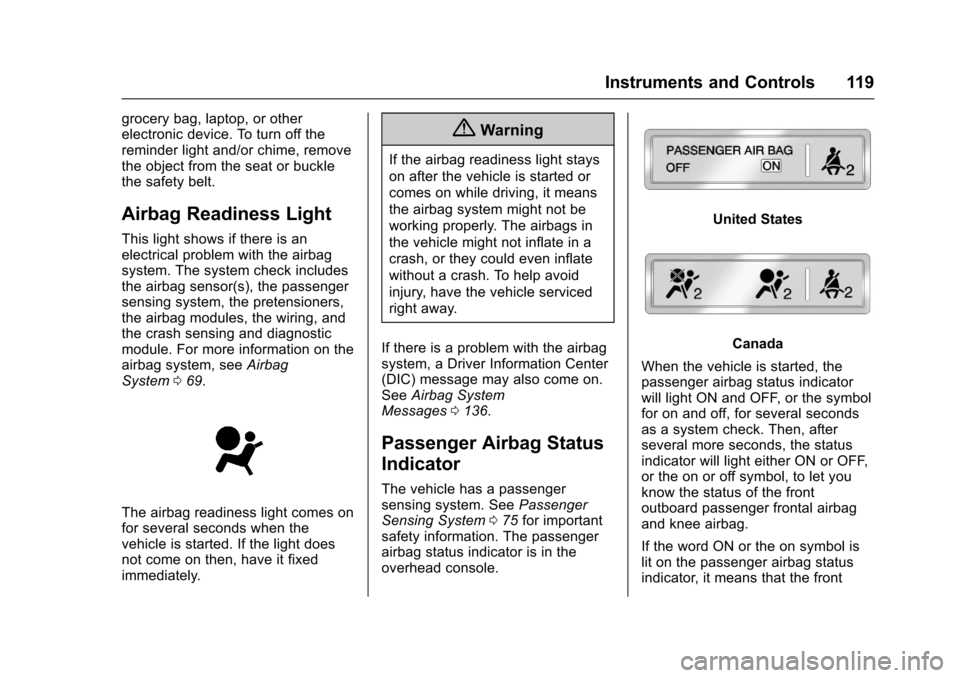
overhead console.
United States
Canada
When the vehicle is started, the
passenger airbag status indicator
will light ON and OFF, or the symbol
for on and off, for several seconds
as a system check. Then, after
several more seconds, the status
indicator will light either ON or OFF,
or the on or off symbol, to let you
know the status of the front
outboard passenger frontal airbag
and knee airbag.
If the word ON or the on symbol is
lit on the passenger airbag status
indicator, it means that the front
Page 166 of 378
Chevrolet Impala Owner Manual (GMNA-Localizing-U.S./Canada-9921197) -
2017 - crc - 3/30/16
Infotainment System 165
in the glass. If the inside surface is
damaged, it could interfere with
radio reception. For proper radio
reception, the antenna connector
needs to be properly attached to the
post on the glass.
If attaching a cell phone antenna to
the glass, attach it between the grid
lines.
Caution
Using a razor blade or sharp
object to clear the inside rear
window can damage the rear
window antenna and/or the rear
window defogger. Repairs would
not be covered by the vehicle
warranty. Do not clear the inside
rear window with sharp objects.
Caution
Do not apply aftermarket glass
tinting with metallic film. The
metallic film in some tinting
materials will interfere with or
distort the incoming radio
reception. Any damage caused to
the backglass antenna due to
metallic tinting materials will not
be covered by the vehicle
warranty.
Multi-Band Antenna
The roof antenna is for OnStar®,
SiriusXM®Satellite Radio, and GPS
(Global Positioning System). Keep
clear of obstructions for clear
reception. If the vehicle has a
sunroof, and it is open, reception
can also be affected.
Audio Players
Avoiding Untrusted Media
Devices
When using media devices such as
CDs, DVDs, Blu-Ray Discs®, SD
cards, USB drives, and mobile
devices, consider the source.
Untrusted media devices could
contain files that affect system
operation or performance. Avoid use
if the content or origin cannot be
trusted.
USB Port
Playing from a USB
A USB mass storage device or
Media Transfer Protocol (MTP)
device can be connected to the
USB port.
If equipped, there are up to two
USB ports in the center console and
if equipped with storage behind the
radio, there is a USB port inside.
Page 168 of 378
Chevrolet Impala Owner Manual (GMNA-Localizing-U.S./Canada-9921197) -
2017 - crc - 3/30/16
Infotainment System 167
There may be problems with
operation and function in the
following situations:
.When connecting an iPod on
which a more recent version of
the firmware is installed than is
supported by the infotainment
system.
. When connecting an iPod on
which firmware from other
providers is installed.
To connect and control an iPod: 1. Connect one end of the standard iPod USB cable to the
iPod's dock connector.
2. Connect the other end to the USB port in the center console.
3. Press the MEDIA button to select the source.
iPod music information displays on
the radio’s display and begins
playing through the vehicle’s audio
system.
The iPod battery recharges
automatically while the vehicle is on.
When the vehicle is off while an
iPod is connected using the iPod USB cable, the iPod battery stops
charging and the iPod automatically
turns off.
If the iPod is an unsupported model,
it can still be listened to in the
vehicle by connecting to the
auxiliary input jack using a standard
3.5 mm (1/8 in) stereo cable.
iPod Menu
Press the MENU knob to display the
iPod Menu and the following may
display:
Browse :
Select to display the files
or songs on the iPod. See “Browse
iPod Media” later in this section.
Tone Settings : Select to adjust
Bass, Midrange, Treble, Balance,
Fade, and EQ (Equalizer). See
“Tone Settings” underAM-FM
Radio 0162.
Auto Volume : If equipped, this
feature adjusts the volume based on
the vehicle speed. Select the level
between off, low, medium-low,
medium, medium-high, and high.
Press
qBACK to go to the
previous menu. EQ (Equalizer) Settings :
If equipped, this feature adjusts the
pre-defined EQ Modes. See
“EQ
(Equalizer) Settings” inAM-FM
Radio 0162.
DSP Modes : If equipped, this
feature adjusts the DSP Modes.
See “DSP Modes” inAM-FM
Radio 0162.
Browse iPod Media
Use the following to browse:
Playlists: 1. Turn the MENU knob to highlight and press to view the
playlists stored on the iPod.
2. Turn the MENU knob to highlight and press to select a
playlist name to view a list of
all songs in the playlist.
3. Turn the MENU knob to highlight and press to select
the song from the list to begin
playback.
Artists: 1. Turn the MENU knob to highlight and press to view the
artists stored on the iPod.
Page 169 of 378
Chevrolet Impala Owner Manual (GMNA-Localizing-U.S./Canada-9921197) -
2017 - crc - 3/30/16
168 Infotainment System
2. Turn the MENU knob tohighlight and press to select an
artist name to view a list of all
albums by the artist.
3. Turn the MENU knob to highlight and press to select
the album from the list.
4. To begin playback, select a song from the album.
Albums: 1. Turn the MENU knob to highlight and press to view the
albums stored on the iPod.
2. Turn the MENU knob to highlight and press to select an
album name to view a list of all
songs on the album.
3. Turn the MENU knob to highlight and press to select
the song from the list to begin
playback.
Genres: 1. Turn the MENU knob to highlight and press to view the
genres stored on the iPod. 2. Turn the MENU knob to
highlight and press to select a
genre name to view a list of
artists of that genre.
3. Turn the MENU knob to highlight and press to select to
view albums by that artist.
4. Turn the MENU knob to highlight and press to select an
album to view songs.
5. Turn the MENU knob to highlight and press to select
the song from the list to begin
playback.
Songs: 1. Turn the MENU knob to highlight and press to view a
list of all songs stored on
the iPod.
2. Turn the MENU knob to highlight and press to select
the song from the list to begin
playback.
Playing from an iPhone®
or iPad®
This feature supports iPhone 3G,
iPhone 3GS, iPhone 4, and iPad. Follow the same instructions as
stated earlier for using an iPod.
SD Card Reader
If equipped, the SD card reader is in
the center console. See
Center
Console Storage 0101.
1. Plug the SD card into the reader.
2. Press the MEDIA button to select the SD device.
If an SD card has already been
connected, but a different source is
currently active, press the MEDIA
screen button repeatedly to cycle
through all of the available audio
source screens, until the SD card
screen is shown.
Playing Music from the SD Card
An SD card is played the same way
a USB device is played. See USB
Port 0165.
Auxiliary Jack
The AUX jack is in the center
console. See Center Console
Storage 0101.
Page 220 of 378
Chevrolet Impala Owner Manual (GMNA-Localizing-U.S./Canada-9921197) -
2017 - crc - 3/30/16
Driving and Operating 219
2. Turn the engine off and wait15 seconds.
3. Start the engine.
Drive the vehicle. If
dcomes on
and stays on, the vehicle may need
more time to diagnose the problem.
If the condition persists, see your
dealer.
Turning the Systems Off
and On
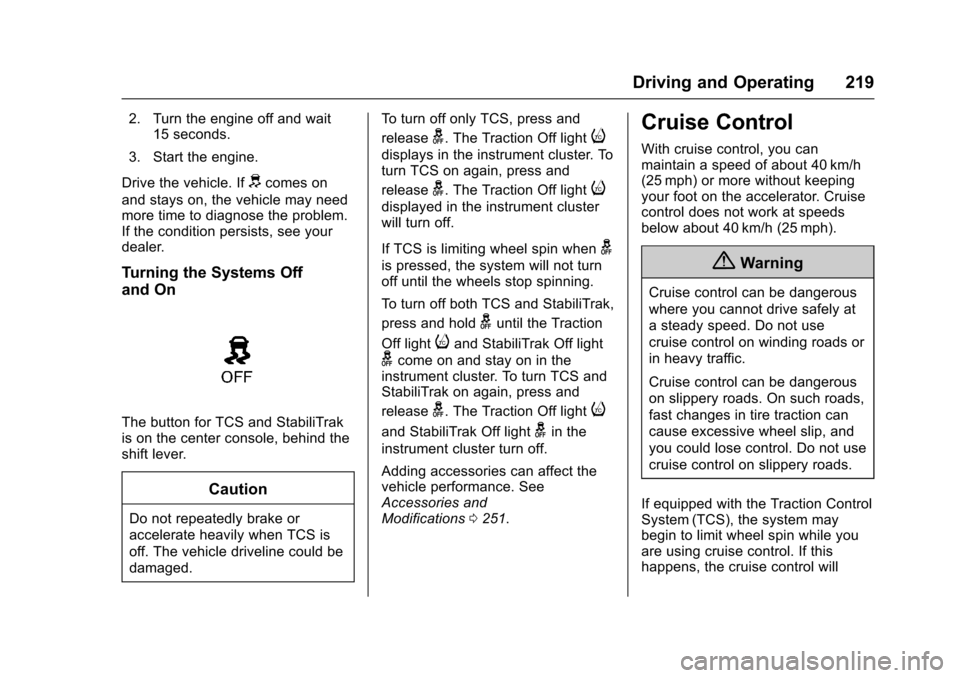
The button for TCS and StabiliTrak
is on the center console, behind the
shift lever.
Caution
Do not repeatedly brake or
accelerate heavily when TCS is
off. The vehicle driveline could be
damaged. To turn off only TCS, press and
release
g. The Traction Off lighti
displays in the instrument cluster. To
turn TCS on again, press and
release
g. The Traction Off lighti
displayed in the instrument cluster
will turn off.
If TCS is limiting wheel spin when
g
is pressed, the system will not turn
off until the wheels stop spinning.
To turn off both TCS and StabiliTrak,
press and hold
guntil the Traction
Off light
iand StabiliTrak Off light
gcome on and stay on in the
instrument cluster. To turn TCS and
StabiliTrak on again, press and
release
g. The Traction Off lighti
and StabiliTrak Off lightgin the
instrument cluster turn off.
Adding accessories can affect the
vehicle performance. See
Accessories and
Modifications 0251.
Cruise Control
With cruise control, you can
maintain a speed of about 40 km/h
(25 mph) or more without keeping
your foot on the accelerator. Cruise
control does not work at speeds
below about 40 km/h (25 mph).
{Warning
Cruise control can be dangerous
where you cannot drive safely at
a steady speed. Do not use
cruise control on winding roads or
in heavy traffic.
Cruise control can be dangerous
on slippery roads. On such roads,
fast changes in tire traction can
cause excessive wheel slip, and
you could lose control. Do not use
cruise control on slippery roads.
If equipped with the Traction Control
System (TCS), the system may
begin to limit wheel spin while you
are using cruise control. If this
happens, the cruise control will
Page 369 of 378

Chevrolet Impala Owner Manual (GMNA-Localizing-U.S./Canada-9921197) -
2017 - crc - 3/30/16
368 Index
Card ReaderSD . . . . . . . . . . . . . . . . . . . . . . . . . . . . 168
Cargo Management System . . . . . . . . . 102
Caution, Danger, and Warning . . . . 3
Center Console Storage . . . . . . . . 101
Chains, Tire . . . . . . . . . . . . . . . . . . . . 303
Charging Wireless . . . . . . . . . . . . . . . . . . . . . . .110
Charging System Light . . . . . . . . . 120
Check Ignition Transmission Lock . . . 271
Malfunction IndicatorEngine Light . . . . . . . . . . . . . . . . 120
Child Restraints Infants and Young Children . . . . . 83
Lower Anchors and Tethers
for Children . . . . . . . . . . . . . . . . . . . 88
Older Children . . . . . . . . . . . . . . . . . . 81
Securing . . . . . . . . . . . . . . . . . . . . 94, 96
Systems . . . . . . . . . . . . . . . . . . . . . . . . 85
Cleaning Exterior Care . . . . . . . . . . . . . . . . . 316
Interior Care . . . . . . . . . . . . . . . . . . 321
Climate Control Systems . . . . . . . 182
Air Conditioning . . . . . . . . . . . . . . 182
Dual Automatic . . . . . . . . . . . . . . . 185
Heating . . . . . . . . . . . . . . . . . . . . . . . 182 Clock . . . . . . . . . . . . . . . . . . . . . . 108, 109
Cluster, Instrument . . . . . . . . . . . . . 113
Collision Damage Repair . . . . . . . 349
Compact Spare Tire . . . . . . . . . . . . 310
Compartments
Storage . . . . . . . . . . . . . . . . . . . . . . . 100
Compass . . . . . . . . . . . . . . . . . . . . . . . 108
Messages . . . . . . . . . . . . . . . . . . . . 131
Connections OnStar
®. . . . . . . . . . . . . . . . . . . . . . 358
Control
Traction and ElectronicStability . . . . . . . . . . . . . . . . . . . . . 218
Control of a Vehicle . . . . . . . . . . . . . 193
Convenience Net . . . . . . . . . . . . . . . 103
Convex Mirrors . . . . . . . . . . . . . . . . . . 46
Coolant Engine . . . . . . . . . . . . . . . . . . . . . . . . 262
Engine Temperature Gauge . . .117
Cooling System . . . . . . . . . . . . . . . . . 261 Engine Messages . . . . . . . . . . . . 132
Courtesy Lamps . . . . . . . . . . . . . . . . 152
Courtesy Transportation Program . . . . . . . . . . . . . . . . . . . . . . . 348
Cruise Control . . . . . . . . . . . . . . . . . . 219
Light . . . . . . . . . . . . . . . . . . . . . . . . . . 127
Messages . . . . . . . . . . . . . . . . . . . . 131
Cruise Control, Adaptive . . . . . . . . 221 Cupholders . . . . . . . . . . . . . . . . . . . . . 101
Customer Assistance . . . . . . . . . . . 345
Offices . . . . . . . . . . . . . . . . . . . . . . . . 344
Text Telephone (TTY)Users . . . . . . . . . . . . . . . . . . . . . . . 345
Customer Information Service Publications
Ordering Information . . . . . . . . 351
Customer Satisfaction Procedure . . . . . . . . . . . . . . . . . . . . . 342
D
Damage Repair, Collision . . . . . . . 349
Danger, Warning, and Caution . . . . 3
Data CollectionInfotainment System . . . . . . . . . . 355
OnStar . . . . . . . . . . . . . . . . . . . . . . . 355
Data Recorders, Event . . . . . . . . . 354
Daytime Running Lamps (DRL) . . . . . . . . . . . . . . . . . . 150
Defensive Driving . . . . . . . . . . . . . . . 193
Delayed Locking . . . . . . . . . . . . . . . . . 40
Diagnostics
OnStar
®. . . . . . . . . . . . . . . . . . . . . . 360
Distracted Driving . . . . . . . . . . . . . . . 192
Dome Lamps . . . . . . . . . . . . . . . . . . . 153
Door Ajar Light . . . . . . . . . . . . . . . . . . . . . 127
Ajar Messages . . . . . . . . . . . . . . . 132