seats CHEVROLET IMPALA 2018 Repair Manual
[x] Cancel search | Manufacturer: CHEVROLET, Model Year: 2018, Model line: IMPALA, Model: CHEVROLET IMPALA 2018Pages: 345, PDF Size: 5.81 MB
Page 99 of 345
Chevrolet Impala Owner Manual (GMNA-Localizing-U.S./Canada-11348316) -
2018 - CRC - 8/22/17
98 Seats and Restraints
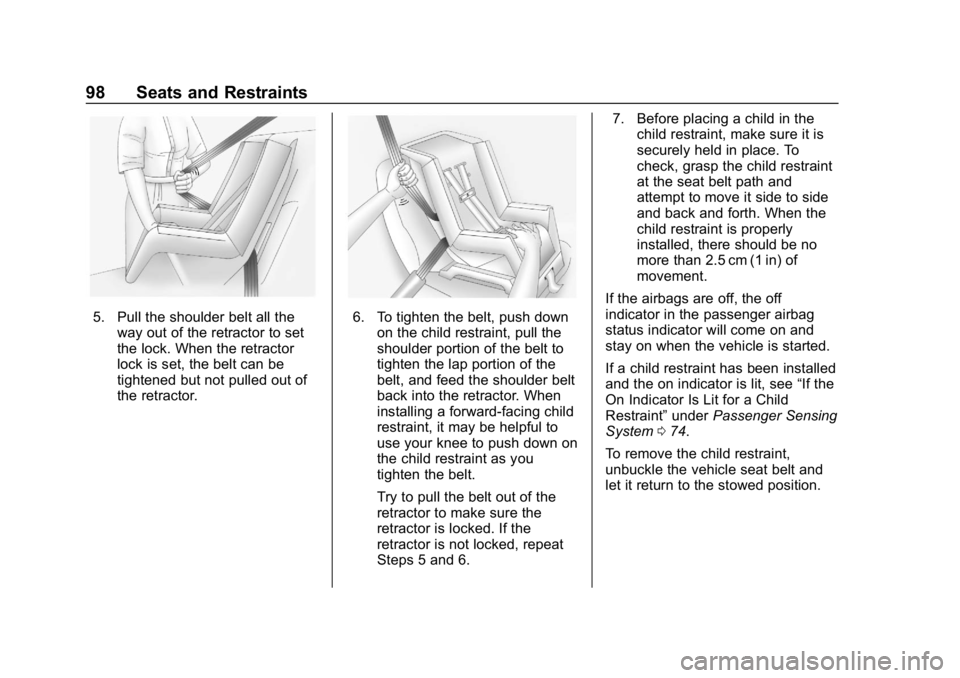
5. Pull the shoulder belt all theway out of the retractor to set
the lock. When the retractor
lock is set, the belt can be
tightened but not pulled out of
the retractor.6. To tighten the belt, push downon the child restraint, pull the
shoulder portion of the belt to
tighten the lap portion of the
belt, and feed the shoulder belt
back into the retractor. When
installing a forward-facing child
restraint, it may be helpful to
use your knee to push down on
the child restraint as you
tighten the belt.
Try to pull the belt out of the
retractor to make sure the
retractor is locked. If the
retractor is not locked, repeat
Steps 5 and 6. 7. Before placing a child in the
child restraint, make sure it is
securely held in place. To
check, grasp the child restraint
at the seat belt path and
attempt to move it side to side
and back and forth. When the
child restraint is properly
installed, there should be no
more than 2.5 cm (1 in) of
movement.
If the airbags are off, the off
indicator in the passenger airbag
status indicator will come on and
stay on when the vehicle is started.
If a child restraint has been installed
and the on indicator is lit, see “If the
On Indicator Is Lit for a Child
Restraint” underPassenger Sensing
System 074.
To remove the child restraint,
unbuckle the vehicle seat belt and
let it return to the stowed position.
Page 132 of 345
Chevrolet Impala Owner Manual (GMNA-Localizing-U.S./Canada-11348316) -
2018 - CRC - 8/22/17
Instruments and Controls 131
complete stop behind another
stopping vehicle, and then that
vehicle drives on.
Select Off or On.
SeeAdaptive Cruise Control 0184.
Lane Change Alert
This allows the feature to be turned
on or off.
Select Off or On.
See Lane Change Alert (LCA)
0 198.
Rear Cross Traffic Alert
This allows the feature to be turned
on or off.
Select Off or On.
See Driver Assistance Systems
0 192.
Comfort and Convenience
Select and the following may
display:
. Auto Memory Recall
. Easy Exit Options
. Chime Volume .
Reverse Tilt Mirror
Auto Memory Recall
This feature automatically recalls
the current driver ’s previously stored
1 or 2 positions when the ignition is
changed from off to on or ACC/
ACCESSORY. See Memory Seats
0 56.
Select Off or On.
Easy Exit Options
This feature automatically recalls
the current driver ’s previously stored
Exit button position when exiting the
vehicle. See Memory Seats 056.
Select Off or On.
Chime Volume
Select to set the chime volume
level.
Touch + or −to adjust the volume.
Reverse Tilt Mirror
When on, both the driver and
passenger, driver, or passenger
mirrors will tilt downward when the
vehicle is shifted to R (Reverse) to
improve visibility of the ground near the rear wheels. They will return to
their previous driving position when
the vehicle is shifted out of
R (Reverse) or the ignition is turned
to off.
Select Off, On - Driver and
Passenger, On - Driver, or On -
Passenger.
Lighting
Select and the following may
display:
.
Vehicle Locator Lights
. Exit Lighting
. Daytime Tail Lights
Vehicle Locator Lights
This feature will flash the exterior
lamps when
Kon the Remote
Keyless Entry (RKE) transmitter is
pressed to locate the vehicle.
Select Off or On.
Exit Lighting
This allows the selection of how
long the exterior lamps stay on
when leaving the vehicle when it is
dark outside.
Page 133 of 345
Chevrolet Impala Owner Manual (GMNA-Localizing-U.S./Canada-11348316) -
2018 - CRC - 8/22/17
132 Instruments and Controls
Select Off, 30 Seconds, 60 Seconds,
or 120 Seconds.
Daytime Tail Lights
This feature allows the taillamps to
be on during the day.
Select Off or On.
Power Door Locks
Select and the following may
display:
.Unlocked Door Anti-Lockout
. Auto Door Unlock
. Delayed Door Lock
Unlocked Door Anti Lock Out
When on, this feature will keep the
driver door from locking when the
door is open. If Off is selected, the
Delayed Door Lock menu will be
available.
Select Off or On.
Auto Door Unlock
This allows selection of which of the
doors will automatically unlock when
the vehicle is shifted into P (Park). Select Off, All Doors, or Driver Door.
Delayed Door Lock
When on, this feature will delay the
locking of the doors. To override the
delay, press the power door lock
switch on the door.
Select Off or On.
Remote Lock, Unlock, Start
Select and the following may
display:
.
Remote Unlock Light Feedback
. Remote Lock Feedback
. Remote Door Unlock
. Remote Start Auto Cool Seats
. Remote Start Auto Heat Seats
. Passive Door Unlock
. Passive Door Lock
. Remote Left in Vehicle Alert
Remote Unlock Light Feedback
When on, the exterior lamps will
flash when unlocking the vehicle
with the RKE transmitter.
Select Off or Flash Lights. Remote Lock Feedback
This allows selection of what type of
feedback is given when locking the
vehicle with the RKE transmitter.
Select Off, Lights and Horn, Lights
Only, or Horn Only.
Remote Door Unlock
This allows selection of which doors
will unlock when pressing
Kon the
RKE transmitter.
Select All Doors or Driver Door.
Remote Start Auto Cool Seats
If equipped and turned on, this
feature will turn the ventilated seats
on when using remote start on
warm days.
Select Off or On.
Remote Start Auto Heat Seats
If equipped and turned on, this
feature will turn the heated seats on
when using remote start on
cold days.
Select Off or On.
Page 145 of 345
Chevrolet Impala Owner Manual (GMNA-Localizing-U.S./Canada-11348316) -
2018 - CRC - 8/22/17
144 Lighting
Lighting Features
Entry Lighting
Some exterior lamps and most of
the interior lamps turn on briefly at
night or in areas with limited lighting
when the Remote Keyless Entry
(RKE) transmitter
Kbutton is
pressed. See Remote Keyless Entry
(RKE) System Operation 028. After
about 30 seconds the exterior lamps
turn off, then the dome lamps and
remaining interior lamps dim to off.
Entry lighting can be disabled
manually by turning the ignition on
or to ACC/ACCESSORY, or by
pressing
Qon the RKE transmitter.
This feature can be changed. See
Vehicle Personalization 0128.
Exit Lighting
Some exterior lamps and interior
lights come on at night, or in areas
with limited lighting, when the driver
door is opened after the ignition is
turned off. The dome lamp comes
on after the ignition is turned off. The exterior lamps and dome lamp
remain on for a set amount of time,
then automatically turn off.
The exterior lamps turn off
immediately by turning the exterior
lamp control off.
This feature can be changed. See
Vehicle Personalization
0128.
Battery Load
Management
The vehicle has Electric Power
Management (EPM) that estimates
the battery's temperature and state
of charge. It then adjusts the voltage
for best performance and extended
life of the battery.
When the battery's state of charge
is low, the voltage is raised slightly
to quickly bring the charge back up.
When the state of charge is high,
the voltage is lowered slightly to
prevent overcharging. If the vehicle
has a voltmeter gauge or a voltage
display on the Driver Information
Center (DIC), you may see the voltage move up or down. This is
normal. If there is a problem, an
alert will be displayed.
The battery can be discharged at
idle if the electrical loads are very
high. This is true for all vehicles.
This is because the generator
(alternator) may not be spinning fast
enough at idle to produce all of the
power needed for very high
electrical loads.
A high electrical load occurs when
several of the following are on, such
as: headlamps, high beams, rear
window defogger, climate control fan
at high speed, heated seats, engine
cooling fans, trailer loads, and loads
plugged into accessory power
outlets.
EPM works to prevent excessive
discharge of the battery. It does this
by balancing the generator's output
and the vehicle's electrical needs.
It can increase engine idle speed to
generate more power whenever
needed. It can temporarily reduce
the power demands of some
accessories.
Page 154 of 345
Chevrolet Impala Owner Manual (GMNA-Localizing-U.S./Canada-11348316) -
2018 - CRC - 8/22/17
Climate Controls 153
on, see“Climate and Air Quality”
under Vehicle Personalization
0 128.
Rear Window Defogger
K:Press to turn the rear window
defogger on or off. An indicator light
on the button comes on to show that
the rear window defogger is on.
The upper region of gridlines on the
rear window are antenna lines and
are not intended to heat when the
defogger is activated.
If equipped with heated outside
mirrors, they turn on with the rear
window defogger and help to clear
fog or frost from the surface of the
mirror. See Heated Mirrors 044.
Caution
Using a razor blade or sharp
object on the inside rear window
can damage the antenna or
defogger. Repairs would not be
covered by the vehicle warranty.
Do not stick anything to the rear
window. Remote Start Climate Control
Operation :
If equipped with remote
start, the climate control system
may run when the vehicle is started
remotely. The system uses the
driver ’s previous settings to heat or
cool the inside of the vehicle. The
rear defog may come on during
remote start based on cold ambient
conditions. The rear defog indicator
light may not come on during a
remote start. The front heated seats
may turn on if it is cold outside. The
heated seat indicator lights may not
come on during a remote start.
See Remote Vehicle Start 034 and
Heated and Ventilated Front Seats
0 59, if equipped.
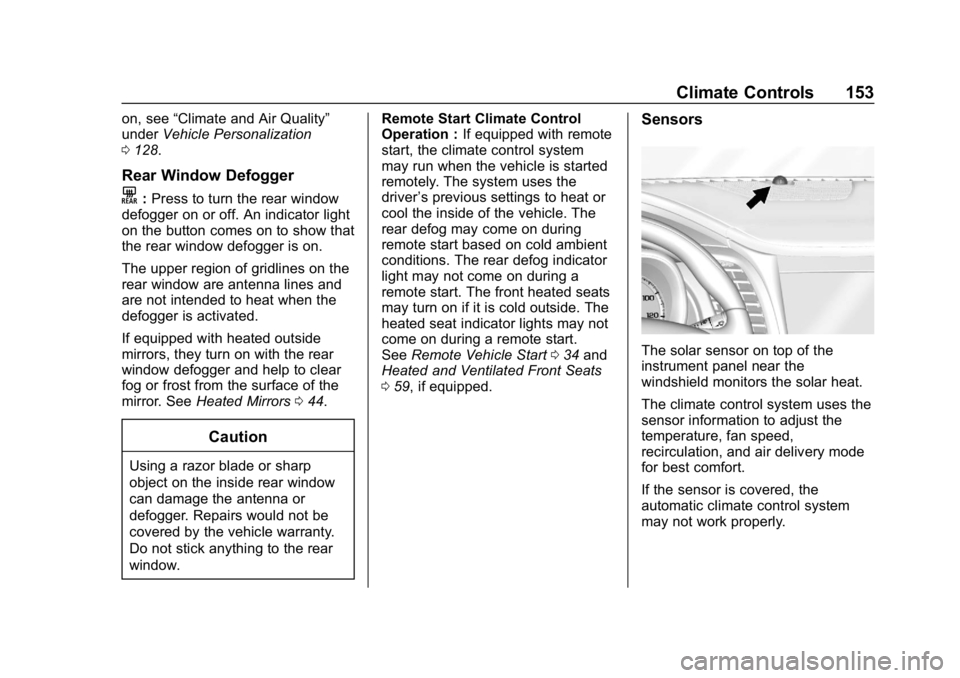
Sensors
The solar sensor on top of the
instrument panel near the
windshield monitors the solar heat.
The climate control system uses the
sensor information to adjust the
temperature, fan speed,
recirculation, and air delivery mode
for best comfort.
If the sensor is covered, the
automatic climate control system
may not work properly.
Page 155 of 345
Chevrolet Impala Owner Manual (GMNA-Localizing-U.S./Canada-11348316) -
2018 - CRC - 8/22/17
154 Climate Controls
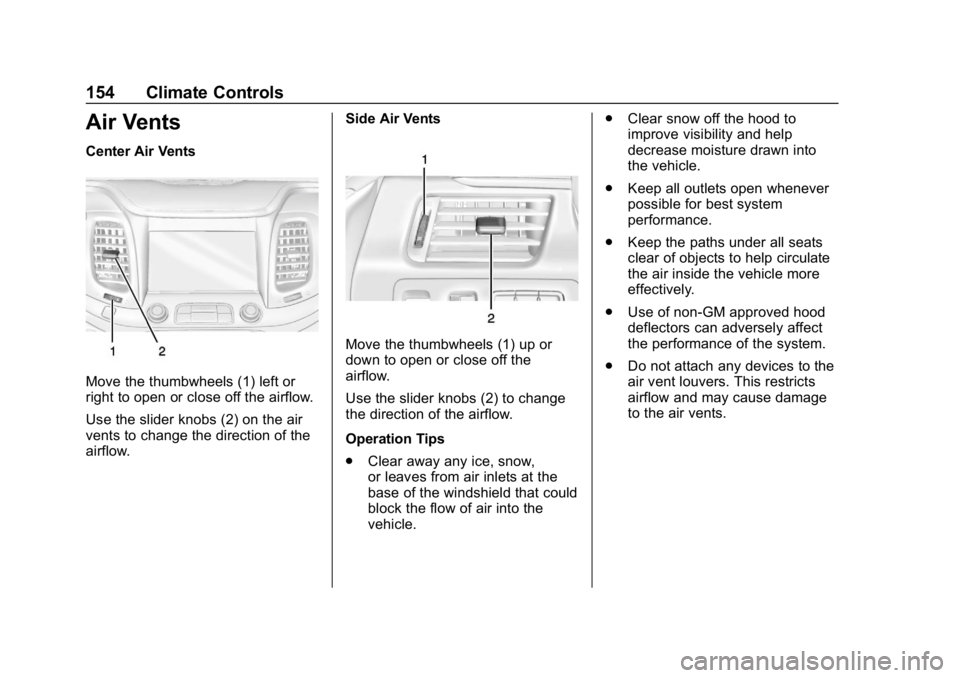
Air Vents
Center Air Vents
Move the thumbwheels (1) left or
right to open or close off the airflow.
Use the slider knobs (2) on the air
vents to change the direction of the
airflow.Side Air Vents
Move the thumbwheels (1) up or
down to open or close off the
airflow.
Use the slider knobs (2) to change
the direction of the airflow.
Operation Tips
.
Clear away any ice, snow,
or leaves from air inlets at the
base of the windshield that could
block the flow of air into the
vehicle. .
Clear snow off the hood to
improve visibility and help
decrease moisture drawn into
the vehicle.
. Keep all outlets open whenever
possible for best system
performance.
. Keep the paths under all seats
clear of objects to help circulate
the air inside the vehicle more
effectively.
. Use of non-GM approved hood
deflectors can adversely affect
the performance of the system.
. Do not attach any devices to the
air vent louvers. This restricts
airflow and may cause damage
to the air vents.
Page 167 of 345
Chevrolet Impala Owner Manual (GMNA-Localizing-U.S./Canada-11348316) -
2018 - CRC - 8/22/17
166 Driving and Operating
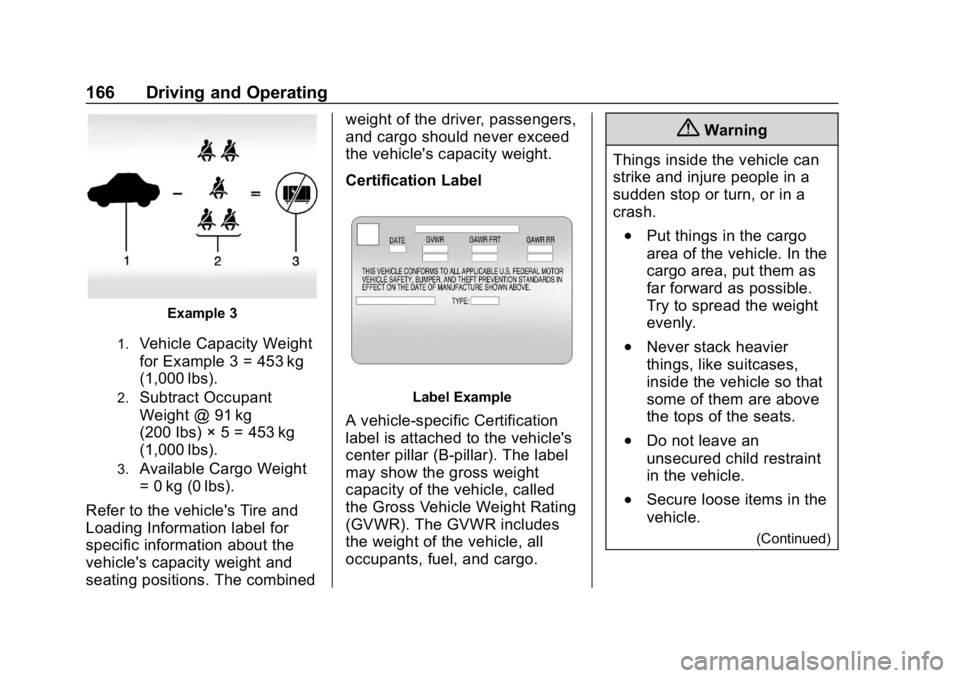
Example 3
1.Vehicle Capacity Weight
for Example 3 = 453 kg
(1,000 lbs).
2.Subtract Occupant
Weight @ 91 kg
(200 lbs) × 5 = 453 kg
(1,000 lbs).
3.Available Cargo Weight
= 0 kg (0 lbs).
Refer to the vehicle's Tire and
Loading Information label for
specific information about the
vehicle's capacity weight and
seating positions. The combined weight of the driver, passengers,
and cargo should never exceed
the vehicle's capacity weight.
Certification Label
Label Example
A vehicle-specific Certification
label is attached to the vehicle's
center pillar (B-pillar). The label
may show the gross weight
capacity of the vehicle, called
the Gross Vehicle Weight Rating
(GVWR). The GVWR includes
the weight of the vehicle, all
occupants, fuel, and cargo.
{Warning
Things inside the vehicle can
strike and injure people in a
sudden stop or turn, or in a
crash.
.Put things in the cargo
area of the vehicle. In the
cargo area, put them as
far forward as possible.
Try to spread the weight
evenly.
.Never stack heavier
things, like suitcases,
inside the vehicle so that
some of them are above
the tops of the seats.
.Do not leave an
unsecured child restraint
in the vehicle.
.Secure loose items in the
vehicle.
(Continued)
Page 255 of 345
Chevrolet Impala Owner Manual (GMNA-Localizing-U.S./Canada-11348316) -
2018 - CRC - 8/22/17
254 Vehicle Care
is certified to carry. The speed
rating is the maximum speed a
tire is certified to carry a load.
Tire Terminology and
Definitions
Air Pressure:The amount of
air inside the tire pressing
outward on each square inch of
the tire. Air pressure is
expressed in kPa (kilopascal)
or psi (pounds per square inch).
Accessory Weight
:The
combined weight of optional
accessories. Some examples of
optional accessories are
automatic transmission, power
windows, power seats, and air
conditioning.
Aspect Ratio
:The relationship
of a tire's height to its width. Belt
:A rubber coated layer of
cords between the plies and the
tread. Cords may be made from
steel or other reinforcing
materials.
Bead
:The tire bead contains
steel wires wrapped by steel
cords that hold the tire onto
the rim.
Bias Ply Tire
:A pneumatic tire
in which the plies are laid at
alternate angles less than
90 degrees to the centerline of
the tread.
Cold Tire Pressure
:The
amount of air pressure in a tire,
measured in kPa (kilopascal)
or psi (pounds per square inch)
before a tire has built up heat
from driving. See Tire Pressure
0 256.
Curb Weight
:The weight of a
motor vehicle with standard and
optional equipment including the maximum capacity of fuel, oil,
and coolant, but without
passengers and cargo.
DOT Markings
:A code molded
into the sidewall of a tire
signifying that the tire is in
compliance with the U.S.
Department of Transportation
(DOT) Motor Vehicle Safety
Standards. The DOT code
includes the Tire Identification
Number (TIN), an alphanumeric
designator which can also
identify the tire manufacturer,
production plant, brand, and
date of production.
GVWR
:Gross Vehicle Weight
Rating. See Vehicle Load Limits
0 163.
GAWR FRT
:Gross Axle Weight
Rating for the front axle. See
Vehicle Load Limits 0163.
GAWR RR
:Gross Axle Weight
Rating for the rear axle. See
Vehicle Load Limits 0163.
Page 334 of 345

Chevrolet Impala Owner Manual (GMNA-Localizing-U.S./Canada-11348316) -
2018 - CRC - 8/22/17
Index 333
IndexA
Accessories andModifications . . . . . . . . . . . . . . . . . . 215
Accessory Power . . . . . . . . . . . . . . . 172
Adaptive Cruise Control . . . . . . . . 184
Add-On Electrical Equipment . . . 211
Additional Information OnStar . . . . . . . . . . . . . . . . . . . . . . . 327
Additional Maintenance and Care . . . . . . . . . . . . . . . . . . . . . . 298
Adjustments Lumbar, Front Seats . . . . . . . . . . . . 55
Air Cleaner/Filter, Engine . . . . . . . 224
Air Conditioning . . . . . . . . . . . 147, 150
Air Filter, Passenger Compartment . . . . . . . . . . . . . . . . . 155
Air Vents . . . . . . . . . . . . . . . . . . . . . . . 154
Airbag System Check . . . . . . . . . . . . . . . . . . . . . . . . . . 80
How Does an Airbag
Restrain? . . . . . . . . . . . . . . . . . . . . . 73
Passenger Sensing System . . . . 74
What Makes an Airbag Inflate? . . . . . . . . . . . . . . . . . . . . . . . . 72
What Will You See after an Airbag Inflates? . . . . . . . . . . . . . . . 73
When Should an Airbag Inflate? . . . . . . . . . . . . . . . . . . . . . . . . 71 Airbag System (cont'd)
Where Are the Airbags? . . . . . . . . 70
Airbags Adding Equipment to the
Vehicle . . . . . . . . . . . . . . . . . . . . . . . . 79
Passenger Status Indicator . . . .116
Readiness Light . . . . . . . . . . . . . . .116
Servicing Airbag-Equipped Vehicles . . . . . . . . . . . . . . . . . . . . . . . 79
System Check . . . . . . . . . . . . . . . . . . 68
Alarm Vehicle Security . . . . . . . . . . . . . . . . 41
Alert Lane Change . . . . . . . . . . . . . . . . . 198
Side Blind Zone (SBZA) . . . . . . 198
All-Season Tires . . . . . . . . . . . . . . . . 249
Antilock Brake System (ABS) . . . 178 Warning Light . . . . . . . . . . . . . . . . . 121
Appearance Care Exterior . . . . . . . . . . . . . . . . . . . . . . . 281
Interior . . . . . . . . . . . . . . . . . . . . . . . . 286
Assistance Program, Roadside . . . . . . . . . . . . . . . . . . . . . . 311
Assistance Systems for Driving . . . . . . . . . . . . . . . . . . . . . . . . 195
Assistance Systems for Parking and Backing . . . . . . . . . . 192
Page 337 of 345

Chevrolet Impala Owner Manual (GMNA-Localizing-U.S./Canada-11348316) -
2018 - CRC - 8/22/17
336 Index
Dual Automatic ClimateControl System . . . . . . . . . . . . . . . . 150
E
E85 or FlexFuel . . . . . . . . . . . . . . . . 203
Electric Parking Brake . . . . . . . . . . 178
Electric Parking Brake Light . . . . 120
Electrical Equipment,
Add-On . . . . . . . . . . . . . . . . . . . . . . . 211
Electrical System Engine Compartment FuseBlock . . . . . . . . . . . . . . . . . . . . . . . . 243
Fuses and Circuit Breakers . . . 243
Instrument Panel Fuse Block . . . . . . . . . . . . . . . . . . . . . . . . 246
Overload . . . . . . . . . . . . . . . . . . . . . 242
Emergency
OnStar . . . . . . . . . . . . . . . . . . . . . . . 322
Engine Air Cleaner/Filter . . . . . . . . . . . . . 224
Check Light (MalfunctionIndicator) . . . . . . . . . . . . . . . . . . . . .118
Compartment Overview . . . . . . . 217
Coolant Temperature Gauge . . . . . . . . . . . . . . . . . . . . . . .115
Cooling System . . . . . . . . . . . . . . . 225
Drive Belt Routing . . . . . . . . . . . . 306
Exhaust . . . . . . . . . . . . . . . . . . . . . . 174 Engine (cont'd)
Heater . . . . . . . . . . . . . . . . . . . . . . . . 171
Oil Life System . . . . . . . . . . . . . . . 222
Oil Pressure Light . . . . . . . . . . . . 123
Overheated Protection
Operating Mode . . . . . . . . . . . . . 230
Overheating . . . . . . . . . . . . . . . . . . 229
Power Messages . . . . . . . . . . . . . 128
Running While Parked . . . . . . . . 174
Starting . . . . . . . . . . . . . . . . . . . . . . . 169
Entry Lighting . . . . . . . . . . . . . . . . . . . 144
Equipment, Towing . . . . . . . . . . . . . 210
Event Data Recorders . . . . . . . . . . 319
Exit Lighting . . . . . . . . . . . . . . . . . . . . 144
Extended Parking . . . . . . . . . . . . . . . 174
Extender, Seat Belt . . . . . . . . . . . . . . 67
Exterior Lamp Controls . . . . . . . . . 139
Exterior Lamps Off Reminder . . . 140
Exterior Lighting Battery Saver . . . . . . . . . . . . . . . . . . . . . . . . . 145
F
FeaturesMemory . . . . . . . . . . . . . . . . . . . . . . . . . 12
Filter, Engine Air Cleaner . . . . . . . . . . . 224
Flash-to-Pass . . . . . . . . . . . . . . . . . . . 140
Flashers, Hazard Warning . . . . . . 141 Flat Tire . . . . . . . . . . . . . . . . . . . . . . . . 269
Changing . . . . . . . . . . . . . . . . . . . . . 270
FlexFuel E85 . . . . . . . . . . . . . . . . . . . . . . . . . . . 203
Floor Mats . . . . . . . . . . . . . . . . . . . . . . 289
Fluid Automatic Transmission . . . . . . 223
Brakes . . . . . . . . . . . . . . . . . . . . . . . . 232
Washer . . . . . . . . . . . . . . . . . . . . . . . 230
Folding Mirrors . . . . . . . . . . . . . . . . . . 44
Forward Automatic Braking . . . . . 197
Forward Collision Alert (FCA) System . . . . . . . . . . . . . . . . . 195
Frequency Statement Radio . . . . . . . . . . . . . . . . . . . . . . . . . 317
Front Seats
Adjustment . . . . . . . . . . . . . . . . . . . . . 53
Heated and Ventilated . . . . . . . . . . 59
Fuel . . . . . . . . . . . . . . . . . . . . . . . . . . . . 202 Additives . . . . . . . . . . . . . . . . . . . . . 203
Economy Driving . . . . . . . . . . . . . . . 26
Filling a Portable FuelContainer . . . . . . . . . . . . . . . . . . . 206
Filling the Tank . . . . . . . . . . . . . . . 204
Foreign Countries . . . . . . . . . . . . 203
Gauge . . . . . . . . . . . . . . . . . . . . . . . . .114
Low Fuel Warning Light . . . . . . . 123
Requirements, California . . . . . 202