child lock CHEVROLET IMPALA 2019 User Guide
[x] Cancel search | Manufacturer: CHEVROLET, Model Year: 2019, Model line: IMPALA, Model: CHEVROLET IMPALA 2019Pages: 353, PDF Size: 5.13 MB
Page 94 of 353
Chevrolet Impala Owner Manual (GMNA-Localizing-U.S./Canada-12146115) -
2019 - crc - 8/27/18
Seats and Restraints 93
The top tether anchors are under
the covers, behind the rear seat, on
the filler panel. Be sure to use an
anchor on the same side of the
vehicle as the seating position
where the child restraint will be
placed.
Do not secure a child restraint in a
position without a top tether anchor
if a national or local law requires
that the top tether be attached, or if
the instructions that come with the
child restraint say that the top tether
must be attached.
According to accident statistics,
children and infants are safer when
properly restrained in a child
restraint system or infant restraint
system secured in a rear seating
position. SeeWhere to Put the
Restraint 089 for additional
information.Securing a Child Restraint
Designed for the LATCH
System
{Warning
A child could be seriously injured
or killed in a crash if the child
restraint is not properly attached
to the vehicle using either the
LATCH anchors or the vehicle
seat belt. Follow the instructions
that came with the child restraint
and the instructions in this
manual.
{Warning
To reduce the risk of serious or
fatal injuries during a crash, do
not attach more than one child
restraint to a single anchor.
Attaching more than one child
restraint to a single anchor could
cause the anchor or attachment
(Continued)
Warning (Continued)
to come loose or even break
during a crash. A child or others
could be injured.
{Warning
Children can be seriously injured
or strangled if a shoulder belt is
wrapped around their neck. The
shoulder belt can tighten but
cannot be loosened if it is locked.
The shoulder belt locks when it is
pulled all the way out of the
retractor. It unlocks when the
shoulder belt is allowed to go all
the way back into the retractor,
but it cannot do this if it is
wrapped around a child’s neck.
If the shoulder belt is locked and
tightened around a child’s neck,
the only way to loosen the belt is
to cut it.(Continued)
Page 95 of 353
Chevrolet Impala Owner Manual (GMNA-Localizing-U.S./Canada-12146115) -
2019 - crc - 8/27/18
94 Seats and Restraints
Warning (Continued)
Buckle any unused seat belts
behind the child restraint so
children cannot reach them. Pull
the shoulder belt all the way out
of the retractor to set the lock,
and tighten the belt behind the
child restraint after the child
restraint has been installed.
Caution
Do not let the LATCH
attachments rub against the
vehicle’s seat belts. This may
damage these parts. If necessary,
move buckled seat belts to avoid
rubbing the LATCH attachments.
Do not fold the rear seatback
when the seat is occupied. Do not
fold the empty rear seat with a
seat belt buckled. This could
damage the seat belt or the seat.(Continued)
Caution (Continued)
Unbuckle and return the seat belt
to its stowed position, before
folding the seat.
If you need to secure more than one
child restraint in the rear seat, see
Where to Put the Restraint 089.
You cannot secure three child
restraints using the LATCH anchors
in the rear seat at the same time,
but you can install two of them.
If you want to do this, install one
LATCH child restraint in the right
rear seating position, and install the
other one either in the left rear
seating position or in the center
seating position. If you need to
install child restraints in both the
center and left rear seating
positions, the one in the center
seating position will need to be
secured using the vehicle seat belts
instead of the LATCH anchors.
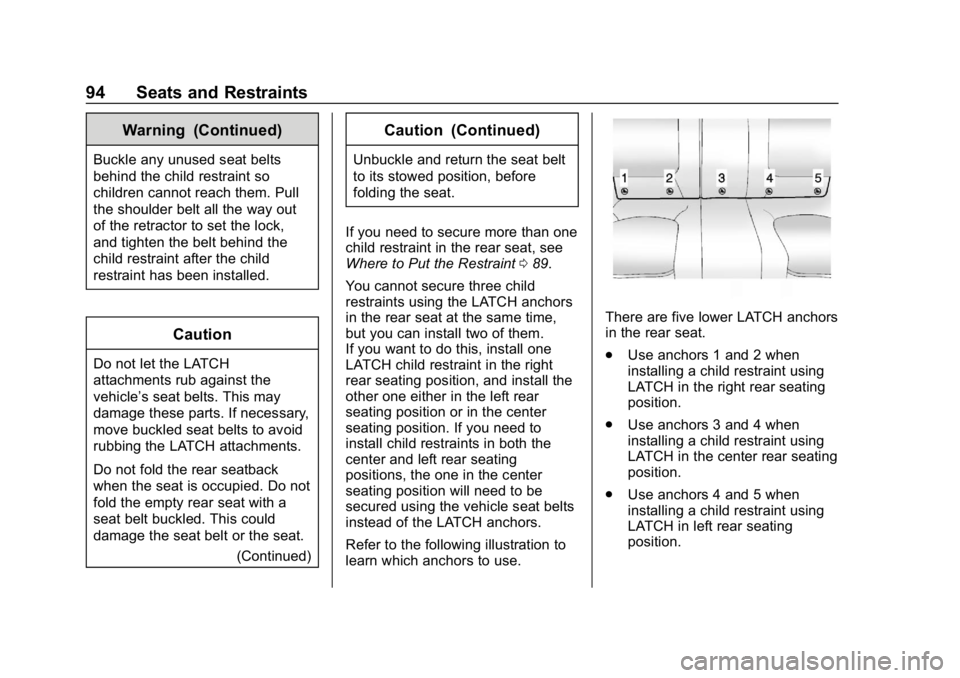
Refer to the following illustration to
learn which anchors to use.
There are five lower LATCH anchors
in the rear seat.
. Use anchors 1 and 2 when
installing a child restraint using
LATCH in the right rear seating
position.
. Use anchors 3 and 4 when
installing a child restraint using
LATCH in the center rear seating
position.
. Use anchors 4 and 5 when
installing a child restraint using
LATCH in left rear seating
position.
Page 99 of 353
Chevrolet Impala Owner Manual (GMNA-Localizing-U.S./Canada-12146115) -
2019 - crc - 8/27/18
98 Seats and Restraints
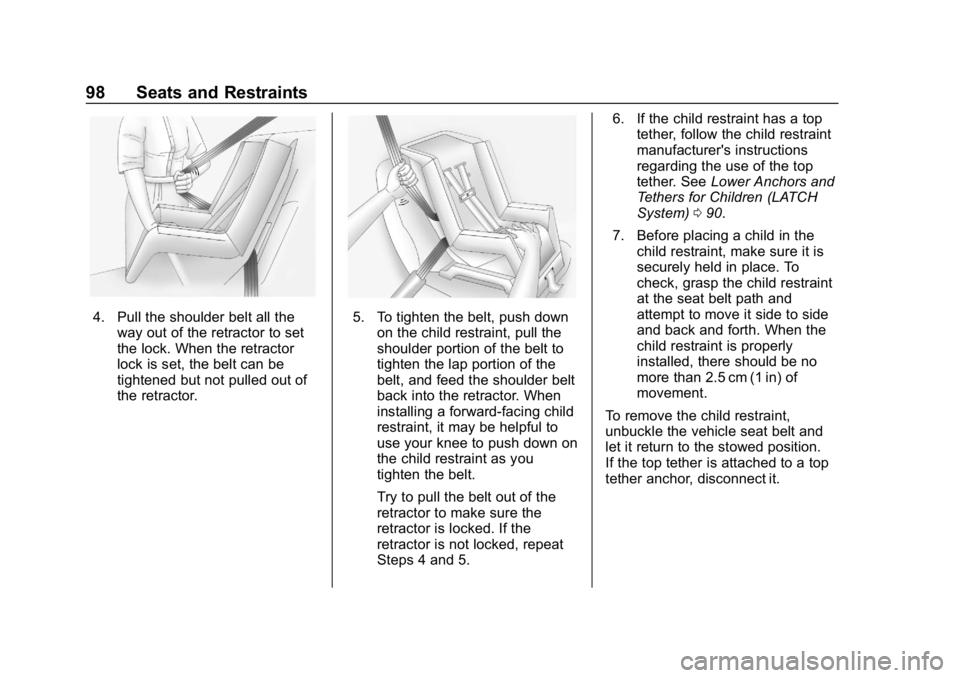
4. Pull the shoulder belt all theway out of the retractor to set
the lock. When the retractor
lock is set, the belt can be
tightened but not pulled out of
the retractor.5. To tighten the belt, push downon the child restraint, pull the
shoulder portion of the belt to
tighten the lap portion of the
belt, and feed the shoulder belt
back into the retractor. When
installing a forward-facing child
restraint, it may be helpful to
use your knee to push down on
the child restraint as you
tighten the belt.
Try to pull the belt out of the
retractor to make sure the
retractor is locked. If the
retractor is not locked, repeat
Steps 4 and 5. 6. If the child restraint has a top
tether, follow the child restraint
manufacturer's instructions
regarding the use of the top
tether. See Lower Anchors and
Tethers for Children (LATCH
System) 090.
7. Before placing a child in the child restraint, make sure it is
securely held in place. To
check, grasp the child restraint
at the seat belt path and
attempt to move it side to side
and back and forth. When the
child restraint is properly
installed, there should be no
more than 2.5 cm (1 in) of
movement.
To remove the child restraint,
unbuckle the vehicle seat belt and
let it return to the stowed position.
If the top tether is attached to a top
tether anchor, disconnect it.
Page 102 of 353
Chevrolet Impala Owner Manual (GMNA-Localizing-U.S./Canada-12146115) -
2019 - crc - 8/27/18
Seats and Restraints 101
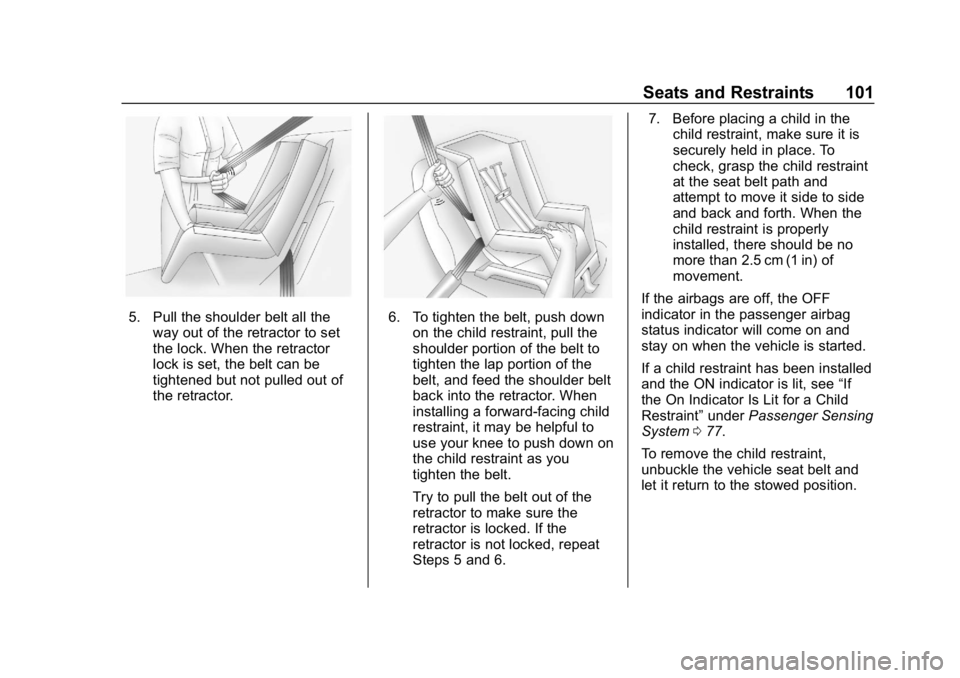
5. Pull the shoulder belt all theway out of the retractor to set
the lock. When the retractor
lock is set, the belt can be
tightened but not pulled out of
the retractor.6. To tighten the belt, push downon the child restraint, pull the
shoulder portion of the belt to
tighten the lap portion of the
belt, and feed the shoulder belt
back into the retractor. When
installing a forward-facing child
restraint, it may be helpful to
use your knee to push down on
the child restraint as you
tighten the belt.
Try to pull the belt out of the
retractor to make sure the
retractor is locked. If the
retractor is not locked, repeat
Steps 5 and 6. 7. Before placing a child in the
child restraint, make sure it is
securely held in place. To
check, grasp the child restraint
at the seat belt path and
attempt to move it side to side
and back and forth. When the
child restraint is properly
installed, there should be no
more than 2.5 cm (1 in) of
movement.
If the airbags are off, the OFF
indicator in the passenger airbag
status indicator will come on and
stay on when the vehicle is started.
If a child restraint has been installed
and the ON indicator is lit, see “If
the On Indicator Is Lit for a Child
Restraint” underPassenger Sensing
System 077.
To remove the child restraint,
unbuckle the vehicle seat belt and
let it return to the stowed position.
Page 191 of 353
Chevrolet Impala Owner Manual (GMNA-Localizing-U.S./Canada-12146115) -
2019 - crc - 8/27/18
190 Driving and Operating
Ending Cruise Control
There are four ways to end cruise
control:
.To disengage cruise control,
step lightly on the brake pedal.
. Press
*.
. Shift the transmission to
N (Neutral).
. To turn off the cruise control,
press
5.
Erasing Speed Memory
The cruise control set speed is
erased from memory if
5is pressed
or the ignition is turned off.
Adaptive Cruise Control
If equipped, Adaptive Cruise Control
(ACC) allows the driver to select the
cruise control set speed and
following gap. Read this entire
section before using this system.
The following gap is the following
time between your vehicle and a
vehicle detected directly ahead in
your path moving in the same direction. If no vehicle is detected in
your path, ACC works like regular
cruise control. ACC uses a radar
sensor. See
Radio Frequency
Statement 0325.
If a vehicle is detected in your path,
ACC can apply acceleration or
limited, moderate braking to
maintain the selected following gap.
To disengage ACC, apply the brake.
If ACC is controlling your vehicle
speed when the Traction Control
System (TCS) or StabiliTrak/
Electronic Stability Control (ESC)
activates, the ACC may
automatically disengage. When road
conditions allow ACC to be safely
used, the ACC can be turned back
on. If TCS or StabiliTrak/ESC have
been disabled, the ACC will not
engage. See Traction Control/
Electronic Stability Control 0186.
{Warning
ACC has limited braking ability
and may not have time to slow
the vehicle down enough to avoid
(Continued)
Warning (Continued)
a collision with another vehicle
you are following. This can occur
when vehicles suddenly slow or
stop ahead, or enter your lane.
Also see“Alerting the Driver” in
this section. Complete attention is
always required while driving and
you should be ready to take
action and apply the brakes. See
Defensive Driving 0163.
{Warning
ACC will not detect or brake for
children, pedestrians, animals,
or other objects.
Do not use ACC when:
. On winding and hilly roads
or when the sensors are
blocked by snow, ice, or dirt.
The system may not detect
(Continued)
Page 198 of 353
Chevrolet Impala Owner Manual (GMNA-Localizing-U.S./Canada-12146115) -
2019 - crc - 8/27/18
Driving and Operating 197
Cleaning the Sensing System
The radar sensor on the front of the
vehicle can become blocked by
snow, ice, dirt, or mud. These areas
need to be cleaned for ACC to
operate properly.
For cleaning instructions, see
“Washing the Vehicle”under
Exterior Care 0289.
System operation may also be
limited under snow, heavy rain,
or road spray conditions.Driver Assistance
Systems
This vehicle may have features that
work together to help avoid crashes
or reduce crash damage while
driving, backing, and parking. Read
this entire section before using
these systems.
{Warning
Do not rely on the Driver
Assistance Systems. These
systems do not replace the need
for paying attention and driving
safely. You may not hear or see
alerts or warnings provided by
these systems. Failure to use
proper care when driving may
result in injury, death, or vehicle
damage. See Defensive Driving
0 163.
(Continued)
Warning (Continued)
Under many conditions, these
systems will not:
. Detect children,
pedestrians, bicyclists,
or animals.
. Detect vehicles or objects
outside the area monitored
by the system.
. Work at all driving speeds.
. Warn you or provide you
with enough time to avoid a
crash.
. Work under poor visibility or
bad weather conditions.
. Work if the detection sensor
is not cleaned or is covered
by ice, snow, mud, or dirt.
. Work if the detection sensor
is covered up, such as with
a sticker, magnet, or metal
plate.
(Continued)
Page 201 of 353
Chevrolet Impala Owner Manual (GMNA-Localizing-U.S./Canada-12146115) -
2019 - crc - 8/27/18
200 Driving and Operating
Blocked sensors will not detect
objects and can also cause false
detections. Keep the sensors clean
of mud, dirt, snow, ice, and slush;
and clean sensors after a car wash
in freezing temperatures.
{Warning
The Park Assist system does not
detect children, pedestrians,
bicyclists, animals, or objects
below the bumper or that are too
close or too far from the vehicle.
It is not available at speeds
greater than 8 km/h (5 mph). To
prevent injury, death, or vehicle
damage, even with Park Assist,
always check the area around the
vehicle and check all mirrors
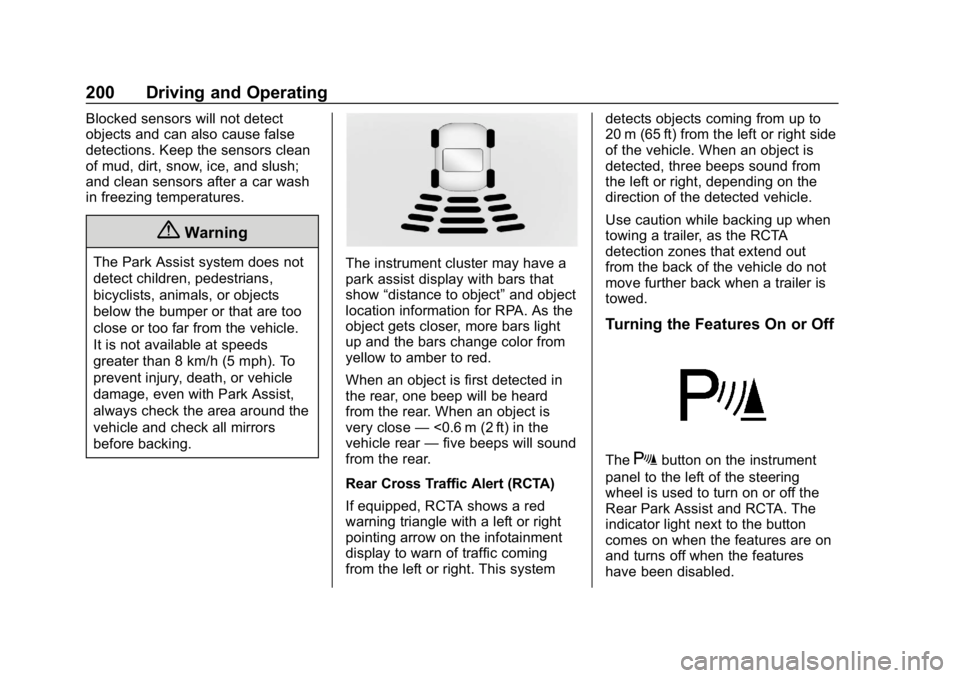
before backing.The instrument cluster may have a
park assist display with bars that
show“distance to object” and object
location information for RPA. As the
object gets closer, more bars light
up and the bars change color from
yellow to amber to red.
When an object is first detected in
the rear, one beep will be heard
from the rear. When an object is
very close —<0.6 m (2 ft) in the
vehicle rear —five beeps will sound
from the rear.
Rear Cross Traffic Alert (RCTA)
If equipped, RCTA shows a red
warning triangle with a left or right
pointing arrow on the infotainment
display to warn of traffic coming
from the left or right. This system detects objects coming from up to
20 m (65 ft) from the left or right side
of the vehicle. When an object is
detected, three beeps sound from
the left or right, depending on the
direction of the detected vehicle.
Use caution while backing up when
towing a trailer, as the RCTA
detection zones that extend out
from the back of the vehicle do not
move further back when a trailer is
towed.
Turning the Features On or Off
TheXbutton on the instrument
panel to the left of the steering
wheel is used to turn on or off the
Rear Park Assist and RCTA. The
indicator light next to the button
comes on when the features are on
and turns off when the features
have been disabled.
Page 211 of 353
Chevrolet Impala Owner Manual (GMNA-Localizing-U.S./Canada-12146115) -
2019 - crc - 8/27/18
210 Driving and Operating
Caution
Do not use fuel containing
methanol. It can corrode metal
parts in the fuel system and also
damage plastic and rubber parts.
That damage would not be
covered under the vehicle
warranty.
Filling the Tank
{Warning
Fuel vapors and fuel fires burn
violently and can cause injury or
death.
Follow these guidelines:. To help avoid injuries to you
and others, read and follow
all the instructions on the
fuel pump island.
. Turn off the engine when
refueling.
(Continued)
Warning (Continued)
.Keep sparks, flames, and
smoking materials away
from fuel.
. Do not leave the fuel pump
unattended.
. Avoid using electronic
devices while refueling.
. Do not re-enter the vehicle
while pumping fuel.
. Keep children away from
the fuel pump and never let
children pump fuel.
. Fuel can spray out if the fuel
cap is opened too quickly.
This spray can happen if the
tank is nearly full, and is
more likely in hot weather.
Open the fuel cap slowly
and wait for any hiss noise
to stop, then unscrew the
cap all the way.
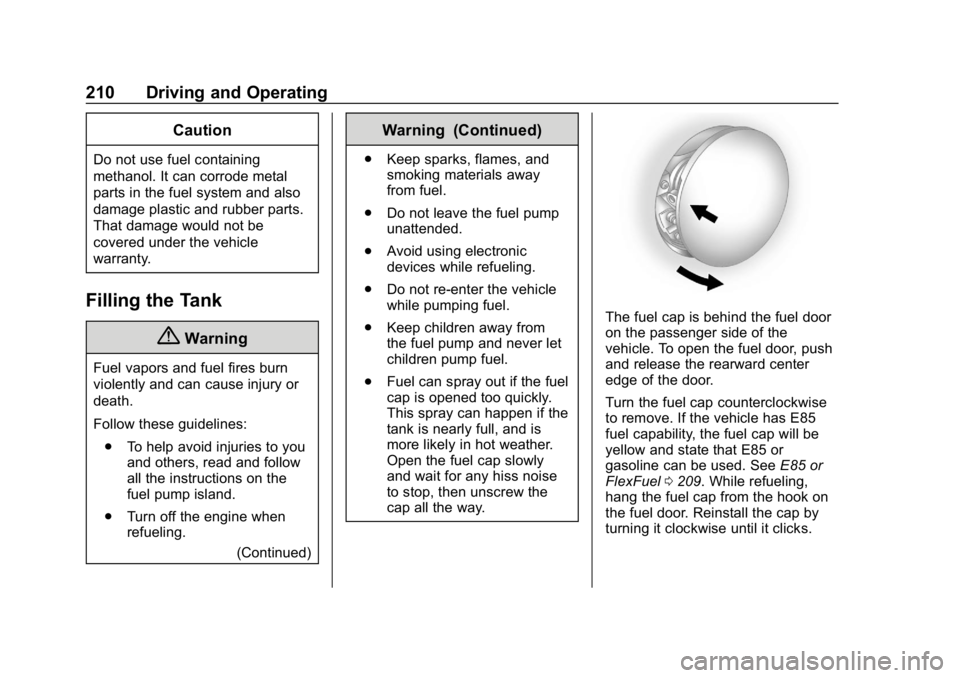
The fuel cap is behind the fuel door
on the passenger side of the
vehicle. To open the fuel door, push
and release the rearward center
edge of the door.
Turn the fuel cap counterclockwise
to remove. If the vehicle has E85
fuel capability, the fuel cap will be
yellow and state that E85 or
gasoline can be used. See E85 or
FlexFuel 0209. While refueling,
hang the fuel cap from the hook on
the fuel door. Reinstall the cap by
turning it clockwise until it clicks.
Page 343 of 353

Chevrolet Impala Owner Manual (GMNA-Localizing-U.S./Canada-12146115) -
2019 - crc - 8/27/18
342 Index
Auto StopStop/Start System . . . . . . . . . . . . 175
Automatic Dimming Mirrors . . . . . . . . . . . . . . . . 44
Door Locks . . . . . . . . . . . . . . . . . . . . . 38
Forward Braking . . . . . . . . . . . . . . 203
Headlamp System . . . . . . . . . . . . 146
Transmission . . . . . . . . . . . . . . . . . 180
Transmission Fluid . . . . . . . . . . . 231
Automatic Transmission Manual Mode . . . . . . . . . . . . . . . . . 182
Shift Lock Control Function
Check . . . . . . . . . . . . . . . . . . . . . . . 243
B
BatteryExterior Lighting Battery
Saver . . . . . . . . . . . . . . . . . . . . . . . 150
Load Management . . . . . . . . . . . . 149
Power Protection . . . . . . . . . . . . . 150
Battery - North America . . . . 241, 284
Blade Replacement, Wiper . . . . . 243
Brake
Parking, Electric . . . . . . . . . . . . . . 184
System Warning Light . . . . . . . . 123
Brakes . . . . . . . . . . . . . . . . . . . . . . . . . . 239
Antilock . . . . . . . . . . . . . . . . . . . . . . . 183
Assist . . . . . . . . . . . . . . . . . . . . . . . . . 185 Brakes (cont'd)
Fluid . . . . . . . . . . . . . . . . . . . . . . . . . . 240
Braking . . . . . . . . . . . . . . . . . . . . . . . . . 163 Automatic Forward . . . . . . . . . . . 203
Break-In, New Vehicle . . . . . . . . . . 172
Bulb Replacement Halogen Bulbs . . . . . . . . . . . . . . . . 246
Headlamp Aiming . . . . . . . . . . . . . 246
Headlamps . . . . . . . . . . . . . . . . . . . 246
Headlamps, Front TurnSignal, Sidemarker, and
Parking Lamps . . . . . . . . . . . . . . 247
High Intensity Discharge (HID) Lighting . . . . . . . . . . . . . . . 246
License Plate Lamps . . . . . . . . . 249
Taillamps, Turn Signal, Stoplamps, and Back-up
Lamps . . . . . . . . . . . . . . . . . . . . . . 248
Buying New Tires . . . . . . . . . . . . . . . 272
C
Calibration . . . . . . . . . . . . . . . . . . . . . . 109
California Perchlorate Materials
Requirements . . . . . . . . . . . . . . . 223 California
Proposition
65 Warning . . . . . . . . . .222, 241, 284,
Back Cover
Canadian Vehicle Owners . . . . . . . . 2
Capacities and Specifications . . . . . . . . . . . . . . . . . 313
Carbon Monoxide Engine Exhaust . . . . . . . . . . . . . . . 179
Trunk . . . . . . . . . . . . . . . . . . . . . . . . . . . 39
Winter Driving . . . . . . . . . . . . . . . . 167
Cargo Management System . . . . . . . . . 104
Caution, Danger, and Warning . . . . 2
Center Console Storage . . . . . . . . 103
Chains, Tire . . . . . . . . . . . . . . . . . . . . 276
Charging Wireless . . . . . . . . . . . . . . . . . . . . . . . 111
Charging System Light . . . . . . . . . 121
Check Engine Light (Malfunction
Indicator) . . . . . . . . . . . . . . . . . . . . 122
Child Restraints Infants and Young Children . . . . . 85
Lower Anchors and Tethersfor Children . . . . . . . . . . . . . . . . . . . 90
Older Children . . . . . . . . . . . . . . . . . . 83
Securing . . . . . . . . . . . . . . . . . . . . 97, 99
Page 344 of 353

Chevrolet Impala Owner Manual (GMNA-Localizing-U.S./Canada-12146115) -
2019 - crc - 8/27/18
Index 343
Child Restraints (cont'd)Systems . . . . . . . . . . . . . . . . . . . . . . . . 87
Circuit Breakers . . . . . . . . . . . . . . . . 251
Cleaning Exterior Care . . . . . . . . . . . . . . . . . 289
Interior Care . . . . . . . . . . . . . . . . . . 294
Climate Control Systems . . . . . . . 152 Air Conditioning . . . . . . . . . . . . . . 152
Dual Automatic . . . . . . . . . . . . . . . 155
Heating . . . . . . . . . . . . . . . . . . . . . . . 152
Clock . . . . . . . . . . . . . . . . . . . . . . . . . . . 109
Cluster, Instrument . . . . . . . . . . . . . 114
Collision Damage Repair . . . . . . . 322
Compact Spare Tire . . . . . . . . . . . . 283
Compartments Storage . . . . . . . . . . . . . . . . . . . . . . . 102
Compass . . . . . . . . . . . . . . . . . . . . . . . 109
Connected Services Connections . . . . . . . . . . . . . . . . . . 338
Diagnostics . . . . . . . . . . . . . . . . . . . 340
Navigation . . . . . . . . . . . . . . . . . . . . 337
Connections Connected Services . . . . . . . . . . 338
Control Traction and ElectronicStability . . . . . . . . . . . . . . . . . . . . . 186
Control of a Vehicle . . . . . . . . . . . . . 163
Convenience Net . . . . . . . . . . . . . . . 105 Convex Mirrors . . . . . . . . . . . . . . . . . . 43
Coolant
Engine Temperature Gauge . . .119
Cooling . . . . . . . . . . . . . . . . . . . . 152, 155
Cooling System . . . . . . . . . . . . . . . . . 233
Courtesy Lamps . . . . . . . . . . . . . . . . 147
Courtesy Transportation Program . . . . . . . . . . . . . . . . . . . . . . . 321
Cruise Control . . . . . . . . . . . . . . . . . . 188 Light . . . . . . . . . . . . . . . . . . . . . . . . . . 128
Cruise Control, Adaptive . . . . . . . . 190
Cupholders . . . . . . . . . . . . . . . . . . . . . 103
Customer Assistance . . . . . . . . . . . 318
Offices . . . . . . . . . . . . . . . . . . . . . . . . 317
Text Telephone (TTY)Users . . . . . . . . . . . . . . . . . . . . . . . 318
Customer Information Publications OrderingInformation . . . . . . . . . . . . . . . . . . 324
Customer Satisfaction Procedure . . . . . . . . . . . . . . . . . . . . . 315
D
Damage Repair, Collision . . . . . . . 322
Danger, Warning, and Caution . . . . 2
Data Collection
Infotainment System . . . . . . . . . . 328 Data Collection (cont'd)
OnStar . . . . . . . . . . . . . . . . . . . . . . . 328
Data Recorders, Event . . . . . . . . . 327
Daytime Running Lamps (DRL) . . . . . . . . . . . . . . . . . . 145
Defensive Driving . . . . . . . . . . . . . . . 163
Delayed Locking . . . . . . . . . . . . . . . . . 38
Diagnostics Connected Services . . . . . . . . . . 340
Distracted Driving . . . . . . . . . . . . . . . 162
Dome Lamps . . . . . . . . . . . . . . . . . . . 148
Door Ajar Light . . . . . . . . . . . . . . . . . . . . . 129
Delayed Locking . . . . . . . . . . . . . . . . 38
Locks . . . . . . . . . . . . . . . . . . . . . . . . . . . 35
Power Locks . . . . . . . . . . . . . . . . . . . . 38
Drive Belt Routing, Engine . . . . . . 314
Driver Assistance Systems . . . . . 197
Driver Information Center (DIC) . . . . . . . . . . . . . . . . . . 129
Driving Assistance Systems . . . . . . . . . . 201
Characteristics andTowing Tips . . . . . . . . . . . . . . . . . 212
Defensive . . . . . . . . . . . . . . . . . . . . . 163
Drunk . . . . . . . . . . . . . . . . . . . . . . . . . 163
For Better Fuel Economy . . . . . . . 26
Hill and Mountain Roads . . . . . . 166