turn signal CHEVROLET IMPALA 2019 Owner's Manual
[x] Cancel search | Manufacturer: CHEVROLET, Model Year: 2019, Model line: IMPALA, Model: CHEVROLET IMPALA 2019Pages: 353, PDF Size: 5.13 MB
Page 8 of 353

Chevrolet Impala Owner Manual (GMNA-Localizing-U.S./Canada-12146115) -
2019 - crc - 8/27/18
In Brief 7
1.Instrument Panel Illumination
Control 0147.
2. Air Vents 0159.
3. Trunk Release. See Trunk
0 39.
Park Assist Button. See
Assistance Systems for
Parking or Backing 0198 (If
Equipped).
Lane Departure Warning
(LDW) Button. See Lane
Departure Warning (LDW)
0 206.
4. Turn Signal Lever. See Turn
and Lane-Change Signals
0 147.
5. Instrument Cluster 0114.
Driver Information Center (DIC)
0 129.
6. Windshield Wiper/Washer
0108.
7. Hazard Warning Flashers
0146.
8. Light Sensor. See Automatic
Headlamp System 0146. 9. Storage Area with USB Port
Inside (If Equipped). See
Instrument Panel Storage
0102 and“USB Port” in the
infotainment manual.
10. Infotainment 0151.
11. Climate Control Systems
0152.
Dual Automatic Climate Control
System 0155.
12. Storage Area with Accessory Power Outlet Inside.
SeeCenter Console Storage
0 103 andPower Outlets
0 109.
13. Heated and Ventilated Front
Seats 060 (If Equipped).
14. Traction Control/Electronic
Stability Control 0186.
15. Shift Lever. See Automatic
Transmission 0180.
16. Ignition Positions 0172.
17. Steering Wheel Controls 0107.
Driver Information Center
Buttons. See Driver Information
Center (DIC) 0129. 18.
Steering Wheel Controls 0107
(Out of View).
19. Horn 0107.
20. Steering Wheel Adjustment
0107.
21. Cruise Control 0188 (If
Equipped).
Adaptive Cruise Control 0190
(If Equipped).
Heated Steering Wheel 0107
(If Equipped).
Forward Collision Alert (FCA)
System 0201 (If Equipped).
22. Instrument Panel Storage
0102 (If Equipped).
Fuse Cover. See Instrument
Panel Fuse Block 0254.
23. Hood Release. See Hood
0 224.
24. Data Link Connector (Out of View). See Malfunction
Indicator Lamp (Check Engine
Light) 0122.
25. Electric Parking Brake 0184.
Page 9 of 353
Chevrolet Impala Owner Manual (GMNA-Localizing-U.S./Canada-12146115) -
2019 - crc - 8/27/18
8 In Brief
Initial Drive
Information
This section provides a brief
overview about some of the
important features that may or may
not be on your specific vehicle.
For more detailed information, refer
to each of the features which can be
found later in this owner’s manual.
Stop/Start System
If equipped, the Stop/Start system
will shut off the engine to help
conserve fuel. It has components
designed for the increased number
of starts.
When the brakes are applied and
the vehicle is at a complete stop,
the engine may turn off. When
stopped, the tachometer displays
AUTO STOP. SeeTachometer
0 117. When the brake pedal is
released or the accelerator pedal is
pressed, the engine will restart. See
Stop/Start System 0175 in Driving
and Operating.
Remote Keyless Entry
(RKE) System
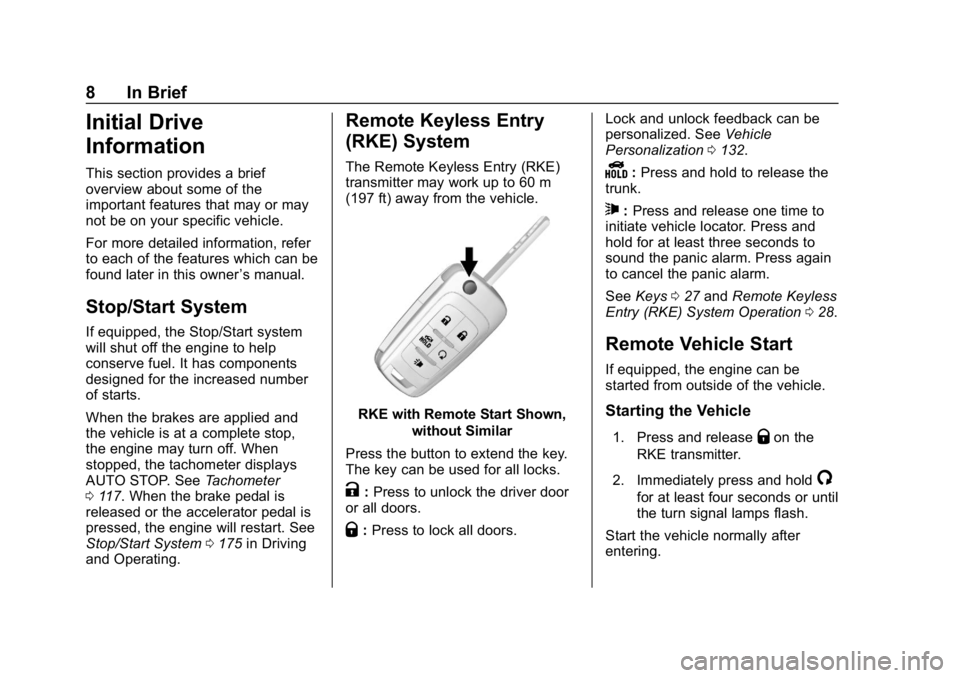
The Remote Keyless Entry (RKE)
transmitter may work up to 60 m
(197 ft) away from the vehicle.
RKE with Remote Start Shown,
without Similar
Press the button to extend the key.
The key can be used for all locks.
K: Press to unlock the driver door
or all doors.
Q: Press to lock all doors. Lock and unlock feedback can be
personalized. See
Vehicle
Personalization 0132.
Y:Press and hold to release the
trunk.
7: Press and release one time to
initiate vehicle locator. Press and
hold for at least three seconds to
sound the panic alarm. Press again
to cancel the panic alarm.
See Keys 027 and Remote Keyless
Entry (RKE) System Operation 028.
Remote Vehicle Start
If equipped, the engine can be
started from outside of the vehicle.
Starting the Vehicle
1. Press and releaseQon the
RKE transmitter.
2. Immediately press and hold
/
for at least four seconds or until
the turn signal lamps flash.
Start the vehicle normally after
entering.
Page 17 of 353
Chevrolet Impala Owner Manual (GMNA-Localizing-U.S./Canada-12146115) -
2019 - crc - 8/27/18
16 In Brief
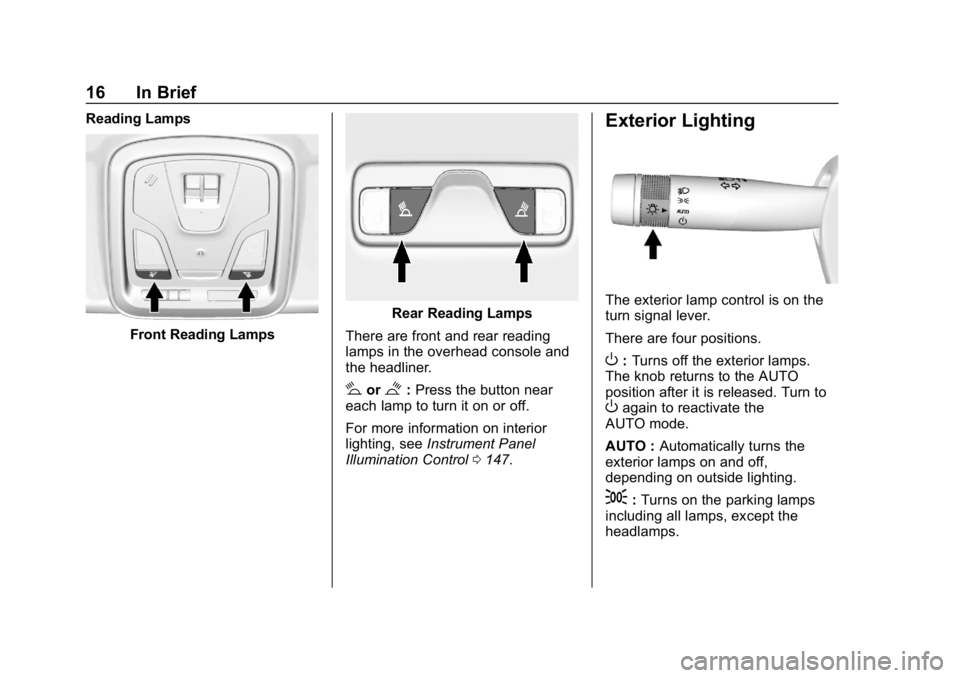
Reading Lamps
Front Reading Lamps
Rear Reading Lamps
There are front and rear reading
lamps in the overhead console and
the headliner.
#or$: Press the button near
each lamp to turn it on or off.
For more information on interior
lighting, see Instrument Panel
Illumination Control 0147.
Exterior Lighting
The exterior lamp control is on the
turn signal lever.
There are four positions.
O:Turns off the exterior lamps.
The knob returns to the AUTO
position after it is released. Turn to
Oagain to reactivate the
AUTO mode.
AUTO : Automatically turns the
exterior lamps on and off,
depending on outside lighting.
;: Turns on the parking lamps
including all lamps, except the
headlamps.
Page 22 of 353
Chevrolet Impala Owner Manual (GMNA-Localizing-U.S./Canada-12146115) -
2019 - crc - 8/27/18
In Brief 21
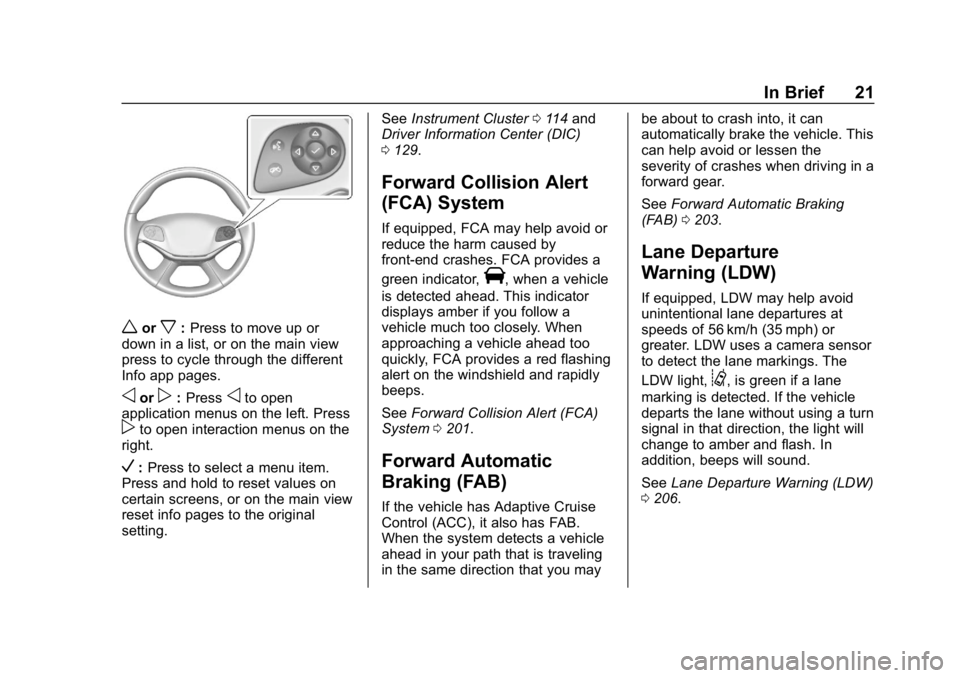
worx:Press to move up or
down in a list, or on the main view
press to cycle through the different
Info app pages.
oorp: Pressoto open
application menus on the left. Press
pto open interaction menus on the
right.
V: Press to select a menu item.
Press and hold to reset values on
certain screens, or on the main view
reset info pages to the original
setting. See
Instrument Cluster 0114 and
Driver Information Center (DIC)
0 129.
Forward Collision Alert
(FCA) System
If equipped, FCA may help avoid or
reduce the harm caused by
front-end crashes. FCA provides a
green indicator,
V, when a vehicle
is detected ahead. This indicator
displays amber if you follow a
vehicle much too closely. When
approaching a vehicle ahead too
quickly, FCA provides a red flashing
alert on the windshield and rapidly
beeps.
See Forward Collision Alert (FCA)
System 0201.
Forward Automatic
Braking (FAB)
If the vehicle has Adaptive Cruise
Control (ACC), it also has FAB.
When the system detects a vehicle
ahead in your path that is traveling
in the same direction that you may be about to crash into, it can
automatically brake the vehicle. This
can help avoid or lessen the
severity of crashes when driving in a
forward gear.
See
Forward Automatic Braking
(FAB) 0203.
Lane Departure
Warning (LDW)
If equipped, LDW may help avoid
unintentional lane departures at
speeds of 56 km/h (35 mph) or
greater. LDW uses a camera sensor
to detect the lane markings. The
LDW light,
@, is green if a lane
marking is detected. If the vehicle
departs the lane without using a turn
signal in that direction, the light will
change to amber and flash. In
addition, beeps will sound.
See Lane Departure Warning (LDW)
0 206.
Page 23 of 353
Chevrolet Impala Owner Manual (GMNA-Localizing-U.S./Canada-12146115) -
2019 - crc - 8/27/18
22 In Brief
Lane Change Alert (LCA)
If equipped, the LCA system is a
lane-changing aid that assists
drivers with avoiding lane change
crashes that occur with moving
vehicles in the side blind zone (or
spot) areas or with vehicles rapidly
approaching these areas from
behind. The LCA warning display
will light up in the corresponding
outside mirror and will flash if the
turn signal is on. The Side Blind
Zone Alert (SBZA) system is
included as part of the LCA system.
SeeSide Blind Zone Alert (SBZA)
0 204 andLane Change Alert (LCA)
0 204.
Rear Vision
Camera (RVC)
If equipped, RVC shows a view of
the area behind the vehicle on the
infotainment display when the
vehicle is shifted into R (Reverse) to
aid with parking and low-speed
backing maneuvers. See
Assistance Systems for Parking
or Backing 0198.
Rear Cross Traffic Alert
(RCTA) System
If equipped, the RCTA system uses
a triangle with an arrow on the
infotainment display to warn of
traffic behind your vehicle that may
cross your vehicle's path while in
R (Reverse). In addition, beeps will
sound.
See Assistance Systems for Parking
or Backing 0198.
Park Assist
If equipped, Rear Park Assist (RPA)
uses sensors on the rear bumper to
assist with parking and avoiding
objects while in R (Reverse).
It operates at speeds less than
8 km/h (5 mph). RPA may show a
warning triangle on the infotainment
display and/or a graphic on the
instrument cluster to provide the
object distance. In addition, multiple
beeps may occur if very close to an
object. See
Assistance Systems for Parking
or Backing 0198.
Power Outlets
The accessory power outlets can be
used to plug in electrical equipment,
such as a cell phone or MP3 player.
The vehicle has three accessory
power outlets:
.
Inside the front storage area
below the climate control system
. Inside the center console
. On the rear of the center
console
Lift the cover to access the
accessory power outlet.
See Power Outlets 0109.
Page 30 of 353
Chevrolet Impala Owner Manual (GMNA-Localizing-U.S./Canada-12146115) -
2019 - crc - 8/27/18
Keys, Doors, and Windows 29
within 1 m (3 ft). See“Keyless
Access Operation” later in this
section.
The transmitter functions may work
up to 60 m (197 ft) away from the
vehicle.
Other conditions can impact the
performance of the transmitter. See
Remote Keyless Entry (RKE)
System 028.
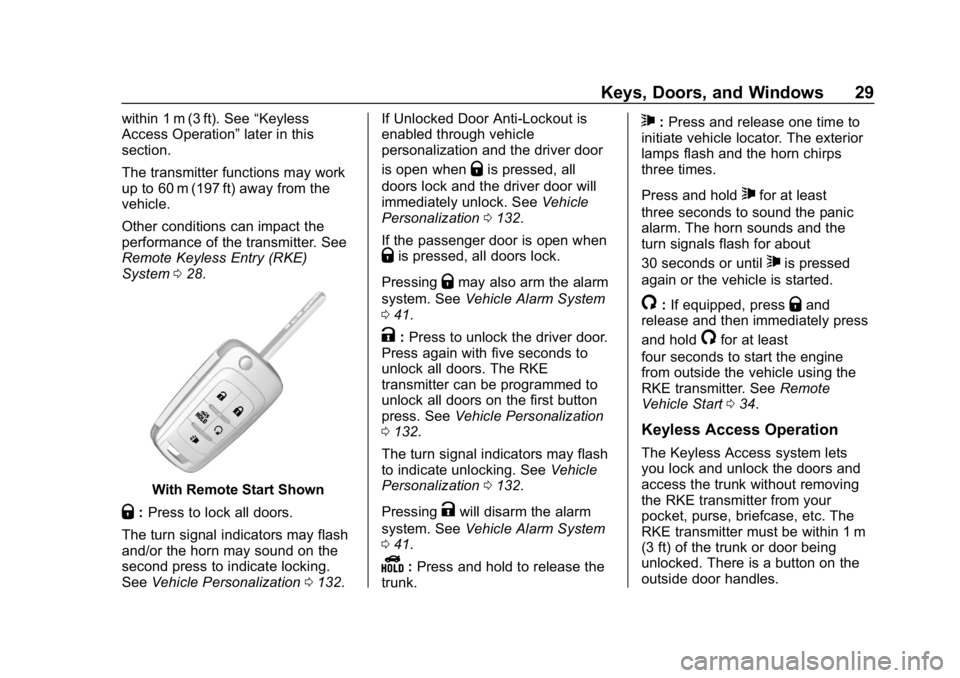
With Remote Start Shown
Q:Press to lock all doors.
The turn signal indicators may flash
and/or the horn may sound on the
second press to indicate locking.
See Vehicle Personalization 0132. If Unlocked Door Anti-Lockout is
enabled through vehicle
personalization and the driver door
is open when
Qis pressed, all
doors lock and the driver door will
immediately unlock. See Vehicle
Personalization 0132.
If the passenger door is open when
Qis pressed, all doors lock.
Pressing
Qmay also arm the alarm
system. See Vehicle Alarm System
0 41.
K:Press to unlock the driver door.
Press again with five seconds to
unlock all doors. The RKE
transmitter can be programmed to
unlock all doors on the first button
press. See Vehicle Personalization
0 132.
The turn signal indicators may flash
to indicate unlocking. See Vehicle
Personalization 0132.
Pressing
Kwill disarm the alarm
system. See Vehicle Alarm System
0 41.
Y:Press and hold to release the
trunk.
7: Press and release one time to
initiate vehicle locator. The exterior
lamps flash and the horn chirps
three times.
Press and hold
7for at least
three seconds to sound the panic
alarm. The horn sounds and the
turn signals flash for about
30 seconds or until
7is pressed
again or the vehicle is started.
/: If equipped, pressQand
release and then immediately press
and hold
/for at least
four seconds to start the engine
from outside the vehicle using the
RKE transmitter. See Remote
Vehicle Start 034.
Keyless Access Operation
The Keyless Access system lets
you lock and unlock the doors and
access the trunk without removing
the RKE transmitter from your
pocket, purse, briefcase, etc. The
RKE transmitter must be within 1 m
(3 ft) of the trunk or door being
unlocked. There is a button on the
outside door handles.
Page 35 of 353
Chevrolet Impala Owner Manual (GMNA-Localizing-U.S./Canada-12146115) -
2019 - crc - 8/27/18
34 Keys, Doors, and Windows
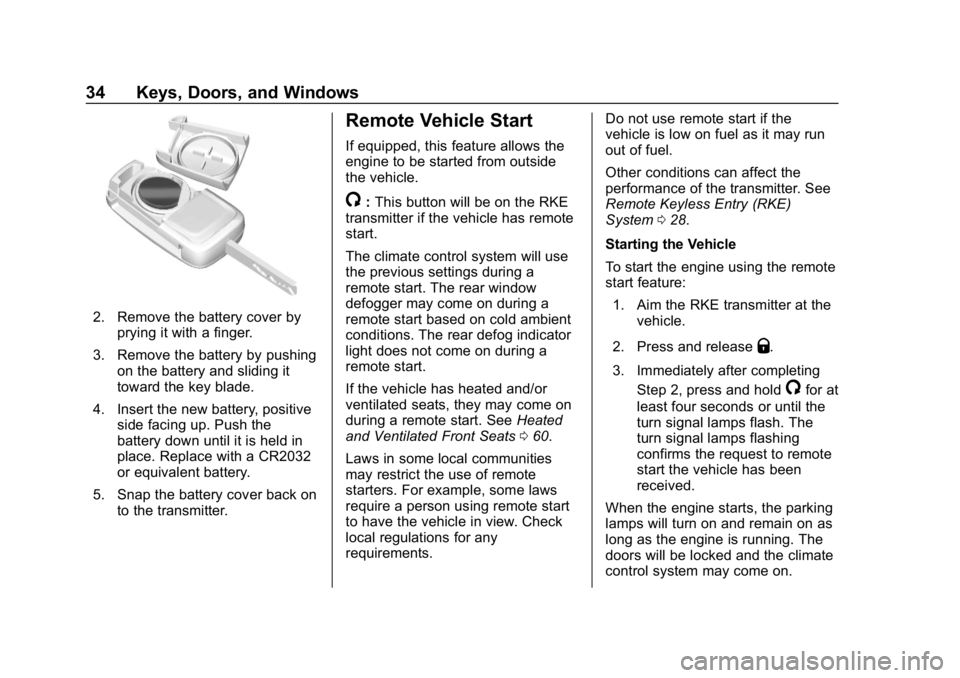
2. Remove the battery cover byprying it with a finger.
3. Remove the battery by pushing on the battery and sliding it
toward the key blade.
4. Insert the new battery, positive side facing up. Push the
battery down until it is held in
place. Replace with a CR2032
or equivalent battery.
5. Snap the battery cover back on to the transmitter.
Remote Vehicle Start
If equipped, this feature allows the
engine to be started from outside
the vehicle.
/:This button will be on the RKE
transmitter if the vehicle has remote
start.
The climate control system will use
the previous settings during a
remote start. The rear window
defogger may come on during a
remote start based on cold ambient
conditions. The rear defog indicator
light does not come on during a
remote start.
If the vehicle has heated and/or
ventilated seats, they may come on
during a remote start. See Heated
and Ventilated Front Seats 060.
Laws in some local communities
may restrict the use of remote
starters. For example, some laws
require a person using remote start
to have the vehicle in view. Check
local regulations for any
requirements. Do not use remote start if the
vehicle is low on fuel as it may run
out of fuel.
Other conditions can affect the
performance of the transmitter. See
Remote Keyless Entry (RKE)
System
028.
Starting the Vehicle
To start the engine using the remote
start feature: 1. Aim the RKE transmitter at the vehicle.
2. Press and release
Q.
3. Immediately after completing Step 2, press and hold
/for at
least four seconds or until the
turn signal lamps flash. The
turn signal lamps flashing
confirms the request to remote
start the vehicle has been
received.
When the engine starts, the parking
lamps will turn on and remain on as
long as the engine is running. The
doors will be locked and the climate
control system may come on.
Page 42 of 353
Chevrolet Impala Owner Manual (GMNA-Localizing-U.S./Canada-12146115) -
2019 - crc - 8/27/18
Keys, Doors, and Windows 41
Vehicle Security
This vehicle has theft-deterrent
features; however, they do not make
the vehicle impossible to steal.
Vehicle Alarm System
This vehicle has an anti-theft alarm
system.
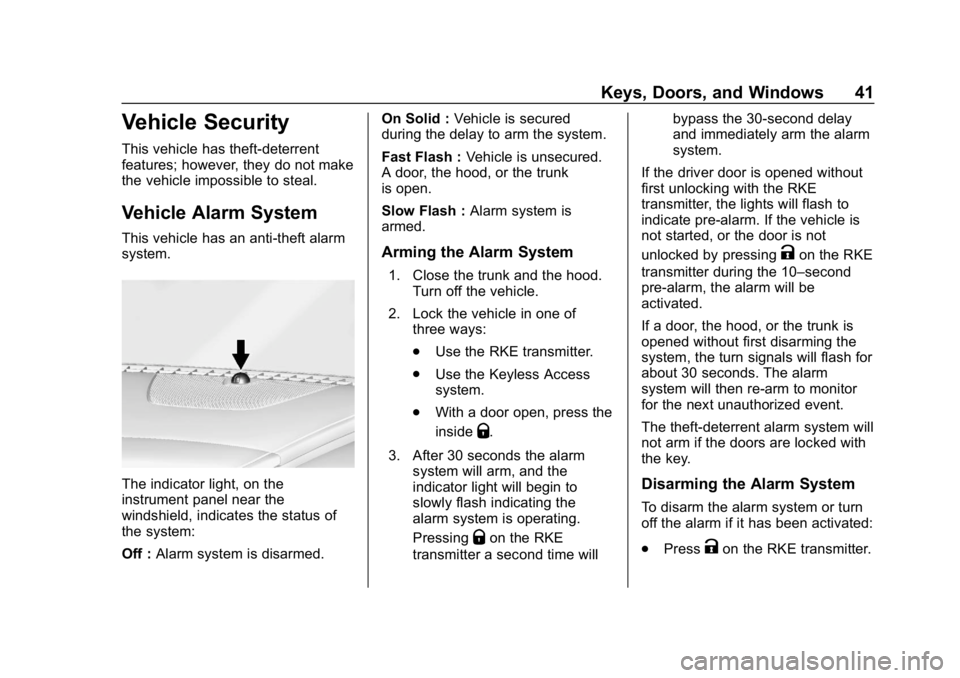
The indicator light, on the
instrument panel near the
windshield, indicates the status of
the system:
Off :Alarm system is disarmed. On Solid :
Vehicle is secured
during the delay to arm the system.
Fast Flash : Vehicle is unsecured.
A door, the hood, or the trunk
is open.
Slow Flash : Alarm system is
armed.
Arming the Alarm System
1. Close the trunk and the hood. Turn off the vehicle.
2. Lock the vehicle in one of three ways:
.Use the RKE transmitter.
. Use the Keyless Access
system.
. With a door open, press the
inside
Q.
3. After 30 seconds the alarm system will arm, and the
indicator light will begin to
slowly flash indicating the
alarm system is operating.
Pressing
Qon the RKE
transmitter a second time will bypass the 30-second delay
and immediately arm the alarm
system.
If the driver door is opened without
first unlocking with the RKE
transmitter, the lights will flash to
indicate pre-alarm. If the vehicle is
not started, or the door is not
unlocked by pressing
Kon the RKE
transmitter during the 10–second
pre-alarm, the alarm will be
activated.
If a door, the hood, or the trunk is
opened without first disarming the
system, the turn signals will flash for
about 30 seconds. The alarm
system will then re-arm to monitor
for the next unauthorized event.
The theft-deterrent alarm system will
not arm if the doors are locked with
the key.
Disarming the Alarm System
To disarm the alarm system or turn
off the alarm if it has been activated:
. Press
Kon the RKE transmitter.
Page 45 of 353
Chevrolet Impala Owner Manual (GMNA-Localizing-U.S./Canada-12146115) -
2019 - crc - 8/27/18
44 Keys, Doors, and Windows
Side Blind Zone Alert (SBZA)
The vehicle may have SBZA. See
Side Blind Zone Alert (SBZA)0204.
Lane Change Alert (LCA)
The vehicle may have LCA. See
Lane Change Alert (LCA) 0204.
Turn Signal Indicator
The vehicle may have a turn signal
indicator on the mirror housings.
The indicator will flash when a turn
signal or the hazard warning
flashers are used.
Puddle Light
The vehicle may have a puddle light
on the mirror housings. The light will
illuminate the ground when the door
is opened.
Folding Mirrors
Manual Folding Mirrors
The vehicle has manual folding
mirrors. These mirrors can be folded
inward to prevent damage when
going through an automatic car wash. To fold, pull the mirror toward
the vehicle. Push the mirror outward
to return it to the original position.
Heated Mirrors
If equipped with heated mirrors:
K:
The rear window defogger also
heats the outside mirrors.
See Dual Automatic Climate Control
System 0155.
Automatic Dimming
Mirror
The vehicle has an automatic
dimming outside mirror on the driver
side. The mirror will adjust for the
glare of headlamps behind you.
Reverse Tilt Mirrors
If equipped with memory seats, the
passenger and/or driver mirror tilts
to a preselected position when the
vehicle is in R (Reverse). This
allows the curb to be seen when
parallel parking. The mirror(s) return to the original
position when:
.
The vehicle is shifted out of
R (Reverse), or remains in
R (Reverse) for about
30 seconds.
. The ignition is turned off.
. The vehicle is driven in
R (Reverse) above a set speed.
To turn this feature on or off, see
Vehicle Personalization 0132.
Page 110 of 353
Chevrolet Impala Owner Manual (GMNA-Localizing-U.S./Canada-12146115) -
2019 - crc - 8/27/18
Instruments and Controls 109
If the ignition is turned off while the
wipers are performing wipes due to
windshield washing, the wipers
continue to run until they reach the
base of the windshield.
Compass
The vehicle may have a compass
display on the Driver Information
Center (DIC). The compass receives
its heading and other information
from the Global Positioning
System (GPS) antenna, StabiliTrak/
Electronic Stability Control (ESC),
and vehicle speed information.
The compass system is designed to
operate for a certain number of
miles or degrees of turn before
needing a signal from the GPS
satellites. When the compass
display shows CAL, drive the
vehicle for a short distance in an
open area where it can receive a
GPS signal. The compass system
will automatically determine when a
GPS signal is restored and provide
a heading again.
Clock
Setting the Time and Date
To set the time:1. Touch SETTINGS on the Home Page, then touch Time
and Date.
2. Touch Set Time, then touch
«
orªto increase or decrease
hours, minutes, and AM or PM.
Touch 12–24 Hr for 12 or
24 hour clock.
3. Touch
Sto go back to the
previous menu.
To turn auto set on and off, touch
Auto set.
Auto set requires an active OnStar
or connected service plan. If auto
set is on, the time displayed on the
clock may not update immediately
when driving into a new time zone.
To set the date: 1. Touch SETTINGS on the Home Page, then touch Time
and Date. 2. Touch Set Date, then touch
«
orªto increase or decrease
month, day, or year.
3. Touch
Sto go back to the
previous menu.
To set the clock display:
1. Touch SETTINGS on the Home Page, then touch Time
and Date.
2. Touch Clock Display, then touch Off or On to turn the
clock display off or on.
3. Touch
Sto go back to the
previous menu.
Power Outlets
Power Outlets 12 Volt Direct
Current
The accessory power outlets can be
used to plug in electrical equipment,
such as a cell phone or MP3 player.
There are three accessory power
outlets:
. Inside the front storage area
below the climate control system