transmission CHEVROLET IMPALA 2020 Owner's Manual
[x] Cancel search | Manufacturer: CHEVROLET, Model Year: 2020, Model line: IMPALA, Model: CHEVROLET IMPALA 2020Pages: 328, PDF Size: 5.07 MB
Page 7 of 328
Chevrolet Impala Owner Manual (GMNA-Localizing-U.S./Canada-13688912) -
2020 - CRC - 6/5/19
6 Introduction
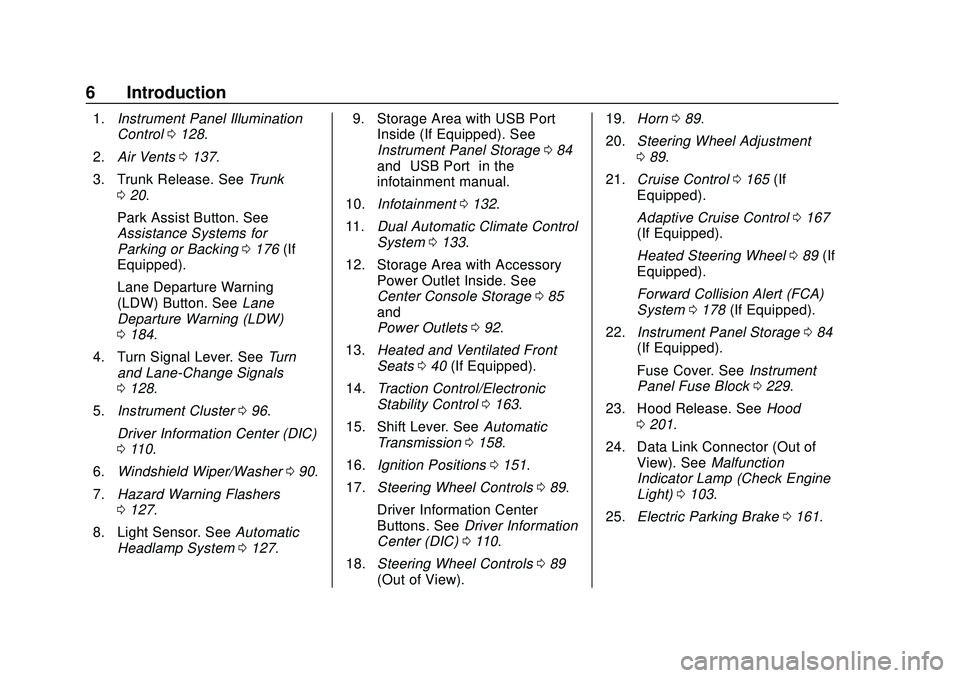
1.Instrument Panel Illumination
Control 0128.
2. Air Vents 0137.
3. Trunk Release. See Trunk
0 20.
Park Assist Button. See
Assistance Systems for
Parking or Backing 0176 (If
Equipped).
Lane Departure Warning
(LDW) Button. See Lane
Departure Warning (LDW)
0 184.
4. Turn Signal Lever. See Turn
and Lane-Change Signals
0 128.
5. Instrument Cluster 096.
Driver Information Center (DIC)
0 110.
6. Windshield Wiper/Washer 090.
7. Hazard Warning Flashers
0127.
8. Light Sensor. See Automatic
Headlamp System 0127. 9. Storage Area with USB Port
Inside (If Equipped). See
Instrument Panel Storage 084
and “USB Port” in the
infotainment manual.
10. Infotainment 0132.
11. Dual Automatic Climate Control
System 0133.
12. Storage Area with Accessory Power Outlet Inside. See
Center Console Storage 085
and
Power Outlets 092.
13. Heated and Ventilated Front
Seats 040 (If Equipped).
14. Traction Control/Electronic
Stability Control 0163.
15. Shift Lever. See Automatic
Transmission 0158.
16. Ignition Positions 0151.
17. Steering Wheel Controls 089.
Driver Information Center
Buttons. See Driver Information
Center (DIC) 0110.
18. Steering Wheel Controls 089
(Out of View). 19.
Horn 089.
20. Steering Wheel Adjustment
089.
21. Cruise Control 0165 (If
Equipped).
Adaptive Cruise Control 0167
(If Equipped).
Heated Steering Wheel 089 (If
Equipped).
Forward Collision Alert (FCA)
System 0178 (If Equipped).
22. Instrument Panel Storage 084
(If Equipped).
Fuse Cover. See Instrument
Panel Fuse Block 0229.
23. Hood Release. See Hood
0 201.
24. Data Link Connector (Out of View). See Malfunction
Indicator Lamp (Check Engine
Light) 0103.
25. Electric Parking Brake 0161.
Page 20 of 328
Chevrolet Impala Owner Manual (GMNA-Localizing-U.S./Canada-13688912) -
2020 - CRC - 6/5/19
Keys, Doors, and Windows 19
removed from the brake or the
vehicle speed becomes faster than
13 km/h (8 mph).
To unlock the doors:
.Press
Kon the power door lock
switch.
. Shift the transmission into
P (Park).
Automatic door locking cannot be
disabled. Automatic door unlocking
can be programmed. See Vehicle
Personalization 0113.
Lockout Protection
When the vehicle is on or in ACC/
ACCESSORY and the power door
lock switch is pressed with the
driver door open, all doors will lock
and only the driver door will unlock.
If the vehicle is off and locking is
requested while a door is open,
when all doors are closed the
vehicle will check for RKE
transmitters inside. If an RKE
transmitter is detected and the
number of RKE transmitters has not
reduced, the driver door will unlock. Lockout Protection Override
Lockout protection can be manually
overridden with the driver door open
by pressing and holding
Qon the
power door lock switch.
Unlocked Door Anti-Lockout
If Unlocked Door Anti-Lockout is
turned on and the vehicle is off, the
driver door is open, and locking is
requested, all the doors will lock and
the driver door will remain open.
Press the button again to lock the
driver door. The Unlocked Door
Anti-Lockout feature can be turned
on or off. See Vehicle
Personalization 0113.
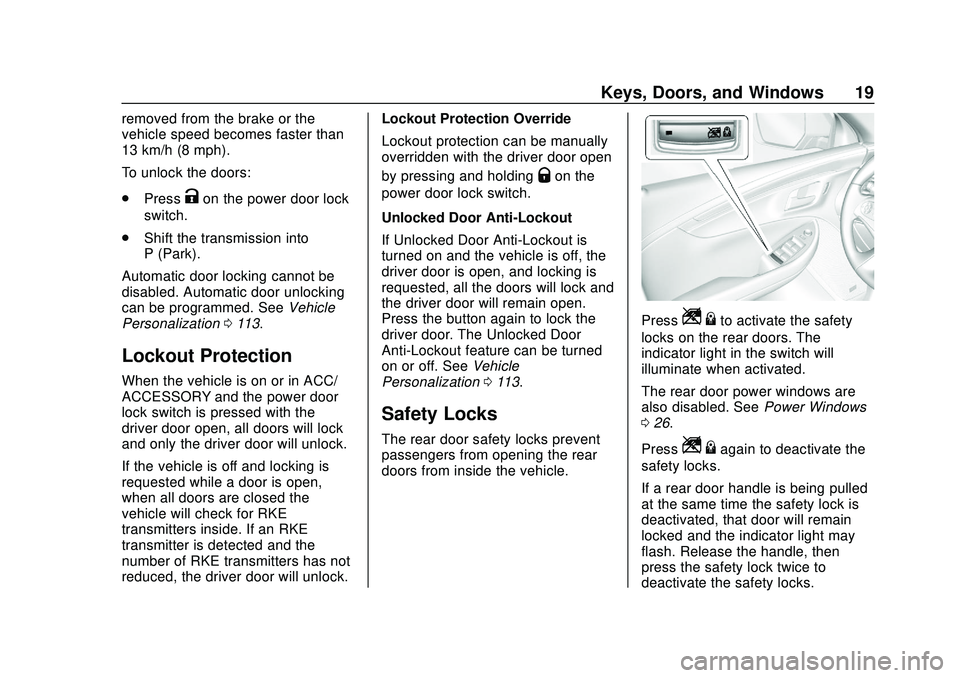
Safety Locks
The rear door safety locks prevent
passengers from opening the rear
doors from inside the vehicle.
PressZ {to activate the safety
locks on the rear doors. The
indicator light in the switch will
illuminate when activated.
The rear door power windows are
also disabled. See Power Windows
0 26.
Press
Z {again to deactivate the
safety locks.
If a rear door handle is being pulled
at the same time the safety lock is
deactivated, that door will remain
locked and the indicator light may
flash. Release the handle, then
press the safety lock twice to
deactivate the safety locks.
Page 21 of 328
Chevrolet Impala Owner Manual (GMNA-Localizing-U.S./Canada-13688912) -
2020 - CRC - 6/5/19
20 Keys, Doors, and Windows
Doors
Trunk
{Warning
Exhaust gases can enter the
vehicle if it is driven with the
liftgate, hatch/trunk open, or with
any objects that pass through the
seal between the body and the
hatch/trunk or liftgate. Engine
exhaust contains carbon
monoxide (CO) which cannot be
seen or smelled. It can cause
unconsciousness and even death.
If the vehicle must be driven with
the liftgate or hatch/trunk open:. Close all of the windows.
. Fully open the air outlets on
or under the instrument
panel.
. Adjust the climate control
system to a setting that
brings in only outside air
(Continued)
Warning (Continued)
and set the fan speed to the
highest setting. See
“Climate Control Systems”
in the Index.
. If the vehicle is equipped
with a power liftgate, disable
the power liftgate function.
For more information about
carbon monoxide, see Engine
Exhaust 0157.
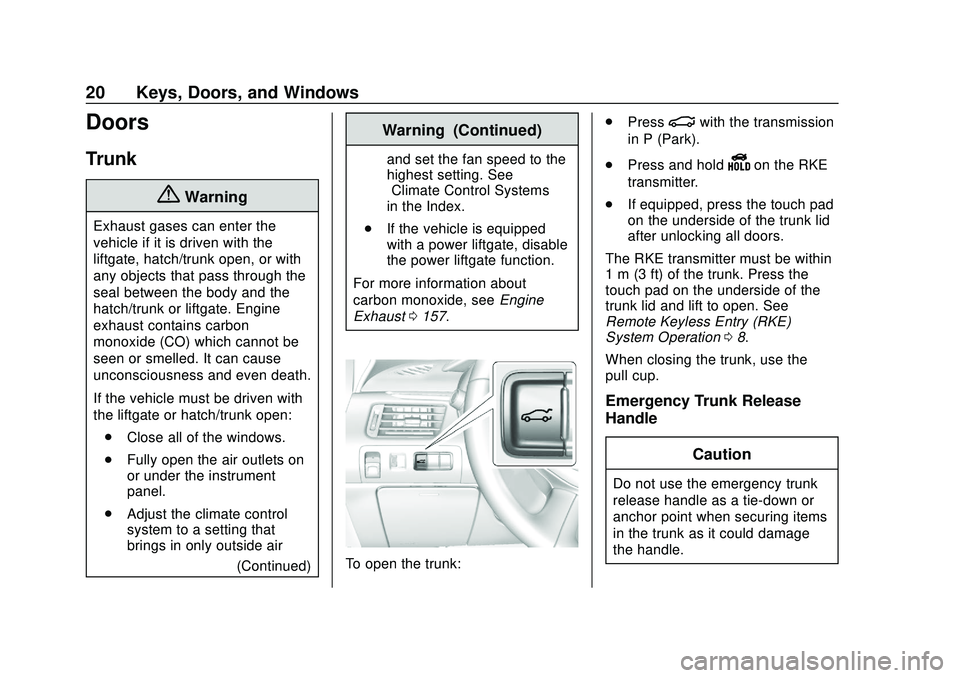
To open the trunk: .
Press
|with the transmission
in P (Park).
. Press and hold
Yon the RKE
transmitter.
. If equipped, press the touch pad
on the underside of the trunk lid
after unlocking all doors.
The RKE transmitter must be within
1 m (3 ft) of the trunk. Press the
touch pad on the underside of the
trunk lid and lift to open. See
Remote Keyless Entry (RKE)
System Operation 08.
When closing the trunk, use the
pull cup.
Emergency Trunk Release
Handle
Caution
Do not use the emergency trunk
release handle as a tie-down or
anchor point when securing items
in the trunk as it could damage
the handle.
Page 104 of 328
Chevrolet Impala Owner Manual (GMNA-Localizing-U.S./Canada-13688912) -
2020 - CRC - 6/5/19
Instruments and Controls 103
When this light comes on, the Driver
Information Center (DIC) also
displays a message.
If a short distance must be driven
with the light on, be sure to turn off
all accessories, such as the radio
and air conditioner.
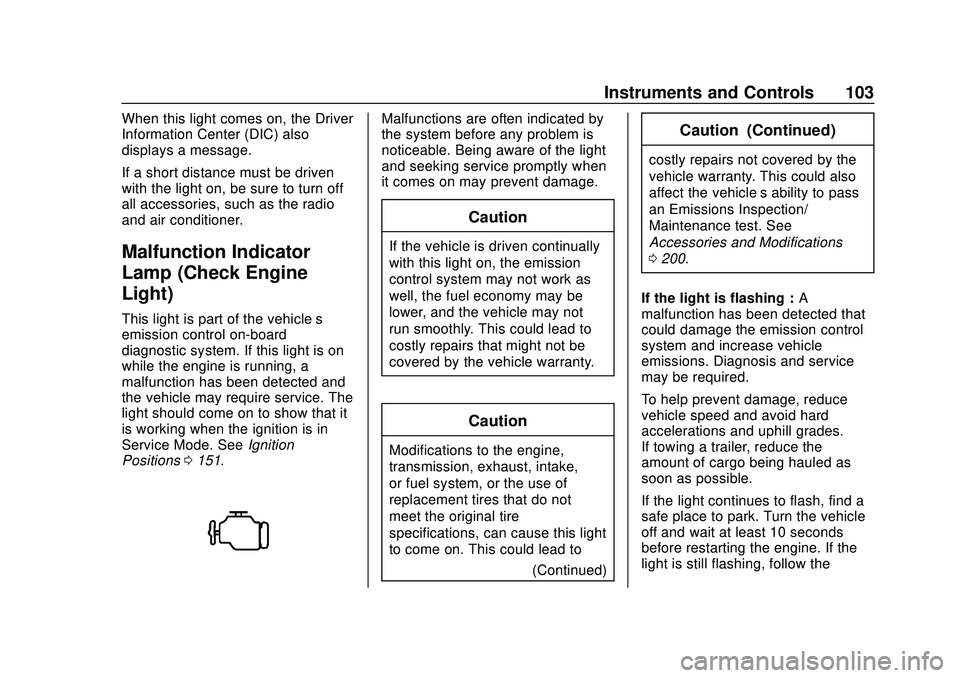
Malfunction Indicator
Lamp (Check Engine
Light)
This light is part of the vehicle’s
emission control on-board
diagnostic system. If this light is on
while the engine is running, a
malfunction has been detected and
the vehicle may require service. The
light should come on to show that it
is working when the ignition is in
Service Mode. SeeIgnition
Positions 0151.
Malfunctions are often indicated by
the system before any problem is
noticeable. Being aware of the light
and seeking service promptly when
it comes on may prevent damage.
Caution
If the vehicle is driven continually
with this light on, the emission
control system may not work as
well, the fuel economy may be
lower, and the vehicle may not
run smoothly. This could lead to
costly repairs that might not be
covered by the vehicle warranty.
Caution
Modifications to the engine,
transmission, exhaust, intake,
or fuel system, or the use of
replacement tires that do not
meet the original tire
specifications, can cause this light
to come on. This could lead to
(Continued)
Caution (Continued)
costly repairs not covered by the
vehicle warranty. This could also
affect the vehicle’s ability to pass
an Emissions Inspection/
Maintenance test. See
Accessories and Modifications
0200.
If the light is flashing : A
malfunction has been detected that
could damage the emission control
system and increase vehicle
emissions. Diagnosis and service
may be required.
To help prevent damage, reduce
vehicle speed and avoid hard
accelerations and uphill grades.
If towing a trailer, reduce the
amount of cargo being hauled as
soon as possible.
If the light continues to flash, find a
safe place to park. Turn the vehicle
off and wait at least 10 seconds
before restarting the engine. If the
light is still flashing, follow the
Page 114 of 328
Chevrolet Impala Owner Manual (GMNA-Localizing-U.S./Canada-13688912) -
2020 - CRC - 6/5/19
Instruments and Controls 113
.Brakes
. Steering
. Ride Control Systems
. Driver Assistance Systems
. Cruise Control
. Lighting and Bulb Replacement
. Wiper/Washer Systems
. Doors and Windows
. Seat Belts
. Airbag Systems
. Engine and Transmission
. Tire Pressure
. Battery
Engine Power Messages
ENGINE POWER IS REDUCED
This message displays when the
vehicle's propulsion power is
reduced. A reduction in propulsion
power can affect the vehicle's ability
to accelerate. If this message is on,
but there is no observed reduction
in performance, proceed to your
destination. The performance may be reduced the next time the vehicle
is driven. The vehicle may be driven
while this message is on, but
maximum acceleration and speed
may be reduced. Anytime this
message stays on, or displays
repeatedly, the vehicle should be
taken to your dealer for service as
soon as possible.
Under certain operating conditions,
propulsion will be disabled. Try
restarting after the vehicle has been
off for 30 seconds.
Vehicle Speed Messages
SPEED LIMITED TO XXX KM/
H (MPH)
This message shows that the
vehicle speed has been limited to
the speed displayed. The limited
speed is a protection for various
propulsion and vehicle systems,
such as lubrication, thermal, brakes,
suspension, Teen Driver if
equipped, or tires.
Vehicle
Personalization
The audio system controls are used
to access the personalization
menus for customizing vehicle
features.
Infotainment System Audio
System Controls
To access the personalization
menus:
1. Touch SETTINGS on the Home Page on the infotainment
display.
2. Touch the desired feature to display a list of available
options.
3. Touch to select the desired feature setting.
4. Press
qBACK to return to the
previous menu.
Personalization Menus
The following list of features may be
available:
. Time and Date
Page 122 of 328
Chevrolet Impala Owner Manual (GMNA-Localizing-U.S./Canada-13688912) -
2020 - CRC - 6/5/19
Instruments and Controls 121
Universal Remote
System
SeeRadio Frequency Statement
0 300.
Universal Remote System
Programming
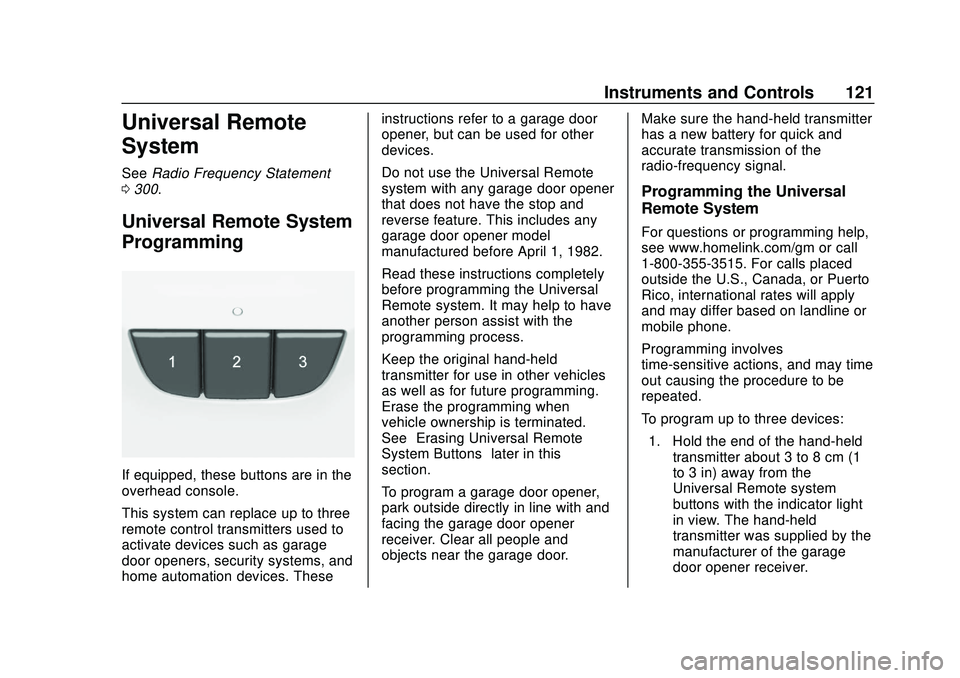
If equipped, these buttons are in the
overhead console.
This system can replace up to three
remote control transmitters used to
activate devices such as garage
door openers, security systems, and
home automation devices. These instructions refer to a garage door
opener, but can be used for other
devices.
Do not use the Universal Remote
system with any garage door opener
that does not have the stop and
reverse feature. This includes any
garage door opener model
manufactured before April 1, 1982.
Read these instructions completely
before programming the Universal
Remote system. It may help to have
another person assist with the
programming process.
Keep the original hand-held
transmitter for use in other vehicles
as well as for future programming.
Erase the programming when
vehicle ownership is terminated.
See
“Erasing Universal Remote
System Buttons” later in this
section.
To program a garage door opener,
park outside directly in line with and
facing the garage door opener
receiver. Clear all people and
objects near the garage door. Make sure the hand-held transmitter
has a new battery for quick and
accurate transmission of the
radio-frequency signal.
Programming the Universal
Remote System
For questions or programming help,
see www.homelink.com/gm or call
1-800-355-3515. For calls placed
outside the U.S., Canada, or Puerto
Rico, international rates will apply
and may differ based on landline or
mobile phone.
Programming involves
time-sensitive actions, and may time
out causing the procedure to be
repeated.
To program up to three devices:
1. Hold the end of the hand-held transmitter about 3 to 8 cm (1
to 3 in) away from the
Universal Remote system
buttons with the indicator light
in view. The hand-held
transmitter was supplied by the
manufacturer of the garage
door opener receiver.
Page 124 of 328
Chevrolet Impala Owner Manual (GMNA-Localizing-U.S./Canada-13688912) -
2020 - CRC - 6/5/19
Instruments and Controls 123
press and hold the same
button a second time for
two seconds, then release it.
Again, if the door does not
move or the garage door lamp
does not flash, press and hold
the same button a third time for
two seconds, then release it.
The Universal Remote system
should now activate the
garage door.
Repeat the process for
programming the two remaining
buttons.
Radio Signals for Canada and
Some Gate Operators
For questions or programming help,
see www.homelink.com/gm or call
1-800-355-3515. For calls placed
outside the U.S., Canada, or Puerto
Rico, international rates will apply
and may differ based on landline or
mobile phone.
Canadian radio-frequency laws and
some U.S. gate operators require
transmitter signals to time out or quit
after several seconds of
transmission. This may not be long enough for the Universal Remote
system to pick up the signal during
programming.
If the programming did not work,
replace Step 2 under
“Programming
the Universal Remote System” with
the following:
Press and hold the Universal
Remote system button while
pressing and releasing the
hand-held transmitter button every
two seconds until the signal has
been successfully accepted by the
Universal Remote system. The
Universal Remote system indicator
light will flash slowly at first and then
rapidly. Proceed with Step 3 under
“Programming the Universal Remote
System” to complete.
Universal Remote System
Operation
Using the Universal Remote
System
Press and hold the appropriate
Universal Remote system button for
at least one-half second. The
indicator light will come on while the
signal is being transmitted.
Erasing Universal Remote
System Buttons
Erase all programmed buttons when
vehicle ownership is terminated.
To erase:
1. Press and hold the two outside buttons until the indicator light
begins to flash. This should
take about 10 seconds.
2. Release both buttons.
Page 127 of 328

Chevrolet Impala Owner Manual (GMNA-Localizing-U.S./Canada-13688912) -
2020 - CRC - 6/5/19
126 Lighting
AUTO :Automatically turns the
exterior lamps on and off,
depending on outside lighting.
;: Turns on the parking lamps
including all lamps, except the
headlamps.
2: Turns on the headlamps
together with the parking lamps and
instrument panel lights.
Exterior Lamps Off
Reminder
A warning chime sounds if the driver
door is opened while the ignition is
off and the exterior lamps are on.
Headlamp High/
Low-Beam Changer
Push the turn signal lever away
from you and release to turn the
high beams on. To return to low
beams, push the lever again or pull
it toward you and release.
This indicator light turns on in the
instrument cluster when the
high-beam headlamps are on.
Flash-to-Pass
To flash the high beams, pull the
turn signal lever toward you, and
release.
Daytime Running
Lamps (DRL)
DRL can make it easier for others to
see the front of your vehicle during
the day. Fully functional DRL are
required on all vehicles first sold in
Canada.
The DRL system turns on the
low-beam headlamps at a reduced
brightness. For vehicles with High
Intensity Discharge (HID)
headlamps, there is a dedicated DRL. The DRL will come on when
all of the following conditions
are met:
.
The ignition is on.
. The exterior lamp control is
in AUTO.
. The light sensor determines it is
daytime.
. The vehicle is not in P (Park).
When the DRL are on, the taillamps,
sidemarker lamps, instrument panel
lights, and other lamps will not
be on.
The DRL turn off when the
headlamps are turned to
Oor the
ignition is off. For vehicles first sold
in Canada, the DRL can only be
turned off when the transmission is
in P (Park).
This vehicle may have a DRL
disabling function. When the DRL
are on and a turn signal is activated,
the DRL on that side will be off until
the turn signal goes off.
Page 140 of 328
Chevrolet Impala Owner Manual (GMNA-Localizing-U.S./Canada-13688912) -
2020 - CRC - 6/11/19
Driving and Operating 139
Driving and
Operating
Driving Information
Driving for Better FuelEconomy . . . . . . . . . . . . . . . . . . . . 140
Distracted Driving . . . . . . . . . . . . 140
Defensive Driving . . . . . . . . . . . . . 141
Drunk Driving . . . . . . . . . . . . . . . . . 141
Control of a Vehicle . . . . . . . . . . . 142
Braking . . . . . . . . . . . . . . . . . . . . . . . 142
Steering . . . . . . . . . . . . . . . . . . . . . . 142
Off-Road Recovery . . . . . . . . . . . 143
Loss of Control . . . . . . . . . . . . . . . 143
Driving on Wet Roads . . . . . . . . 144
Hill and Mountain Roads . . . . . 145
Winter Driving . . . . . . . . . . . . . . . . 145
If the Vehicle Is Stuck . . . . . . . . 147
Vehicle Load Limits . . . . . . . . . . . 147
Starting and Operating
New Vehicle Break-In . . . . . . . . . 151
Ignition Positions . . . . . . . . . . . . . 151
Starting the Engine . . . . . . . . . . . 153
Engine Heater . . . . . . . . . . . . . . . . 154
Retained Accessory Power (RAP) . . . . . . . . . . . . . . . . 155
Shifting Into Park . . . . . . . . . . . . . 155 Shifting out of Park . . . . . . . . . . . 156
Parking over Things
That Burn . . . . . . . . . . . . . . . . . . . 156
Extended Parking . . . . . . . . . . . . 157
Engine Exhaust
Engine Exhaust . . . . . . . . . . . . . . 157
Running the Vehicle While Parked . . . . . . . . . . . . . . . . . . . . . . 157
Automatic Transmission
Automatic Transmission . . . . . . 158
Manual Mode . . . . . . . . . . . . . . . . . 160
Brakes
Antilock BrakeSystem (ABS) . . . . . . . . . . . . . . . 161
Electric Parking Brake . . . . . . . . 161
Brake Assist . . . . . . . . . . . . . . . . . . 163
Hill Start Assist (HSA) . . . . . . . . 163
Ride Control Systems
Traction Control/Electronic Stability Control . . . . . . . . . . . . . 163
Cruise Control
Cruise Control . . . . . . . . . . . . . . . . 165
Adaptive Cruise Control . . . . . . 167
Driver Assistance Systems
Driver Assistance Systems . . . 174 Assistance Systems for
Parking or Backing . . . . . . . . . . 176
Assistance Systems for Driving . . . . . . . . . . . . . . . . . . . . . . 178
Forward Collision Alert (FCA)
System . . . . . . . . . . . . . . . . . . . . . . 178
Automatic Emergency Braking (AEB) . . . . . . . . . . . . . . . 180
Side Blind Zone Alert (SBZA) . . . . . . . . . . . . . . . . 181
Lane Change Alert (LCA) . . . . . 182
Lane Departure Warning (LDW) . . . . . . . . . . . . . 184
Fuel
Top Tier Fuel . . . . . . . . . . . . . . . . . 185
Recommended Fuel . . . . . . . . . . 185
Prohibited Fuels . . . . . . . . . . . . . . 186
Fuels in Foreign Countries . . . 186
Fuel Additives . . . . . . . . . . . . . . . . 186
E85 or FlexFuel . . . . . . . . . . . . . . 186
Filling the Tank . . . . . . . . . . . . . . . 187
Filling a Portable FuelContainer . . . . . . . . . . . . . . . . . . . 189
Trailer Towing
General TowingInformation . . . . . . . . . . . . . . . . . . 189
Driving Characteristics and
Towing Tips . . . . . . . . . . . . . . . . . 189
Trailer Towing . . . . . . . . . . . . . . . . 193
Page 146 of 328
Chevrolet Impala Owner Manual (GMNA-Localizing-U.S./Canada-13688912) -
2020 - CRC - 6/11/19
Driving and Operating 145
There is no hard and fast rule about
hydroplaning. The best advice is to
slow down when the road is wet.
Other Rainy Weather Tips
Besides slowing down, other wet
weather driving tips include:
.Allow extra following distance.
. Pass with caution.
. Keep windshield wiping
equipment in good shape.
. Keep the windshield washer fluid
reservoir filled.
. Have good tires with proper
tread depth. See Tires0231.
. Turn off cruise control.
Hill and Mountain Roads
Driving on steep hills or through
mountains is different than driving
on flat or rolling terrain. Tips include:
.
Keep the vehicle serviced and in
good shape.
. Check all fluid levels and brakes,
tires, cooling system, and
transmission. .
Shift to a lower gear when going
down steep or long hills.
{Warning
Using the brakes to slow the
vehicle on a long downhill slope
can cause brake overheating, can
reduce brake performance, and
could result in a loss of braking.
Shift the transmission to a lower
gear to let the engine assist the
brakes on a steep downhill slope.
{Warning
Coasting downhill in N (Neutral)
or with the ignition off is
dangerous. This can cause
overheating of the brakes and
loss of steering assist. Always
have the engine running and the
vehicle in gear. .
Drive at speeds that keep the
vehicle in its own lane. Do not
swing wide or cross the
center line.
. Be alert on top of hills;
something could be in your lane
(e.g., stalled car, crash).
. Pay attention to special road
signs (e.g., falling rocks area,
winding roads, long grades,
passing or no-passing zones)
and take appropriate action.
Winter Driving
Driving on Snow or Ice
Snow or ice between the tires and
the road creates less traction or
grip, so drive carefully. Wet ice can
occur at about 0 °C (32 °F) when
freezing rain begins to fall. Avoid
driving on wet ice or in freezing rain
until roads can be treated.
For Slippery Road Driving:
.Accelerate gently. Accelerating
too quickly causes the wheels to
spin and makes the surface
under the tires slick.