automatic transmission CHEVROLET KODIAK 2005 Owner's Manual
[x] Cancel search | Manufacturer: CHEVROLET, Model Year: 2005, Model line: KODIAK, Model: CHEVROLET KODIAK 2005Pages: 374, PDF Size: 5.46 MB
Page 184 of 374
Traction Control System (TCS)
Your vehicle may have a traction control system that
limits wheel spin. This is especially useful in slippery
road conditions. The system operates only if it senses
that one or both of the rear wheels are spinning or
beginning to lose traction. When this happens,
the system applies the brake(s) at the affected wheel(s).
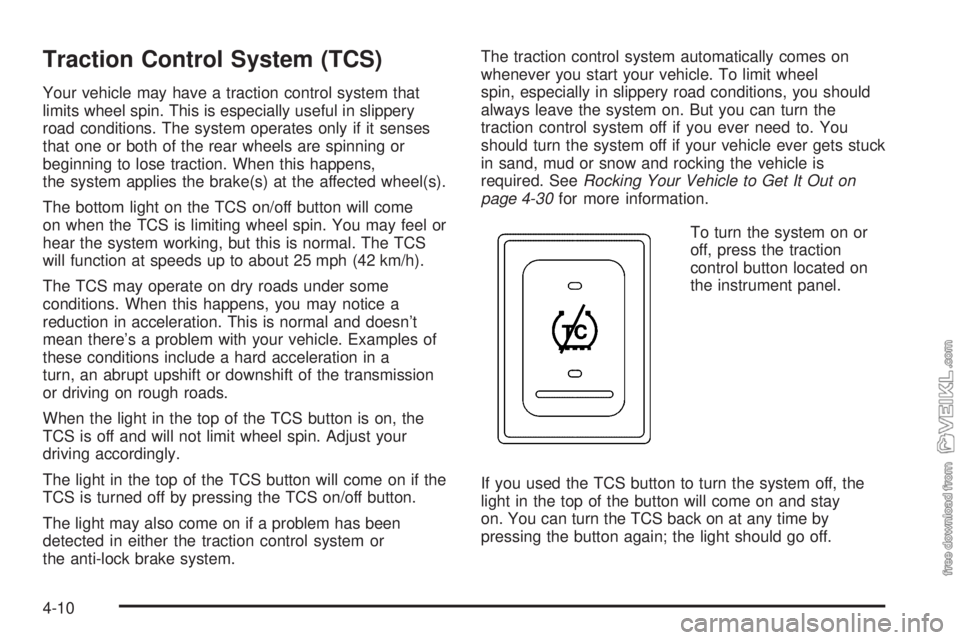
The bottom light on the TCS on/off button will come
on when the TCS is limiting wheel spin. You may feel or
hear the system working, but this is normal. The TCS
will function at speeds up to about 25 mph (42 km/h).
The TCS may operate on dry roads under some
conditions. When this happens, you may notice a
reduction in acceleration. This is normal and doesn’t
mean there’s a problem with your vehicle. Examples of
these conditions include a hard acceleration in a
turn, an abrupt upshift or downshift of the transmission
or driving on rough roads.
When the light in the top of the TCS button is on, the
TCS is off and will not limit wheel spin. Adjust your
driving accordingly.
The light in the top of the TCS button will come on if the
TCS is turned off by pressing the TCS on/off button.
The light may also come on if a problem has been
detected in either the traction control system or
the anti-lock brake system.The traction control system automatically comes on
whenever you start your vehicle. To limit wheel
spin, especially in slippery road conditions, you should
always leave the system on. But you can turn the
traction control system off if you ever need to. You
should turn the system off if your vehicle ever gets stuck
in sand, mud or snow and rocking the vehicle is
required. SeeRocking Your Vehicle to Get It Out on
page 4-30for more information.
To turn the system on or
off, press the traction
control button located on
the instrument panel.
If you used the TCS button to turn the system off, the
light in the top of the button will come on and stay
on. You can turn the TCS back on at any time by
pressing the button again; the light should go off.
4-10
Page 213 of 374
Service............................................................5-3
Doing Your Own Service Work.........................5-4
Two Safety Cautions about Engine Fan
Breakage...................................................5-5
Fuel................................................................5-6
Gasoline Octane............................................5-6
Gasoline Specifications....................................5-6
Additives.......................................................5-6
Diesel Engine Fuel.........................................5-7
What Fuel to Use...........................................5-8
Very Cold Weather Operation.........................5-10
Water in Fuel...............................................5-10
Running Out of Fuel.....................................5-15
Fuel Filter Replacement.................................5-16
Fuels in Foreign Countries.............................5-17
Filling the Tank............................................5-18
Filling a Portable Fuel Container.....................5-19
Checking Things Under the Hood....................5-20
Hood Latches...............................................5-20
Engine Oil (Caterpillar
®Diesel Engine).............5-22
Engine Oil (DURAMAX®Diesel)......................5-22
Engine Oil (Gasoline Engine)..........................5-26
Engine Oil Life System (Gasoline Engine)........5-29
Engine Oil Life System (DURAMAX
®Diesel).....5-31
Engine Oil Life System (Caterpillar®
Diesel Engine)..........................................5-32Engine Air Cleaner/Filter................................5-33
Automatic Transmission Fluid.........................5-34
Manual Transmission Fluid.............................5-35
Engine Coolant (Gas and
DURAMAX
®Engines).................................5-36
Engine Coolant (Caterpillar®Diesel Engines).....5-38
Coolant Surge Tank Pressure Cap..................5-38
Engine Overheating.......................................5-38
Cooling System (Gas and
DURAMAX
®Engines).................................5-40
Engine Fan Noise.........................................5-45
Power Steering Fluid.....................................5-45
Windshield Washer Fluid................................5-46
Brakes........................................................5-47
Battery........................................................5-55
Jump Starting...............................................5-56
Rear Axle.......................................................5-60
Rear Axle Shift Motor....................................5-62
Four-Wheel Drive............................................5-62
Front Axle......................................................5-63
Noise Control System.....................................5-64
Tampering with Noise Control System
Prohibited.................................................5-64
Bulb Replacement..........................................5-65
Windshield Wiper Blade Replacement..............5-65
Section 5 Service and Appearance Care
5-1
Page 219 of 374
Gasolines containing oxygenates, such as ethers and
ethanol, and reformulated gasolines may be available in
your area to contribute to clean air. General Motors
recommends that you use these gasolines, particularly if
they comply with the specifications described earlier.
Notice:Your vehicle was not designed for fuel that
contains methanol. Do not use fuel containing
methanol. It can corrode metal parts in your fuel
system and also damage the plastic and rubber
parts. That damage would not be covered under
your warranty.
Some gasolines that are not reformulated for low
emissions may contain an octane-enhancing additive
called methylcyclopentadienyl manganese tricarbonyl
(MMT); ask the attendant where you buy gasoline
whether the fuel contains MMT. General Motors
does not recommend the use of such gasolines.
Fuels containing MMT can reduce the life of spark plugs
and the performance of the emission control system
may be affected. The malfunction indicator lamp
may turn on. If this occurs, return to your authorized
GM dealer for service.Diesel Engine Fuel
For the Caterpillar®diesel, see the Caterpillar®
Operation & Maintenance Manual for information
concerning fuel usage.
Notice:Diesel fuel or fuel additives not
recommended in this manual could damage your
fuel system and engine. Your warranty would
not cover this damage. And:
Diesel fuel that has been mixed with engine oil
or automatic transmission uid could damage
your engine and emission controls.
Aftermarket diesel fuel additives are not tested
by General Motors. Some additives, particularly
those which contain alcohol or water emulsiers,
may damage your fuel system. If you believe that
unique circumstances call for a fuel additive to
be used, consult your dealer for advice.
If you ever run out of diesel fuel, it can be difficult
to restart your engine. To avoid all this, never let
your tank get empty.
If gasoline is ever accidentally added to the fuel
tank, to avoid severe engine damage, do not run the
engine until the fuel tank can be drained.
If you run out of fuel,Running Out of Fuel on page 5-15
tells you how to restart your engine.
5-7
Page 246 of 374
How to Inspect the Engine
Air Cleaner/Filter
Locate the filter change indicator. When the change
indicator turns black or is in the red/orange change area,
replace the filter and reset the indicator.
To inspect the engine air cleaner/filter, remove the filter
from the vehicle and lightly shake the filter to release
loose dust and dirt. If the filter remains caked with dirt,
a new filter is required.
{CAUTION:
Operating the engine with the air cleaner/lter
off can cause you or others to be burned.
The air cleaner not only cleans the air; it helps
to stop ame if the engine backres. If it is
not there and the engine backres, you could
be burned. Do not drive with it off, and be
careful working on the engine with the air
cleaner/lter off.
Notice:If the air cleaner/lter is off, a backre can
cause a damaging engine re. And, dirt can
easily get into your engine, which will damage it.
Always have the air cleaner/lter in place when you
are driving.
Automatic Transmission Fluid
When to Check
A good time to check your automatic transmission fluid
level is when the engine oil is checked. See your Allison
Automatic Transmission Operator’s Manual to find out
when to change your transmission fluid and filters.
How to Check and What to Use
The Allison Automatic Transmission Operator’s Manual
that came with the vehicle shows how to check the
automatic transmission fluid and what fluid to use.
Automatic Transmission External Filter
Your automatic transmission filter requires periodic
replacement.
Consult the Allison Automatic Transmission Operator’s
Manual that came with the vehicle for proper change
intervals.
5-34
Page 269 of 374
2. Get the vehicles close enough so the jumper cables
can reach, but be sure the vehicles are not touching
each other. If they are, it could cause a ground
connection you do not want. You would not be able
to start your vehicle, and the bad grounding
could damage the electrical systems.
To avoid the possibility of the vehicles rolling, set the
parking brake firmly on both vehicles involved in the
jump start procedure. Put an automatic transmission
in PARK (P) or a manual transmission in NEUTRAL
before setting the parking brake. If you have a
four-wheel-drive vehicle, be sure the transfer case is
in a drive gear, not in NEUTRAL.
Notice:If you leave your radio or other accessories
on during the jump starting procedure, they could
be damaged. The repairs would not be covered
by your warranty. Always turn off your radio and
other accessories when jump starting your vehicle.
3. Turn off the ignition on both vehicles. Unplug
unnecessary accessories plugged into the cigarette
lighter or accessory power outlets. Turn off the
radio and all lamps that are not needed. This will
avoid sparks and help save both batteries, and
it could save the radio!4. Open the hood on the other vehicle and locate the
positive (+) and the negative (−) terminal locations
on that vehicle.
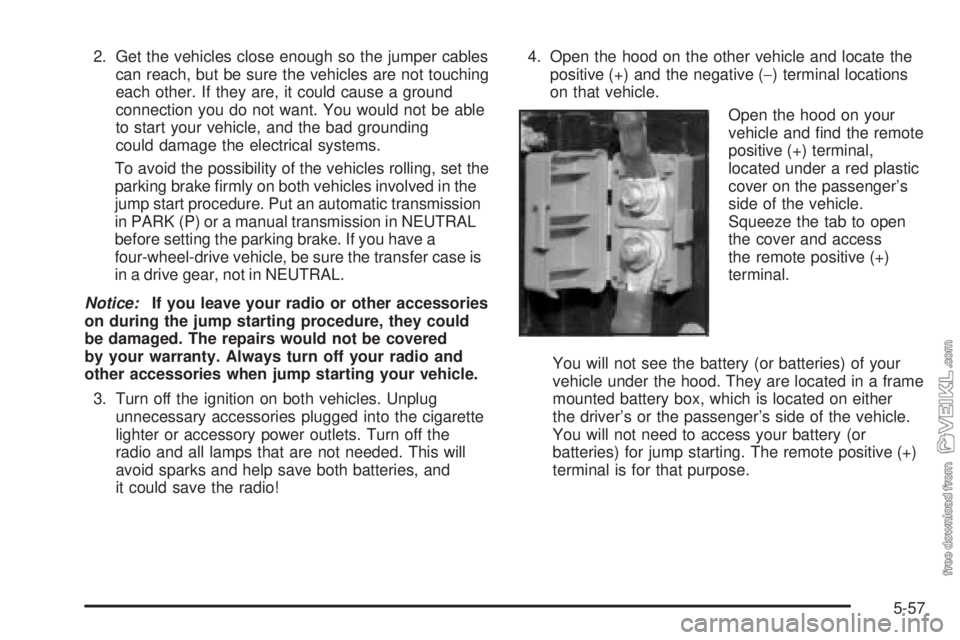
Open the hood on your
vehicle and find the remote
positive (+) terminal,
located under a red plastic
cover on the passenger’s
side of the vehicle.
Squeeze the tab to open
the cover and access
the remote positive (+)
terminal.
You will not see the battery (or batteries) of your
vehicle under the hood. They are located in a frame
mounted battery box, which is located on either
the driver’s or the passenger’s side of the vehicle.
You will not need to access your battery (or
batteries) for jump starting. The remote positive (+)
terminal is for that purpose.
5-57
Page 307 of 374
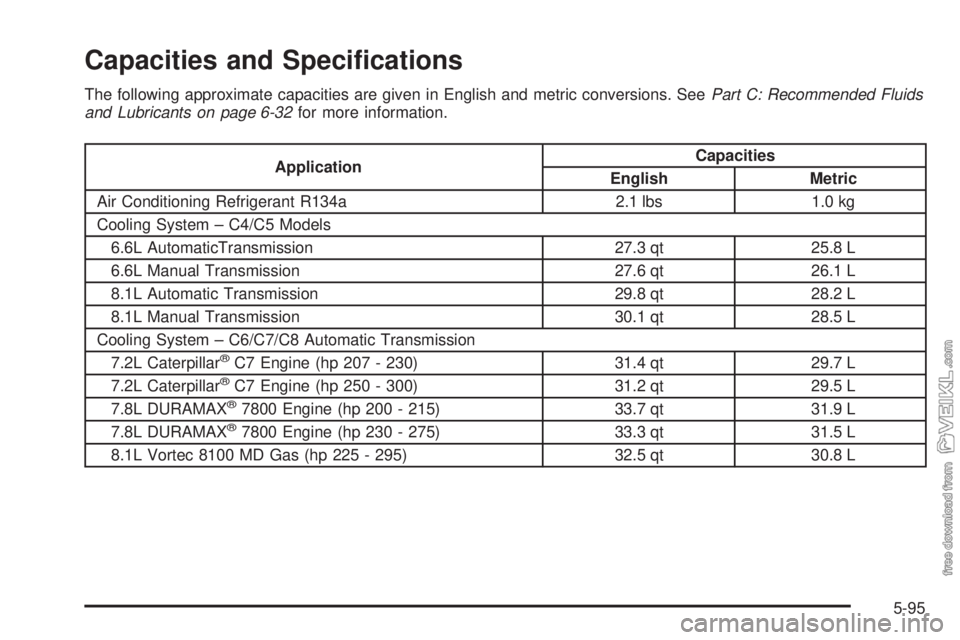
Capacities and Specications
The following approximate capacities are given in English and metric conversions. SeePart C: Recommended Fluids
and Lubricants on page 6-32for more information.
ApplicationCapacities
English Metric
Air Conditioning Refrigerant R134a 2.1 lbs 1.0 kg
Cooling System – C4/C5 Models
6.6L AutomaticTransmission 27.3 qt 25.8 L
6.6L Manual Transmission 27.6 qt 26.1 L
8.1L Automatic Transmission 29.8 qt 28.2 L
8.1L Manual Transmission 30.1 qt 28.5 L
Cooling System – C6/C7/C8 Automatic Transmission
7.2L Caterpillar
®C7 Engine (hp 207 - 230) 31.4 qt 29.7 L
7.2L Caterpillar®C7 Engine (hp 250 - 300) 31.2 qt 29.5 L
7.8L DURAMAX®7800 Engine (hp 200 - 215) 33.7 qt 31.9 L
7.8L DURAMAX®7800 Engine (hp 230 - 275) 33.3 qt 31.5 L
8.1L Vortec 8100 MD Gas (hp 225 - 295) 32.5 qt 30.8 L
5-95
Page 311 of 374
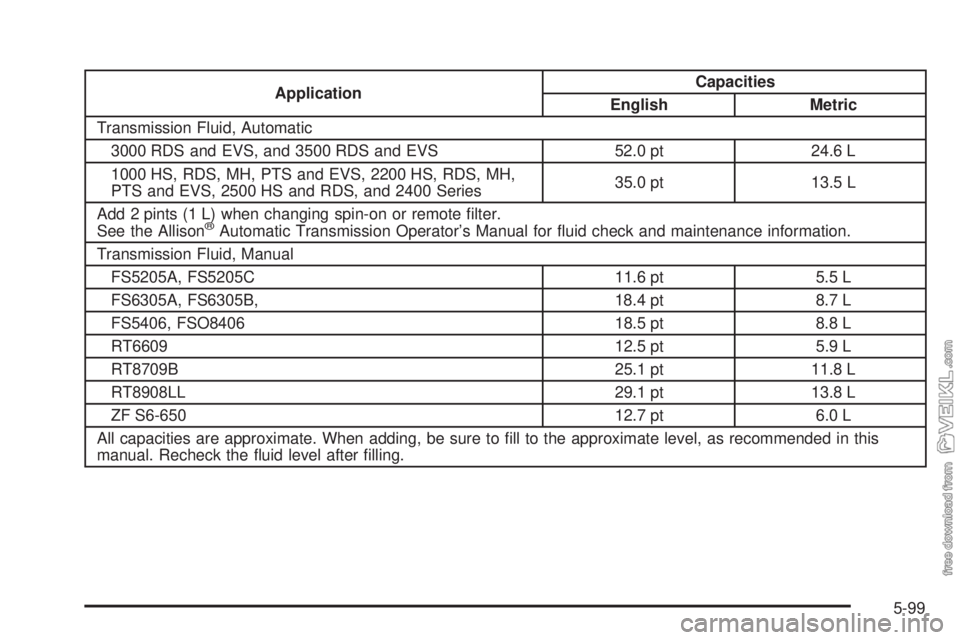
ApplicationCapacities
English Metric
Transmission Fluid, Automatic
3000 RDS and EVS, and 3500 RDS and EVS 52.0 pt 24.6 L
1000 HS, RDS, MH, PTS and EVS, 2200 HS, RDS, MH,
PTS and EVS, 2500 HS and RDS, and 2400 Series35.0 pt 13.5 L
Add 2 pints (1 L) when changing spin-on or remote filter.
See the Allison
®Automatic Transmission Operator’s Manual for fluid check and maintenance information.
Transmission Fluid, Manual
FS5205A, FS5205C 11.6 pt 5.5 L
FS6305A, FS6305B, 18.4 pt 8.7 L
FS5406, FSO8406 18.5 pt 8.8 L
RT6609 12.5 pt 5.9 L
RT8709B 25.1 pt 11.8 L
RT8908LL 29.1 pt 13.8 L
ZF S6-650 12.7 pt 6.0 L
All capacities are approximate. When adding, be sure to fill to the approximate level, as recommended in this
manual. Recheck the fluid level after filling.
5-99
Page 334 of 374
❑Air brake automatic slack adjuster service (or every
500 hours, whichever occurs first).(33)
❑Check air brake relay valve operation and check for
leaks (or every month, or every 300 hours, whichever
occurs first).
❑Clean air brake application valve (or every 3 months,
or every 300 hours, whichever occurs first). Lubricate
linkage.
❑Air brake chamber service (or every 2 months,
whichever occurs first).(34)
100,000 Miles (160 000 km)
❑Diesel Only: Inspect engine drive belt; replace as
necessary.
❑Gasoline Engine Only (Vehicles with GVW of
16,000 lbs or less): Spark plug service.(2) (25)
❑Change power steering fluid (or every 36 months,
whichever occurs first).(12)
❑Replace power steering reservoir filter element (or
every 24 months, whichever occurs first).
❑Except four-wheel drive: Front axle service.(31)
❑Four-wheel drive only: Front axle service.(30)
❑Four-wheel drive only: Transfer case service.(30)
❑Rear axle service — Eaton
®, Rockwell®, Spicer®
axles (or every 12 months, whichever occurs
first).(30)❑Exhaust brake service, if equipped. Check for
excessive spindle free play and smooth operation.
Lubricate ball joint cap.
❑Inspect air compressor discharge port (or every
6 months or every 1,800 hours, whichever
occurs first).
❑Manual transmission (ZF 6-speed only) fluid
replacement (or every 48 months, whichever
occurs first).
❑Trailer brake hand control valve service (or every
12 months, or every 3,600 hours, whichever
occurs first).(35)
120,000 Miles (192 000 km)
❑C600, C700, and C800 Gasoline Engines Only:
Replace engine drive belts.
❑C400 and C500 Gasoline Engines Only: Engine drive
belts service (or every 12 months, whichever occurs
first).(17)
150,000 Miles (240 000 km)
❑Cooling system service (or every 60 months since
last service, whichever occurs first).(2) (29)
❑Diesel Engine Only: Inspect engine drive belt;
replace as necessary.
6-20
Page 343 of 374
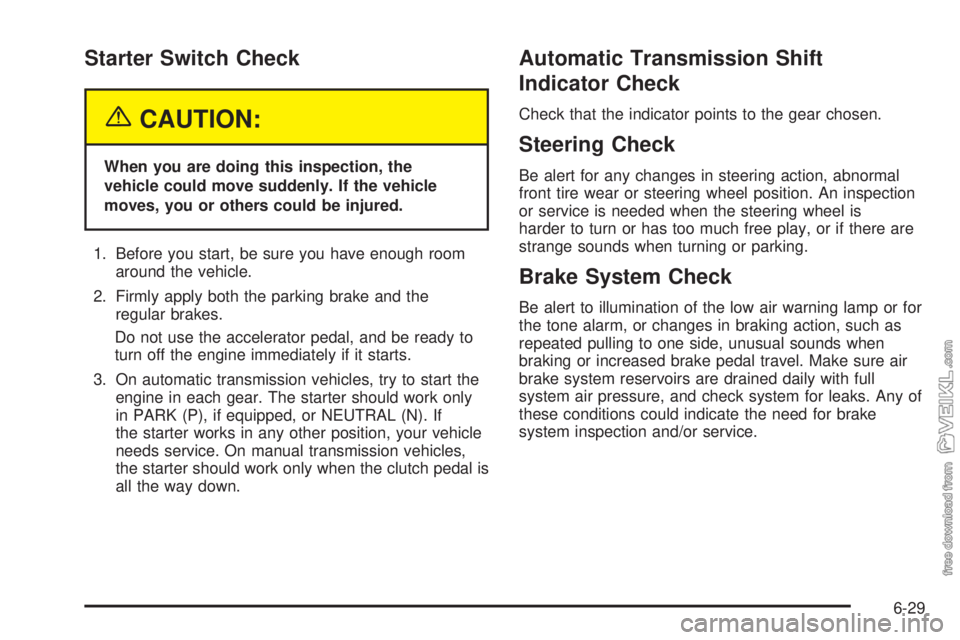
Starter Switch Check
{CAUTION:
When you are doing this inspection, the
vehicle could move suddenly. If the vehicle
moves, you or others could be injured.
1. Before you start, be sure you have enough room
around the vehicle.
2. Firmly apply both the parking brake and the
regular brakes.
Do not use the accelerator pedal, and be ready to
turn off the engine immediately if it starts.
3. On automatic transmission vehicles, try to start the
engine in each gear. The starter should work only
in PARK (P), if equipped, or NEUTRAL (N). If
the starter works in any other position, your vehicle
needs service. On manual transmission vehicles,
the starter should work only when the clutch pedal is
all the way down.
Automatic Transmission Shift
Indicator Check
Check that the indicator points to the gear chosen.
Steering Check
Be alert for any changes in steering action, abnormal
front tire wear or steering wheel position. An inspection
or service is needed when the steering wheel is
harder to turn or has too much free play, or if there are
strange sounds when turning or parking.
Brake System Check
Be alert to illumination of the low air warning lamp or for
the tone alarm, or changes in braking action, such as
repeated pulling to one side, unusual sounds when
braking or increased brake pedal travel. Make sure air
brake system reservoirs are drained daily with full
system air pressure, and check system for leaks. Any of
these conditions could indicate the need for brake
system inspection and/or service.
6-29
Page 346 of 374
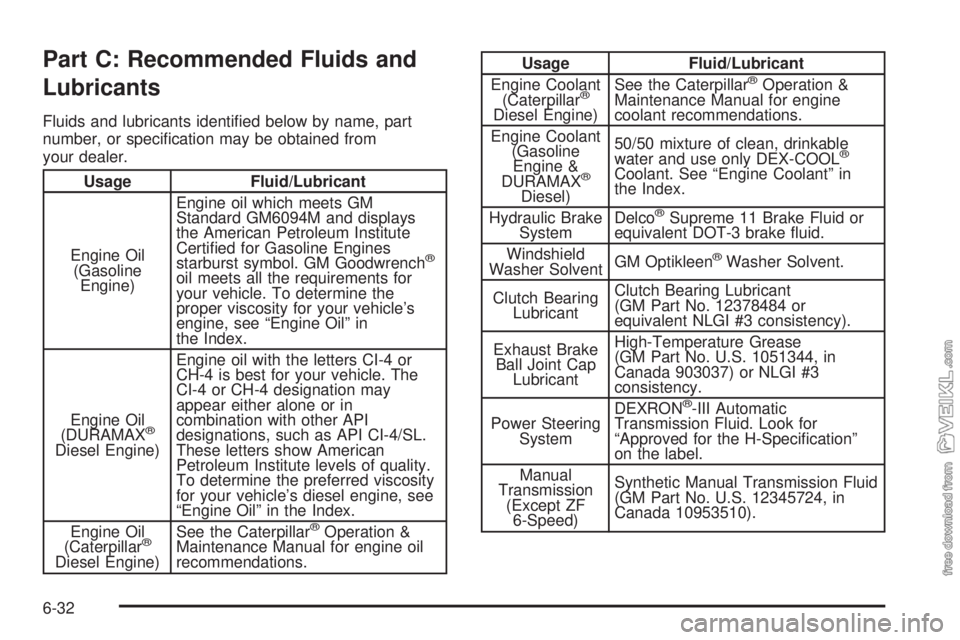
Part C: Recommended Fluids and
Lubricants
Fluids and lubricants identified below by name, part
number, or specification may be obtained from
your dealer.
Usage Fluid/Lubricant
Engine Oil
(Gasoline
Engine)Engine oil which meets GM
Standard GM6094M and displays
the American Petroleum Institute
Certified for Gasoline Engines
starburst symbol. GM Goodwrench
®
oil meets all the requirements for
your vehicle. To determine the
proper viscosity for your vehicle’s
engine, see “Engine Oil” in
the Index.
Engine Oil
(DURAMAX
®
Diesel Engine)Engine oil with the letters CI-4 or
CH-4 is best for your vehicle. The
CI-4 or CH-4 designation may
appear either alone or in
combination with other API
designations, such as API CI-4/SL.
These letters show American
Petroleum Institute levels of quality.
To determine the preferred viscosity
for your vehicle’s diesel engine, see
“Engine Oil” in the Index.
Engine Oil
(Caterpillar
®
Diesel Engine)See the Caterpillar
®Operation &
Maintenance Manual for engine oil
recommendations.
Usage Fluid/Lubricant
Engine Coolant
(Caterpillar
®
Diesel Engine)See the Caterpillar
®Operation &
Maintenance Manual for engine
coolant recommendations.
Engine Coolant
(Gasoline
Engine &
DURAMAX
®
Diesel)50/50 mixture of clean, drinkable
water and use only DEX-COOL
®
Coolant. See “Engine Coolant” in
the Index.
Hydraulic Brake
SystemDelco
®Supreme 11 Brake Fluid or
equivalent DOT-3 brake fluid.
Windshield
Washer SolventGM Optikleen
®Washer Solvent.
Clutch Bearing
LubricantClutch Bearing Lubricant
(GM Part No. 12378484 or
equivalent NLGI #3 consistency).
Exhaust Brake
Ball Joint Cap
LubricantHigh-Temperature Grease
(GM Part No. U.S. 1051344, in
Canada 903037) or NLGI #3
consistency.
Power Steering
SystemDEXRON
®-III Automatic
Transmission Fluid. Look for
“Approved for the H-Specification”
on the label.
Manual
Transmission
(Except ZF
6-Speed)Synthetic Manual Transmission Fluid
(GM Part No. U.S. 12345724, in
Canada 10953510).
6-32