reset CHEVROLET KODIAK 2005 Owners Manual
[x] Cancel search | Manufacturer: CHEVROLET, Model Year: 2005, Model line: KODIAK, Model: CHEVROLET KODIAK 2005Pages: 374, PDF Size: 5.46 MB
Page 78 of 374
Ignition Positions
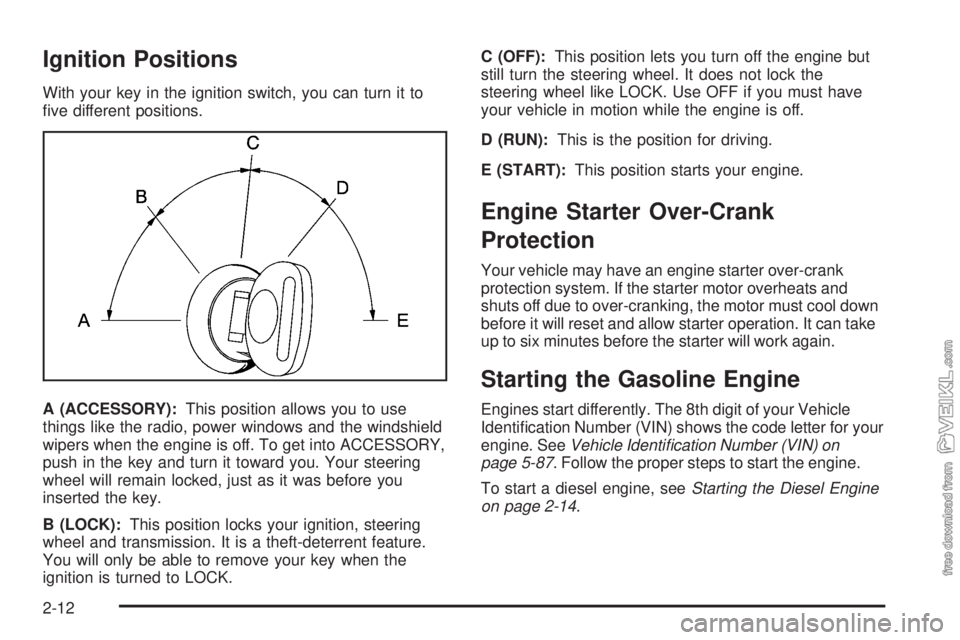
With your key in the ignition switch, you can turn it to
five different positions.
A (ACCESSORY):This position allows you to use
things like the radio, power windows and the windshield
wipers when the engine is off. To get into ACCESSORY,
push in the key and turn it toward you. Your steering
wheel will remain locked, just as it was before you
inserted the key.
B (LOCK):This position locks your ignition, steering
wheel and transmission. It is a theft-deterrent feature.
You will only be able to remove your key when the
ignition is turned to LOCK.C (OFF):This position lets you turn off the engine but
still turn the steering wheel. It does not lock the
steering wheel like LOCK. Use OFF if you must have
your vehicle in motion while the engine is off.
D (RUN):This is the position for driving.
E (START):This position starts your engine.
Engine Starter Over-Crank
Protection
Your vehicle may have an engine starter over-crank
protection system. If the starter motor overheats and
shuts off due to over-cranking, the motor must cool down
before it will reset and allow starter operation. It can take
up to six minutes before the starter will work again.
Starting the Gasoline Engine
Engines start differently. The 8th digit of your Vehicle
Identification Number (VIN) shows the code letter for your
engine. SeeVehicle Identication Number (VIN) on
page 5-87. Follow the proper steps to start the engine.
To start a diesel engine, seeStarting the Diesel Engine
on page 2-14.
2-12
Page 85 of 374
If the system senses low engine coolant, the five beat
per second alarm and the low coolant warning light
will come on.
The five beats per second tone alarm means that your
engine will shut down in about 25 to 30 seconds.
There is also an engine shutdown light to indicate that
the engine will shut down. SeeEngine Shutdown
Warning Light on page 3-39.
Pull off the road and shut off the engine. Do not start it
until the reason for the problem is known, and the
problem is fixed. If the engine shuts down when you are
still in traffic, you can restart the engine and get
another 25 to 30 seconds of operation. Do this only if
you have to, since there is a problem that can harm the
engine if it is not fixed. Engine automatic shutdown,
for gasoline engines, requires activation by your dealer.
Notice:If you try to operate the vehicle after the
engine automatically shuts down, you may damage
the vehicle. Have your vehicle repaired as soon
as possible.High Idle System
(Caterpillar
®Diesel/Gasoline Engine)
Automatic High Idle System
(Diesel Engines)
The automatic high idle feature will engage whenever
you start your vehicle and the engine is below the preset
operating temperature. This will help decrease engine
warm-up time.
Idle speed will then return to normal under any of the
following conditions:
•The engine reaches the preset operating
temperature or has been operating for at least
10 minutes.
•The brake pedal is pressed.
•The manual transmission clutch pedal is pressed
or, the automatic transmission (if equipped) is
shifted from NEUTRAL (N) or PARK (P).
•The vehicle speed exceeds about 5 mph (8 km/h).
•The throttle is pressed.
2-19
Page 86 of 374
Manual High Idle System
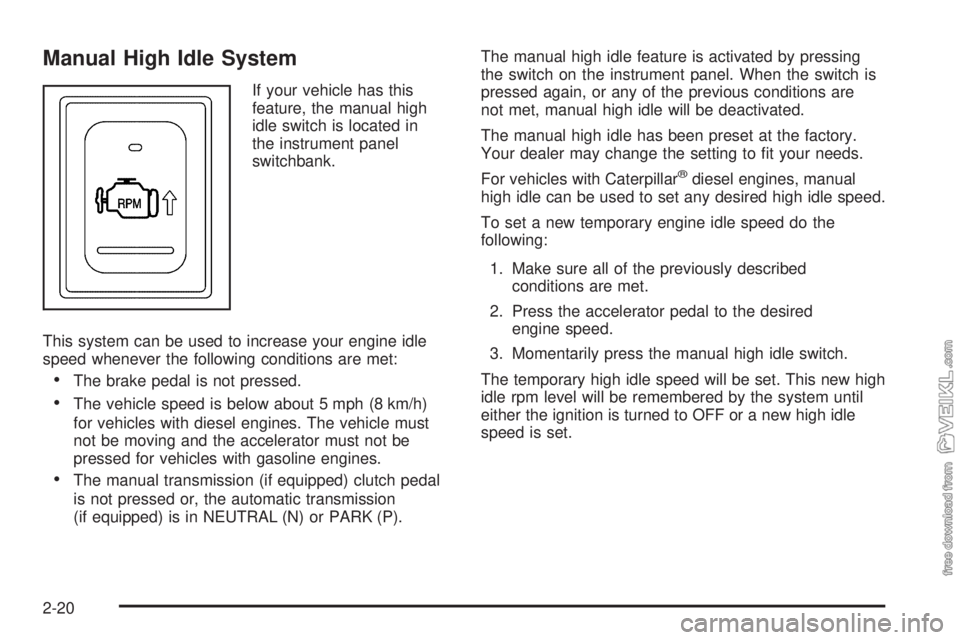
If your vehicle has this
feature, the manual high
idle switch is located in
the instrument panel
switchbank.
This system can be used to increase your engine idle
speed whenever the following conditions are met:
•The brake pedal is not pressed.
•The vehicle speed is below about 5 mph (8 km/h)
for vehicles with diesel engines. The vehicle must
not be moving and the accelerator must not be
pressed for vehicles with gasoline engines.
•The manual transmission (if equipped) clutch pedal
is not pressed or, the automatic transmission
(if equipped) is in NEUTRAL (N) or PARK (P).The manual high idle feature is activated by pressing
the switch on the instrument panel. When the switch is
pressed again, or any of the previous conditions are
not met, manual high idle will be deactivated.
The manual high idle has been preset at the factory.
Your dealer may change the setting to fit your needs.
For vehicles with Caterpillar
®diesel engines, manual
high idle can be used to set any desired high idle speed.
To set a new temporary engine idle speed do the
following:
1. Make sure all of the previously described
conditions are met.
2. Press the accelerator pedal to the desired
engine speed.
3. Momentarily press the manual high idle switch.
The temporary high idle speed will be set. This new high
idle rpm level will be remembered by the system until
either the ignition is turned to OFF or a new high idle
speed is set.
2-20
Page 124 of 374
Windshield Washer
L(Washer Fluid):There is a paddle marked with the
windshield washer symbol at the top of the multifunction
lever. To spray washer fluid on the windshield, press
the paddle. The wipers will clear the window and
then either stop or return to your preset speed.
{CAUTION:
In freezing weather, do not use your washer
until the windshield is warmed. Otherwise the
washer uid can form ice on the windshield,
blocking your vision.
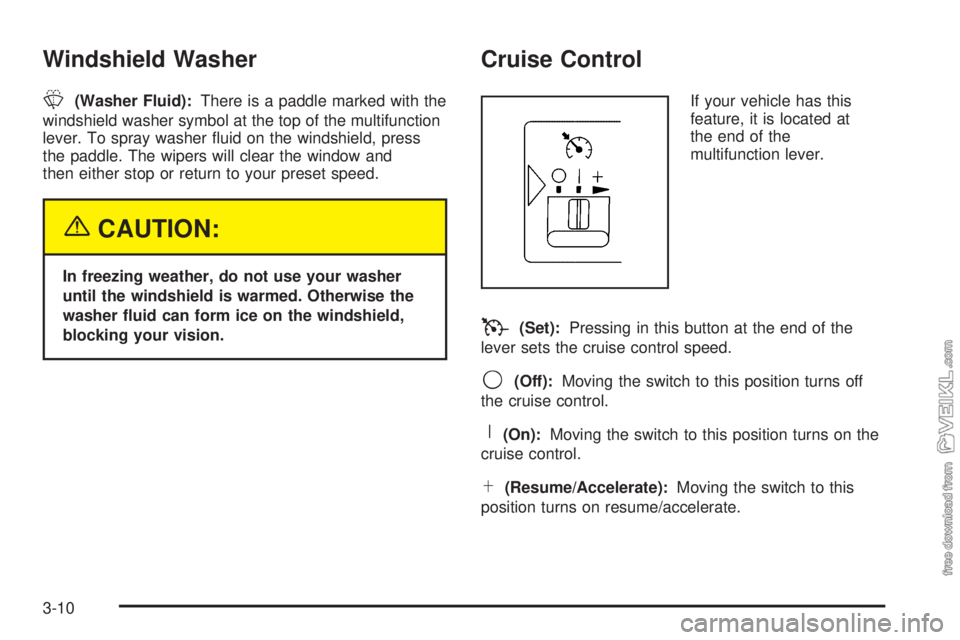
Cruise Control
If your vehicle has this
feature, it is located at
the end of the
multifunction lever.
T(Set):Pressing in this button at the end of the
lever sets the cruise control speed.
9(Off):Moving the switch to this position turns off
the cruise control.
R(On):Moving the switch to this position turns on the
cruise control.
S(Resume/Accelerate):Moving the switch to this
position turns on resume/accelerate.
3-10
Page 126 of 374
Resuming a Set Speed
Suppose you set your cruise control at a desired speed
and then you apply the brake. This, of course, shuts
off the cruise control. But you don’t need to reset it.
Once you’re going about 30 mph (48 km/h) or more, you
can move the cruise control switch briefly from on to
resume/accelerate.
The vehicle will return to your chosen speed and
stay there.
If you hold the switch at resume/accelerate, the vehicle
will keep going faster until you release the switch or
apply the brake. So unless you want to go faster, don’t
hold the switch at resume/accelerate.
Increasing Speed While Using Cruise
Control
There are two ways to go to a higher speed:
•Use the accelerator pedal to get to the higher
speed. Press the button at the end of the lever, then
release the button and the accelerator pedal.
You’ll now cruise at the higher speed.
•Move the cruise switch from on to
resume/accelerate. Hold it there until you get up to
the speed you want, and then release the switch.
To increase your speed in very small amounts,
move the switch briefly to resume/accelerate. Each
time you do this, your vehicle will go about
1 mph (1.6 km/h) faster.
3-12
Page 140 of 374
Speedometer and Odometer
Your speedometer lets you see your speed in both
miles per hour (mph) and kilometers per hour (km/h).
Your odometer shows how far your vehicle has
been driven, in either miles (used in the United States)
or kilometers (used in Canada).
Trip Odometer
The trip odometer can tell you how far your vehicle
has been driven since you last set the trip odometer
to zero.
While the engine is running, press the reset button,
located to the right of the trip odometer, to toggle
between the trip odometer and the regular odometer.
Holding the reset button for two seconds while the
engine is running and the trip odometer is displayed, will
reset it.
To display the odometer reading with the ignition off,
press the reset button.
The hourmeter gage is accessed through the trip
odometer, for more information seeHourmeter Gage on
page 3-44.
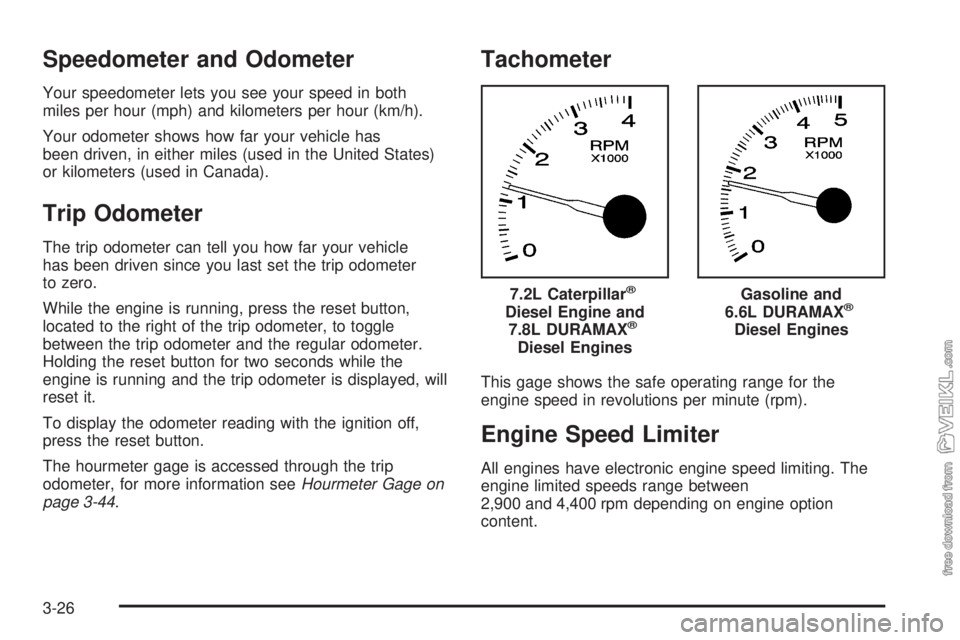
Tachometer
This gage shows the safe operating range for the
engine speed in revolutions per minute (rpm).
Engine Speed Limiter
All engines have electronic engine speed limiting. The
engine limited speeds range between
2,900 and 4,400 rpm depending on engine option
content.7.2L Caterpillar
®
Diesel Engine and
7.8L DURAMAX®
Diesel Engines
Gasoline and
6.6L DURAMAX®
Diesel Engines
3-26
Page 152 of 374
Low Oil Level Light
This light should come on
as a check, when you start
your engine. If the light
fails to come on, have it
repaired as soon as
possible so you will be
aware when the oil level
is low.
If this light comes on and stays on, it means your
engine is low on oil. You need to check the oil level
right away. SeeEngine Oil (Caterpillar
®Diesel Engine)
on page 5-22orEngine Oil (DURAMAX®Diesel) on
page 5-22orEngine Oil (Gasoline Engine) on page 5-26
for further information.
Notice:Lack of proper engine oil maintenance may
damage the engine. The repairs would not be
covered by your warranty. Always follow the
maintenance schedule in this manual for changing
engine oil.
Change Engine Oil Light
The change engine oil light
should come on briefly as
a bulb check when you
start the engine. If the light
does not come on, have
it serviced.
If the change engine oil light comes on and stays on
after you start the engine, have the oil changed.
For additional information on when to change engine oil
for gasoline engines or DURAMAX
®diesel engines,
seeEngine Oil (Caterpillar®Diesel Engine) on page 5-22
orEngine Oil (DURAMAX®Diesel) on page 5-22or
Engine Oil (Gasoline Engine) on page 5-26and
Scheduled Maintenance on page 6-5. To reset the
change engine oil light, seeEngine Oil Life System
(Gasoline Engine) on page 5-29orEngine Oil Life
System (DURAMAX
®Diesel) on page 5-31orEngine
Oil Life System (Caterpillar®Diesel Engine) on
page 5-32.
3-38
Page 157 of 374
If your vehicle has dual fuel tanks, the reading on the
gage is the total fuel left in both tanks.
Here are four concerns of some operators. None of
these shows a problem with your fuel gage:
•The gage moves a little when you turn a corner or
speed up.
•The gage does not go back to empty when you turn
off the ignition.
•At the gas station, the pump shuts off before the
gage reads full.
•It takes a little more or less fuel to fill up than the
gage indicated.
If you have a Caterpillar
®diesel engine, also see your
Caterpillar®Operation & Maintenance Manual.
Water in Fuel Warning Light
If your vehicle has the 6.6L
or 7.8L DURAMAX®diesel
engine, this light will
come on to warn you that
there is water in the
fuel system.
For more information on how this light works, seeWater
in Fuel on page 5-10.
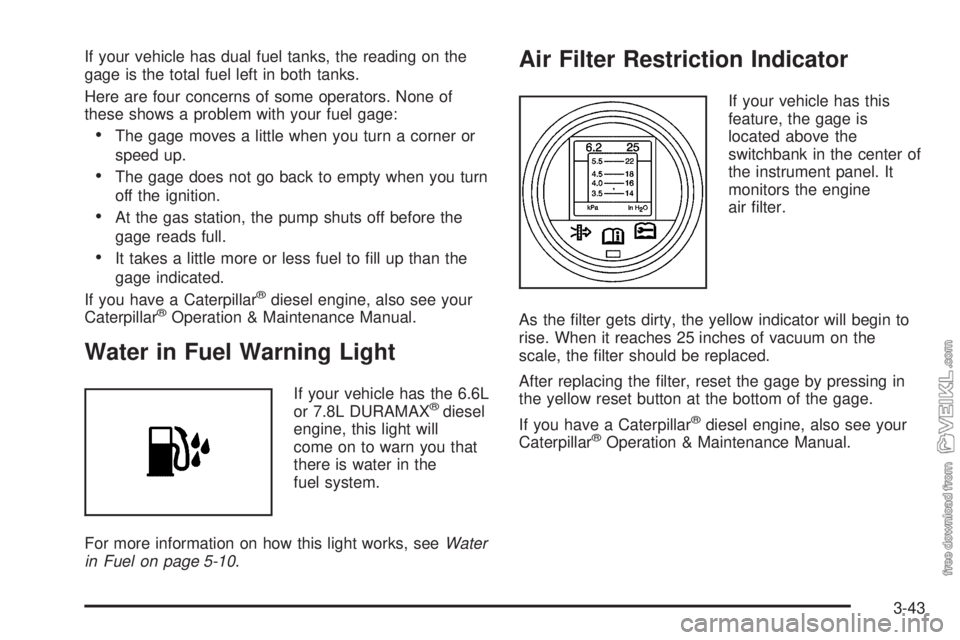
Air Filter Restriction Indicator
If your vehicle has this
feature, the gage is
located above the
switchbank in the center of
the instrument panel. It
monitors the engine
air filter.
As the filter gets dirty, the yellow indicator will begin to
rise. When it reaches 25 inches of vacuum on the
scale, the filter should be replaced.
After replacing the filter, reset the gage by pressing in
the yellow reset button at the bottom of the gage.
If you have a Caterpillar
®diesel engine, also see your
Caterpillar®Operation & Maintenance Manual.
3-43
Page 158 of 374
Air Pressure Gage
If your vehicle has air
brakes, the air pressure
gage is located above the
switchbank in the center
of the instrument panel.
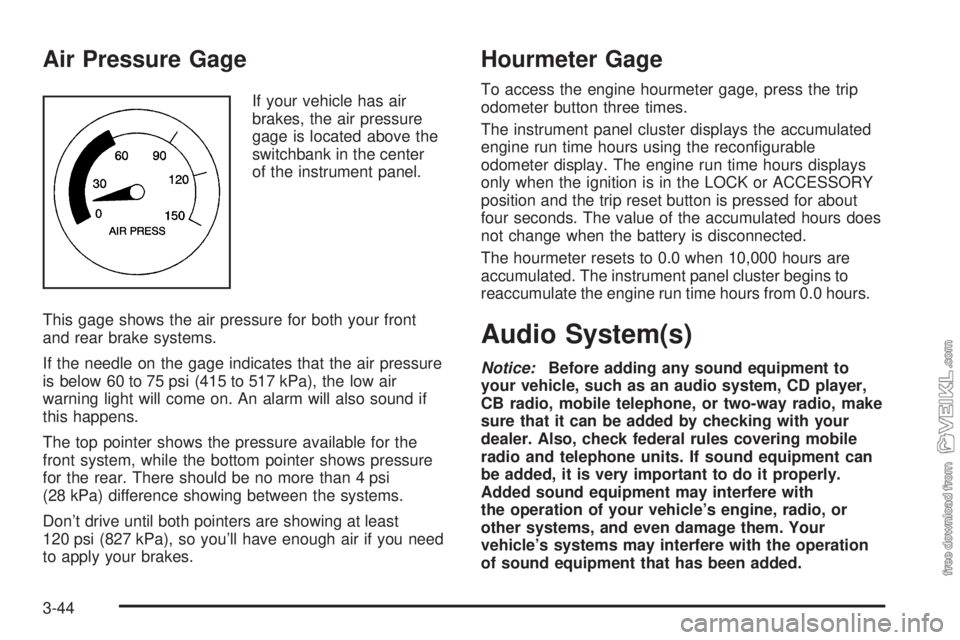
This gage shows the air pressure for both your front
and rear brake systems.
If the needle on the gage indicates that the air pressure
is below 60 to 75 psi (415 to 517 kPa), the low air
warning light will come on. An alarm will also sound if
this happens.
The top pointer shows the pressure available for the
front system, while the bottom pointer shows pressure
for the rear. There should be no more than 4 psi
(28 kPa) difference showing between the systems.
Don’t drive until both pointers are showing at least
120 psi (827 kPa), so you’ll have enough air if you need
to apply your brakes.
Hourmeter Gage
To access the engine hourmeter gage, press the trip
odometer button three times.
The instrument panel cluster displays the accumulated
engine run time hours using the reconfigurable
odometer display. The engine run time hours displays
only when the ignition is in the LOCK or ACCESSORY
position and the trip reset button is pressed for about
four seconds. The value of the accumulated hours does
not change when the battery is disconnected.
The hourmeter resets to 0.0 when 10,000 hours are
accumulated. The instrument panel cluster begins to
reaccumulate the engine run time hours from 0.0 hours.
Audio System(s)
Notice:Before adding any sound equipment to
your vehicle, such as an audio system, CD player,
CB radio, mobile telephone, or two-way radio, make
sure that it can be added by checking with your
dealer. Also, check federal rules covering mobile
radio and telephone units. If sound equipment can
be added, it is very important to do it properly.
Added sound equipment may interfere with
the operation of your vehicle’s engine, radio, or
other systems, and even damage them. Your
vehicle’s systems may interfere with the operation
of sound equipment that has been added.
3-44
Page 160 of 374
Finding a Station
AM FM:Press this button to switch between FM1, FM2,
or AM. The display will show the selection.
TUNE:Turn this knob to select radio stations.
oSEEKp:Press the right or the left arrow to go to
the next or to the previous station and stay there.
To scan stations, press and hold either SEEK arrow for
two seconds until you hear a beep. The radio will go
to a station, play for a few seconds, then go on to
the next station. Press either SEEK arrow again to stop
scanning.
To scan preset stations, press and hold either SEEK
arrow for more than four seconds until you hear
two beeps. The radio will go to the first preset station
stored on the pushbuttons, play for a few seconds, then
go on to the next preset station. Press either SEEK
arrow again to stop scanning presets.
The radio will only seek and scan stations with a strong
signal that are in the selected band.
Setting Preset Stations
Up to 18 stations (six FM1, six FM2, and six AM) can be
programmed on the six numbered pushbuttons, by
performing the following steps:
1. Turn the radio on.
2. Press AM FM to select FM1, FM2, or AM.
3. Tune in the desired station.
4. Press and hold one of the six numbered
pushbuttons until you hear a beep. Whenever that
numbered pushbutton is pressed, the station
that was set will return.
5. Repeat the steps for each pushbutton.
Setting the Tone (Bass/Treble)
AUDIO:To adjust bass or treble, press and release
AUDIO until BAS or TRE appears on the display. Then
press and hold the up or the down arrow to increase
or to decrease. If a station is weak or noisy, decrease
the treble.
To adjust bass or treble to the middle position, select
BAS or TRE. Then press and hold AUDIO for more than
two seconds until you hear a beep. B and a zero or
T and a zero will appear on the display.
3-46