display CHEVROLET KODIAK 2007 Owner's Manual
[x] Cancel search | Manufacturer: CHEVROLET, Model Year: 2007, Model line: KODIAK, Model: CHEVROLET KODIAK 2007Pages: 430, PDF Size: 6.06 MB
Page 201 of 430
Theft-Deterrent Feature
(Non-RDS Radios)
THEFTLOCK®is designed to discourage theft of
your vehicle’s radio. The feature works
automatically by learning a portion of the Vehicle
Identification Number (VIN). If the radio is
moved to a different vehicle, it will not operate and
LOC will appear on the display.
With THEFTLOCK
®activated, the radio will not
operate if stolen.
Radio Reception
You may experience frequency interference and
static during normal radio reception if items
such as cellphone chargers, vehicle convenience
accessories, and external electronic devices
are plugged into the accessory power outlet. If
there is interference or static, unplug the item from
the accessory power outlet.
AM
The range for most AM stations is greater than for
FM, especially at night. The longer range can
cause station frequencies to interfere with each
other. For better radio reception, most AM
radio stations will boost the power levels during
the day, and then reduce these levels during
the night. Static can also occur when things like
storms and power lines interfere with radio
reception. When this happens, try reducing the
treble on your radio.
FM Stereo
FM stereo will give the best sound, but FM signals
will reach only about 10 to 40 miles (16 to 65 km).
Tall buildings or hills can interfere with FM
signals, causing the sound to fade in and out.
201
Page 202 of 430
Care of the Cassette Tape Player
A tape player that is not cleaned regularly
can cause reduced sound quality, ruined cassettes
or a damaged mechanism. Cassette tapes
should be stored in their cases away from
contaminants, direct sunlight and extreme heat.
If they aren’t, they may not operate properly
or may cause failure of the tape player.
The tape player should be cleaned regularly after
every 50 hours of use. The radio may display
CLN to indicate that the tape player has been used
for 50 hours without resetting the tape clean
timer. If this message appears on the display, the
cassette tape player needs to be cleaned. It
will still play tapes, but it should be cleaned as
soon as possible to prevent damage to the tapes
and player. If there is a reduction in sound
quality, try a known good cassette to see if the
tape or the tape player is at fault. If this other
cassette has no improvement in sound quality,
clean the tape player.For best results, use a scrubbing action,
non-abrasive cleaning cassette with pads which
scrub the tape head as the hubs of the cleaner
cassette turn. The recommended cleaning cassette
is available through your dealer.
The cut tape detection feature of the cassette tape
player may identify the cleaning cassette as a
damaged tape. To prevent the cleaning cassette
from being ejected, use the following steps:
1. Turn the ignition on.
2. Turn the radio off.
3. Press and hold the TAPE button for
two seconds until the radio produces
one beep. CAS will flash on the display for
five seconds.
4. Insert the scrubbing action cleaning cassette.
5. Eject the cleaning cassette after the
manufacturer’s recommended cleaning time.
After the cleaning cassette is ejected, the
cut tape detection feature will be active again.
202
Page 203 of 430
A non-scrubbing action, wet-type cleaner which
uses a cassette with a fabric belt to clean the tape
head can be used. This type of cleaning cassette
will not eject on its own. A non-scrubbing action
cleaner may not clean as thoroughly as the
scrubbing type cleaner. The use of a non-scrubbing
action, dry-type cleaning cassette is not
recommended.
After the player is cleaned, press and hold the
eject button for three seconds to reset the
CLN indicator. The radio will display --- to show
the indicator was reset.
Cassettes are subject to wear and the sound
quality may degrade over time. Always make sure
the cassette tape is in good condition before
the tape player is serviced.Care of Your CDs
Handle CDs carefully. Store them in their original
cases or other protective cases and away from
direct sunlight and dust. The CD player scans the
bottom surface of the disc. If the surface of a
CD is damaged, such as cracked, broken,
or scratched, the CD will not play properly or not
at all. If the surface of a CD is soiled, take a
soft, lint free cloth or dampen a clean, soft cloth in
a mild, neutral detergent solution mixed with
water, and clean it. Make sure the wiping process
starts from the center to the edge.
Do not touch the bottom side of a CD while
handling it; this could damage the surface. Pick up
CDs by grasping the outer edges or the edge of
the hole and the outer edge.
203
Page 204 of 430
Care of the CD Player
Do not use CD lens cleaners for CD players
because the lens of the CD optics can become
contaminated by lubricants.
Fixed Mast Antenna
The fixed mast antenna can withstand most
vehicle washes without being damaged. If the mast
should ever become slightly bent, straighten it
out by hand. If the mast is badly bent, replace it.
Check occasionally to make sure the mast is
still tightened to the fender. If tightening is
required, tighten by hand, then with a wrench
one quarter turn.
Chime Level Adjustment
The radio is used to adjust the vehicle’s chime
level. To change the volume level of the chime,
press and hold pushbutton 6 with the ignition on
and the radio power off. The volume level will
change from the normal level to loud, and HI will
appear on the radio display. To change back to the
default or normal setting, press and hold
pushbutton 6 again. The volume level will change
from the loud level to normal, and LO will appear on
the radio display. Each time the chime volume is
changed, three chimes will sound as an example of
the new volume selected. Removing the radio and
not replacing it with a factory radio or chime module
will disable vehicle chimes.
204
Page 275 of 430
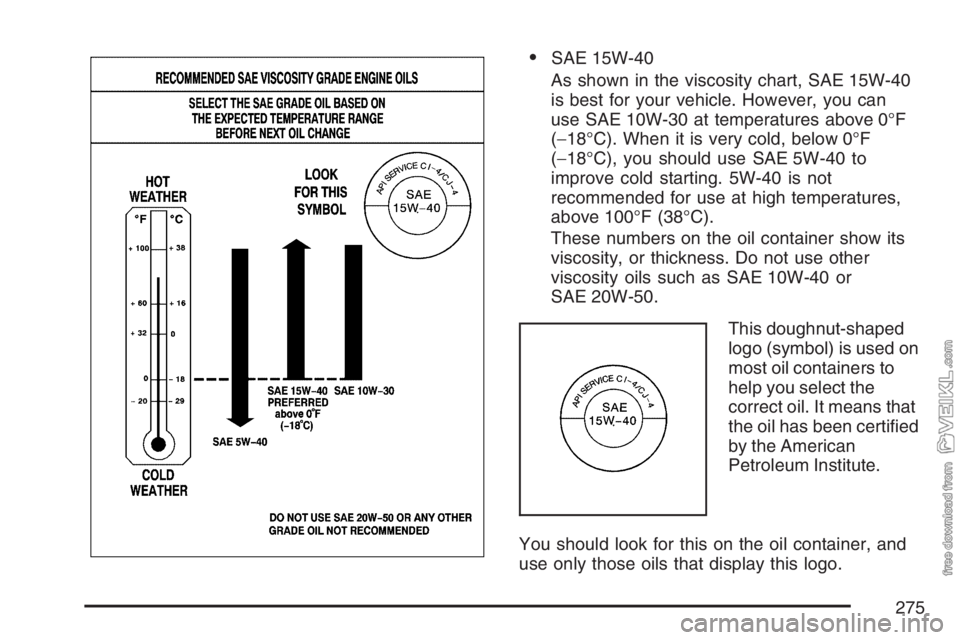
•SAE 15W-40
As shown in the viscosity chart, SAE 15W-40
is best for your vehicle. However, you can
use SAE 10W-30 at temperatures above 0°F
(−18°C). When it is very cold, below 0°F
(−18°C), you should use SAE 5W-40 to
improve cold starting. 5W-40 is not
recommended for use at high temperatures,
above 100°F (38°C).
These numbers on the oil container show its
viscosity, or thickness. Do not use other
viscosity oils such as SAE 10W-40 or
SAE 20W-50.
This doughnut-shaped
logo (symbol) is used on
most oil containers to
help you select the
correct oil. It means that
the oil has been certified
by the American
Petroleum Institute.
You should look for this on the oil container, and
use only those oils that display this logo.
275
Page 397 of 430
Part C: Recommended Fluids
and Lubricants
Fluids and lubricants identified below by name,
part number, or specification may be obtained
from your dealer.
Usage Fluid/Lubricant
Engine Oil
(Gasoline
Engine)Engine oil which meets GM
Standard GM6094M and displays
the American Petroleum Institute
Certified for Gasoline Engines
starburst symbol. GM Goodwrench
®
oil meets all the requirements for
your vehicle. To determine the
proper viscosity for your vehicle’s
engine, see “Engine Oil” in the
Index.
Usage Fluid/Lubricant
Engine Oil
(DURAMAX
®/
Isuzu Diesel
Engines)Engine oil with the letters CJ-4
or CI-4 is best for your vehicle.
The CJ-4 or CI-4 designation
may appear either alone or in
combination with other API
designations, such as API CJ-4/SM.
These letters show American
Petroleum Institute levels of quality.
To determine the preferred viscosity
for your vehicle’s diesel engine,
see “Engine Oil” in the Index.
Engine Oil
(Caterpillar
®
Diesel Engine)See the Caterpillar
®Operation &
Maintenance Manual for engine
oil recommendations.
Engine Coolant
(Caterpillar
®
Diesel Engine)See the Caterpillar
®Operation &
Maintenance Manual for engine
coolant recommendations.
397