reset CHEVROLET KODIAK 2009 User Guide
[x] Cancel search | Manufacturer: CHEVROLET, Model Year: 2009, Model line: KODIAK, Model: CHEVROLET KODIAK 2009Pages: 376, PDF Size: 5.39 MB
Page 167 of 376
Radio(s)
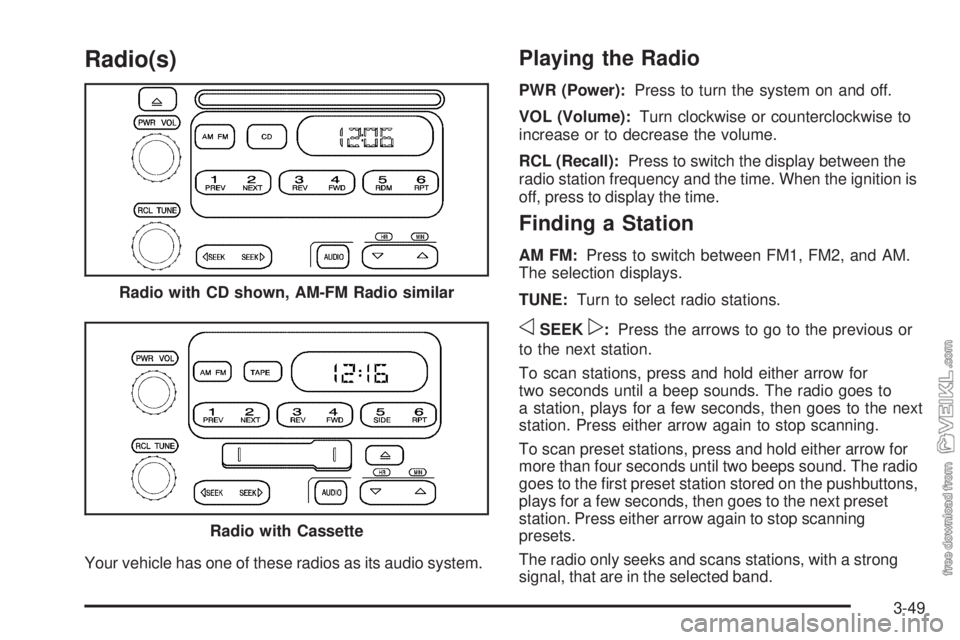
Your vehicle has one of these radios as its audio system.
Playing the Radio
PWR (Power):Press to turn the system on and off.
VOL (Volume):Turn clockwise or counterclockwise to
increase or to decrease the volume.
RCL (Recall):Press to switch the display between the
radio station frequency and the time. When the ignition is
off, press to display the time.
Finding a Station
AM FM:Press to switch between FM1, FM2, and AM.
The selection displays.
TUNE:Turn to select radio stations.
oSEEKp:Press the arrows to go to the previous or
to the next station.
To scan stations, press and hold either arrow for
two seconds until a beep sounds. The radio goes to
a station, plays for a few seconds, then goes to the next
station. Press either arrow again to stop scanning.
To scan preset stations, press and hold either arrow for
more than four seconds until two beeps sound. The radio
goes to the first preset station stored on the pushbuttons,
plays for a few seconds, then goes to the next preset
station. Press either arrow again to stop scanning
presets.
The radio only seeks and scans stations, with a strong
signal, that are in the selected band. Radio with CD shown, AM-FM Radio similar
Radio with Cassette
3-49
Page 168 of 376
Setting Preset Stations
Up to 18 stations (six FM1, six FM2, and six AM), can
be programmed on the six numbered pushbuttons,
by performing the following steps:
1. Turn the radio on.
2. Press AM FM to select FM1, FM2, or AM.
3. Tune in the desired station.
4. Press and hold one of the six numbered
pushbuttons until a beep sounds. When that
numbered pushbutton is pressed, the station that
was set, returns.
5. Repeat Steps 2 through 4 for each pushbutton.
Setting the Tone (Bass/Treble)
AUDIO:To adjust the bass or the treble, press
and release the AUDIO button until BAS (bass) or
TRE (treble) displays. Then press and hold the
up
wor the downxarrow to increase or to
decrease. If a station is weak or has static,
decrease the treble.To adjust bass or treble to the middle position, select
BAS or TRE. Then press and hold the AUDIO button for
more than two seconds until a beep sounds. B and a
zero or T and a zero displays.
To adjust both tone controls and both speaker controls
to the middle position, first end out of audio mode
by pressing another button, causing the radio to perform
that function, or by waiting five seconds for the display
to return to the time of day. Then press and hold
the AUDIO button for more than two seconds until a
beep sounds. CEN (center) displays.
Adjusting the Speakers (Balance/Fade)
AUDIO:To adjust the balance between the right
and the left speakers, press and release the AUDIO
button until BAL (balance) displays. Then press and hold
the up
wor the downxarrow to move the sound
toward the right or the left speakers.
To adjust the fade between the front and the rear
speakers, press and release the AUDIO button until
FAD (fade) displays. Then press and hold either arrow to
move the sound toward the front or the rear speakers.
3-50
Page 173 of 376
2 NEXT:The tape must have at least three seconds of
silence between each selection for next to work. Press
this pushbutton to go to the next selection on the tape.
Pressing this pushbutton multiple times in the next mode
increases the number of selections to be searched
forward. Pressing the PREV pushbutton cancels the
selections.
3 REV (Reverse):Press to quickly reverse the tape.
FR displays. The radio plays while the tape reverses.
Press it again to return to playing speed. Select stations
during reverse operation by using the TUNE or SEEK
controls or by using the scan or preset scan features.
4 FWD (Forward):Press to quickly advance the
tape. FF displays. The radio plays while the tape
advances. Press again to return to playing speed. Select
stations during forward operation by using the TUNE
or SEEK controls or by using the scan or preset
scan features.
5 SIDE:Press to play the other side of the tape.
6 RPT (Repeat):The tape must have at least three
seconds of silence between each selection for repeat to
work. Press and release to hear a selection over again.
RPT displays. Press again to turn off repeated play.
OFF displays.oSEEKp:The tape must have at least three seconds
of silence between each selection for seek to work. The
left arrow is the same as the PREV pushbutton and the
right arrow is the same as the NEXT pushbutton. If either
the left or right arrow is held or pressed more than once,
the player continues moving backward or forward through
the tape.
AM FM:Press to listen to the radio when a tape is
playing. The inactive tape remains inside the radio for
future listening.
TAPE:Press to play a cassette tape when listening to
the radio. CAS displays when a tape is loaded.
Z(Eject):Press to eject a tape. Eject can be
activated with the radio off. Cassette tapes can be
loaded with the ignition and radio off if this button is
pressed first.
3-55
Page 174 of 376
Care of the Cassette Tape Player
A tape player that is not cleaned regularly can cause
reduced sound quality, ruined cassettes, or a damaged
mechanism. Cassette tapes should be stored in their
cases away from contaminants, direct sunlight and
extreme heat. If they are not properly stored, they may
not operate properly or may cause failure of the
tape player.
The tape player should be cleaned regularly after
every 50 hours of use. The radio may display CLN to
indicate that the tape player has been used for 50 hours
without resetting the tape clean timer. If this message
appears on the display, the cassette tape player
needs to be cleaned. It will still play tapes, but it should
be cleaned as soon as possible to prevent damage
to the tapes and player. If there is a reduction in sound
quality, try a known good cassette to see if the tape
or the tape player is at fault. If this other cassette has no
improvement in sound quality, clean the tape player.
For best results, use a scrubbing action, non-abrasive
cleaning cassette with pads which scrub the tape
head as the hubs of the cleaner cassette turn. The
recommended cleaning cassette is available through
your dealer/retailer.The cut tape detection feature of the cassette tape player
may identify the cleaning cassette as a damaged tape.
To prevent the cleaning cassette from being ejected,
use the following steps:
1. Turn the ignition on.
2. Turn the radio off.
3. Press and hold the TAPE button for two seconds
until the radio produces one beep. CAS will flash
on the display for five seconds.
4. Insert the scrubbing action cleaning cassette.
5. Eject the cleaning cassette after the manufacturer’s
recommended cleaning time.
After the cleaning cassette is ejected, the cut tape
detection feature will be active again.
A non-scrubbing action, wet-type cleaner which uses a
cassette with a fabric belt to clean the tape head can be
used. This type of cleaning cassette will not eject on its
own. A non-scrubbing action cleaner may not clean as
thoroughly as the scrubbing type cleaner. The use of a
non-scrubbing action, dry-type cleaning cassette is not
recommended.
After the player is cleaned, press and hold the eject
button for three seconds to reset the CLN indicator. The
radio will display --- to show the indicator was reset.
Cassettes are subject to wear and the sound quality may
degrade over time. Always make sure the cassette
tape is in good condition before the tape player
is serviced.
3-56
Page 221 of 376
4. Install the new filter element.
5. Reinstall and tighten the filter container and
reconnect the water sensor wire to the filter.
6. Use the fuel filter priming procedure earlier in this
section to prime the fuel filter.
7. Tighten the air bleed valve by turning it clockwise
until hand-tight.
8. Start the engine and let it idle for five minutes.
Check the fuel filter and air bleed valve for leaks.
How to Reset Fuel Filter Change
Light - DURAMAX 6.6L (LMM) Engine
The engine controller calculates when to change the fuel
filter based on vehicle and fuel use. Whenever the
fuel filter is changed, reset the fuel filter light so
the engine controller can calculate when the next fuel
filter change is required. If the fuel filter is ever changed
prior to a change fuel filter light being turned on,
reset the fuel filter change light.To reset the Fuel Filter Change light:
1. Turn the ignition key to ON/RUN with the engine off
2. Fully press the accelerator and brake pedals at the
same time for 10 seconds. If the Fuel Filter Change
light flashes for 5 seconds, the system is resetting.
3. Turn the key to OFF.
If the Fuel Filter Change light comes back on when you
start the vehicle, the light has not been reset. Repeat
the procedure. SeeChange Fuel Filter Warning Light on
page 3-45for more information.
Fuels in Foreign Countries
If you plan on driving in another country outside the
United States or Canada, the proper fuel might be hard
to find. Never use leaded gasoline or any other fuel
not recommended in the previous text on fuel. Costly
repairs caused by use of improper fuel would not
be covered by the vehicle warranty.
To check the fuel availability, ask an auto club, or
contact a major oil company that does business in the
country where you will be driving.
5-19
Page 237 of 376
Engine Oil Additives / Engine Oil
Flushes
Do not add anything to the oil. The recommended oils
with the API service symbol are all that is needed
for good performance and engine protection.
Engine oil system flushes are not recommended and
could cause engine damage not covered by the vehicle
warranty.
Engine Oil Life System (Gasoline
Engine)
When to Change Engine Oil
This vehicle has a computer system that indicates when
to change the engine oil and filter. This is based on
engine revolutions and engine temperature, and not on
mileage. Based on driving conditions, the mileage at
which an oil change is indicated can vary considerably.
For the oil life system to work properly, the system
must be reset every time the oil is changed.
When the system has calculated that oil life has been
diminished, it indicates that an oil change is necessary.
A change engine oil light comes on. SeeChangeEngine Oil Light on page 3-39. Change the oil as soon
as possible within the next 600 miles (1 000 km). It
is possible that, if driving under the best conditions, the
oil life system might not indicate that an oil change
is necessary for over a year. However, the engine oil
and filter must be changed at least once a year and at
this time the system must be reset. Your dealer/retailer
has trained service people who will perform this
work using genuine parts and reset the system. It is
also important to check the oil regularly and keep it at
the proper level.
If the system is ever reset accidentally, the oil must be
changed at 3,000 miles (5 000 km) since the last oil
change. Remember to reset the oil life system whenever
the oil is changed.How to Reset the Engine Oil Life
System
The Engine Oil Life System calculates when to change
the engine oil and filter based on vehicle use. Whenever
the oil is changed, reset the system so it can calculate
when the next oil change is required. If a situation occurs
where the oil is changed prior to a change engine oil light
being turned on, reset the system.
5-35
Page 238 of 376
To reset the change engine oil light:
1. Turn the ignition key to ON/RUN with the
engine off.
2. Fully press and release the accelerator pedal slowly
three times within 10 seconds.
If the change engine oil light flashes for
five seconds, the system is resetting.
3. Turn the key to OFF.
If the change engine oil light comes back on when the
vehicle is started, the engine oil life system has not
reset. Repeat the procedure.
What to Do with Used Oil
Used engine oil contains certain elements that can be
unhealthy for your skin and could even cause cancer.
Do not let used oil stay on your skin for very long. Clean
your skin and nails with soap and water, or a good
hand cleaner. Wash or properly dispose of clothing or
rags containing used engine oil. See the manufacturer’s
warnings about the use and disposal of oil products.
Used oil can be a threat to the environment. If you
change your own oil, be sure to drain all the oil from the
filter before disposal. Never dispose of oil by putting it
in the trash, pouring it on the ground, into sewers, or into
streams or bodies of water. Recycle it by taking it to a
place that collects used oil.
Engine Oil Life System
(DURAMAX/Isuzu Diesel Engines)
When to Change Engine Oil
If the vehicle has the Engine Oil Life System, it has a
computer system that indicates when to change
the engine oil and filter. This is based on injection timing,
engine load, and engine temperature, and not on
mileage. Based on driving conditions, the mileage at
which an oil change is indicated can vary considerably.
For the oil life system to work properly, the system
must be reset every time the oil is changed.
When the system has calculated that oil life has been
diminished, it indicates that an oil change is necessary.
A change engine oil light comes on. SeeChange Engine
Oil Light on page 3-39. Change the oil as soon as
possible within the next 600 miles (1 000 km) or 30 hours
of engine operation, whichever occurs first. It is possible
that, if driving under the best conditions, the oil life system
might not indicate that an oil change is necessary for over
a year. However, the engine oil and filter must be
changed at least once a year and at this time the system
must be reset. Your dealer/retailer has trained service
people who will perform this work using genuine parts
and reset the system. It is also important to check the oil
regularly and keep it at the proper level.
5-36
Page 239 of 376
If the system is ever reset accidentally, the oil must be
changed at 15,000 miles (24 000 km), or 150 hours
of engine operation, whichever occurs first, since the last
oil change. Remember to reset the oil life system
whenever the oil is changed.
How to Reset the Engine Oil Life
System
The Engine Oil Life System calculates when to change
the engine oil and filter based on vehicle use. Whenever
the oil is changed, reset the system so it can calculate
when the next oil change is required. If a situation occurs
where oil is changed prior to a change engine oil light
being turned on, reset the system.
To reset the Engine Oil Life System:
1. Turn the ignition key to ON/RUN with the
engine off.
2. Fully press and release the accelerator pedal slowly
three times within five seconds.
If the change engine oil light is turned off, the
system is resetting.
3. Turn the key to OFF.If the change engine oil light comes back on when the
vehicle is started, the Engine Oil Life System has
not reset. Repeat the procedure.
What to Do with Used Oil
Used engine oil contains certain elements that can be
unhealthy for your skin and could even cause cancer.
Do not let used oil stay on your skin for very long. Clean
your skin and nails with soap and water, or a good
hand cleaner. Wash or properly dispose of clothing or
rags containing used engine oil. See the manufacturer’s
warnings about the use and disposal of oil products.
Used oil can be a threat to the environment. If you
change your own oil, be sure to drain all the oil from the
filter before disposal. Never dispose of oil by putting it
in the trash, pouring it on the ground, into sewers, or into
streams or bodies of water. Recycle it by taking it to a
place that collects used oil.
5-37
Page 240 of 376
Engine Oil Life System (Caterpillar
Diesel Engine)
How to Reset the Engine Oil Life
System
The Engine Oil Life System calculates when to change
the engine oil and filter based on vehicle use. Whenever
the oil is changed, reset the system so it can calculate
when the next oil change is required. If a situation occurs
where the oil is changed prior to a change engine oil light
being turned on, reset the system.
To reset the Engine Oil Life System:
1. Turn the ignition key to ON/RUN with the
engine off.
2. Fully apply and hold the brake pedal while fully
pressing and releasing the accelerator pedal,
pausing slightly at each press and each release,
three times within five seconds.
3. Turn the key to OFF.
If the change engine oil light comes back on when the
vehicle is started, the Engine Oil Life System has
not reset. Repeat the procedure.
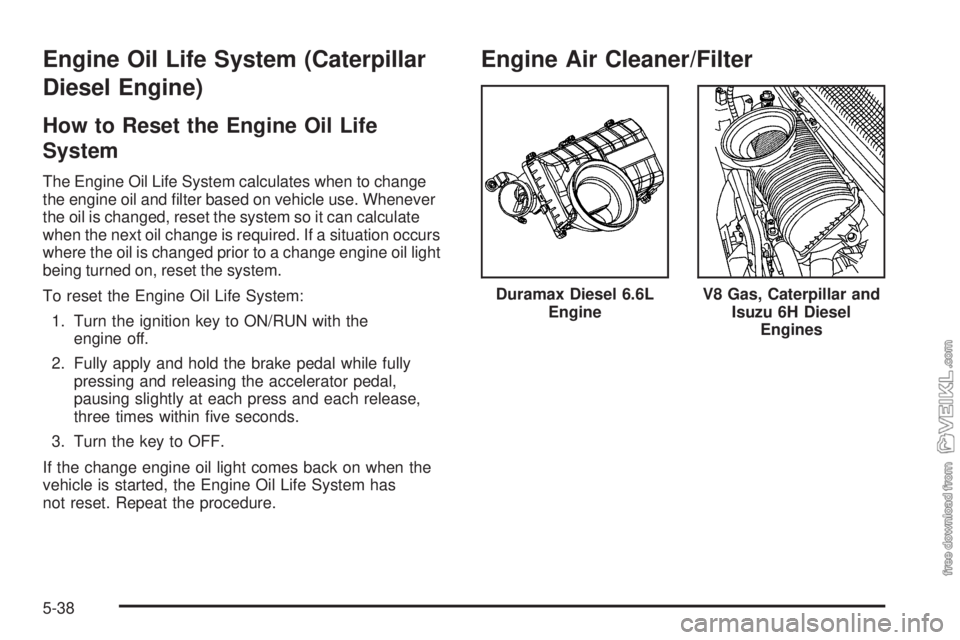
Engine Air Cleaner/Filter
Duramax Diesel 6.6L
EngineV8 Gas, Caterpillar and
Isuzu 6H Diesel
Engines
5-38
Page 241 of 376
When to Inspect the Engine Air
Cleaner/Filters
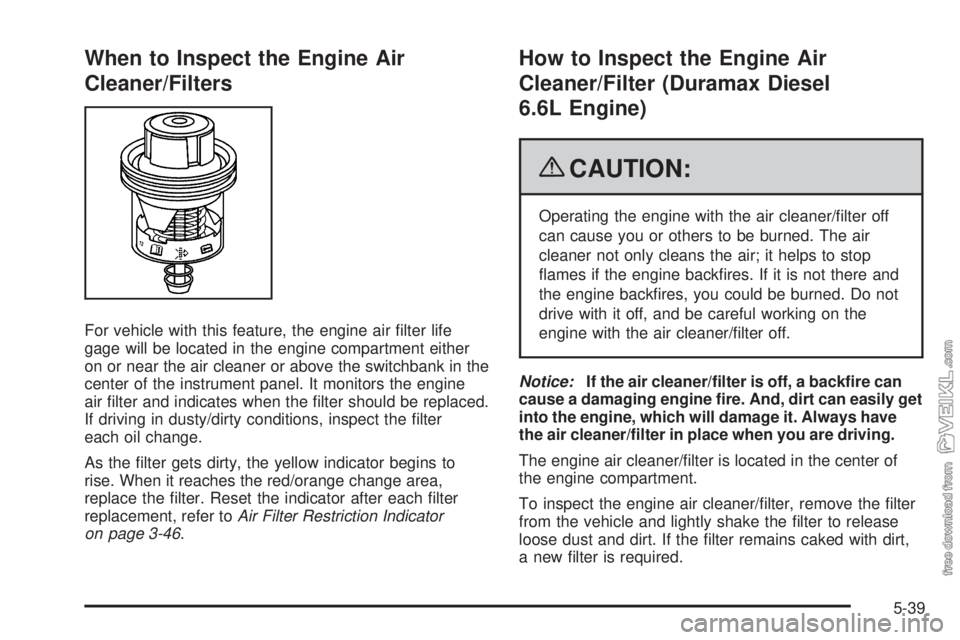
For vehicle with this feature, the engine air filter life
gage will be located in the engine compartment either
on or near the air cleaner or above the switchbank in the
center of the instrument panel. It monitors the engine
air filter and indicates when the filter should be replaced.
If driving in dusty/dirty conditions, inspect the filter
each oil change.
As the filter gets dirty, the yellow indicator begins to
rise. When it reaches the red/orange change area,
replace the filter. Reset the indicator after each filter
replacement, refer toAir Filter Restriction Indicator
on page 3-46.
How to Inspect the Engine Air
Cleaner/Filter (Duramax Diesel
6.6L Engine)
{CAUTION:
Operating the engine with the air cleaner/filter off
can cause you or others to be burned. The air
cleaner not only cleans the air; it helps to stop
flames if the engine backfires. If it is not there and
the engine backfires, you could be burned. Do not
drive with it off, and be careful working on the
engine with the air cleaner/filter off.
Notice:If the air cleaner/filter is off, a backfire can
cause a damaging engine fire. And, dirt can easily get
into the engine, which will damage it. Always have
the air cleaner/filter in place when you are driving.
The engine air cleaner/filter is located in the center of
the engine compartment.
To inspect the engine air cleaner/filter, remove the filter
from the vehicle and lightly shake the filter to release
loose dust and dirt. If the filter remains caked with dirt,
a new filter is required.
5-39