door lock CHEVROLET LOW CAB FORWARD 2017 User Guide
[x] Cancel search | Manufacturer: CHEVROLET, Model Year: 2017, Model line: LOW CAB FORWARD, Model: CHEVROLET LOW CAB FORWARD 2017Pages: 414, PDF Size: 7.97 MB
Page 37 of 414
Chevrolet Low Cab Forward Owner Manual (GMNA-Localizing-U.S.-
10716700) - 2017 - crc - 12/6/16
36 Keys, Doors, and Windows
Warning (Continued)
Exercise caution when opening or
closing doors, as strong winds or
steep slopes may cause doors to
open or close suddenly.
Do not hold parts other than the
grip when getting in or out of the
vehicle. Doing so may cause
damage to the vehicle or injuries
to yourself or others.
You and others could be seriously
injured.
Door Locks
{Warning
Be sure to do the following
whenever you leave the vehicle:1. Fully engage the parkingbrake.
2. Stop the engine.
3. Lock the doors. (Continued)
Warning (Continued)
When you close the door after
sitting behind the wheel, check
that the door is fully closed.
Driving with any door ajar is very
dangerous.
Before opening the door when
climbing into or out of the cab,
carefully check all areas around
the vehicle for safety, especially
the area at the rear of the vehicle.
If you suddenly open a door
without checking the surrounding
area, the door could be hit by a
vehicle behind you or a
pedestrian.
Never leave the key in the
vehicle.
Tilt the cab only after fully closing
the doors.
To help reduce the risk of
personal injury in an accident,
always lock the doors when
driving. Along with using the seat
(Continued)
Warning (Continued)
belts properly, locking the doors
helps prevent people from being
thrown from the vehicle. It also
helps prevent unintended opening
of the doors and helps keep out
intruders.
You and others could be seriously
injured.
{Warning
To protect the child from the
danger of getting his/her hands
and head trapped, an adult must
open, close and lock the door for
the child.
Be careful that the child does not
interfere with the power window
switches and get his/her hands or
head trapped in the window.
While a child is in the cab, be
(Continued)
Page 38 of 414
Chevrolet Low Cab Forward Owner Manual (GMNA-Localizing-U.S.-
10716700) - 2017 - crc - 12/6/16
Keys, Doors, and Windows 37
Warning (Continued)
sure to control the power windows
using the power window switches
beside the driver's seat.
You and others could be seriously
injured.
Overriding door locks are a
standard safety feature. When the
doors are locked, the inside handles
will not open them. This is to
prevent accidental opening of the
doors.
Front Doors
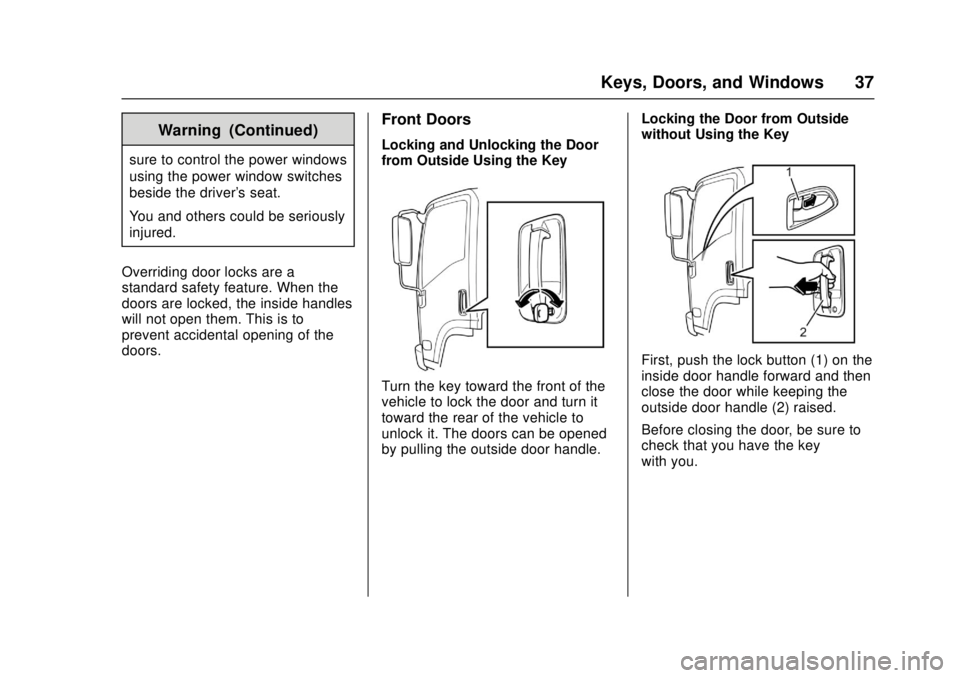
Locking and Unlocking the Door
from Outside Using the Key
Turn the key toward the front of the
vehicle to lock the door and turn it
toward the rear of the vehicle to
unlock it. The doors can be opened
by pulling the outside door handle. Locking the Door from Outside
without Using the Key
First, push the lock button (1) on the
inside door handle forward and then
close the door while keeping the
outside door handle (2) raised.
Before closing the door, be sure to
check that you have the key
with you.
Page 39 of 414
Chevrolet Low Cab Forward Owner Manual (GMNA-Localizing-U.S.-
10716700) - 2017 - crc - 12/6/16
38 Keys, Doors, and Windows
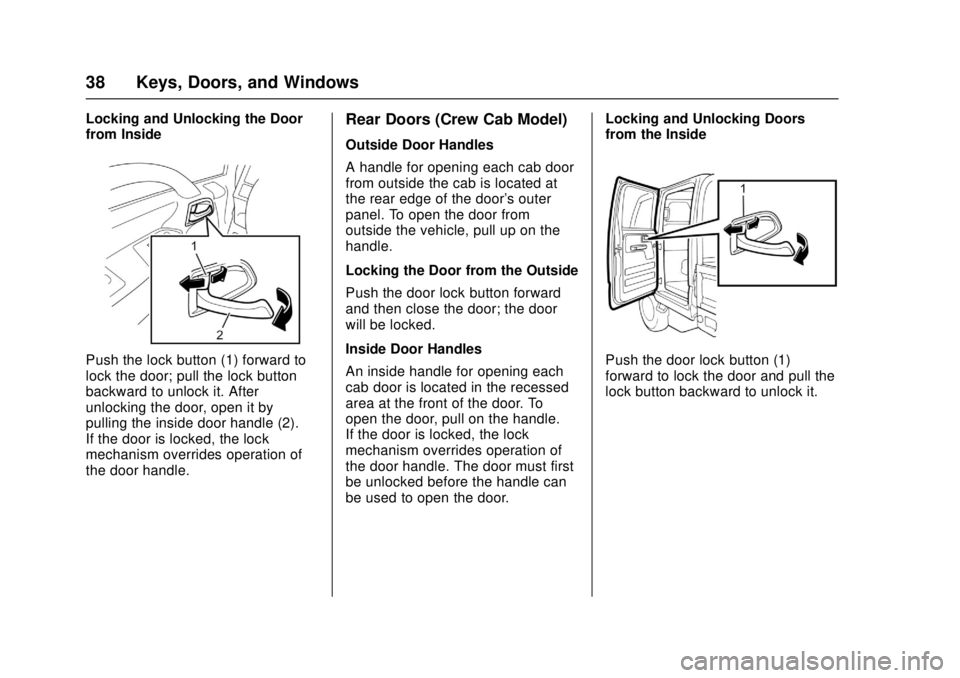
Locking and Unlocking the Door
from Inside
Push the lock button (1) forward to
lock the door; pull the lock button
backward to unlock it. After
unlocking the door, open it by
pulling the inside door handle (2).
If the door is locked, the lock
mechanism overrides operation of
the door handle.
Rear Doors (Crew Cab Model)
Outside Door Handles
A handle for opening each cab door
from outside the cab is located at
the rear edge of the door's outer
panel. To open the door from
outside the vehicle, pull up on the
handle.
Locking the Door from the Outside
Push the door lock button forward
and then close the door; the door
will be locked.
Inside Door Handles
An inside handle for opening each
cab door is located in the recessed
area at the front of the door. To
open the door, pull on the handle.
If the door is locked, the lock
mechanism overrides operation of
the door handle. The door must first
be unlocked before the handle can
be used to open the door.Locking and Unlocking Doors
from the Inside
Push the door lock button (1)
forward to lock the door and pull the
lock button backward to unlock it.
Page 40 of 414
Chevrolet Low Cab Forward Owner Manual (GMNA-Localizing-U.S.-
10716700) - 2017 - crc - 12/6/16
Keys, Doors, and Windows 39
Power Door Locks
Power Door Lock (Central
Door Lock)
How the Power Door Lock System
Operates
When you lock the driver's door
using the key or by operating the
lock button, the power door lock
system will automatically lock all
doors simultaneously.
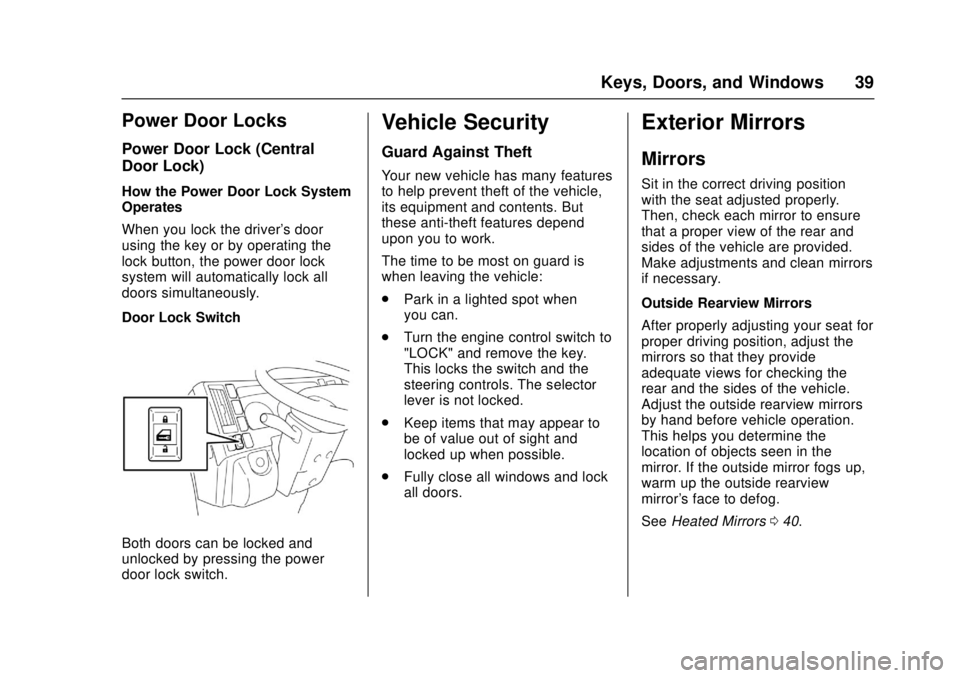
Door Lock Switch
Both doors can be locked and
unlocked by pressing the power
door lock switch.
Vehicle Security
Guard Against Theft
Your new vehicle has many features
to help prevent theft of the vehicle,
its equipment and contents. But
these anti-theft features depend
upon you to work.
The time to be most on guard is
when leaving the vehicle:
.Park in a lighted spot when
you can.
. Turn the engine control switch to
"LOCK" and remove the key.
This locks the switch and the
steering controls. The selector
lever is not locked.
. Keep items that may appear to
be of value out of sight and
locked up when possible.
. Fully close all windows and lock
all doors.
Exterior Mirrors
Mirrors
Sit in the correct driving position
with the seat adjusted properly.
Then, check each mirror to ensure
that a proper view of the rear and
sides of the vehicle are provided.
Make adjustments and clean mirrors
if necessary.
Outside Rearview Mirrors
After properly adjusting your seat for
proper driving position, adjust the
mirrors so that they provide
adequate views for checking the
rear and the sides of the vehicle.
Adjust the outside rearview mirrors
by hand before vehicle operation.
This helps you determine the
location of objects seen in the
mirror. If the outside mirror fogs up,
warm up the outside rearview
mirror's face to defog.
See Heated Mirrors 040.
Page 43 of 414
Chevrolet Low Cab Forward Owner Manual (GMNA-Localizing-U.S.-
10716700) - 2017 - crc - 12/6/16
42 Keys, Doors, and Windows
automatic movement of the window
before it lowers completely, raise the
switch lightly.
To Close the Driver’s Window
Lightly raising the driver-side
window switch will cause the
driver's window to move up until the
switch is released.
To Open the Passenger ’s Window
The passenger's window continues
to lower while the passenger-side
switch on the driver's door is being
pressed.
To Close the Passenger ’s Window
The passenger's window continues
to move up while the
passenger-side switch on the
driver's door is being raised.
Window Switches on
Passenger ’s Door and Rear
Doors (If equipped)
The power window switch on the
passenger's door can raise and
lower the passenger's side window only, while, if equipped, the rear
power window switches can raise
and lower the rear door windows.
{Warning
Be sure to warn passengers not
to let any part of the body
become trapped or caught in a
moving window.
You and others could be seriously
injured.
The window continues to lower
while the window switch is being
pressed and continues to rise while
the switch is being raised. It will
stop moving at any position when
the switch is released.
When the rear power window lock
switch is in the “LOCK”position, it is
not possible to open and close the
rear windows.
Window Switches on Center of
Dashboard (Crew Cab Model)
The power window switch on the
instrument panel and rear door can
raise and lower the rear door
window.
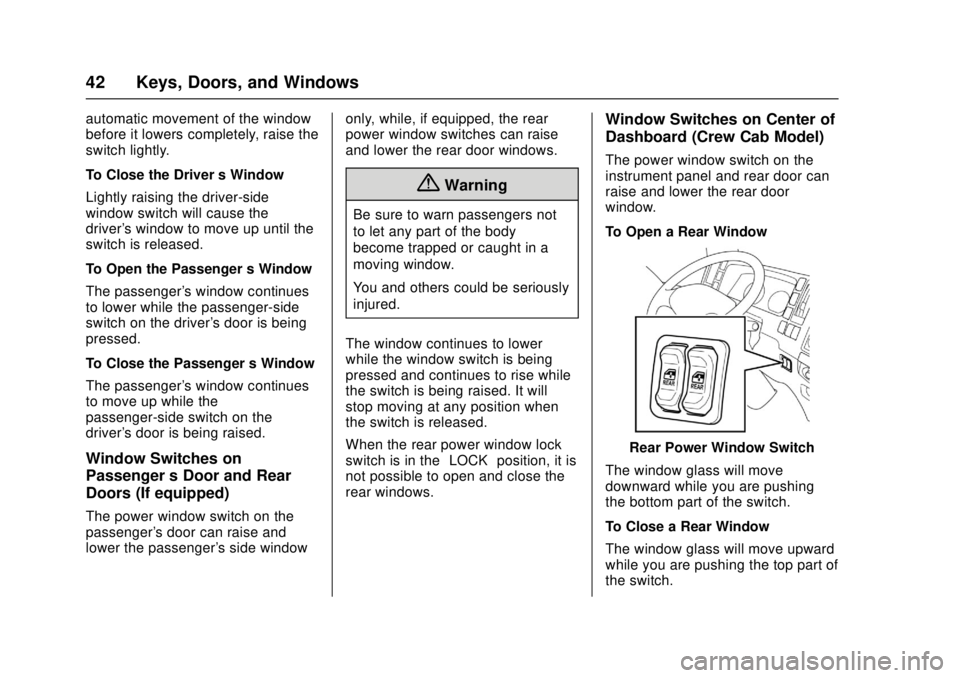
To Open a Rear Window
Rear Power Window Switch
The window glass will move
downward while you are pushing
the bottom part of the switch.
To Close a Rear Window
The window glass will move upward
while you are pushing the top part of
the switch.
Page 44 of 414
Chevrolet Low Cab Forward Owner Manual (GMNA-Localizing-U.S.-
10716700) - 2017 - crc - 12/6/16
Keys, Doors, and Windows 43
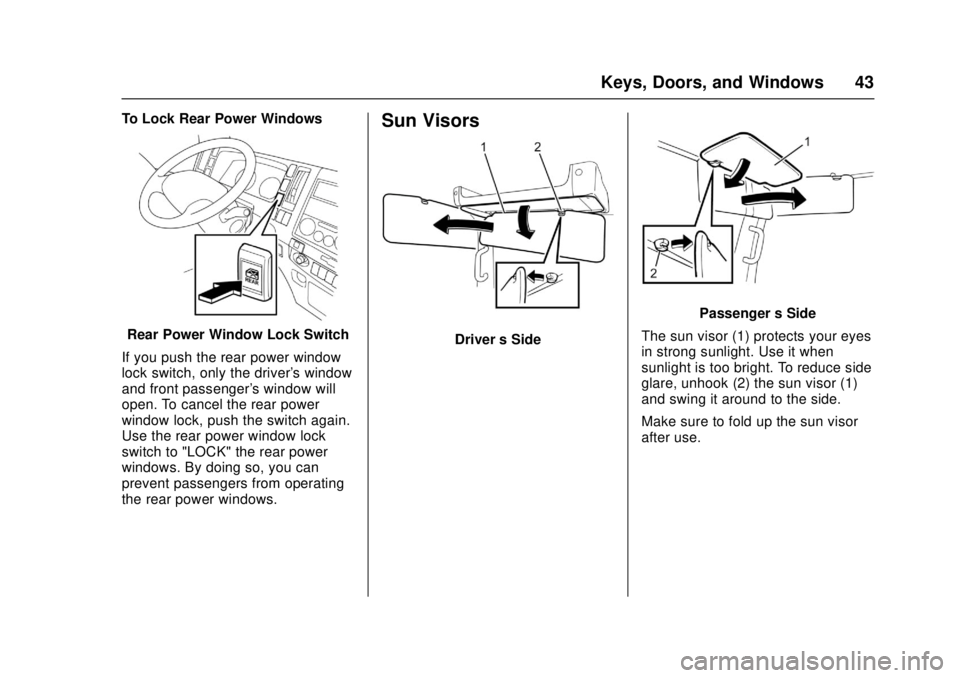
To Lock Rear Power Windows
Rear Power Window Lock Switch
If you push the rear power window
lock switch, only the driver's window
and front passenger's window will
open. To cancel the rear power
window lock, push the switch again.
Use the rear power window lock
switch to "LOCK" the rear power
windows. By doing so, you can
prevent passengers from operating
the rear power windows.
Sun Visors
Driver ’s Side
Passenger ’s Side
The sun visor (1) protects your eyes
in strong sunlight. Use it when
sunlight is too bright. To reduce side
glare, unhook (2) the sun visor (1)
and swing it around to the side.
Make sure to fold up the sun visor
after use.
Page 53 of 414

Chevrolet Low Cab Forward Owner Manual (GMNA-Localizing-U.S.-
10716700) - 2017 - crc - 12/6/16
52 Seats and Restraints
To Fasten:1. Sit on the seat in the correct driving position.
2. Pull out the seat belt holdingthe latch plate. After checking
that there are no twists in the
belt, insert the latch plate into
the buckle until it clicks. If the
retractor locks before the latch
plate reaches the buckle, let
the belt retract slightly, then
withdraw it slower than before.
3. To reduce the risk of slidingunder the belt during a
collision, position the belt
across your lap as low on your
hips as possible and adjust it to
a snug fit by pulling the
"shoulder" portion upward
through the latch plate.
The lap-shoulder belt is
designed to lock during a
sudden stop or impact. At other
times it should move freely. To Unfasten:
Push the button on the buckle. As
the belt automatically retracts, let it
be taken up slowly by holding on to
the latch plate until the belt is fully
retracted.
While being automatically retracted,
the seat belt could damage a
nearby window or interior trim
unless the latch plate is properly
held. Hold the latch plate to ensure
that the belt is taken up slowly.
Before closing the door, check that
the retracted seat belt is taut.
A slack belt could become trapped
in the door or seat rail.
Page 149 of 414

Chevrolet Low Cab Forward Owner Manual (GMNA-Localizing-U.S.-
10716700) - 2017 - crc - 12/6/16
148 Driving and Operating
.Do not use a sharp implement to
remove snow. Sharp edges
could damage rubber parts.
Refer to Antilock Brake System
(ABS) 0217.
Remove snow that has stuck to the
inside of the fenders and to the
brake hoses. Otherwise, it may
damage components. After driving
on a salted road, wash the
underside of the vehicle as soon as
possible to prevent the salt from
causing rust. Spraying water under
high pressure is an effective way to
get the salt off.
After washing the vehicle, wipe the
door openings dry.
If the Vehicle Is Stuck
When Driving on Bad Roads
Freeing the Vehicle from Sand,
Mud, Snow, and Ice
If your vehicle gets stuck in sand,
mud, snow or ice, move the selector
lever from "Second" to "Reverse".
Apply a light pressure to the
accelerator pedal while the
transmission is in gear. Remove your foot from the accelerator and
press the brake pedal while shifting.
Do not race the engine. For best
traction, avoid spinning the wheels.
When you cannot avoid driving
through deep mud, using tire chains
is an effective way to avoid getting
stuck.
Do not allow wheels to spin freely in
mud, sand, snow, ice or other poor
road conditions. This free spinning
will damage the rear axle. Even
vehicles equipped with LSD (Limited
Slip Differential) have traction
limitations. If your vehicle gets stuck
and it is difficult to extricate,
immediately stop driving and have
the vehicle towed. Spinning wheels
for an extended period of time may
cause abnormal noises or
malfunction to LSD.
Do not spin wheels faster than
32 km/h (20 MPH). Damage may
result from excessive wheel
spinning, including tire, transmission
and/or rear axle malfunction.
When driving in sand or mud, avoid
hard braking, sudden acceleration
and sharp turns of the steering
wheel. Such actions could get the
vehicle stuck and make it difficult to
extricate.
After driving through deep mud: any
mud stuck to the vehicle can harm
the steering, brakes and powertrain.
Wash the vehicle and remove all
mud and other incrustation.
The vehicle speed sensors are fitted
on the wheels. When removing mud
and other incrustation, take great
care not to damage the
components.
Do not use a sharp implement to
remove mud. Sharp edges could
damage rubber parts.
Refer to
Antilock Brake System
(ABS) 0217 andExterior Care
0 334.Emergencies
(Troubleshooting)
Troubleshooting
Performing regular inspections and
maintenance prevents damage. Be
sure to perform inspections and
maintenance at regular intervals.
Page 166 of 414

Chevrolet Low Cab Forward Owner Manual (GMNA-Localizing-U.S.-
10716700) - 2017 - crc - 12/6/16
Driving and Operating 165
Turn the key against spring
pressure to energize the starter.
When key is released, spring
pressure returns it to the ON
position. Release the key as soon
as the engine has started.
If the key cannot be turned from the
LOCK position to the ON position,
lightly move the steering wheel
clockwise and counterclockwise
while trying to turn the key.
Starting and Stopping the
Vehicle (Gasoline Only)
Check around the Vehicle before
Starting the Engine
Proper care and operation will not
only extend the service life of your
vehicle but also improve fuel
economy.
Before pulling away, perform a
thorough safety check, making sure
there are no children or obstructions
around the vehicle. Take off the
chocks after confirming that the
parking brake is securely applied.Sit behind the wheel, adjust the seat
position, and buckle up the seat
belt. The passengers are also
required to buckle up the seat belts.
Adjust the positions of the steering
wheel and mirrors. Lock the doors.
Turn the power of the dome light or
accessories OFF before starting the
engine. See
Seat Position 044,
Seat Belts 049, Steering Wheel
Adjustment 072, and Mirrors039.
Keep the Floor Around the
Driver's Seat Clean and Tidy{Warning
It is extremely dangerous to have
empty cans, empty bottles or
other items rolling around on the
floor because they could get
trapped under the brake pedal
and prevent brake application.
For proper pedal operation, it is
also essential to lay floor mats
properly. Incorrectly installed floor
mats would hinder free movement
of the pedals. (Continued)
Warning (Continued)
Do not use the dashboard pocket
or the top of the dashboard as a
place to put items that could roll,
which could interfere with your
driving. You and others could be
seriously injured.
Choose Your Footwear Suitable
for Driving
{Warning
Choose footwear that ensures
proper operation of pedals when
driving the vehicle. Use of
footwear unsuitable for driving
may cause an accident.
Checks Before Operating
Allow the engine to warm up before
driving. While the engine is warming
up, the following checks should
be made: 1. Observe the engine oil pressure warning light. The
light should go out when the
Page 170 of 414

Chevrolet Low Cab Forward Owner Manual (GMNA-Localizing-U.S.-
10716700) - 2017 - crc - 12/6/16
Driving and Operating 169
Sit behind the wheel, adjust the seat
position, and buckle up the seat
belt. The passengers are also
required to buckle up the seat belts.
Adjust the positions of the steering
wheel and mirrors. Lock the doors.
Turn the power of the dome light or
accessories OFF before starting the
engine. SeeSeat Position 044,
Seat Belts 049, Steering Wheel
Adjustment 072, and Mirrors039.
Keep the Floor Around the
Driver's Seat Clean and Tidy
{Warning
It is extremely dangerous to have
empty cans, empty bottles or
other items rolling around on the
floor because they could get
trapped under the brake pedal
and prevent brake application.
For proper pedal operation, it is
also essential to lay floor mats
properly. Incorrectly installed floor
mats would hinder free movement
of the pedals. (Continued)
Warning (Continued)
Do not use the dashboard pocket
or the top of the dashboard as a
place to put items that could roll,
which could interfere with your
driving. You and others could be
seriously injured.
Choose Your Footwear Suitable
for Driving
{Warning
Choose footwear that ensures
proper operation of pedals when
driving the vehicle. Use of
footwear unsuitable for driving
may cause an accident.
Starting the Engine
Do not keep the engine control
switch in the START position for
more than about 10 seconds.
Operating the starter for too long
might cause starter and battery
failure or may result in overheating. When the engine does not start,
wait for 20 to 30 seconds and then
turn the engine control switch again.
Before starting the engine sit in the
driver seat, check that the parking
brake is firmly engaged, the selector
lever is in the P or N (P is preferred)
position and the shift indicator also
shows P or N, and firmly press the
brake pedal to start the engine.
When stopped on a slope, start the
engine with the selector lever in the
P position. See
Ignition Positions
0 163.
1. Make sure that the selector lever is in the P or N position
and firmly press the brake
pedal.
2. When the engine control switchis turned to the ON position,
the wait-to-start light comes on
and it goes out in about