battery CHEVROLET LOW CAB FORWARD 2017 Owner's Manual
[x] Cancel search | Manufacturer: CHEVROLET, Model Year: 2017, Model line: LOW CAB FORWARD, Model: CHEVROLET LOW CAB FORWARD 2017Pages: 414, PDF Size: 7.97 MB
Page 25 of 414
Chevrolet Low Cab Forward Owner Manual (GMNA-Localizing-U.S.-
10716700) - 2017 - crc - 12/6/16
24 In Brief
3. Firmly lock the steering wheelat the selected position by
moving the lock lever to the
lock position.
Interior Lighting
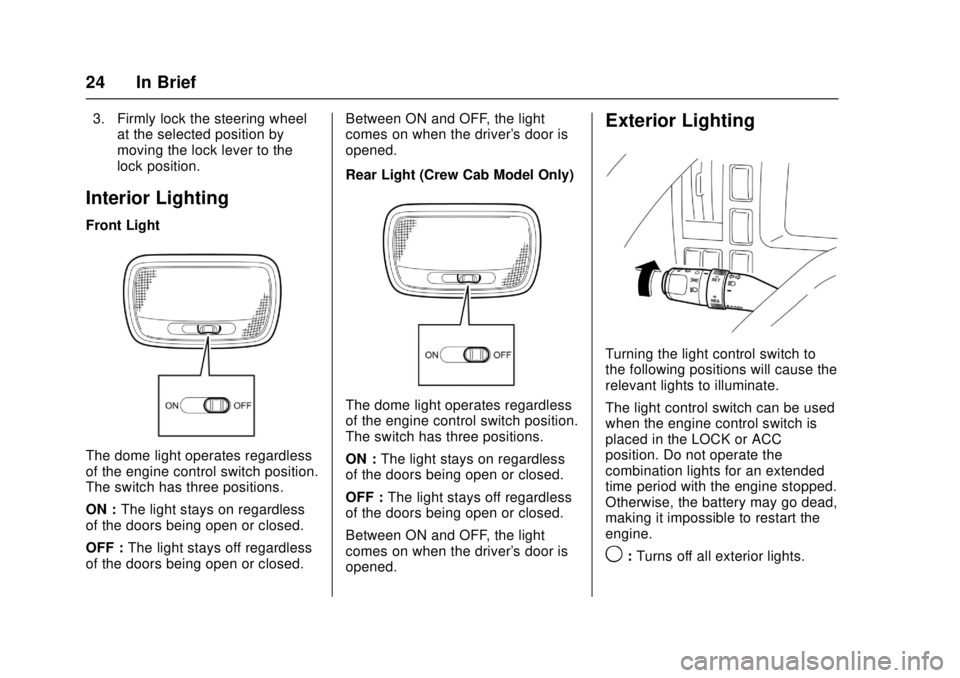
Front Light
The dome light operates regardless
of the engine control switch position.
The switch has three positions.
ON : The light stays on regardless
of the doors being open or closed.
OFF : The light stays off regardless
of the doors being open or closed. Between ON and OFF, the light
comes on when the driver's door is
opened.
Rear Light (Crew Cab Model Only)
The dome light operates regardless
of the engine control switch position.
The switch has three positions.
ON :
The light stays on regardless
of the doors being open or closed.
OFF : The light stays off regardless
of the doors being open or closed.
Between ON and OFF, the light
comes on when the driver's door is
opened.
Exterior Lighting
Turning the light control switch to
the following positions will cause the
relevant lights to illuminate.
The light control switch can be used
when the engine control switch is
placed in the LOCK or ACC
position. Do not operate the
combination lights for an extended
time period with the engine stopped.
Otherwise, the battery may go dead,
making it impossible to restart the
engine.
9: Turns off all exterior lights.
Page 33 of 414
Chevrolet Low Cab Forward Owner Manual (GMNA-Localizing-U.S.-
10716700) - 2017 - crc - 12/6/16
32 Keys, Doors, and Windows
If you resell the vehicle, be sure to
hand over the plate with key code to
the new owner together with the
vehicle.
Remote Keyless Entry
(RKE) System
SeeRadio Frequency Statement
0 404.
If there is a decrease in the Remote
Keyless Entry (RKE) operating
range:
. Check the distance. The
transmitter may be too far from
the vehicle.
. Check the location. Other
vehicles or objects may be
blocking the signal.
. Check the transmitter's battery.
See “Replacing the Battery in
the Remote Control Unit” later in
this section.
. If the transmitter is still not
working correctly, see your
dealer or a qualified technician
for service.
Remote Keyless Entry
(RKE) System Operation
The keyless entry system allows
you to lock/unlock the doors by
simply pressing the remote control
button rather than inserting the key
into the lock.
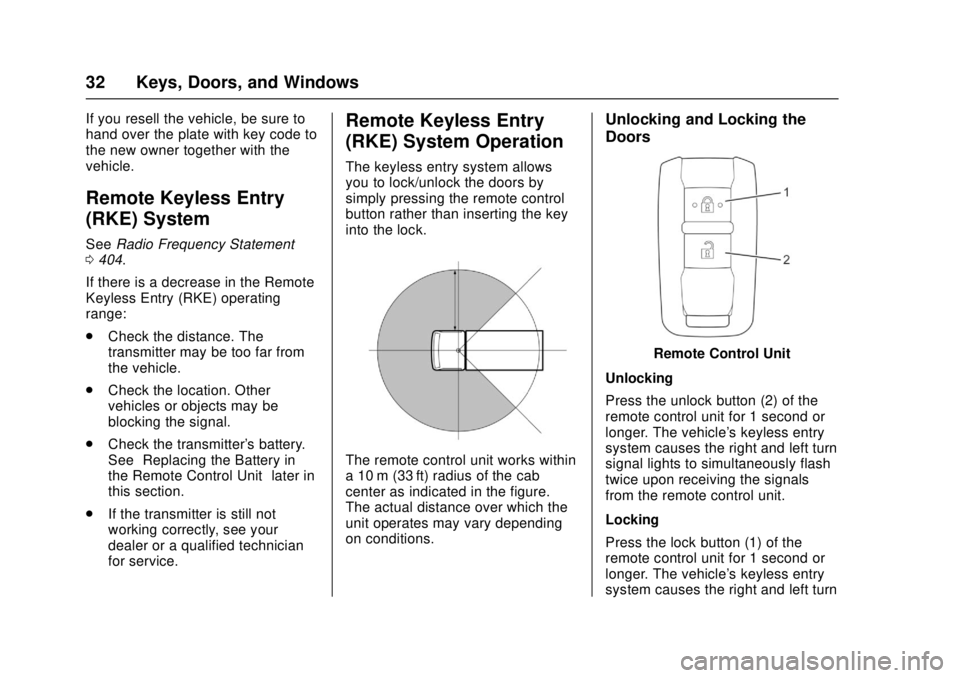
The remote control unit works within
a 10 m (33 ft) radius of the cab
center as indicated in the figure.
The actual distance over which the
unit operates may vary depending
on conditions.
Unlocking and Locking the
Doors
Remote Control Unit
Unlocking
Press the unlock button (2) of the
remote control unit for 1 second or
longer. The vehicle's keyless entry
system causes the right and left turn
signal lights to simultaneously flash
twice upon receiving the signals
from the remote control unit.
Locking
Press the lock button (1) of the
remote control unit for 1 second or
longer. The vehicle's keyless entry
system causes the right and left turn
Page 34 of 414

Chevrolet Low Cab Forward Owner Manual (GMNA-Localizing-U.S.-
10716700) - 2017 - crc - 12/6/16
Keys, Doors, and Windows 33
signal lights to simultaneously flash
once upon receiving the signals
from the remote control unit.
Should you lose the remote control
unit, please contact your dealer.
After locking the doors using the
remote control unit, be sure to
check that they are locked by
pulling the door handles.
Avoid getting water on the remote
control unit, dropping it, hitting it
against another object, or stepping
on it; otherwise, the remote control
unit could malfunction.
Do not leave the remote control unit
on the dashboard or any other
surface where the unit might be
exposed to high temperatures
(exceeding 60°C/140°F). Doing so
may result in shorter battery life or
malfunction of the remote
control unit.
If the keyless entry system fails to
operate normally, lock and unlock
the doors using the key and have
the system inspected by your
dealer.The lock or unlock buttons on the
remote control unit must be fully
pressed for more than 1 second
to work.
If you do not open any doors within
about 30 seconds after pressing the
unlock button to unlock the doors,
the automatic locking function of the
system will lock the doors again to
prevent theft.
In areas near a TV tower, electric
power plant, radio station, etc. or
under any conditions involving
strong electrical disturbances, the
remote control unit operating range
might change or the keyless entry
system might not work.
The keyless entry system does not
operate in the following cases:
.
The engine control switch is in
the "ON" position.
. The key is inserted in the engine
control switch.
. One of the doors is open.Replacing the Battery in the
Remote Control Unit
When the battery runs down,
replace it. Battery life is
approximately two years.
Battery Used Number of
Battery
Lithium battery 1
Model number:
CR 2032
Voltage: DC3V
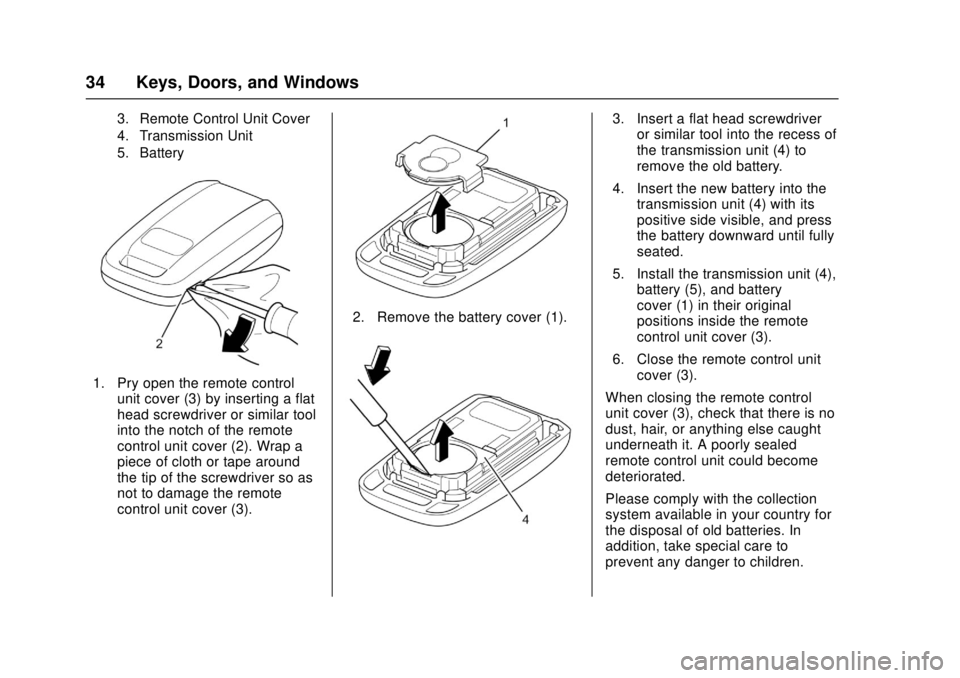
1. Battery Cover
2. Remote Control Cover Notch
Page 35 of 414
Chevrolet Low Cab Forward Owner Manual (GMNA-Localizing-U.S.-
10716700) - 2017 - crc - 12/6/16
34 Keys, Doors, and Windows
3. Remote Control Unit Cover
4. Transmission Unit
5. Battery
1. Pry open the remote controlunit cover (3) by inserting a flat
head screwdriver or similar tool
into the notch of the remote
control unit cover (2). Wrap a
piece of cloth or tape around
the tip of the screwdriver so as
not to damage the remote
control unit cover (3).
2. Remove the battery cover (1).
3. Insert a flat head screwdriveror similar tool into the recess of
the transmission unit (4) to
remove the old battery.
4. Insert the new battery into the transmission unit (4) with its
positive side visible, and press
the battery downward until fully
seated.
5. Install the transmission unit (4), battery (5), and battery
cover (1) in their original
positions inside the remote
control unit cover (3).
6. Close the remote control unit cover (3).
When closing the remote control
unit cover (3), check that there is no
dust, hair, or anything else caught
underneath it. A poorly sealed
remote control unit could become
deteriorated.
Please comply with the collection
system available in your country for
the disposal of old batteries. In
addition, take special care to
prevent any danger to children.
Page 36 of 414
Chevrolet Low Cab Forward Owner Manual (GMNA-Localizing-U.S.-
10716700) - 2017 - crc - 12/6/16
Keys, Doors, and Windows 35
{Warning
When changing the battery, use
only a battery of the same type as
the original battery, or an
equivalent. Otherwise, there is a
risk of explosion.
Do not place the battery in direct
sunlight, or near a fire or other
sources of heat.
Be sure to install the battery with
the "+" and "-" sides correctly
oriented. Incorrect installation will
result in leakage of chemicals
from inside the battery or other
operational problems.
You and others could be seriously
injured.
The battery life varies depending on
how the remote control unit is used.
The battery has reached its end of
life when the remote control unit
works intermittently or does not
work at all. Replace the battery as
soon as this happens.
Getting In and Out of the
Vehicle
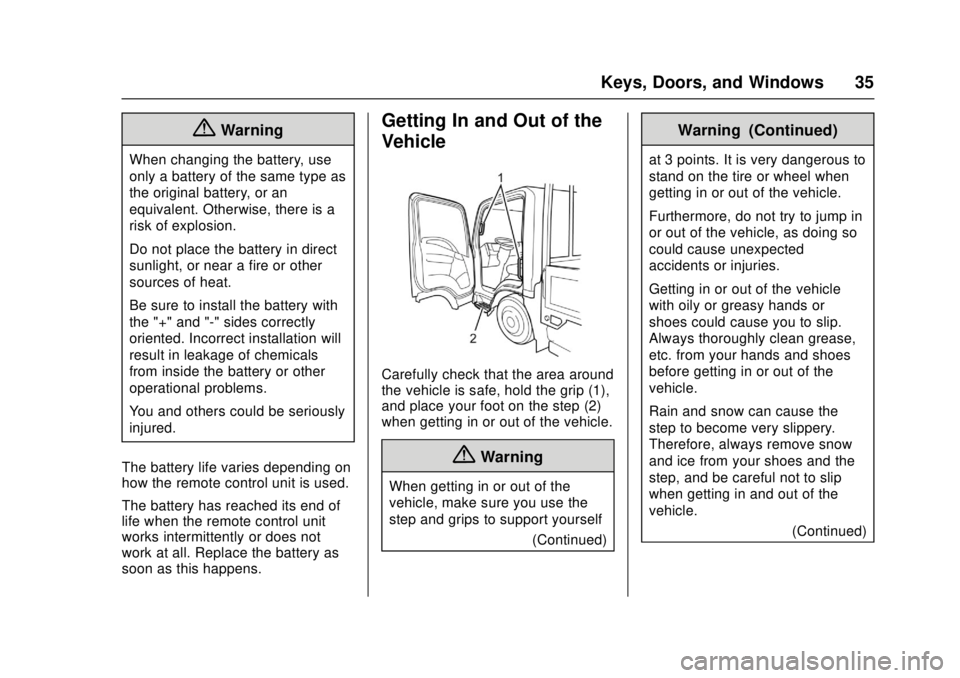
Carefully check that the area around
the vehicle is safe, hold the grip (1),
and place your foot on the step (2)
when getting in or out of the vehicle.
{Warning
When getting in or out of the
vehicle, make sure you use the
step and grips to support yourself (Continued)
Warning (Continued)
at 3 points. It is very dangerous to
stand on the tire or wheel when
getting in or out of the vehicle.
Furthermore, do not try to jump in
or out of the vehicle, as doing so
could cause unexpected
accidents or injuries.
Getting in or out of the vehicle
with oily or greasy hands or
shoes could cause you to slip.
Always thoroughly clean grease,
etc. from your hands and shoes
before getting in or out of the
vehicle.
Rain and snow can cause the
step to become very slippery.
Therefore, always remove snow
and ice from your shoes and the
step, and be careful not to slip
when getting in and out of the
vehicle.(Continued)
Page 41 of 414
Chevrolet Low Cab Forward Owner Manual (GMNA-Localizing-U.S.-
10716700) - 2017 - crc - 12/6/16
40 Keys, Doors, and Windows
{Warning
Before driving, be sure to adjust
the seat and mirrors to positions
that give you a correct driving
posture.
Do not adjust the outside mirrors
while operating the vehicle.
Adjust the mirrors when the
vehicle is stationary, not while the
vehicle is in motion.
When checking the rear of the
vehicle with mirrors, be careful
that this does not distract your
attention from the traffic ahead.
Rearview mirrors may make the
vehicle behind you appear farther
away than it really is. Use these
mirrors very carefully until you are
able to correctly determine
distances from the images.(Continued)
Warning (Continued)
Keep the mirrors in mind when
passing another vehicle on a
narrow road, moving the vehicle
into a garage or driving near
pedestrians.
Do not drive with the mirrors
folded.
You and others could be seriously
injured.
Heated Mirrors
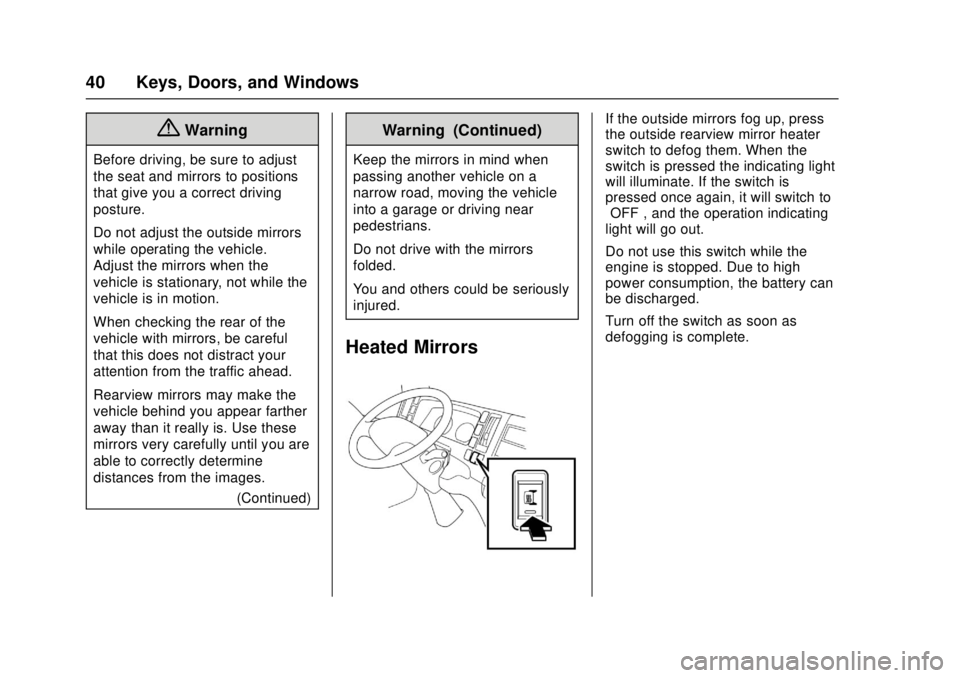
If the outside mirrors fog up, press
the outside rearview mirror heater
switch to defog them. When the
switch is pressed the indicating light
will illuminate. If the switch is
pressed once again, it will switch to
“OFF”, and the operation indicating
light will go out.
Do not use this switch while the
engine is stopped. Due to high
power consumption, the battery can
be discharged.
Turn off the switch as soon as
defogging is complete.
Page 72 of 414
Chevrolet Low Cab Forward Owner Manual (GMNA-Localizing-U.S.-
10716700) - 2017 - crc - 12/6/16
Instruments and Controls 71
Instruments and
Controls
Controls
Steering Wheel Adjustment . . . . 72
Horn . . . . . . . . . . . . . . . . . . . . . . . . . . . 72
Windshield Wiper/Washer . . . . . . 73
Power Outlets . . . . . . . . . . . . . . . . . 74
Cigarette Lighter . . . . . . . . . . . . . . . 74
Ashtrays . . . . . . . . . . . . . . . . . . . . . . . 75
Warning Lights, Gauges, and
Indicators
Warning Lights, Gauges, andIndicators . . . . . . . . . . . . . . . . . . . . 76
Instrument Cluster . . . . . . . . . . . . . 77
Speedometer . . . . . . . . . . . . . . . . . . 80
Odometer . . . . . . . . . . . . . . . . . . . . . . 80
Trip Odometer . . . . . . . . . . . . . . . . . 80
Tachometer . . . . . . . . . . . . . . . . . . . . 81
Fuel Gauge . . . . . . . . . . . . . . . . . . . . 81
Engine Coolant Temperature Gauge . . . . . . . . . . . . . . . . . . . . . . . . 82
Diesel Exhaust Fluid (DEF) Gauge . . . . . . . . . . . . . . . . . . . . . . . . 83
Seat Belt Reminders . . . . . . . . . . . 83
Battery Warning Light . . . . . . . . . . 83
Malfunction Indicator Lamp (Check Engine Light) . . . . . . . . . 84 Service Vehicle Soon Light . . . . 84
Brake System Warning Light
(Parking Brake Light) . . . . . . . . . 84
Antilock Brake System (ABS) Warning Light . . . . . . . . . . . . . . . . 87
Exhaust Brake Light . . . . . . . . . . . 88
Service Transmission Warning Light . . . . . . . . . . . . . . . . . . . . . . . . . 88
Automatic Transmission Fluid Temperature Warning Light . . . 88
Overdrive Off Light (Diesel Only) . . . . . . . . . . . . . . . . . 89
Wait-to-Start Light . . . . . . . . . . . . . 89
Engine Oil Pressure Light . . . . . . 89
Engine Oil Level Indicator Light . . . . . . . . . . . . . . . . . . . . . . . . . 90
Diesel Exhaust Fluid (DEF) Warning Light . . . . . . . . . . . . . . . . 90
Engine Shutdown Warning Light . . . . . . . . . . . . . . . . . . . . . . . . . 91
Reduced Engine Power Light . . . . . . . . . . . . . . . . . . . . . . . . . 91
High-Beam On Light . . . . . . . . . . . 92
Daytime Running Lamps (DRL) Indicator Light . . . . . . . . . . . . . . . . 92
Cruise Control Light . . . . . . . . . . . 92
Information Displays
Driver Information Center (DIC) (Diesel Only) . . . . . . . . . . . . . . . . . 93
Vehicle Messages
Vehicle Messages(Diesel Only) . . . . . . . . . . . . . . . . . 97
Warning Buzzers . . . . . . . . . . . . . 101
Page 75 of 414
Chevrolet Low Cab Forward Owner Manual (GMNA-Localizing-U.S.-
10716700) - 2017 - crc - 12/6/16
74 Instruments and Controls
If windshield washer fluid does not
come out in sufficient quantity,
immediately release the switch.
Otherwise, the windshield surface
may sustain damage.
If windshield washer fluid does not
come out, release the windshield
washer switch immediately.
Otherwise the motor may seize up.
Do not hold the switch pressed for
more than 30 seconds. Otherwise,
the washer pump may sustain
damage.
Check the washer fluid level
regularly. Do it often when the
weather is bad.
Use a good quality windshield
antifreeze to help prevent freezing
damage, and for better cleaning.
When the vehicle is used in a
cold-climate region or during the
winter:
.Use washer fluid with
appropriate concentration for the
season to prevent frozen fluid. .
Fill the washer fluid reservoir
only 3/4 full to allow for
expansion if the temperature
should fall low enough to freeze
the solution.
See Washer Fluid 0274 for
information on filling the windshield
washer fluid reservoir.
Power Outlets
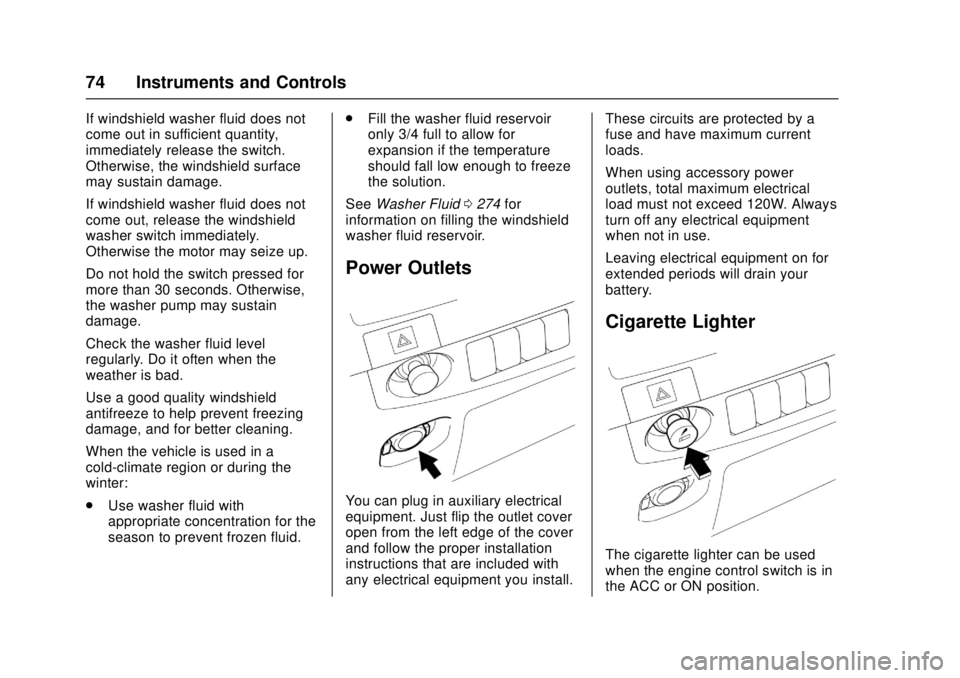
You can plug in auxiliary electrical
equipment. Just flip the outlet cover
open from the left edge of the cover
and follow the proper installation
instructions that are included with
any electrical equipment you install. These circuits are protected by a
fuse and have maximum current
loads.
When using accessory power
outlets, total maximum electrical
load must not exceed 120W. Always
turn off any electrical equipment
when not in use.
Leaving electrical equipment on for
extended periods will drain your
battery.
Cigarette Lighter
The cigarette lighter can be used
when the engine control switch is in
the ACC or ON position.
Page 81 of 414

Chevrolet Low Cab Forward Owner Manual (GMNA-Localizing-U.S.-
10716700) - 2017 - crc - 12/6/16
80 Instruments and Controls
Speedometer
The speedometer shows the
vehicle's speed in either kilometers
per hour (km/h) or miles per
hour (mph).
Odometer
The odometer shows how far the
vehicle has been driven, in either
kilometers or miles.
Each time the reset knob is pressed
with the engine control switch in the
ON position, the odometer/trip meter
shows ODO, TRIP A, and TRIP B in
this sequence. With the key
removed, the odometer and trip
meter continue to indicate for about
five minutes.
Odometer Check Switch
Press the Odometer Check switch
to display the odometer and trip
meter mileage after the key is
turned off. The fuel gauge will also
operate when this switch is pressed.
For diesel vehicles, the DIC and
some lights will illuminate on the
instrument panel.
Trip Odometer
The trip odometer shows how far
the vehicle has been driven since
the trip odometer was last reset.
Press the trip odometer reset stem
next to the odometer to switch
between the odometer and trip
odometer.To reset the trip odometer to zero,
press and hold the trip odometer
reset stem while TRIP A or TRIP B
is displayed. The engine control
switch should be in the ON position.
When the battery is disconnected,
TRIP A and TRIP B will be reset to
zero. The per trip fuel economy is
also reset by the TRIP B reset. See
Driver Information Center (DIC)
(Diesel Only)
093.
When you turn the engine control
switch to the ON position, the
odometer/trip odometer shows what
was displayed the last time the
engine control switch was turned to
LOCK or ACC.
To set the odometer to display each
time you turn the engine control
switch to the ON position, turn the
engine control switch to LOCK or
ACC while the odometer is
displayed. With the reset stem
pressed, turn the engine control
switch to the ON position and then
within three seconds, turn the
engine control switch back to the
Page 84 of 414
Chevrolet Low Cab Forward Owner Manual (GMNA-Localizing-U.S.-
10716700) - 2017 - crc - 12/6/16
Instruments and Controls 83
Caution (Continued)
problem, but check the engine
coolant level in the reservoir. Add
engine coolant as necessary.
See “Engine Overheat Warning
Light” under Driver Information
Center (DIC) (Diesel Only) 093 and
Engine Coolant 0263.
Diesel Exhaust Fluid
(DEF) Gauge
The DEF gauge is part of the Driver
Information Center (DIC). See
Driver Information Center (DIC)
(Diesel Only) 093.
Seat Belt Reminders
Seat Belt Warning Light
There is a driver seat belt reminder
light on the instrument cluster.
This warning light comes on and a
warning buzzer sounds when the
driver is not wearing the seat belt
while the engine control switch is in
the ON position.
When the vehicle speed exceeds
20 km/h (12 mph) with the seat belt
unbuckled, the warning light will
flash and the buzzer will continue to
sound. The warning light will go out
and the warning buzzer will stop
when the driver buckles the
seat belt.
Battery Warning Light
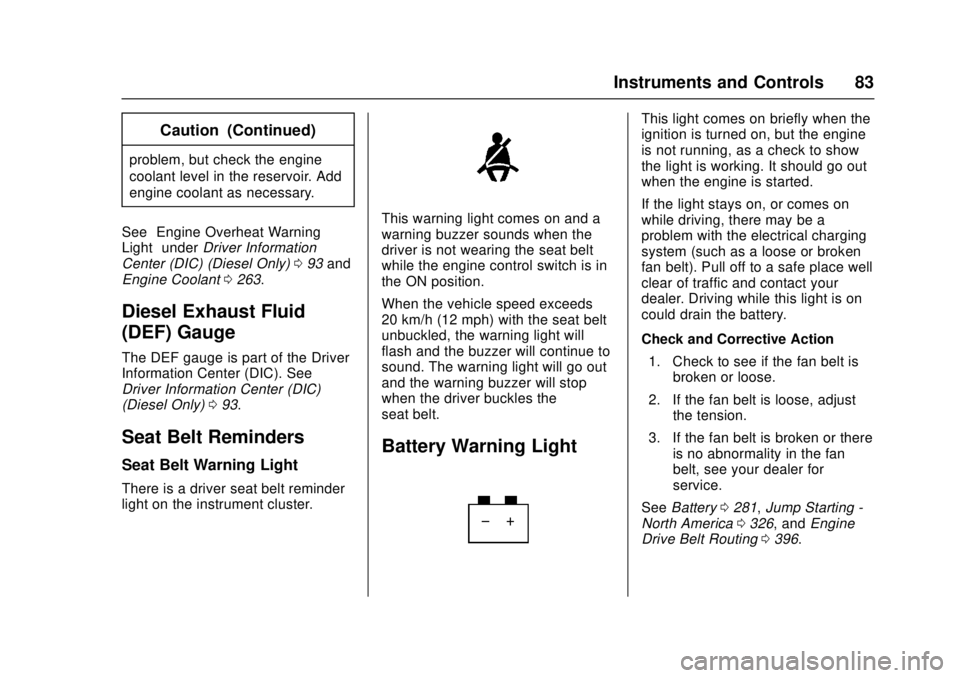
This light comes on briefly when the
ignition is turned on, but the engine
is not running, as a check to show
the light is working. It should go out
when the engine is started.
If the light stays on, or comes on
while driving, there may be a
problem with the electrical charging
system (such as a loose or broken
fan belt). Pull off to a safe place well
clear of traffic and contact your
dealer. Driving while this light is on
could drain the battery.
Check and Corrective Action
1. Check to see if the fan belt is broken or loose.
2. If the fan belt is loose, adjust the tension.
3. If the fan belt is broken or there is no abnormality in the fan
belt, see your dealer for
service.
See Battery 0281, Jump Starting -
North America 0326, and Engine
Drive Belt Routing 0396.