battery CHEVROLET LOW CAB FORWARD 2017 User Guide
[x] Cancel search | Manufacturer: CHEVROLET, Model Year: 2017, Model line: LOW CAB FORWARD, Model: CHEVROLET LOW CAB FORWARD 2017Pages: 414, PDF Size: 7.97 MB
Page 95 of 414
Chevrolet Low Cab Forward Owner Manual (GMNA-Localizing-U.S.-
10716700) - 2017 - crc - 12/6/16
94 Instruments and Controls
DIC Menu Items
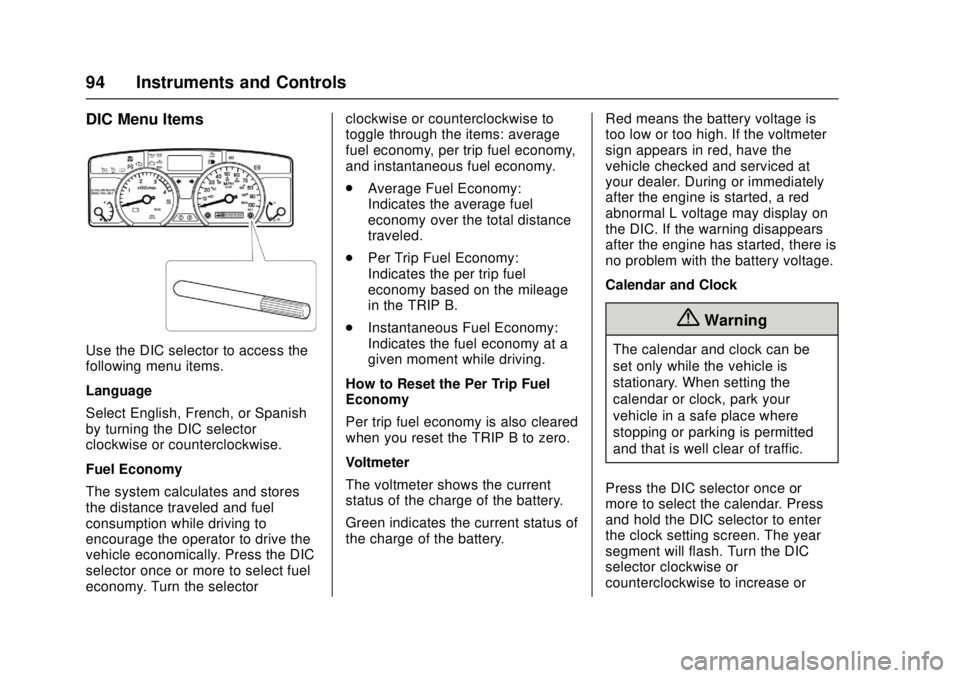
Use the DIC selector to access the
following menu items.
Language
Select English, French, or Spanish
by turning the DIC selector
clockwise or counterclockwise.
Fuel Economy
The system calculates and stores
the distance traveled and fuel
consumption while driving to
encourage the operator to drive the
vehicle economically. Press the DIC
selector once or more to select fuel
economy. Turn the selectorclockwise or counterclockwise to
toggle through the items: average
fuel economy, per trip fuel economy,
and instantaneous fuel economy.
.
Average Fuel Economy:
Indicates the average fuel
economy over the total distance
traveled.
. Per Trip Fuel Economy:
Indicates the per trip fuel
economy based on the mileage
in the TRIP B.
. Instantaneous Fuel Economy:
Indicates the fuel economy at a
given moment while driving.
How to Reset the Per Trip Fuel
Economy
Per trip fuel economy is also cleared
when you reset the TRIP B to zero.
Voltmeter
The voltmeter shows the current
status of the charge of the battery.
Green indicates the current status of
the charge of the battery. Red means the battery voltage is
too low or too high. If the voltmeter
sign appears in red, have the
vehicle checked and serviced at
your dealer. During or immediately
after the engine is started, a red
abnormal L voltage may display on
the DIC. If the warning disappears
after the engine has started, there is
no problem with the battery voltage.
Calendar and Clock
{Warning
The calendar and clock can be
set only while the vehicle is
stationary. When setting the
calendar or clock, park your
vehicle in a safe place where
stopping or parking is permitted
and that is well clear of traffic.
Press the DIC selector once or
more to select the calendar. Press
and hold the DIC selector to enter
the clock setting screen. The year
segment will flash. Turn the DIC
selector clockwise or
counterclockwise to increase or
Page 104 of 414
Chevrolet Low Cab Forward Owner Manual (GMNA-Localizing-U.S.-
10716700) - 2017 - crc - 12/6/16
Lighting 103
Lighting
Exterior Lighting
Exterior Lamp Controls . . . . . . . 103
Headlamp High/Low-BeamChanger . . . . . . . . . . . . . . . . . . . . 104
Flash-to-Pass . . . . . . . . . . . . . . . . 104
Hazard Warning Flashers . . . . . 105
Turn and Lane-Change Signals . . . . . . . . . . . . . . . . . . . . . . 105
Cornering Lamps . . . . . . . . . . . . . 106
Interior Lighting
Instrument Panel Illumination Control . . . . . . . . . . . . . . . . . . . . . . 106
Cargo Lamp . . . . . . . . . . . . . . . . . . 107
Dome Lamps . . . . . . . . . . . . . . . . . 107
Exterior Lighting
Exterior Lamp Controls
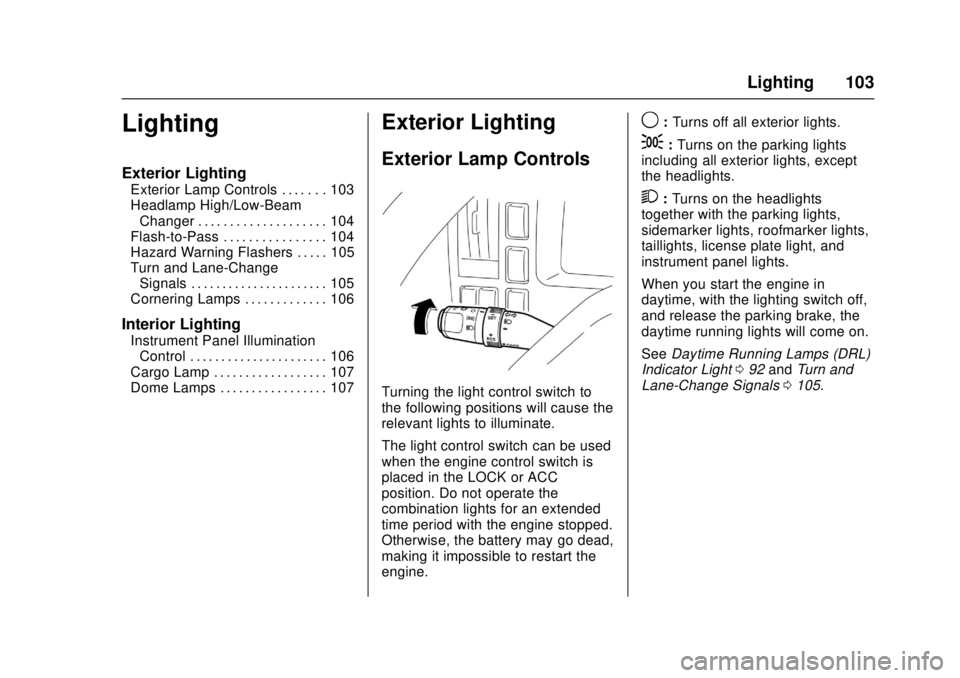
Turning the light control switch to
the following positions will cause the
relevant lights to illuminate.
The light control switch can be used
when the engine control switch is
placed in the LOCK or ACC
position. Do not operate the
combination lights for an extended
time period with the engine stopped.
Otherwise, the battery may go dead,
making it impossible to restart the
engine.
9: Turns off all exterior lights.
;:Turns on the parking lights
including all exterior lights, except
the headlights.
2: Turns on the headlights
together with the parking lights,
sidemarker lights, roofmarker lights,
taillights, license plate light, and
instrument panel lights.
When you start the engine in
daytime, with the lighting switch off,
and release the parking brake, the
daytime running lights will come on.
See Daytime Running Lamps (DRL)
Indicator Light 092 and Turn and
Lane-Change Signals 0105.
Page 106 of 414
Chevrolet Low Cab Forward Owner Manual (GMNA-Localizing-U.S.-
10716700) - 2017 - crc - 12/6/16
Lighting 105
Hazard Warning Flashers
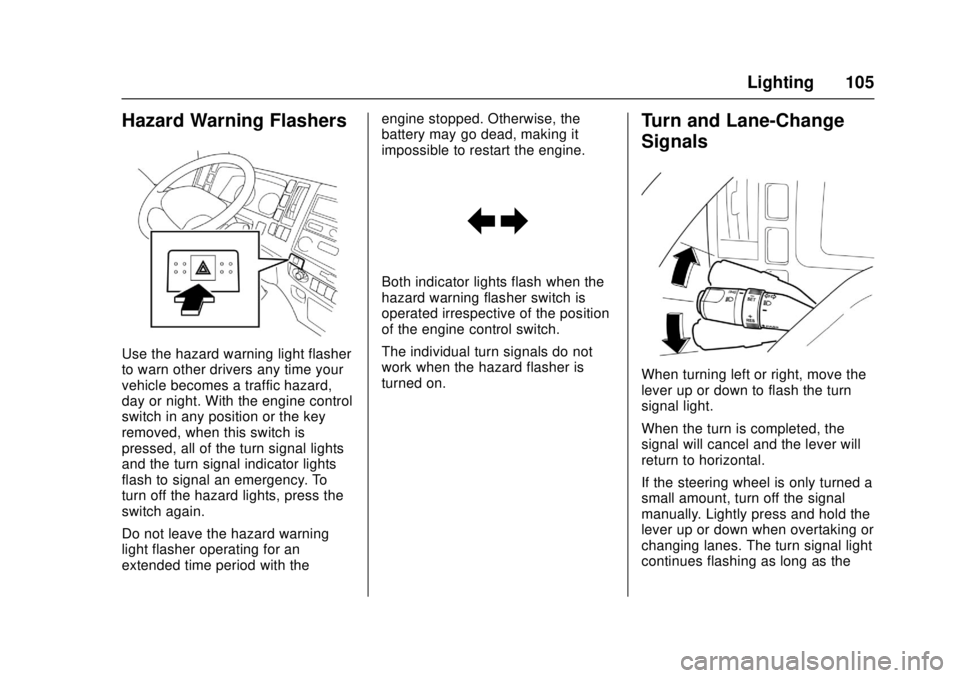
Use the hazard warning light flasher
to warn other drivers any time your
vehicle becomes a traffic hazard,
day or night. With the engine control
switch in any position or the key
removed, when this switch is
pressed, all of the turn signal lights
and the turn signal indicator lights
flash to signal an emergency. To
turn off the hazard lights, press the
switch again.
Do not leave the hazard warning
light flasher operating for an
extended time period with theengine stopped. Otherwise, the
battery may go dead, making it
impossible to restart the engine.
Both indicator lights flash when the
hazard warning flasher switch is
operated irrespective of the position
of the engine control switch.
The individual turn signals do not
work when the hazard flasher is
turned on.
Turn and Lane-Change
Signals
When turning left or right, move the
lever up or down to flash the turn
signal light.
When the turn is completed, the
signal will cancel and the lever will
return to horizontal.
If the steering wheel is only turned a
small amount, turn off the signal
manually. Lightly press and hold the
lever up or down when overtaking or
changing lanes. The turn signal light
continues flashing as long as the
Page 109 of 414
Chevrolet Low Cab Forward Owner Manual (GMNA-Localizing-U.S.-
10716700) - 2017 - crc - 12/6/16
108 Infotainment System
Infotainment
System
Radio
AM-FM Radio . . . . . . . . . . . . . . . . 108
Radio Reception . . . . . . . . . . . . . . 112
Fixed Mast Antenna . . . . . . . . . . 113
Audio Players
CD Player . . . . . . . . . . . . . . . . . . . . 114
USB Port . . . . . . . . . . . . . . . . . . . . . 121
Auxiliary Devices . . . . . . . . . . . . . 124
Trademarks and License
Agreements
Trademarks and LicenseAgreements . . . . . . . . . . . . . . . . . 125
Radio
AM-FM Radio
Control Panel
{Warning
Adjust the radio or CD player only
while the vehicle is stationary.
Adjusting them while the vehicle
is moving could cause an
accident. You and others could be
seriously injured.
Adjust the volume so that sound
outside of the vehicle can be heard.
If outside sound cannot be heard,
accidents may be harder to avoid.
Do not install a radio equipment
antenna near the vehicle's radio
antenna. This could cause
unwanted noise on the radio or
while playing a CD.
The radio or CD/USB player can be
used when the engine control switch
is in the "ACC" or "ON" position. Continued use while engine is
stopped may cause the battery to
discharge.
Take care not to spill liquids, etc. on
the radio or CD player. It may cause
damage to the player.
Do not disassemble or apply oil to
radio or CD player.
Page 111 of 414
Chevrolet Low Cab Forward Owner Manual (GMNA-Localizing-U.S.-
10716700) - 2017 - crc - 12/6/16
110 Infotainment System
Adjusting Treble1. Press the "FUNC" button to display "TRE."
2. Press the "TUNE/TRACK" button ("
y z") while "TRE" is
displayed to adjust the treble
level.
y: Level will increase every
time the button is pressed.
z: Level will decrease every
time the button is pressed.
It can be adjusted in the range
of -5 . -4 . -3 . -2 . -1 . 0 . 1 . 2 .
3 . 4 . 5.
Default setting is 0.
Adjusting Fader 1. Press the "FUNC" button to display "FAD."
2. Press the "TUNE/TRACK" button ("
y z") while "FAD" is
displayed to adjust the front
and rear speaker volume.
y: Front speaker volume will
increase every time the button
is pressed.
z: Rear speaker volume will
increase every time the button
is pressed.
It can be adjusted in the range
of R7 . R6 . R5 . R4 . R3 . R2 .
R1 . 0 . F1 . F2 . F3 . F4 . F5 .
F6 . F7.
Default setting is 0.
Adjustment of rear speaker volume
is not possible if there are no rear
speakers installed.
Adjusting Balance 1. Press the "FUNC" button to display "BAL."
2. Press the "TUNE/TRACK" button ("
y z") while "BAL" is
displayed to adjust the balance
of volume from the left and
right speakers.
y: Right speaker volume will
increase every time the button
is pressed.
z: Left speaker volume will
increase every time the button
is pressed. It can be adjusted in the range
of L7 . L6 . L5 . L4 . L3 . L2 .
L1 . 0 . R1 . R2 . R3 . R4 . R5 .
R6 . R7.
Default setting is 0.
Switching the Time Display 1. Press the "FUNC" button for less than 1 second to
display "CLK."
2. Press the "TUNE/TRACK" button ("
y z") while “CLK”is
displayed and select
“ON"/"OFF."
"ON": Clock is displayed.
"OFF": Clock is not displayed.
When the clock display is "ON," it is
displayed prioritized over the audio
display (radio frequency, song
number, or elapsed time).
When the power source is
interrupted by battery disconnection,
the time of the clock will be reset.
Setting the Hour 1. Press the "FUNC" button to display "CLK" and make the
clock display (hours) blink.
Page 113 of 414
Chevrolet Low Cab Forward Owner Manual (GMNA-Localizing-U.S.-
10716700) - 2017 - crc - 12/6/16
112 Infotainment System
As an example, "CH1" is
displayed.
The radio stations in memory are
erased when the power supply is
interrupted to replace the battery or
fuses.
Programming Preset Channels 1. Display the channel number you wish to program.
2. Press the "CH" button for 2 seconds or longer.
The frequency display will
blink.
3. Press the "TUNE" button ("
y
z
") to select the frequency
you wish to program.
4. Press the "CH" button for 2 seconds or longer.
Once it has been set as a
preset channel, the frequency
display will stop blinking.
Radio Reception
Usually, a problem with radio
reception does not mean there is a
problem with your radio - it is just the normal result of conditions
outside the vehicle. For example,
nearby buildings and terrain can
interfere with FM reception. Power
lines or telephone wires can
interfere with AM signals.
And of course, radio signals have a
limited range. The farther you are
from a station, the weaker its signal
will be. In addition, reception
conditions change constantly as
your vehicle moves.
Here are some common reception
problems that probably do not
indicate a problem with your radio.
FM Transmissions
Fading and drifting stations -
Generally, the effective range of FM
is about 40 km (25 miles). Once
outside this range, you may notice
fading and drifting, which increase
with the distance from the radio
transmitter. They are often
accompanied by distortion.
Multi-path - FM signals are
reflective, making it possible for two
signals to reach your antenna at the
same time. If this happens, the
signals will cancel each other out,
causing a momentary flutter or loss
of reception.
Static and fluttering - These occur
when signals are blocked by
buildings, trees, or other large
objects. Increasing the bass level
may reduce static and fluttering.
Station swapping - If the FM signal
you are listening to is interrupted or
weakened, and there is another
strong station nearby on the FM
band, your radio may tune in the
second station until the original
signal can be picked up again.
AM Transmissions
Fading - AM broadcasts are
reflected by the upper atmosphere -
especially at night. These reflected
signals can interfere with those
received directly from the radio
station, causing the radio station to
sound alternately strong and weak.
Station interference - When a
reflected signal and a signal
received directly from a radio station
are very nearly the same frequency,
Page 118 of 414
Chevrolet Low Cab Forward Owner Manual (GMNA-Localizing-U.S.-
10716700) - 2017 - crc - 12/6/16
Infotainment System 117
Using the Audio System
{Warning
Adjust the radio or CD player only
while the vehicle is stationary.
Adjusting them while the vehicle
is moving could cause an
accident. You and others could be
seriously injured.
Adjust the volume so that sound
outside of the vehicle can be heard.
If outside sound cannot be heard,
accidents may be harder to avoid.
Do not install a radio equipment
antenna near the vehicle's radio
antenna. This could cause
unwanted noise on the radio or
while playing a CD.
The radio or CD/USB player can be
used when the engine control switch
is in the "ACC" or "ON" position.
Continued use while the engine is
stopped may cause the battery to
discharge. Take care not to spill liquids, etc. on
the radio or CD player. It may cause
damage to the player.
Do not disassemble or apply oil to
the radio or CD player.
Disc
When it is cold or when it is raining,
the car windows will fog up and
cause dew (water drops) to form in
the vehicle compartment
(condensation). When this happens,
the audio may skip, and playback
will stop. Ventilate the vehicle
compartment and dehumidify before
resuming use.
The audio may skip due to violent
vibrations when the car is traveling
across harsh roads.
Never insert foreign objects into the
disc insertion slot.
Do not insert a wet disc into the
player.
This player uses an invisible laser
beam which could cause hazardous
radiation exposure if directed
outside the player. Be sure to
operate the player correctly.Playback may not be possible due
to recording conditions or disc
characteristics, scratches, dirt,
or deterioration.
Usable Discs
Most music CDs can be used. CD-R
and CD-RW discs recorded
according to the CD-DA format can
also be played.
CD-R (CD-Recordable), CD-RW
(CD-ReWritable) may not be able to
play back due to the recording
condition, characteristics of the disc,
damage, dirt or deterioration due to
long exposure to the environment of
the vehicle compartment. CD-R,
CD-RW that are not finalized and
CD-R and CD-RW that are saved in
the UDF format cannot be played
(excluding MP3/WMA).
CD-TEXT function is only
compatible with commercial CD
compatible with CD-TEXT.
Characters may not display
accurately in CD-R and CD-RW.
Page 125 of 414
Chevrolet Low Cab Forward Owner Manual (GMNA-Localizing-U.S.-
10716700) - 2017 - crc - 12/6/16
124 Infotainment System
MP3/WMA files are compatible with
up to 8 levels of folders. However,
when there are many levels, it may
take some time before the first file is
played. Therefore, a two-level folder
is recommended.
Maximum characters for a folder/file
name: 64 (including extension).
A maximum of 700 folders and
3,000 files can be played in a single
memory device.
Auxiliary Devices
AUX Operations
Connecting Your Portable Audio
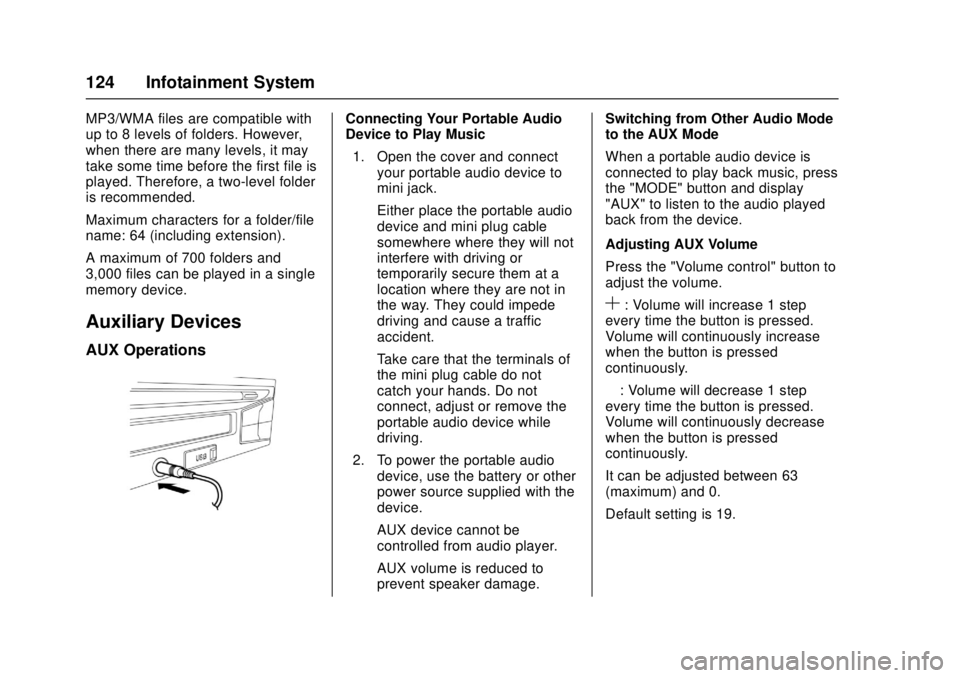
Device to Play Music1. Open the cover and connect your portable audio device to
mini jack.
Either place the portable audio
device and mini plug cable
somewhere where they will not
interfere with driving or
temporarily secure them at a
location where they are not in
the way. They could impede
driving and cause a traffic
accident.
Take care that the terminals of
the mini plug cable do not
catch your hands. Do not
connect, adjust or remove the
portable audio device while
driving.
2. To power the portable audio device, use the battery or other
power source supplied with the
device.
AUX device cannot be
controlled from audio player.
AUX volume is reduced to
prevent speaker damage. Switching from Other Audio Mode
to the AUX Mode
When a portable audio device is
connected to play back music, press
the "MODE" button and display
"AUX" to listen to the audio played
back from the device.
Adjusting AUX Volume
Press the "Volume control" button to
adjust the volume.
S: Volume will increase 1 step
every time the button is pressed.
Volume will continuously increase
when the button is pressed
continuously.
—: Volume will decrease 1 step
every time the button is pressed.
Volume will continuously decrease
when the button is pressed
continuously.
It can be adjusted between 63
(maximum) and 0.
Default setting is 19.
Page 146 of 414
Chevrolet Low Cab Forward Owner Manual (GMNA-Localizing-U.S.-
10716700) - 2017 - crc - 12/6/16
Driving and Operating 145
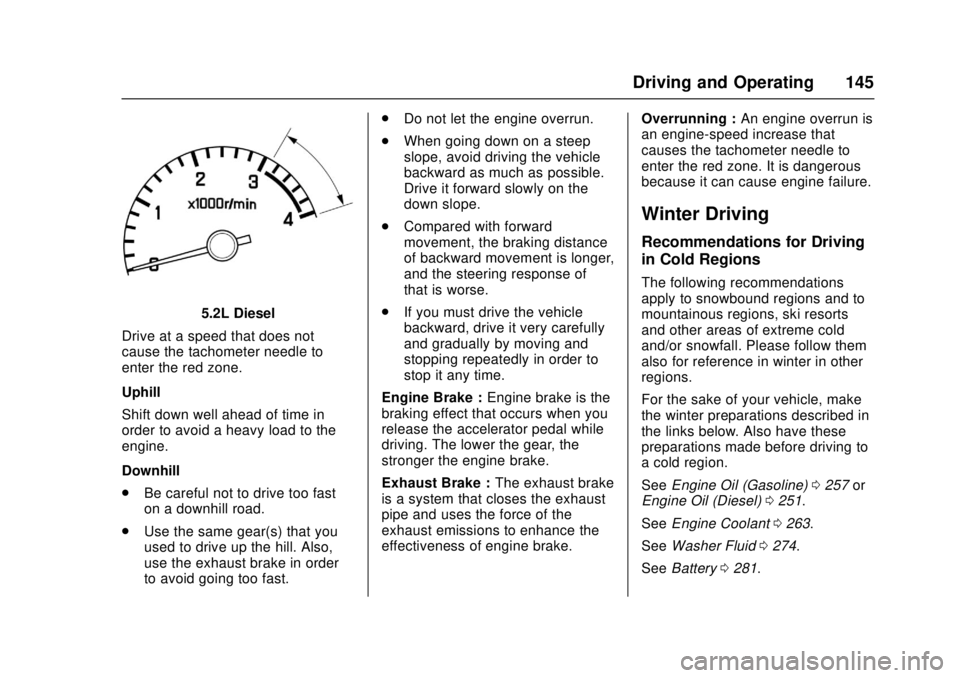
5.2L Diesel
Drive at a speed that does not
cause the tachometer needle to
enter the red zone.
Uphill
Shift down well ahead of time in
order to avoid a heavy load to the
engine.
Downhill
. Be careful not to drive too fast
on a downhill road.
. Use the same gear(s) that you
used to drive up the hill. Also,
use the exhaust brake in order
to avoid going too fast. .
Do not let the engine overrun.
. When going down on a steep
slope, avoid driving the vehicle
backward as much as possible.
Drive it forward slowly on the
down slope.
. Compared with forward
movement, the braking distance
of backward movement is longer,
and the steering response of
that is worse.
. If you must drive the vehicle
backward, drive it very carefully
and gradually by moving and
stopping repeatedly in order to
stop it any time.
Engine Brake : Engine brake is the
braking effect that occurs when you
release the accelerator pedal while
driving. The lower the gear, the
stronger the engine brake.
Exhaust Brake : The exhaust brake
is a system that closes the exhaust
pipe and uses the force of the
exhaust emissions to enhance the
effectiveness of engine brake. Overrunning :
An engine overrun is
an engine-speed increase that
causes the tachometer needle to
enter the red zone. It is dangerous
because it can cause engine failure.
Winter Driving
Recommendations for Driving
in Cold Regions
The following recommendations
apply to snowbound regions and to
mountainous regions, ski resorts
and other areas of extreme cold
and/or snowfall. Please follow them
also for reference in winter in other
regions.
For the sake of your vehicle, make
the winter preparations described in
the links below. Also have these
preparations made before driving to
a cold region.
See Engine Oil (Gasoline) 0257 or
Engine Oil (Diesel) 0251.
See Engine Coolant 0263.
See Washer Fluid 0274.
See Battery 0281.
Page 147 of 414
Chevrolet Low Cab Forward Owner Manual (GMNA-Localizing-U.S.-
10716700) - 2017 - crc - 12/6/16
146 Driving and Operating
When Ice Prevents You from
Putting Your Key in the Door
or Opening the Door
If you try to force the key into the
door, you could bend it. And if you
try to pull the door open with undue
force, the rubber seal around the
door could come unstuck or become
damaged. Use warm water to melt
the ice, then quickly wipe it away
and open the door.
If the wipers, electric door mirrors,
or power windows freeze up, also
use warm water to melt the ice and
then operate the system. Otherwise,
you could damage the mechanism
and drain the battery. After that,
wipe the water away.
Before Driving in Cold Regions
Getting In and Out of the Vehicle
The step can get icy in cold regions.
Be careful not to slip when getting in
and out of the vehicle.
Before Sitting in the Driver’s Seat
Remove snow and ice from your
shoes when getting into the vehicle.
If you try to drive with snow on your shoes, your shoes would slip on the
pedals and you would not be able to
press the pedals properly, meaning
that your driving would be
inconsistent. Also, the cabin could
become more humid, causing the
glass to fog up.
Check Fuel Level
Fuel consumption increases when
tire chains are used. Determine how
much fuel you need to reach your
destination and fill up the tank in
advance. Refer to
Fuel for Diesel
Engines 0232 orFuel (Gasoline)
0 231.
Removing Snow from Glass
and Underbody
Do not use a sharp implement to
remove snow. Sharp edges could
damage rubber parts.
To maintain an adequate field of
view, use a plastic scraper to
remove snow and frost from the
glass surfaces. By using a plastic
scraper, you can remove the snow
and frost without scratching the glass. At this time, check whether
the wiper blades are frozen onto the
glass.
Also, look under the vehicle and
remove any lumps of ice that are
stuck to the underbody. Be careful
not to damage components.
Driving on Snowy or Frozen
Roads
On slippery roads, never accelerate
rapidly, brake hard, decelerate
rapidly or make sharp turns of the
steering wheel.
There is a risk of reduced grip
between the tires and road surface
and of increased braking distances.
The danger of icy road surfaces is
particularly great on bridges, in
shady places and where there are
puddles.
Keep your speed down and be sure
to use tire chains or winter tires on
snowy or frozen road surfaces.
For diesel vehicles, use engine
brakes together with the foot brakes
to decelerate. Using the exhaust
brake on a slippery road surface
could cause the tires to slip.